Technology Projects
Project-Based Activities for Microsoft Office, Office 365 Online,
Google Apps, Adobe, KID PIX, and more!
What is TechnoKids Computer Curriculum?
• TechnoKids Computer Curriculum is a collection of K-12 technology
projects.
• Teachers use the technology projects to integrate computer-based
activities into curriculum to meet learning objectives.
• Students develop technology skills in the context of completing a
meaningful task such as building a web page, designing a brochure,
producing a digital story, writing a blog, or analyzing graphed data.
• Each technology project provides teachers with the necessary
instructional materials and resources to complete the activities.
What is a Technology Project?
• A technology project is an e-book with a set of activities that use the
computer as a productivity and creation tool. Each project includes a
teacher guide, student workbook, and resource files.
 A teacher guide has instructions for teaching including preparatory steps,
teaching strategies, lesson outlines, objectives, assignments, and answer keys.
 A student workbook includes worksheets that help organize ideas, provide
step-by-step instructions to complete a task, and monitor learning.
 Resource files support learning with customizable templates, samples,
flashcards, assessment tools, and parent letters.
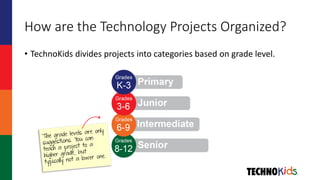
How are the Technology Projects Organized?
• TechnoKids divides projects into categories based on grade level.
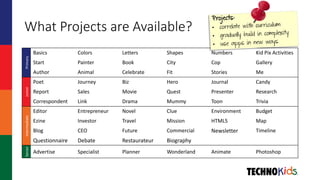
What Projects are Available?Primary
Basics Colors Letters Shapes Numbers Kid Pix Activities
Start Painter Book City Cop Gallery
Author Animal Celebrate Fit Stories Me
Junior
Poet Journey Biz Hero Journal Candy
Report Sales Movie Quest Presenter Research
Correspondent Link Drama Mummy Toon Trivia
Intermediate
Editor Entrepreneur Novel Clue Environment Budget
Ezine Investor Travel Mission HTML5 Map
Blog CEO Future Commercial Newsletter Timeline
Questionnaire Debate Restaurateur Biography
Senior
Advertise Specialist Planner Wonderland Animate Photoshop
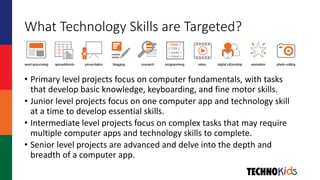
What Technology Skills are Targeted?
• Primary level projects focus on computer fundamentals, with tasks
that develop basic knowledge, keyboarding, and fine motor skills.
• Junior level projects focus on one computer app and technology skill
at a time to develop essential skills.
• Intermediate level projects focus on complex tasks that may require
multiple computer apps and technology skills to complete.
• Senior level projects are advanced and delve into the depth and
breadth of a computer app.
How Do the Technology Projects Integrate
into Curriculum?
• TechnoKids technology projects are not an “extra” thing to teach.
• Projects have activities that specifically target learning objectives and
topics in curriculum.
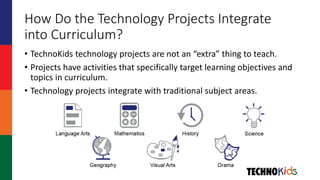
• Technology projects integrate with traditional subject areas.
What Apps are Used in the Technology
Projects?
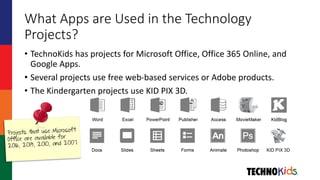
• TechnoKids has projects for Microsoft Office, Office 365 Online, and
Google Apps.
• Several projects use free web-based services or Adobe products.
• The Kindergarten projects use KID PIX 3D.
Who Uses TechnoKids Technology Projects?
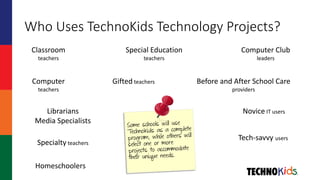
Classroom
teachers
Computer
teachers
Librarians
Media Specialists
Special Education
teachers
Gifted teachers Before and After School Care
providers
Computer Club
leaders
Novice IT users
Tech-savvy users
Specialty teachers
Homeschoolers
How do Teachers Use Technology Projects?
• Technology projects can be integrated into a curriculum unit, used as
part of a computer course, offered as an introduction to a larger area
of study, or available as part of a computer club activity.
• The average teacher will complete three or four projects per school
year if class time is allocated one or two times per week.
• A teacher that has longer class periods and students attending class
every day will complete a project in about three to four weeks.
 This time does not account for reviews, skill reviews, and extension activities.
What are the Top 7 Reasons to Use
TechnoKids Technology Projects?
1. Project based learning engages students
2. Integrate technology into learning experiences
3. Instructional materials save planning time
4. Unlimited use at school
 Print or view an unlimited number of teacher guides or workbooks at school
 Store resource files on an unlimited number of devices at school
5. Flexible purchasing options
 Download a project, Buy a set of projects, Get the package
6. No yearly fee
7. Free curriculum support
 1-800-221-7921 or support@technokids.com

Learn About TechnoKids

  • 1.
    Technology Projects Project-Based Activitiesfor Microsoft Office, Office 365 Online, Google Apps, Adobe, KID PIX, and more!
  • 2.
    What is TechnoKidsComputer Curriculum? • TechnoKids Computer Curriculum is a collection of K-12 technology projects. • Teachers use the technology projects to integrate computer-based activities into curriculum to meet learning objectives. • Students develop technology skills in the context of completing a meaningful task such as building a web page, designing a brochure, producing a digital story, writing a blog, or analyzing graphed data. • Each technology project provides teachers with the necessary instructional materials and resources to complete the activities.
  • 3.
    What is aTechnology Project? • A technology project is an e-book with a set of activities that use the computer as a productivity and creation tool. Each project includes a teacher guide, student workbook, and resource files.  A teacher guide has instructions for teaching including preparatory steps, teaching strategies, lesson outlines, objectives, assignments, and answer keys.  A student workbook includes worksheets that help organize ideas, provide step-by-step instructions to complete a task, and monitor learning.  Resource files support learning with customizable templates, samples, flashcards, assessment tools, and parent letters.
  • 4.
    How are theTechnology Projects Organized? • TechnoKids divides projects into categories based on grade level.
  • 5.
    What Projects areAvailable?Primary Basics Colors Letters Shapes Numbers Kid Pix Activities Start Painter Book City Cop Gallery Author Animal Celebrate Fit Stories Me Junior Poet Journey Biz Hero Journal Candy Report Sales Movie Quest Presenter Research Correspondent Link Drama Mummy Toon Trivia Intermediate Editor Entrepreneur Novel Clue Environment Budget Ezine Investor Travel Mission HTML5 Map Blog CEO Future Commercial Newsletter Timeline Questionnaire Debate Restaurateur Biography Senior Advertise Specialist Planner Wonderland Animate Photoshop
  • 6.
    What Technology Skillsare Targeted? • Primary level projects focus on computer fundamentals, with tasks that develop basic knowledge, keyboarding, and fine motor skills. • Junior level projects focus on one computer app and technology skill at a time to develop essential skills. • Intermediate level projects focus on complex tasks that may require multiple computer apps and technology skills to complete. • Senior level projects are advanced and delve into the depth and breadth of a computer app.
  • 7.
    How Do theTechnology Projects Integrate into Curriculum? • TechnoKids technology projects are not an “extra” thing to teach. • Projects have activities that specifically target learning objectives and topics in curriculum. • Technology projects integrate with traditional subject areas.
  • 8.
    What Apps areUsed in the Technology Projects? • TechnoKids has projects for Microsoft Office, Office 365 Online, and Google Apps. • Several projects use free web-based services or Adobe products. • The Kindergarten projects use KID PIX 3D.
  • 9.
    Who Uses TechnoKidsTechnology Projects? Classroom teachers Computer teachers Librarians Media Specialists Special Education teachers Gifted teachers Before and After School Care providers Computer Club leaders Novice IT users Tech-savvy users Specialty teachers Homeschoolers
  • 10.
    How do TeachersUse Technology Projects? • Technology projects can be integrated into a curriculum unit, used as part of a computer course, offered as an introduction to a larger area of study, or available as part of a computer club activity. • The average teacher will complete three or four projects per school year if class time is allocated one or two times per week. • A teacher that has longer class periods and students attending class every day will complete a project in about three to four weeks.  This time does not account for reviews, skill reviews, and extension activities.
  • 11.
    What are theTop 7 Reasons to Use TechnoKids Technology Projects? 1. Project based learning engages students 2. Integrate technology into learning experiences 3. Instructional materials save planning time 4. Unlimited use at school  Print or view an unlimited number of teacher guides or workbooks at school  Store resource files on an unlimited number of devices at school 5. Flexible purchasing options  Download a project, Buy a set of projects, Get the package 6. No yearly fee 7. Free curriculum support  1-800-221-7921 or support@technokids.com