LANGUAGE TRANSLATOR USING
PYTHON AND GOOGLE API
Dept. of Computer Science and Engineering Data Science
GITA AUTOMOUS COLLEGE, BHUBANESWAR
MINI PROJECT ON
Submitted by
SP Aryan Biswal
Subhrajit Rout
Rudra Prasad Jena
Guided by
Prof. Lipsarani Jena
OUTLINE
• Introduction
• What is ?
• Objective
• Synopsis of the project
• Project Details, Data Models
• The Process: Importing data, Transforming data, Creating visualizations
• Data Charts
• Project Result and Learnings
• Conclusion
INTRODUCTION
• Translation is necessary for the spreading new information, knowledge,
and ideas across the world.
• Language Translation is the process of conveying a written source
language text clearly, completely, accurately, and appropriately in a target
language.
• A text language translator is a tool or application that translates text from
one language to another.
• It helps users overcome language barriers by providing the ability to
convert written content from one language into another, making it more
accessible and understandable to individuals who speak different
languages.
TRANSLATOR PROGRAM
• Microsoft’s Power BI (business intelligence) is a business and data
analytics service that enables professionals to process, analyze, and
visualize vast volumes of data.
• Power BI dashboards are single-page documents, often referred to as
canvas, which illustrate a story through visualizations.
• It helps extract insights, draw conclusions, and share results in the form
of reports and dashboards across various departments.
• It provides an easy drag and drops feature with a range of interactive
data visualizations to generate reports and dashboards.
OBJECTIVE
• Facilitate communication between individuals who speak different
languages.
• Enhance accessibility to information on the internet and in various
documents for a global audience.
• Prioritize commonly spoken languages as well as languages of emerging
importance.
• Integrate the language translator with various platforms, including
websites, mobile apps, and other communication tools.
• Provide additional features for language learning and educational
purposes.
SYNOPSIS OF THE PROJECT
PROJECT DETAILS
Name: Language Translator Using Python and Google API
Session: 5th Semester, CSE-DS 2023
Under the guidance of: Prof. Lipsarani Jena
Platform: Windows only
Project material: -
• Visual Studio Code
• Googletrans API
• Tkinter Package
Project Type: Translator using programming
PROJECT PREREQUISITES
• The language translator project uses only two libraries, googletrans, and
tkinter. To install googletrans through pip, use the following command:
pip install googletrans==3.1.0a0
• Tkinter is a built-in GUI library in python, hence import to check if it is
present.
python
>>> import tkinter
• This command should not display an error if tkinter is installed and
available to use. In case the module is missing, install it on linux systems
using:
sudo apt-get install python3-tkinter
THE PROCESS
THE GENERAL INTERFACE
• When we run the program the following Tkinter GUI opens.
• The GUI is an window .
• The window has three textfields and two buttons.
• Each text field and button has different function.
ENTERING INPUT
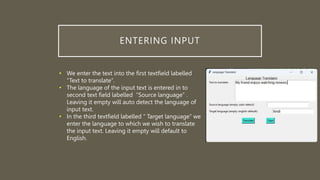
• We enter the text into the first textfield labelled
“Text to translate”.
• The language of the input text is entered in to
second text field labelled “Source language” .
Leaving it empty will auto detect the language of
input text.
• In the third textfield labelled “ Target language” we
enter the language to which we wish to translate
the input text. Leaving it empty will default to
English.
THE OUTPUT
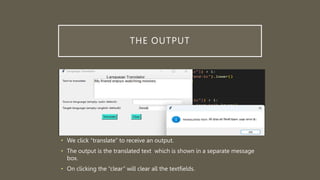
• We click “translate” to receive an output.
• The output is the translated text which is shown in a separate message
box.
• On clicking the “clear” will clear all the textfields.
PROJECT RESULT AND LEARNINGS
RESULT OF THE PROJECT
• We develop this application for desktop application. Here we are
integrating the, text to text, and language translator in one system so
user doesn’t have to download for the different application. You can also
give voice input to translate language.
CONCLUSION
• In conclusion, I think that translation is necessary, or rather,
indispensable, to communicate and bring a concept closer to people
who belong to different cultural realities.
• The better translation must be accepted by all people in logic and
based on fact; thus, the message which contained in the source
language (SL) can satisfy the target language (TL) reader with the
information within.
FUTURE SCOPE
• However to make this system more precise and useful for a wide range
of target audience, it demands some further improvements Further we
are aiming at following improvements:
• To take input text from an image of printed English text by
implementing character recognition and a mic for voice input. Presently
we are only able to take manual input through virtual keyboard.
• The system can be further extended to include more languages and
possibly dialects.
THANK YOU!

Language Translator using python and google API

  • 1.
    LANGUAGE TRANSLATOR USING PYTHONAND GOOGLE API Dept. of Computer Science and Engineering Data Science GITA AUTOMOUS COLLEGE, BHUBANESWAR MINI PROJECT ON Submitted by SP Aryan Biswal Subhrajit Rout Rudra Prasad Jena Guided by Prof. Lipsarani Jena
  • 2.
    OUTLINE • Introduction • Whatis ? • Objective • Synopsis of the project • Project Details, Data Models • The Process: Importing data, Transforming data, Creating visualizations • Data Charts • Project Result and Learnings • Conclusion
  • 3.
    INTRODUCTION • Translation isnecessary for the spreading new information, knowledge, and ideas across the world. • Language Translation is the process of conveying a written source language text clearly, completely, accurately, and appropriately in a target language. • A text language translator is a tool or application that translates text from one language to another. • It helps users overcome language barriers by providing the ability to convert written content from one language into another, making it more accessible and understandable to individuals who speak different languages.
  • 4.
    TRANSLATOR PROGRAM • Microsoft’sPower BI (business intelligence) is a business and data analytics service that enables professionals to process, analyze, and visualize vast volumes of data. • Power BI dashboards are single-page documents, often referred to as canvas, which illustrate a story through visualizations. • It helps extract insights, draw conclusions, and share results in the form of reports and dashboards across various departments. • It provides an easy drag and drops feature with a range of interactive data visualizations to generate reports and dashboards.
  • 5.
    OBJECTIVE • Facilitate communicationbetween individuals who speak different languages. • Enhance accessibility to information on the internet and in various documents for a global audience. • Prioritize commonly spoken languages as well as languages of emerging importance. • Integrate the language translator with various platforms, including websites, mobile apps, and other communication tools. • Provide additional features for language learning and educational purposes.
  • 6.
  • 7.
    PROJECT DETAILS Name: LanguageTranslator Using Python and Google API Session: 5th Semester, CSE-DS 2023 Under the guidance of: Prof. Lipsarani Jena Platform: Windows only Project material: - • Visual Studio Code • Googletrans API • Tkinter Package Project Type: Translator using programming
  • 8.
    PROJECT PREREQUISITES • Thelanguage translator project uses only two libraries, googletrans, and tkinter. To install googletrans through pip, use the following command: pip install googletrans==3.1.0a0 • Tkinter is a built-in GUI library in python, hence import to check if it is present. python >>> import tkinter • This command should not display an error if tkinter is installed and available to use. In case the module is missing, install it on linux systems using: sudo apt-get install python3-tkinter
  • 9.
  • 10.
    THE GENERAL INTERFACE •When we run the program the following Tkinter GUI opens. • The GUI is an window . • The window has three textfields and two buttons. • Each text field and button has different function.
  • 11.
    ENTERING INPUT • Weenter the text into the first textfield labelled “Text to translate”. • The language of the input text is entered in to second text field labelled “Source language” . Leaving it empty will auto detect the language of input text. • In the third textfield labelled “ Target language” we enter the language to which we wish to translate the input text. Leaving it empty will default to English.
  • 12.
    THE OUTPUT • Weclick “translate” to receive an output. • The output is the translated text which is shown in a separate message box. • On clicking the “clear” will clear all the textfields.
  • 13.
  • 14.
    RESULT OF THEPROJECT • We develop this application for desktop application. Here we are integrating the, text to text, and language translator in one system so user doesn’t have to download for the different application. You can also give voice input to translate language.
  • 15.
    CONCLUSION • In conclusion,I think that translation is necessary, or rather, indispensable, to communicate and bring a concept closer to people who belong to different cultural realities. • The better translation must be accepted by all people in logic and based on fact; thus, the message which contained in the source language (SL) can satisfy the target language (TL) reader with the information within.
  • 16.
    FUTURE SCOPE • Howeverto make this system more precise and useful for a wide range of target audience, it demands some further improvements Further we are aiming at following improvements: • To take input text from an image of printed English text by implementing character recognition and a mic for voice input. Presently we are only able to take manual input through virtual keyboard. • The system can be further extended to include more languages and possibly dialects.
  • 17.