Victoria Minorczyk
vaminorc@buffalo.edu
Office Hours:
Thursdays 1-1:50pm
in Davis 302
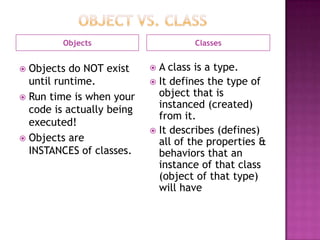
Objects Classes
 Objects do NOT exist
until runtime.
 Run time is when your
code is actually being
executed!
 Objects are
INSTANCES of classes.
 A class is a type.
 It defines the type of
object that is
instanced (created)
from it.
 It describes (defines)
all of the properties &
behaviors that an
instance of that class
(object of that type)
will have
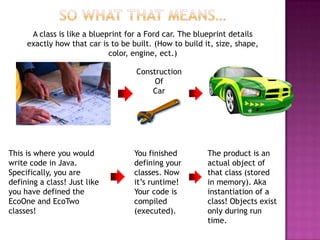
A class is like a blueprint for a Ford car. The blueprint details
exactly how that car is to be built. (How to build it, size, shape,
color, engine, ect.)
Construction
Of
Car
This is where you would
write code in Java.
Specifically, you are
defining a class! Just like
you have defined the
EcoOne and EcoTwo
classes!
You finished
defining your
classes. Now
it‟s runtime!
Your code is
compiled
(executed).
The product is an
actual object of
that class (stored
in memory). Aka
instantiation of a
class! Objects exist
only during run
time.
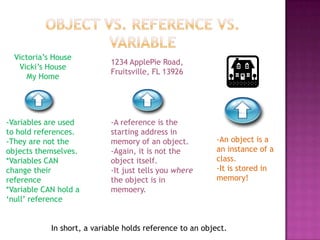
In short, a variable holds reference to an object.
-A reference is the
starting address in
memory of an object.
-Again, it is not the
object itself.
-It just tells you where
the object is in
memoery.
Victoria‟s House
Vicki‟s House
My Home
-Variables are used
to hold references.
-They are not the
objects themselves.
*Variables CAN
change their
reference
*Variable CAN hold a
„null‟ reference
1234 ApplePie Road,
Fruitsville, FL 13926
-An object is a
an instance of a
class.
-It is stored in
memory!
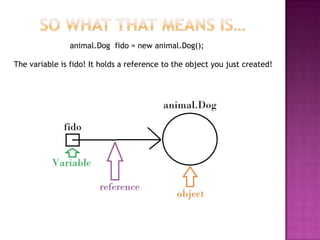
animal.Dog fido = new animal.Dog();
The variable is fido! It holds a reference to the object you just created!
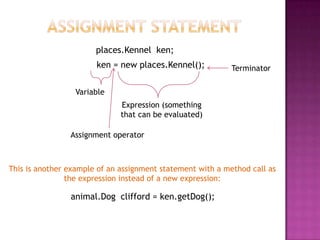
ken = new places.Kennel();
Variable
Assignment operator
Expression (something
that can be evaluated)
Terminator
animal.Dog clifford = ken.getDog();
places.Kennel ken;
This is another example of an assignment statement with a method call as
the expression instead of a new expression:
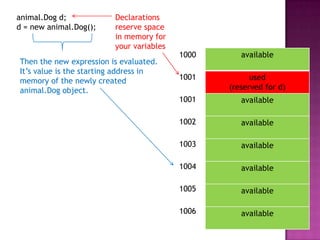
animal.Dog d;
d = new animal.Dog();
Declarations
reserve space
in memory for
your variables
available
used
(reserved for d)
available
available
available
available
available
available
1000
1001
1001
1002
1003
1004
1005
1006
Then the new expression is evaluated.
It‟s value is the starting address in
memory of the newly created
animal.Dog object.
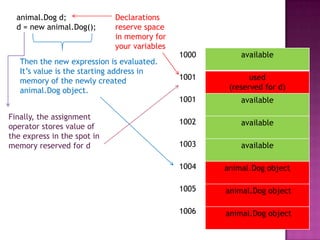
animal.Dog d;
d = new animal.Dog();
available
used
(reserved for d)
available
available
available
animal.Dog object
animal.Dog object
animal.Dog object
1000
1001
1001
1002
1003
1004
1005
1006
Declarations
reserve space
in memory for
your variables
Then the new expression is evaluated.
It‟s value is the starting address in
memory of the newly created
animal.Dog object.
Finally, the assignment
operator stores value of
the express in the spot in
memory reserved for d
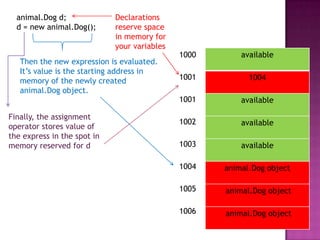
animal.Dog d;
d = new animal.Dog();
Declarations
reserve space
in memory for
your variables
available
1004
available
available
available
animal.Dog object
animal.Dog object
animal.Dog object
1000
1001
1001
1002
1003
1004
1005
1006
Then the new expression is evaluated.
It‟s value is the starting address in
memory of the newly created
animal.Dog object.
Finally, the assignment
operator stores value of
the express in the spot in
memory reserved for d
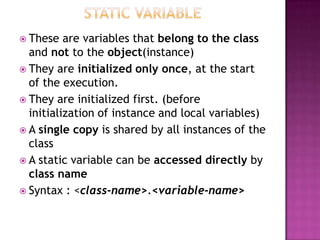
 These are variables that belong to the class
and not to the object(instance)
 They are initialized only once, at the start
of the execution.
 They are initialized first. (before
initialization of instance and local variables)
 A single copy is shared by all instances of the
class
 A static variable can be accessed directly by
class name
 Syntax : <class-name>.<variable-name>
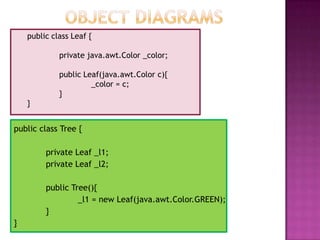
public class Leaf {
private java.awt.Color _color;
public Leaf(java.awt.Color c){
_color = c;
}
}
public class Tree {
private Leaf _l1;
private Leaf _l2;
public Tree(){
_l1 = new Leaf(java.awt.Color.GREEN);
}
}
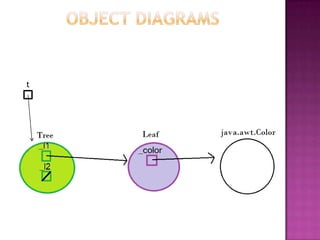
t
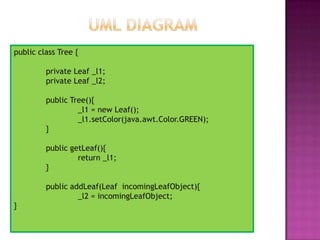
public class Tree {
private Leaf _l1;
private Leaf _l2;
public Tree(){
_l1 = new Leaf();
_l1.setColor(java.awt.Color.GREEN);
}
public getLeaf(){
return _l1;
}
public addLeaf(Leaf incomingLeafObject){
_l2 = incomingLeafObject;
}
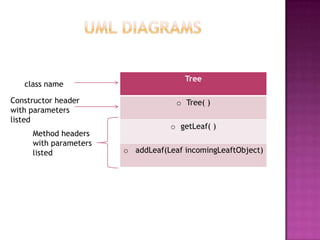
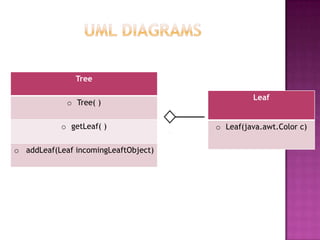
Tree
o Tree( )
o getLeaf( )
o addLeaf(Leaf)
Method headers
with parameter
types ONLY not
variable names
class name
Constructor header
with parameters
listed
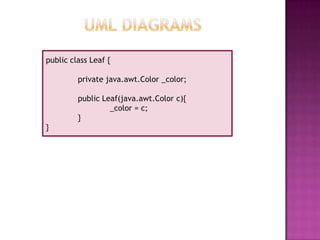
public class Leaf {
private java.awt.Color _color;
public Leaf(java.awt.Color c){
_color = c;
}
}
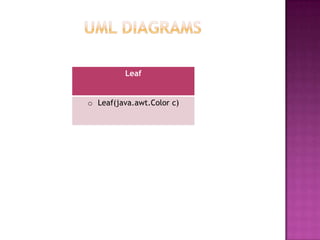
Leaf
o Leaf(java.awt.Color)
Leaf
o Leaf(java.awt.Color)
Tree
o Tree( )
o getLeaf( )
o addLeaf(Leaf)
What relationship does this arrow represent?
What other relationships have we learned so far?
 Keep calm. You have two
weeks to finish this lab,
however…
 Don’t be lulled into a
false sense of security.
This lab is a lot of work. Do a
little part of it each day.
 Remember: You can do
this! You have all the
resources you need to
complete this lab. Check your
lecture notes if you get stuck
or attend office hours.
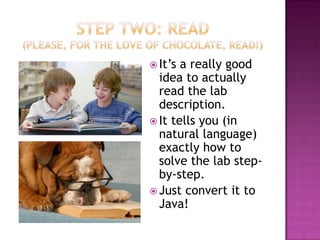
 It‟s a really good
idea to actually
read the lab
description.
 It tells you (in
natural language)
exactly how to
solve the lab step-
by-step.
 Just convert it to
Java!
• You only need to complete the ones in
the lab4 package!
• This means define the SquareButton, SimpleDraw, ColorButton,
CircleButton and ColorHolder classes.
• If you change stuff in classes besides these…there could be problems

• The UML diagram are given for the classes you need to define. You
should be very happy about this. Remember what UML diagrams
contain? 
 Holds the “current color”
 Defines two methods: „getColor‟ and
„setColor‟
 Has a single instance variable of type
jave.awt.Color
 It‟s constructor initializes instance variable
to java.awt.Color.WHITE
 IMPORTANT: For the system to work properly
there must be exactly(one ColorHolder
instance in your finished system.)
 The colorButton class defines a
“buttonPressed” method.
 The “buttonPressed” method is called when
the mouse is clicked over the top of a
ColorButton
 Defines a “buttonPressed” method
 When the circle button is pressed, a new
supportcode.Square must be added to the
supportcode.Window.
 You can do this by using the Window‟s
addCircle method.
 NOTE: there is only ONE instance of the
supportcode.Window class. The squareButton
classes keeps a reference to it!
 IMPORTANT: the parameters for the
constructor of this class must be declared in
the order given in the UML diagram.
 Refer to “squareButton class” slide.
 Replace all the words “square” with “circle”
 Its constructor creates an instance of the
Window class, the ColorHolder class,
CircleButton class, SquareButton class and
three instances of the ColorButton classes.
 Constructor also adds the SquareButton and
CircleButton to the Window; call the Window
object‟s addSquareButton and
addCircleButton method to do this.
 Constructor also adds the ColorButton
objects to the Window by calling the
Window‟s addColorButton method

Lab 4

  • 1.
  • 2.
    Objects Classes  Objectsdo NOT exist until runtime.  Run time is when your code is actually being executed!  Objects are INSTANCES of classes.  A class is a type.  It defines the type of object that is instanced (created) from it.  It describes (defines) all of the properties & behaviors that an instance of that class (object of that type) will have
  • 3.
    A class islike a blueprint for a Ford car. The blueprint details exactly how that car is to be built. (How to build it, size, shape, color, engine, ect.) Construction Of Car This is where you would write code in Java. Specifically, you are defining a class! Just like you have defined the EcoOne and EcoTwo classes! You finished defining your classes. Now it‟s runtime! Your code is compiled (executed). The product is an actual object of that class (stored in memory). Aka instantiation of a class! Objects exist only during run time.
  • 4.
    In short, avariable holds reference to an object. -A reference is the starting address in memory of an object. -Again, it is not the object itself. -It just tells you where the object is in memoery. Victoria‟s House Vicki‟s House My Home -Variables are used to hold references. -They are not the objects themselves. *Variables CAN change their reference *Variable CAN hold a „null‟ reference 1234 ApplePie Road, Fruitsville, FL 13926 -An object is a an instance of a class. -It is stored in memory!
  • 5.
    animal.Dog fido =new animal.Dog(); The variable is fido! It holds a reference to the object you just created!
  • 6.
    ken = newplaces.Kennel(); Variable Assignment operator Expression (something that can be evaluated) Terminator animal.Dog clifford = ken.getDog(); places.Kennel ken; This is another example of an assignment statement with a method call as the expression instead of a new expression:
  • 8.
    animal.Dog d; d =new animal.Dog(); Declarations reserve space in memory for your variables available used (reserved for d) available available available available available available 1000 1001 1001 1002 1003 1004 1005 1006 Then the new expression is evaluated. It‟s value is the starting address in memory of the newly created animal.Dog object.
  • 9.
    animal.Dog d; d =new animal.Dog(); available used (reserved for d) available available available animal.Dog object animal.Dog object animal.Dog object 1000 1001 1001 1002 1003 1004 1005 1006 Declarations reserve space in memory for your variables Then the new expression is evaluated. It‟s value is the starting address in memory of the newly created animal.Dog object. Finally, the assignment operator stores value of the express in the spot in memory reserved for d
  • 10.
    animal.Dog d; d =new animal.Dog(); Declarations reserve space in memory for your variables available 1004 available available available animal.Dog object animal.Dog object animal.Dog object 1000 1001 1001 1002 1003 1004 1005 1006 Then the new expression is evaluated. It‟s value is the starting address in memory of the newly created animal.Dog object. Finally, the assignment operator stores value of the express in the spot in memory reserved for d
  • 11.
     These arevariables that belong to the class and not to the object(instance)  They are initialized only once, at the start of the execution.  They are initialized first. (before initialization of instance and local variables)  A single copy is shared by all instances of the class  A static variable can be accessed directly by class name  Syntax : <class-name>.<variable-name>
  • 12.
    public class Leaf{ private java.awt.Color _color; public Leaf(java.awt.Color c){ _color = c; } } public class Tree { private Leaf _l1; private Leaf _l2; public Tree(){ _l1 = new Leaf(java.awt.Color.GREEN); } }
  • 13.
  • 14.
    public class Tree{ private Leaf _l1; private Leaf _l2; public Tree(){ _l1 = new Leaf(); _l1.setColor(java.awt.Color.GREEN); } public getLeaf(){ return _l1; } public addLeaf(Leaf incomingLeafObject){ _l2 = incomingLeafObject; }
  • 15.
    Tree o Tree( ) ogetLeaf( ) o addLeaf(Leaf) Method headers with parameter types ONLY not variable names class name Constructor header with parameters listed
  • 16.
    public class Leaf{ private java.awt.Color _color; public Leaf(java.awt.Color c){ _color = c; } }
  • 17.
  • 18.
    Leaf o Leaf(java.awt.Color) Tree o Tree() o getLeaf( ) o addLeaf(Leaf) What relationship does this arrow represent? What other relationships have we learned so far?
  • 20.
     Keep calm.You have two weeks to finish this lab, however…  Don’t be lulled into a false sense of security. This lab is a lot of work. Do a little part of it each day.  Remember: You can do this! You have all the resources you need to complete this lab. Check your lecture notes if you get stuck or attend office hours.
  • 21.
     It‟s areally good idea to actually read the lab description.  It tells you (in natural language) exactly how to solve the lab step- by-step.  Just convert it to Java!
  • 22.
    • You onlyneed to complete the ones in the lab4 package! • This means define the SquareButton, SimpleDraw, ColorButton, CircleButton and ColorHolder classes. • If you change stuff in classes besides these…there could be problems  • The UML diagram are given for the classes you need to define. You should be very happy about this. Remember what UML diagrams contain? 
  • 23.
     Holds the“current color”  Defines two methods: „getColor‟ and „setColor‟  Has a single instance variable of type jave.awt.Color  It‟s constructor initializes instance variable to java.awt.Color.WHITE  IMPORTANT: For the system to work properly there must be exactly(one ColorHolder instance in your finished system.)
  • 24.
     The colorButtonclass defines a “buttonPressed” method.  The “buttonPressed” method is called when the mouse is clicked over the top of a ColorButton
  • 25.
     Defines a“buttonPressed” method  When the circle button is pressed, a new supportcode.Square must be added to the supportcode.Window.  You can do this by using the Window‟s addCircle method.  NOTE: there is only ONE instance of the supportcode.Window class. The squareButton classes keeps a reference to it!  IMPORTANT: the parameters for the constructor of this class must be declared in the order given in the UML diagram.
  • 26.
     Refer to“squareButton class” slide.  Replace all the words “square” with “circle”
  • 27.
     Its constructorcreates an instance of the Window class, the ColorHolder class, CircleButton class, SquareButton class and three instances of the ColorButton classes.  Constructor also adds the SquareButton and CircleButton to the Window; call the Window object‟s addSquareButton and addCircleButton method to do this.  Constructor also adds the ColorButton objects to the Window by calling the Window‟s addColorButton method