© 2018, Amazon Web Services, Inc. or its Affiliates. All rights reserved.
Kwangyoung Kim
Aug 2019
Kubernetes/ EKS
Journey to modern application
© 2018, Amazon Web Services, Inc. or its Affiliates. All rights reserved.
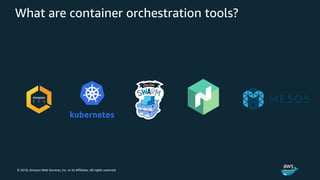
What are container orchestration tools?
© 2018, Amazon Web Services, Inc. or its Affiliates. All rights reserved.
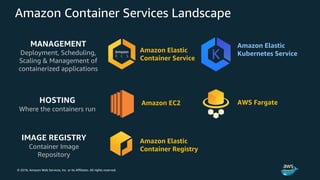
Amazon Container Services Landscape
MANAGEMENT
Deployment, Scheduling,
Scaling & Management of
containerized applications
HOSTING
Where the containers run
Amazon Elastic
Container Service
Amazon Elastic
Kubernetes Service
Amazon EC2 AWS Fargate
IMAGE REGISTRY
Container Image
Repository
Amazon Elastic
Container Registry
© 2018, Amazon Web Services, Inc. or its Affiliates. All rights reserved.
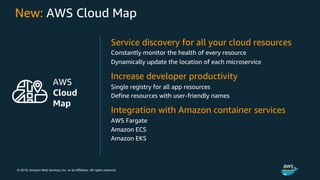
New: AWS Cloud Map
Service discovery for all your cloud resources
Constantly monitor the health of every resource
Dynamically update the location of each microservice
Increase developer productivity
Single registry for all app resources
Define resources with user-friendly names
Integration with Amazon container services
AWS Fargate
Amazon ECS
Amazon EKS
AWS
Cloud
Map
© 2018, Amazon Web Services, Inc. or its Affiliates. All rights reserved.
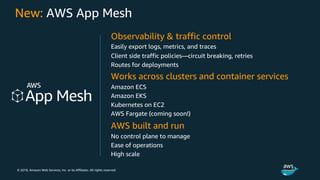
New: AWS App Mesh
Observability & traffic control
Easily export logs, metrics, and traces
Client side traffic policies—circuit breaking, retries
Routes for deployments
Works across clusters and container services
Amazon ECS
Amazon EKS
Kubernetes on EC2
AWS Fargate (coming soon!)
AWS built and run
No control plane to manage
Ease of operations
High scale
© 2018, Amazon Web Services, Inc. or its Affiliates. All rights reserved.
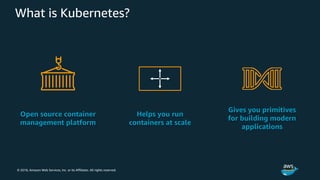
Open source container
management platform
Helps you run
containers at scale
Gives you primitives
for building modern
applications
What is Kubernetes?
© 2018, Amazon Web Services, Inc. or its Affiliates. All rights reserved.
Community, contribution, choice
© 2018, Amazon Web Services, Inc. or its Affiliates. All rights reserved.
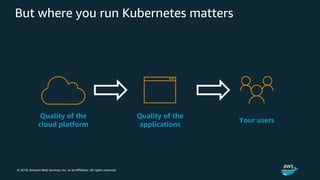
But where you run Kubernetes matters
Quality of the
cloud platform
Quality of the
applications
Your users
© 2018, Amazon Web Services, Inc. or its Affiliates. All rights reserved.
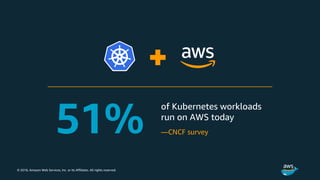
—CNCF survey
© 2018, Amazon Web Services, Inc. or its Affiliates. All rights reserved.
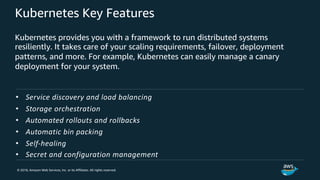
Kubernetes Key Features
Kubernetes provides you with a framework to run distributed systems
resiliently. It takes care of your scaling requirements, failover, deployment
patterns, and more. For example, Kubernetes can easily manage a canary
deployment for your system.
• Service discovery and load balancing
• Storage orchestration
• Automated rollouts and rollbacks
• Automatic bin packing
• Self-healing
• Secret and configuration management
© 2018, Amazon Web Services, Inc. or its Affiliates. All rights reserved.
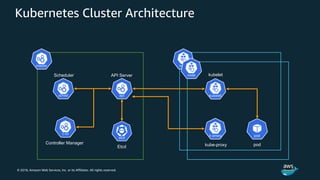
Kubernetes Cluster Architecture
API ServerScheduler
Etcd
Controller Manager
kubelet
kube-proxy pod
© 2018, Amazon Web Services, Inc. or its Affiliates. All rights reserved.
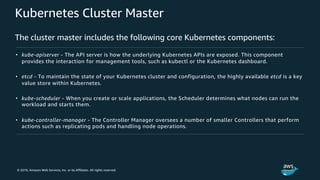
Kubernetes Cluster Master
The cluster master includes the following core Kubernetes components:
• kube-apiserver - The API server is how the underlying Kubernetes APIs are exposed. This component
provides the interaction for management tools, such as kubectl or the Kubernetes dashboard.
• etcd - To maintain the state of your Kubernetes cluster and configuration, the highly available etcd is a key
value store within Kubernetes.
• kube-scheduler - When you create or scale applications, the Scheduler determines what nodes can run the
workload and starts them.
• kube-controller-manager - The Controller Manager oversees a number of smaller Controllers that perform
actions such as replicating pods and handling node operations.
© 2018, Amazon Web Services, Inc. or its Affiliates. All rights reserved.
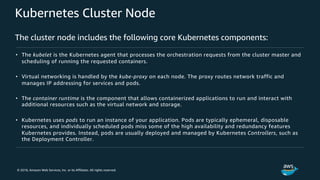
Kubernetes Cluster Node
The cluster node includes the following core Kubernetes components:
• The kubelet is the Kubernetes agent that processes the orchestration requests from the cluster master and
scheduling of running the requested containers.
• Virtual networking is handled by the kube-proxy on each node. The proxy routes network traffic and
manages IP addressing for services and pods.
• The container runtime is the component that allows containerized applications to run and interact with
additional resources such as the virtual network and storage.
• Kubernetes uses pods to run an instance of your application. Pods are typically ephemeral, disposable
resources, and individually scheduled pods miss some of the high availability and redundancy features
Kubernetes provides. Instead, pods are usually deployed and managed by Kubernetes Controllers, such as
the Deployment Controller.
© 2018, Amazon Web Services, Inc. or its Affiliates. All rights reserved.
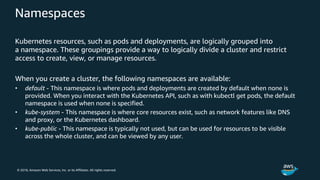
Namespaces
Kubernetes resources, such as pods and deployments, are logically grouped into
a namespace. These groupings provide a way to logically divide a cluster and restrict
access to create, view, or manage resources.
When you create a cluster, the following namespaces are available:
• default - This namespace is where pods and deployments are created by default when none is
provided. When you interact with the Kubernetes API, such as with kubectl get pods, the default
namespace is used when none is specified.
• kube-system - This namespace is where core resources exist, such as network features like DNS
and proxy, or the Kubernetes dashboard.
• kube-public - This namespace is typically not used, but can be used for resources to be visible
across the whole cluster, and can be viewed by any user.
© 2018, Amazon Web Services, Inc. or its Affiliates. All rights reserved.
Understanding Kubernetes Object
Kubernetes Objects are persistent entities in the Kubernetes system.
Kubernetes uses these entities to represent the state of your cluster.
Specifically, they can describe:
• What containerized applications are running (and on which nodes)
• The resources available to those applications
• The policies around how those applications behave, such as restart policies,
upgrades, and fault-tolerance
© 2018, Amazon Web Services, Inc. or its Affiliates. All rights reserved.
Object Spec and Status
Every Kubernetes object includes two nested object fields that govern the object’s
configuration: the object spec and the object status.
• spec - which you must provide, describes your desired state for the object–the
characteristics that you want the object to have.
• status - describes the actual state of the object, and is supplied and updated by the
Kubernetes system. At any given time, the Kubernetes Control Plane actively
manages an object’s actual state to match the desired state you supplied.
• Example - Kubernetes Deployment, When status of # of available pod is different
from its spec, Kubernetes correct status to match your spec
© 2018, Amazon Web Services, Inc. or its Affiliates. All rights reserved.
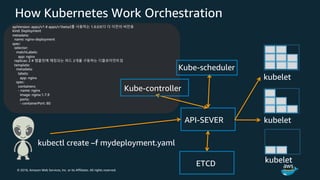
How Kubernetes Work Orchestration
apiVersion: apps/v1 # apps/v1beta2를 사용하는 1.9.0보다 더 이전의 버전용
kind: Deployment
metadata:
name: nginx-deployment
spec:
selector:
matchLabels:
app: nginx
replicas: 2 # 템플릿에 매칭되는 파드 2개를 구동하는 디플로이먼트임
template:
metadata:
labels:
app: nginx
spec:
containers:
- name: nginx
image: nginx:1.7.9
ports:
- containerPort: 80
API-SEVER
Kube-scheduler
kubectl create –f mydeployment.yaml
kubelet
kubelet
kubeletETCD
Kube-controller
© 2018, Amazon Web Services, Inc. or its Affiliates. All rights reserved.
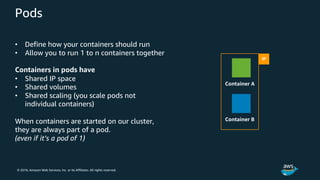
Pods
• Define how your containers should run
• Allow you to run 1 to n containers together
Containers in pods have
• Shared IP space
• Shared volumes
• Shared scaling (you scale pods not
individual containers)
When containers are started on our cluster,
they are always part of a pod.
(even if it’s a pod of 1)
IP
Container A
Container B
© 2018, Amazon Web Services, Inc. or its Affiliates. All rights reserved.
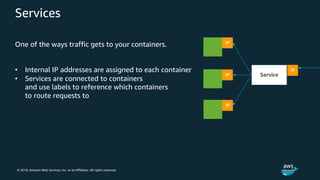
Services
One of the ways traffic gets to your containers.
• Internal IP addresses are assigned to each container
• Services are connected to containers
and use labels to reference which containers
to route requests to
IP
IP
IP
Service
IP
© 2018, Amazon Web Services, Inc. or its Affiliates. All rights reserved.
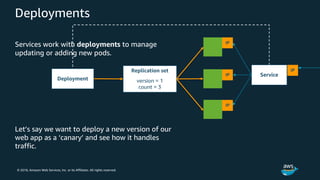
Deployments
Services work with deployments to manage
updating or adding new pods.
Let’s say we want to deploy a new version of our
web app as a ‘canary’ and see how it handles
traffic.
© 2018, Amazon Web Services, Inc. or its Affiliates. All rights reserved.
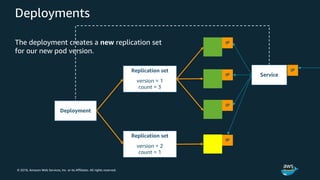
Deployments
The deployment creates a new replication set
for our new pod version.
© 2018, Amazon Web Services, Inc. or its Affiliates. All rights reserved.
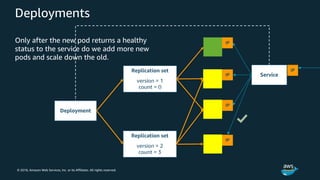
Deployments
Only after the new pod returns a healthy
status to the service do we add more new
pods and scale down the old.
© 2018, Amazon Web Services, Inc. or its Affiliates. All rights reserved.
StatefulSets and DaemonSets
The Deployment Controller uses the Kubernetes Scheduler to run a given number of
replicas on any available node with available resources.
For applications that require a replica to exist on each node, or selected nodes, within a
cluster, the Deployment Controller doesn't look at how replicas are distributed across
the nodes.
There are two Kubernetes resources that let you manage these types of applications:
• StatefulSets - Maintain the state of applications beyond an individual pod lifecycle,
such as storage.
• DaemonSets - Ensure a running instance on each node, early in the Kubernetes
bootstrap process.
© 2018, Amazon Web Services, Inc. or its Affiliates. All rights reserved.
Services
• A Kubernetes Service is an abstraction which defines a logical set
of Pods and a policy by which to access them - sometimes called a
micro-service. The set of Pods targeted by a Service is (usually)
determined by a Label Selector.
• Let’s talk about what are the differences between LoadBalancer,
NodePort and Ingress
© 2018, Amazon Web Services, Inc. or its Affiliates. All rights reserved.
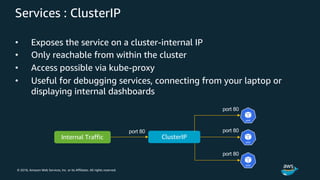
Services : ClusterIP
• Exposes the service on a cluster-internal IP
• Only reachable from within the cluster
• Access possible via kube-proxy
• Useful for debugging services, connecting from your laptop or
displaying internal dashboards
ClusterIPInternal Traffic
port 80
port 80
port 80
port 80
© 2018, Amazon Web Services, Inc. or its Affiliates. All rights reserved.
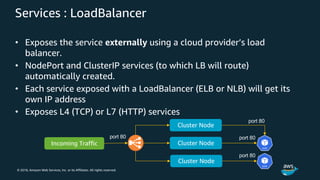
Services : LoadBalancer
• Exposes the service externally using a cloud provider’s load
balancer.
• NodePort and ClusterIP services (to which LB will route)
automatically created.
• Each service exposed with a LoadBalancer (ELB or NLB) will get its
own IP address
• Exposes L4 (TCP) or L7 (HTTP) services
Cluster Node
Incoming Traffic
port 80 port 80
port 80
Cluster Node
Cluster Node
port 80
© 2018, Amazon Web Services, Inc. or its Affiliates. All rights reserved.
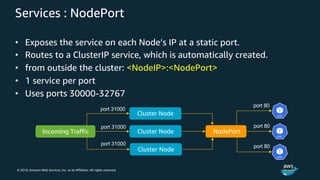
Services : NodePort
• Exposes the service on each Node’s IP at a static port.
• Routes to a ClusterIP service, which is automatically created.
• from outside the cluster: <NodeIP>:<NodePort>
• 1 service per port
• Uses ports 30000-32767
Cluster Node
Incoming Traffic
port 31000
port 80
port 80
Cluster Node
Cluster Node
port 31000
port 31000
NodePort
port 80
© 2018, Amazon Web Services, Inc. or its Affiliates. All rights reserved.
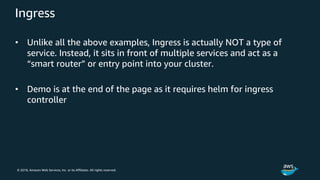
Ingress
• Unlike all the above examples, Ingress is actually NOT a type of
service. Instead, it sits in front of multiple services and act as a
“smart router” or entry point into your cluster.
• Demo is at the end of the page as it requires helm for ingress
controller
© 2018, Amazon Web Services, Inc. or its Affiliates. All rights reserved.
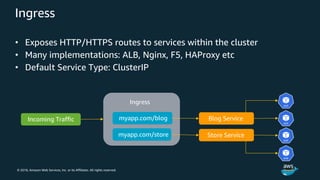
Ingress
• Exposes HTTP/HTTPS routes to services within the cluster
• Many implementations: ALB, Nginx, F5, HAProxy etc
• Default Service Type: ClusterIP
Incoming Traffic myapp.com/blog
myapp.com/store
Blog Service
Ingress
Store Service
© 2018, Amazon Web Services, Inc. or its Affiliates. All rights reserved.
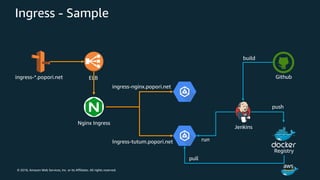
Ingress - Sample
ELBingress-*.popori.net
Nginx Ingress
ingress-nginx.popori.net
Ingress-tutum.popori.net
Jenkins
Github
Registry
build
push
pull
run
© 2018, Amazon Web Services, Inc. or its Affiliates. All rights reserved.
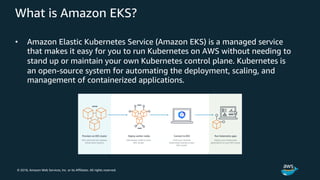
What is Amazon EKS?
• Amazon Elastic Kubernetes Service (Amazon EKS) is a managed service
that makes it easy for you to run Kubernetes on AWS without needing to
stand up or maintain your own Kubernetes control plane. Kubernetes is
an open-source system for automating the deployment, scaling, and
management of containerized applications.
© 2018, Amazon Web Services, Inc. or its Affiliates. All rights reserved.
EKS is Kubernetes certified
© 2018, Amazon Web Services, Inc. or its Affiliates. All rights reserved.
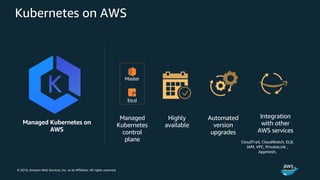
Kubernetes on AWS
Managed Kubernetes on
AWS
Highly
available
Automated
version
upgrades
Integration
with other
AWS services
Etcd
Master
Managed
Kubernetes
control
plane CloudTrail, CloudWatch, ELB,
IAM, VPC, PrivateLink ,
Appmesh,
© 2018, Amazon Web Services, Inc. or its Affiliates. All rights reserved.
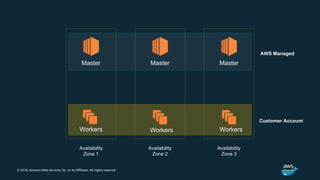
Availability
Zone 1
Master Master
Availability
Zone 2
Availability
Zone 3
Master
Workers Workers Workers
Customer Account
AWS Managed
© 2018, Amazon Web Services, Inc. or its Affiliates. All rights reserved.
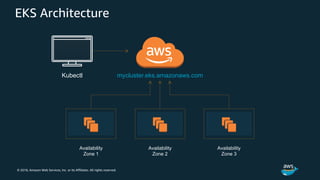
EKS Architecture
mycluster.eks.amazonaws.com
Availability
Zone 1
Availability
Zone 2
Availability
Zone 3
Kubectl
© 2018, Amazon Web Services, Inc. or its Affiliates. All rights reserved.
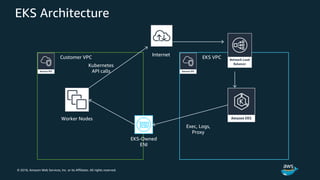
EKS Architecture
EKS VPCCustomer VPC
Worker Nodes
EKS-Owned
ENI
Kubernetes
API calls
Exec, Logs,
Proxy
Internet
© 2018, Amazon Web Services, Inc. or its Affiliates. All rights reserved.
EKS Control Plane
© 2018, Amazon Web Services, Inc. or its Affiliates. All rights reserved.
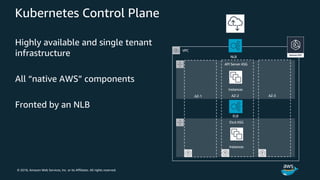
Kubernetes Control Plane
Highly available and single tenant
infrastructure
All “native AWS” components
Fronted by an NLB
VPC
API Server ASG
Etcd ASG
NLB
AZ-1 AZ-2 AZ-3
ELB
Instances
Instances
© 2018, Amazon Web Services, Inc. or its Affiliates. All rights reserved.
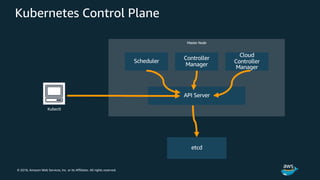
Kubernetes Control Plane
Master Node
Scheduler
Controller
Manager
Cloud
Controller
Manager
API Server
etcd
Kubectl
© 2018, Amazon Web Services, Inc. or its Affiliates. All rights reserved.
What happens when I run ‘kubectl create –f pods.yaml’?
© 2018, Amazon Web Services, Inc. or its Affiliates. All rights reserved.
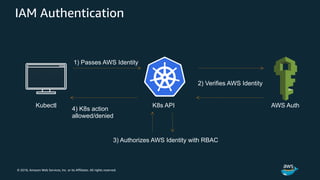
IAM Authentication
Kubectl
3) Authorizes AWS Identity with RBAC
K8s API
1) Passes AWS Identity
2) Verifies AWS Identity
4) K8s action
allowed/denied
AWS Auth
© 2018, Amazon Web Services, Inc. or its Affiliates. All rights reserved.
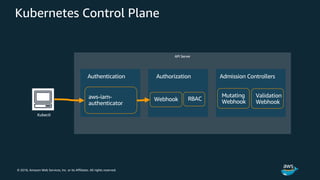
Kubernetes Control Plane
API Server
Kubectl
Authorization
Webhook RBACaws-iam-
authenticator
Authentication Admission Controllers
Mutating
Webhook
Validation
Webhook
© 2018, Amazon Web Services, Inc. or its Affiliates. All rights reserved.
kubectl configuration
# [...]
users:
- name: aws
user:
exec:
apiVersion: client.authentication.k8s.io/v1alpha1
command: aws-iam-authenticator
args:
- "token"
- "-i"
- "CLUSTER_ID"
- "-r"
- "ROLE_ARN"
# no client certificate/key needed here!
© 2018, Amazon Web Services, Inc. or its Affiliates. All rights reserved.
EKS Data Plane
© 2018, Amazon Web Services, Inc. or its Affiliates. All rights reserved.
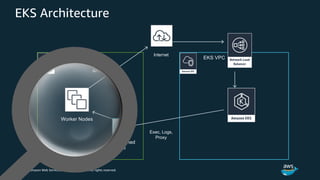
EKS Architecture
EKS VPCCustomer VPC
Worker Nodes
EKS-Owned
ENI
Kubernetes
API calls
Exec, Logs,
Proxy
Internet
© 2018, Amazon Web Services, Inc. or its Affiliates. All rights reserved.
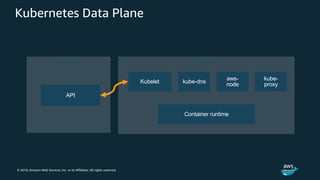
Kubernetes Data Plane
Worker Node
kube-dnsKubelet
aws-
node
Container runtime
Control Plane
API
kube-
proxy
© 2018, Amazon Web Services, Inc. or its Affiliates. All rights reserved.
EKS Upgrades
© 2018, Amazon Web Services, Inc. or its Affiliates. All rights reserved.
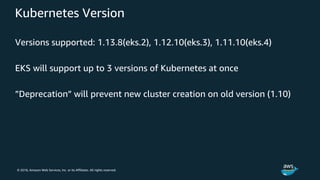
Kubernetes Version
Versions supported: 1.13.8(eks.2), 1.12.10(eks.3), 1.11.10(eks.4)
EKS will support up to 3 versions of Kubernetes at once
”Deprecation” will prevent new cluster creation on old version (1.10)
© 2018, Amazon Web Services, Inc. or its Affiliates. All rights reserved.
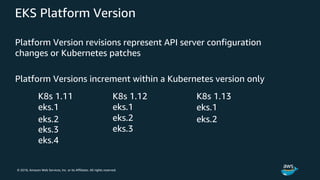
EKS Platform Version
Platform Version revisions represent API server configuration
changes or Kubernetes patches
Platform Versions increment within a Kubernetes version only
© 2018, Amazon Web Services, Inc. or its Affiliates. All rights reserved.
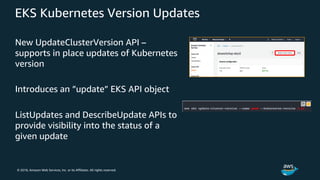
EKS Kubernetes Version Updates
New UpdateClusterVersion API –
supports in place updates of Kubernetes
version
Introduces an ”update” EKS API object
ListUpdates and DescribeUpdate APIs to
provide visibility into the status of a
given update
© 2018, Amazon Web Services, Inc. or its Affiliates. All rights reserved.
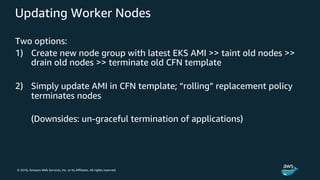
Updating Worker Nodes
Two options:
1) Create new node group with latest EKS AMI >> taint old nodes >>
drain old nodes >> terminate old CFN template
2) Simply update AMI in CFN template; “rolling” replacement policy
terminates nodes
(Downsides: un-graceful termination of applications)
© 2018, Amazon Web Services, Inc. or its Affiliates. All rights reserved.
EKS Networking & Load Balancing
© 2018, Amazon Web Services, Inc. or its Affiliates. All rights reserved.
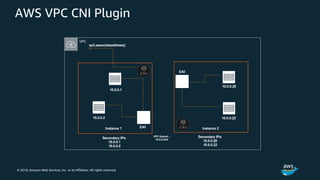
AWS VPC CNI Plugin
ENI
Secondary IPs:
10.0.0.1
10.0.0.2
10.0.0.1
10.0.0.2
ENI
10.0.0.20
10.0.0.22
Secondary IPs:
10.0.0.20
10.0.0.22
ec2.associateaddress()
VPC Subnet –
10.0.0.0/24
Instance 1 Instance 2
VPC
© 2018, Amazon Web Services, Inc. or its Affiliates. All rights reserved.
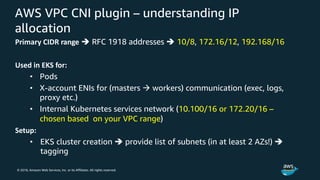
AWS VPC CNI plugin – understanding IP
allocation
Primary CIDR range è RFC 1918 addresses è 10/8, 172.16/12, 192.168/16
Used in EKS for:
• Pods
• X-account ENIs for (masters à workers) communication (exec, logs,
proxy etc.)
• Internal Kubernetes services network (10.100/16 or 172.20/16 –
chosen based on your VPC range)
Setup:
• EKS cluster creation è provide list of subnets (in at least 2 AZs!) è
tagging
© 2018, Amazon Web Services, Inc. or its Affiliates. All rights reserved.
Load Balancing
All three AWS Elastic Load Balancing products are supported
NLB and CLB supported by Kubernetes Service type=LoadBalancer
Internal and External Load Balancer support
© 2018, Amazon Web Services, Inc. or its Affiliates. All rights reserved.
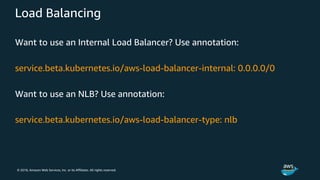
Load Balancing
Want to use an Internal Load Balancer? Use annotation:
service.beta.kubernetes.io/aws-load-balancer-internal: 0.0.0.0/0
Want to use an NLB? Use annotation:
service.beta.kubernetes.io/aws-load-balancer-type: nlb
© 2018, Amazon Web Services, Inc. or its Affiliates. All rights reserved.
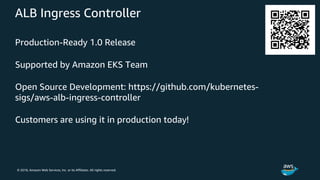
ALB Ingress Controller
Production-Ready 1.0 Release
Supported by Amazon EKS Team
Open Source Development: https://github.com/kubernetes-
sigs/aws-alb-ingress-controller
Customers are using it in production today!
© 2018, Amazon Web Services, Inc. or its Affiliates. All rights reserved.
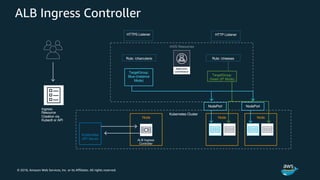
ALB Ingress Controller
AWS Resources
Kubernetes Cluster
Node Node
Kubernetes
API Server ALB Ingress
Controller
Node
HTTP ListenerHTTPS Listener
Rule: /cheesesRule: /charcuterie
TargetGroup:
Green (IP Mode)
TargetGroup:
Blue (Instance
Mode)
NodePort NodePort
Ingress
Resource
Creation via
Kubectl or API
© 2018, Amazon Web Services, Inc. or its Affiliates. All rights reserved.
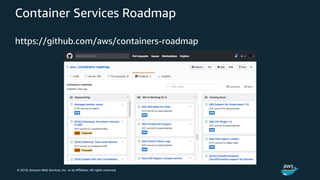
Container Services Roadmap
https://github.com/aws/containers-roadmap
© 2018, Amazon Web Services, Inc. or its Affiliates. All rights reserved.
Hands On Lab
Spin up your Kubernetes Cluster
© 2018, Amazon Web Services, Inc. or its Affiliates. All rights reserved.
Appendix

Kubernetes/ EKS - 김광영 (AWS 솔루션즈 아키텍트)

  • 1.
    © 2018, AmazonWeb Services, Inc. or its Affiliates. All rights reserved. Kwangyoung Kim Aug 2019 Kubernetes/ EKS Journey to modern application
  • 2.
    © 2018, AmazonWeb Services, Inc. or its Affiliates. All rights reserved. What are container orchestration tools?
  • 3.
    © 2018, AmazonWeb Services, Inc. or its Affiliates. All rights reserved. Amazon Container Services Landscape MANAGEMENT Deployment, Scheduling, Scaling & Management of containerized applications HOSTING Where the containers run Amazon Elastic Container Service Amazon Elastic Kubernetes Service Amazon EC2 AWS Fargate IMAGE REGISTRY Container Image Repository Amazon Elastic Container Registry
  • 4.
    © 2018, AmazonWeb Services, Inc. or its Affiliates. All rights reserved. New: AWS Cloud Map Service discovery for all your cloud resources Constantly monitor the health of every resource Dynamically update the location of each microservice Increase developer productivity Single registry for all app resources Define resources with user-friendly names Integration with Amazon container services AWS Fargate Amazon ECS Amazon EKS AWS Cloud Map
  • 5.
    © 2018, AmazonWeb Services, Inc. or its Affiliates. All rights reserved. New: AWS App Mesh Observability & traffic control Easily export logs, metrics, and traces Client side traffic policies—circuit breaking, retries Routes for deployments Works across clusters and container services Amazon ECS Amazon EKS Kubernetes on EC2 AWS Fargate (coming soon!) AWS built and run No control plane to manage Ease of operations High scale
  • 6.
    © 2018, AmazonWeb Services, Inc. or its Affiliates. All rights reserved.
  • 7.
    © 2018, AmazonWeb Services, Inc. or its Affiliates. All rights reserved. Open source container management platform Helps you run containers at scale Gives you primitives for building modern applications What is Kubernetes?
  • 8.
    © 2018, AmazonWeb Services, Inc. or its Affiliates. All rights reserved. Community, contribution, choice
  • 9.
    © 2018, AmazonWeb Services, Inc. or its Affiliates. All rights reserved. But where you run Kubernetes matters Quality of the cloud platform Quality of the applications Your users
  • 10.
    © 2018, AmazonWeb Services, Inc. or its Affiliates. All rights reserved. —CNCF survey
  • 11.
    © 2018, AmazonWeb Services, Inc. or its Affiliates. All rights reserved. Kubernetes Key Features Kubernetes provides you with a framework to run distributed systems resiliently. It takes care of your scaling requirements, failover, deployment patterns, and more. For example, Kubernetes can easily manage a canary deployment for your system. • Service discovery and load balancing • Storage orchestration • Automated rollouts and rollbacks • Automatic bin packing • Self-healing • Secret and configuration management
  • 12.
    © 2018, AmazonWeb Services, Inc. or its Affiliates. All rights reserved. Kubernetes Cluster Architecture API ServerScheduler Etcd Controller Manager kubelet kube-proxy pod
  • 13.
    © 2018, AmazonWeb Services, Inc. or its Affiliates. All rights reserved. Kubernetes Cluster Master The cluster master includes the following core Kubernetes components: • kube-apiserver - The API server is how the underlying Kubernetes APIs are exposed. This component provides the interaction for management tools, such as kubectl or the Kubernetes dashboard. • etcd - To maintain the state of your Kubernetes cluster and configuration, the highly available etcd is a key value store within Kubernetes. • kube-scheduler - When you create or scale applications, the Scheduler determines what nodes can run the workload and starts them. • kube-controller-manager - The Controller Manager oversees a number of smaller Controllers that perform actions such as replicating pods and handling node operations.
  • 14.
    © 2018, AmazonWeb Services, Inc. or its Affiliates. All rights reserved. Kubernetes Cluster Node The cluster node includes the following core Kubernetes components: • The kubelet is the Kubernetes agent that processes the orchestration requests from the cluster master and scheduling of running the requested containers. • Virtual networking is handled by the kube-proxy on each node. The proxy routes network traffic and manages IP addressing for services and pods. • The container runtime is the component that allows containerized applications to run and interact with additional resources such as the virtual network and storage. • Kubernetes uses pods to run an instance of your application. Pods are typically ephemeral, disposable resources, and individually scheduled pods miss some of the high availability and redundancy features Kubernetes provides. Instead, pods are usually deployed and managed by Kubernetes Controllers, such as the Deployment Controller.
  • 15.
    © 2018, AmazonWeb Services, Inc. or its Affiliates. All rights reserved. Namespaces Kubernetes resources, such as pods and deployments, are logically grouped into a namespace. These groupings provide a way to logically divide a cluster and restrict access to create, view, or manage resources. When you create a cluster, the following namespaces are available: • default - This namespace is where pods and deployments are created by default when none is provided. When you interact with the Kubernetes API, such as with kubectl get pods, the default namespace is used when none is specified. • kube-system - This namespace is where core resources exist, such as network features like DNS and proxy, or the Kubernetes dashboard. • kube-public - This namespace is typically not used, but can be used for resources to be visible across the whole cluster, and can be viewed by any user.
  • 16.
    © 2018, AmazonWeb Services, Inc. or its Affiliates. All rights reserved. Understanding Kubernetes Object Kubernetes Objects are persistent entities in the Kubernetes system. Kubernetes uses these entities to represent the state of your cluster. Specifically, they can describe: • What containerized applications are running (and on which nodes) • The resources available to those applications • The policies around how those applications behave, such as restart policies, upgrades, and fault-tolerance
  • 17.
    © 2018, AmazonWeb Services, Inc. or its Affiliates. All rights reserved. Object Spec and Status Every Kubernetes object includes two nested object fields that govern the object’s configuration: the object spec and the object status. • spec - which you must provide, describes your desired state for the object–the characteristics that you want the object to have. • status - describes the actual state of the object, and is supplied and updated by the Kubernetes system. At any given time, the Kubernetes Control Plane actively manages an object’s actual state to match the desired state you supplied. • Example - Kubernetes Deployment, When status of # of available pod is different from its spec, Kubernetes correct status to match your spec
  • 18.
    © 2018, AmazonWeb Services, Inc. or its Affiliates. All rights reserved. How Kubernetes Work Orchestration apiVersion: apps/v1 # apps/v1beta2를 사용하는 1.9.0보다 더 이전의 버전용 kind: Deployment metadata: name: nginx-deployment spec: selector: matchLabels: app: nginx replicas: 2 # 템플릿에 매칭되는 파드 2개를 구동하는 디플로이먼트임 template: metadata: labels: app: nginx spec: containers: - name: nginx image: nginx:1.7.9 ports: - containerPort: 80 API-SEVER Kube-scheduler kubectl create –f mydeployment.yaml kubelet kubelet kubeletETCD Kube-controller
  • 19.
    © 2018, AmazonWeb Services, Inc. or its Affiliates. All rights reserved. Pods • Define how your containers should run • Allow you to run 1 to n containers together Containers in pods have • Shared IP space • Shared volumes • Shared scaling (you scale pods not individual containers) When containers are started on our cluster, they are always part of a pod. (even if it’s a pod of 1) IP Container A Container B
  • 20.
    © 2018, AmazonWeb Services, Inc. or its Affiliates. All rights reserved. Services One of the ways traffic gets to your containers. • Internal IP addresses are assigned to each container • Services are connected to containers and use labels to reference which containers to route requests to IP IP IP Service IP
  • 21.
    © 2018, AmazonWeb Services, Inc. or its Affiliates. All rights reserved. Deployments Services work with deployments to manage updating or adding new pods. Let’s say we want to deploy a new version of our web app as a ‘canary’ and see how it handles traffic.
  • 22.
    © 2018, AmazonWeb Services, Inc. or its Affiliates. All rights reserved. Deployments The deployment creates a new replication set for our new pod version.
  • 23.
    © 2018, AmazonWeb Services, Inc. or its Affiliates. All rights reserved. Deployments Only after the new pod returns a healthy status to the service do we add more new pods and scale down the old.
  • 24.
    © 2018, AmazonWeb Services, Inc. or its Affiliates. All rights reserved. StatefulSets and DaemonSets The Deployment Controller uses the Kubernetes Scheduler to run a given number of replicas on any available node with available resources. For applications that require a replica to exist on each node, or selected nodes, within a cluster, the Deployment Controller doesn't look at how replicas are distributed across the nodes. There are two Kubernetes resources that let you manage these types of applications: • StatefulSets - Maintain the state of applications beyond an individual pod lifecycle, such as storage. • DaemonSets - Ensure a running instance on each node, early in the Kubernetes bootstrap process.
  • 25.
    © 2018, AmazonWeb Services, Inc. or its Affiliates. All rights reserved. Services • A Kubernetes Service is an abstraction which defines a logical set of Pods and a policy by which to access them - sometimes called a micro-service. The set of Pods targeted by a Service is (usually) determined by a Label Selector. • Let’s talk about what are the differences between LoadBalancer, NodePort and Ingress
  • 26.
    © 2018, AmazonWeb Services, Inc. or its Affiliates. All rights reserved. Services : ClusterIP • Exposes the service on a cluster-internal IP • Only reachable from within the cluster • Access possible via kube-proxy • Useful for debugging services, connecting from your laptop or displaying internal dashboards ClusterIPInternal Traffic port 80 port 80 port 80 port 80
  • 27.
    © 2018, AmazonWeb Services, Inc. or its Affiliates. All rights reserved. Services : LoadBalancer • Exposes the service externally using a cloud provider’s load balancer. • NodePort and ClusterIP services (to which LB will route) automatically created. • Each service exposed with a LoadBalancer (ELB or NLB) will get its own IP address • Exposes L4 (TCP) or L7 (HTTP) services Cluster Node Incoming Traffic port 80 port 80 port 80 Cluster Node Cluster Node port 80
  • 28.
    © 2018, AmazonWeb Services, Inc. or its Affiliates. All rights reserved. Services : NodePort • Exposes the service on each Node’s IP at a static port. • Routes to a ClusterIP service, which is automatically created. • from outside the cluster: <NodeIP>:<NodePort> • 1 service per port • Uses ports 30000-32767 Cluster Node Incoming Traffic port 31000 port 80 port 80 Cluster Node Cluster Node port 31000 port 31000 NodePort port 80
  • 29.
    © 2018, AmazonWeb Services, Inc. or its Affiliates. All rights reserved. Ingress • Unlike all the above examples, Ingress is actually NOT a type of service. Instead, it sits in front of multiple services and act as a “smart router” or entry point into your cluster. • Demo is at the end of the page as it requires helm for ingress controller
  • 30.
    © 2018, AmazonWeb Services, Inc. or its Affiliates. All rights reserved. Ingress • Exposes HTTP/HTTPS routes to services within the cluster • Many implementations: ALB, Nginx, F5, HAProxy etc • Default Service Type: ClusterIP Incoming Traffic myapp.com/blog myapp.com/store Blog Service Ingress Store Service
  • 31.
    © 2018, AmazonWeb Services, Inc. or its Affiliates. All rights reserved. Ingress - Sample ELBingress-*.popori.net Nginx Ingress ingress-nginx.popori.net Ingress-tutum.popori.net Jenkins Github Registry build push pull run
  • 32.
    © 2018, AmazonWeb Services, Inc. or its Affiliates. All rights reserved.
  • 33.
    © 2018, AmazonWeb Services, Inc. or its Affiliates. All rights reserved. What is Amazon EKS? • Amazon Elastic Kubernetes Service (Amazon EKS) is a managed service that makes it easy for you to run Kubernetes on AWS without needing to stand up or maintain your own Kubernetes control plane. Kubernetes is an open-source system for automating the deployment, scaling, and management of containerized applications.
  • 34.
    © 2018, AmazonWeb Services, Inc. or its Affiliates. All rights reserved. EKS is Kubernetes certified
  • 35.
    © 2018, AmazonWeb Services, Inc. or its Affiliates. All rights reserved. Kubernetes on AWS Managed Kubernetes on AWS Highly available Automated version upgrades Integration with other AWS services Etcd Master Managed Kubernetes control plane CloudTrail, CloudWatch, ELB, IAM, VPC, PrivateLink , Appmesh,
  • 36.
    © 2018, AmazonWeb Services, Inc. or its Affiliates. All rights reserved. Availability Zone 1 Master Master Availability Zone 2 Availability Zone 3 Master Workers Workers Workers Customer Account AWS Managed
  • 37.
    © 2018, AmazonWeb Services, Inc. or its Affiliates. All rights reserved. EKS Architecture mycluster.eks.amazonaws.com Availability Zone 1 Availability Zone 2 Availability Zone 3 Kubectl
  • 38.
    © 2018, AmazonWeb Services, Inc. or its Affiliates. All rights reserved. EKS Architecture EKS VPCCustomer VPC Worker Nodes EKS-Owned ENI Kubernetes API calls Exec, Logs, Proxy Internet
  • 39.
    © 2018, AmazonWeb Services, Inc. or its Affiliates. All rights reserved. EKS Control Plane
  • 40.
    © 2018, AmazonWeb Services, Inc. or its Affiliates. All rights reserved. Kubernetes Control Plane Highly available and single tenant infrastructure All “native AWS” components Fronted by an NLB VPC API Server ASG Etcd ASG NLB AZ-1 AZ-2 AZ-3 ELB Instances Instances
  • 41.
    © 2018, AmazonWeb Services, Inc. or its Affiliates. All rights reserved. Kubernetes Control Plane Master Node Scheduler Controller Manager Cloud Controller Manager API Server etcd Kubectl
  • 42.
    © 2018, AmazonWeb Services, Inc. or its Affiliates. All rights reserved. What happens when I run ‘kubectl create –f pods.yaml’?
  • 43.
    © 2018, AmazonWeb Services, Inc. or its Affiliates. All rights reserved. IAM Authentication Kubectl 3) Authorizes AWS Identity with RBAC K8s API 1) Passes AWS Identity 2) Verifies AWS Identity 4) K8s action allowed/denied AWS Auth
  • 44.
    © 2018, AmazonWeb Services, Inc. or its Affiliates. All rights reserved. Kubernetes Control Plane API Server Kubectl Authorization Webhook RBACaws-iam- authenticator Authentication Admission Controllers Mutating Webhook Validation Webhook
  • 45.
    © 2018, AmazonWeb Services, Inc. or its Affiliates. All rights reserved. kubectl configuration # [...] users: - name: aws user: exec: apiVersion: client.authentication.k8s.io/v1alpha1 command: aws-iam-authenticator args: - "token" - "-i" - "CLUSTER_ID" - "-r" - "ROLE_ARN" # no client certificate/key needed here!
  • 46.
    © 2018, AmazonWeb Services, Inc. or its Affiliates. All rights reserved. EKS Data Plane
  • 47.
    © 2018, AmazonWeb Services, Inc. or its Affiliates. All rights reserved. EKS Architecture EKS VPCCustomer VPC Worker Nodes EKS-Owned ENI Kubernetes API calls Exec, Logs, Proxy Internet
  • 48.
    © 2018, AmazonWeb Services, Inc. or its Affiliates. All rights reserved. Kubernetes Data Plane Worker Node kube-dnsKubelet aws- node Container runtime Control Plane API kube- proxy
  • 49.
    © 2018, AmazonWeb Services, Inc. or its Affiliates. All rights reserved. EKS Upgrades
  • 50.
    © 2018, AmazonWeb Services, Inc. or its Affiliates. All rights reserved. Kubernetes Version Versions supported: 1.13.8(eks.2), 1.12.10(eks.3), 1.11.10(eks.4) EKS will support up to 3 versions of Kubernetes at once ”Deprecation” will prevent new cluster creation on old version (1.10)
  • 51.
    © 2018, AmazonWeb Services, Inc. or its Affiliates. All rights reserved. EKS Platform Version Platform Version revisions represent API server configuration changes or Kubernetes patches Platform Versions increment within a Kubernetes version only
  • 52.
    © 2018, AmazonWeb Services, Inc. or its Affiliates. All rights reserved. EKS Kubernetes Version Updates New UpdateClusterVersion API – supports in place updates of Kubernetes version Introduces an ”update” EKS API object ListUpdates and DescribeUpdate APIs to provide visibility into the status of a given update
  • 53.
    © 2018, AmazonWeb Services, Inc. or its Affiliates. All rights reserved. Updating Worker Nodes Two options: 1) Create new node group with latest EKS AMI >> taint old nodes >> drain old nodes >> terminate old CFN template 2) Simply update AMI in CFN template; “rolling” replacement policy terminates nodes (Downsides: un-graceful termination of applications)
  • 54.
    © 2018, AmazonWeb Services, Inc. or its Affiliates. All rights reserved. EKS Networking & Load Balancing
  • 55.
    © 2018, AmazonWeb Services, Inc. or its Affiliates. All rights reserved. AWS VPC CNI Plugin ENI Secondary IPs: 10.0.0.1 10.0.0.2 10.0.0.1 10.0.0.2 ENI 10.0.0.20 10.0.0.22 Secondary IPs: 10.0.0.20 10.0.0.22 ec2.associateaddress() VPC Subnet – 10.0.0.0/24 Instance 1 Instance 2 VPC
  • 56.
    © 2018, AmazonWeb Services, Inc. or its Affiliates. All rights reserved. AWS VPC CNI plugin – understanding IP allocation Primary CIDR range è RFC 1918 addresses è 10/8, 172.16/12, 192.168/16 Used in EKS for: • Pods • X-account ENIs for (masters à workers) communication (exec, logs, proxy etc.) • Internal Kubernetes services network (10.100/16 or 172.20/16 – chosen based on your VPC range) Setup: • EKS cluster creation è provide list of subnets (in at least 2 AZs!) è tagging
  • 57.
    © 2018, AmazonWeb Services, Inc. or its Affiliates. All rights reserved. Load Balancing All three AWS Elastic Load Balancing products are supported NLB and CLB supported by Kubernetes Service type=LoadBalancer Internal and External Load Balancer support
  • 58.
    © 2018, AmazonWeb Services, Inc. or its Affiliates. All rights reserved. Load Balancing Want to use an Internal Load Balancer? Use annotation: service.beta.kubernetes.io/aws-load-balancer-internal: 0.0.0.0/0 Want to use an NLB? Use annotation: service.beta.kubernetes.io/aws-load-balancer-type: nlb
  • 59.
    © 2018, AmazonWeb Services, Inc. or its Affiliates. All rights reserved. ALB Ingress Controller Production-Ready 1.0 Release Supported by Amazon EKS Team Open Source Development: https://github.com/kubernetes- sigs/aws-alb-ingress-controller Customers are using it in production today!
  • 60.
    © 2018, AmazonWeb Services, Inc. or its Affiliates. All rights reserved. ALB Ingress Controller AWS Resources Kubernetes Cluster Node Node Kubernetes API Server ALB Ingress Controller Node HTTP ListenerHTTPS Listener Rule: /cheesesRule: /charcuterie TargetGroup: Green (IP Mode) TargetGroup: Blue (Instance Mode) NodePort NodePort Ingress Resource Creation via Kubectl or API
  • 61.
    © 2018, AmazonWeb Services, Inc. or its Affiliates. All rights reserved. Container Services Roadmap https://github.com/aws/containers-roadmap
  • 62.
    © 2018, AmazonWeb Services, Inc. or its Affiliates. All rights reserved. Hands On Lab Spin up your Kubernetes Cluster
  • 63.
    © 2018, AmazonWeb Services, Inc. or its Affiliates. All rights reserved. Appendix