© KPIT Cummins Infosystems Ltd. Template version 2011.1.0
Webinar
Diagnostic Flash
Application with OTX
Presented
By
Ralf Ramrath
Today’s Presenter
© KPIT Cummins Infosystems Ltd 2
diagnostics@kpit.com
+49 89 322 99 66 - 0
Mr Ralf Ramrath
Product Manager
Diagnostics
© KPIT Cummins Infosystems Ltd. Template version 2011.1.0© KPIT Cummins Infosystems Ltd 3
Overview of
Diagnostic
toolchain
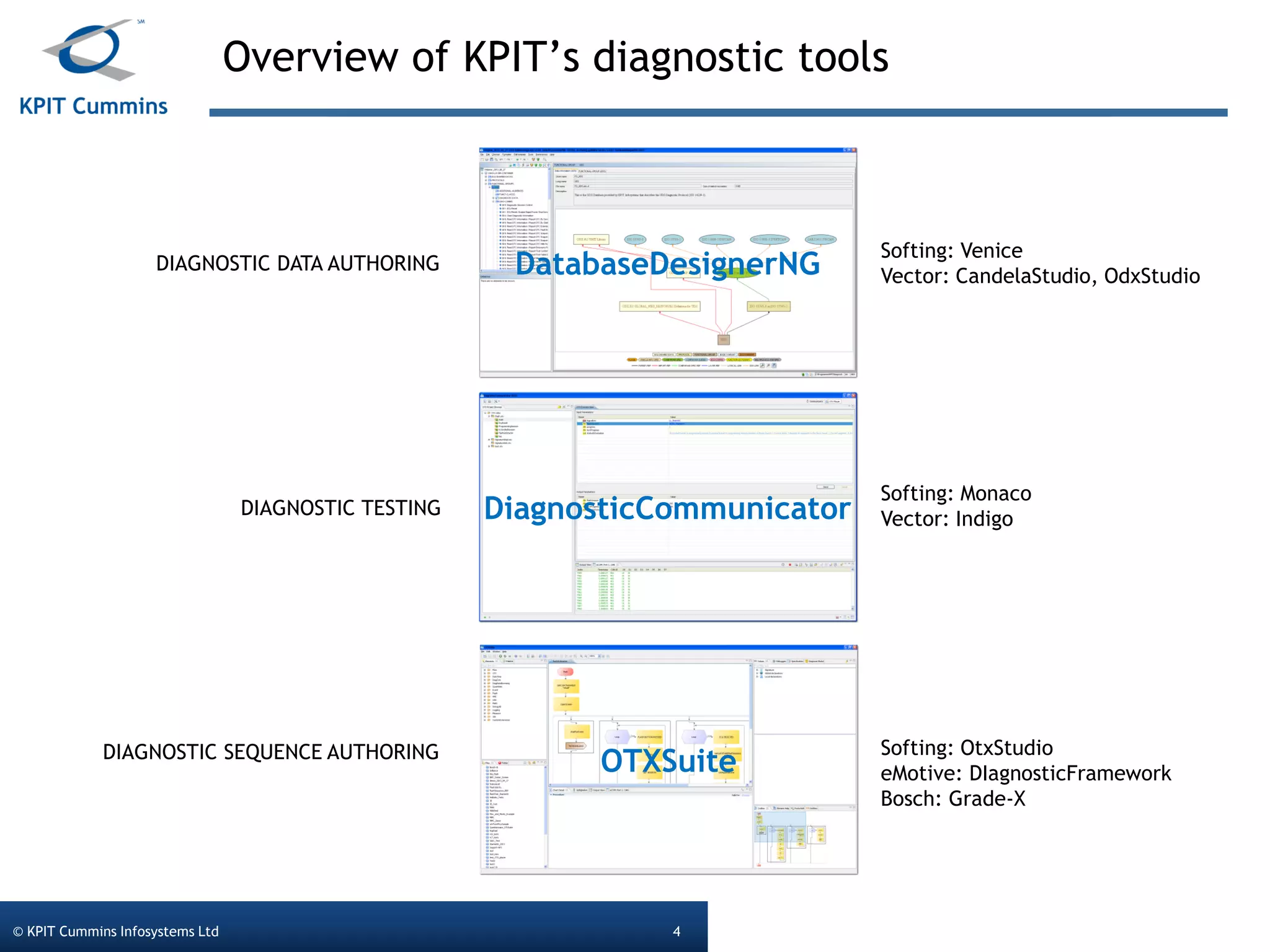
Overview of KPIT’s diagnostic tools
© KPIT Cummins Infosystems Ltd 4
DatabaseDesignerNG
DiagnosticCommunicator
OTXSuite
DIAGNOSTIC DATA AUTHORING
DIAGNOSTIC TESTING
DIAGNOSTIC SEQUENCE AUTHORING
Softing: Venice
Vector: CandelaStudio, OdxStudio
Softing: Monaco
Vector: Indigo
Softing: OtxStudio
eMotive: DIagnosticFramework
Bosch: Grade-X
© KPIT Cummins Infosystems Ltd. Template version 2011.1.0© KPIT Cummins Infosystems Ltd 5
The problem
statement
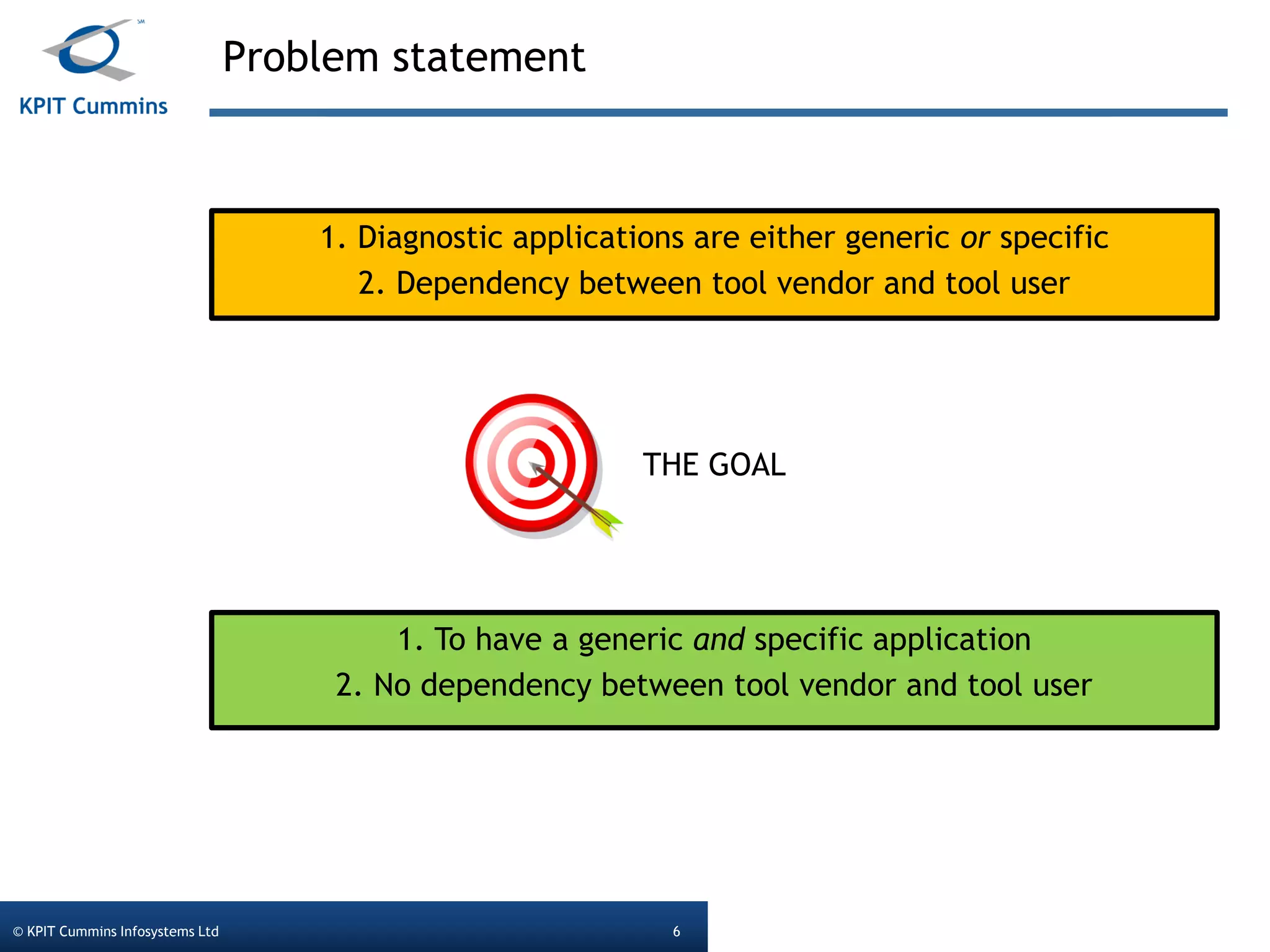
Problem statement
© KPIT Cummins Infosystems Ltd 6
1. Diagnostic applications are either generic or specific
2. Dependency between tool vendor and tool user
THE GOAL
1. To have a generic and specific application
2. No dependency between tool vendor and tool user
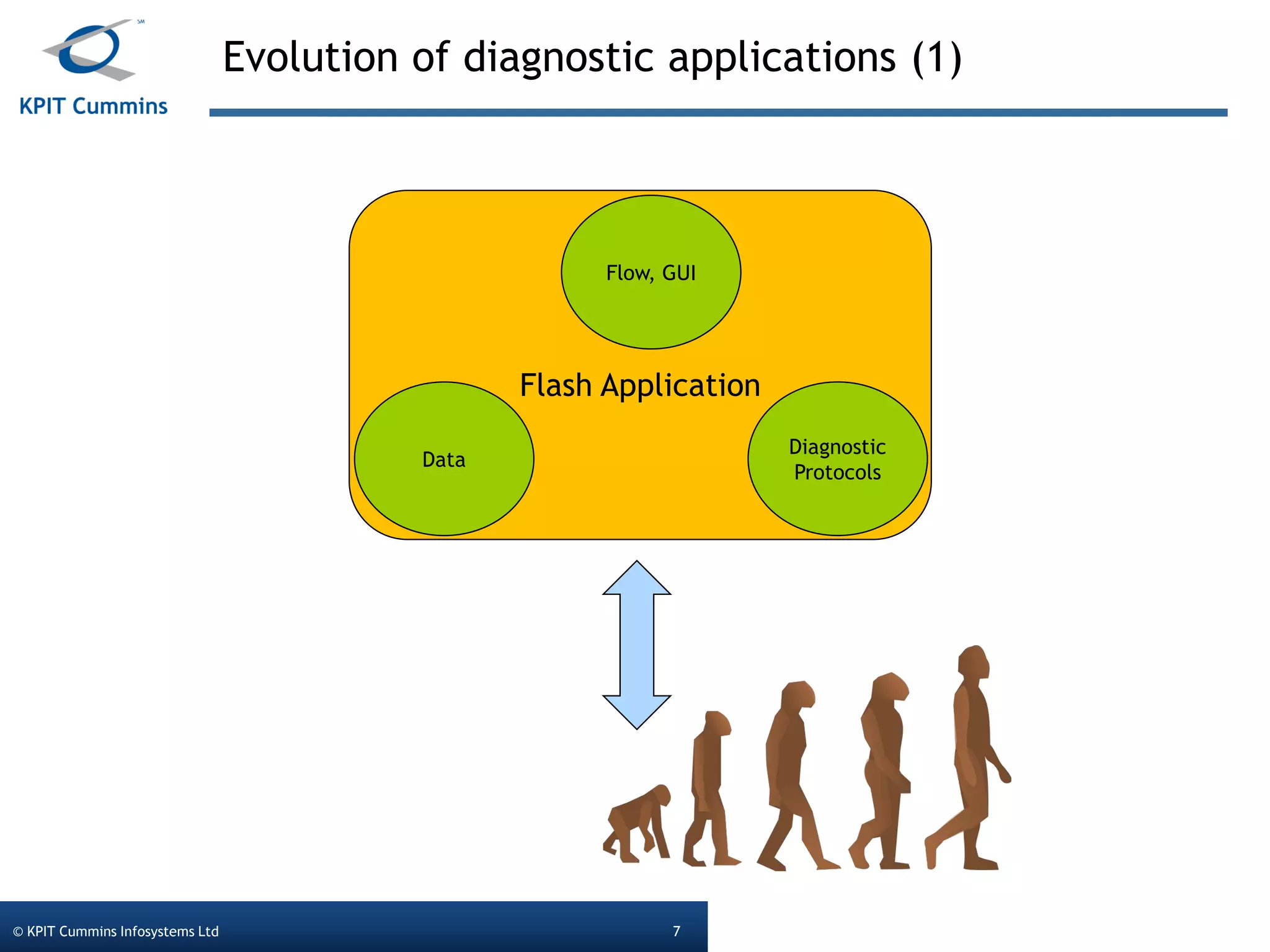
Evolution of diagnostic applications (1)
© KPIT Cummins Infosystems Ltd 7
Flash Application
Data
Flow, GUI
Diagnostic
Protocols
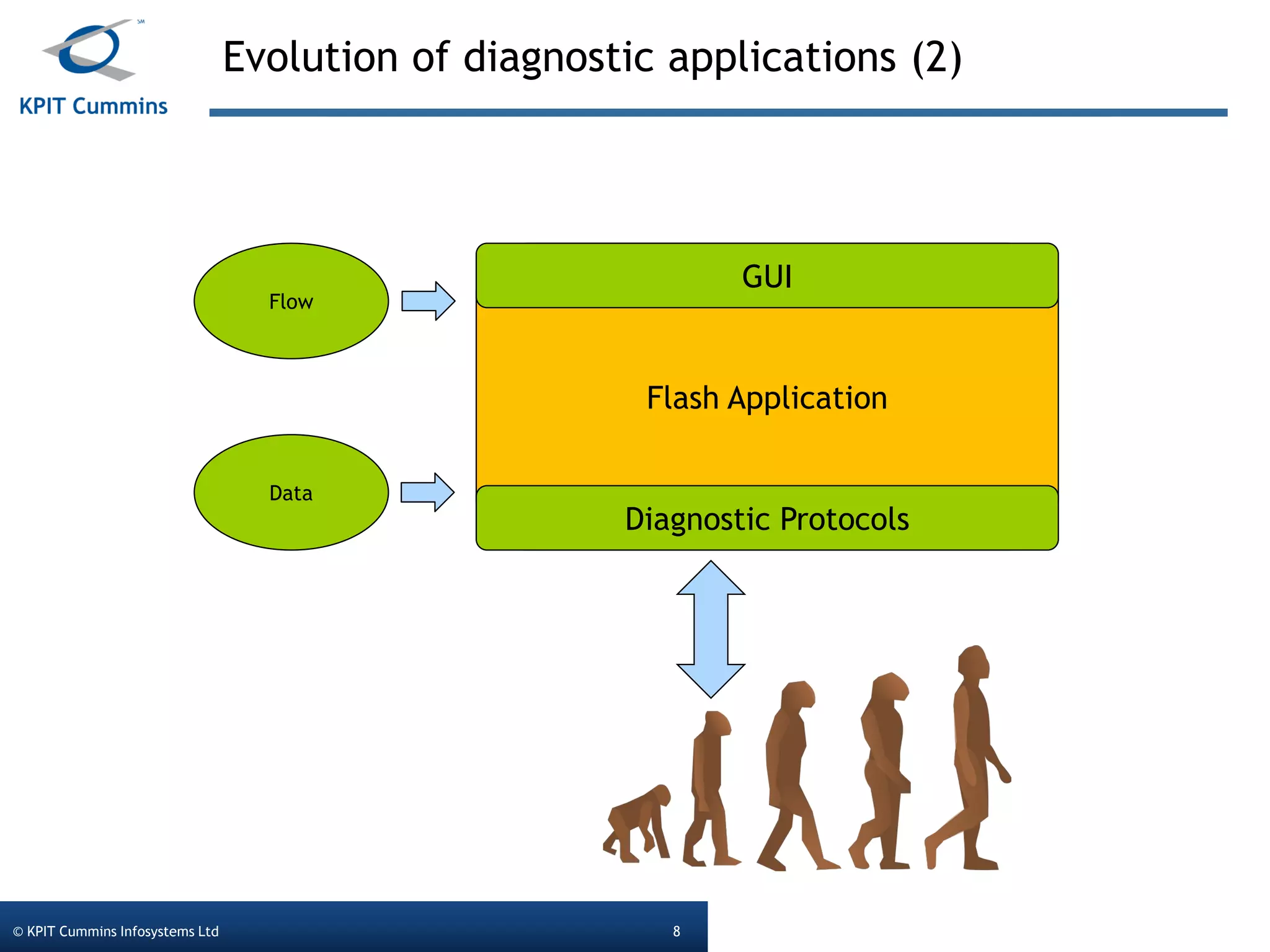
Evolution of diagnostic applications (2)
© KPIT Cummins Infosystems Ltd 8
Flash Application
Data
Flow
Diagnostic Protocols
GUI
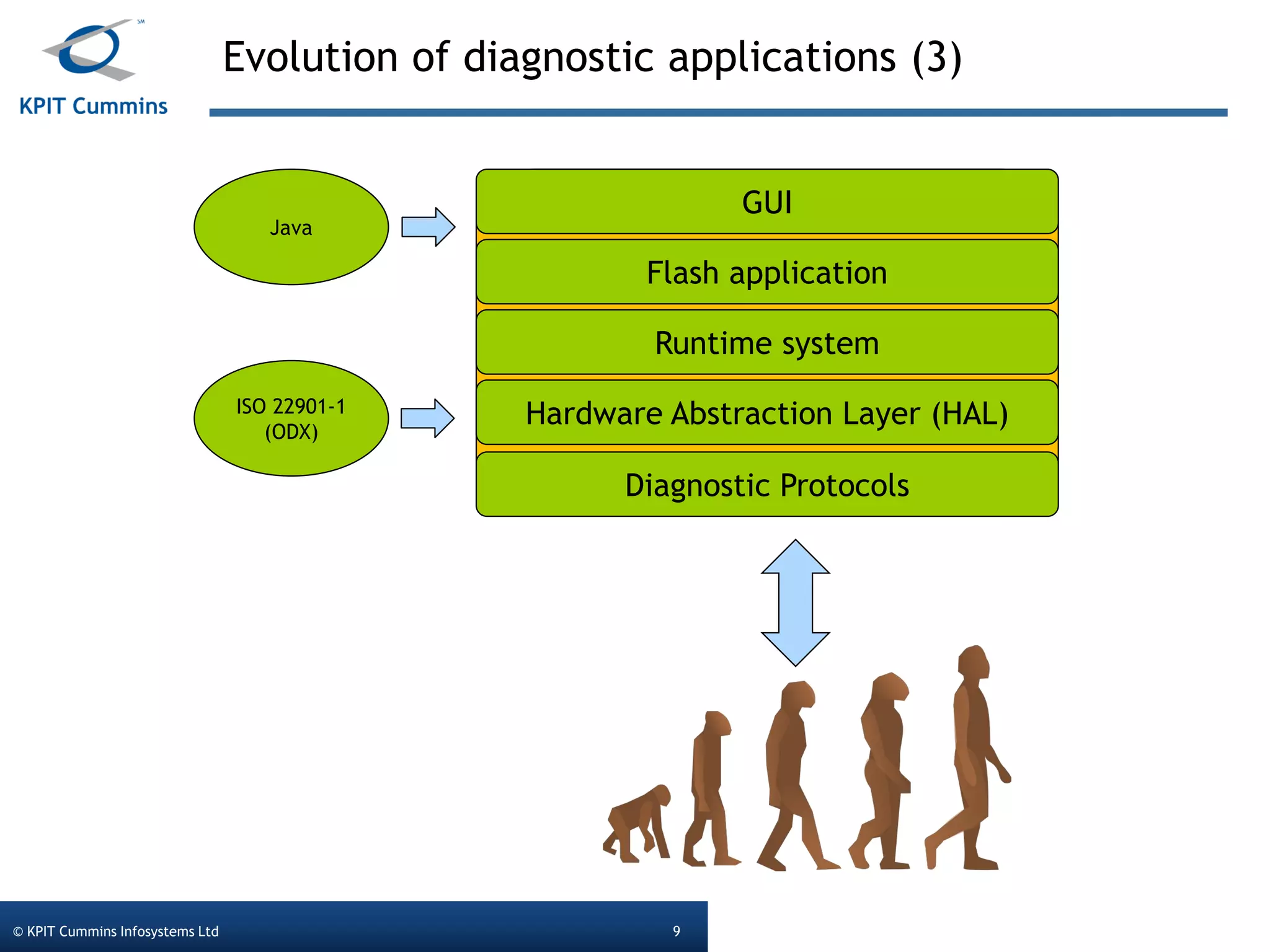
Evolution of diagnostic applications (3)
© KPIT Cummins Infosystems Ltd 9
ISO 22901-1
(ODX)
Java
Diagnostic Protocols
GUI
Flash application
Runtime system
Hardware Abstraction Layer (HAL)
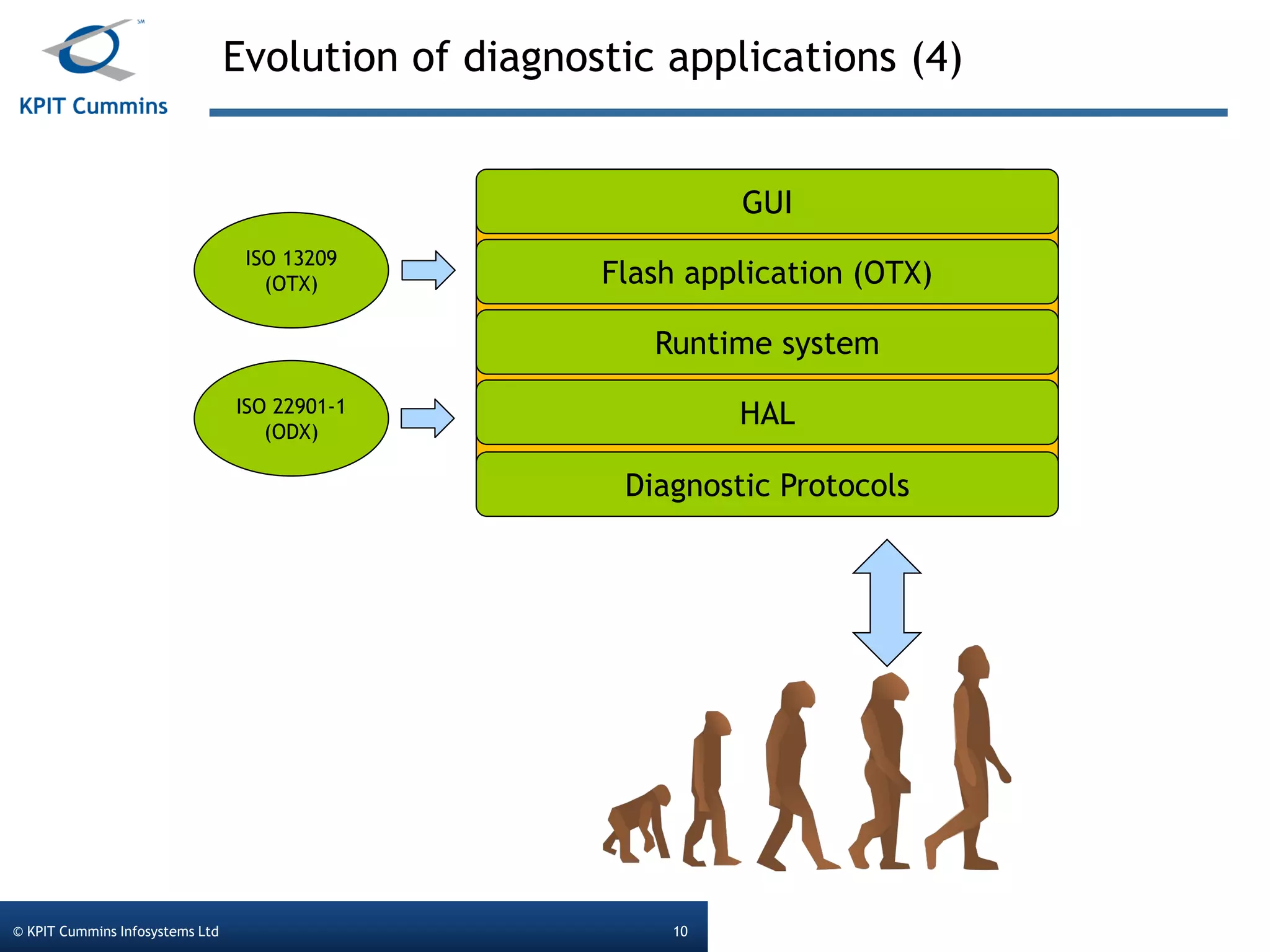
Evolution of diagnostic applications (4)
© KPIT Cummins Infosystems Ltd 10
ISO 22901-1
(ODX)
ISO 13209
(OTX)
Diagnostic Protocols
GUI
Flash application (OTX)
Runtime system
HAL
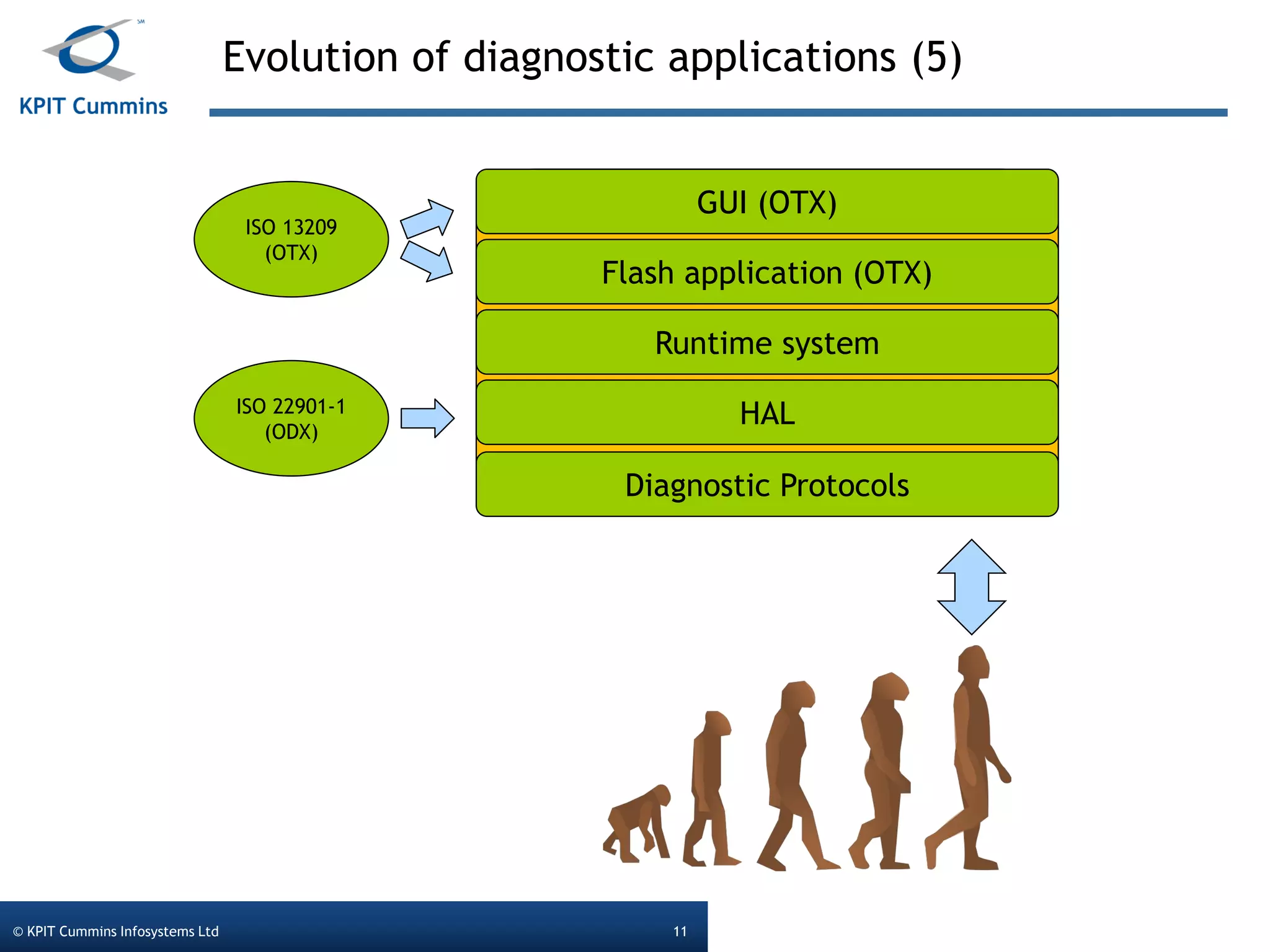
Evolution of diagnostic applications (5)
© KPIT Cummins Infosystems Ltd 11
ISO 22901-1
(ODX)
ISO 13209
(OTX)
Diagnostic Protocols
GUI (OTX)
Flash application (OTX)
Runtime system
HAL
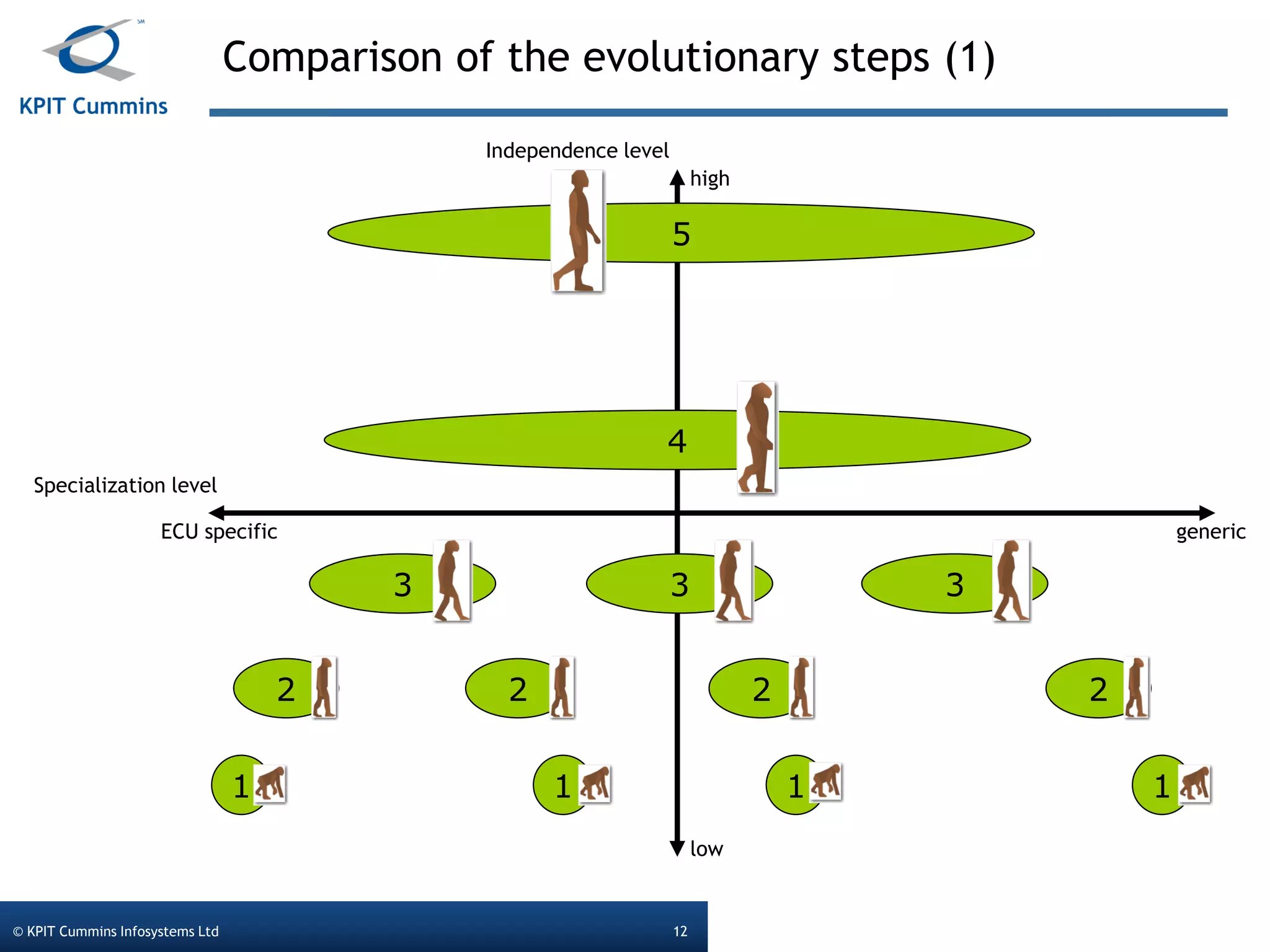
Comparison of the evolutionary steps (1)
© KPIT Cummins Infosystems Ltd 12
ECU specific generic
high
low
Specialization level
Independence level
1
2
3
4
5
33
2 2 2
111
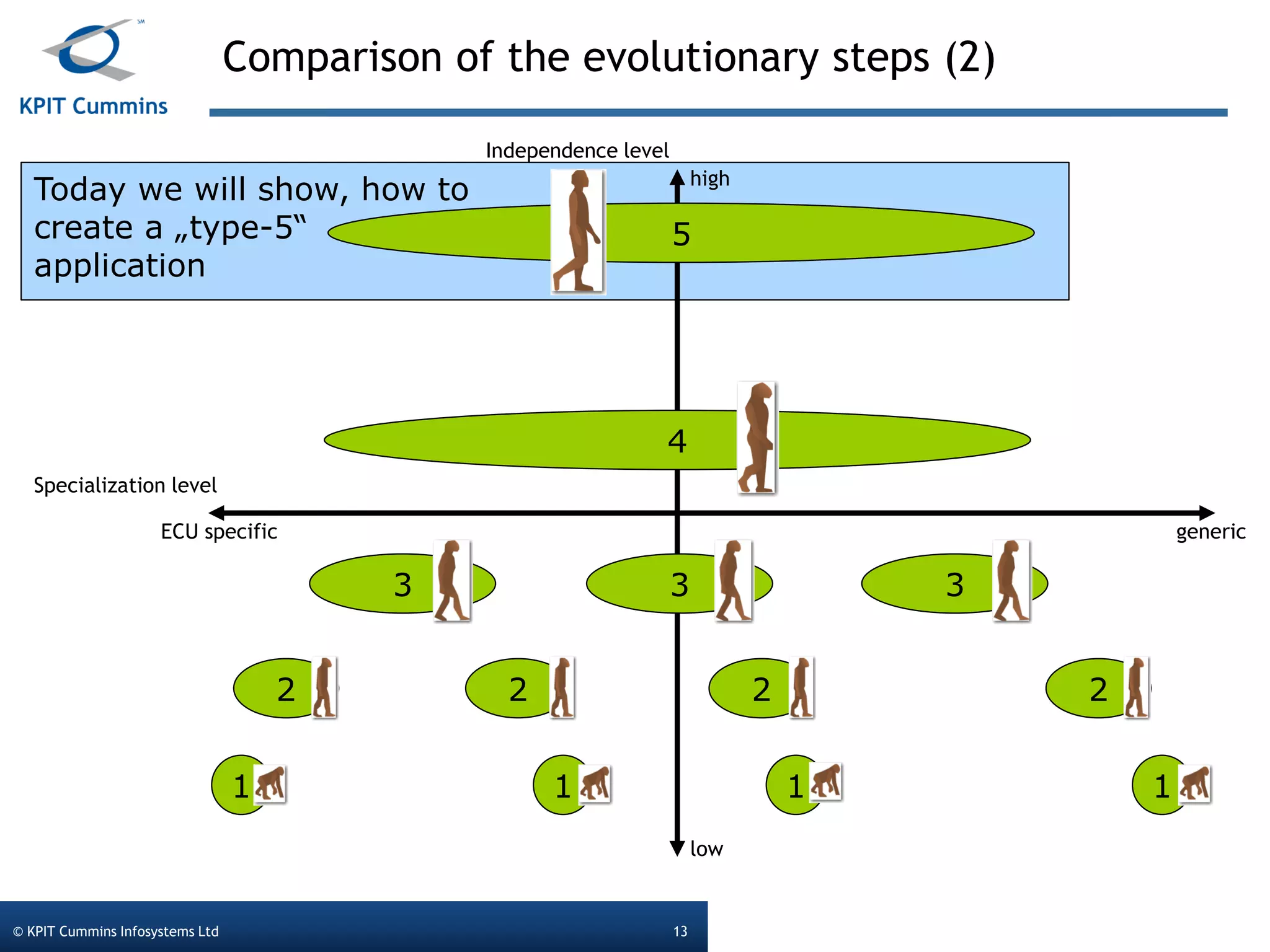
Today we will show, how to
create a „type-5“
application
Comparison of the evolutionary steps (2)
© KPIT Cummins Infosystems Ltd 13
ECU specific generic
high
low
Specialization level
Independence level
1
2
3
4
5
33
2 2 2
111
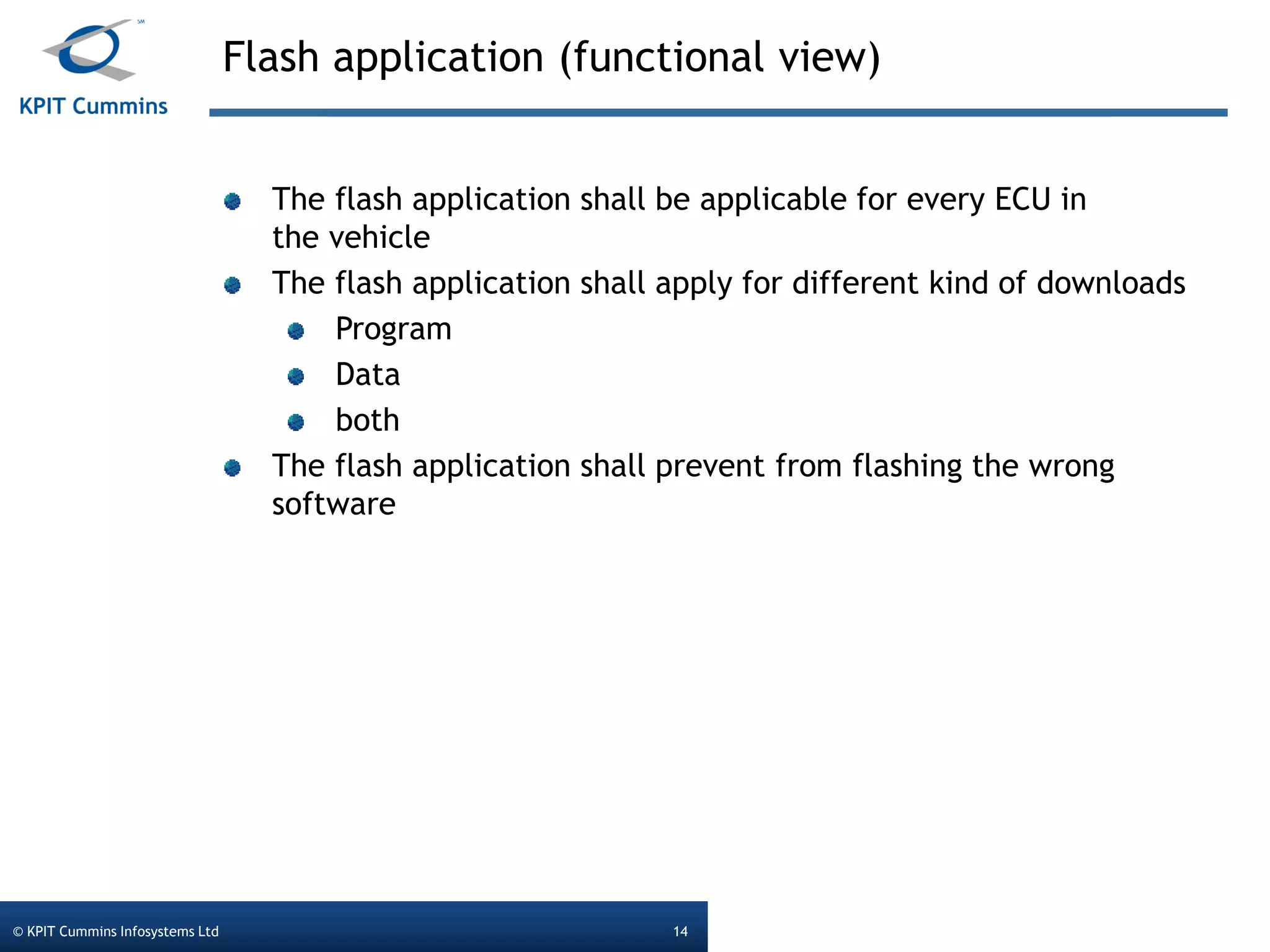
Flash application (functional view)
© KPIT Cummins Infosystems Ltd 14
The flash application shall be applicable for every ECU in
the vehicle
The flash application shall apply for different kind of downloads
Program
Data
both
The flash application shall prevent from flashing the wrong
software
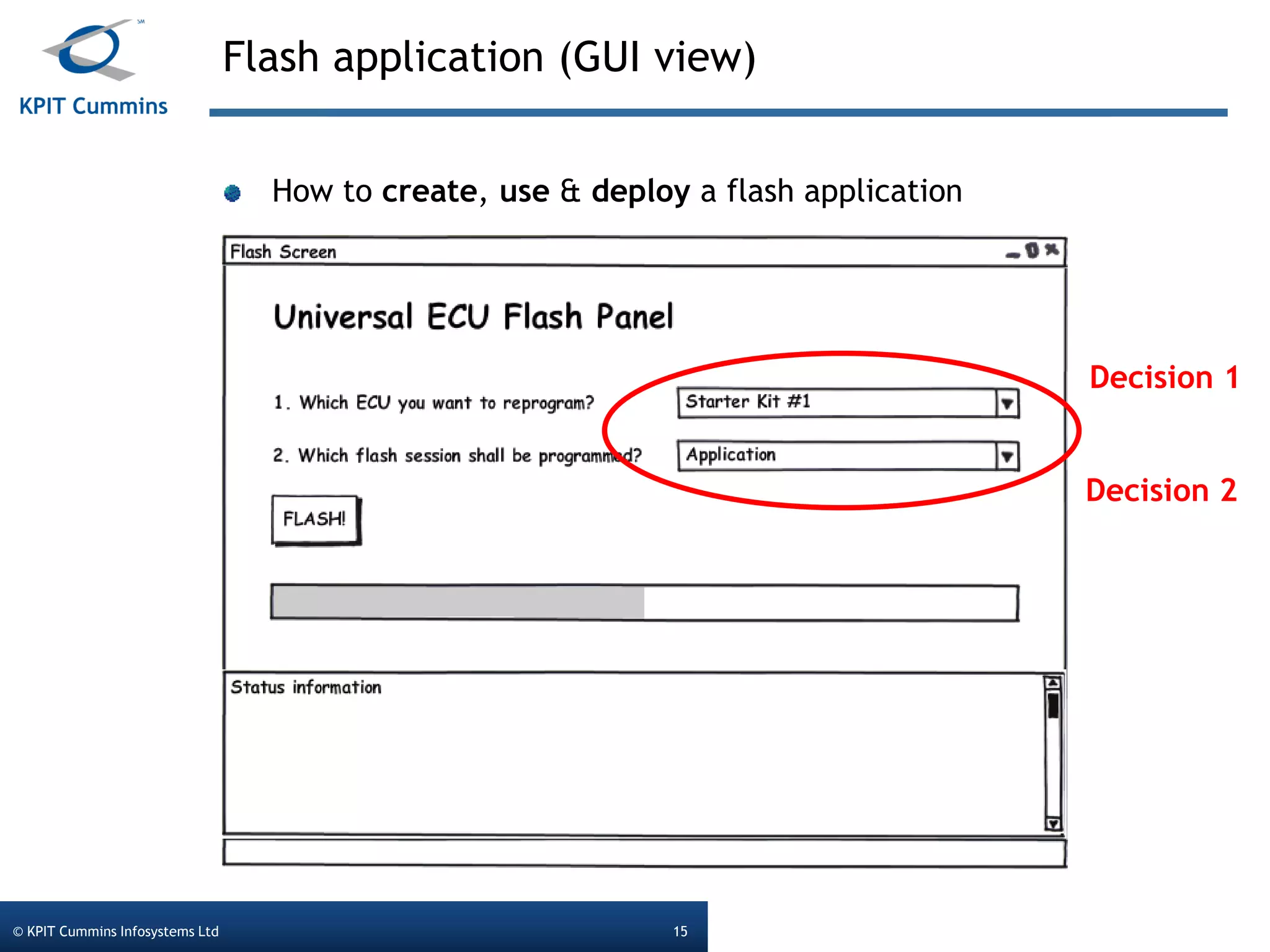
Flash application (GUI view)
© KPIT Cummins Infosystems Ltd 15
How to create, use & deploy a flash application
Decision 1
Decision 2
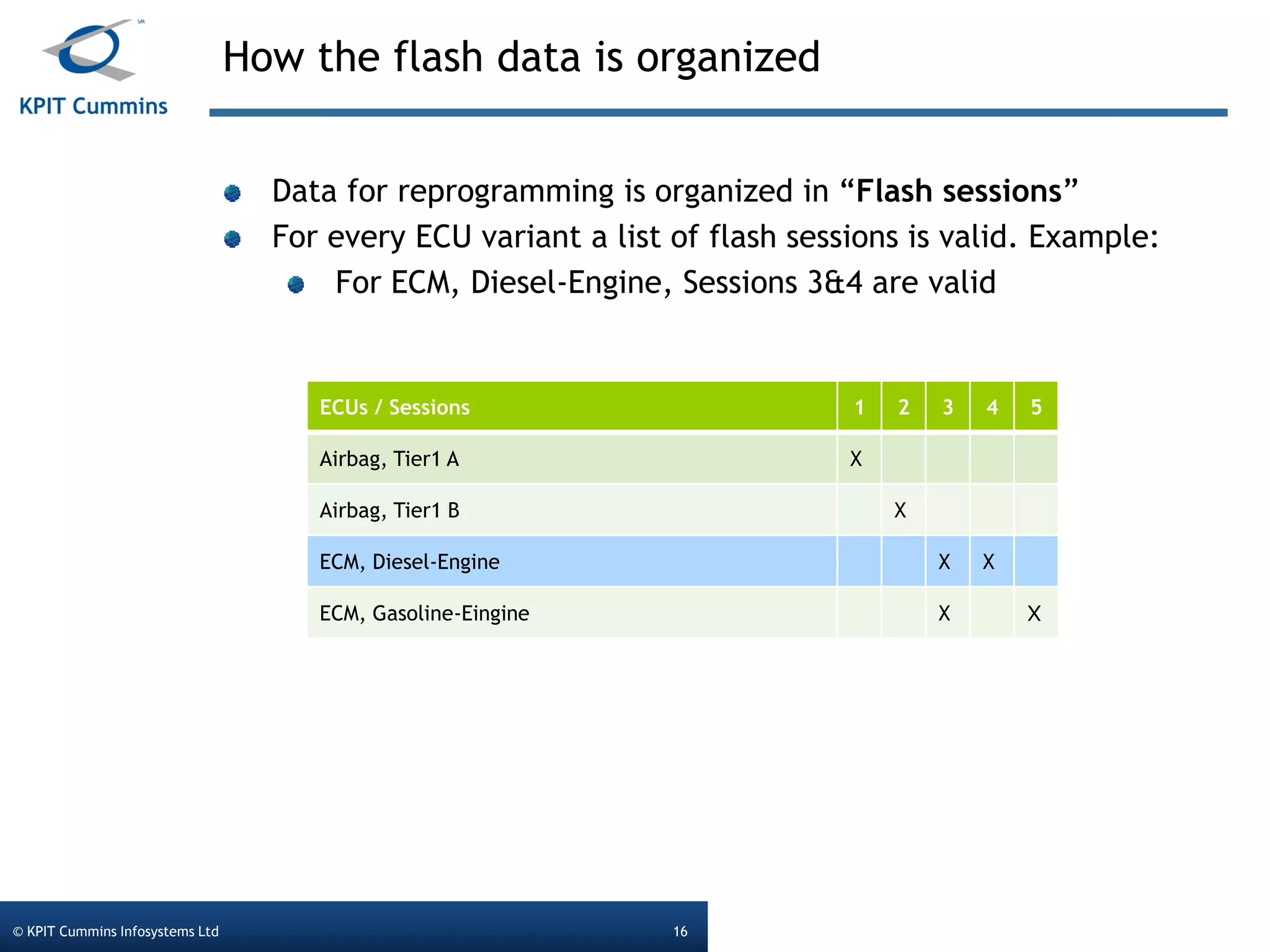
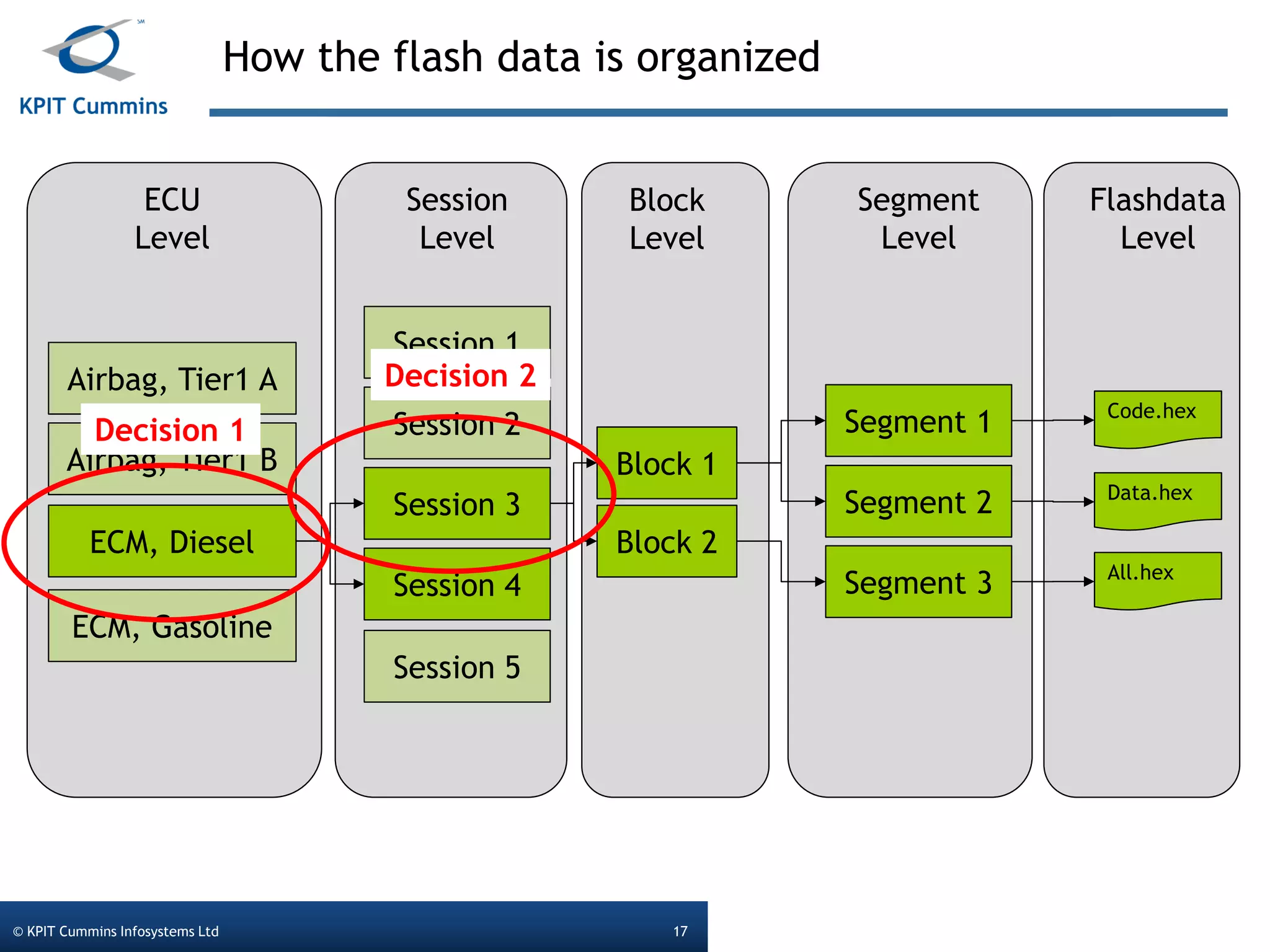
How the flash data is organized
© KPIT Cummins Infosystems Ltd 16
ECUs / Sessions 1 2 3 4 5
Airbag, Tier1 A X
Airbag, Tier1 B X
ECM, Diesel-Engine X X
ECM, Gasoline-Eingine X X
Data for reprogramming is organized in “Flash sessions”
For every ECU variant a list of flash sessions is valid. Example:
For ECM, Diesel-Engine, Sessions 3&4 are valid
How the flash data is organized
© KPIT Cummins Infosystems Ltd 17
Airbag, Tier1 A
Airbag, Tier1 B
ECM, Diesel
ECM, Gasoline
Session 1
Session 2
Session 3
Session 4
Session 5
ECU
Level
Session
Level
Block 1
Block 2
Segment 1
Segment 2
Segment 3
Block
Level
Segment
Level
Flashdata
Level
Code.hex
Data.hex
All.hex
Decision 1
Decision 2
© KPIT Cummins Infosystems Ltd. Template version 2011.1.0© KPIT Cummins Infosystems Ltd 18
How it really
works…
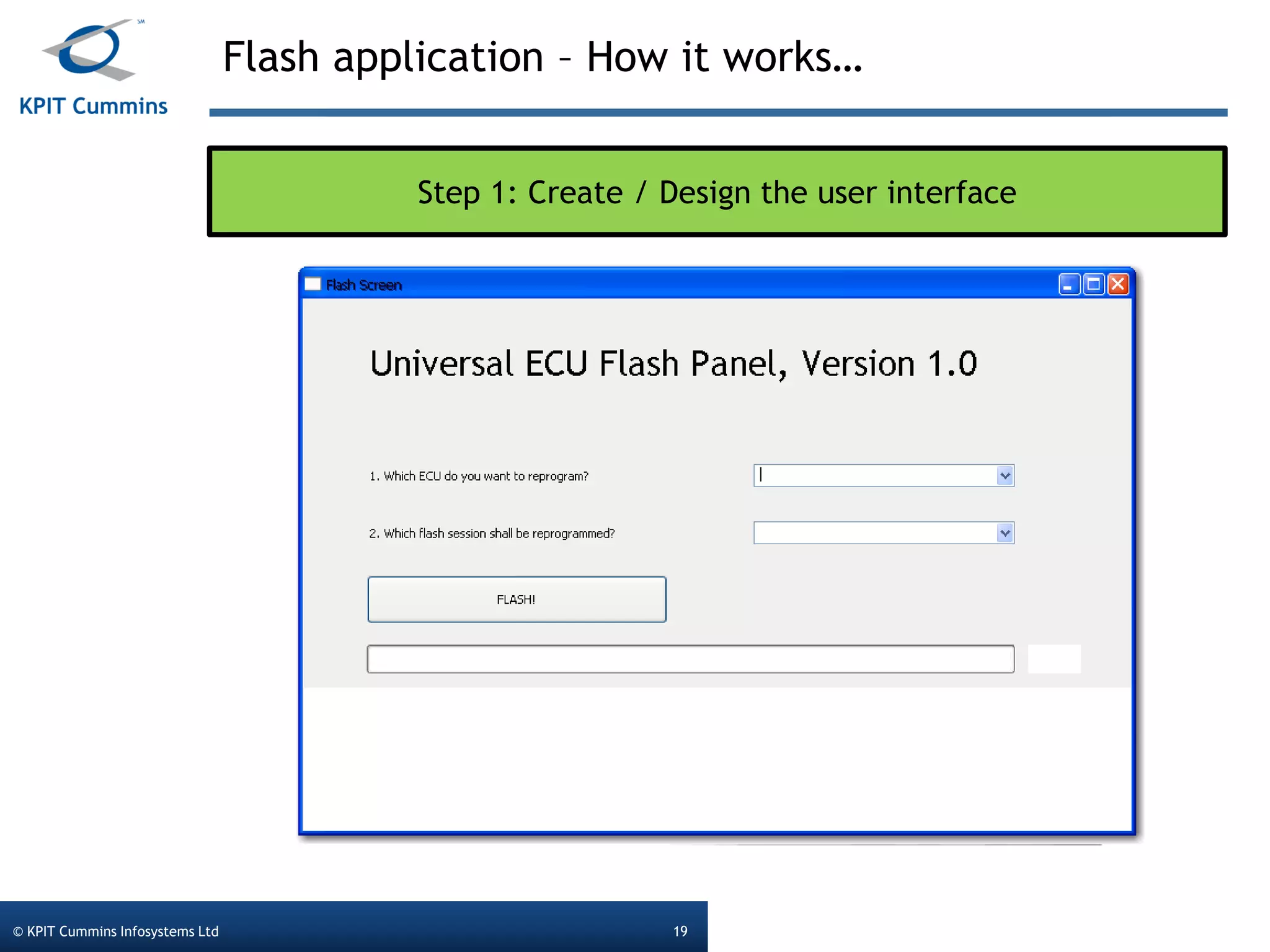
Flash application – How it works…
© KPIT Cummins Infosystems Ltd 19
Step 1: Create / Design the user interface
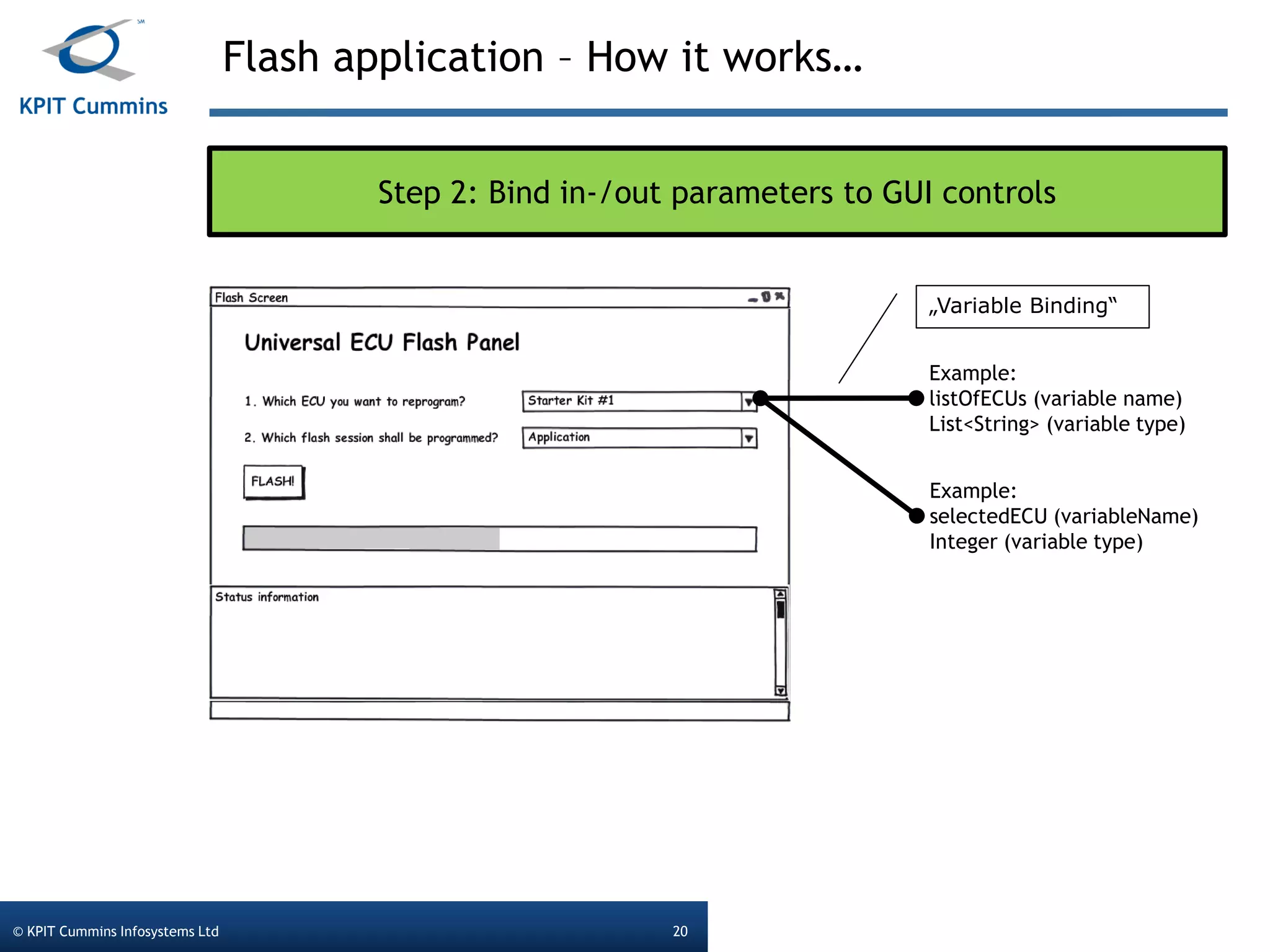
Flash application – How it works…
© KPIT Cummins Infosystems Ltd 20
Step 2: Bind in-/out parameters to GUI controls
Example:
listOfECUs (variable name)
List<String> (variable type)
„Variable Binding“
Example:
selectedECU (variableName)
Integer (variable type)
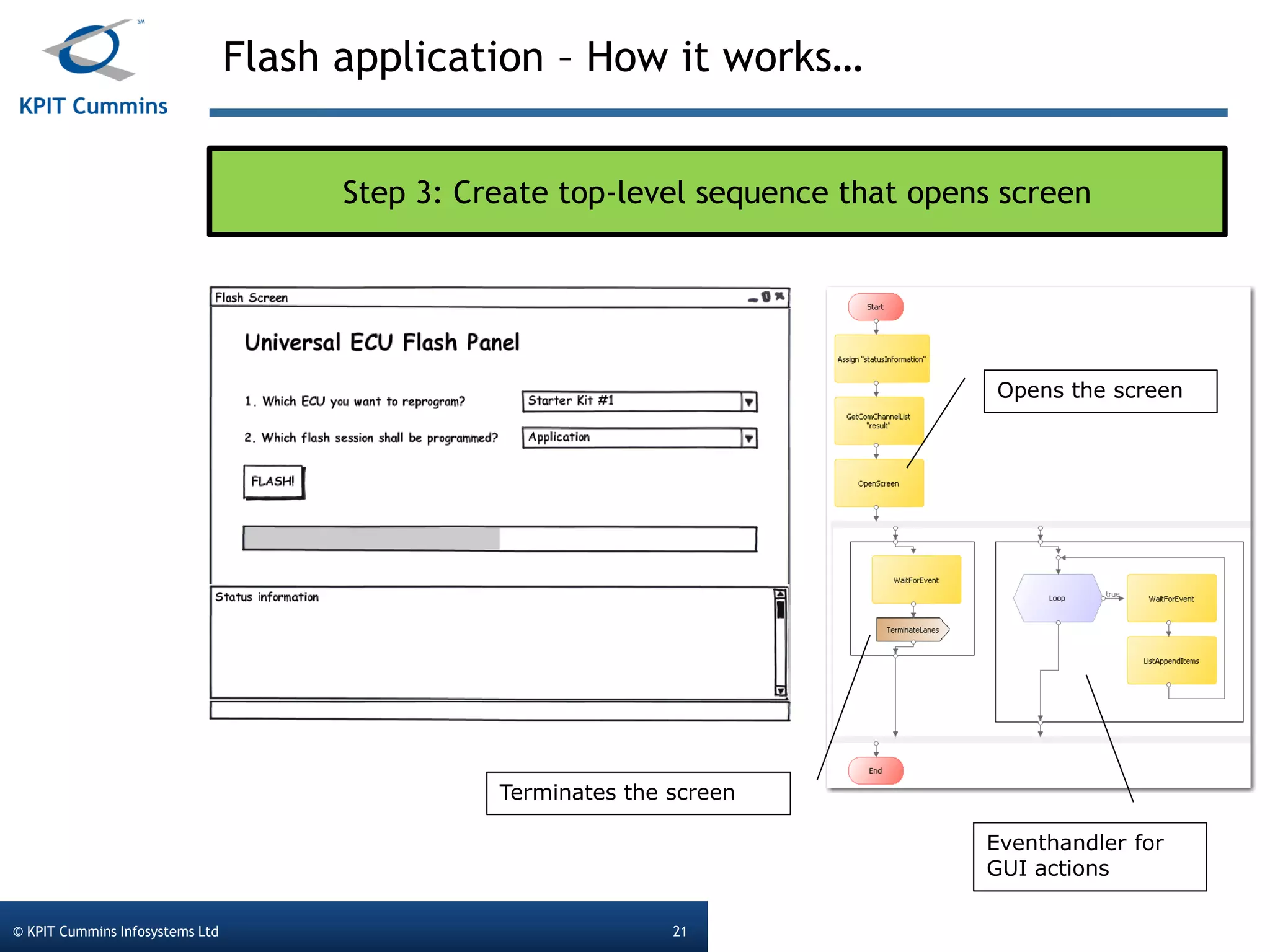
Flash application – How it works…
© KPIT Cummins Infosystems Ltd 21
Step 3: Create top-level sequence that opens screen
Opens the screen
Terminates the screen
Eventhandler for
GUI actions
Flash application – How it works…
© KPIT Cummins Infosystems Ltd 22
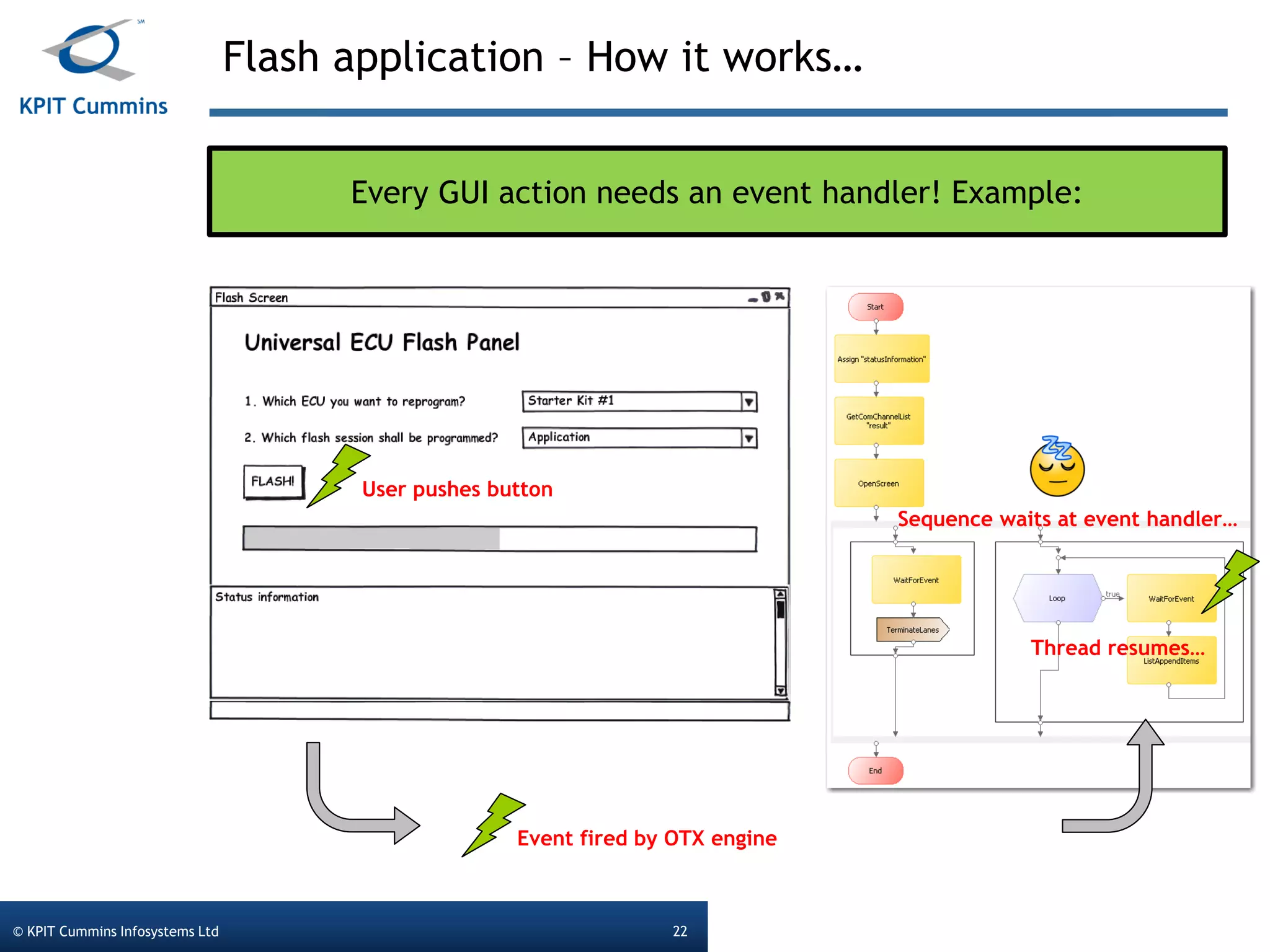
Every GUI action needs an event handler! Example:
User pushes button
Event fired by OTX engine
Thread resumes…
Sequence waits at event handler…
© KPIT Cummins Infosystems Ltd. Template version 2011.1.0© KPIT Cummins Infosystems Ltd 23
Important OTX
(Flash)
commands
Important OTX (Flash) commands
© KPIT Cummins Infosystems Ltd 24
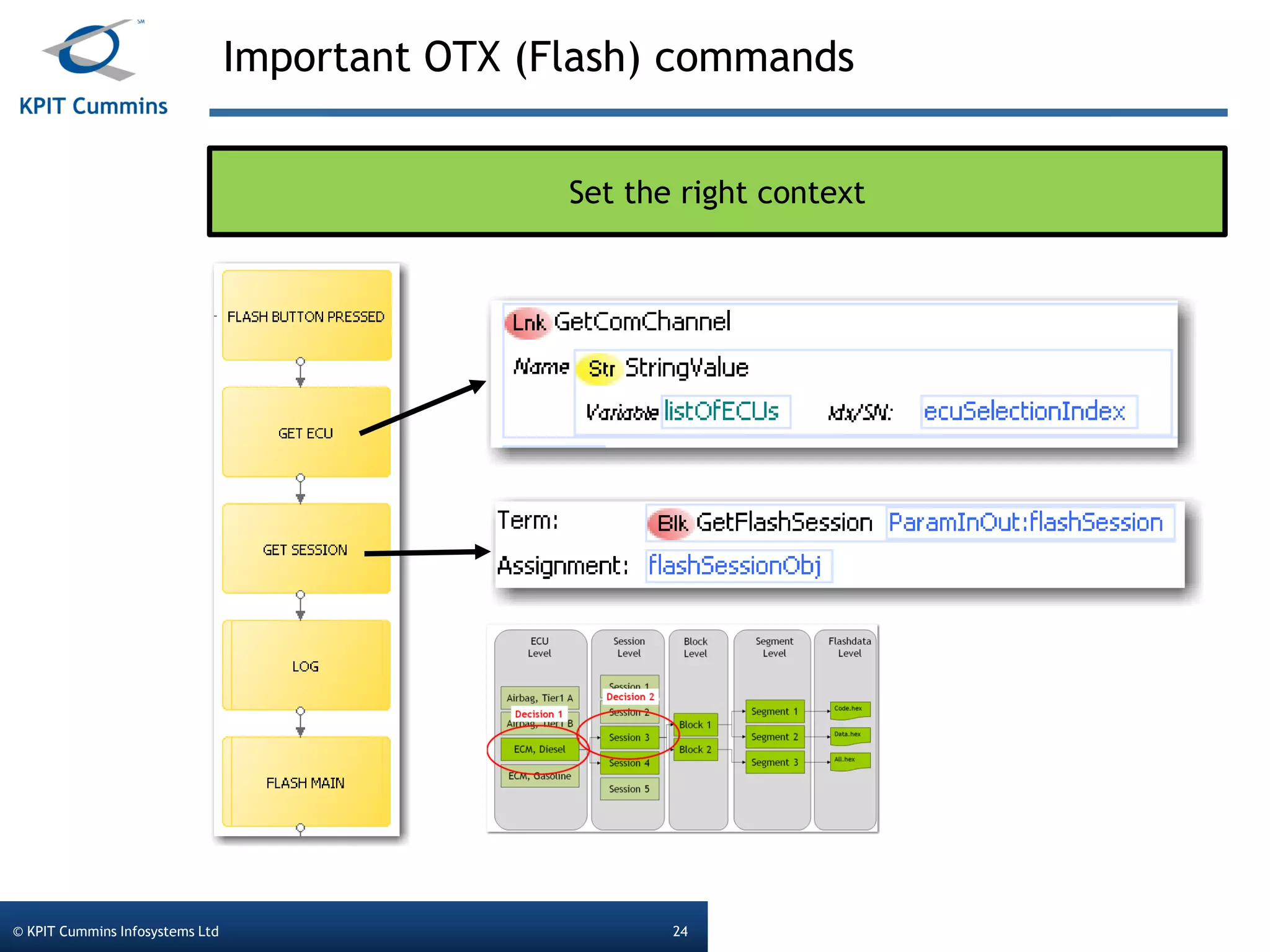
Set the right context
Important OTX (Flash) commands
© KPIT Cummins Infosystems Ltd 25
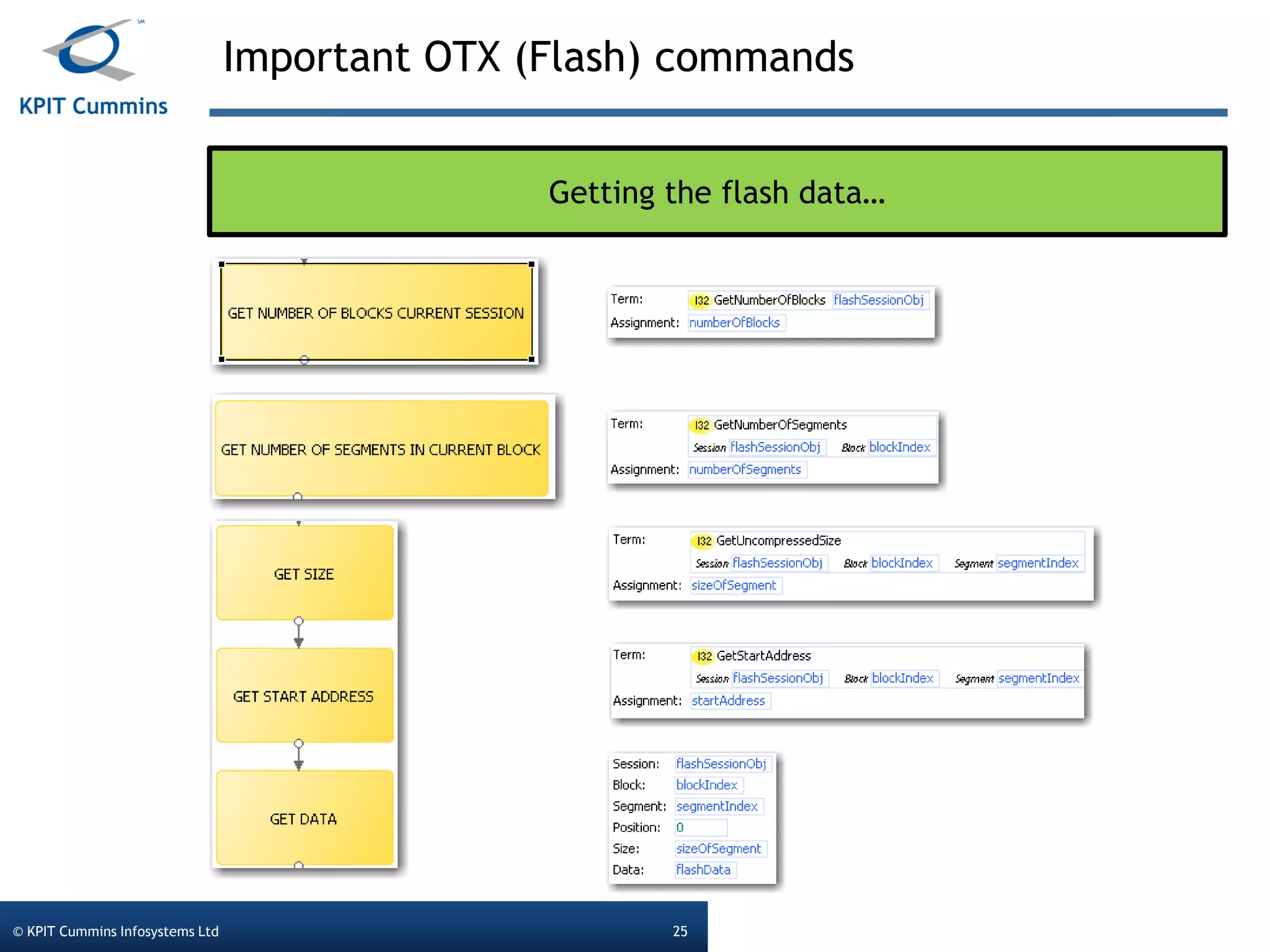
Getting the flash data…
© KPIT Cummins Infosystems Ltd. Template version 2011.1.0© KPIT Cummins Infosystems Ltd 26
Deployment of
Reprogramming
Sequence
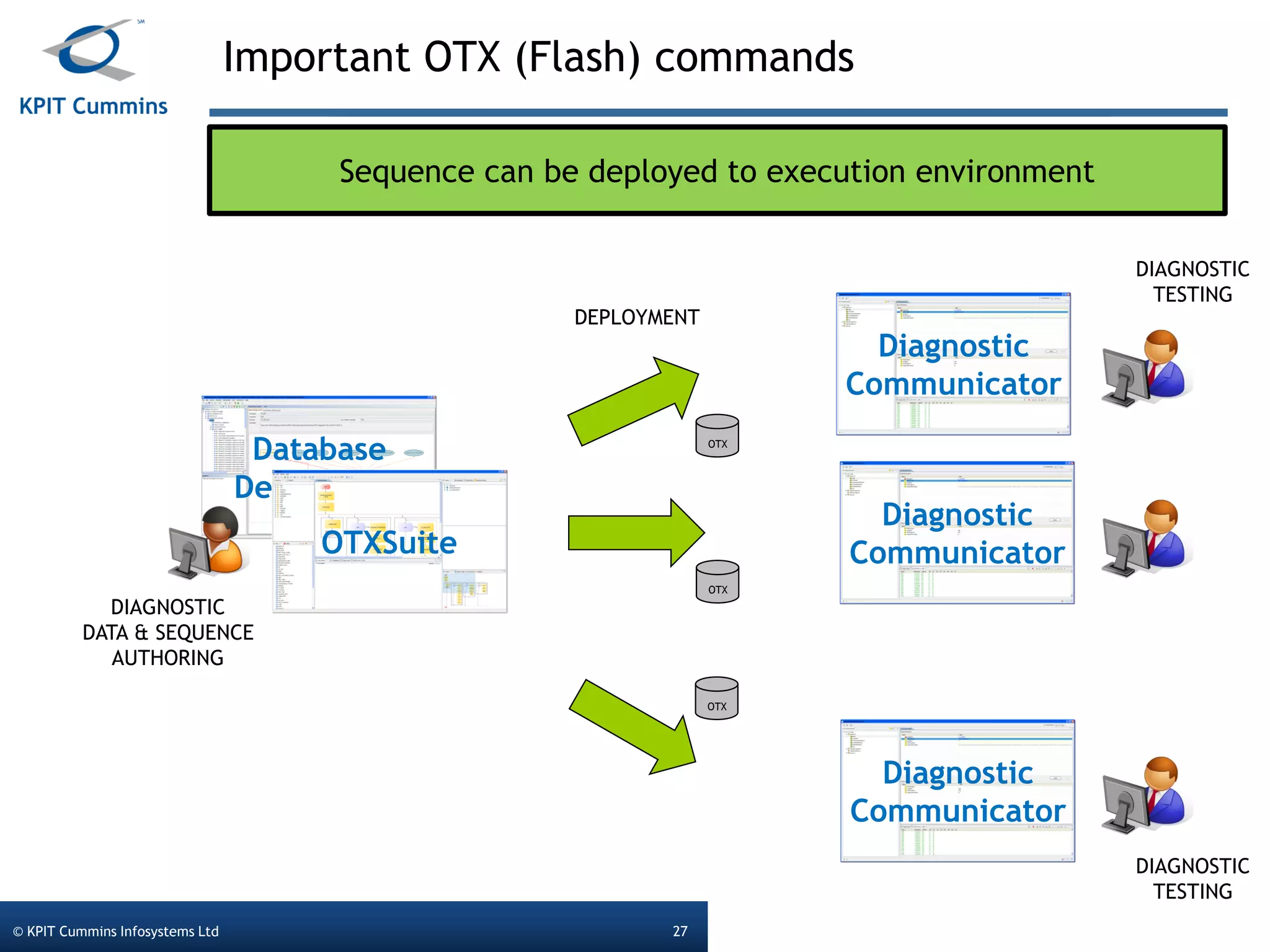
Database
DesignerNG
Important OTX (Flash) commands
© KPIT Cummins Infosystems Ltd 27
Sequence can be deployed to execution environment
OTXSuite
DIAGNOSTIC
DATA & SEQUENCE
AUTHORING
Diagnostic
Communicator
Diagnostic
Communicator
Diagnostic
Communicator
DIAGNOSTIC
TESTING
DIAGNOSTIC
TESTING
DEPLOYMENT
OTX
OTX
OTX
© KPIT Cummins Infosystems Ltd. Template version 2011.1.0© KPIT Cummins Infosystems Ltd 28
Q&A
Thank You

Webinar Presentation: "Diagnostic Flash Application with OTX"

  • 1.
    © KPIT CumminsInfosystems Ltd. Template version 2011.1.0 Webinar Diagnostic Flash Application with OTX Presented By Ralf Ramrath
  • 2.
    Today’s Presenter © KPITCummins Infosystems Ltd 2 diagnostics@kpit.com +49 89 322 99 66 - 0 Mr Ralf Ramrath Product Manager Diagnostics
  • 3.
    © KPIT CumminsInfosystems Ltd. Template version 2011.1.0© KPIT Cummins Infosystems Ltd 3 Overview of Diagnostic toolchain
  • 4.
    Overview of KPIT’sdiagnostic tools © KPIT Cummins Infosystems Ltd 4 DatabaseDesignerNG DiagnosticCommunicator OTXSuite DIAGNOSTIC DATA AUTHORING DIAGNOSTIC TESTING DIAGNOSTIC SEQUENCE AUTHORING Softing: Venice Vector: CandelaStudio, OdxStudio Softing: Monaco Vector: Indigo Softing: OtxStudio eMotive: DIagnosticFramework Bosch: Grade-X
  • 5.
    © KPIT CumminsInfosystems Ltd. Template version 2011.1.0© KPIT Cummins Infosystems Ltd 5 The problem statement
  • 6.
    Problem statement © KPITCummins Infosystems Ltd 6 1. Diagnostic applications are either generic or specific 2. Dependency between tool vendor and tool user THE GOAL 1. To have a generic and specific application 2. No dependency between tool vendor and tool user
  • 7.
    Evolution of diagnosticapplications (1) © KPIT Cummins Infosystems Ltd 7 Flash Application Data Flow, GUI Diagnostic Protocols
  • 8.
    Evolution of diagnosticapplications (2) © KPIT Cummins Infosystems Ltd 8 Flash Application Data Flow Diagnostic Protocols GUI
  • 9.
    Evolution of diagnosticapplications (3) © KPIT Cummins Infosystems Ltd 9 ISO 22901-1 (ODX) Java Diagnostic Protocols GUI Flash application Runtime system Hardware Abstraction Layer (HAL)
  • 10.
    Evolution of diagnosticapplications (4) © KPIT Cummins Infosystems Ltd 10 ISO 22901-1 (ODX) ISO 13209 (OTX) Diagnostic Protocols GUI Flash application (OTX) Runtime system HAL
  • 11.
    Evolution of diagnosticapplications (5) © KPIT Cummins Infosystems Ltd 11 ISO 22901-1 (ODX) ISO 13209 (OTX) Diagnostic Protocols GUI (OTX) Flash application (OTX) Runtime system HAL
  • 12.
    Comparison of theevolutionary steps (1) © KPIT Cummins Infosystems Ltd 12 ECU specific generic high low Specialization level Independence level 1 2 3 4 5 33 2 2 2 111
  • 13.
    Today we willshow, how to create a „type-5“ application Comparison of the evolutionary steps (2) © KPIT Cummins Infosystems Ltd 13 ECU specific generic high low Specialization level Independence level 1 2 3 4 5 33 2 2 2 111
  • 14.
    Flash application (functionalview) © KPIT Cummins Infosystems Ltd 14 The flash application shall be applicable for every ECU in the vehicle The flash application shall apply for different kind of downloads Program Data both The flash application shall prevent from flashing the wrong software
  • 15.
    Flash application (GUIview) © KPIT Cummins Infosystems Ltd 15 How to create, use & deploy a flash application Decision 1 Decision 2
  • 16.
    How the flashdata is organized © KPIT Cummins Infosystems Ltd 16 ECUs / Sessions 1 2 3 4 5 Airbag, Tier1 A X Airbag, Tier1 B X ECM, Diesel-Engine X X ECM, Gasoline-Eingine X X Data for reprogramming is organized in “Flash sessions” For every ECU variant a list of flash sessions is valid. Example: For ECM, Diesel-Engine, Sessions 3&4 are valid
  • 17.
    How the flashdata is organized © KPIT Cummins Infosystems Ltd 17 Airbag, Tier1 A Airbag, Tier1 B ECM, Diesel ECM, Gasoline Session 1 Session 2 Session 3 Session 4 Session 5 ECU Level Session Level Block 1 Block 2 Segment 1 Segment 2 Segment 3 Block Level Segment Level Flashdata Level Code.hex Data.hex All.hex Decision 1 Decision 2
  • 18.
    © KPIT CumminsInfosystems Ltd. Template version 2011.1.0© KPIT Cummins Infosystems Ltd 18 How it really works…
  • 19.
    Flash application –How it works… © KPIT Cummins Infosystems Ltd 19 Step 1: Create / Design the user interface
  • 20.
    Flash application –How it works… © KPIT Cummins Infosystems Ltd 20 Step 2: Bind in-/out parameters to GUI controls Example: listOfECUs (variable name) List<String> (variable type) „Variable Binding“ Example: selectedECU (variableName) Integer (variable type)
  • 21.
    Flash application –How it works… © KPIT Cummins Infosystems Ltd 21 Step 3: Create top-level sequence that opens screen Opens the screen Terminates the screen Eventhandler for GUI actions
  • 22.
    Flash application –How it works… © KPIT Cummins Infosystems Ltd 22 Every GUI action needs an event handler! Example: User pushes button Event fired by OTX engine Thread resumes… Sequence waits at event handler…
  • 23.
    © KPIT CumminsInfosystems Ltd. Template version 2011.1.0© KPIT Cummins Infosystems Ltd 23 Important OTX (Flash) commands
  • 24.
    Important OTX (Flash)commands © KPIT Cummins Infosystems Ltd 24 Set the right context
  • 25.
    Important OTX (Flash)commands © KPIT Cummins Infosystems Ltd 25 Getting the flash data…
  • 26.
    © KPIT CumminsInfosystems Ltd. Template version 2011.1.0© KPIT Cummins Infosystems Ltd 26 Deployment of Reprogramming Sequence
  • 27.
    Database DesignerNG Important OTX (Flash)commands © KPIT Cummins Infosystems Ltd 27 Sequence can be deployed to execution environment OTXSuite DIAGNOSTIC DATA & SEQUENCE AUTHORING Diagnostic Communicator Diagnostic Communicator Diagnostic Communicator DIAGNOSTIC TESTING DIAGNOSTIC TESTING DEPLOYMENT OTX OTX OTX
  • 28.
    © KPIT CumminsInfosystems Ltd. Template version 2011.1.0© KPIT Cummins Infosystems Ltd 28 Q&A
  • 29.