Keys to Enterprise WLAN Reliability How to Achieve Wire-like Reliability Over the Air October 28, 2010
Today’s Speakers Mark Cowtan,  Director Product Marketing, Trapeze Networks Matthew Herzog,  Customer Support Manager, Trapeze Networks
WLAN Reliability Agenda Why WLAN reliability matters Five focus areas for reliability  Downtime Traffic jams Disrupted roaming RF & Access limitations Competing services Conclusions, Q&A
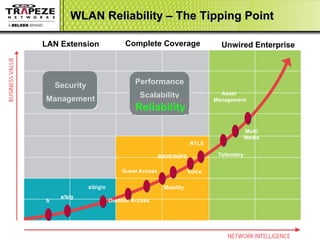
WLAN Reliability – The Tipping Point Reliability Unwired Enterprise a\b\g\n b a/b/g Outdoor Access Mobility WIDS/WIPS Voice RTLS Telemetry Asset  Management Multi Media Guest Access Security Management LAN Extension Performance Scalability Complete Coverage
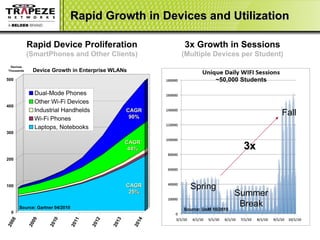
Rapid Growth in Devices and Utilization Rapid Device Proliferation (SmartPhones and Other Clients) CAGR 90% CAGR 25% CAGR 44% Source: Gartner 04/2010 Spring Summer Break Fall 3x Growth in Sessions (Multiple Devices per Student) ~50,000 Students 3x Source: UoM 10/2010
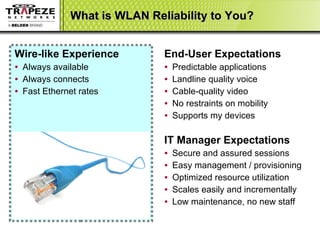
What is WLAN Reliability to You? Wire-like Experience   Always available Always connects Fast Ethernet rates End-User Expectations Predictable applications Landline quality voice Cable-quality video No restraints on mobility Supports my devices IT Manager Expectations Secure and assured sessions Easy management / provisioning Optimized resource utilization Scales easily and incrementally Low maintenance, no new staff
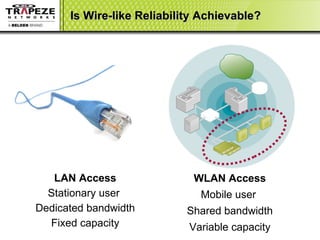
Is Wire-like Reliability Achievable? LAN Access Stationary user Dedicated bandwidth Fixed capacity WLAN Access Mobile user Shared bandwidth Variable capacity
Five Focus Areas for WLAN Reliability  Downtime AP and controller resiliency Configuration and maintenance Traffic Jams  Forwarding / encryption bottlenecks  Disrupted Roaming Losing sessions or quality Crossing network boundaries RF & Access Limitations Wasted bandwidth or sessions Rogues, Interference, Old clients Competing Services Multimedia versus mission-critical
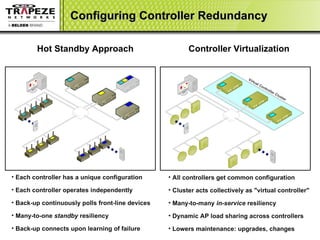
Configuring Controller Redundancy Hot Standby Approach Controller Virtualization Each controller has a unique configuration Each controller operates independently Back-up continuously polls front-line devices Many-to-one  standby  resiliency  Back-up connects upon learning of failure All controllers get common configuration Cluster acts collectively as "virtual controller" Many-to-many  in-service  resiliency Dynamic AP load sharing across controllers Lowers maintenance: upgrades, changes Virtual Controller Cluster
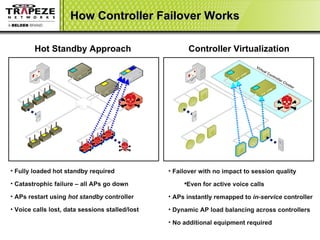
How Controller Failover Works Hot Standby Approach  Fully loaded hot standby required Catastrophic failure – all APs go down  APs restart using  hot standby  controller  Voice calls lost, data sessions stalled/lost Failover with no impact to session quality Even for active voice calls APs instantly remapped to  in-service  controller Dynamic AP load balancing across controllers No additional equipment required Virtual Controller Cluster Controller Virtualization
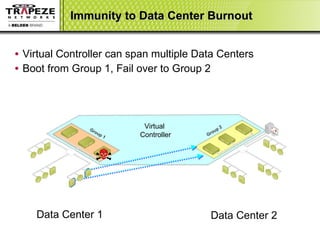
Immunity to Data Center Burnout Virtual Controller can span multiple Data Centers Boot from Group 1, Fail over to Group 2 Data Center 1 Data Center 2 Group 1 Group 2 Virtual  Controller
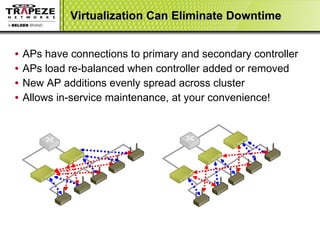
Virtualization Can Eliminate Downtime APs have connections to primary and secondary controller  APs load re-balanced when controller added or removed New AP additions evenly spread across cluster Allows in-service maintenance, at your convenience!
WLAN Reliability Agenda Why WLAN reliability matters Five focus areas for reliability  Downtime Traffic jams Disrupted roaming RF & Access limitations Competing services Conclusions, Q&A
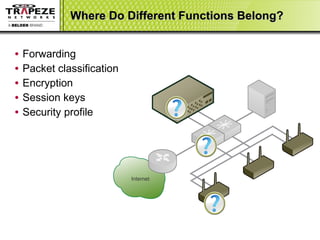
Where Do Different Functions Belong? Forwarding Packet classification Encryption Session keys Security profile Internet
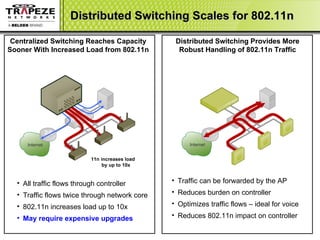
Distributed Switching Scales for 802.11n All traffic flows through controller  Traffic flows twice through network core 802.11n increases load up to 10x  May require expensive upgrades Centralized Switching Reaches Capacity Sooner With Increased Load from 802.11n Distributed Switching Provides More Robust Handling of 802.11n Traffic Traffic can be forwarded by the AP Reduces burden on controller  Optimizes traffic flows – ideal for voice Reduces 802.11n impact on controller 11n increases load by up to 10x Internet Internet
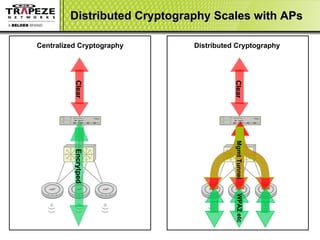
Distributed Cryptography Scales with APs Clear Encrytped Centralized Cryptography Distributed Cryptography Clear Mgmt Tunnel WPA2 etc
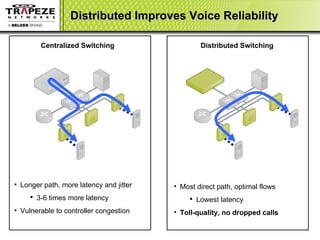
Distributed Improves Voice Reliability Longer path, more latency and jitter 3-6 times more latency Vulnerable to controller congestion Centralized Switching Distributed Switching Most direct path, optimal flows Lowest latency Toll-quality, no dropped calls
WLAN Reliability Agenda Why WLAN reliability matters Five focus areas for reliability  Downtime Traffic jams Disrupted roaming RF & Access limitations Competing services Conclusions, Q&A
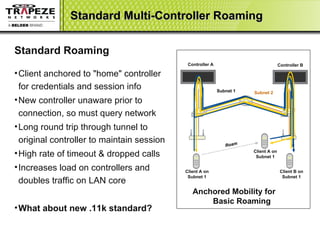
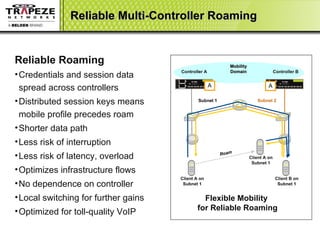
Ensuring Reliable Roaming Roaming within APs managed by same controller Everyone expects this and most vendors very reliable Part of IEEE 802.11i standard. Well defined mechanisms Roaming between controllers not a given No standards for cross-controller roaming Usually requires tunneling to home controllers Distributed session keys improve reliability One solution is fewer, bigger controllers Roaming across indoor / outdoor boundaries Some vendors don’t have common indoor / outdoor architecture Some vendors OEM outdoor solution Important evaluation criteria
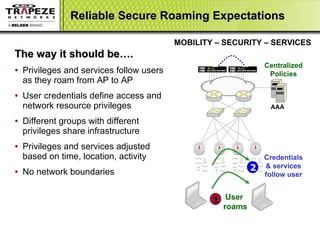
Reliable Secure Roaming Expectations  The way it should be….  Privileges and services follow users as they roam from AP to AP User credentials define access and network resource privileges Different groups with different privileges share infrastructure Privileges and services adjusted based on time, location, activity No network boundaries  MOBILITY – SECURITY – SERVICES Centralized Policies Credentials & services follow user 2  AAA User  roams 1
Standard Multi-Controller Roaming Client A on Subnet 1 Standard Roaming Client anchored to "home" controller for credentials and session info  New controller unaware prior to connection, so must query network Long round trip through tunnel to original controller to maintain session High rate of timeout & dropped calls Increases load on controllers and doubles traffic on LAN core What about new .11k standard?   Anchored Mobility for  Basic Roaming Controller A Roam Client A on Subnet 1 Client B on Subnet 1 Subnet 1 Subnet 2 Controller B
Reliable Multi-Controller Roaming Client A on Subnet 1 Flexible Mobility  for Reliable Roaming Reliable Roaming Credentials and session data spread across controllers Distributed session keys means mobile profile precedes roam Shorter data path Less risk of interruption Less risk of latency, overload Optimizes infrastructure flows  No dependence on controller Local switching for further gains Optimized for toll-quality VoIP Controller A Controller B Subnet 1 Subnet 2 Client A on Subnet 1 Client B on Subnet 1 Mobility Domain A A Roam
WLAN Reliability Agenda Why WLAN reliability matters Five focus areas for reliability  Downtime Traffic jams Disrupted roaming RF & Access limitations Competing services Conclusions, Q&A
Considerations for Reliable RF Access Radio transmission is a mysterious black art! Unlicensed spectrum, becoming crowded Legacy clients on a/b/g slow everyone else down What’s the right cell size? Do I need 2x2, 2x3, 3x3? What you can control up front: RF Coverage and Capacity design Managing and monitoring your WLAN What you can only respond to: Radio interference, Unwanted visitors, Malicious attacks
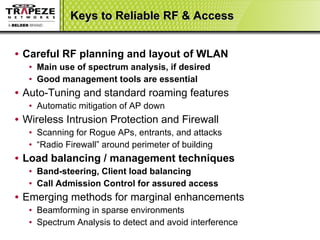
Keys to Reliable RF & Access Careful RF planning and layout of WLAN Main use of spectrum analysis, if desired Good management tools are essential Auto-Tuning and standard roaming features Automatic mitigation of AP down  Wireless Intrusion Protection and Firewall Scanning for Rogue APs, entrants, and attacks “ Radio Firewall” around perimeter of building Load balancing / management techniques Band-steering, Client load balancing Call Admission Control for assured access Emerging methods for marginal enhancements Beamforming in sparse environments Spectrum Analysis to detect and avoid interference
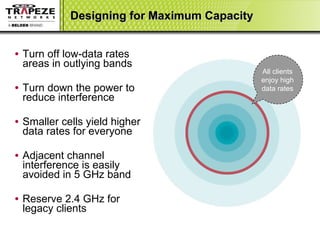
Designing for Maximum Capacity Turn off low-data rates areas in outlying bands Turn down the power to reduce interference Smaller cells yield higher data rates for everyone  Adjacent channel interference is easily avoided in 5 GHz band  Reserve 2.4 GHz for  legacy clients All clients enjoy high data rates
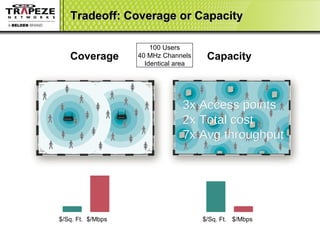
Tradeoff: Coverage or Capacity Coverage  Capacity $/Mbps 100 Users 40 MHz Channels Identical area $/Sq. Ft. $/Mbps $/Sq. Ft. $/Mbps 3x Access points  2x Total cost 7x Avg throughput
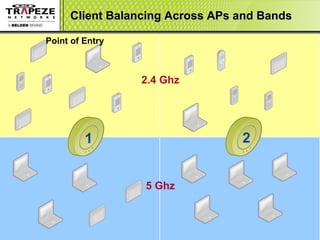
Client Balancing Across APs and Bands 5 Ghz 1 2 2.4 Ghz Point of Entry Most clients default to 2.4Ghz on the AP with strongest signal
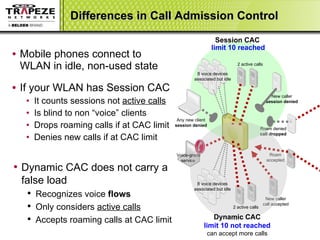
Differences in Call Admission Control Mobile phones connect to WLAN in idle, non-used state If your WLAN has Session CAC It counts sessions not  active calls Is blind to non “voice” clients  Drops roaming calls if at CAC limit Denies new calls if at CAC limit Session CAC Roam denied call dropped 2 active calls New caller session denied Any new client session denied limit 10 reached Dynamic CAC does not carry a false load Recognizes voice  flows Only considers  active calls   Accepts roaming calls at CAC limit New caller call accepted Roam accepted 8 voice devices associated but idle Voice-grade service  8 voice devices associated but idle Dynamic CAC limit 10 not reached can accept more calls 2 active calls
WLAN Reliability Agenda Why WLAN reliability matters Five focus areas for reliability  Downtime Traffic jams Disrupted roaming RF & Access limitations Competing services Conclusions, Q&A
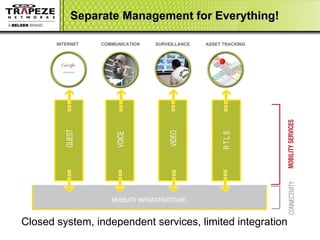
Separate Management for Everything! Closed system, independent services, limited integration INTERNET  COMMUNICATION SURVEILLANCE ASSET TRACKING
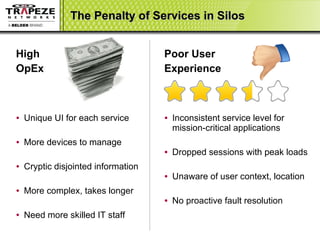
Poor User Experience Inconsistent service level for mission-critical applications Dropped sessions with peak loads Unaware of user context, location No proactive fault resolution High OpEx Unique UI for each service More devices to manage Cryptic disjointed information More complex, takes longer Need more skilled IT staff The Penalty of Services in Silos
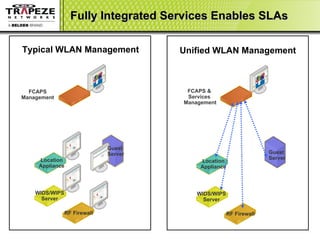
Fully Integrated Services Enables SLAs WIDS/WIPS Server RF Firewall Location Appliance FCAPS Management WIDS/WIPS Server RF Firewall Location Appliance FCAPS &  Services  Management Typical WLAN Management Unified WLAN Management Guest  Server Guest  Server
WLAN Reliability Agenda Why WLAN reliability matters Five focus areas for reliability  Downtime Traffic jams Disrupted roaming RF & Access limitations Competing services Conclusions, Q&A
Conclusion Reliability is needed for mission-critical applications Economics of mobility and “unwired enterprise” unstoppable End-to-end session reliability is a test-bed must do! Achieving Wire-like reliability IS possible! Controller virtualization eliminates downtime Distributed switching and crypto avoids traffic jams Distributed session keys improve roaming reliability  RF Planning and load management assures access to medium Unified infrastructure & service management will allow SLAs Least mature aspect of whole solution for most vendors Drill down on vendor claims, and test them
Q & A Mark Cowtan,  Director Product Marketing, Trapeze Networks Matthew Herzog,  Customer Support Manager, Trapeze Networks

Keys to Enterprise WLAN Reliability

  • 1.
    Keys to EnterpriseWLAN Reliability How to Achieve Wire-like Reliability Over the Air October 28, 2010
  • 2.
    Today’s Speakers MarkCowtan, Director Product Marketing, Trapeze Networks Matthew Herzog, Customer Support Manager, Trapeze Networks
  • 3.
    WLAN Reliability AgendaWhy WLAN reliability matters Five focus areas for reliability Downtime Traffic jams Disrupted roaming RF & Access limitations Competing services Conclusions, Q&A
  • 4.
    WLAN Reliability –The Tipping Point Reliability Unwired Enterprise a\b\g\n b a/b/g Outdoor Access Mobility WIDS/WIPS Voice RTLS Telemetry Asset Management Multi Media Guest Access Security Management LAN Extension Performance Scalability Complete Coverage
  • 5.
    Rapid Growth inDevices and Utilization Rapid Device Proliferation (SmartPhones and Other Clients) CAGR 90% CAGR 25% CAGR 44% Source: Gartner 04/2010 Spring Summer Break Fall 3x Growth in Sessions (Multiple Devices per Student) ~50,000 Students 3x Source: UoM 10/2010
  • 6.
    What is WLANReliability to You? Wire-like Experience Always available Always connects Fast Ethernet rates End-User Expectations Predictable applications Landline quality voice Cable-quality video No restraints on mobility Supports my devices IT Manager Expectations Secure and assured sessions Easy management / provisioning Optimized resource utilization Scales easily and incrementally Low maintenance, no new staff
  • 7.
    Is Wire-like ReliabilityAchievable? LAN Access Stationary user Dedicated bandwidth Fixed capacity WLAN Access Mobile user Shared bandwidth Variable capacity
  • 8.
    Five Focus Areasfor WLAN Reliability Downtime AP and controller resiliency Configuration and maintenance Traffic Jams Forwarding / encryption bottlenecks Disrupted Roaming Losing sessions or quality Crossing network boundaries RF & Access Limitations Wasted bandwidth or sessions Rogues, Interference, Old clients Competing Services Multimedia versus mission-critical
  • 9.
    Configuring Controller RedundancyHot Standby Approach Controller Virtualization Each controller has a unique configuration Each controller operates independently Back-up continuously polls front-line devices Many-to-one standby resiliency Back-up connects upon learning of failure All controllers get common configuration Cluster acts collectively as "virtual controller" Many-to-many in-service resiliency Dynamic AP load sharing across controllers Lowers maintenance: upgrades, changes Virtual Controller Cluster
  • 10.
    How Controller FailoverWorks Hot Standby Approach Fully loaded hot standby required Catastrophic failure – all APs go down APs restart using hot standby controller Voice calls lost, data sessions stalled/lost Failover with no impact to session quality Even for active voice calls APs instantly remapped to in-service controller Dynamic AP load balancing across controllers No additional equipment required Virtual Controller Cluster Controller Virtualization
  • 11.
    Immunity to DataCenter Burnout Virtual Controller can span multiple Data Centers Boot from Group 1, Fail over to Group 2 Data Center 1 Data Center 2 Group 1 Group 2 Virtual Controller
  • 12.
    Virtualization Can EliminateDowntime APs have connections to primary and secondary controller APs load re-balanced when controller added or removed New AP additions evenly spread across cluster Allows in-service maintenance, at your convenience!
  • 13.
    WLAN Reliability AgendaWhy WLAN reliability matters Five focus areas for reliability Downtime Traffic jams Disrupted roaming RF & Access limitations Competing services Conclusions, Q&A
  • 14.
    Where Do DifferentFunctions Belong? Forwarding Packet classification Encryption Session keys Security profile Internet
  • 15.
    Distributed Switching Scalesfor 802.11n All traffic flows through controller Traffic flows twice through network core 802.11n increases load up to 10x May require expensive upgrades Centralized Switching Reaches Capacity Sooner With Increased Load from 802.11n Distributed Switching Provides More Robust Handling of 802.11n Traffic Traffic can be forwarded by the AP Reduces burden on controller Optimizes traffic flows – ideal for voice Reduces 802.11n impact on controller 11n increases load by up to 10x Internet Internet
  • 16.
    Distributed Cryptography Scaleswith APs Clear Encrytped Centralized Cryptography Distributed Cryptography Clear Mgmt Tunnel WPA2 etc
  • 17.
    Distributed Improves VoiceReliability Longer path, more latency and jitter 3-6 times more latency Vulnerable to controller congestion Centralized Switching Distributed Switching Most direct path, optimal flows Lowest latency Toll-quality, no dropped calls
  • 18.
    WLAN Reliability AgendaWhy WLAN reliability matters Five focus areas for reliability Downtime Traffic jams Disrupted roaming RF & Access limitations Competing services Conclusions, Q&A
  • 19.
    Ensuring Reliable RoamingRoaming within APs managed by same controller Everyone expects this and most vendors very reliable Part of IEEE 802.11i standard. Well defined mechanisms Roaming between controllers not a given No standards for cross-controller roaming Usually requires tunneling to home controllers Distributed session keys improve reliability One solution is fewer, bigger controllers Roaming across indoor / outdoor boundaries Some vendors don’t have common indoor / outdoor architecture Some vendors OEM outdoor solution Important evaluation criteria
  • 20.
    Reliable Secure RoamingExpectations The way it should be…. Privileges and services follow users as they roam from AP to AP User credentials define access and network resource privileges Different groups with different privileges share infrastructure Privileges and services adjusted based on time, location, activity No network boundaries MOBILITY – SECURITY – SERVICES Centralized Policies Credentials & services follow user 2 AAA User roams 1
  • 21.
    Standard Multi-Controller RoamingClient A on Subnet 1 Standard Roaming Client anchored to "home" controller for credentials and session info New controller unaware prior to connection, so must query network Long round trip through tunnel to original controller to maintain session High rate of timeout & dropped calls Increases load on controllers and doubles traffic on LAN core What about new .11k standard? Anchored Mobility for Basic Roaming Controller A Roam Client A on Subnet 1 Client B on Subnet 1 Subnet 1 Subnet 2 Controller B
  • 22.
    Reliable Multi-Controller RoamingClient A on Subnet 1 Flexible Mobility for Reliable Roaming Reliable Roaming Credentials and session data spread across controllers Distributed session keys means mobile profile precedes roam Shorter data path Less risk of interruption Less risk of latency, overload Optimizes infrastructure flows No dependence on controller Local switching for further gains Optimized for toll-quality VoIP Controller A Controller B Subnet 1 Subnet 2 Client A on Subnet 1 Client B on Subnet 1 Mobility Domain A A Roam
  • 23.
    WLAN Reliability AgendaWhy WLAN reliability matters Five focus areas for reliability Downtime Traffic jams Disrupted roaming RF & Access limitations Competing services Conclusions, Q&A
  • 24.
    Considerations for ReliableRF Access Radio transmission is a mysterious black art! Unlicensed spectrum, becoming crowded Legacy clients on a/b/g slow everyone else down What’s the right cell size? Do I need 2x2, 2x3, 3x3? What you can control up front: RF Coverage and Capacity design Managing and monitoring your WLAN What you can only respond to: Radio interference, Unwanted visitors, Malicious attacks
  • 25.
    Keys to ReliableRF & Access Careful RF planning and layout of WLAN Main use of spectrum analysis, if desired Good management tools are essential Auto-Tuning and standard roaming features Automatic mitigation of AP down Wireless Intrusion Protection and Firewall Scanning for Rogue APs, entrants, and attacks “ Radio Firewall” around perimeter of building Load balancing / management techniques Band-steering, Client load balancing Call Admission Control for assured access Emerging methods for marginal enhancements Beamforming in sparse environments Spectrum Analysis to detect and avoid interference
  • 26.
    Designing for MaximumCapacity Turn off low-data rates areas in outlying bands Turn down the power to reduce interference Smaller cells yield higher data rates for everyone Adjacent channel interference is easily avoided in 5 GHz band Reserve 2.4 GHz for legacy clients All clients enjoy high data rates
  • 27.
    Tradeoff: Coverage orCapacity Coverage Capacity $/Mbps 100 Users 40 MHz Channels Identical area $/Sq. Ft. $/Mbps $/Sq. Ft. $/Mbps 3x Access points 2x Total cost 7x Avg throughput
  • 28.
    Client Balancing AcrossAPs and Bands 5 Ghz 1 2 2.4 Ghz Point of Entry Most clients default to 2.4Ghz on the AP with strongest signal
  • 29.
    Differences in CallAdmission Control Mobile phones connect to WLAN in idle, non-used state If your WLAN has Session CAC It counts sessions not active calls Is blind to non “voice” clients Drops roaming calls if at CAC limit Denies new calls if at CAC limit Session CAC Roam denied call dropped 2 active calls New caller session denied Any new client session denied limit 10 reached Dynamic CAC does not carry a false load Recognizes voice flows Only considers active calls Accepts roaming calls at CAC limit New caller call accepted Roam accepted 8 voice devices associated but idle Voice-grade service 8 voice devices associated but idle Dynamic CAC limit 10 not reached can accept more calls 2 active calls
  • 30.
    WLAN Reliability AgendaWhy WLAN reliability matters Five focus areas for reliability Downtime Traffic jams Disrupted roaming RF & Access limitations Competing services Conclusions, Q&A
  • 31.
    Separate Management forEverything! Closed system, independent services, limited integration INTERNET COMMUNICATION SURVEILLANCE ASSET TRACKING
  • 32.
    Poor User ExperienceInconsistent service level for mission-critical applications Dropped sessions with peak loads Unaware of user context, location No proactive fault resolution High OpEx Unique UI for each service More devices to manage Cryptic disjointed information More complex, takes longer Need more skilled IT staff The Penalty of Services in Silos
  • 33.
    Fully Integrated ServicesEnables SLAs WIDS/WIPS Server RF Firewall Location Appliance FCAPS Management WIDS/WIPS Server RF Firewall Location Appliance FCAPS & Services Management Typical WLAN Management Unified WLAN Management Guest Server Guest Server
  • 34.
    WLAN Reliability AgendaWhy WLAN reliability matters Five focus areas for reliability Downtime Traffic jams Disrupted roaming RF & Access limitations Competing services Conclusions, Q&A
  • 35.
    Conclusion Reliability isneeded for mission-critical applications Economics of mobility and “unwired enterprise” unstoppable End-to-end session reliability is a test-bed must do! Achieving Wire-like reliability IS possible! Controller virtualization eliminates downtime Distributed switching and crypto avoids traffic jams Distributed session keys improve roaming reliability RF Planning and load management assures access to medium Unified infrastructure & service management will allow SLAs Least mature aspect of whole solution for most vendors Drill down on vendor claims, and test them
  • 36.
    Q & AMark Cowtan, Director Product Marketing, Trapeze Networks Matthew Herzog, Customer Support Manager, Trapeze Networks

Editor's Notes

  • #11 The traditional approach to redundancy is to have a fully-loaded, fully-configured device ready to back up any other device which may fail. But many-to-one redundancy is inefficient, as ninety nine percent of the time, the back up device sits idle. And by the time you need it, chances are, it has the wrong configuration anyway, because no-one has time to test disaster recovery! Configuring redundancy, one device at a time - each with a unique configuration - is also extremely complex and time consuming, and requires constant maintenance whenever there are adds, moves or changes. Trapeze’s approach is different. Think of it as “controller virtualization ”. Controllers are configured as a cluster, not one by one, and they all get a common configuration that allows each controller to act as a backup for any other. This many-to-many redundancy keeps all devices in service , so you know they work. This approach accommodates device or network failures, enables instant capacity scaling and allows in-service upgrades, all with zero downtime – this is simply not possible with other vendors systems. Amazingly, configuration management is also much easier, taking less than 20% of the time of traditional one-to-one, or many-to-one redundancy configuration. With Trapeze’s clustered approach a single configuration containing all service profiles, is loaded to only one controller – no matter how large the network. After that, the network configures itself, automatically.
  • #12 In normal operation, you want APs to boot from nearby controllers to avoid wasting backbone or WAN bandwidth. But in a fail over condition, the APs should use different controllers, elsewhere in the network. This is done by having multiple “Affinity Groups” each of which contains only a subset of all the controllers that make up a virtual controller cluster. For example, imagine a large campus in which the primary data center is experiencing power problems. This “AP Affinity” feature allows an AP that normally boots from controllers in Affinity Group 1 in the unstable “primary data center”, to fail over to Affinity group 2 located in the stable “alternate data center”. This provides complete protection against Data Center or Wiring-Closet black-out.
  • #27 DONE
  • #28 DONE
  • #29 Most Wi-Fi devices default to 2.4Ghz (better range) Increases contention for spectrum, while 5Ghz virtually unused We steer 5Ghz-capable clients (802.11a/n) to 5Ghz Completely transparent - No duplication of SSID, VLAN required Reserves 2.4Ghz for Phones, Tags, Scanners, and legacy clients Trapeze has hosted the SuperComputing show in 2006 and 2007. In 2007 we implemented this feature and immediately saw over 50% of 1100 concurrent clients moving from 2.4Ghz to 5Ghz.
  • #32 But today, all mobility services are separately installed, configured, and managed. Instead of collaborating, they are competing for resources, unaware of each other or user context User mobility, literally makes resource management a moving target – that’s hard enough, but if you also ignore information that you already have access to, because its too cryptic, or you have no way to correlate it, then its easy to see that existing solutions will never be able to honor SLAs when the network is saturated, or the air space is dirty, or part of the network has failed.
  • #33 DONE FMC - NEW IMAGE FOR PDA Hospitals are deploying advanced clinical applications for their mobile workforce for 4 main reasons: COMPLIANCE To meet regulatory compliance requirements of JHACO, Sarbannes Oxley, and HIPAA. COST CONTROL To maximize profitability by reducing cost, and increasing efficiency of their clinical staff. PHYSICIAN RETENTION In addition by taking these measures they are also hoping to attract and retain the best physicians by offering them the most efficient place to work. PATIENT CARE Hospitals are deploying EMR systems and advanced clinical applications to reduce medical errors and improve patient care. But their success depends on those applications being mobile. While most hospitals have already begun deploying wireless LANs, many are finding that wireless mobility is more elusive than they expected. Unfortunately, without medical-grade mobility most of these initiatives are doomed to mediocrity, leaving physicians frustrated, and costing hundreds of '000s to fix.