Award Number
ACI-1547611
Marcus Christie
Science Gateways Research Center
Indiana University
EDS Consultant
Using Keycloak to Provide
Authentication, Authorization, and
Identity Management Services for Your
Gateway
Overview
• OpenID Connect with CILogon
• Using Keycloak for Authentication and Role-based Authorization
• Integrating Keycloak with Apache Airavata
The Problem
• Gateways expose (shared) resources and APIs for manipulating
those resources to a diverse set of users
• Authentication – another password to remember?
• Authorization – granting access without too much administrative
burden
• Multiple gateways, multiple gateway clients
• SciGaP (Science Gateway Platform as a Service)
• Campus gateways
Authentication
• Many options here but easiest thing is use an account the user
already has
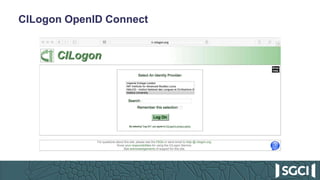
• CILogon
• A service that allows users to authenticate to their institutions in order to
retrieve credentials for accessing cyberinfrastructure.
• Also provides a OpenID Connect (OIDC) interface to this federated
authentication
• OpenID Connect
• Built on top of OAuth2
• Allows user to sign in with their identity provider
• User grants client the right to access some of the user’s information
CILogon OpenID Connect
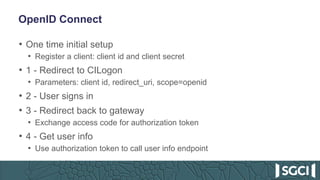
OpenID Connect
• One time initial setup
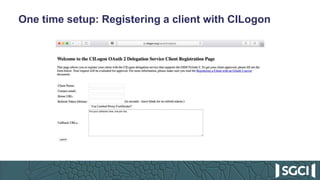
• Register a client: client id and client secret
• 1 - Redirect to CILogon
• Parameters: client id, redirect_uri, scope=openid
• 2 - User signs in
• 3 - Redirect back to gateway
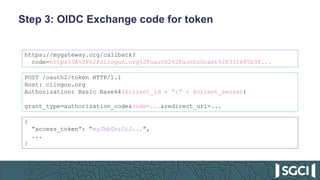
• Exchange access code for authorization token
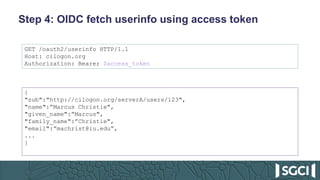
• 4 - Get user info
• Use authorization token to call user info endpoint
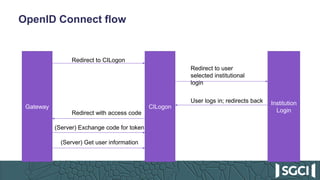
OpenID Connect flow
Gateway CILogon
Institution
Login
Redirect to CILogon
Redirect to user
selected institutional
login
User logs in; redirects back
Redirect with access code
(Server) Exchange code for token
(Server) Get user information
One time setup: Registering a client with CILogon
Step 1: OIDC Redirection
https://cilogon.org/authorize?response_type=code
&client_id=CLIENT_ID
&redirect_uri=https://mygateway.org/callback
&scope=openid
Step 3: OIDC Exchange code for token
https://mygateway.org/callback?
code=https%3A%2F%2Fcilogon.org%2Foauth2%2FauthzGrant%2F331685b3f...
POST /oauth2/token HTTP/1.1
Host: cilogon.org
Authorization: Basic Base64($client_id + “:” + $client_secret)
grant_type=authorization_code&code=...&redirect_uri=...
{
”access_token”: “eyJhbGciOiJ...”,
...
}
Step 4: OIDC fetch userinfo using access token
GET /oauth2/userinfo HTTP/1.1
Host: cilogon.org
Authorization: Bearer $access_token
{
"sub":"http://cilogon.org/serverA/users/123",
"name":”Marcus Christie",
"given_name":”Marcus",
"family_name":”Christie",
"email":”machrist@iu.edu”,
...
}
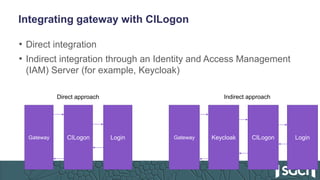
Integrating gateway with CILogon
• Direct integration
• Indirect integration through an Identity and Access Management
(IAM) Server (for example, Keycloak)
Gateway CILogon Login Gateway CILogon LoginKeycloak
Direct approach Indirect approach
Advantages of using IAM server
• Flexible Authentication options
• Gateway client software integration is done once
• Authorization services
Keycloak
• http://www.keycloak.org/
• Red Hat, 200+ contributors on GH, 4,500+ merged PRs
• Open source (ALv2) identity and access management server
• Identity brokering; pluggable authentication mechanisms
• Authorization services: attribute-based, role-based, group-based,
etc.
• Multi-tenanted
• Complete, well-documented REST API
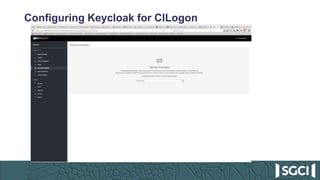
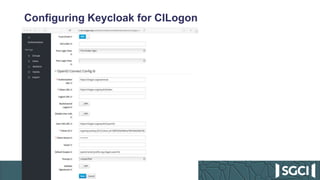
Configuring Keycloak for CILogon
How to integrate Keycloak
• Multi-tenanted: create a “realm” for each gateway
• configure authentication options, like CILogon
• Web portal to use OpenID Connect for authentication
• Redirect user to Keycloak to log in
• REST API for administrative and authorization integration
• http://www.keycloak.org/docs-api/3.0/rest-api/index.html
• E.g., Manage what roles a user has
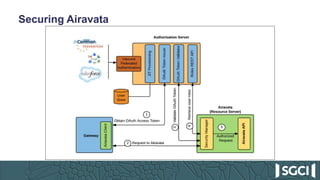
Securing Airavata
Apache Airavata – Profile Service
• Integrates with Keycloak REST API for tenant and user management
• Tenant Management
• createTenant
• Keycloak REST API: create Realm, create Realm Roles, create Admin user for Realm,
create default client for web application
• User Management
• createUser – Keycloak REST API: create User
• enableUser – Keycloak REST API: update User
• resetUserPassword – Keycloak REST API: update User with updated password
• addRoleToUser – Keycloak REST API: add Realm Roles to User
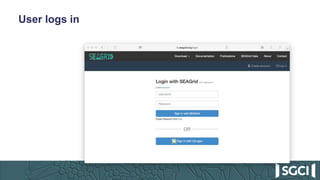
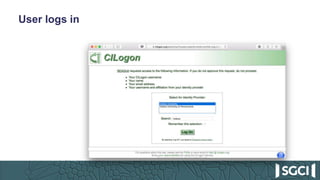
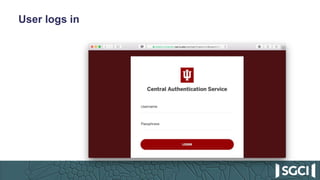
User logs in
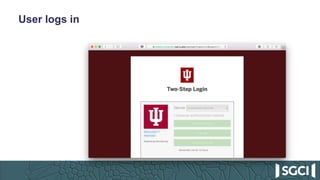
User logs in
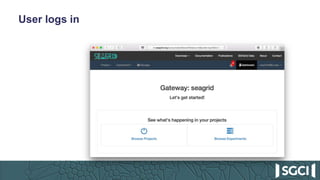
User logs in
User logs in
User logs in
First login: user is assigned a default role
• At this point, the user is logged in but can’t do anything yet
• User is assigned to ‘user-pending’ role
• Gateway admin gets an email about a new gateway user
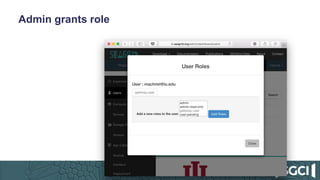
Admin grants role
How does the role get used?
• Portal – show/hide functionality based on role
• Airavata API server – each API method is restricted to certain
roles
• Uses OIDC endpoints to verify access token
• Uses Keycloak REST API to get user’s roles
• Mapping from role to API methods accessible by that role
Questions?
• Feel free also to email me at machrist@iu.edu

Keycloak for Science Gateways - SGCI Technology Sampler Webinar

  • 1.
    Award Number ACI-1547611 Marcus Christie ScienceGateways Research Center Indiana University EDS Consultant Using Keycloak to Provide Authentication, Authorization, and Identity Management Services for Your Gateway
  • 2.
    Overview • OpenID Connectwith CILogon • Using Keycloak for Authentication and Role-based Authorization • Integrating Keycloak with Apache Airavata
  • 3.
    The Problem • Gatewaysexpose (shared) resources and APIs for manipulating those resources to a diverse set of users • Authentication – another password to remember? • Authorization – granting access without too much administrative burden • Multiple gateways, multiple gateway clients • SciGaP (Science Gateway Platform as a Service) • Campus gateways
  • 4.
    Authentication • Many optionshere but easiest thing is use an account the user already has • CILogon • A service that allows users to authenticate to their institutions in order to retrieve credentials for accessing cyberinfrastructure. • Also provides a OpenID Connect (OIDC) interface to this federated authentication • OpenID Connect • Built on top of OAuth2 • Allows user to sign in with their identity provider • User grants client the right to access some of the user’s information
  • 5.
  • 6.
    OpenID Connect • Onetime initial setup • Register a client: client id and client secret • 1 - Redirect to CILogon • Parameters: client id, redirect_uri, scope=openid • 2 - User signs in • 3 - Redirect back to gateway • Exchange access code for authorization token • 4 - Get user info • Use authorization token to call user info endpoint
  • 7.
    OpenID Connect flow GatewayCILogon Institution Login Redirect to CILogon Redirect to user selected institutional login User logs in; redirects back Redirect with access code (Server) Exchange code for token (Server) Get user information
  • 8.
    One time setup:Registering a client with CILogon
  • 9.
    Step 1: OIDCRedirection https://cilogon.org/authorize?response_type=code &client_id=CLIENT_ID &redirect_uri=https://mygateway.org/callback &scope=openid
  • 10.
    Step 3: OIDCExchange code for token https://mygateway.org/callback? code=https%3A%2F%2Fcilogon.org%2Foauth2%2FauthzGrant%2F331685b3f... POST /oauth2/token HTTP/1.1 Host: cilogon.org Authorization: Basic Base64($client_id + “:” + $client_secret) grant_type=authorization_code&code=...&redirect_uri=... { ”access_token”: “eyJhbGciOiJ...”, ... }
  • 11.
    Step 4: OIDCfetch userinfo using access token GET /oauth2/userinfo HTTP/1.1 Host: cilogon.org Authorization: Bearer $access_token { "sub":"http://cilogon.org/serverA/users/123", "name":”Marcus Christie", "given_name":”Marcus", "family_name":”Christie", "email":”machrist@iu.edu”, ... }
  • 12.
    Integrating gateway withCILogon • Direct integration • Indirect integration through an Identity and Access Management (IAM) Server (for example, Keycloak) Gateway CILogon Login Gateway CILogon LoginKeycloak Direct approach Indirect approach
  • 13.
    Advantages of usingIAM server • Flexible Authentication options • Gateway client software integration is done once • Authorization services
  • 14.
    Keycloak • http://www.keycloak.org/ • RedHat, 200+ contributors on GH, 4,500+ merged PRs • Open source (ALv2) identity and access management server • Identity brokering; pluggable authentication mechanisms • Authorization services: attribute-based, role-based, group-based, etc. • Multi-tenanted • Complete, well-documented REST API
  • 15.
  • 16.
  • 17.
    How to integrateKeycloak • Multi-tenanted: create a “realm” for each gateway • configure authentication options, like CILogon • Web portal to use OpenID Connect for authentication • Redirect user to Keycloak to log in • REST API for administrative and authorization integration • http://www.keycloak.org/docs-api/3.0/rest-api/index.html • E.g., Manage what roles a user has
  • 18.
  • 19.
    Apache Airavata –Profile Service • Integrates with Keycloak REST API for tenant and user management • Tenant Management • createTenant • Keycloak REST API: create Realm, create Realm Roles, create Admin user for Realm, create default client for web application • User Management • createUser – Keycloak REST API: create User • enableUser – Keycloak REST API: update User • resetUserPassword – Keycloak REST API: update User with updated password • addRoleToUser – Keycloak REST API: add Realm Roles to User
  • 20.
  • 21.
  • 22.
  • 23.
  • 24.
  • 25.
    First login: useris assigned a default role • At this point, the user is logged in but can’t do anything yet • User is assigned to ‘user-pending’ role • Gateway admin gets an email about a new gateway user
  • 26.
  • 27.
    How does therole get used? • Portal – show/hide functionality based on role • Airavata API server – each API method is restricted to certain roles • Uses OIDC endpoints to verify access token • Uses Keycloak REST API to get user’s roles • Mapping from role to API methods accessible by that role
  • 28.
    Questions? • Feel freealso to email me at machrist@iu.edu

Editor's Notes

  • #2 Science Gateways Community Institute EDS is modeled on XSEDE ECSS
  • #5 Oauth 2 is a delegated authorization protocol designed for the web.
  • #13 If you are just making one gateway, then direct integration is simpler. But if you are making several gateways, having some indirection makes configuration easier and gives you more flexibility.
  • #15 Additional features we haven’t explored yet: account linking Multi tenanted