Best Practices for Cross-
 Platform Mobile Apps

       Kevin Whinnery
Kevin Whinnery
Engineer and Platform Evangelist
Appcelerator since 2008

Husband and father of three:


Web developer and JavaScript slinger
turned mobile and desktop hacker.

http://kevinwhinnery.com
http://twitter.com/kevinwhinnery
http://github.com/kwhinnery
Agenda
•  Cross-Platform UI
   Approaches

•  Component-Oriented
   Applications

•  Modular JavaScript
   Techniques

•  Code Walkthrough
Cross-Platform in Titanium
•  Cross-Platform !== “Write Once, Run
   Everywhere”

•  Cross-Platform in Titanium means:
    •  100%* Non-visual code reuse
    •  Lots of UI code reuse, depending on
       design
    •  Best-in-class experience on every
       platform


•  “Write Once, Adapt Everywhere”**

* This isn’t always true, but we’re working in that direction
** Term coined by Yehuda Katz, SproutCore, jQuery, and Rails contributor
Cross-Platform Interface Guidelines
•  Maybe we’ll call this the C-PIG (pr. Sea Pig)?

•  The best Titanium applications are conscious of their
   target platforms, and meet user expectations

•  Cross-platform applications are useless unless they
   blend seamlessly with the best applications on a
   platform

•  Take the time to learn the UI conventions of the
   platforms you’re targeting
Characteristics of iOS Interfaces
•  Touch centric

•  Gestures are central to
   hiding complexity

•  Uniformity in UI conventions
   is encouraged with rich
   controls and well-defined
   interaction models

•  HIG is required reading
Characteristics of Android Interfaces
•  Touch and hardware
   interaction

•  Activities are central
   elements

•  Interfaces are less
   homogenous

•  Android Interface Guidelines
   is required reading
Reconciling Cross-Platform UIs
•  Focus on the primary task

•  Sketch out an information
   architecture for apps on all
   platforms

•  Based on those exercises,
   pick out the common
   components for re-use
Cross-Platform
 Approaches
Schools of Cross-Platform Thought
Platform Identity            Brand Identity
•  Immediately Familiar      •  Evocative of emotions
   to platform users            around the brand

•  Self-evident navigation   •  Able to create new,
   and interaction models       engaging experience
                                not seen before
•  Polished look that
   makes an app feel like    •  Not bound by platform
   it belongs on the            UI conventions
   platform
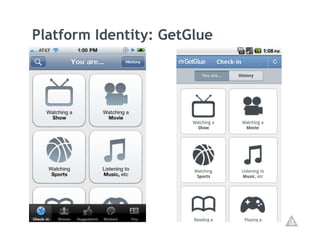
Platform Identity: GetGlue
The Platform Identity Approach
•  Different designs and interaction models for each app

•  Individual UI components could be reused, the rest
   would be platform specific

•  Common UI conventions and components are used

•  Win for a developers: 100% non-visual code reuse, and
   50% or better UI code reuse

•  Tradeoff: Less reuse, more is done for you (UI controls)
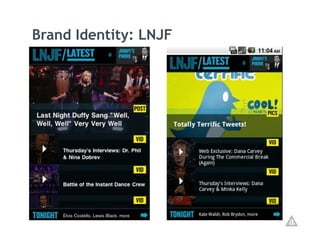
Brand Identity: LNJF
The Brand Identity Approach
•  UI is almost identical across platforms (immersive UI)

•  Small differences:
   •  Android back button support
   •  Transitions – iOS: animated transitions, Android: new activities


•  New UI conventions are created and must be learned

•  Win for developers: 100% non-visual code re-use,
   80-90% UI code re-use, strong branded experience

•  Tradeoff: More reuse, less is done for you
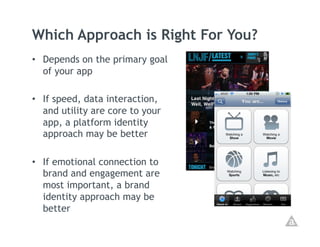
Which Approach is Right For You?
•  Depends on the primary goal
   of your app

•  If speed, data interaction,
   and utility are core to your
   app, a platform identity
   approach may be better

•  If emotional connection to
   brand and engagement are
   most important, a brand
   identity approach may be
   better
Component-
 Oriented
Applications
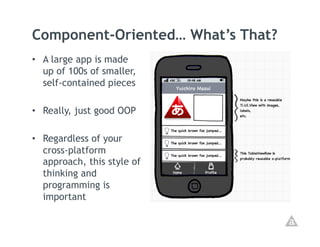
Component-Oriented… What’s That?
•  A large app is made
   up of 100s of smaller,
   self-contained pieces

•  Really, just good OOP

•  Regardless of your
   cross-platform
   approach, this style of
   thinking and
   programming is
   important
Advantages of a Component Arch.
•  100 small pieces are easier to understand and debug
   than 20 very large pieces

•  Easier to handle orientation changes

•  Easier to adapt cross-platform

•  Enhances reusability

•  Decouples your application, making it more adaptable
   to changing requirements
Modular JavaScript
   Techniques
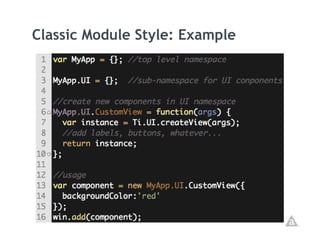
Classic Module Pattern
•  Uses Ti.include to split modules into files

•  Requires steps to avoid polluting the global scope
   (Namespaces)

•  Can use constructor style or factory style
Classic Module Style: Example
CommonJS Module Pattern
•  Uses require to split modules into files

•  Secure by default – no self-calling function boilerplate
   or namespaces (strictly) required

•  Can use constructor style or factory style
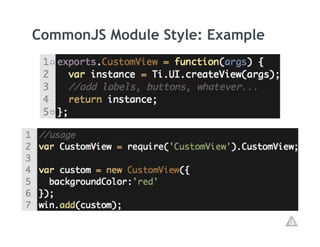
CommonJS Module Style: Example
Walkthrough:
Platform Identity
      Style
Questions?
Thank You!

Kevin Whinnery: Best Practices for Cross-Platform Mobile Development

  • 1.
    Best Practices forCross- Platform Mobile Apps Kevin Whinnery
  • 2.
    Kevin Whinnery Engineer andPlatform Evangelist Appcelerator since 2008 Husband and father of three: Web developer and JavaScript slinger turned mobile and desktop hacker. http://kevinwhinnery.com http://twitter.com/kevinwhinnery http://github.com/kwhinnery
  • 3.
    Agenda •  Cross-Platform UI Approaches •  Component-Oriented Applications •  Modular JavaScript Techniques •  Code Walkthrough
  • 4.
    Cross-Platform in Titanium • Cross-Platform !== “Write Once, Run Everywhere” •  Cross-Platform in Titanium means: •  100%* Non-visual code reuse •  Lots of UI code reuse, depending on design •  Best-in-class experience on every platform •  “Write Once, Adapt Everywhere”** * This isn’t always true, but we’re working in that direction ** Term coined by Yehuda Katz, SproutCore, jQuery, and Rails contributor
  • 5.
    Cross-Platform Interface Guidelines • Maybe we’ll call this the C-PIG (pr. Sea Pig)? •  The best Titanium applications are conscious of their target platforms, and meet user expectations •  Cross-platform applications are useless unless they blend seamlessly with the best applications on a platform •  Take the time to learn the UI conventions of the platforms you’re targeting
  • 6.
    Characteristics of iOSInterfaces •  Touch centric •  Gestures are central to hiding complexity •  Uniformity in UI conventions is encouraged with rich controls and well-defined interaction models •  HIG is required reading
  • 7.
    Characteristics of AndroidInterfaces •  Touch and hardware interaction •  Activities are central elements •  Interfaces are less homogenous •  Android Interface Guidelines is required reading
  • 8.
    Reconciling Cross-Platform UIs • Focus on the primary task •  Sketch out an information architecture for apps on all platforms •  Based on those exercises, pick out the common components for re-use
  • 9.
  • 10.
    Schools of Cross-PlatformThought Platform Identity Brand Identity •  Immediately Familiar •  Evocative of emotions to platform users around the brand •  Self-evident navigation •  Able to create new, and interaction models engaging experience not seen before •  Polished look that makes an app feel like •  Not bound by platform it belongs on the UI conventions platform
  • 11.
  • 12.
    The Platform IdentityApproach •  Different designs and interaction models for each app •  Individual UI components could be reused, the rest would be platform specific •  Common UI conventions and components are used •  Win for a developers: 100% non-visual code reuse, and 50% or better UI code reuse •  Tradeoff: Less reuse, more is done for you (UI controls)
  • 13.
  • 14.
    The Brand IdentityApproach •  UI is almost identical across platforms (immersive UI) •  Small differences: •  Android back button support •  Transitions – iOS: animated transitions, Android: new activities •  New UI conventions are created and must be learned •  Win for developers: 100% non-visual code re-use, 80-90% UI code re-use, strong branded experience •  Tradeoff: More reuse, less is done for you
  • 15.
    Which Approach isRight For You? •  Depends on the primary goal of your app •  If speed, data interaction, and utility are core to your app, a platform identity approach may be better •  If emotional connection to brand and engagement are most important, a brand identity approach may be better
  • 16.
  • 17.
    Component-Oriented… What’s That? • A large app is made up of 100s of smaller, self-contained pieces •  Really, just good OOP •  Regardless of your cross-platform approach, this style of thinking and programming is important
  • 18.
    Advantages of aComponent Arch. •  100 small pieces are easier to understand and debug than 20 very large pieces •  Easier to handle orientation changes •  Easier to adapt cross-platform •  Enhances reusability •  Decouples your application, making it more adaptable to changing requirements
  • 19.
  • 20.
    Classic Module Pattern • Uses Ti.include to split modules into files •  Requires steps to avoid polluting the global scope (Namespaces) •  Can use constructor style or factory style
  • 21.
  • 22.
    CommonJS Module Pattern • Uses require to split modules into files •  Secure by default – no self-calling function boilerplate or namespaces (strictly) required •  Can use constructor style or factory style
  • 23.
  • 24.
  • 25.
  • 26.