Keeping up with Educational Technology Trends from your Desktop Alicia Cundell Qatar University [email_address] http://del.icio.us/acundell http://qutechnews.edublogs.org
Why use technology in Language Learning?
Why Technology? Today’s youth are growing up with constant digital stimuli This constant interaction with digital stimuli has lead to different learning processes  These changes have resulted in physiological changes to the brain We need to prepare them for their futures after their education
Technology: how? As a solution To be more productive To do things we couldn’t do without them
Web 1.0 for professional development Online journals & magazines TESL-EJ   The Internet TESL Journal (ITESL)   Teaching English with Technology Listservs TESLCA-L TESL-L 
How is learning changing now? Students “can either be passive receivers of media messages or they can be digital content creators and critical thinkers.” Source : Retrieved January 18, 2008, from  video in the classroom.com  : http://www.needleworkspictures.com/vic/
Web 2.0: The Read/Write Web anyone can be an author no knowledge of programming necessary connecting and collaborating with others
Web 2.0 for professional development: Blogs What are blogs? Individuals share their knowledge, expertise and experiences in practical applications Organizational blogs as a means of keeping faculty updated As a personal tool for internalizing your own experiences
Web 2.0 for professional development: Blogs Example ELT Technology Blogs Larry  Ferlazzo's  Websites of the Day   Technology for QU Faculty ELT Notes Language Lab Unleashed
Web 2.0 for professional development: podcasts What are podcasts? Like a blog, but in audio format Often follow interview or talk show formats with guests and experts Can be downloaded onto mp3 players and played in the car, on the bus, etc. Examples of ELT podcasts ELT  Podcast  – The Teachers’ Lounge
Web 2.0 for professional development: wikis What are wikis? Web sites that can be written by a group of people Facilitate collaborative learning Draw on knowledge, expertise and experience of many people as opposed to one Examples of wikis devoted to technology QU Foundation Classroom Technology The web 2.0 for EFL teachers 99waystouseapodcast
Web 2.0 for professional development:  rss Technology that works for you by pulling only new information from a blog, wiki or Web site and putting it all in a central location Video:  RSS in Plain English
Web 2.0 for professional development:  rss Aggregators that use RSS technology Feedblitz  - uses email to deliver content Web-based aggregators Google Reader  Bloglines Netvibes   Learn more about RSS
Web 2.0 for professional development:  social bookmarking What is social bookmarking? Saving your bookmarks online to a Web page and organizing them with  tags Most popular Social Bookmarking tool:   del.icio.us Watch the CommonCraft video
Web 2.0 for professional development:  social bookmarking How can bookmarking be social? Having bookmarks online makes them public: anyone can see what you save Follow your favourite professionals through rss to find out what they are bookmarking (use rss!) http://del.icio.us/acundell
Web 2.0 for professional development: online videos & tutorials Search the Web for tutorials or info using video search engines in YouTube, Google, Yahoo Example Sites expressly for tutorials Teacher Training Videos Commoncraft  –  technology in  Plain English Atomic Learning  – subscription required, but some free demos available
Web 2.0 for professional development: online conferences, lectures & workshops Web 2.0 technology has made it possible to broadcast live events over the Web Examples: 'The Web 2.0 for EFL Teachers:  Podcasts ,  Blogs ,  Wikis , Virtual Worlds and Digital Games'   Web-based conference Nov. 2007 Webheads  in Action  – regular chats & webcasts
Web 2.0 for professional development: Webquests WebQuests are guided inquiry-based lessons where research is done on the Internet and then reported and usually applied. WebQuests always have the same structure: Introduction Task Process Evaluation Conclusion
Web 2.0 for professional development: Webquests Examples of WebQuests as professional development tools A  WebQuest  –  Blogs  and RSS Digital Natives: Reading, Writing and Learning in the 21 st  Century   A  WebQuest  on  WebQuests : An Introductory  WebQuest  for In-service EFL Teachers A  WebQuest  about…Creating  WebQuests
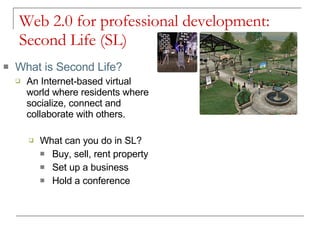
Web 2.0 for professional development: Second Life (SL) What is Second Life? An Internet-based virtual world where residents where socialize, connect and collaborate with others. What can you do in SL? Buy, sell, rent property Set up a business Hold a conference
Web 2.0 for professional development: Second Life (SL) Examples of SL professional development SLanguages  2007  – hosted by Edunation Free seminar series  – Edunation Language learning in Second Life  –  Lancelot  & Eucation
Web 2.0 for professional development: other tools Social Networking: Facebook, My Space, Twitter Slideshare: online presenations Yahoo!Groups Discussion Boards Online chats Online paid courses
Example Technology Tools  Mainstream technologies: discussion boards, blogs, wikis, podcasts, multimedia production (PowerPoint,  Photo Story 3 ,  VoiceThread ) Students make comic strips or animated movies with dialogue boxes using Web 2.0 tools, such as  make beliefs  comix  &  Dvolver ,  Students send speaking task audio files via email through  springdoo  as homework Students share poems, stories online and share with others for commenting with: PowerPoint,  VoiceThread ,  The Sims On Stage ,
Follow up resources Web 2.0 Tools http://del.icio.us/acundell/web2.0tools My blog: http://qutechnews.edublogs.org

Keeping Up With Educational Technology Trends From Your Desktop

  • 1.
    Keeping up withEducational Technology Trends from your Desktop Alicia Cundell Qatar University [email_address] http://del.icio.us/acundell http://qutechnews.edublogs.org
  • 2.
    Why use technologyin Language Learning?
  • 3.
    Why Technology? Today’syouth are growing up with constant digital stimuli This constant interaction with digital stimuli has lead to different learning processes These changes have resulted in physiological changes to the brain We need to prepare them for their futures after their education
  • 4.
    Technology: how? Asa solution To be more productive To do things we couldn’t do without them
  • 5.
    Web 1.0 forprofessional development Online journals & magazines TESL-EJ The Internet TESL Journal (ITESL) Teaching English with Technology Listservs TESLCA-L TESL-L 
  • 6.
    How is learningchanging now? Students “can either be passive receivers of media messages or they can be digital content creators and critical thinkers.” Source : Retrieved January 18, 2008, from video in the classroom.com : http://www.needleworkspictures.com/vic/
  • 7.
    Web 2.0: TheRead/Write Web anyone can be an author no knowledge of programming necessary connecting and collaborating with others
  • 8.
    Web 2.0 forprofessional development: Blogs What are blogs? Individuals share their knowledge, expertise and experiences in practical applications Organizational blogs as a means of keeping faculty updated As a personal tool for internalizing your own experiences
  • 9.
    Web 2.0 forprofessional development: Blogs Example ELT Technology Blogs Larry Ferlazzo's Websites of the Day Technology for QU Faculty ELT Notes Language Lab Unleashed
  • 10.
    Web 2.0 forprofessional development: podcasts What are podcasts? Like a blog, but in audio format Often follow interview or talk show formats with guests and experts Can be downloaded onto mp3 players and played in the car, on the bus, etc. Examples of ELT podcasts ELT Podcast – The Teachers’ Lounge
  • 11.
    Web 2.0 forprofessional development: wikis What are wikis? Web sites that can be written by a group of people Facilitate collaborative learning Draw on knowledge, expertise and experience of many people as opposed to one Examples of wikis devoted to technology QU Foundation Classroom Technology The web 2.0 for EFL teachers 99waystouseapodcast
  • 12.
    Web 2.0 forprofessional development: rss Technology that works for you by pulling only new information from a blog, wiki or Web site and putting it all in a central location Video: RSS in Plain English
  • 13.
    Web 2.0 forprofessional development: rss Aggregators that use RSS technology Feedblitz - uses email to deliver content Web-based aggregators Google Reader Bloglines Netvibes Learn more about RSS
  • 14.
    Web 2.0 forprofessional development: social bookmarking What is social bookmarking? Saving your bookmarks online to a Web page and organizing them with tags Most popular Social Bookmarking tool: del.icio.us Watch the CommonCraft video
  • 15.
    Web 2.0 forprofessional development: social bookmarking How can bookmarking be social? Having bookmarks online makes them public: anyone can see what you save Follow your favourite professionals through rss to find out what they are bookmarking (use rss!) http://del.icio.us/acundell
  • 16.
    Web 2.0 forprofessional development: online videos & tutorials Search the Web for tutorials or info using video search engines in YouTube, Google, Yahoo Example Sites expressly for tutorials Teacher Training Videos Commoncraft – technology in Plain English Atomic Learning – subscription required, but some free demos available
  • 17.
    Web 2.0 forprofessional development: online conferences, lectures & workshops Web 2.0 technology has made it possible to broadcast live events over the Web Examples: 'The Web 2.0 for EFL Teachers: Podcasts , Blogs , Wikis , Virtual Worlds and Digital Games' Web-based conference Nov. 2007 Webheads in Action – regular chats & webcasts
  • 18.
    Web 2.0 forprofessional development: Webquests WebQuests are guided inquiry-based lessons where research is done on the Internet and then reported and usually applied. WebQuests always have the same structure: Introduction Task Process Evaluation Conclusion
  • 19.
    Web 2.0 forprofessional development: Webquests Examples of WebQuests as professional development tools A WebQuest – Blogs and RSS Digital Natives: Reading, Writing and Learning in the 21 st Century A WebQuest on WebQuests : An Introductory WebQuest for In-service EFL Teachers A WebQuest about…Creating WebQuests
  • 20.
    Web 2.0 forprofessional development: Second Life (SL) What is Second Life? An Internet-based virtual world where residents where socialize, connect and collaborate with others. What can you do in SL? Buy, sell, rent property Set up a business Hold a conference
  • 21.
    Web 2.0 forprofessional development: Second Life (SL) Examples of SL professional development SLanguages 2007 – hosted by Edunation Free seminar series – Edunation Language learning in Second Life – Lancelot & Eucation
  • 22.
    Web 2.0 forprofessional development: other tools Social Networking: Facebook, My Space, Twitter Slideshare: online presenations Yahoo!Groups Discussion Boards Online chats Online paid courses
  • 23.
    Example Technology Tools Mainstream technologies: discussion boards, blogs, wikis, podcasts, multimedia production (PowerPoint, Photo Story 3 , VoiceThread ) Students make comic strips or animated movies with dialogue boxes using Web 2.0 tools, such as make beliefs comix & Dvolver , Students send speaking task audio files via email through springdoo as homework Students share poems, stories online and share with others for commenting with: PowerPoint, VoiceThread , The Sims On Stage ,
  • 24.
    Follow up resourcesWeb 2.0 Tools http://del.icio.us/acundell/web2.0tools My blog: http://qutechnews.edublogs.org