Unit  Testing  with JUnit Alessandro Marchetto Fondazione Bruno Kessler - IRST
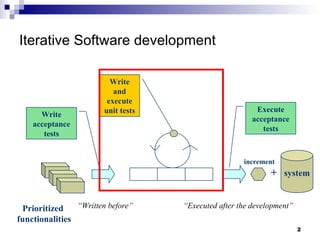
Iterative Software development + system increment Prioritized  functionalities Write acceptance tests Execute acceptance tests Write and execute unit tests “ Executed after the development ” “ Written before ”
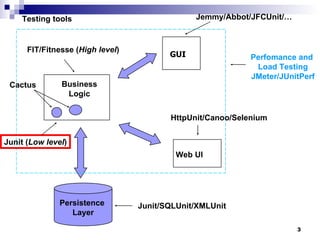
Business Logic GUI Web UI Persistence  Layer Jemmy/Abbot/JFCUnit/… HttpUnit/Canoo/Selenium Junit/SQLUnit/XMLUnit FIT/Fitnesse ( High level ) Junit ( Low level ) Cactus Perfomance and  Load Testing JMeter/JUnitPerf Testing tools
Junit is a  unit  test environment  for Java programs developed by  Erich Gamma  and  Kent Beck . Writing test cases Executing test cases Pass/fail? (expected result = obtained result?) Consists in a  framework  providing all the tools for testing. framework : set of classes and conventions to use them. It is  integrated into  eclipse  through a graphical plug-in . Testing with JUnit
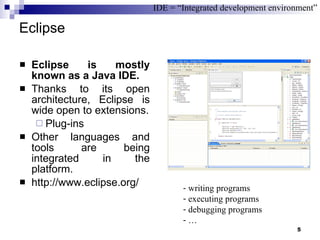
Eclipse Eclipse is mostly known as a Java IDE. Thanks to its open architecture, Eclipse is wide open to extensions. Plug-ins Other languages and tools are being integrated in the platform.  http://www.eclipse.org/  IDE = “Integrated development environment” writing programs executing programs debugging programs …
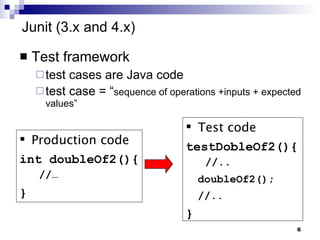
Test framework  test cases are Java code test case = “ sequence of operations +inputs + expected values” Junit (3.x and 4.x)  Test code testDobleOf2(){  //.. doubleOf2(); //.. } Production code int doubleOf2(){  //… }
JUnit 3.x for testing programs JUnit tests  “ substitute the use of  main()  to check the program behaviour” All we need to do is: write a sub-class of  TestCase  add to it one or more  test methods run the test using JUnit junit.framework.*
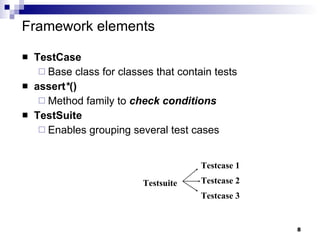
Framework elements TestCase Base class for classes that contain tests assert * () Method family to  check conditions TestSuite Enables grouping several test cases Testsuite Testcase 2 Testcase 1 Testcase 3
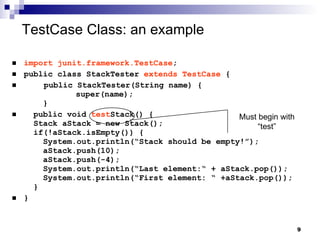
TestCase Class: an example   import junit.framework.TestCase ; public class StackTester  extends TestCase  { public StackTester(String name) { super(name);   } public void  test Stack() {   Stack aStack = new Stack();   if(!aStack.isEmpty()) {   System.out.println(“Stack should be empty!”);   aStack.push(10);   aStack.push(-4);   System.out.println(“Last element:“ + aStack.pop());   System.out.println(“First element: “ +aStack.pop());   } } Must begin with “test”
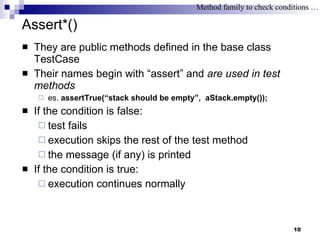
Assert*() They are public methods defined in the base class TestCase Their names begin with “assert” and  are used in test methods es.  assertTrue(“stack should be empty”,  aStack.empty()); If the condition is false:  test fails execution skips the rest of the test method the message (if any) is printed If the condition is true: execution continues normally Method family to check conditions …
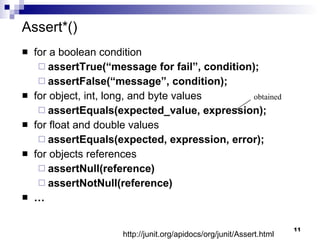
Assert*() for a boolean condition assertTrue(“message for fail”, condition); assertFalse(“message”, condition); for object, int, long, and byte values assertEquals(expected_value, expression); for float and double values assertEquals(expected, expression, error); for objects references assertNull(reference) assertNotNull(reference) … obtained http://junit.org/apidocs/org/junit/Assert.html
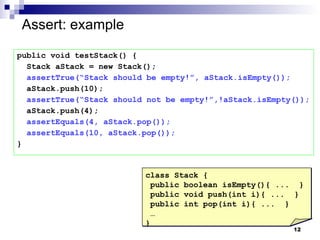
Assert: example public void testStack() { Stack aStack = new Stack(); assertTrue(“Stack should be empty!”, aStack.isEmpty()); aStack.push(10); assertTrue(“Stack should not be empty!”,!aStack.isEmpty()); aStack.push(4); assertEquals(4, aStack.pop()); assertEquals(10, aStack.pop()); } class Stack { public boolean isEmpty(){ ...  } public void push(int i){ ...  } public int pop(int i){ ...  } … }
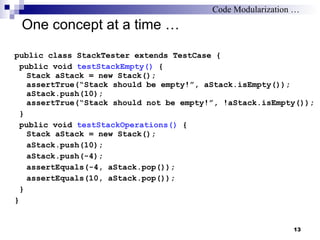
One concept at a time … public class StackTester extends TestCase { public void  testStackEmpty()  { Stack aStack = new Stack(); assertTrue(“Stack should be empty!”, aStack.isEmpty()); aStack.push(10); assertTrue(“Stack should not be empty!”, !aStack.isEmpty()); } public void  testStackOperations()  { Stack aStack = new Stack(); aStack.push(10); aStack.push(-4); assertEquals(-4, aStack.pop()); assertEquals(10, aStack.pop()); } } Code Modularization …
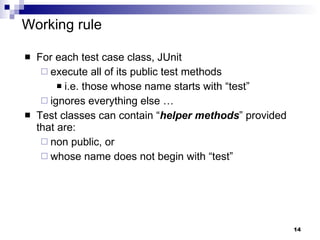
Working rule For each test case class, JUnit execute all of its public test methods i.e. those whose name starts with “test” ignores everything else … Test classes can contain “ helper methods ” provided that are: non public, or whose name does not begin with “test”
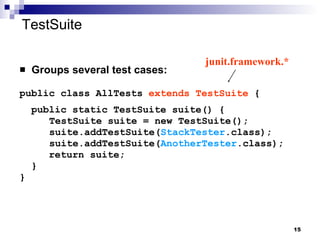
TestSuite Groups several test cases: public class AllTests  extends TestSuite  { public static TestSuite suite() {   TestSuite suite = new TestSuite();   suite.addTestSuite( StackTester .class);   suite.addTestSuite( AnotherTester .class); return suite; } } junit.framework.*
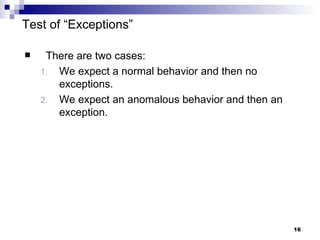
Test of “Exceptions” There are two cases: We expect a normal behavior and then no exceptions. We expect an anomalous behavior and then an exception.
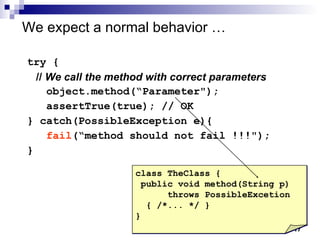
We expect a normal behavior … try { //  We call the method with correct parameters object.method(“Parameter"); assertTrue(true); // OK  } catch(PossibleException e){  fail (“method should not fail !!!"); } class TheClass { public void method(String p) throws PossibleExcetion { /*... */ } }
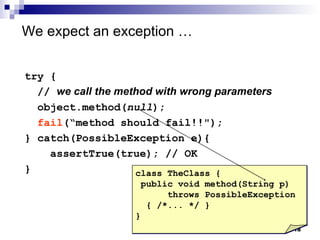
We expect an exception  … try { //  we call the method with wrong parameters object.method( null ); fail (“method should fail!!"); } catch(PossibleException e){  assertTrue(true); // OK } class TheClass { public void method(String p) throws PossibleException { /*... */ } }
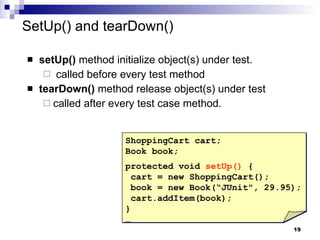
SetUp() and tearDown() setUp()  method initialize object(s) under test. called before every test method tearDown()  method release object(s) under test called after every test case method.  ShoppingCart cart; Book book; protected void  setUp()  { cart = new ShoppingCart(); book = new Book(“JUnit", 29.95); cart.addItem(book); }  …
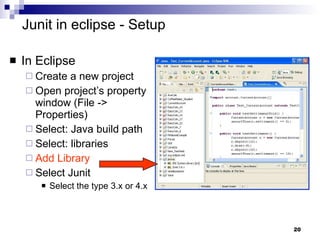
Junit in eclipse - Setup In Eclipse Create a new project Open project’s property window (File -> Properties)  Select: Java build path Select: libraries Add Library Select Junit Select the type 3.x or 4.x
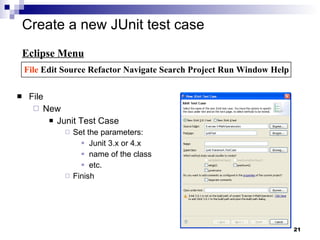
Create a new JUnit test case  File New Junit Test Case Set the parameters: Junit 3.x or 4.x name of the class etc. Finish Eclipse Menu File  Edit Source Refactor Navigate Search Project Run Window Help
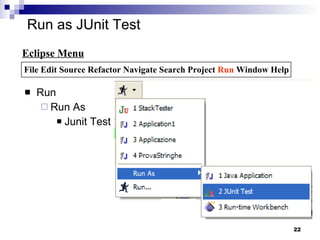
Run as JUnit Test Run Run As Junit Test Eclipse Menu File Edit Source Refactor Navigate Search Project  Run  Window Help
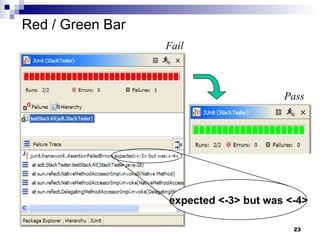
Red / Green Bar Fail Pass expected <-3> but was <-4>
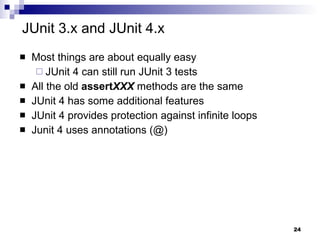
JUnit 3.x and JUnit 4.x Most things are about equally easy JUnit 4 can still run JUnit 3 tests All the old  assert XXX  methods are the same JUnit 4 has some additional features JUnit 4 provides protection against infinite loops Junit 4 uses annotations (@)
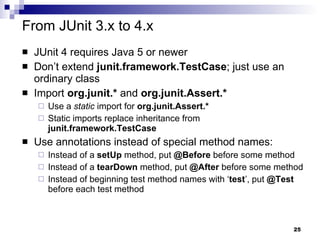
From JUnit 3.x to 4.x JUnit 4 requires Java 5 or newer Don’t extend  junit.framework.TestCase ; just use an ordinary class Import  org.junit.*  and  org.junit.Assert.* Use a  static  import for   org.junit.Assert.* Static imports replace inheritance from  junit.framework.TestCase Use annotations instead of special method names: Instead of a  setUp  method, put  @Before  before some method Instead of a  tearDown  method, put  @After  before some method Instead of beginning test method names with ‘ test ’, put  @Test  before each test method
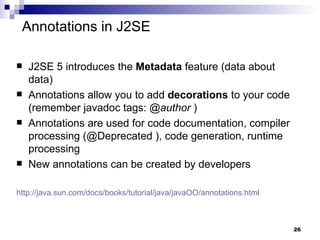
J2SE 5 introduces the  Metadata  feature (data about data) Annotations allow you to add  decorations   to your code (remember javadoc tags:  @author  )  Annotations are used for code documentation, compiler processing (@Deprecated ), code generation, runtime processing New annotations can be created by developers http ://java.sun.com/docs/books/tutorial/java/javaOO/annotations.html   Annotations in J2SE
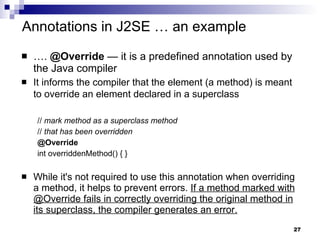
… .  @Override  — it is a predefined annotation used by the Java compiler It informs the compiler that the element (a method) is meant to override an element declared in a superclass   //  mark method as a superclass method   //  that has been overridden   @Override   int overriddenMethod() { } While it's not required to use this annotation when overriding a method, it helps to prevent errors.  If a method marked with @Override fails in correctly overriding the original method in its superclass, the compiler generates an error. Annotations in J2SE … an example
Junit 4.x for testing programs Import the JUnit 4 classes you need import org.junit.*; import static org.junit.Assert.*; Declare your (conventional) Java class public class MyProgramTest { Declare any variables you are going to use, e.g., an instance of the class being tested   MyProgram program; int [ ] array; int solution;
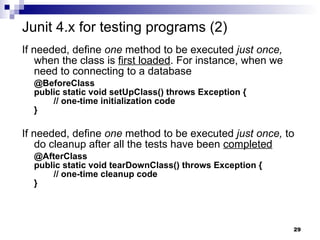
If needed, define  one  method to be executed  just once,  when the class is  first loaded . For instance, when we need to connecting to a database @BeforeClass public static void setUpClass() throws Exception {   // one-time initialization code } If needed, define  one  method to be executed  just once,  to do cleanup after all the tests have been  completed @AfterClass public static void tearDownClass() throws Exception {   // one-time cleanup code } Junit 4.x for testing programs (2)
If needed, define  one or more  methods to be executed  before   each test , e.g., typically for initializing values @Before public void setUp() {   program = new MyProgram();   array = new int[] { 1, 2, 3, 4, 5 }; } If needed, define  one or more  methods to be executed after  each test , e.g.,   typically for releasing resources (files, etc.) @After public void tearDown() { } Junit 4.x for testing programs (3)
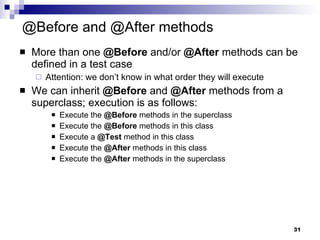
@Before and @After methods More than one  @Before  and/or  @After  methods can be defined in a test case  Attention: we don’t know in what order they will execute We can inherit  @Before  and  @After  methods from a superclass; execution is as follows: Execute the  @Before  methods in the superclass Execute the  @Before  methods in this class Execute a  @Test  method in this class Execute the  @After  methods in this class Execute the  @After  methods in the superclass
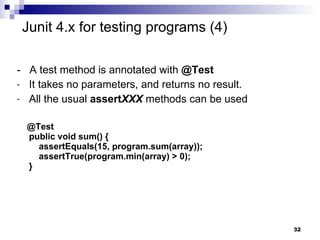
-  A test method is annotated with  @Test It takes no parameters, and returns no result.  All the usual  assert XXX  methods can be used @Test public void sum() {   assertEquals(15, program.sum(array));   assertTrue(program.min(array) > 0); } Junit 4.x for testing programs (4)
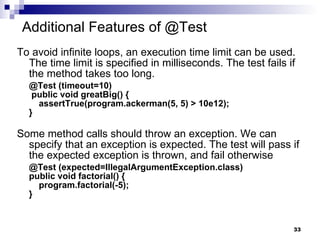
Additional Features of @Test To avoid infinite loops, an execution time limit can be used. The time limit is specified in milliseconds. The test fails if the method takes too long. @Test (timeout=10)  public void greatBig() {   assertTrue(program.ackerman(5, 5) > 10e12); }  Some method calls should throw an exception. We can specify that an exception is expected. The test will pass if the expected exception is thrown, and fail otherwise @Test (expected=IllegalArgumentException.class) public void factorial() {   program.factorial(-5); }
Parameterized tests Using  @RunWith(value=Parameterized.class)  and a method  @Parameters , a test class is executed with several inputs @RunWith(value=Parameterized.class) public class FactorialTest {   private long expected;   private int value;   @Parameters   public static Collection data() {   return Arrays.asList( new Object[ ][ ] { { 1, 0 }, { 1, 1 }, { 2, 2 }, { 120, 5 } });   }   public FactorialTest(long expected, int value) { // constructor   this.expected = expected;   this.value = value;   }   @Test   public void factorial() {   assertEquals(expected, new Calculator().factorial(value));   } } import  org.junit.runner.RunWith; import  org.junit.runners.Parameterized; import  org.junit.runners.Parameterized.Parameters; Parameters used to exercise  different instances of the class
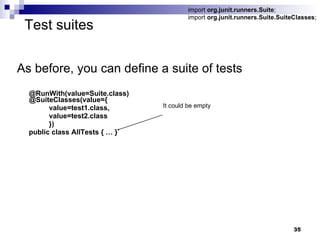
Test suites As before, you can define a suite of tests @RunWith(value=Suite.class) @SuiteClasses(value={   value=test1.class, value=test2.class }) public class AllTests { … } import  org.junit.runners.Suite ; import  org.junit.runners.Suite.SuiteClasses ; It could be empty
Additional features of Junit 4 Instead of JUnit 3’s AssertionFailedError, now failed tests throw an  AssertionError There is now an additional version of  assertEquals  for arrays of objects: assertEquals(Object[] expected, Object[] actual) JUnit 3 had an  assertEquals( p ,  p )  method for each kind of primitive  p , but JUnit 4 only has an assertEquals( object ,  object ) and depends on  autoboxing @Override public   boolean  equals(Object o){ …  return   … ; }
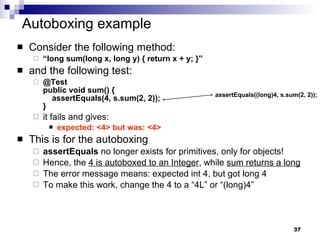
Autoboxing example Consider the following method: “ long sum(long x, long y) { return x + y; }” and the following test: @Test public void sum() {   assertEquals(4, s.sum(2, 2)); }  it fails and gives: expected: <4> but was: <4> This is for the autoboxing assertEquals  no longer exists for primitives, only for objects! Hence, the  4 is autoboxed to an Integer , while  sum returns a long The error message means: expected int 4, but got long 4 To make this work, change the 4 to a “4L” or “(long)4” assertEquals((long)4, s.sum(2, 2));
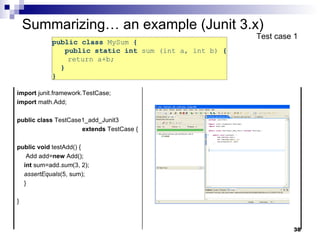
public class  MySum  {   public static int  sum (int a, int b)  { return a+b;  }  }  Summarizing… an example (Junit 3.x) Test case 1 import  junit.framework.TestCase; import  math.Add; public   class  TestCase1_add_Junit3  extends  TestCase { public   void  testAdd() { Add add= new  Add(); int  sum=add. sum (3, 2); assertEquals (5, sum); } }
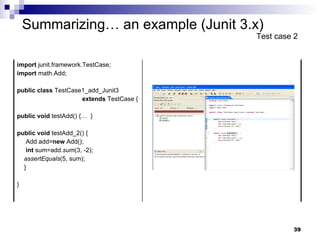
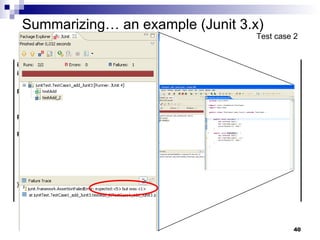
Summarizing… an example (Junit 3.x) Test case 2 import  junit.framework.TestCase; import  math.Add; public   class  TestCase1_add_Junit3  extends  TestCase { public   void  testAdd() {…  } public   void  testAdd_2() { Add add= new  Add(); int  sum=add. sum (3, -2); assertEquals (5, sum); } }
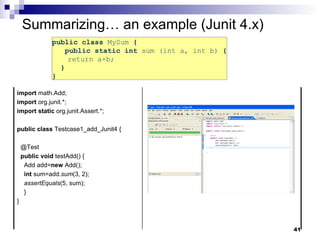
public class  MySum  {   public static int  sum (int a, int b)  { return a+b;  }  }  Summarizing… an example (Junit 4.x) import  math.Add; import  org.junit.*; import   static  org.junit.Assert.*; public   class  Testcase1_add_Junit4 { @Test public   void  testAdd() { Add add= new  Add(); int  sum=add. sum (3, 2); assertEquals (5, sum); } }
When testing programs? Test last  The conventional way for testing in which testing follows the implementation Test first The Extreme-Programming   view in which testing is used as a developement tool
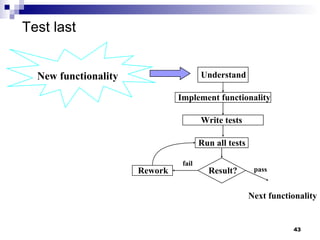
Test last New  functionality Understand Implement functionality Write tests  Run all tests Result? Rework fail pass Next functionality
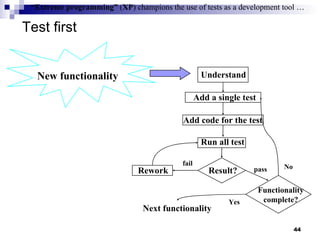
Test first “ Extreme programming”  ( XP ) champions the use of tests as a development tool … New functionality Understand Add a single test Add code for the test Run all test Result? Rework Functionality complete? fail pass No Next functionality Yes “ Extreme programming”  ( XP ) champions the use of tests as a development tool …
Test First Advantages Each method has associated a testcase the confidence of our code increases … It simplifies:  refactoring/restructuring maintenance the introduction of new functionalities Test first help to build the  documentation testcases are good “use samples” Programming is more fun …
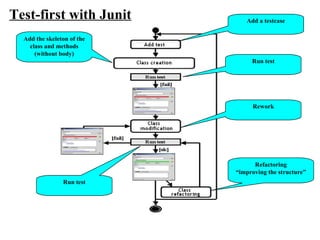
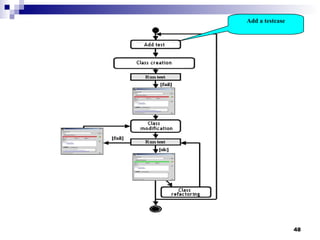
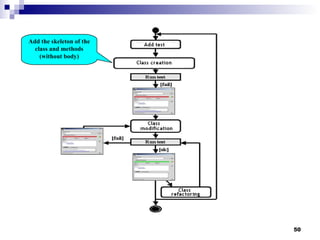
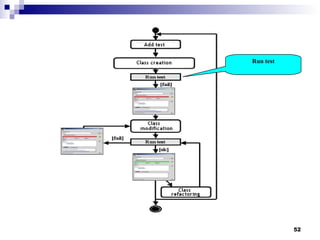
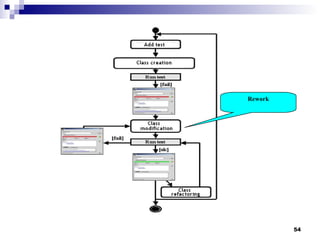
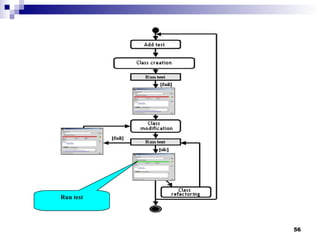
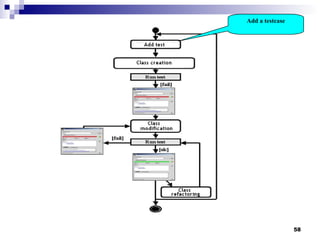
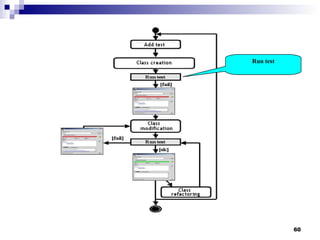
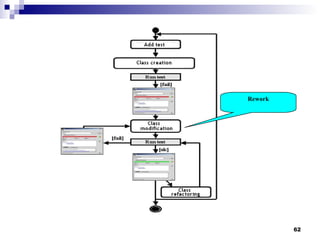
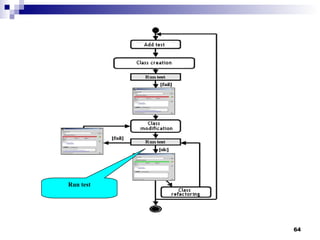
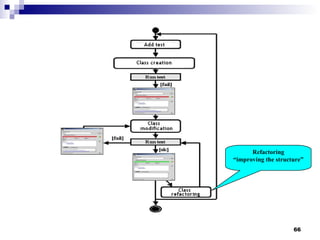
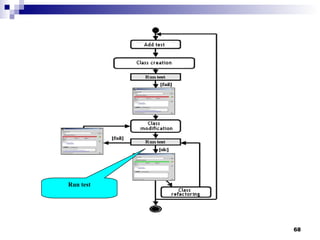
Add the skeleton of the class and methods (without body) Test-first with Junit Rework Refactoring “ improving the structure” Add a testcase Run test Run test
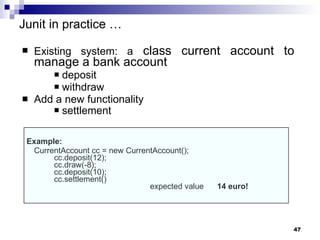
Junit in practice  … Existing system: a  class current account to manage a bank account deposit withdraw  Add a new functionality  settlement   Example: CurrentAccount cc = new CurrentAccount(); cc.deposit(12); cc.draw(-8); cc.deposit(10); cc.settlement() expected value  14 euro!
Add a testcase
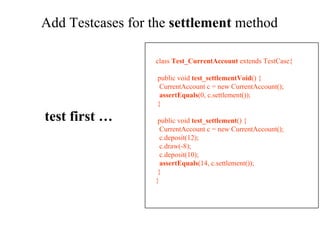
Add Testcases for the  settlement  method  class  Test_CurrentAccount  extends TestCase { public void  test_settlementVoid () { CurrentAccount c = new CurrentAccount(); assertEquals (0, c.settlement()); } public void  test_settlement () { CurrentAccount c = new CurrentAccount(); c.deposit(12); c.draw(-8); c.deposit(10); assertEquals (14, c.settlement()); } } test first …
Add the skeleton of the class and methods (without body)
Add the skeletone code of the method class  CurrentAccount  { int account[]; int lastMove; CurrentAccount (){ lastMove=0;  account=new int[10]; } public void  deposit (int value){ account[lastMove]=value;  lastMove++; } public void  draw (int value) { account[lastMove]=value;  lastMove++; } public int  settlement () {return 0;} public static void  main (String args[]) {} } class  Test_CurrentAccount  extends TestCase { public void  test_settlementVoid () { currentAccount c = new currentAccount(); assertEquals (0, c.settlement()); } public void  test_settlement () { currentAccount c = new currentAccount(); c.deposit(12); c.draw(-8); c.deposit(10); assertEquals (14, c.settlement()); } }
Run test
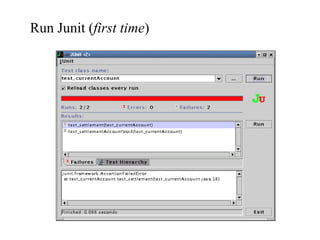
Run Junit ( first time )
Rework
Rework class  CurrentAccount  { int account[]; int lastMove; CurrentAccount (){ lastMove=0; account=new int[10]; } public void  deposit (int value){ …} public void  draw (int value) { …} public int  settlement ()  { int result = 0 for (int i=0; i<account.length; i++) { result = result + account[i]; } return result; } public static void  main (String args[]) {} } class  Test_CurrentAccount  extends TestCase { public void  test_settlementVoid () { currentAccount c = new currentAccount(); assertEquals (0, c.settlement()); } public void  test_settlement () { currentAccount c = new currentAccount(); c.deposit(12); c.draw(-8); c.deposit(10); assertEquals (14, c.settlement()); } }
Run test
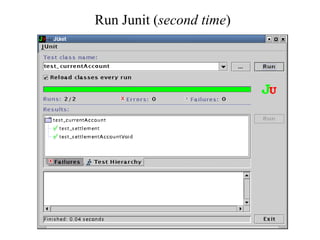
Run Junit ( second time )
Add a testcase
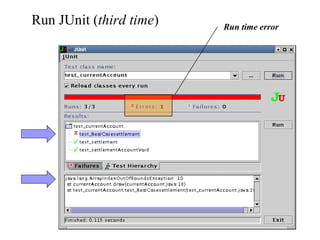
Add a new testcase class  CurrentAccount  { int account[]; int lastMove; CurrentAccount (){ lastMove=0; account=new int[10]; } public void  deposit (int value){ …} public void  draw (int value) { …} public int  settlement ()  { int result = 0 for (int i=0; i<account.length; i++) { result = result + account[i]; } return result; } public static void  main (String args[]) {} } class  Test_currentAccount  extends TestCase { … public void  test_realCaseSettlement () { currentAccount c = new currentAccount(); for (int i=0; i <10 ; i++) c.deposit(1); c.draw(-10); assertEquals (0, c.settlement()); } }
Run test
Run JUnit ( third time ) Run time error
Rework
class  CurrentAccount  { int account[]; int lastMove; CurrentAccount (){ lastMove=0; account=new int[ 100 ]; } public void  deposit (int value){ …} public void  draw (int value) { …} public int  settlement ()  { int result = 0 for (int i=0; i<account.length; i++) { result = result + account[i]; } return result; } public static void  main (String args[]) {} } class  Test_currentAccount  extends TestCase  { … public void  test_realCaseSettlement () { currentAccount c = new currentAccount(); for (int i=0; i <10 ; i++) c.deposit(1); c.draw(-10); assertTrue (0, c.settlement()); } } Rework
Run test
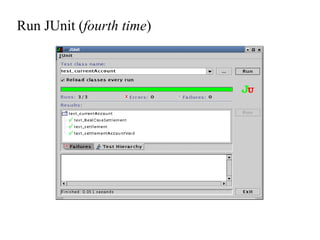
Run JUnit ( fourth time )
Refactoring “ improving the structure”
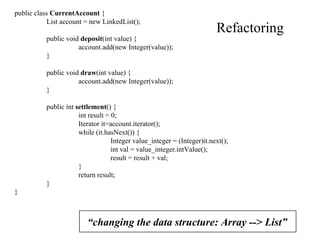
Refactoring “ changing the data structure: Array --> List” public class  CurrentAccount  { List account = new LinkedList(); public void  deposit (int value) { account.add(new Integer(value)); } public void  draw (int value) { account.add(new Integer(value)); } public int  settlement () { int result = 0; Iterator it=account.iterator(); while (it.hasNext()) { Integer value_integer = (Integer)it.next(); int val = value_integer.intValue(); result = result + val; } return result; } }
Run test
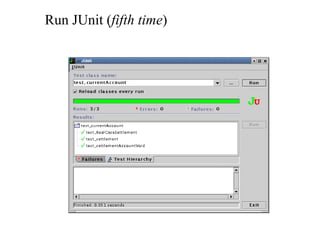
Run JUnit ( fifth time )
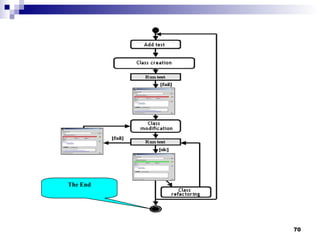
The End
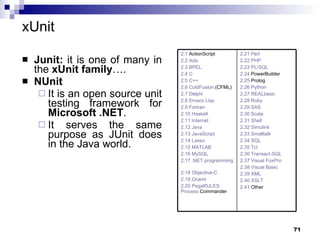
xUnit Junit:  it is one of many in the  xUnit family ….   NUnit   It is an open source unit testing framework for  Microsoft .NET . It serves the same purpose as JUnit does in the Java world. 2.21  Perl 2.22 PHP   2.23 PL/SQL   2.24  PowerBuilder   2.25  Prolog   2.26 Python   2.27 REALbasic   2.28 Ruby   2.29 SAS   2.30 Scala   2.31 Shell   2.32 Simulink   2.33 Smalltalk   2.34 SQL   2.35 Tcl   2.36 Transact-SQL   2.37 Visual FoxPro   2.38 Visual Basic   2.39 XML   2.40 XSLT   2.41  Other   2.1  ActionScript   2.2 Ada   2.3 BPEL   2.4 C   2.5 C++   2.6  ColdFusion  (CFML)   2.7 Delphi   2.8 Emacs Lisp   2.9 Fortran   2.10 Haskell   2.11 Internet   2.12 Java   2.13 JavaScript   2.14 Lasso   2.15 MATLAB   2.16 MySQL   2.17 .NET programming languages   2.18 Objective-C   2.19 Ocaml   2.20 PegaRULES  Process   Commander
“ The tip of the iceberg”   Coverage testing (JCoverage, Clover, …) Integration testing System/GUI testing (Jemmy, Abbot, …) Testing legacy applications Testing J2EE applications Testing database applications.  Testing EJBs Testing Web applications (HttpUnit, JWebUnit, …) Testing Web services Testing in isolation with Mock Objects …
References Reference WebSite :  http://ww.junit.org   JUnit 4.0 in 10 minutes   http://www.instrumentalservices.com/media/articles/java/junit4/JUnit4.pdf   Quick and easy introduction   http://clarkware.com/articles/JUnitPrimer.html   Ted Husted, Vincent Massol . JUnit in Action.  Book. Kent Beck, Eric Gamma,  Test Infected: Programmers Love Writing Tests.  http://junit.sourceforge.net/doc/testinfected/testing.htm   Bryan Dollery . JUnit and Its Extensions Make Unit Testing Your Java Code Much Easier.  http://www.devx.com/Java/Article/9614   Test First Demo:   http://rm.mirror.garr.it/mirrors/eclipse/technology/phoenix/demos/testfirst/testfirst.html An early look at JUnit 4 ,  http://www.ibm.com/developerworks/java/library/j-junit4.html   http://today.java.net/pub/a/today/2006/12/07/junit-reloaded.html   http://www.devx.com/Java/Article/31983/1763/page/2

3 j unit

  • 1.
    Unit Testing with JUnit Alessandro Marchetto Fondazione Bruno Kessler - IRST
  • 2.
    Iterative Software development+ system increment Prioritized functionalities Write acceptance tests Execute acceptance tests Write and execute unit tests “ Executed after the development ” “ Written before ”
  • 3.
    Business Logic GUIWeb UI Persistence Layer Jemmy/Abbot/JFCUnit/… HttpUnit/Canoo/Selenium Junit/SQLUnit/XMLUnit FIT/Fitnesse ( High level ) Junit ( Low level ) Cactus Perfomance and Load Testing JMeter/JUnitPerf Testing tools
  • 4.
    Junit is a unit test environment for Java programs developed by Erich Gamma and Kent Beck . Writing test cases Executing test cases Pass/fail? (expected result = obtained result?) Consists in a framework providing all the tools for testing. framework : set of classes and conventions to use them. It is integrated into eclipse through a graphical plug-in . Testing with JUnit
  • 5.
    Eclipse Eclipse ismostly known as a Java IDE. Thanks to its open architecture, Eclipse is wide open to extensions. Plug-ins Other languages and tools are being integrated in the platform. http://www.eclipse.org/ IDE = “Integrated development environment” writing programs executing programs debugging programs …
  • 6.
    Test framework test cases are Java code test case = “ sequence of operations +inputs + expected values” Junit (3.x and 4.x) Test code testDobleOf2(){ //.. doubleOf2(); //.. } Production code int doubleOf2(){ //… }
  • 7.
    JUnit 3.x fortesting programs JUnit tests “ substitute the use of main() to check the program behaviour” All we need to do is: write a sub-class of TestCase add to it one or more test methods run the test using JUnit junit.framework.*
  • 8.
    Framework elements TestCaseBase class for classes that contain tests assert * () Method family to check conditions TestSuite Enables grouping several test cases Testsuite Testcase 2 Testcase 1 Testcase 3
  • 9.
    TestCase Class: anexample import junit.framework.TestCase ; public class StackTester extends TestCase { public StackTester(String name) { super(name); } public void test Stack() { Stack aStack = new Stack(); if(!aStack.isEmpty()) { System.out.println(“Stack should be empty!”); aStack.push(10); aStack.push(-4); System.out.println(“Last element:“ + aStack.pop()); System.out.println(“First element: “ +aStack.pop()); } } Must begin with “test”
  • 10.
    Assert*() They arepublic methods defined in the base class TestCase Their names begin with “assert” and are used in test methods es. assertTrue(“stack should be empty”, aStack.empty()); If the condition is false: test fails execution skips the rest of the test method the message (if any) is printed If the condition is true: execution continues normally Method family to check conditions …
  • 11.
    Assert*() for aboolean condition assertTrue(“message for fail”, condition); assertFalse(“message”, condition); for object, int, long, and byte values assertEquals(expected_value, expression); for float and double values assertEquals(expected, expression, error); for objects references assertNull(reference) assertNotNull(reference) … obtained http://junit.org/apidocs/org/junit/Assert.html
  • 12.
    Assert: example publicvoid testStack() { Stack aStack = new Stack(); assertTrue(“Stack should be empty!”, aStack.isEmpty()); aStack.push(10); assertTrue(“Stack should not be empty!”,!aStack.isEmpty()); aStack.push(4); assertEquals(4, aStack.pop()); assertEquals(10, aStack.pop()); } class Stack { public boolean isEmpty(){ ... } public void push(int i){ ... } public int pop(int i){ ... } … }
  • 13.
    One concept ata time … public class StackTester extends TestCase { public void testStackEmpty() { Stack aStack = new Stack(); assertTrue(“Stack should be empty!”, aStack.isEmpty()); aStack.push(10); assertTrue(“Stack should not be empty!”, !aStack.isEmpty()); } public void testStackOperations() { Stack aStack = new Stack(); aStack.push(10); aStack.push(-4); assertEquals(-4, aStack.pop()); assertEquals(10, aStack.pop()); } } Code Modularization …
  • 14.
    Working rule Foreach test case class, JUnit execute all of its public test methods i.e. those whose name starts with “test” ignores everything else … Test classes can contain “ helper methods ” provided that are: non public, or whose name does not begin with “test”
  • 15.
    TestSuite Groups severaltest cases: public class AllTests extends TestSuite { public static TestSuite suite() { TestSuite suite = new TestSuite(); suite.addTestSuite( StackTester .class); suite.addTestSuite( AnotherTester .class); return suite; } } junit.framework.*
  • 16.
    Test of “Exceptions”There are two cases: We expect a normal behavior and then no exceptions. We expect an anomalous behavior and then an exception.
  • 17.
    We expect anormal behavior … try { // We call the method with correct parameters object.method(“Parameter&quot;); assertTrue(true); // OK } catch(PossibleException e){ fail (“method should not fail !!!&quot;); } class TheClass { public void method(String p) throws PossibleExcetion { /*... */ } }
  • 18.
    We expect anexception … try { // we call the method with wrong parameters object.method( null ); fail (“method should fail!!&quot;); } catch(PossibleException e){ assertTrue(true); // OK } class TheClass { public void method(String p) throws PossibleException { /*... */ } }
  • 19.
    SetUp() and tearDown()setUp() method initialize object(s) under test. called before every test method tearDown() method release object(s) under test called after every test case method. ShoppingCart cart; Book book; protected void setUp() { cart = new ShoppingCart(); book = new Book(“JUnit&quot;, 29.95); cart.addItem(book); } …
  • 20.
    Junit in eclipse- Setup In Eclipse Create a new project Open project’s property window (File -> Properties) Select: Java build path Select: libraries Add Library Select Junit Select the type 3.x or 4.x
  • 21.
    Create a newJUnit test case File New Junit Test Case Set the parameters: Junit 3.x or 4.x name of the class etc. Finish Eclipse Menu File Edit Source Refactor Navigate Search Project Run Window Help
  • 22.
    Run as JUnitTest Run Run As Junit Test Eclipse Menu File Edit Source Refactor Navigate Search Project Run Window Help
  • 23.
    Red / GreenBar Fail Pass expected <-3> but was <-4>
  • 24.
    JUnit 3.x andJUnit 4.x Most things are about equally easy JUnit 4 can still run JUnit 3 tests All the old assert XXX methods are the same JUnit 4 has some additional features JUnit 4 provides protection against infinite loops Junit 4 uses annotations (@)
  • 25.
    From JUnit 3.xto 4.x JUnit 4 requires Java 5 or newer Don’t extend junit.framework.TestCase ; just use an ordinary class Import org.junit.* and org.junit.Assert.* Use a static import for org.junit.Assert.* Static imports replace inheritance from junit.framework.TestCase Use annotations instead of special method names: Instead of a setUp method, put @Before before some method Instead of a tearDown method, put @After before some method Instead of beginning test method names with ‘ test ’, put @Test before each test method
  • 26.
    J2SE 5 introducesthe Metadata feature (data about data) Annotations allow you to add decorations to your code (remember javadoc tags: @author ) Annotations are used for code documentation, compiler processing (@Deprecated ), code generation, runtime processing New annotations can be created by developers http ://java.sun.com/docs/books/tutorial/java/javaOO/annotations.html Annotations in J2SE
  • 27.
    … . @Override — it is a predefined annotation used by the Java compiler It informs the compiler that the element (a method) is meant to override an element declared in a superclass // mark method as a superclass method // that has been overridden @Override int overriddenMethod() { } While it's not required to use this annotation when overriding a method, it helps to prevent errors. If a method marked with @Override fails in correctly overriding the original method in its superclass, the compiler generates an error. Annotations in J2SE … an example
  • 28.
    Junit 4.x fortesting programs Import the JUnit 4 classes you need import org.junit.*; import static org.junit.Assert.*; Declare your (conventional) Java class public class MyProgramTest { Declare any variables you are going to use, e.g., an instance of the class being tested MyProgram program; int [ ] array; int solution;
  • 29.
    If needed, define one method to be executed just once, when the class is first loaded . For instance, when we need to connecting to a database @BeforeClass public static void setUpClass() throws Exception { // one-time initialization code } If needed, define one method to be executed just once, to do cleanup after all the tests have been completed @AfterClass public static void tearDownClass() throws Exception { // one-time cleanup code } Junit 4.x for testing programs (2)
  • 30.
    If needed, define one or more methods to be executed before each test , e.g., typically for initializing values @Before public void setUp() { program = new MyProgram(); array = new int[] { 1, 2, 3, 4, 5 }; } If needed, define one or more methods to be executed after each test , e.g., typically for releasing resources (files, etc.) @After public void tearDown() { } Junit 4.x for testing programs (3)
  • 31.
    @Before and @Aftermethods More than one @Before and/or @After methods can be defined in a test case Attention: we don’t know in what order they will execute We can inherit @Before and @After methods from a superclass; execution is as follows: Execute the @Before methods in the superclass Execute the @Before methods in this class Execute a @Test method in this class Execute the @After methods in this class Execute the @After methods in the superclass
  • 32.
    - Atest method is annotated with @Test It takes no parameters, and returns no result. All the usual assert XXX methods can be used @Test public void sum() { assertEquals(15, program.sum(array)); assertTrue(program.min(array) > 0); } Junit 4.x for testing programs (4)
  • 33.
    Additional Features of@Test To avoid infinite loops, an execution time limit can be used. The time limit is specified in milliseconds. The test fails if the method takes too long. @Test (timeout=10) public void greatBig() { assertTrue(program.ackerman(5, 5) > 10e12); } Some method calls should throw an exception. We can specify that an exception is expected. The test will pass if the expected exception is thrown, and fail otherwise @Test (expected=IllegalArgumentException.class) public void factorial() { program.factorial(-5); }
  • 34.
    Parameterized tests Using @RunWith(value=Parameterized.class) and a method @Parameters , a test class is executed with several inputs @RunWith(value=Parameterized.class) public class FactorialTest { private long expected; private int value; @Parameters public static Collection data() { return Arrays.asList( new Object[ ][ ] { { 1, 0 }, { 1, 1 }, { 2, 2 }, { 120, 5 } }); } public FactorialTest(long expected, int value) { // constructor this.expected = expected; this.value = value; } @Test public void factorial() { assertEquals(expected, new Calculator().factorial(value)); } } import org.junit.runner.RunWith; import org.junit.runners.Parameterized; import org.junit.runners.Parameterized.Parameters; Parameters used to exercise different instances of the class
  • 35.
    Test suites Asbefore, you can define a suite of tests @RunWith(value=Suite.class) @SuiteClasses(value={ value=test1.class, value=test2.class }) public class AllTests { … } import org.junit.runners.Suite ; import org.junit.runners.Suite.SuiteClasses ; It could be empty
  • 36.
    Additional features ofJunit 4 Instead of JUnit 3’s AssertionFailedError, now failed tests throw an AssertionError There is now an additional version of assertEquals for arrays of objects: assertEquals(Object[] expected, Object[] actual) JUnit 3 had an assertEquals( p , p ) method for each kind of primitive p , but JUnit 4 only has an assertEquals( object , object ) and depends on autoboxing @Override public boolean equals(Object o){ … return … ; }
  • 37.
    Autoboxing example Considerthe following method: “ long sum(long x, long y) { return x + y; }” and the following test: @Test public void sum() { assertEquals(4, s.sum(2, 2)); } it fails and gives: expected: <4> but was: <4> This is for the autoboxing assertEquals no longer exists for primitives, only for objects! Hence, the 4 is autoboxed to an Integer , while sum returns a long The error message means: expected int 4, but got long 4 To make this work, change the 4 to a “4L” or “(long)4” assertEquals((long)4, s.sum(2, 2));
  • 38.
    public class MySum { public static int sum (int a, int b) { return a+b; } } Summarizing… an example (Junit 3.x) Test case 1 import junit.framework.TestCase; import math.Add; public class TestCase1_add_Junit3 extends TestCase { public void testAdd() { Add add= new Add(); int sum=add. sum (3, 2); assertEquals (5, sum); } }
  • 39.
    Summarizing… an example(Junit 3.x) Test case 2 import junit.framework.TestCase; import math.Add; public class TestCase1_add_Junit3 extends TestCase { public void testAdd() {… } public void testAdd_2() { Add add= new Add(); int sum=add. sum (3, -2); assertEquals (5, sum); } }
  • 40.
    Summarizing… an example(Junit 3.x) Test case 2 import junit.framework.TestCase; import math.Add; public class TestCase1_add_Junit3 extends TestCase { public void testAdd() {… } public void testAdd_2() { Add add= new Add(); int sum=add. sum (3, -2); assertEquals (5, sum); } }
  • 41.
    public class MySum { public static int sum (int a, int b) { return a+b; } } Summarizing… an example (Junit 4.x) import math.Add; import org.junit.*; import static org.junit.Assert.*; public class Testcase1_add_Junit4 { @Test public void testAdd() { Add add= new Add(); int sum=add. sum (3, 2); assertEquals (5, sum); } }
  • 42.
    When testing programs?Test last The conventional way for testing in which testing follows the implementation Test first The Extreme-Programming view in which testing is used as a developement tool
  • 43.
    Test last New functionality Understand Implement functionality Write tests Run all tests Result? Rework fail pass Next functionality
  • 44.
    Test first “Extreme programming” ( XP ) champions the use of tests as a development tool … New functionality Understand Add a single test Add code for the test Run all test Result? Rework Functionality complete? fail pass No Next functionality Yes “ Extreme programming” ( XP ) champions the use of tests as a development tool …
  • 45.
    Test First AdvantagesEach method has associated a testcase the confidence of our code increases … It simplifies: refactoring/restructuring maintenance the introduction of new functionalities Test first help to build the documentation testcases are good “use samples” Programming is more fun …
  • 46.
    Add the skeletonof the class and methods (without body) Test-first with Junit Rework Refactoring “ improving the structure” Add a testcase Run test Run test
  • 47.
    Junit in practice … Existing system: a class current account to manage a bank account deposit withdraw Add a new functionality settlement Example: CurrentAccount cc = new CurrentAccount(); cc.deposit(12); cc.draw(-8); cc.deposit(10); cc.settlement() expected value 14 euro!
  • 48.
  • 49.
    Add Testcases forthe settlement method class Test_CurrentAccount extends TestCase { public void test_settlementVoid () { CurrentAccount c = new CurrentAccount(); assertEquals (0, c.settlement()); } public void test_settlement () { CurrentAccount c = new CurrentAccount(); c.deposit(12); c.draw(-8); c.deposit(10); assertEquals (14, c.settlement()); } } test first …
  • 50.
    Add the skeletonof the class and methods (without body)
  • 51.
    Add the skeletonecode of the method class CurrentAccount { int account[]; int lastMove; CurrentAccount (){ lastMove=0; account=new int[10]; } public void deposit (int value){ account[lastMove]=value; lastMove++; } public void draw (int value) { account[lastMove]=value; lastMove++; } public int settlement () {return 0;} public static void main (String args[]) {} } class Test_CurrentAccount extends TestCase { public void test_settlementVoid () { currentAccount c = new currentAccount(); assertEquals (0, c.settlement()); } public void test_settlement () { currentAccount c = new currentAccount(); c.deposit(12); c.draw(-8); c.deposit(10); assertEquals (14, c.settlement()); } }
  • 52.
  • 53.
    Run Junit (first time )
  • 54.
  • 55.
    Rework class CurrentAccount { int account[]; int lastMove; CurrentAccount (){ lastMove=0; account=new int[10]; } public void deposit (int value){ …} public void draw (int value) { …} public int settlement () { int result = 0 for (int i=0; i<account.length; i++) { result = result + account[i]; } return result; } public static void main (String args[]) {} } class Test_CurrentAccount extends TestCase { public void test_settlementVoid () { currentAccount c = new currentAccount(); assertEquals (0, c.settlement()); } public void test_settlement () { currentAccount c = new currentAccount(); c.deposit(12); c.draw(-8); c.deposit(10); assertEquals (14, c.settlement()); } }
  • 56.
  • 57.
    Run Junit (second time )
  • 58.
  • 59.
    Add a newtestcase class CurrentAccount { int account[]; int lastMove; CurrentAccount (){ lastMove=0; account=new int[10]; } public void deposit (int value){ …} public void draw (int value) { …} public int settlement () { int result = 0 for (int i=0; i<account.length; i++) { result = result + account[i]; } return result; } public static void main (String args[]) {} } class Test_currentAccount extends TestCase { … public void test_realCaseSettlement () { currentAccount c = new currentAccount(); for (int i=0; i <10 ; i++) c.deposit(1); c.draw(-10); assertEquals (0, c.settlement()); } }
  • 60.
  • 61.
    Run JUnit (third time ) Run time error
  • 62.
  • 63.
    class CurrentAccount { int account[]; int lastMove; CurrentAccount (){ lastMove=0; account=new int[ 100 ]; } public void deposit (int value){ …} public void draw (int value) { …} public int settlement () { int result = 0 for (int i=0; i<account.length; i++) { result = result + account[i]; } return result; } public static void main (String args[]) {} } class Test_currentAccount extends TestCase { … public void test_realCaseSettlement () { currentAccount c = new currentAccount(); for (int i=0; i <10 ; i++) c.deposit(1); c.draw(-10); assertTrue (0, c.settlement()); } } Rework
  • 64.
  • 65.
    Run JUnit (fourth time )
  • 66.
    Refactoring “ improvingthe structure”
  • 67.
    Refactoring “ changingthe data structure: Array --> List” public class CurrentAccount { List account = new LinkedList(); public void deposit (int value) { account.add(new Integer(value)); } public void draw (int value) { account.add(new Integer(value)); } public int settlement () { int result = 0; Iterator it=account.iterator(); while (it.hasNext()) { Integer value_integer = (Integer)it.next(); int val = value_integer.intValue(); result = result + val; } return result; } }
  • 68.
  • 69.
    Run JUnit (fifth time )
  • 70.
  • 71.
    xUnit Junit: it is one of many in the xUnit family …. NUnit It is an open source unit testing framework for Microsoft .NET . It serves the same purpose as JUnit does in the Java world. 2.21 Perl 2.22 PHP 2.23 PL/SQL 2.24 PowerBuilder 2.25 Prolog 2.26 Python 2.27 REALbasic 2.28 Ruby 2.29 SAS 2.30 Scala 2.31 Shell 2.32 Simulink 2.33 Smalltalk 2.34 SQL 2.35 Tcl 2.36 Transact-SQL 2.37 Visual FoxPro 2.38 Visual Basic 2.39 XML 2.40 XSLT 2.41 Other 2.1 ActionScript 2.2 Ada 2.3 BPEL 2.4 C 2.5 C++ 2.6 ColdFusion (CFML) 2.7 Delphi 2.8 Emacs Lisp 2.9 Fortran 2.10 Haskell 2.11 Internet 2.12 Java 2.13 JavaScript 2.14 Lasso 2.15 MATLAB 2.16 MySQL 2.17 .NET programming languages 2.18 Objective-C 2.19 Ocaml 2.20 PegaRULES Process Commander
  • 72.
    “ The tipof the iceberg” Coverage testing (JCoverage, Clover, …) Integration testing System/GUI testing (Jemmy, Abbot, …) Testing legacy applications Testing J2EE applications Testing database applications. Testing EJBs Testing Web applications (HttpUnit, JWebUnit, …) Testing Web services Testing in isolation with Mock Objects …
  • 73.
    References Reference WebSite: http://ww.junit.org JUnit 4.0 in 10 minutes http://www.instrumentalservices.com/media/articles/java/junit4/JUnit4.pdf Quick and easy introduction http://clarkware.com/articles/JUnitPrimer.html Ted Husted, Vincent Massol . JUnit in Action. Book. Kent Beck, Eric Gamma, Test Infected: Programmers Love Writing Tests. http://junit.sourceforge.net/doc/testinfected/testing.htm Bryan Dollery . JUnit and Its Extensions Make Unit Testing Your Java Code Much Easier. http://www.devx.com/Java/Article/9614 Test First Demo: http://rm.mirror.garr.it/mirrors/eclipse/technology/phoenix/demos/testfirst/testfirst.html An early look at JUnit 4 , http://www.ibm.com/developerworks/java/library/j-junit4.html http://today.java.net/pub/a/today/2006/12/07/junit-reloaded.html http://www.devx.com/Java/Article/31983/1763/page/2