JSON TO HIVE SCHEMA
GENERATOR
CONTENTS
 WHAT IS BIGDATA?
 HADOOP & IT’S ECOSYSTEM
 CORE COMPONENTS OF HADOOP
 HADOOP HIGH LEVEL ARCHITECTURE
 OVERVIEW OF APACHE HIVE
 HIVE DATA MODEL AND IT’s DATATYPES
 ANALYSING JSON DATA IN HIVE
 OVERVIEW OF JSON TO HIVE SCHEMA GENERATOR
 CHALLENGES WITH SEMI_STRUCTURED DATA OR JSON DATA
 DATA SAMPLE
 EXECUTION
 SAMPLE EXAMPLE
 IMPORTANCE OF SCHEMA GENERATOR
BIGDATA
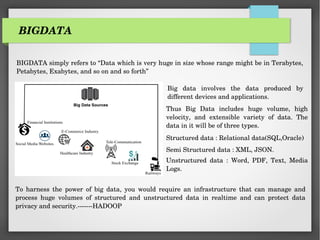
BIGDATA simply refers to “Data which is very huge in size whose range might be in Terabytes,
Petabytes, Exabytes, and so on and so forth”
Big data involves the data produced by
different devices and applications.
Thus Big Data includes huge volume, high
velocity, and extensible variety of data. The
data in it will be of three types.
Structured data : Relational data(SQL,Oracle)
Semi Structured data : XML, JSON.
Unstructured data : Word, PDF, Text, Media
Logs.
To harness the power of big data, you would require an infrastructure that can manage and
process huge volumes of structured and unstructured data in realtime and can protect data
privacy and security.-------HADOOP
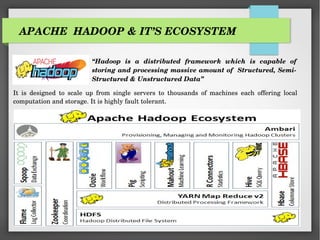
APACHE HADOOP & IT’S ECOSYSTEM
“Hadoop is a distributed framework which is capable of
storing and processing massive amount of Structured, Semi-
Structured & Unstructured Data”
It is designed to scale up from single servers to thousands of machines each offering local
computation and storage. It is highly fault tolerant.
CORE COMPONENTS OF HADOOP
Hadoop Distributed Framework is designed to handle large data sets. It can scale out to several
thousands of nodes and process enormous amount of data in Parallel Distributed Approach.
Apache Hadoop consists of two components. First one is HDFS (Hadoop Distributed File
System) and the second component is Map Reduce (MR). Hadoop is write once and read many
times.
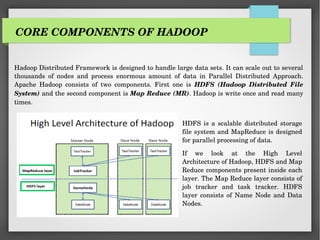
HDFS is a scalable distributed storage
file system and MapReduce is designed
for parallel processing of data.
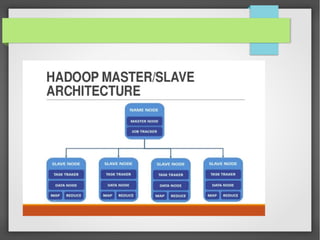
If we look at the High Level
Architecture of Hadoop, HDFS and Map
Reduce components present inside each
layer. The Map Reduce layer consists of
job tracker and task tracker. HDFS
layer consists of Name Node and Data
Nodes.
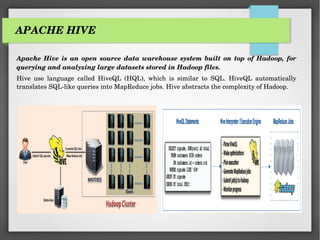
APACHE HIVE
Apache Hive is an open source data warehouse system built on top of Hadoop, for
querying and analyzing large datasets stored in Hadoop files.
Hive use language called HiveQL (HQL), which is similar to SQL. HiveQL automatically
translates SQL-like queries into MapReduce jobs. Hive abstracts the complexity of Hadoop.
HIVE DATA MODEL
Apache Hive tables are the same as the tables present in a Relational Database. The table in
Hive is logically made up of the data being stored. And the associated metadata describes the
layout of the data in the table.
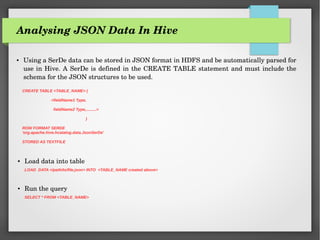
Analysing JSON Data In Hive
● Using a SerDe data can be stored in JSON format in HDFS and be automatically parsed for
use in Hive. A SerDe is defined in the CREATE TABLE statement and must include the
schema for the JSON structures to be used.
CREATE TABLE <TABLE_NAME> (
<fieldName1 Type,
fieldName2 Type,.........>
)
ROW FORMAT SERDE
'org.apache.hive.hcatalog.data.JsonSerDe'
STORED AS TEXTFILE
● Load data into table
LOAD DATA </path/to/file.json> INTO <TABLE_NAME created above>
● Run the query
SELECT * FROM <TABLE_NAME>
JSON TO HIVE SCHEMA GENERATOR
JSON To Hive Schema Generator is a command line tool designed to automatically generate
hive schema from JSON Data.
JSON can arrive at your cluster from lots of different places. It’s becoming one of the most
widely used ways of representing a semi-structured collection of data fields. Some of the top
sources include REST APIs, networks of sensors or devices, or the representation of data
that originated in other formats.
Handling large JSON-based datasets in Hadoop can be a project unto itself. Endless hours
toiling away into obscurity with complicated transformations, extractions, and flattening.
Data is stored as JSON with multiple JSON objects per file (For instance, Twitter logs with
around 500 tweets or so). Handling this data using hive would require a tool to generate the
JSON-HIVE schema structure and a SerDe for JSON data
CHALLENGES IN HANDLING JSON DATA
● Multiple JSON objects per file
● Extracting necessary insights from JSON data with multiple records tends to be
cumbersome
● Nested data structure, It might contain an entities element, which is a nested structure. It
might contain arrays/structs, the elements of which are all nested structures in their own
right. Thus it becomes very hard to force JSON data into a standard schema
● Handling sorts of data with a schema that may vary from record to record
● Object in one record might be missing in some other record
● Handling NULL values (Value for one key might be existing in one record and NULL in
another record)
● Dealing with huge amount of data say gigabytes or terabytes with the above defined
complexities and then defining a schema for it becomes a complicated task. (Since we need
to parse millions of records to determine the schema definition)
DATA SAMPLE
INPUT (input.json)
{
"created_at":"Wed Aug 22 02:06:33 +0000 2012",
"entities":{
"hashtags":[
{
"indices":[103,111],
"text":"Angular"
}
],
"symbols":[],
"urls":[
{
"display_url":"buff.ly/2sr60pf",
"expanded_url":"http://buff.ly/2sr60pf",
"indices":[79,102],
"url":"https://t.co/xFox78juL1"
}
],
"user_mentions":[]
},
"favourites_count":57,
"followers_count":2145,
"friends_count":18,
"id":877994604561387500,
"id_str":"877994604561387520",
"listed_count":328,
"protected":false,
"source":"<a href="http://bufferapp.com" rel="nofollow">Buffer</a>",
"text":"Creating a Grocery List Manager Using Angular, Part 1: Add &amp; Display Items https://t.co/xFox78juL1 #Angular",
"time_zone":"Wellington",
"truncated":false,
"user":{
"description":"Keep up with JavaScript tutorials, tips, tricks and articles at SitePoint.",
"id":772682964,
"id_str":"772682964",
"location":"Melbourne, Australia",
"name":"SitePoint JavaScript",
"screen_name":"SitePointJS",
"url":"http://t.co/cCH13gqeUK"
},
"utc_offset":43200
}
SIMPLE???? LET’zzzz see for more SAMPLE DATASETS
The below sample only shows nested complexity of json data.
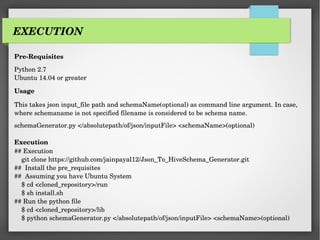
Pre-Requisites
Python 2.7
Ubuntu 14.04 or greater
Usage
This takes json input_file path and schemaName(optional) as command line argument. In case,
where schemaname is not specified filename is considered to be schema name.
schemaGenerator.py </absolutepath/of/json/inputFile> <schemaName>(optional)
Execution
## Execution
git clone https://github.com/jainpayal12/Json_To_HiveSchema_Generator.git
## Install the pre_requisites
## Assuming you have Ubuntu System
$ cd <cloned_repository>/run
$ sh install.sh
## Run the python file
$ cd <cloned_repository>/lib
$ python schemaGenerator.py </absolutepath/of/json/inputFile> <schemaName>(optional)
EXECUTION
SAMPLE EXAMPLE
INPUT (twitterInput.json)
{
"created_at":"Wed Aug 22 02:06:33 +0000 2012",
"entities":{
"hashtags":[
{
"indices":[103,111],
"text":"Angular"
}
],
"symbols":[],
"urls":[
{
"display_url":"buff.ly/2sr60pf",
"expanded_url":"http://buff.ly/2sr60pf",
"indices":[79,102],
"url":"https://t.co/xFox78juL1"
}
],
"user_mentions":[]
},
"favourites_count":57,
"followers_count":2145,
"friends_count":18,
"id":877994604561387500,
"id_str":"877994604561387520",
"listed_count":328,
"protected":false,
"source":"<a href="http://bufferapp.com" rel="nofollow">Buffer</a>",
"text":"Creating a Grocery List Manager Using Angular, Part 1: Add &amp; Display Items https://t.co/xFox78juL1 #Angular",
"time_zone":"Wellington",
"truncated":false,
"user":{
"description":"Keep up with JavaScript tutorials, tips, tricks and articles at SitePoint.",
"id":772682964,
"id_str":"772682964",
"location":"Melbourne, Australia",
"name":"SitePoint JavaScript",
"screen_name":"SitePointJS",
"url":"http://t.co/cCH13gqeUK"
},
"utc_offset":43200
}
SCHEMA NAME ARGUMENT MISSING. USING SCHEMA NAME TO BE THE FILENAME PROVIDED AS INPUT
I:e twitterInput
CREATING HIVE SCHEMA DEFINITION FOR FILE twitterInput.json WITH SCHEMA_NAME twitterInput
************SCHEMA DEFINITION*********************
create table twitterInput(utc_offset SMALLINT,
favourites_count TINYINT,
friends_count TINYINT,
truncated BOOLEAN,
source STRING,
text STRING,
created_at STRING,
time_zone STRING,
entities STRUCT<screen_name:STRING,id_str:STRING,name:STRING,url:STRING,description:STRING,id:INT,location:STRING,
symbols:NULL, user_mentions:NULL,hashtags:ARRAY<STRUCT<indices:ARRAY<TINYINT>,text:STRING>>,
urls:ARRAY<STRUCT<url:STRING,indices:ARRAY<TINYINT>,expanded_url:STRING,display_url:STRING>>>,
followers_count SMALLINT,
protected BOOLEAN,
user STRUCT<screen_name:STRING,id_str:STRING,name:STRING,url:STRING,description:STRING,id:INT,location:STRING>,
listed_count SMALLINT,
id INT,
id_str STRING,
)
cd <cloned_repository>/lib
$ python schemaGenerator.py input.json
OUTPUT (HIVE_SCHEMA_DEFINITION)
IMPORTANCE OF SCHEMA GENERATOR
 JSON TO HIVE SCHEMA GENERATOR is a handy tool that effortlessly converts your JSON
data to Hive schema, which then can be used with JSON serde to carry out processing of data
 It resolves all the complexities faced in handling JSON Data
 Also it resolves challenge of handling huge volume of data as it uses HIVE. HIVE is an ETL
Tool built on top of Hadoop, for querying and analyzing large datasets stored in Hadoop files
 More productive than an individual first acquiring the knowledge on dataset and writing a
schema definition
 Helps in automating a process. For Instance analysis of twitter log files.
Schema generator will help in creating partition tables which can be scheduled using oozie
 Reduces time taken to generate schema for huge data.

Json to hive_schema_generator

  • 1.
    JSON TO HIVESCHEMA GENERATOR
  • 2.
    CONTENTS  WHAT ISBIGDATA?  HADOOP & IT’S ECOSYSTEM  CORE COMPONENTS OF HADOOP  HADOOP HIGH LEVEL ARCHITECTURE  OVERVIEW OF APACHE HIVE  HIVE DATA MODEL AND IT’s DATATYPES  ANALYSING JSON DATA IN HIVE  OVERVIEW OF JSON TO HIVE SCHEMA GENERATOR  CHALLENGES WITH SEMI_STRUCTURED DATA OR JSON DATA  DATA SAMPLE  EXECUTION  SAMPLE EXAMPLE  IMPORTANCE OF SCHEMA GENERATOR
  • 3.
    BIGDATA BIGDATA simply refersto “Data which is very huge in size whose range might be in Terabytes, Petabytes, Exabytes, and so on and so forth” Big data involves the data produced by different devices and applications. Thus Big Data includes huge volume, high velocity, and extensible variety of data. The data in it will be of three types. Structured data : Relational data(SQL,Oracle) Semi Structured data : XML, JSON. Unstructured data : Word, PDF, Text, Media Logs. To harness the power of big data, you would require an infrastructure that can manage and process huge volumes of structured and unstructured data in realtime and can protect data privacy and security.-------HADOOP
  • 4.
    APACHE HADOOP &IT’S ECOSYSTEM “Hadoop is a distributed framework which is capable of storing and processing massive amount of Structured, Semi- Structured & Unstructured Data” It is designed to scale up from single servers to thousands of machines each offering local computation and storage. It is highly fault tolerant.
  • 5.
    CORE COMPONENTS OFHADOOP Hadoop Distributed Framework is designed to handle large data sets. It can scale out to several thousands of nodes and process enormous amount of data in Parallel Distributed Approach. Apache Hadoop consists of two components. First one is HDFS (Hadoop Distributed File System) and the second component is Map Reduce (MR). Hadoop is write once and read many times. HDFS is a scalable distributed storage file system and MapReduce is designed for parallel processing of data. If we look at the High Level Architecture of Hadoop, HDFS and Map Reduce components present inside each layer. The Map Reduce layer consists of job tracker and task tracker. HDFS layer consists of Name Node and Data Nodes.
  • 7.
    APACHE HIVE Apache Hiveis an open source data warehouse system built on top of Hadoop, for querying and analyzing large datasets stored in Hadoop files. Hive use language called HiveQL (HQL), which is similar to SQL. HiveQL automatically translates SQL-like queries into MapReduce jobs. Hive abstracts the complexity of Hadoop.
  • 8.
    HIVE DATA MODEL ApacheHive tables are the same as the tables present in a Relational Database. The table in Hive is logically made up of the data being stored. And the associated metadata describes the layout of the data in the table.
  • 9.
    Analysing JSON DataIn Hive ● Using a SerDe data can be stored in JSON format in HDFS and be automatically parsed for use in Hive. A SerDe is defined in the CREATE TABLE statement and must include the schema for the JSON structures to be used. CREATE TABLE <TABLE_NAME> ( <fieldName1 Type, fieldName2 Type,.........> ) ROW FORMAT SERDE 'org.apache.hive.hcatalog.data.JsonSerDe' STORED AS TEXTFILE ● Load data into table LOAD DATA </path/to/file.json> INTO <TABLE_NAME created above> ● Run the query SELECT * FROM <TABLE_NAME>
  • 10.
    JSON TO HIVESCHEMA GENERATOR JSON To Hive Schema Generator is a command line tool designed to automatically generate hive schema from JSON Data. JSON can arrive at your cluster from lots of different places. It’s becoming one of the most widely used ways of representing a semi-structured collection of data fields. Some of the top sources include REST APIs, networks of sensors or devices, or the representation of data that originated in other formats. Handling large JSON-based datasets in Hadoop can be a project unto itself. Endless hours toiling away into obscurity with complicated transformations, extractions, and flattening. Data is stored as JSON with multiple JSON objects per file (For instance, Twitter logs with around 500 tweets or so). Handling this data using hive would require a tool to generate the JSON-HIVE schema structure and a SerDe for JSON data
  • 11.
    CHALLENGES IN HANDLINGJSON DATA ● Multiple JSON objects per file ● Extracting necessary insights from JSON data with multiple records tends to be cumbersome ● Nested data structure, It might contain an entities element, which is a nested structure. It might contain arrays/structs, the elements of which are all nested structures in their own right. Thus it becomes very hard to force JSON data into a standard schema ● Handling sorts of data with a schema that may vary from record to record ● Object in one record might be missing in some other record ● Handling NULL values (Value for one key might be existing in one record and NULL in another record) ● Dealing with huge amount of data say gigabytes or terabytes with the above defined complexities and then defining a schema for it becomes a complicated task. (Since we need to parse millions of records to determine the schema definition)
  • 12.
    DATA SAMPLE INPUT (input.json) { "created_at":"WedAug 22 02:06:33 +0000 2012", "entities":{ "hashtags":[ { "indices":[103,111], "text":"Angular" } ], "symbols":[], "urls":[ { "display_url":"buff.ly/2sr60pf", "expanded_url":"http://buff.ly/2sr60pf", "indices":[79,102], "url":"https://t.co/xFox78juL1" } ], "user_mentions":[] }, "favourites_count":57, "followers_count":2145, "friends_count":18, "id":877994604561387500, "id_str":"877994604561387520", "listed_count":328, "protected":false, "source":"<a href="http://bufferapp.com" rel="nofollow">Buffer</a>", "text":"Creating a Grocery List Manager Using Angular, Part 1: Add &amp; Display Items https://t.co/xFox78juL1 #Angular", "time_zone":"Wellington", "truncated":false, "user":{ "description":"Keep up with JavaScript tutorials, tips, tricks and articles at SitePoint.", "id":772682964, "id_str":"772682964", "location":"Melbourne, Australia", "name":"SitePoint JavaScript", "screen_name":"SitePointJS", "url":"http://t.co/cCH13gqeUK" }, "utc_offset":43200 } SIMPLE???? LET’zzzz see for more SAMPLE DATASETS The below sample only shows nested complexity of json data.
  • 13.
    Pre-Requisites Python 2.7 Ubuntu 14.04or greater Usage This takes json input_file path and schemaName(optional) as command line argument. In case, where schemaname is not specified filename is considered to be schema name. schemaGenerator.py </absolutepath/of/json/inputFile> <schemaName>(optional) Execution ## Execution git clone https://github.com/jainpayal12/Json_To_HiveSchema_Generator.git ## Install the pre_requisites ## Assuming you have Ubuntu System $ cd <cloned_repository>/run $ sh install.sh ## Run the python file $ cd <cloned_repository>/lib $ python schemaGenerator.py </absolutepath/of/json/inputFile> <schemaName>(optional) EXECUTION
  • 14.
    SAMPLE EXAMPLE INPUT (twitterInput.json) { "created_at":"WedAug 22 02:06:33 +0000 2012", "entities":{ "hashtags":[ { "indices":[103,111], "text":"Angular" } ], "symbols":[], "urls":[ { "display_url":"buff.ly/2sr60pf", "expanded_url":"http://buff.ly/2sr60pf", "indices":[79,102], "url":"https://t.co/xFox78juL1" } ], "user_mentions":[] }, "favourites_count":57, "followers_count":2145, "friends_count":18, "id":877994604561387500, "id_str":"877994604561387520", "listed_count":328, "protected":false, "source":"<a href="http://bufferapp.com" rel="nofollow">Buffer</a>", "text":"Creating a Grocery List Manager Using Angular, Part 1: Add &amp; Display Items https://t.co/xFox78juL1 #Angular", "time_zone":"Wellington", "truncated":false, "user":{ "description":"Keep up with JavaScript tutorials, tips, tricks and articles at SitePoint.", "id":772682964, "id_str":"772682964", "location":"Melbourne, Australia", "name":"SitePoint JavaScript", "screen_name":"SitePointJS", "url":"http://t.co/cCH13gqeUK" }, "utc_offset":43200 }
  • 15.
    SCHEMA NAME ARGUMENTMISSING. USING SCHEMA NAME TO BE THE FILENAME PROVIDED AS INPUT I:e twitterInput CREATING HIVE SCHEMA DEFINITION FOR FILE twitterInput.json WITH SCHEMA_NAME twitterInput ************SCHEMA DEFINITION********************* create table twitterInput(utc_offset SMALLINT, favourites_count TINYINT, friends_count TINYINT, truncated BOOLEAN, source STRING, text STRING, created_at STRING, time_zone STRING, entities STRUCT<screen_name:STRING,id_str:STRING,name:STRING,url:STRING,description:STRING,id:INT,location:STRING, symbols:NULL, user_mentions:NULL,hashtags:ARRAY<STRUCT<indices:ARRAY<TINYINT>,text:STRING>>, urls:ARRAY<STRUCT<url:STRING,indices:ARRAY<TINYINT>,expanded_url:STRING,display_url:STRING>>>, followers_count SMALLINT, protected BOOLEAN, user STRUCT<screen_name:STRING,id_str:STRING,name:STRING,url:STRING,description:STRING,id:INT,location:STRING>, listed_count SMALLINT, id INT, id_str STRING, ) cd <cloned_repository>/lib $ python schemaGenerator.py input.json OUTPUT (HIVE_SCHEMA_DEFINITION)
  • 16.
    IMPORTANCE OF SCHEMAGENERATOR  JSON TO HIVE SCHEMA GENERATOR is a handy tool that effortlessly converts your JSON data to Hive schema, which then can be used with JSON serde to carry out processing of data  It resolves all the complexities faced in handling JSON Data  Also it resolves challenge of handling huge volume of data as it uses HIVE. HIVE is an ETL Tool built on top of Hadoop, for querying and analyzing large datasets stored in Hadoop files  More productive than an individual first acquiring the knowledge on dataset and writing a schema definition  Helps in automating a process. For Instance analysis of twitter log files. Schema generator will help in creating partition tables which can be scheduled using oozie  Reduces time taken to generate schema for huge data.