jQuery
WEB ENGINEERING
By: Muhammad Adeel
jQuery
• jQuery is a JavaScript Library.
• jQuery greatly simplifies JavaScript
programming.
• jQuery is easy to learn.
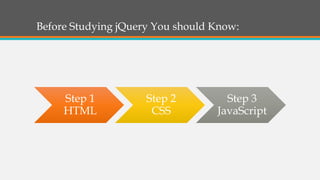
Before Studying jQuery You should Know:
Step 1
HTML
Step 2
CSS
Step 3
JavaScript
Purpose
• jQuery is a lightweight, "write less, do more", JavaScript
library.
• The purpose of jQuery is to make it much easier to use
JavaScript on your website.
• jQuery takes a lot of common tasks that require many
lines of JavaScript code to accomplish, you can call with a
single line of code.
• Many of the biggest companies on the Web use jQuery,
such as: Google, Microsoft, IBM, Netflix.
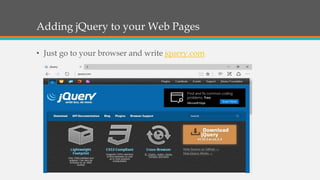
Adding jQuery to your Web Pages
• Just go to your browser and write jquery.com
Adding jQuery to your Web Pages (cont.)
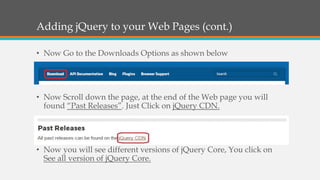
• Now Go to the Downloads Options as shown below
• Now Scroll down the page, at the end of the Web page you will
found “Past Releases”. Just Click on jQuery CDN.
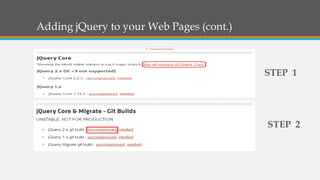
• Now you will see different versions of jQuery Core, You click on
See all version of jQuery Core.
Adding jQuery to your Web Pages (cont.)
STEP 1
STEP 2
Adding jQuery to your Web Pages (cont.)
• When you uncompressed it, new tab will be open automatically
with JavaScript/jQuery code.
• Press Ctrl + A then Ctrl + C, then Paste it on Notepad and save as
file name: jquery.js and save as type: All files.
How to Refer jQuery ?
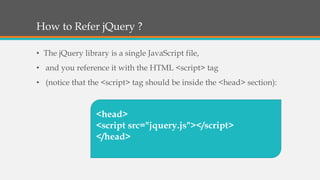
• The jQuery library is a single JavaScript file,
• and you reference it with the HTML <script> tag
• (notice that the <script> tag should be inside the <head> section):
<head>
<script src="jquery.js"></script>
</head>
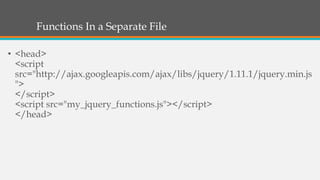
Functions In a Separate File
• <head>
<script
src="http://ajax.googleapis.com/ajax/libs/jquery/1.11.1/jquery.min.js
">
</script>
<script src="my_jquery_functions.js"></script>
</head>
jQuery Syntax
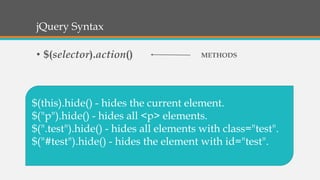
• $(selector).action()
$(this).hide() - hides the current element.
$("p").hide() - hides all <p> elements.
$(".test").hide() - hides all elements with class="test".
$("#test").hide() - hides the element with id="test".
METHODS
jQuery Method
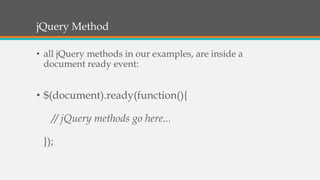
• all jQuery methods in our examples, are inside a
document ready event:
• $(document).ready(function(){
// jQuery methods go here...
});
The #id Selector
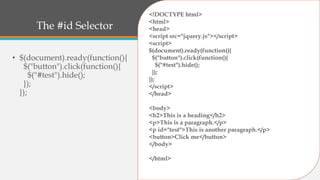
• $(document).ready(function(){
$("button").click(function(){
$("#test").hide();
});
});
<!DOCTYPE html>
<html>
<head>
<script src="jquery.js"></script>
<script>
$(document).ready(function(){
$("button").click(function(){
$("#test").hide();
});
});
</script>
</head>
<body>
<h2>This is a heading</h2>
<p>This is a paragraph.</p>
<p id="test">This is another paragraph.</p>
<button>Click me</button>
</body>
</html>
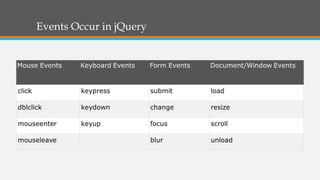
Events Occur in jQuery
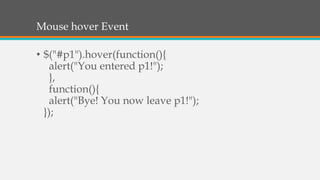
Mouse hover Event
• $("#p1").hover(function(){
alert("You entered p1!");
},
function(){
alert("Bye! You now leave p1!");
});
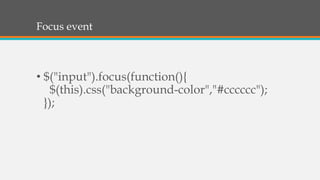
Focus event
• $("input").focus(function(){
$(this).css("background-color","#cccccc");
});
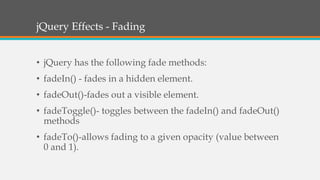
jQuery Effects - Fading
• jQuery has the following fade methods:
• fadeIn() - fades in a hidden element.
• fadeOut()-fades out a visible element.
• fadeToggle()- toggles between the fadeIn() and fadeOut()
methods
• fadeTo()-allows fading to a given opacity (value between
0 and 1).
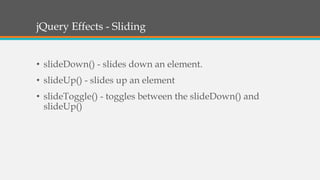
jQuery Effects - Sliding
• slideDown() - slides down an element.
• slideUp() - slides up an element
• slideToggle() - toggles between the slideDown() and
slideUp()
THANK YOU….

jQuery - Web Engineering

  • 1.
  • 2.
    jQuery • jQuery isa JavaScript Library. • jQuery greatly simplifies JavaScript programming. • jQuery is easy to learn.
  • 3.
    Before Studying jQueryYou should Know: Step 1 HTML Step 2 CSS Step 3 JavaScript
  • 4.
    Purpose • jQuery isa lightweight, "write less, do more", JavaScript library. • The purpose of jQuery is to make it much easier to use JavaScript on your website. • jQuery takes a lot of common tasks that require many lines of JavaScript code to accomplish, you can call with a single line of code. • Many of the biggest companies on the Web use jQuery, such as: Google, Microsoft, IBM, Netflix.
  • 5.
    Adding jQuery toyour Web Pages • Just go to your browser and write jquery.com
  • 6.
    Adding jQuery toyour Web Pages (cont.) • Now Go to the Downloads Options as shown below • Now Scroll down the page, at the end of the Web page you will found “Past Releases”. Just Click on jQuery CDN. • Now you will see different versions of jQuery Core, You click on See all version of jQuery Core.
  • 7.
    Adding jQuery toyour Web Pages (cont.) STEP 1 STEP 2
  • 8.
    Adding jQuery toyour Web Pages (cont.) • When you uncompressed it, new tab will be open automatically with JavaScript/jQuery code. • Press Ctrl + A then Ctrl + C, then Paste it on Notepad and save as file name: jquery.js and save as type: All files.
  • 9.
    How to ReferjQuery ? • The jQuery library is a single JavaScript file, • and you reference it with the HTML <script> tag • (notice that the <script> tag should be inside the <head> section): <head> <script src="jquery.js"></script> </head>
  • 10.
    Functions In aSeparate File • <head> <script src="http://ajax.googleapis.com/ajax/libs/jquery/1.11.1/jquery.min.js "> </script> <script src="my_jquery_functions.js"></script> </head>
  • 11.
    jQuery Syntax • $(selector).action() $(this).hide()- hides the current element. $("p").hide() - hides all <p> elements. $(".test").hide() - hides all elements with class="test". $("#test").hide() - hides the element with id="test". METHODS
  • 12.
    jQuery Method • alljQuery methods in our examples, are inside a document ready event: • $(document).ready(function(){ // jQuery methods go here... });
  • 13.
    The #id Selector •$(document).ready(function(){ $("button").click(function(){ $("#test").hide(); }); }); <!DOCTYPE html> <html> <head> <script src="jquery.js"></script> <script> $(document).ready(function(){ $("button").click(function(){ $("#test").hide(); }); }); </script> </head> <body> <h2>This is a heading</h2> <p>This is a paragraph.</p> <p id="test">This is another paragraph.</p> <button>Click me</button> </body> </html>
  • 14.
  • 15.
    Mouse hover Event •$("#p1").hover(function(){ alert("You entered p1!"); }, function(){ alert("Bye! You now leave p1!"); });
  • 16.
  • 17.
    jQuery Effects -Fading • jQuery has the following fade methods: • fadeIn() - fades in a hidden element. • fadeOut()-fades out a visible element. • fadeToggle()- toggles between the fadeIn() and fadeOut() methods • fadeTo()-allows fading to a given opacity (value between 0 and 1).
  • 18.
    jQuery Effects -Sliding • slideDown() - slides down an element. • slideUp() - slides up an element • slideToggle() - toggles between the slideDown() and slideUp()
  • 19.