By Ishaq Khan


<!DOCTYPE html PUBLIC "-//W3C//DTD XHTML 1.0 Transitional//EN" "http://www.w3.org/TR/xhtml1/DTD/xhtml1-transitional.dtd">



<html xmlns="http://www.w3.org/1999/xhtml">



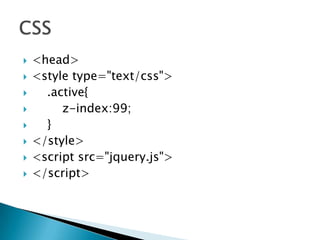
<head>



<style type="text/css">



.active{
z-index:99;




}



</style>



<script src="jquery.js">



</script>



<script>



function slideSwitch() {



var $active = $('div#slideshow IMG.active');



var $next = $active.next();



$next.addClass('active');
$active.removeClass('active');




}



$(function() {
setInterval( "slideSwitch()", 1000 );




});



</script>



<meta content="text/html; charset=utf-8" http-equiv="Content-Type" />



<title>Untitled 1</title>



</head>



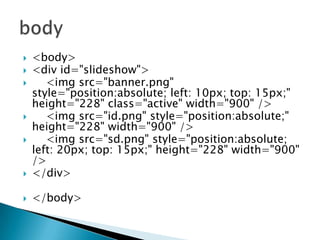
<body>



<div id="slideshow">



<img src="banner.png" style="position:absolute; left: 10px; top: 15px;" height="228" class="active" width="900" />



<img src="id.png" style="position:absolute;" height="228" width="900" />



<img src="sd.png" style="position:absolute; left: 20px; top: 15px;" height="228" width="900" />



</div>



</body>


<body>
<div id="slideshow">
<img src="banner.png"
style="position:absolute; left: 10px; top: 15px;"
height="228" class="active" width="900" />
<img src="id.png" style="position:absolute;"
height="228" width="900" />
<img src="sd.png" style="position:absolute;
left: 20px; top: 15px;" height="228" width="900"
/>
</div>



</body>



















<head>
<style type="text/css">
.active{
z-index:99;
}
</style>
<script src="jquery.js">
</script>








<script src="jquery.js">
</script>

<script>
function slideSwitch() {
var $active = $('div#slideshow IMG.active');
var $next = $active.next();



$next.addClass('active');



$active.removeClass('active');








}

$(function() {
setInterval( "slideSwitch()", 1000 );
});
</script>

Jquery image slider

  • 1.
  • 2.
     <!DOCTYPE html PUBLIC"-//W3C//DTD XHTML 1.0 Transitional//EN" "http://www.w3.org/TR/xhtml1/DTD/xhtml1-transitional.dtd">  <html xmlns="http://www.w3.org/1999/xhtml">  <head>  <style type="text/css">  .active{ z-index:99;   }  </style>  <script src="jquery.js">  </script>  <script>  function slideSwitch() {  var $active = $('div#slideshow IMG.active');  var $next = $active.next();  $next.addClass('active'); $active.removeClass('active');   }  $(function() { setInterval( "slideSwitch()", 1000 );   });  </script>  <meta content="text/html; charset=utf-8" http-equiv="Content-Type" />  <title>Untitled 1</title>  </head>  <body>  <div id="slideshow">  <img src="banner.png" style="position:absolute; left: 10px; top: 15px;" height="228" class="active" width="900" />  <img src="id.png" style="position:absolute;" height="228" width="900" />  <img src="sd.png" style="position:absolute; left: 20px; top: 15px;" height="228" width="900" />  </div>  </body>
  • 3.
     <body> <div id="slideshow"> <img src="banner.png" style="position:absolute;left: 10px; top: 15px;" height="228" class="active" width="900" /> <img src="id.png" style="position:absolute;" height="228" width="900" /> <img src="sd.png" style="position:absolute; left: 20px; top: 15px;" height="228" width="900" /> </div>  </body>     
  • 4.
  • 5.
          <script src="jquery.js"> </script> <script> function slideSwitch(){ var $active = $('div#slideshow IMG.active'); var $next = $active.next();  $next.addClass('active');  $active.removeClass('active');      } $(function() { setInterval( "slideSwitch()", 1000 ); }); </script>