JQuery
2011/05/05
Cheng-Yu Lin
Step 1- WWW
• Tim Berners-Lee is a British physicist, computer scientist and MIT professor,
credited for his invention of the World Wide Web, making the first proposal for it
in March 1989.[2] On 25 December 1990, with the help of Robert Cailliau and a
young student at CERN, he implemented the first successful communication
between a Hypertext Transfer Protocol (HTTP) client and server via the Internet.
What is CERN?
European Organisation for Nuclear Research
Their current task: LHC (超大型質子對撞機)
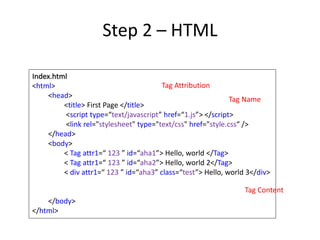
Step 2 – HTML
Tag Name
Tag Attribution
Tag Content
Index.html
<html>
<head>
<title> First Page </title>
<script type=“text/javascript” href=“1.js”> </script>
<link rel="stylesheet" type="text/css" href="style.css“ />
</head>
<body>
< Tag attr1=“ 123 ” id=“aha1”> Hello, world </Tag>
< Tag attr1=“ 123 ” id=“aha2”> Hello, world 2</Tag>
< div attr1=“ 123 ” id=“aha3” class=“test”> Hello, world 3</div>
</body>
</html>
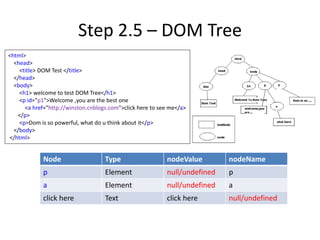
Step 2.5 – DOM Tree
<html>
<head>
<title> DOM Test </title>
</head>
<body>
<h1> welcome to test DOM Tree</h1>
<p id="p1">Welcome ,you are the best one
<a href="http://winston.cnblogs.com">click here to see me</a>
</p>
<p>Dom is so powerful, what do u think about it</p>
</body>
</html>
Node Type nodeValue nodeName
p Element null/undefined p
a Element null/undefined a
click here Text click here null/undefined
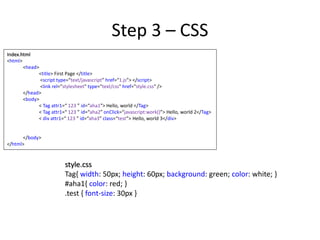
Step 3 – CSS
Index.html
<html>
<head>
<title> First Page </title>
<script type=“text/javascript” href=“1.js”> </script>
<link rel="stylesheet" type="text/css" href="style.css“ />
</head>
<body>
< Tag attr1=“ 123 ” id=“aha1”> Hello, world </Tag>
< Tag attr1=“ 123 ” id=“aha2” onClick=“javascript:work()”> Hello, world 2</Tag>
< div attr1=“ 123 ” id=“aha3” class=“test”> Hello, world 3</div>
</body>
</html>
style.css
Tag{ width: 50px; height: 60px; background: green; color: white; }
#aha1{ color: red; }
.test { font-size: 30px }
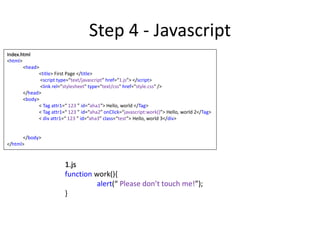
Step 4 - Javascript
Index.html
<html>
<head>
<title> First Page </title>
<script type=“text/javascript” href=“1.js”> </script>
<link rel="stylesheet" type="text/css" href="style.css“ />
</head>
<body>
< Tag attr1=“ 123 ” id=“aha1”> Hello, world </Tag>
< Tag attr1=“ 123 ” id=“aha2” onClick=“javascript:work()”> Hello, world 2</Tag>
< div attr1=“ 123 ” id=“aha3” class=“test”> Hello, world 3</div>
</body>
</html>
1.js
function work(){
alert(“ Please don’t touch me!”);
}
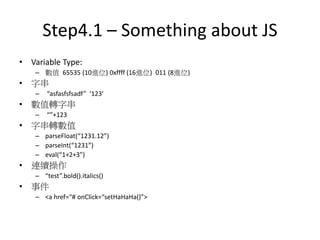
Step4.1 – Something about JS
• Variable Type:
– 數值 65535 (10進位) 0xffff (16進位) 011 (8進位)
• 字串
– “asfasfsfsadf” ‘123’
• 數值轉字串
– “”+123
• 字串轉數值
– parseFloat(“1231.12”)
– parseInt(“1231”)
– eval(“1+2+3”)
• 連續操作
– “test”.bold().italics()
• 事件
– <a href=“# onClick=“setHaHaHa()”>
Step4.2 – Something about OO in JS
• New delete
• Var
• Arguments
• Prototype
• This
• Apply
• Call
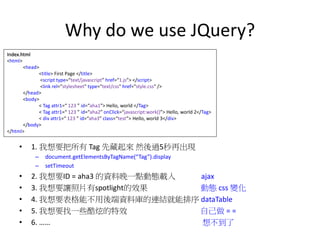
Why do we use JQuery?
• 1. 我想要把所有 Tag 先藏起來 然後過5秒再出現
– document.getElementsByTagName(“Tag”).display
– setTimeout
• 2. 我想要ID = aha3 的資料晚一點動態載入 ajax
• 3. 我想要讓照片有spotlight的效果 動態 css 變化
• 4. 我想要表格能不用後端資料庫的連結就能排序 dataTable
• 5. 我想要找一些酷炫的特效 自己做 = =
• 6. …… 想不到了
Index.html
<html>
<head>
<title> First Page </title>
<script type=“text/javascript” href=“1.js”> </script>
<link rel="stylesheet" type="text/css" href="style.css“ />
</head>
<body>
< Tag attr1=“ 123 ” id=“aha1”> Hello, world </Tag>
< Tag attr1=“ 123 ” id=“aha2” onClick=“javascript:work()”> Hello, world 2</Tag>
< div attr1=“ 123 ” id=“aha3” class=“test”> Hello, world 3</div>
</body>
</html>
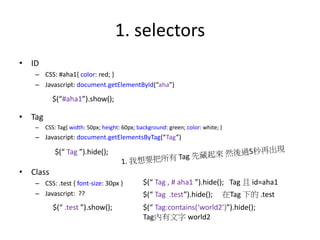
1. selectors
• ID
– CSS: #aha1{ color: red; }
– Javascript: document.getElementById(“aha”)
• Tag
– CSS: Tag{ width: 50px; height: 60px; background: green; color: white; }
– Javascript: document.getElementsByTag(“Tag”)
• Class
– CSS: .test { font-size: 30px }
– Javascript: ??
$(“#aha1”).show();
$(“ Tag ”).hide();
$(“ .test ”).show();
$(“ Tag , # aha1 ”).hide(); Tag 且 id=aha1
$(“ Tag .test”).hide(); 在Tag 下的 .test
$(“ Tag:contains(‘world2’)”).hide();
Tag內有文字 world2
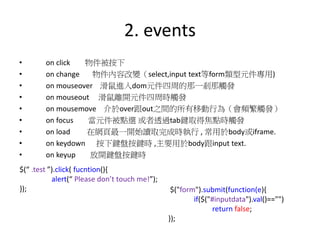
2. events
• on click 物件被按下
• on change 物件內容改變(select,input text等form類型元件專用)
• on mouseover 滑鼠進入dom元件四周的那一剎那觸發
• on mouseout 滑鼠離開元件四周時觸發
• on mousemove 介於over跟out之間的所有移動行為(會頻繁觸發)
• on focus 當元件被點選 或者透過tab鍵取得焦點時觸發
• on load 在網頁最一開始讀取完成時執行 , 常用於body或iframe.
• on keydown 按下鍵盤按鍵時 ,主要用於body跟input text.
• on keyup 放開鍵盤按鍵時
$(“ .test ”).click( fucntion(){
alert(“ Please don’t touch me!”);
}); $("form").submit(function(e){
if($("#inputdata").val()=="")
return false;
});
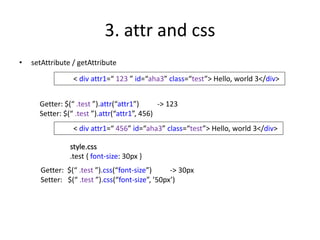
3. attr and css
• setAttribute / getAttribute
< div attr1=“ 123 ” id=“aha3” class=“test”> Hello, world 3</div>
Getter: $(“ .test ”).attr(“attr1”) -> 123
Setter: $(“ .test ”).attr(“attr1”, 456)
< div attr1=“ 456” id=“aha3” class=“test”> Hello, world 3</div>
Getter: $(“ .test ”).css(“font-size”) -> 30px
Setter: $(“ .test ”).css(“font-size”, ’50px’)
style.css
.test { font-size: 30px }
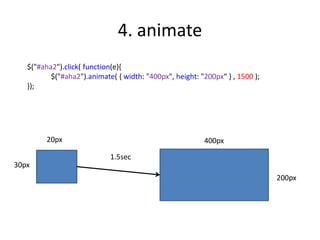
4. animate
$("#aha2").click( function(e){
$("#aha2").animate( { width: "400px", height: "200px“ } , 1500 );
});
1.5sec
400px
200px
20px
30px
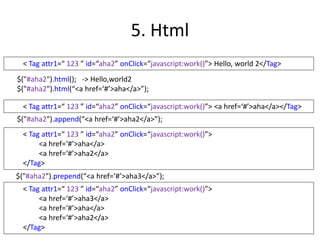
5. Html
$("#aha2").html(); -> Hello,world2
$("#aha2").html(“<a href=‘#’>aha</a>”);
< Tag attr1=“ 123 ” id=“aha2” onClick=“javascript:work()”> Hello, world 2</Tag>
< Tag attr1=“ 123 ” id=“aha2” onClick=“javascript:work()”> <a href=‘#’>aha</a></Tag>
$("#aha2").append(“<a href=‘#’>aha2</a>”);
< Tag attr1=“ 123 ” id=“aha2” onClick=“javascript:work()”>
<a href=‘#’>aha</a>
<a href=‘#’>aha2</a>
</Tag>
$("#aha2").prepend(“<a href=‘#’>aha3</a>”);
< Tag attr1=“ 123 ” id=“aha2” onClick=“javascript:work()”>
<a href=‘#’>aha3</a>
<a href=‘#’>aha</a>
<a href=‘#’>aha2</a>
</Tag>
6. ajax
$.ajax({
url: './PHP/navigate.php',
type:'post',
dataType:'json',
data:{'mode':mode1,'title':title1},
success: function(response)
{
}
});
PHP/navigate.php
$_POST[‘mode’] -> mode1
$_POST[‘title’] -> title1
….
$echo =
array(‘ans1’=>’aha1’,
‘ans2’=>
‘aha2’);
echo json_encode($echo);
{‘ans1’:’aha1’ , ‘ans2’: ‘aha2’}
response[‘ans1’] -> aha1
response[‘ans2’] -> aha2
7. Examples
jQuery

jQuery

  • 1.
  • 2.
    Step 1- WWW •Tim Berners-Lee is a British physicist, computer scientist and MIT professor, credited for his invention of the World Wide Web, making the first proposal for it in March 1989.[2] On 25 December 1990, with the help of Robert Cailliau and a young student at CERN, he implemented the first successful communication between a Hypertext Transfer Protocol (HTTP) client and server via the Internet. What is CERN? European Organisation for Nuclear Research Their current task: LHC (超大型質子對撞機)
  • 3.
    Step 2 –HTML Tag Name Tag Attribution Tag Content Index.html <html> <head> <title> First Page </title> <script type=“text/javascript” href=“1.js”> </script> <link rel="stylesheet" type="text/css" href="style.css“ /> </head> <body> < Tag attr1=“ 123 ” id=“aha1”> Hello, world </Tag> < Tag attr1=“ 123 ” id=“aha2”> Hello, world 2</Tag> < div attr1=“ 123 ” id=“aha3” class=“test”> Hello, world 3</div> </body> </html>
  • 4.
    Step 2.5 –DOM Tree <html> <head> <title> DOM Test </title> </head> <body> <h1> welcome to test DOM Tree</h1> <p id="p1">Welcome ,you are the best one <a href="http://winston.cnblogs.com">click here to see me</a> </p> <p>Dom is so powerful, what do u think about it</p> </body> </html> Node Type nodeValue nodeName p Element null/undefined p a Element null/undefined a click here Text click here null/undefined
  • 5.
    Step 3 –CSS Index.html <html> <head> <title> First Page </title> <script type=“text/javascript” href=“1.js”> </script> <link rel="stylesheet" type="text/css" href="style.css“ /> </head> <body> < Tag attr1=“ 123 ” id=“aha1”> Hello, world </Tag> < Tag attr1=“ 123 ” id=“aha2” onClick=“javascript:work()”> Hello, world 2</Tag> < div attr1=“ 123 ” id=“aha3” class=“test”> Hello, world 3</div> </body> </html> style.css Tag{ width: 50px; height: 60px; background: green; color: white; } #aha1{ color: red; } .test { font-size: 30px }
  • 6.
    Step 4 -Javascript Index.html <html> <head> <title> First Page </title> <script type=“text/javascript” href=“1.js”> </script> <link rel="stylesheet" type="text/css" href="style.css“ /> </head> <body> < Tag attr1=“ 123 ” id=“aha1”> Hello, world </Tag> < Tag attr1=“ 123 ” id=“aha2” onClick=“javascript:work()”> Hello, world 2</Tag> < div attr1=“ 123 ” id=“aha3” class=“test”> Hello, world 3</div> </body> </html> 1.js function work(){ alert(“ Please don’t touch me!”); }
  • 7.
    Step4.1 – Somethingabout JS • Variable Type: – 數值 65535 (10進位) 0xffff (16進位) 011 (8進位) • 字串 – “asfasfsfsadf” ‘123’ • 數值轉字串 – “”+123 • 字串轉數值 – parseFloat(“1231.12”) – parseInt(“1231”) – eval(“1+2+3”) • 連續操作 – “test”.bold().italics() • 事件 – <a href=“# onClick=“setHaHaHa()”>
  • 8.
    Step4.2 – Somethingabout OO in JS • New delete • Var • Arguments • Prototype • This • Apply • Call
  • 9.
    Why do weuse JQuery? • 1. 我想要把所有 Tag 先藏起來 然後過5秒再出現 – document.getElementsByTagName(“Tag”).display – setTimeout • 2. 我想要ID = aha3 的資料晚一點動態載入 ajax • 3. 我想要讓照片有spotlight的效果 動態 css 變化 • 4. 我想要表格能不用後端資料庫的連結就能排序 dataTable • 5. 我想要找一些酷炫的特效 自己做 = = • 6. …… 想不到了 Index.html <html> <head> <title> First Page </title> <script type=“text/javascript” href=“1.js”> </script> <link rel="stylesheet" type="text/css" href="style.css“ /> </head> <body> < Tag attr1=“ 123 ” id=“aha1”> Hello, world </Tag> < Tag attr1=“ 123 ” id=“aha2” onClick=“javascript:work()”> Hello, world 2</Tag> < div attr1=“ 123 ” id=“aha3” class=“test”> Hello, world 3</div> </body> </html>
  • 10.
    1. selectors • ID –CSS: #aha1{ color: red; } – Javascript: document.getElementById(“aha”) • Tag – CSS: Tag{ width: 50px; height: 60px; background: green; color: white; } – Javascript: document.getElementsByTag(“Tag”) • Class – CSS: .test { font-size: 30px } – Javascript: ?? $(“#aha1”).show(); $(“ Tag ”).hide(); $(“ .test ”).show(); $(“ Tag , # aha1 ”).hide(); Tag 且 id=aha1 $(“ Tag .test”).hide(); 在Tag 下的 .test $(“ Tag:contains(‘world2’)”).hide(); Tag內有文字 world2
  • 11.
    2. events • onclick 物件被按下 • on change 物件內容改變(select,input text等form類型元件專用) • on mouseover 滑鼠進入dom元件四周的那一剎那觸發 • on mouseout 滑鼠離開元件四周時觸發 • on mousemove 介於over跟out之間的所有移動行為(會頻繁觸發) • on focus 當元件被點選 或者透過tab鍵取得焦點時觸發 • on load 在網頁最一開始讀取完成時執行 , 常用於body或iframe. • on keydown 按下鍵盤按鍵時 ,主要用於body跟input text. • on keyup 放開鍵盤按鍵時 $(“ .test ”).click( fucntion(){ alert(“ Please don’t touch me!”); }); $("form").submit(function(e){ if($("#inputdata").val()=="") return false; });
  • 12.
    3. attr andcss • setAttribute / getAttribute < div attr1=“ 123 ” id=“aha3” class=“test”> Hello, world 3</div> Getter: $(“ .test ”).attr(“attr1”) -> 123 Setter: $(“ .test ”).attr(“attr1”, 456) < div attr1=“ 456” id=“aha3” class=“test”> Hello, world 3</div> Getter: $(“ .test ”).css(“font-size”) -> 30px Setter: $(“ .test ”).css(“font-size”, ’50px’) style.css .test { font-size: 30px }
  • 13.
    4. animate $("#aha2").click( function(e){ $("#aha2").animate({ width: "400px", height: "200px“ } , 1500 ); }); 1.5sec 400px 200px 20px 30px
  • 14.
    5. Html $("#aha2").html(); ->Hello,world2 $("#aha2").html(“<a href=‘#’>aha</a>”); < Tag attr1=“ 123 ” id=“aha2” onClick=“javascript:work()”> Hello, world 2</Tag> < Tag attr1=“ 123 ” id=“aha2” onClick=“javascript:work()”> <a href=‘#’>aha</a></Tag> $("#aha2").append(“<a href=‘#’>aha2</a>”); < Tag attr1=“ 123 ” id=“aha2” onClick=“javascript:work()”> <a href=‘#’>aha</a> <a href=‘#’>aha2</a> </Tag> $("#aha2").prepend(“<a href=‘#’>aha3</a>”); < Tag attr1=“ 123 ” id=“aha2” onClick=“javascript:work()”> <a href=‘#’>aha3</a> <a href=‘#’>aha</a> <a href=‘#’>aha2</a> </Tag>
  • 15.
    6. ajax $.ajax({ url: './PHP/navigate.php', type:'post', dataType:'json', data:{'mode':mode1,'title':title1}, success:function(response) { } }); PHP/navigate.php $_POST[‘mode’] -> mode1 $_POST[‘title’] -> title1 …. $echo = array(‘ans1’=>’aha1’, ‘ans2’=> ‘aha2’); echo json_encode($echo); {‘ans1’:’aha1’ , ‘ans2’: ‘aha2’} response[‘ans1’] -> aha1 response[‘ans2’] -> aha2
  • 16.