1
SAN FRANCISCO PALACE OF FINE ARTS
SPEAKERS
SPEAKERS
JONATHON MILLER-GIRVETZ
Data Analyst, Customer Support
To Use or Not Use
PDT’s
What we will
cover
•  Why we derive and persist
•  Types of derived tables
•  When to use them
•  What to LOOK out for
•  When to move to ETL
•  Balance
•  Best practices
2
Why we derive and persist?
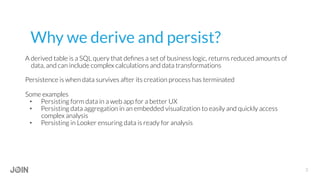
A derived table is a SQL query that defines a set of business logic, returns reduced amounts of
data, and can include complex calculations and data transformations
Persistence is when data survives after its creation process has terminated
Some examples
•  Persisting form data in a web app for a better UX
•  Persisting data aggregation in an embedded visualization to easily and quickly access
complex analysis
•  Persisting in Looker ensuring data is ready for analysis
3
4
Types of derived tables
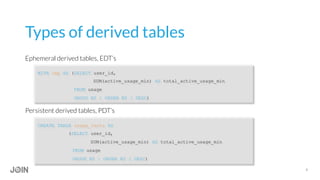
Ephemeral derived tables, EDT’s
WITH tmp AS (SELECT user_id,
SUM(active_usage_min) AS total_active_usage_min
FROM usage
GROUP BY 1 ORDER BY 2 DESC)
Persistent derived tables, PDT’s
CREATE TABLE usage_facts AS
(SELECT user_id,
SUM(active_usage_min) AS total_active_usage_min
FROM usage
GROUP BY 1 ORDER BY 2 DESC)
5
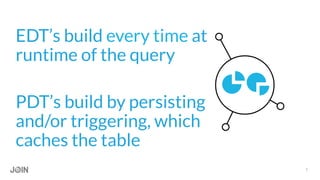
PDT’s build by persisting
and/or triggering, which
caches the table
EDT’s build every time at
runtime of the query
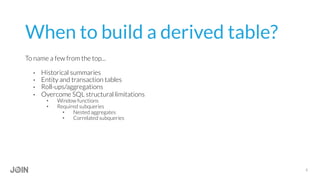
When to build a derived table?
To name a few from the top...
•  Historical summaries
•  Entity and transaction tables
•  Roll-ups/aggregations
•  Overcome SQL structural limitations
•  Window functions
•  Required subqueries
•  Nested aggregates
•  Correlated subqueries
6
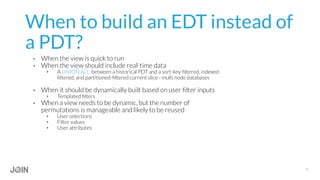
When to build an EDT instead of
a PDT?
•  When the view is quick to run
•  When the view should include real-time data
•  A UNION ALL between a historical PDT and a sort-key-filtered, indexed-
filtered, and partitioned-filtered current slice - multi node databases
•  When it should be dynamically built based on user filter inputs
•  Templated filters
•  When a view needs to be dynamic, but the number of
permutations is manageable and likely to be reused
•  User selections
•  Filter values
•  User attributes
7
8
“I love ephemeral derived tables because they
feel light-weight and focused, but they make
the most sense when you're doing something
small and quick and/or if what you're doing is
sensitive to frequent ETL. If you don't mind the
[computation] cost and redoing the
computation each time, then I'd say don't
persist.”
Maxie Corbin
Looker Data Analyst, Customer Support
9
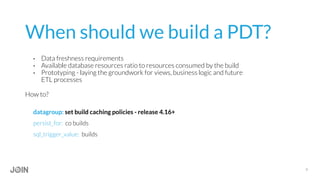
When should we build a PDT?
•  Data freshness requirements
•  Available database resources ratio to resources consumed by the build
•  Prototyping - laying the groundwork for views, business logic and future
ETL processes
How to?
datagroup: set build caching policies - release 4.16+
persist_for: co builds
sql_trigger_value: builds
10
What to LOOK out for?
PDT’s are very powerful but they are not perfect
•  Being aware of the front-end UX and the derived table aggregations that affect it
•  Computational resources
•  Available database resources
•  Time, query queue, and (potentially) money
How much
usage per
customer?
How has our
retention rate
changed over
the past 6
years?
None of the
queries
appear to be
working?
Select
margin
of error?
[SQL
ERROR]:
Table lock?
Table lock.
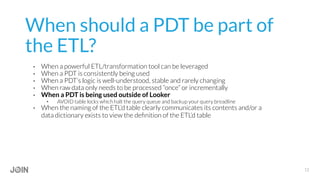
When should a PDT be part of
the ETL?
•  When a powerful ETL/transformation tool can be leveraged
•  When a PDT is consistently being used
•  When a PDT’s logic is well-understood, stable and rarely changing
•  When raw data only needs to be processed “once” or incrementally
•  When a PDT is being used outside of Looker
•  AVOID table locks which halt the query queue and backup your query breadline
•  When the naming of the ETL’d table clearly communicates its contents and/or a
data dictionary exists to view the definition of the ETL’d table
12
13
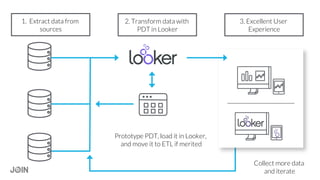
1. Extract data from
sources
2. Transform data with
PDT in Looker
3. Excellent User
Experience
Prototype PDT, load it in Looker,
and move it to ETL if merited
Collect more data
and iterate
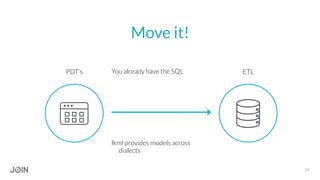
Move it!
14
PDT’s ETLYou already have the SQL
lkml provides models across
dialects
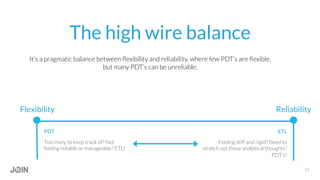
The high wire balance
It’s a pragmatic balance between flexibility and reliability, where few PDT’s are flexible,
but many PDT’s can be unreliable.
PDT
Too many to keep track of? Not
feeling reliable or manageable? ETL!
ReliabilityFlexibility
ETL
Feeling stiff and rigid? Need to
stretch out those analytical thoughts?
PDT’s!
15
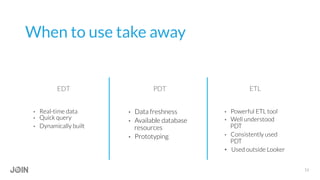
When to use take away
16
•  Real-time data
•  Quick query
•  Dynamically built
•  Data freshness
•  Available database
resources
•  Prototyping
•  Powerful ETL tool
•  Well understood
PDT
•  Consistently used
PDT
•  Used outside Looker
EDT PDT ETL
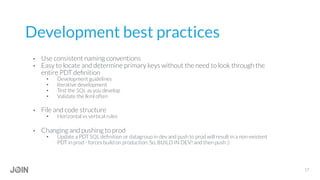
Development best practices
•  Use consistent naming conventions
•  Easy to locate and determine primary keys without the need to look through the
entire PDT definition
•  Development guidelines
•  Iterative development
•  Test the SQL as you develop
•  Validate the lkml often
•  File and code structure
•  Horizontal vs vertical rules
•  Changing and pushing to prod
•  Update a PDT SQL definition or datagroup in dev and push to prod will result in a non-existent
PDT in prod - forces build on production. So, BUILD IN DEV! and then push :)
17
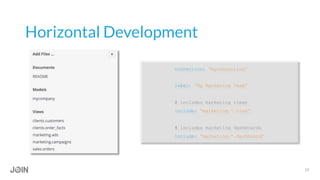
Horizontal Development
connection: “myconnection”
label: “My Marketing Team”
# includes marketing views
include: “marketing.*.view”
# includes marketing dashboards
include: “marketing.*.dashboard”
18
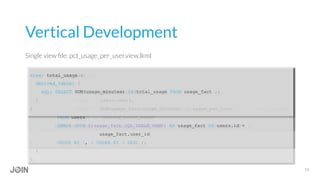
view: usage_per_user { }
view: total_usage { }
view: pct_usage_per_user { }
explore: pct_usage_per_user {hidden: yes}
view: pct_usage_per_user {
derived_table: {
sql: SELECT email,
usage,
SUM(1.0*usage_per_customer/NULLIF(total_usage,0)) OVER (ORDER BY total_usage
DESC ) AS running_total_usage
FROM ${usage_per_user.SQL_TABLE_NAME}, ${total_usage.SQL_TABLE_NAME} ;;
}
}
view: usage_per_user {
derived_table: {
sql: SELECT DISTINCT users.user_id,
users.email,
SUM(usage_fact.usage_minutes) AS usage_per_user
FROM users
INNER JOIN ${usage_fact.SQL_TABLE_NAME} AS usage_fact ON users.id =
usage_fact.user_id
GROUP BY 1, 2 ORDER BY 3 DESC ;;
}
}
view: total_usage {
derived_table: {
sql: SELECT SUM(usage_minutes) AS total_usage FROM usage_fact ;;
}
}
Vertical Development
19
Single view file: pct_usage_per_user.view.lkml
Questions?
https://discourse.looker.com/t/join-2017-deep-dive-to-use-or-not-use-pdts/5846
Jonathon M-G
21
Data Analyst, Customer Support

Join 2017_Deep Dive_To Use or Not Use PDT's

  • 1.
    1 SAN FRANCISCO PALACEOF FINE ARTS SPEAKERS SPEAKERS JONATHON MILLER-GIRVETZ Data Analyst, Customer Support To Use or Not Use PDT’s
  • 2.
    What we will cover • Why we derive and persist •  Types of derived tables •  When to use them •  What to LOOK out for •  When to move to ETL •  Balance •  Best practices 2
  • 3.
    Why we deriveand persist? A derived table is a SQL query that defines a set of business logic, returns reduced amounts of data, and can include complex calculations and data transformations Persistence is when data survives after its creation process has terminated Some examples •  Persisting form data in a web app for a better UX •  Persisting data aggregation in an embedded visualization to easily and quickly access complex analysis •  Persisting in Looker ensuring data is ready for analysis 3
  • 4.
    4 Types of derivedtables Ephemeral derived tables, EDT’s WITH tmp AS (SELECT user_id, SUM(active_usage_min) AS total_active_usage_min FROM usage GROUP BY 1 ORDER BY 2 DESC) Persistent derived tables, PDT’s CREATE TABLE usage_facts AS (SELECT user_id, SUM(active_usage_min) AS total_active_usage_min FROM usage GROUP BY 1 ORDER BY 2 DESC)
  • 5.
    5 PDT’s build bypersisting and/or triggering, which caches the table EDT’s build every time at runtime of the query
  • 6.
    When to builda derived table? To name a few from the top... •  Historical summaries •  Entity and transaction tables •  Roll-ups/aggregations •  Overcome SQL structural limitations •  Window functions •  Required subqueries •  Nested aggregates •  Correlated subqueries 6
  • 7.
    When to buildan EDT instead of a PDT? •  When the view is quick to run •  When the view should include real-time data •  A UNION ALL between a historical PDT and a sort-key-filtered, indexed- filtered, and partitioned-filtered current slice - multi node databases •  When it should be dynamically built based on user filter inputs •  Templated filters •  When a view needs to be dynamic, but the number of permutations is manageable and likely to be reused •  User selections •  Filter values •  User attributes 7
  • 8.
    8 “I love ephemeralderived tables because they feel light-weight and focused, but they make the most sense when you're doing something small and quick and/or if what you're doing is sensitive to frequent ETL. If you don't mind the [computation] cost and redoing the computation each time, then I'd say don't persist.” Maxie Corbin Looker Data Analyst, Customer Support
  • 9.
    9 When should webuild a PDT? •  Data freshness requirements •  Available database resources ratio to resources consumed by the build •  Prototyping - laying the groundwork for views, business logic and future ETL processes How to? datagroup: set build caching policies - release 4.16+ persist_for: co builds sql_trigger_value: builds
  • 10.
    10 What to LOOKout for? PDT’s are very powerful but they are not perfect •  Being aware of the front-end UX and the derived table aggregations that affect it •  Computational resources •  Available database resources •  Time, query queue, and (potentially) money
  • 11.
    How much usage per customer? Howhas our retention rate changed over the past 6 years? None of the queries appear to be working? Select margin of error? [SQL ERROR]: Table lock? Table lock.
  • 12.
    When should aPDT be part of the ETL? •  When a powerful ETL/transformation tool can be leveraged •  When a PDT is consistently being used •  When a PDT’s logic is well-understood, stable and rarely changing •  When raw data only needs to be processed “once” or incrementally •  When a PDT is being used outside of Looker •  AVOID table locks which halt the query queue and backup your query breadline •  When the naming of the ETL’d table clearly communicates its contents and/or a data dictionary exists to view the definition of the ETL’d table 12
  • 13.
    13 1. Extract datafrom sources 2. Transform data with PDT in Looker 3. Excellent User Experience Prototype PDT, load it in Looker, and move it to ETL if merited Collect more data and iterate
  • 14.
    Move it! 14 PDT’s ETLYoualready have the SQL lkml provides models across dialects
  • 15.
    The high wirebalance It’s a pragmatic balance between flexibility and reliability, where few PDT’s are flexible, but many PDT’s can be unreliable. PDT Too many to keep track of? Not feeling reliable or manageable? ETL! ReliabilityFlexibility ETL Feeling stiff and rigid? Need to stretch out those analytical thoughts? PDT’s! 15
  • 16.
    When to usetake away 16 •  Real-time data •  Quick query •  Dynamically built •  Data freshness •  Available database resources •  Prototyping •  Powerful ETL tool •  Well understood PDT •  Consistently used PDT •  Used outside Looker EDT PDT ETL
  • 17.
    Development best practices • Use consistent naming conventions •  Easy to locate and determine primary keys without the need to look through the entire PDT definition •  Development guidelines •  Iterative development •  Test the SQL as you develop •  Validate the lkml often •  File and code structure •  Horizontal vs vertical rules •  Changing and pushing to prod •  Update a PDT SQL definition or datagroup in dev and push to prod will result in a non-existent PDT in prod - forces build on production. So, BUILD IN DEV! and then push :) 17
  • 18.
    Horizontal Development connection: “myconnection” label:“My Marketing Team” # includes marketing views include: “marketing.*.view” # includes marketing dashboards include: “marketing.*.dashboard” 18
  • 19.
    view: usage_per_user {} view: total_usage { } view: pct_usage_per_user { } explore: pct_usage_per_user {hidden: yes} view: pct_usage_per_user { derived_table: { sql: SELECT email, usage, SUM(1.0*usage_per_customer/NULLIF(total_usage,0)) OVER (ORDER BY total_usage DESC ) AS running_total_usage FROM ${usage_per_user.SQL_TABLE_NAME}, ${total_usage.SQL_TABLE_NAME} ;; } } view: usage_per_user { derived_table: { sql: SELECT DISTINCT users.user_id, users.email, SUM(usage_fact.usage_minutes) AS usage_per_user FROM users INNER JOIN ${usage_fact.SQL_TABLE_NAME} AS usage_fact ON users.id = usage_fact.user_id GROUP BY 1, 2 ORDER BY 3 DESC ;; } } view: total_usage { derived_table: { sql: SELECT SUM(usage_minutes) AS total_usage FROM usage_fact ;; } } Vertical Development 19 Single view file: pct_usage_per_user.view.lkml
  • 20.
  • 21.