1
Creating Seamless
Workflows
with Zapier
Maxie Corbin, Support Analyst, Looker
Looker As An
Analytics Tool
Looker on its own can get the right
information to the right people.
But those people must act on the data
for the data to have value.
Looker As A Data
Platform
Integrations allow you to
automatically act on new data as soon
as it is available.
No more shuffling data around
between different places. That's robot
work.
Acting on Data from
Looker at a High
Level
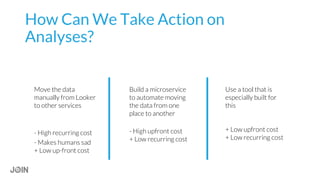
How Can We Take Action on
Analyses?
Move the data
manually from Looker
to other services
- High recurring cost
- Makes humans sad
+ Low up-front cost
Use a tool that is
especially built for
this
+ Low upfront cost
+ Low recurring cost
Build a microservice
to automate moving
the data from one
place to another
- High upfront cost
+ Low recurring cost
Automating these processes
and creating seamless
workflows reduces the friction
between exploration and
action.
Why is
automation so
rad?
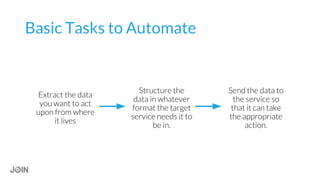
Basic Tasks to Automate
Structure the
data in whatever
format the target
service needs it to
be in.
Extract the data
you want to act
upon from where
it lives
Send the data to
the service so
that it can take
the appropriate
action.
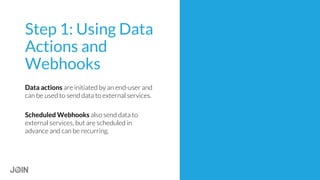
Step 1: Using Data
Actions and
Webhooks
Data actions are initiated by an end-user and
can be used to send data to external services.
Scheduled Webhooks also send data to
external services, but are scheduled in
advance and can be recurring.
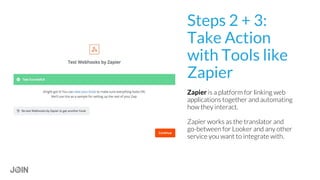
Steps 2 + 3:
Take Action
with Tools like
Zapier
Zapier is a platform for linking web
applications together and automating
how they interact.
Zapier works as the translator and
go-between for Looker and any other
service you want to integrate with.
Example 1:
Using Looker to
Announce or Flag
Important Stuff
Enable support analysts and
managers to flag anything that
looks off immediately, right from
Looker, without taking them out of
their flow.
As an example, I'll post a quick
notification to a Slack channel
using a Data Action.
Example: Flag or
announce an
important thing
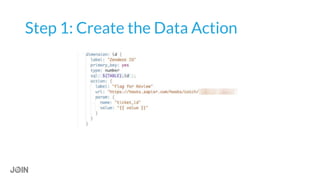
Step 1: Create the Data Action
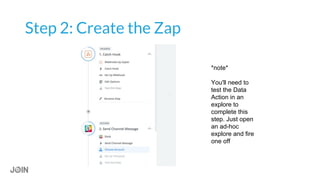
Step 2: Create the Zap
*note*
You'll need to
test the Data
Action in an
explore to
complete this
step. Just open
an ad-hoc
explore and fire
one off
Demo!
Due to sensitivity of the data, I'll be
using surf log data instead
● Instantly bring an insight you
had while engaged in analysis
to Slack.
● No more copying and pasting
or taking screenshots.
● Start conversations by
posting into direct messages
or using @here in a channel
Benefits
Example 2:
Automatically
create new Zendesk
tickets from data in
Looker
Example: Create
a Zendesk ticket
for new Github
issues
● Engineers work in Github
● Customer Success works in
Zendesk
● We use ZD tickets to record
which customers were
impacted by which issues
● Creating a matching Zendesk
ticket manually kind of sucks
Some Extra Conditions
Don't create ZD
tickets for issues
that engineers
created
Don't create ZD
tickets for issues
that already have
a ZD ticket linked
to them
Looker is the
only place that
has all the data
we need to filter
these cases out
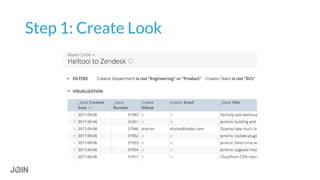
Step 1: Create Look
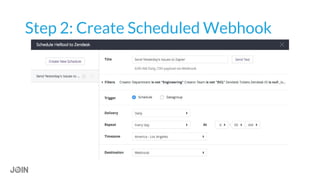
Step 2: Create Scheduled Webhook
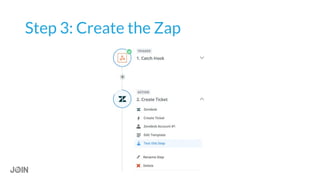
Step 3: Create the Zap
Demo!
Due to sensitivity of the data, I'll be
using surf log data instead
● For us: improved follow-up
on bugs encountered by
non-support staff
● More reliable relationship
between ZD tickets and
Github issues
● More generally, ability to
take any kind of action on
many things at once without
any manual intervention
Benefits
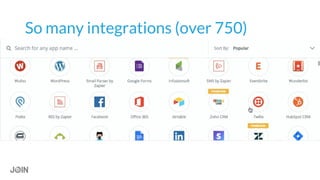
So many integrations (over 750)
Questions?
● Add email address to campaign on
MailChimp
● Create or update Zendesk ticket
● Add to-do to Todoist / Omnifocus /
Wunderlist / Basecamp / Asana
● Open a Github issue
● Add a row to MySQL or Postgres
● Send an email and a Zoom invite
● Update a Salesforce record
● Invoke an AWS Lambda function
● Create a Trello card
● Notify yourself by Slack for new
events in EVE Online
● Create new OpsGenie alerts
● Send text messages
More Examples!
Thank You to our Sponsors
PETABYTE
TERABYTE
GIGABYTE
Join 2017_Deep Dive_Workflows with Zapier

Join 2017_Deep Dive_Workflows with Zapier

  • 1.
    1 Creating Seamless Workflows with Zapier MaxieCorbin, Support Analyst, Looker
  • 2.
    Looker As An AnalyticsTool Looker on its own can get the right information to the right people. But those people must act on the data for the data to have value.
  • 3.
    Looker As AData Platform Integrations allow you to automatically act on new data as soon as it is available. No more shuffling data around between different places. That's robot work.
  • 4.
    Acting on Datafrom Looker at a High Level
  • 5.
    How Can WeTake Action on Analyses? Move the data manually from Looker to other services - High recurring cost - Makes humans sad + Low up-front cost Use a tool that is especially built for this + Low upfront cost + Low recurring cost Build a microservice to automate moving the data from one place to another - High upfront cost + Low recurring cost
  • 6.
    Automating these processes andcreating seamless workflows reduces the friction between exploration and action. Why is automation so rad?
  • 7.
    Basic Tasks toAutomate Structure the data in whatever format the target service needs it to be in. Extract the data you want to act upon from where it lives Send the data to the service so that it can take the appropriate action.
  • 8.
    Step 1: UsingData Actions and Webhooks Data actions are initiated by an end-user and can be used to send data to external services. Scheduled Webhooks also send data to external services, but are scheduled in advance and can be recurring.
  • 9.
    Steps 2 +3: Take Action with Tools like Zapier Zapier is a platform for linking web applications together and automating how they interact. Zapier works as the translator and go-between for Looker and any other service you want to integrate with.
  • 10.
    Example 1: Using Lookerto Announce or Flag Important Stuff
  • 11.
    Enable support analystsand managers to flag anything that looks off immediately, right from Looker, without taking them out of their flow. As an example, I'll post a quick notification to a Slack channel using a Data Action. Example: Flag or announce an important thing
  • 12.
    Step 1: Createthe Data Action
  • 13.
    Step 2: Createthe Zap *note* You'll need to test the Data Action in an explore to complete this step. Just open an ad-hoc explore and fire one off
  • 14.
    Demo! Due to sensitivityof the data, I'll be using surf log data instead
  • 15.
    ● Instantly bringan insight you had while engaged in analysis to Slack. ● No more copying and pasting or taking screenshots. ● Start conversations by posting into direct messages or using @here in a channel Benefits
  • 16.
    Example 2: Automatically create newZendesk tickets from data in Looker
  • 17.
    Example: Create a Zendeskticket for new Github issues ● Engineers work in Github ● Customer Success works in Zendesk ● We use ZD tickets to record which customers were impacted by which issues ● Creating a matching Zendesk ticket manually kind of sucks
  • 18.
    Some Extra Conditions Don'tcreate ZD tickets for issues that engineers created Don't create ZD tickets for issues that already have a ZD ticket linked to them Looker is the only place that has all the data we need to filter these cases out
  • 19.
  • 20.
    Step 2: CreateScheduled Webhook
  • 21.
  • 22.
    Demo! Due to sensitivityof the data, I'll be using surf log data instead
  • 23.
    ● For us:improved follow-up on bugs encountered by non-support staff ● More reliable relationship between ZD tickets and Github issues ● More generally, ability to take any kind of action on many things at once without any manual intervention Benefits
  • 24.
  • 25.
    Questions? ● Add emailaddress to campaign on MailChimp ● Create or update Zendesk ticket ● Add to-do to Todoist / Omnifocus / Wunderlist / Basecamp / Asana ● Open a Github issue ● Add a row to MySQL or Postgres ● Send an email and a Zoom invite ● Update a Salesforce record ● Invoke an AWS Lambda function ● Create a Trello card ● Notify yourself by Slack for new events in EVE Online ● Create new OpsGenie alerts ● Send text messages More Examples!
  • 26.
    Thank You toour Sponsors PETABYTE TERABYTE GIGABYTE