Deepak H B
Full-Stack Developer
Gmail: deepakhb2@gmail.com
Linkedin: http://in.linkedin.com/in/deepakhb
GitHub: https://github.com/deepakhb2
Ruby Gems
Introduction
• The gem command allows you to interact with RubyGems.
• Finding Gems
$gem search rails
• To find more info on gems
$gem search rails –d
• The install command downloads and installs the gem and any necessary
dependencies then builds documentation for the installed gems.
$gem install rails
• The list of installed gems can be viewed by running following command
$gem list
• Uninstallin gems
$gem uninstall rails
• If you uninstall a dependency of a gem, RubyGems will ask for
confirmation before uninstalling.
• The documents can be viewed by using ri.
$ri RBTree
• You can view the documentation for your installed gem in your browser
with server command
$gem server
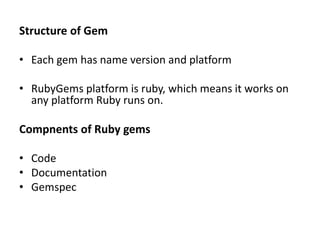
Structure of Gem
• Each gem has name version and platform
• RubyGems platform is ruby, which means it works on
any platform Ruby runs on.
Compnents of Ruby gems
• Code
• Documentation
• Gemspec
Contd..
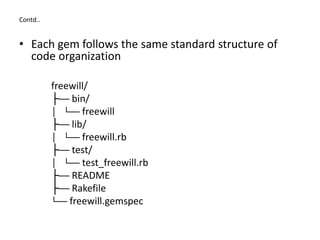
• Each gem follows the same standard structure of
code organization
freewill/
├── bin/
│ └── freewill
├── lib/
│ └── freewill.rb
├── test/
│ └── test_freewill.rb
├── README
├── Rakefile
└── freewill.gemspec
Contd..
• The lib directory contains the code for the gem
• The test or spec directory contains tests, depending on
which test framework the developer uses.
• The gem usually has a Rakefile. Which the rake program
used to automate tests, generate code and perform other
tasks.
• Documentation is usally included in the README and inline
with the code.
• The final piece is the gemspec, which contains the
information about the gem.
Contd..
% cat freewill.gemspec
Gem::Specification.new do |s|
s.name = 'freewill‘
s.version = '1.0.0'
s.summary = "Freewill!"
s.description = "I will choose Freewill!"
s.authors = ["Nick Quaranto"]
s.email = 'nick@quaran.to‘
s.homepage = 'http://example.com/freewill'
s.files = ["lib/freewill.rb", ...]
end
Making your own gem
• Creating publishing your own gem is simple thanks to the tools baked
right into RubyGems.
• Create the folder containing hello.gemspec, lib and lib/hello.rb
• The code for your package is placed inside lib.
• The code inside of lib/hello.rb is pretty bare bones.
$cat lib/hello.rb
• The content for gemspec needs to be updated.
• After you have created gemspec , you can build the gem from it.
gem build hello.gemspec
• Then you can install the generated gem locally to test it out.
• This gem can be pushed to to ruby gems by running following command.
Gem push hello-0.0.0.gem
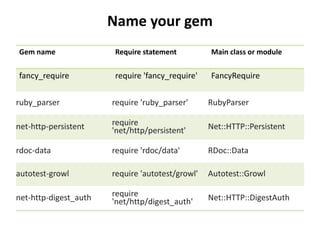
Name your gem
Gem name Require statement Main class or module
fancy_require require 'fancy_require' FancyRequire
ruby_parser require 'ruby_parser' RubyParser
net-http-persistent require
'net/http/persistent' Net::HTTP::Persistent
rdoc-data require 'rdoc/data' RDoc::Data
autotest-growl require 'autotest/growl' Autotest::Growl
net-http-digest_auth require
'net/http/digest_auth' Net::HTTP::DigestAuth
Contd..
• If you publish a gem on rubygems.org it may be removed if the
name is objectionalble, violates intellectual property or the
contents of the gem meet these criteria.
• You can also report such a gem on the RugyGems support site.
• Don’t use upper case letters.
• Use underscore for multiple words
– If a class or module has multiple words, use underscores to
separate them.
– This matches the file the user will require, making is easier for
the use to start using your gem.
Contd..
• Mix underscore and dashes appropriately.
– If your class or module has multiple words and your also adding
functionality to another gem, follow both of the rules above.
– Example, “net-http-digest_auth adds HTTP digest authentication
to net/http.
– The user will require “net/http/digest_aut” to use the extension
“Net::HTTP::DigestAuth.
• Use dashes for extensions.
– If your adding functionality to another gem, use a dash.
– This usually correspond to a / in the require statement and :: in
the name of your main class or module
Publishing to RubyGems.org
• The simplest way to distribute a gem for public consumption is to
use RubyGems.org.
• Gems that are published to RubyGems.org can be installed via the
gem install command.
• To begin, you will need to create an account on RubyGems.org.
• After creating the account, use your email and password when
pushing the gem.
• RubyGems saves the credentials in ~/.gem/credentials for you so
you only need to log in once.

11 Ruby Gems

  • 1.
    Deepak H B Full-StackDeveloper Gmail: deepakhb2@gmail.com Linkedin: http://in.linkedin.com/in/deepakhb GitHub: https://github.com/deepakhb2
  • 2.
  • 3.
    Introduction • The gemcommand allows you to interact with RubyGems. • Finding Gems $gem search rails • To find more info on gems $gem search rails –d • The install command downloads and installs the gem and any necessary dependencies then builds documentation for the installed gems. $gem install rails • The list of installed gems can be viewed by running following command $gem list • Uninstallin gems $gem uninstall rails • If you uninstall a dependency of a gem, RubyGems will ask for confirmation before uninstalling. • The documents can be viewed by using ri. $ri RBTree • You can view the documentation for your installed gem in your browser with server command $gem server
  • 4.
    Structure of Gem •Each gem has name version and platform • RubyGems platform is ruby, which means it works on any platform Ruby runs on. Compnents of Ruby gems • Code • Documentation • Gemspec
  • 5.
    Contd.. • Each gemfollows the same standard structure of code organization freewill/ ├── bin/ │ └── freewill ├── lib/ │ └── freewill.rb ├── test/ │ └── test_freewill.rb ├── README ├── Rakefile └── freewill.gemspec
  • 6.
    Contd.. • The libdirectory contains the code for the gem • The test or spec directory contains tests, depending on which test framework the developer uses. • The gem usually has a Rakefile. Which the rake program used to automate tests, generate code and perform other tasks. • Documentation is usally included in the README and inline with the code. • The final piece is the gemspec, which contains the information about the gem.
  • 7.
    Contd.. % cat freewill.gemspec Gem::Specification.newdo |s| s.name = 'freewill‘ s.version = '1.0.0' s.summary = "Freewill!" s.description = "I will choose Freewill!" s.authors = ["Nick Quaranto"] s.email = 'nick@quaran.to‘ s.homepage = 'http://example.com/freewill' s.files = ["lib/freewill.rb", ...] end
  • 8.
    Making your owngem • Creating publishing your own gem is simple thanks to the tools baked right into RubyGems. • Create the folder containing hello.gemspec, lib and lib/hello.rb • The code for your package is placed inside lib. • The code inside of lib/hello.rb is pretty bare bones. $cat lib/hello.rb • The content for gemspec needs to be updated. • After you have created gemspec , you can build the gem from it. gem build hello.gemspec • Then you can install the generated gem locally to test it out. • This gem can be pushed to to ruby gems by running following command. Gem push hello-0.0.0.gem
  • 9.
    Name your gem Gemname Require statement Main class or module fancy_require require 'fancy_require' FancyRequire ruby_parser require 'ruby_parser' RubyParser net-http-persistent require 'net/http/persistent' Net::HTTP::Persistent rdoc-data require 'rdoc/data' RDoc::Data autotest-growl require 'autotest/growl' Autotest::Growl net-http-digest_auth require 'net/http/digest_auth' Net::HTTP::DigestAuth
  • 10.
    Contd.. • If youpublish a gem on rubygems.org it may be removed if the name is objectionalble, violates intellectual property or the contents of the gem meet these criteria. • You can also report such a gem on the RugyGems support site. • Don’t use upper case letters. • Use underscore for multiple words – If a class or module has multiple words, use underscores to separate them. – This matches the file the user will require, making is easier for the use to start using your gem.
  • 11.
    Contd.. • Mix underscoreand dashes appropriately. – If your class or module has multiple words and your also adding functionality to another gem, follow both of the rules above. – Example, “net-http-digest_auth adds HTTP digest authentication to net/http. – The user will require “net/http/digest_aut” to use the extension “Net::HTTP::DigestAuth. • Use dashes for extensions. – If your adding functionality to another gem, use a dash. – This usually correspond to a / in the require statement and :: in the name of your main class or module
  • 12.
    Publishing to RubyGems.org •The simplest way to distribute a gem for public consumption is to use RubyGems.org. • Gems that are published to RubyGems.org can be installed via the gem install command. • To begin, you will need to create an account on RubyGems.org. • After creating the account, use your email and password when pushing the gem. • RubyGems saves the credentials in ~/.gem/credentials for you so you only need to log in once.