JSON REST API for WordPress 
@tlovett12 
+ JSON 
REST API 
=
Who Am I? 
• My name is Taylor Lovett! 
• Director of Web Engineering at 10up 
• Open source community member 
• WordPress core contributor 
• WP API team member 
@tlovett12
We are hiring! 
@tlovett12
So what’s this new WordPress API 
thing all about? Don’t we already have 
one?
Right now, we have XML-RPC. 
Remote Procedural Call API’s are part of an old standard. They 
are very difficult to use.
Why JSON REST API? 
• In a nutshell, JSON REST API’s have swept the 
web becoming an almost standard. They are 
extremely intuitive and provide an easy way to 
distribute, collect, and modify data. 
Let’s break it down a bit.
JSON 
• JSON is an abbreviation for “JavaScript Object Notation” 
• It’s simply a way to describe data that is lightweight and 
extremely easy to use. Arguably much easier to use than 
XML.
REST 
• REST (Representational State Transfer) is an architectural style 
that dictates how HTTP and URI’s should be used and organized. 
• Verbs and resources: GET /post/1 
• Hypermedia as the Engine of Application State (HATEOAS) - 
Server provides everything you need to know how to use it in a 
response. 
• Actions are autonomous and do not depend on each other. 
• Bottom line: RESTful API’s have become extremely popular 
across the web. They are much easier to use than things like RPC 
or SOAP.
And of course, API 
• An API (Application Programming Interface) is a 
set of entry points that allow you to interact with 
a platform (WordPress in this case).
How can I start using it now?
First, install the plugin 
http://wordpress.org/plugins/json-rest-api/ 
! 
Core integration coming soon.
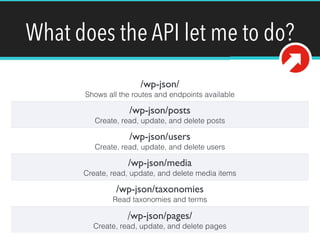
What does the API let me to do? 
/wp-json/ 
Shows all the routes and endpoints available 
/wp-json/posts 
Create, read, update, and delete posts 
/wp-json/users 
Create, read, update, and delete users 
/wp-json/media 
Create, read, update, and delete media items 
/wp-json/taxonomies 
Read taxonomies and terms 
/wp-json/pages/ 
Create, read, update, and delete pages
The API is rich with functionality. 
Explore the documentation! 
http://wp-api.org
The basic building block of 
WordPress is the post. 
http://codex.wordpress.org/Writing_Posts
List Posts 
[{! 
"ID": 11297,! 
"title": "Post 19",! 
"status": "publish",! 
"type": "post",! 
"author": 1,! 
"content": "",! 
"parent": null,! 
"link": "http://example.com/2014/08/post-19/",! 
"format": "standard",! 
"slug": "post-19",! 
"guid": "http://example.com/2014/08/post-19/",! 
"excerpt": null,! 
"menu_order": 0,! 
"comment_status": "closed",! 
"ping_status": "open",! 
"sticky": false,! 
"meta": {},! 
"featured_image": null,! 
"terms": {}! 
}] 
GET /wp-json/posts
List Posts 
GET /wp-json/posts 
Takes a number of useful parameters: 
• Filter[]: Accepts WP_Query arguments 
http://codex.wordpress.org/Class_Reference/WP_Query 
• Page: Allows for pagination 
• Context: Determines usage context i.e. “view or edit” 
• … 
https://github.com/WP-API/WP-API/blob/master/docs/routes/routes.md
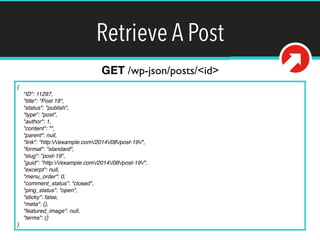
Retrieve A Post 
{! 
"ID": 11297,! 
"title": "Post 19",! 
"status": "publish",! 
"type": "post",! 
"author": 1,! 
"content": "",! 
"parent": null,! 
"link": "http://example.com/2014/08/post-19/",! 
"format": "standard",! 
"slug": "post-19",! 
"guid": "http://example.com/2014/08/post-19/",! 
"excerpt": null,! 
"menu_order": 0,! 
"comment_status": "closed",! 
"ping_status": "open",! 
"sticky": false,! 
"meta": {},! 
"featured_image": null,! 
"terms": {}! 
} 
GET /wp-json/posts/<id>
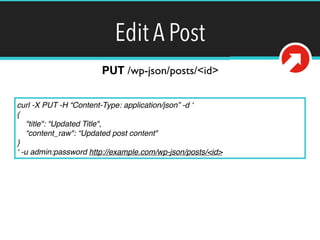
Edit A Post 
PUT /wp-json/posts/<id> 
curl -X PUT -H “Content-Type: application/json” -d ‘! 
{! 
"title": “Updated Title",! 
“content_raw": “Updated post content"! 
}! 
‘ -u admin:password http://example.com/wp-json/posts/<id> 
We need to send a PUT request to this endpoint with 
our post data. Of course we must authenticate before 
doing this.
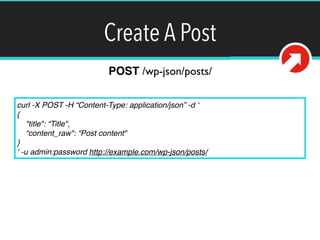
Create A Post 
POST /wp-json/posts/ 
curl -X POST -H “Content-Type: application/json” -d ‘! 
{! 
"title": “Title",! 
“content_raw": “Post content"! 
}! 
‘ -u admin:password http://example.com/wp-json/posts/ 
Notice we are using a POST request this time.
Build Your Own Routes and Endpoints 
WP API is very extensible 
http://wp-api.org/guides/extending.html
What can I do with the JSON 
REST API for WordPress?
ANYTHING!!!!
If you learned nothing so far, 
know this: 
You can do amazing things with the JSON REST 
API for WordPress. 
Soon ~23% of the web will be using this API.
Questions? 
@tlovett12! 
taylor.lovett@10up.com! 
taylorlovett.com 
We need to send a PUT request to this endpoint with 
our post data. Of course we must authenticate before 
doing this.

JSON REST API for WordPress

  • 1.
    JSON REST APIfor WordPress @tlovett12 + JSON REST API =
  • 2.
    Who Am I? • My name is Taylor Lovett! • Director of Web Engineering at 10up • Open source community member • WordPress core contributor • WP API team member @tlovett12
  • 3.
    We are hiring! @tlovett12
  • 4.
    So what’s thisnew WordPress API thing all about? Don’t we already have one?
  • 5.
    Right now, wehave XML-RPC. Remote Procedural Call API’s are part of an old standard. They are very difficult to use.
  • 6.
    Why JSON RESTAPI? • In a nutshell, JSON REST API’s have swept the web becoming an almost standard. They are extremely intuitive and provide an easy way to distribute, collect, and modify data. Let’s break it down a bit.
  • 7.
    JSON • JSONis an abbreviation for “JavaScript Object Notation” • It’s simply a way to describe data that is lightweight and extremely easy to use. Arguably much easier to use than XML.
  • 8.
    REST • REST(Representational State Transfer) is an architectural style that dictates how HTTP and URI’s should be used and organized. • Verbs and resources: GET /post/1 • Hypermedia as the Engine of Application State (HATEOAS) - Server provides everything you need to know how to use it in a response. • Actions are autonomous and do not depend on each other. • Bottom line: RESTful API’s have become extremely popular across the web. They are much easier to use than things like RPC or SOAP.
  • 9.
    And of course,API • An API (Application Programming Interface) is a set of entry points that allow you to interact with a platform (WordPress in this case).
  • 10.
    How can Istart using it now?
  • 11.
    First, install theplugin http://wordpress.org/plugins/json-rest-api/ ! Core integration coming soon.
  • 12.
    What does theAPI let me to do? /wp-json/ Shows all the routes and endpoints available /wp-json/posts Create, read, update, and delete posts /wp-json/users Create, read, update, and delete users /wp-json/media Create, read, update, and delete media items /wp-json/taxonomies Read taxonomies and terms /wp-json/pages/ Create, read, update, and delete pages
  • 13.
    The API isrich with functionality. Explore the documentation! http://wp-api.org
  • 14.
    The basic buildingblock of WordPress is the post. http://codex.wordpress.org/Writing_Posts
  • 15.
    List Posts [{! "ID": 11297,! "title": "Post 19",! "status": "publish",! "type": "post",! "author": 1,! "content": "",! "parent": null,! "link": "http://example.com/2014/08/post-19/",! "format": "standard",! "slug": "post-19",! "guid": "http://example.com/2014/08/post-19/",! "excerpt": null,! "menu_order": 0,! "comment_status": "closed",! "ping_status": "open",! "sticky": false,! "meta": {},! "featured_image": null,! "terms": {}! }] GET /wp-json/posts
  • 16.
    List Posts GET/wp-json/posts Takes a number of useful parameters: • Filter[]: Accepts WP_Query arguments http://codex.wordpress.org/Class_Reference/WP_Query • Page: Allows for pagination • Context: Determines usage context i.e. “view or edit” • … https://github.com/WP-API/WP-API/blob/master/docs/routes/routes.md
  • 17.
    Retrieve A Post {! "ID": 11297,! "title": "Post 19",! "status": "publish",! "type": "post",! "author": 1,! "content": "",! "parent": null,! "link": "http://example.com/2014/08/post-19/",! "format": "standard",! "slug": "post-19",! "guid": "http://example.com/2014/08/post-19/",! "excerpt": null,! "menu_order": 0,! "comment_status": "closed",! "ping_status": "open",! "sticky": false,! "meta": {},! "featured_image": null,! "terms": {}! } GET /wp-json/posts/<id>
  • 18.
    Edit A Post PUT /wp-json/posts/<id> curl -X PUT -H “Content-Type: application/json” -d ‘! {! "title": “Updated Title",! “content_raw": “Updated post content"! }! ‘ -u admin:password http://example.com/wp-json/posts/<id> We need to send a PUT request to this endpoint with our post data. Of course we must authenticate before doing this.
  • 19.
    Create A Post POST /wp-json/posts/ curl -X POST -H “Content-Type: application/json” -d ‘! {! "title": “Title",! “content_raw": “Post content"! }! ‘ -u admin:password http://example.com/wp-json/posts/ Notice we are using a POST request this time.
  • 20.
    Build Your OwnRoutes and Endpoints WP API is very extensible http://wp-api.org/guides/extending.html
  • 21.
    What can Ido with the JSON REST API for WordPress?
  • 22.
  • 23.
    If you learnednothing so far, know this: You can do amazing things with the JSON REST API for WordPress. Soon ~23% of the web will be using this API.
  • 24.
    Questions? @tlovett12! taylor.lovett@10up.com! taylorlovett.com We need to send a PUT request to this endpoint with our post data. Of course we must authenticate before doing this.