Introduction to Programming 2 1
8 GUI Event Handling
Introduction to Programming 2 2
Topics
? The Delegation Event Model
? Event Classes
? Event Listeners
– ActionListener Method
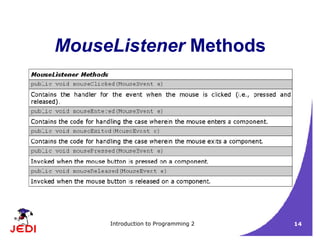
– MouseListener Methods
– MouseMotionListener Methods
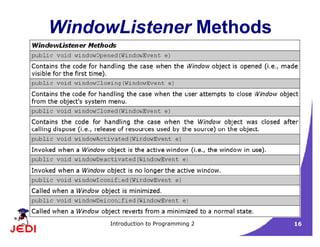
– WindowListener Methods
– Guidelines for Creating Applications Handling GUI Events
Introduction to Programming 2 3
Topics
? Adapter Classes
? Inner Classes
? Anonymous Inner Classes
Introduction to Programming 2 4
The Delegation Event Model
? The Delegation Event Model
– Model used by Java to handle user interaction with GUI components
– Describes how your program can respond to user interaction
? Three important components:
– Event Source
– Event Listener/Handler
– Event Object
Introduction to Programming 2 5
The Delegation Event Model
? Event Source
– GUI component that generates the event
– Example: button, mouse, keyboard
? Event Listener/Handler
– Receives news of events and processes user's interaction
– Example: displaying an information useful to the user, computing for
a value
Introduction to Programming 2 6
The Delegation Event Model
? Event Object
– Created when an event occurs (i.e., user interacts with a GUI
component)
– Contains all necessary information about the event that has
occurred
? Type of event that has occurred
? Source of the event
– May have one of several event classes as data type
Introduction to Programming 2 7
The Delegation Event Model
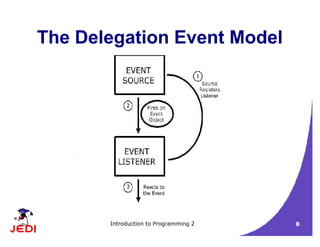
? A listener should be registered with a source
? Once registered, listener waits until an event occurs
? When an event occurs
– An event object created
– Event object is fired by the source to the registered listeners
? Once the listener receives an event object from the source
– Deciphers the notification
– Processes the event that occurred.
Introduction to Programming 2 8
The Delegation Event Model
Introduction to Programming 2 9
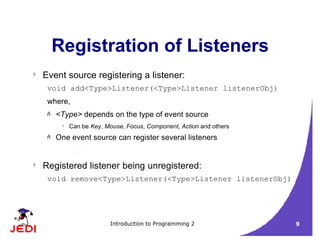
Registration of Listeners
? Event source registering a listener:
void add<Type>Listener(<Type>Listener listenerObj)
where,
– <Type> depends on the type of event source
? Can be Key, Mouse, Focus, Component, Action and others
– One event source can register several listeners
? Registered listener being unregistered:
void remove<Type>Listener(<Type>Listener listenerObj)
Introduction to Programming 2 10
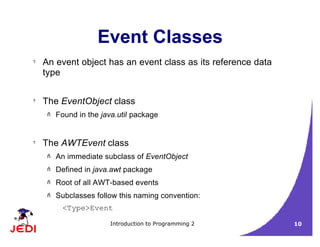
Event Classes
? An event object has an event class as its reference data
type
? The EventObject class
– Found in the java.util package
? The AWTEvent class
– An immediate subclass of EventObject
– Defined in java.awt package
– Root of all AWT-based events
– Subclasses follow this naming convention:
<Type>Event
Introduction to Programming 2 11
Event Classes
Introduction to Programming 2 12
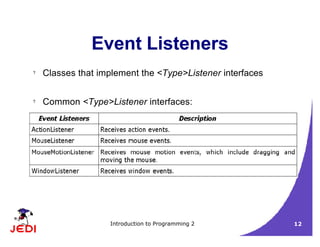
Event Listeners
? Classes that implement the <Type>Listener interfaces
? Common <Type>Listener interfaces:
Introduction to Programming 2 13
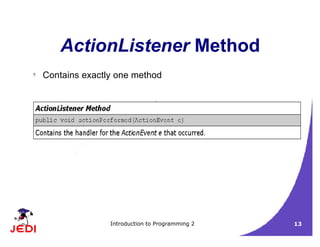
ActionListener Method
? Contains exactly one method
Introduction to Programming 2 14
MouseListener Methods
Introduction to Programming 2 15
MouseMotionListener
Methods
Introduction to Programming 2 16
WindowListener Methods
Introduction to Programming 2 17
Creating GUI Applications
with Event Handling
? Guidelines:
1. Create a GUI class
?
Describes and displays the appearance of your GUI application
2. Create a class implementing the appropriate listener interface
? May refer to the same class as step 1
3. In the implementing class
? Override ALL methods of the appropriate listener interface
? Describe in each method how you would like the event to be handled
? May give empty implementations for methods you don't need
4. Register the listener object with the source
? The object is an instantiation of the listener class in step 2
? Use the add<Type>Listener method
Introduction to Programming 2 18
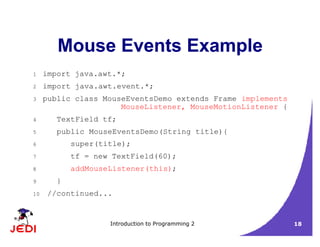
Mouse Events Example
1 import java.awt.*;
2 import java.awt.event.*;
3 public class MouseEventsDemo extends Frame implements
MouseListener, MouseMotionListener {
4 TextField tf;
5 public MouseEventsDemo(String title){
6 super(title);
7 tf = new TextField(60);
8 addMouseListener(this);
9 }
10 //continued...
Introduction to Programming 2 19
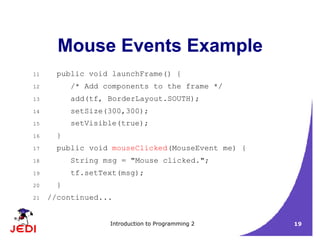
Mouse Events Example
11 public void launchFrame() {
12 /* Add components to the frame */
13 add(tf, BorderLayout.SOUTH);
14 setSize(300,300);
15 setVisible(true);
16 }
17 public void mouseClicked(MouseEvent me) {
18 String msg = "Mouse clicked.";
19 tf.setText(msg);
20 }
21 //continued...
Introduction to Programming 2 20
Mouse Events Example
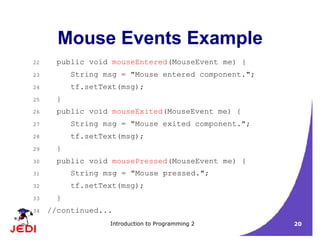
22 public void mouseEntered(MouseEvent me) {
23 String msg = "Mouse entered component.";
24 tf.setText(msg);
25 }
26 public void mouseExited(MouseEvent me) {
27 String msg = "Mouse exited component.";
28 tf.setText(msg);
29 }
30 public void mousePressed(MouseEvent me) {
31 String msg = "Mouse pressed.";
32 tf.setText(msg);
33 }
34 //continued...
Introduction to Programming 2 21
Mouse Events Example
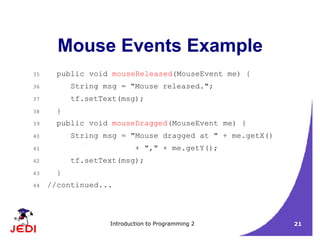
35 public void mouseReleased(MouseEvent me) {
36 String msg = "Mouse released.";
37 tf.setText(msg);
38 }
39 public void mouseDragged(MouseEvent me) {
40 String msg = "Mouse dragged at " + me.getX()
41 + "," + me.getY();
42 tf.setText(msg);
43 }
44 //continued...
Introduction to Programming 2 22
Mouse Events Example
45 public void mouseMoved(MouseEvent me) {
46 String msg = "Mouse moved at " + me.getX()
47 + "," + me.getY();
48 tf.setText(msg);
49 }
50 public static void main(String args[]) {
51 MouseEventsDemo med =
52 new MouseEventsDemo("Mouse Events Demo");
53 med.launchFrame();
54 }
55 }
Introduction to Programming 2 23
Close Window Example
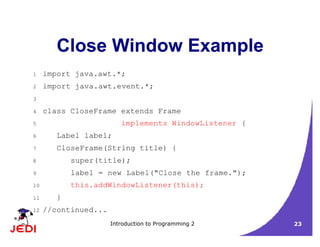
1 import java.awt.*;
2 import java.awt.event.*;
3
4 class CloseFrame extends Frame
5 implements WindowListener {
6 Label label;
7 CloseFrame(String title) {
8 super(title);
9 label = new Label("Close the frame.");
10 this.addWindowListener(this);
11 }
12 //continued...
Introduction to Programming 2 24
Close Window Example
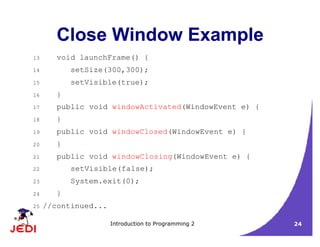
13 void launchFrame() {
14 setSize(300,300);
15 setVisible(true);
16 }
17 public void windowActivated(WindowEvent e) {
18 }
19 public void windowClosed(WindowEvent e) {
20 }
21 public void windowClosing(WindowEvent e) {
22 setVisible(false);
23 System.exit(0);
24 }
25 //continued...
Introduction to Programming 2 25
Close Window Example
26 public void windowDeactivated(WindowEvent e) {
27 }
28 public void windowDeiconified(WindowEvent e) {
29 }
30 public void windowIconified(WindowEvent e) {
31 }
32 public void windowOpened(WindowEvent e) {
33 }
34 public static void main(String args[]) {
35 CloseFrame cf =
36 new CloseFrame("Close Window Example");
37 cf.launchFrame();
38 }
39 }
Introduction to Programming 2 26
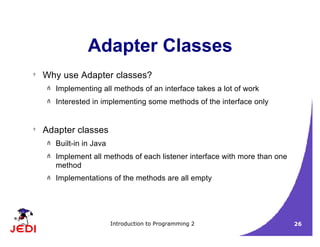
Adapter Classes
? Why use Adapter classes?
– Implementing all methods of an interface takes a lot of work
– Interested in implementing some methods of the interface only
? Adapter classes
– Built-in in Java
– Implement all methods of each listener interface with more than one
method
– Implementations of the methods are all empty
Introduction to Programming 2 27
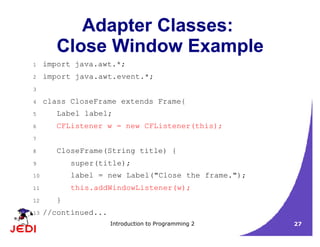
Adapter Classes:
Close Window Example
1 import java.awt.*;
2 import java.awt.event.*;
3
4 class CloseFrame extends Frame{
5 Label label;
6 CFListener w = new CFListener(this);
7
8 CloseFrame(String title) {
9 super(title);
10 label = new Label("Close the frame.");
11 this.addWindowListener(w);
12 }
13 //continued...
Introduction to Programming 2 28
Adapter Classes:
Close Window Example
14 void launchFrame() {
15 setSize(300,300);
16 setVisible(true);
17 }
18
19 public static void main(String args[]) {
20 CloseFrame cf =
21 new CloseFrame("Close Window Example");
22 cf.launchFrame();
23 }
24 }
25 //continued...
Introduction to Programming 2 29
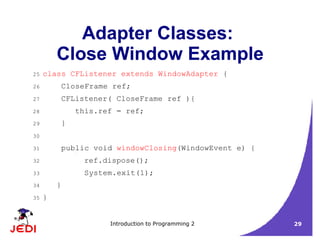
Adapter Classes:
Close Window Example
25 class CFListener extends WindowAdapter {
26 CloseFrame ref;
27 CFListener( CloseFrame ref ){
28 this.ref = ref;
29 }
30
31 public void windowClosing(WindowEvent e) {
32 ref.dispose();
33 System.exit(1);
34 }
35 }
Introduction to Programming 2 30
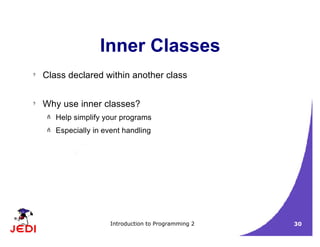
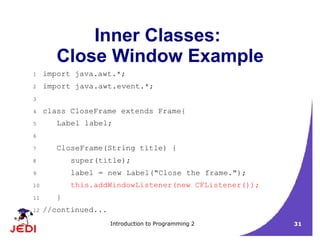
Inner Classes
? Class declared within another class
? Why use inner classes?
– Help simplify your programs
– Especially in event handling
Introduction to Programming 2 31
Inner Classes:
Close Window Example
1 import java.awt.*;
2 import java.awt.event.*;
3
4 class CloseFrame extends Frame{
5 Label label;
6
7 CloseFrame(String title) {
8 super(title);
9 label = new Label("Close the frame.");
10 this.addWindowListener(new CFListener());
11 }
12 //continued...
Introduction to Programming 2 32
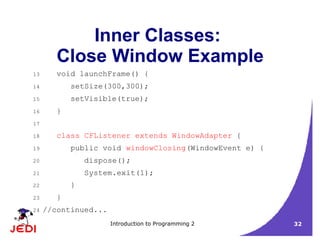
Inner Classes:
Close Window Example
13 void launchFrame() {
14 setSize(300,300);
15 setVisible(true);
16 }
17
18 class CFListener extends WindowAdapter {
19 public void windowClosing(WindowEvent e) {
20 dispose();
21 System.exit(1);
22 }
23 }
24 //continued...
Introduction to Programming 2 33
Inner Classes:
Close Window Example
25 public static void main(String args[]) {
26 CloseFrame cf =
27 new CloseFrame("Close Window Example");
28 cf.launchFrame();
29 }
30 }
Introduction to Programming 2 34
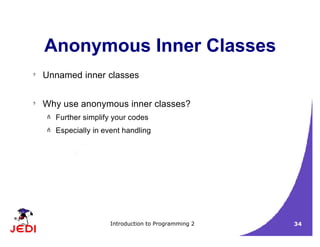
Anonymous Inner Classes
? Unnamed inner classes
? Why use anonymous inner classes?
– Further simplify your codes
– Especially in event handling
Introduction to Programming 2 35
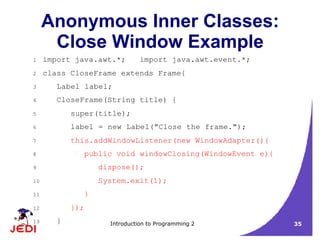
Anonymous Inner Classes:
Close Window Example
1 import java.awt.*; import java.awt.event.*;
2 class CloseFrame extends Frame{
3 Label label;
4 CloseFrame(String title) {
5 super(title);
6 label = new Label("Close the frame.");
7 this.addWindowListener(new WindowAdapter(){
8 public void windowClosing(WindowEvent e){
9 dispose();
10 System.exit(1);
11 }
12 });
13 }
Introduction to Programming 2 36
Anonymous Inner Classes:
Close Window Example
14 void launchFrame() {
15 setSize(300,300);
16 setVisible(true);
17 }
18
19 public static void main(String args[]) {
20 CloseFrame cf =
21 new CloseFrame("Close Window Example");
22 cf.launchFrame();
23 }
24 }
Introduction to Programming 2 37
Summary
? The Delegation Event Model
– Register listeners
void add<Type>Listener(<Type>Listener listenerObj)
– Listeners wait for an event to occur
– When event occurs:
?
Event object created
?
Object is fired by source to registered listeners
– When listener receives event object:
?
Deciphers notification
?
Processes the event
Introduction to Programming 2 38
Summary
? The Delegation Event Model Components
– Event Source
– Event Listener/Handler
– Event Object
?
Event Classes
– The EventObject Class
– The AWTEvent Class
? Root of all AWT-based events
?
Subclasses follow this naming convention:
<Type>Event
Introduction to Programming 2 39
Summary
? Event Listeners
– ActionListener Method
– MouseListener Methods
– MouseMotionListener Methods
– WindowListener Methods
Introduction to Programming 2 40
Summary
? Creating GUI Applications with Event Handling
1. Create a GUI class
2. Create a class implementing the appropriate listener interface
3. In the implementing class
? Override ALL methods of the appropriate listener interface
? Describe in each method how you would like the event to be handled
4. Register the listener object with the source
? Use the add<Type>Listener method
? Simplifying your code:
– Adapter Classes
– Inner Classes
– Anonymous Inner Classes

JEDI Slides-Intro2-Chapter20-GUI Event Handling.pdf

  • 1.
    Introduction to Programming2 1 8 GUI Event Handling
  • 2.
    Introduction to Programming2 2 Topics ? The Delegation Event Model ? Event Classes ? Event Listeners – ActionListener Method – MouseListener Methods – MouseMotionListener Methods – WindowListener Methods – Guidelines for Creating Applications Handling GUI Events
  • 3.
    Introduction to Programming2 3 Topics ? Adapter Classes ? Inner Classes ? Anonymous Inner Classes
  • 4.
    Introduction to Programming2 4 The Delegation Event Model ? The Delegation Event Model – Model used by Java to handle user interaction with GUI components – Describes how your program can respond to user interaction ? Three important components: – Event Source – Event Listener/Handler – Event Object
  • 5.
    Introduction to Programming2 5 The Delegation Event Model ? Event Source – GUI component that generates the event – Example: button, mouse, keyboard ? Event Listener/Handler – Receives news of events and processes user's interaction – Example: displaying an information useful to the user, computing for a value
  • 6.
    Introduction to Programming2 6 The Delegation Event Model ? Event Object – Created when an event occurs (i.e., user interacts with a GUI component) – Contains all necessary information about the event that has occurred ? Type of event that has occurred ? Source of the event – May have one of several event classes as data type
  • 7.
    Introduction to Programming2 7 The Delegation Event Model ? A listener should be registered with a source ? Once registered, listener waits until an event occurs ? When an event occurs – An event object created – Event object is fired by the source to the registered listeners ? Once the listener receives an event object from the source – Deciphers the notification – Processes the event that occurred.
  • 8.
    Introduction to Programming2 8 The Delegation Event Model
  • 9.
    Introduction to Programming2 9 Registration of Listeners ? Event source registering a listener: void add<Type>Listener(<Type>Listener listenerObj) where, – <Type> depends on the type of event source ? Can be Key, Mouse, Focus, Component, Action and others – One event source can register several listeners ? Registered listener being unregistered: void remove<Type>Listener(<Type>Listener listenerObj)
  • 10.
    Introduction to Programming2 10 Event Classes ? An event object has an event class as its reference data type ? The EventObject class – Found in the java.util package ? The AWTEvent class – An immediate subclass of EventObject – Defined in java.awt package – Root of all AWT-based events – Subclasses follow this naming convention: <Type>Event
  • 11.
    Introduction to Programming2 11 Event Classes
  • 12.
    Introduction to Programming2 12 Event Listeners ? Classes that implement the <Type>Listener interfaces ? Common <Type>Listener interfaces:
  • 13.
    Introduction to Programming2 13 ActionListener Method ? Contains exactly one method
  • 14.
    Introduction to Programming2 14 MouseListener Methods
  • 15.
    Introduction to Programming2 15 MouseMotionListener Methods
  • 16.
    Introduction to Programming2 16 WindowListener Methods
  • 17.
    Introduction to Programming2 17 Creating GUI Applications with Event Handling ? Guidelines: 1. Create a GUI class ? Describes and displays the appearance of your GUI application 2. Create a class implementing the appropriate listener interface ? May refer to the same class as step 1 3. In the implementing class ? Override ALL methods of the appropriate listener interface ? Describe in each method how you would like the event to be handled ? May give empty implementations for methods you don't need 4. Register the listener object with the source ? The object is an instantiation of the listener class in step 2 ? Use the add<Type>Listener method
  • 18.
    Introduction to Programming2 18 Mouse Events Example 1 import java.awt.*; 2 import java.awt.event.*; 3 public class MouseEventsDemo extends Frame implements MouseListener, MouseMotionListener { 4 TextField tf; 5 public MouseEventsDemo(String title){ 6 super(title); 7 tf = new TextField(60); 8 addMouseListener(this); 9 } 10 //continued...
  • 19.
    Introduction to Programming2 19 Mouse Events Example 11 public void launchFrame() { 12 /* Add components to the frame */ 13 add(tf, BorderLayout.SOUTH); 14 setSize(300,300); 15 setVisible(true); 16 } 17 public void mouseClicked(MouseEvent me) { 18 String msg = "Mouse clicked."; 19 tf.setText(msg); 20 } 21 //continued...
  • 20.
    Introduction to Programming2 20 Mouse Events Example 22 public void mouseEntered(MouseEvent me) { 23 String msg = "Mouse entered component."; 24 tf.setText(msg); 25 } 26 public void mouseExited(MouseEvent me) { 27 String msg = "Mouse exited component."; 28 tf.setText(msg); 29 } 30 public void mousePressed(MouseEvent me) { 31 String msg = "Mouse pressed."; 32 tf.setText(msg); 33 } 34 //continued...
  • 21.
    Introduction to Programming2 21 Mouse Events Example 35 public void mouseReleased(MouseEvent me) { 36 String msg = "Mouse released."; 37 tf.setText(msg); 38 } 39 public void mouseDragged(MouseEvent me) { 40 String msg = "Mouse dragged at " + me.getX() 41 + "," + me.getY(); 42 tf.setText(msg); 43 } 44 //continued...
  • 22.
    Introduction to Programming2 22 Mouse Events Example 45 public void mouseMoved(MouseEvent me) { 46 String msg = "Mouse moved at " + me.getX() 47 + "," + me.getY(); 48 tf.setText(msg); 49 } 50 public static void main(String args[]) { 51 MouseEventsDemo med = 52 new MouseEventsDemo("Mouse Events Demo"); 53 med.launchFrame(); 54 } 55 }
  • 23.
    Introduction to Programming2 23 Close Window Example 1 import java.awt.*; 2 import java.awt.event.*; 3 4 class CloseFrame extends Frame 5 implements WindowListener { 6 Label label; 7 CloseFrame(String title) { 8 super(title); 9 label = new Label("Close the frame."); 10 this.addWindowListener(this); 11 } 12 //continued...
  • 24.
    Introduction to Programming2 24 Close Window Example 13 void launchFrame() { 14 setSize(300,300); 15 setVisible(true); 16 } 17 public void windowActivated(WindowEvent e) { 18 } 19 public void windowClosed(WindowEvent e) { 20 } 21 public void windowClosing(WindowEvent e) { 22 setVisible(false); 23 System.exit(0); 24 } 25 //continued...
  • 25.
    Introduction to Programming2 25 Close Window Example 26 public void windowDeactivated(WindowEvent e) { 27 } 28 public void windowDeiconified(WindowEvent e) { 29 } 30 public void windowIconified(WindowEvent e) { 31 } 32 public void windowOpened(WindowEvent e) { 33 } 34 public static void main(String args[]) { 35 CloseFrame cf = 36 new CloseFrame("Close Window Example"); 37 cf.launchFrame(); 38 } 39 }
  • 26.
    Introduction to Programming2 26 Adapter Classes ? Why use Adapter classes? – Implementing all methods of an interface takes a lot of work – Interested in implementing some methods of the interface only ? Adapter classes – Built-in in Java – Implement all methods of each listener interface with more than one method – Implementations of the methods are all empty
  • 27.
    Introduction to Programming2 27 Adapter Classes: Close Window Example 1 import java.awt.*; 2 import java.awt.event.*; 3 4 class CloseFrame extends Frame{ 5 Label label; 6 CFListener w = new CFListener(this); 7 8 CloseFrame(String title) { 9 super(title); 10 label = new Label("Close the frame."); 11 this.addWindowListener(w); 12 } 13 //continued...
  • 28.
    Introduction to Programming2 28 Adapter Classes: Close Window Example 14 void launchFrame() { 15 setSize(300,300); 16 setVisible(true); 17 } 18 19 public static void main(String args[]) { 20 CloseFrame cf = 21 new CloseFrame("Close Window Example"); 22 cf.launchFrame(); 23 } 24 } 25 //continued...
  • 29.
    Introduction to Programming2 29 Adapter Classes: Close Window Example 25 class CFListener extends WindowAdapter { 26 CloseFrame ref; 27 CFListener( CloseFrame ref ){ 28 this.ref = ref; 29 } 30 31 public void windowClosing(WindowEvent e) { 32 ref.dispose(); 33 System.exit(1); 34 } 35 }
  • 30.
    Introduction to Programming2 30 Inner Classes ? Class declared within another class ? Why use inner classes? – Help simplify your programs – Especially in event handling
  • 31.
    Introduction to Programming2 31 Inner Classes: Close Window Example 1 import java.awt.*; 2 import java.awt.event.*; 3 4 class CloseFrame extends Frame{ 5 Label label; 6 7 CloseFrame(String title) { 8 super(title); 9 label = new Label("Close the frame."); 10 this.addWindowListener(new CFListener()); 11 } 12 //continued...
  • 32.
    Introduction to Programming2 32 Inner Classes: Close Window Example 13 void launchFrame() { 14 setSize(300,300); 15 setVisible(true); 16 } 17 18 class CFListener extends WindowAdapter { 19 public void windowClosing(WindowEvent e) { 20 dispose(); 21 System.exit(1); 22 } 23 } 24 //continued...
  • 33.
    Introduction to Programming2 33 Inner Classes: Close Window Example 25 public static void main(String args[]) { 26 CloseFrame cf = 27 new CloseFrame("Close Window Example"); 28 cf.launchFrame(); 29 } 30 }
  • 34.
    Introduction to Programming2 34 Anonymous Inner Classes ? Unnamed inner classes ? Why use anonymous inner classes? – Further simplify your codes – Especially in event handling
  • 35.
    Introduction to Programming2 35 Anonymous Inner Classes: Close Window Example 1 import java.awt.*; import java.awt.event.*; 2 class CloseFrame extends Frame{ 3 Label label; 4 CloseFrame(String title) { 5 super(title); 6 label = new Label("Close the frame."); 7 this.addWindowListener(new WindowAdapter(){ 8 public void windowClosing(WindowEvent e){ 9 dispose(); 10 System.exit(1); 11 } 12 }); 13 }
  • 36.
    Introduction to Programming2 36 Anonymous Inner Classes: Close Window Example 14 void launchFrame() { 15 setSize(300,300); 16 setVisible(true); 17 } 18 19 public static void main(String args[]) { 20 CloseFrame cf = 21 new CloseFrame("Close Window Example"); 22 cf.launchFrame(); 23 } 24 }
  • 37.
    Introduction to Programming2 37 Summary ? The Delegation Event Model – Register listeners void add<Type>Listener(<Type>Listener listenerObj) – Listeners wait for an event to occur – When event occurs: ? Event object created ? Object is fired by source to registered listeners – When listener receives event object: ? Deciphers notification ? Processes the event
  • 38.
    Introduction to Programming2 38 Summary ? The Delegation Event Model Components – Event Source – Event Listener/Handler – Event Object ? Event Classes – The EventObject Class – The AWTEvent Class ? Root of all AWT-based events ? Subclasses follow this naming convention: <Type>Event
  • 39.
    Introduction to Programming2 39 Summary ? Event Listeners – ActionListener Method – MouseListener Methods – MouseMotionListener Methods – WindowListener Methods
  • 40.
    Introduction to Programming2 40 Summary ? Creating GUI Applications with Event Handling 1. Create a GUI class 2. Create a class implementing the appropriate listener interface 3. In the implementing class ? Override ALL methods of the appropriate listener interface ? Describe in each method how you would like the event to be handled 4. Register the listener object with the source ? Use the add<Type>Listener method ? Simplifying your code: – Adapter Classes – Inner Classes – Anonymous Inner Classes