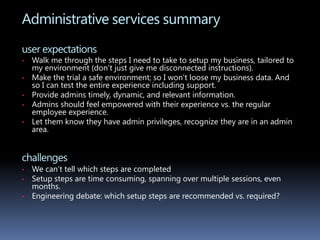
User experience designerUX Designer : Jeannine Boone
About me	I have been in the design industry for over 15 years and have a great deal of diverse experience:MicrosoftFreelance positions through FilterMicrosoft StudiosStarted and run my own photography businessJack Morton Worldwide ImagioSitewerksBoeingAsymetrixStarwaveReal World studios, EnglandVarious freelance projects for small businesses and individualsCustom Jewelry designMy areas of expertise include visual design, interaction design, information architecture, motion design. I also do pottery, jewelry, photography and love snowboarding, spending time with my son, and being outdoors.
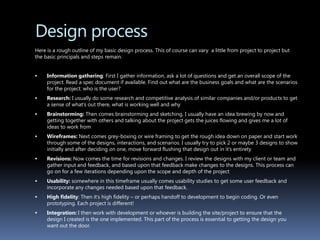
Design process	Here is a rough outline of my basic design process. This of course can vary  a little from project to project but the basic principals and steps remain.Information gathering: First I gather information, ask a lot of questions and get an overall scope of the project. Read a spec document if available. Find out what are the business goals and what are the scenarios for the project: who is the user?Research: I usually do some research and competitive analysis of similar companies and/or products to get a sense of what’s out there, what is working well and whyBrainstorming: Then comes brainstorming and sketching. I usually have an idea brewing by now and getting together with others and talking about the project gets the juices flowing and gives me a lot of ideas to work fromWireframes: Next comes grey-boxing or wire framing to get the rough idea down on paper and start work through some of the designs, interactions, and scenarios. I usually try to pick 2 or maybe 3 designs to show initially and after deciding on one, move forward flushing that design out in it’s entiretyRevisions: Now comes the time for revisions and changes. I review the designs with my client or team and gather input and feedback, and based upon that feedback make changes to the designs. This process can go on for a few iterations depending upon the scope and depth of the projectUsability: somewhere in this timeframe usually comes usability studies to get some user feedback and incorporate any changes needed based upon that feedback. High fidelity: Then it’s high fidelity – or perhaps handoff to development to begin coding. Or even prototyping. Each project is different!Integration: I then work with development or whoever is building the site/project to ensure that the design I created is the one implemented. This part of the process is essential to getting the design you want out the door.
Project: my msnUX Designer : Jeannine Boone
My MSN redesignProject: The main object of this project was to update the current version of my msn. Besides porting it to a new platform (Bedrock), we also wanted to give it a visual and interactive makeover. Team: 1 UX designer
2 PM
1User researcher
Team of developersMy role: interaction design
Art direction
Information architecture
Collaborate with research/PM  on usability testing  Goals and ObjectivesChange look and feel to reflect more of MSN.comAdd new and exciting content that appeals to new and existing usersResize capabilities for scaling browser windowHave Hotmail have link back to myMSN (new version)Change functionality of gadget windows to be simpler and more intuitiveHave default “MyMSN” home page that is a simple yet personal version of MSN.comAdd new themes to choose from, add dynamic setHave dynamically updating content
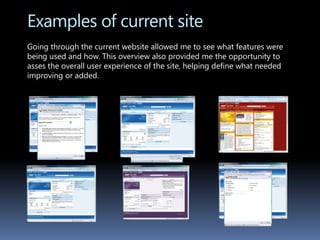
Examples of current siteGoing through the current website allowed me to see what features were being used and how. This overview also provided me the opportunity to asses the overall user experience of the site, helping define what needed improving or added.
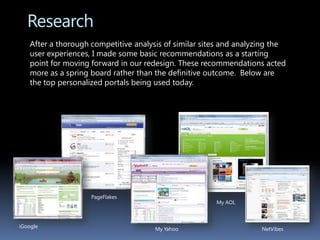
ResearchAfter a thorough competitive analysis of similar sites and analyzing the user experiences, I made some basic recommendations as a starting point for moving forward in our redesign. These recommendations acted more as a spring board rather than the definitive outcome.  Below are the top personalized portals being used today.PageFlakesMy AOLiGoogleMy YahooNetVibes
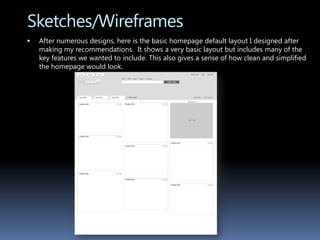
Sketches/WireframesAfter numerous designs, here is the basic homepage default layout I designed after making my recommendations.  It shows a very basic layout but includes many of the key features we wanted to include. This also gives a sense of how clean and simplified the homepage would look.
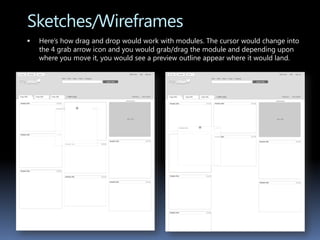
Sketches/WireframesHere’s how drag and drop would work with modules. The cursor would change into the 4 grab arrow icon and you would grab/drag the module and depending upon where you move it, you would see a preview outline appear where it would land.
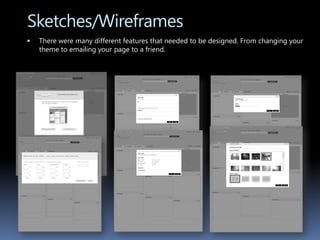
Sketches/WireframesThere were many different features that needed to be designed. From changing your theme to emailing your page to a friend.
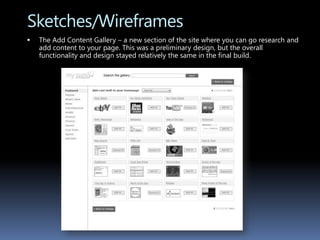
Sketches/WireframesThe Add Content Gallery – a new section of the site where you can go research and add content to your page. This was a preliminary design, but the overall functionality and design stayed relatively the same in the final build.
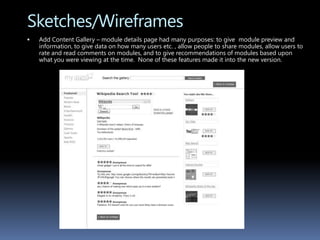
Sketches/WireframesAdd Content Gallery – module details page had many purposes: to give module preview and information, to give data on how many users etc. , allow people to share modules, allow users to rate and read comments on modules, and to give recommendations of modules based upon what you were viewing at the time.  None of these features made it into the new version.
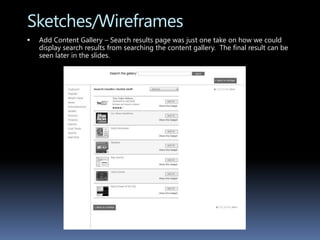
Sketches/WireframesAdd Content Gallery – Search results page was just one take on how we could display search results from searching the content gallery.  The final result can be seen later in the slides.
MockupsAfter the team reviewed and I made multiple changes to the layout, it was time to do high fidelity mockups of the site.The default color was easy to decide upon since the mandate for this was to match closely to the msn.com homepage, this tied my msn into the homepage much more closely than before and gave users a sense of familiarityThe changes that were made to the UI for the mockups were minor. One hurdle was the ‘add content gallery’ and how we would display the module previews within the gallery. Specifically how to separate the msn content from content from the web content.An illustrator was brought on board to help with the theme graphics; this is a significant part of the new look of my msn.
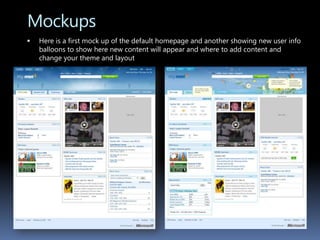
MockupsHere is a first mock up of the default homepage and another showing new user info balloons to show here new content will appear and where to add content and change your theme and layout
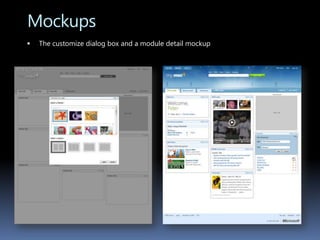
MockupsThe customize dialog box and a module detail mockup
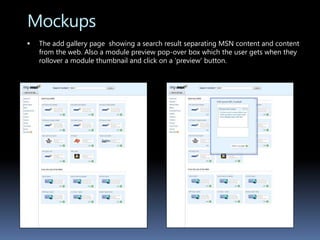
MockupsThe add gallery page  showing a search result separating MSN content and content from the web. Also a module preview pop-over box which the user gets when they rollover a module thumbnail and click on a ‘preview’ button.
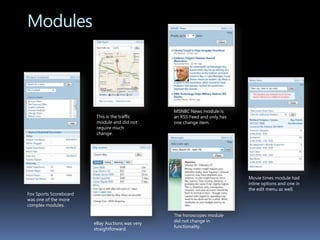
Module DevelopmentAs soon as the style layout and basic functionality were decided upon, module development began. The basic module interaction changed from having inline dialog boxes and input to having edit menusThe basic module edit menu remains the same for each module except the input itself can vary for different modulesEach module and it’s interaction were designed by myself and finalized upon by the team
ModulesMSNBC News module is an RSS Feed and only has one change item.This is the traffic module and did not require much change.Movie times module had inline options and one in the edit menu as well. Fox Sports Scoreboard was one of the more complex modules.The horoscopes module did not change in functionality.eBay Auctions was very straightforward.
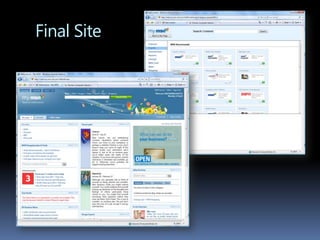
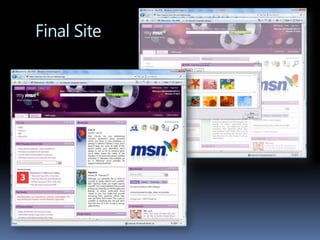
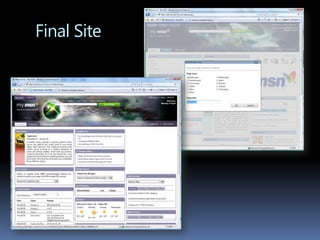
Final SiteAfter months of conceptual work, design and prototyping the beta build is nearly doneThe final beta site is a vast improvement upon the current version of my msnThere are still many bugs in the beta build that have not been correctedMany of the features I proposed did not make it into the new version:Dynamic themesUnlimited new content and gadgetsModule reviews and comments from usersModule recommendationsModule detail pagesFull scalability of site
Final Site
Final Site
Final Site
Project : MICROSOFT ONLINE services trial sign upUX Designer : Jeannine Boone
Microsoft Online Services trial sign upProject: To redesign the sign up process for Microsoft online services – now Office 365. Team: 1 UX designer
2 UA writers
2 PM
2 User researcherMy role: interaction design
Information architecture
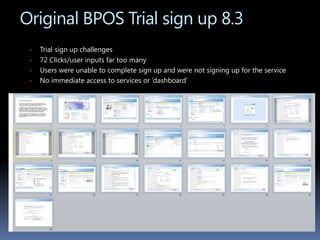
Collaborate with research/PM  on usability testing  Original BPOS Trial sign up 8.3Trialsign up challenges
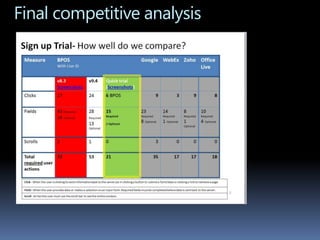
72 Clicks/user inputs far too many
Users were unable to complete sign up and were not signing up for the service
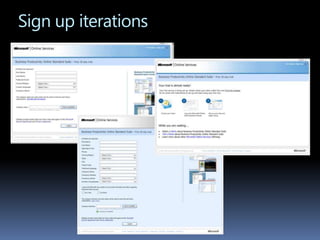
No immediate access to services or ‘dashboard’Sign up iterations
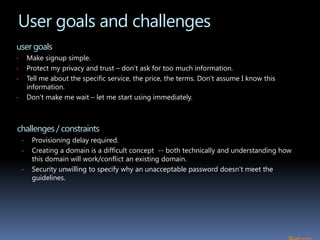
User goals and challengesuser goalsMake signup simple.
Protect my privacy and trust – don’t ask for too much information.
Tell me about the specific service, the price, the terms. Don’t assume I know this information.
Don’t make me wait – let me start using immediately. challenges / constraintsProvisioning delay required.
Creating a domain is a difficult concept  -- both technically and understanding how this domain will work/conflict an existing domain.
Security unwilling to specify why an unacceptable password doesn’t meet the guidelines.  Return
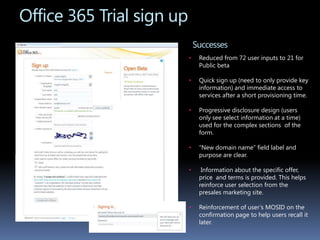
Office 365 Trial sign upSuccessesReduced from 72 user inputs to 21 for Public beta
Quick sign up (need to only provide key information) and immediate access to services after a short provisioning time.
Progressive disclosure design (users only see select information at a time) used for the complex sections  of the form.
“New domain name” field label and purpose are clear.
 Information about the specific offer, price  and terms is provided. This helps reinforce user selection from the presales marketing site.
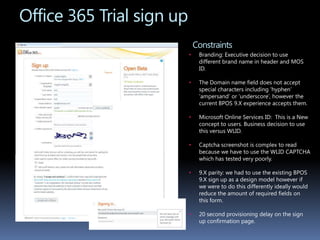
Reinforcement of user’s MOSID on the confirmation page to help users recall it later.Office 365 Trial sign upConstraintsBranding: Executive decision to use different brand name in header and MOS ID.
The Domain name field does not accept special characters including ‘hyphen’ ‘ampersand’ or ‘underscore’, however the current BPOS 9.X experience accepts them.

Jeannine boone4_11portfolio

  • 1.
    User experience designerUXDesigner : Jeannine Boone
  • 2.
    About me I havebeen in the design industry for over 15 years and have a great deal of diverse experience:MicrosoftFreelance positions through FilterMicrosoft StudiosStarted and run my own photography businessJack Morton Worldwide ImagioSitewerksBoeingAsymetrixStarwaveReal World studios, EnglandVarious freelance projects for small businesses and individualsCustom Jewelry designMy areas of expertise include visual design, interaction design, information architecture, motion design. I also do pottery, jewelry, photography and love snowboarding, spending time with my son, and being outdoors.
  • 3.
    Design process Here isa rough outline of my basic design process. This of course can vary a little from project to project but the basic principals and steps remain.Information gathering: First I gather information, ask a lot of questions and get an overall scope of the project. Read a spec document if available. Find out what are the business goals and what are the scenarios for the project: who is the user?Research: I usually do some research and competitive analysis of similar companies and/or products to get a sense of what’s out there, what is working well and whyBrainstorming: Then comes brainstorming and sketching. I usually have an idea brewing by now and getting together with others and talking about the project gets the juices flowing and gives me a lot of ideas to work fromWireframes: Next comes grey-boxing or wire framing to get the rough idea down on paper and start work through some of the designs, interactions, and scenarios. I usually try to pick 2 or maybe 3 designs to show initially and after deciding on one, move forward flushing that design out in it’s entiretyRevisions: Now comes the time for revisions and changes. I review the designs with my client or team and gather input and feedback, and based upon that feedback make changes to the designs. This process can go on for a few iterations depending upon the scope and depth of the projectUsability: somewhere in this timeframe usually comes usability studies to get some user feedback and incorporate any changes needed based upon that feedback. High fidelity: Then it’s high fidelity – or perhaps handoff to development to begin coding. Or even prototyping. Each project is different!Integration: I then work with development or whoever is building the site/project to ensure that the design I created is the one implemented. This part of the process is essential to getting the design you want out the door.
  • 4.
    Project: my msnUXDesigner : Jeannine Boone
  • 5.
    My MSN redesignProject:The main object of this project was to update the current version of my msn. Besides porting it to a new platform (Bedrock), we also wanted to give it a visual and interactive makeover. Team: 1 UX designer
  • 6.
  • 7.
  • 8.
    Team of developersMyrole: interaction design
  • 9.
  • 10.
  • 11.
    Collaborate with research/PM on usability testing Goals and ObjectivesChange look and feel to reflect more of MSN.comAdd new and exciting content that appeals to new and existing usersResize capabilities for scaling browser windowHave Hotmail have link back to myMSN (new version)Change functionality of gadget windows to be simpler and more intuitiveHave default “MyMSN” home page that is a simple yet personal version of MSN.comAdd new themes to choose from, add dynamic setHave dynamically updating content
  • 12.
    Examples of currentsiteGoing through the current website allowed me to see what features were being used and how. This overview also provided me the opportunity to asses the overall user experience of the site, helping define what needed improving or added.
  • 13.
    ResearchAfter a thoroughcompetitive analysis of similar sites and analyzing the user experiences, I made some basic recommendations as a starting point for moving forward in our redesign. These recommendations acted more as a spring board rather than the definitive outcome. Below are the top personalized portals being used today.PageFlakesMy AOLiGoogleMy YahooNetVibes
  • 14.
    Sketches/WireframesAfter numerous designs,here is the basic homepage default layout I designed after making my recommendations. It shows a very basic layout but includes many of the key features we wanted to include. This also gives a sense of how clean and simplified the homepage would look.
  • 15.
    Sketches/WireframesHere’s how dragand drop would work with modules. The cursor would change into the 4 grab arrow icon and you would grab/drag the module and depending upon where you move it, you would see a preview outline appear where it would land.
  • 16.
    Sketches/WireframesThere were manydifferent features that needed to be designed. From changing your theme to emailing your page to a friend.
  • 17.
    Sketches/WireframesThe Add ContentGallery – a new section of the site where you can go research and add content to your page. This was a preliminary design, but the overall functionality and design stayed relatively the same in the final build.
  • 18.
    Sketches/WireframesAdd Content Gallery– module details page had many purposes: to give module preview and information, to give data on how many users etc. , allow people to share modules, allow users to rate and read comments on modules, and to give recommendations of modules based upon what you were viewing at the time. None of these features made it into the new version.
  • 19.
    Sketches/WireframesAdd Content Gallery– Search results page was just one take on how we could display search results from searching the content gallery. The final result can be seen later in the slides.
  • 20.
    MockupsAfter the teamreviewed and I made multiple changes to the layout, it was time to do high fidelity mockups of the site.The default color was easy to decide upon since the mandate for this was to match closely to the msn.com homepage, this tied my msn into the homepage much more closely than before and gave users a sense of familiarityThe changes that were made to the UI for the mockups were minor. One hurdle was the ‘add content gallery’ and how we would display the module previews within the gallery. Specifically how to separate the msn content from content from the web content.An illustrator was brought on board to help with the theme graphics; this is a significant part of the new look of my msn.
  • 21.
    MockupsHere is afirst mock up of the default homepage and another showing new user info balloons to show here new content will appear and where to add content and change your theme and layout
  • 22.
    MockupsThe customize dialogbox and a module detail mockup
  • 23.
    MockupsThe add gallerypage showing a search result separating MSN content and content from the web. Also a module preview pop-over box which the user gets when they rollover a module thumbnail and click on a ‘preview’ button.
  • 24.
    Module DevelopmentAs soonas the style layout and basic functionality were decided upon, module development began. The basic module interaction changed from having inline dialog boxes and input to having edit menusThe basic module edit menu remains the same for each module except the input itself can vary for different modulesEach module and it’s interaction were designed by myself and finalized upon by the team
  • 25.
    ModulesMSNBC News moduleis an RSS Feed and only has one change item.This is the traffic module and did not require much change.Movie times module had inline options and one in the edit menu as well. Fox Sports Scoreboard was one of the more complex modules.The horoscopes module did not change in functionality.eBay Auctions was very straightforward.
  • 26.
    Final SiteAfter monthsof conceptual work, design and prototyping the beta build is nearly doneThe final beta site is a vast improvement upon the current version of my msnThere are still many bugs in the beta build that have not been correctedMany of the features I proposed did not make it into the new version:Dynamic themesUnlimited new content and gadgetsModule reviews and comments from usersModule recommendationsModule detail pagesFull scalability of site
  • 27.
  • 28.
  • 29.
  • 30.
    Project : MICROSOFTONLINE services trial sign upUX Designer : Jeannine Boone
  • 31.
    Microsoft Online Servicestrial sign upProject: To redesign the sign up process for Microsoft online services – now Office 365. Team: 1 UX designer
  • 32.
  • 33.
  • 34.
    2 User researcherMyrole: interaction design
  • 35.
  • 36.
    Collaborate with research/PM on usability testing Original BPOS Trial sign up 8.3Trialsign up challenges
  • 37.
  • 38.
    Users were unableto complete sign up and were not signing up for the service
  • 39.
    No immediate accessto services or ‘dashboard’Sign up iterations
  • 40.
    User goals andchallengesuser goalsMake signup simple.
  • 41.
    Protect my privacyand trust – don’t ask for too much information.
  • 42.
    Tell me aboutthe specific service, the price, the terms. Don’t assume I know this information.
  • 43.
    Don’t make mewait – let me start using immediately. challenges / constraintsProvisioning delay required.
  • 44.
    Creating a domainis a difficult concept -- both technically and understanding how this domain will work/conflict an existing domain.
  • 45.
    Security unwilling tospecify why an unacceptable password doesn’t meet the guidelines. Return
  • 46.
    Office 365 Trialsign upSuccessesReduced from 72 user inputs to 21 for Public beta
  • 47.
    Quick sign up(need to only provide key information) and immediate access to services after a short provisioning time.
  • 48.
    Progressive disclosure design(users only see select information at a time) used for the complex sections of the form.
  • 49.
    “New domain name”field label and purpose are clear.
  • 50.
    Information aboutthe specific offer, price and terms is provided. This helps reinforce user selection from the presales marketing site.
  • 51.
    Reinforcement of user’sMOSID on the confirmation page to help users recall it later.Office 365 Trial sign upConstraintsBranding: Executive decision to use different brand name in header and MOS ID.
  • 52.
    The Domain namefield does not accept special characters including ‘hyphen’ ‘ampersand’ or ‘underscore’, however the current BPOS 9.X experience accepts them.

Editor's Notes

  • #33 Without WLID, we need to add ~ 3 clicks and 9 fields.
  • #44  9x path at: http://www.microsoft.com/online/help/setupaccelerator/default.aspx?l=en-us 9x ‘Setup Accelerator’