jBPM 4

 Tom Baeyens
JBoss, Red Hat


                 1
Agenda
• What is jBPM
• jBPM 4 Goals
• jBPM 4 Use Cases


                              2
Tom Baeyens
•   Lead and founder of JBoss jBPM
•   Consulting for numerous BPM projects
•   Bringing BPM mainstream
•   Articles
    – InfoQ, TSS, Dzone, OnJava,…
• Blogs
    – http://processdevelopments.blogspot.com/
• Talks
    – JavaOne, JBossWorld, JAOO, TSS,…
                                                 3
What is jBPM
• Business Process Management
  – BPM as a discipline
  – BPM as software engineering
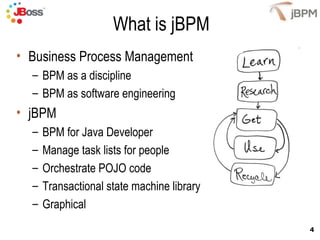
• jBPM
  –   BPM for Java Developer
  –   Manage task lists for people
  –   Orchestrate POJO code
  –   Transactional state machine library
  –   Graphical
                                            4
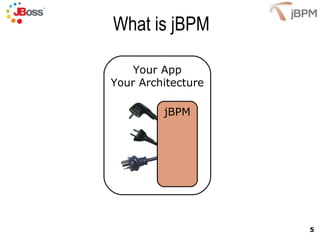
What is jBPM

    Your App
Your Architecture

         jBPM


                    5
What is jBPM
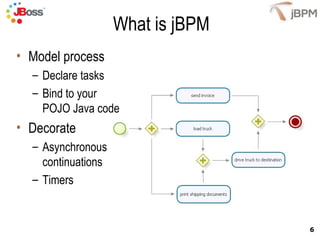
• Model process
  – Declare tasks
  – Bind to your
    POJO Java code
• Decorate
  – Asynchronous
    continuations
  – Timers


                                   6
jBPM 4 Goals
•   Improve supportability
•   Grow to next level of adoption
•   Raise 'ability to execute'
•   Implementation improvements


                                     7
Improve Supportability
• Separation between normal usage from bleeding
  edge usage
   – public API vs internal packages
   – Userguide vs devguide
• More stable database / process definition caching
   – Migration between 4.x releases (plan)
• Automatic JBoss installation
   – No messing with configs and libs
   – Tested configurations
                                                      8
Improve Supportability
• Continuous integration
  – Ability to reproduce bugs
  – Collect community knowledge in test suite
     Ability to keep improving over longer time
     Longer lifespan of jBPM 4
• Config import system
  – Less error prone
  – Imports for hibernate tx, jta tx, spring tx
  – Allows for default updates in default imports

                                                    9
Grow to Next Level of Adoption
• Lowering the treshold to get started
   – Simpler API
      • Split normal usage from bleeding edge
      • API based queries
   – Better container and app pluggability
• Much! improved docs
• Examples
• Automatic installations
   – Remove need for messing on your own
• Easier configuration abstraction through imports   10
Increase ‘Ability to Execute'
• Historical data separated from runtime data
   – Queryable history information
   – Keeps runtime data healthy
• Improved transaction mappings
• Proper handling of timers and external triggers
• More stable database
   – DB data migration becomes possible
• Improved job executor

                                                    11
Implementation Improvements
• Improved pluggable architecture
   – Changed composition to inheritence.
   – Direct variable access
• Interfaces for activity implementations
   – Only exposing the methods that can be invoked.
• Changed recursion with iteration
   – Dealing with automatic long loops.


                                                      12
Use Case 1: Rapid Prototyping
•   Model the process
•   Include tasks
•   Generate forms
•   Deploy
•   Show live demo


                                      13
Use Cases 2: Transactional Script
•       Model the script process
•       Delegate activities
    –     To POJO user code
    –     EJBeans
    –     SEAM beans
•       Demarcate
    –     Asynchonous continuations
    –     Timers
•       Update control flow
    –     Hot redeploy
    –     Changed logic
                                            14
Use Cases 3: Pageflow
•   Pages are activities
•   Navigations are transitions
•   Persistence in HTTP session
•   SEAM


                                    15
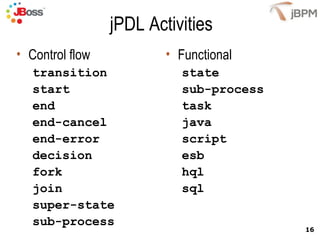
jPDL Activities
• Control flow           • Functional
   transition              state
   start                   sub-process
   end                     task
   end-cancel              java
   end-error               script
   decision                esb
   fork                    hql
   join                    sql
   super-state
   sub-process
                                         16
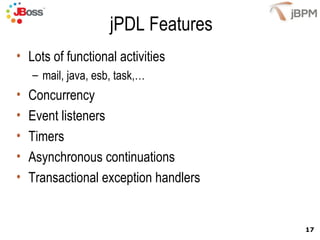
jPDL Features
• Lots of functional activities
    – mail, java, esb, task,…
•   Concurrency
•   Event listeners
•   Timers
•   Asynchronous continuations
•   Transactional exception handlers


                                       17
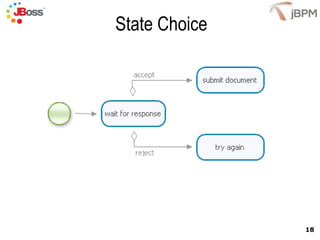
State Choice


               18
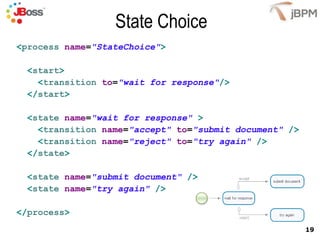
State Choice
<process name="StateChoice">

  <start>
    <transition to="wait for response"/>
  </start>

  <state name="wait for response" >
    <transition name="accept" to="submit document" />
    <transition name="reject" to="try again" />
  </state>

  <state name="submit document" />
  <state name="try again" />

</process>
                                                        19
State Choice
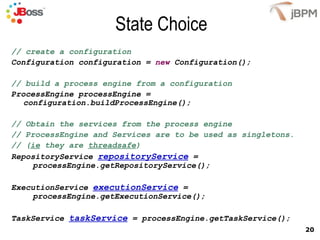
// create a configuration
Configuration configuration = new Configuration();

// build a process engine from a configuration
ProcessEngine processEngine =
   configuration.buildProcessEngine();

// Obtain the services from the process engine
// ProcessEngine and Services are to be used as singletons.
// (ie they are threadsafe)
RepositoryService repositoryService =
     processEngine.getRepositoryService();

ExecutionService executionService =
     processEngine.getExecutionService();

TaskService taskService = processEngine.getTaskService();
                                                              20
State Choice
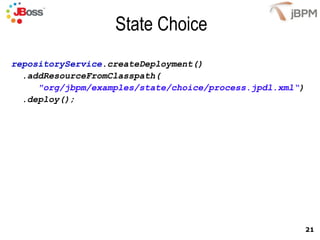
repositoryService.createDeployment()
  .addResourceFromClasspath(
     "org/jbpm/examples/state/choice/process.jpdl.xml“)
  .deploy();


                                                          21
State Choice
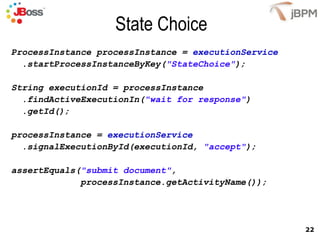
ProcessInstance processInstance = executionService
  .startProcessInstanceByKey("StateChoice");

String executionId = processInstance
  .findActiveExecutionIn("wait for response")
  .getId();

processInstance = executionService
  .signalExecutionById(executionId, "accept");

assertEquals("submit document",
             processInstance.getActivityName());


                                                     22
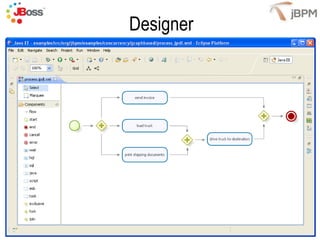
Designer


           23
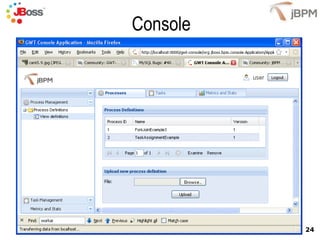
Console


          24
Conclusion
• jBPM provides overview of application
   – External triggers
   – Wait states
   – Business view
• jBPM adds a layer on top of TX basics
   – Transactional timers
   – Asynchronous messages
• Integrates with
   –   Standard & Enterprise Java
   –   JBoss and other app servers
   –   SEAM
   –   Spring
                                          25
Q&A


      26
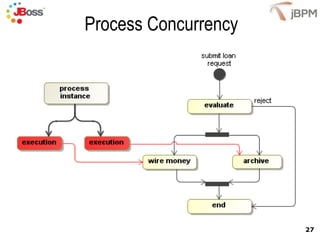
Process Concurrency


                      27

JBUG.be jBPM4

  • 1.
    jBPM 4 TomBaeyens JBoss, Red Hat 1
  • 2.
    Agenda • What isjBPM • jBPM 4 Goals • jBPM 4 Use Cases 2
  • 3.
    Tom Baeyens • Lead and founder of JBoss jBPM • Consulting for numerous BPM projects • Bringing BPM mainstream • Articles – InfoQ, TSS, Dzone, OnJava,… • Blogs – http://processdevelopments.blogspot.com/ • Talks – JavaOne, JBossWorld, JAOO, TSS,… 3
  • 4.
    What is jBPM •Business Process Management – BPM as a discipline – BPM as software engineering • jBPM – BPM for Java Developer – Manage task lists for people – Orchestrate POJO code – Transactional state machine library – Graphical 4
  • 5.
    What is jBPM Your App Your Architecture jBPM 5
  • 6.
    What is jBPM •Model process – Declare tasks – Bind to your POJO Java code • Decorate – Asynchronous continuations – Timers 6
  • 7.
    jBPM 4 Goals • Improve supportability • Grow to next level of adoption • Raise 'ability to execute' • Implementation improvements 7
  • 8.
    Improve Supportability • Separationbetween normal usage from bleeding edge usage – public API vs internal packages – Userguide vs devguide • More stable database / process definition caching – Migration between 4.x releases (plan) • Automatic JBoss installation – No messing with configs and libs – Tested configurations 8
  • 9.
    Improve Supportability • Continuousintegration – Ability to reproduce bugs – Collect community knowledge in test suite Ability to keep improving over longer time Longer lifespan of jBPM 4 • Config import system – Less error prone – Imports for hibernate tx, jta tx, spring tx – Allows for default updates in default imports 9
  • 10.
    Grow to NextLevel of Adoption • Lowering the treshold to get started – Simpler API • Split normal usage from bleeding edge • API based queries – Better container and app pluggability • Much! improved docs • Examples • Automatic installations – Remove need for messing on your own • Easier configuration abstraction through imports 10
  • 11.
    Increase ‘Ability toExecute' • Historical data separated from runtime data – Queryable history information – Keeps runtime data healthy • Improved transaction mappings • Proper handling of timers and external triggers • More stable database – DB data migration becomes possible • Improved job executor 11
  • 12.
    Implementation Improvements • Improvedpluggable architecture – Changed composition to inheritence. – Direct variable access • Interfaces for activity implementations – Only exposing the methods that can be invoked. • Changed recursion with iteration – Dealing with automatic long loops. 12
  • 13.
    Use Case 1:Rapid Prototyping • Model the process • Include tasks • Generate forms • Deploy • Show live demo 13
  • 14.
    Use Cases 2:Transactional Script • Model the script process • Delegate activities – To POJO user code – EJBeans – SEAM beans • Demarcate – Asynchonous continuations – Timers • Update control flow – Hot redeploy – Changed logic 14
  • 15.
    Use Cases 3:Pageflow • Pages are activities • Navigations are transitions • Persistence in HTTP session • SEAM 15
  • 16.
    jPDL Activities • Controlflow • Functional transition state start sub-process end task end-cancel java end-error script decision esb fork hql join sql super-state sub-process 16
  • 17.
    jPDL Features • Lotsof functional activities – mail, java, esb, task,… • Concurrency • Event listeners • Timers • Asynchronous continuations • Transactional exception handlers 17
  • 18.
  • 19.
    State Choice <process name="StateChoice"> <start> <transition to="wait for response"/> </start> <state name="wait for response" > <transition name="accept" to="submit document" /> <transition name="reject" to="try again" /> </state> <state name="submit document" /> <state name="try again" /> </process> 19
  • 20.
    State Choice // createa configuration Configuration configuration = new Configuration(); // build a process engine from a configuration ProcessEngine processEngine = configuration.buildProcessEngine(); // Obtain the services from the process engine // ProcessEngine and Services are to be used as singletons. // (ie they are threadsafe) RepositoryService repositoryService = processEngine.getRepositoryService(); ExecutionService executionService = processEngine.getExecutionService(); TaskService taskService = processEngine.getTaskService(); 20
  • 21.
    State Choice repositoryService.createDeployment() .addResourceFromClasspath( "org/jbpm/examples/state/choice/process.jpdl.xml“) .deploy(); 21
  • 22.
    State Choice ProcessInstance processInstance= executionService .startProcessInstanceByKey("StateChoice"); String executionId = processInstance .findActiveExecutionIn("wait for response") .getId(); processInstance = executionService .signalExecutionById(executionId, "accept"); assertEquals("submit document", processInstance.getActivityName()); 22
  • 23.
  • 24.
  • 25.
    Conclusion • jBPM providesoverview of application – External triggers – Wait states – Business view • jBPM adds a layer on top of TX basics – Transactional timers – Asynchronous messages • Integrates with – Standard & Enterprise Java – JBoss and other app servers – SEAM – Spring 25
  • 26.
    Q&A 26
  • 27.