Unleash the power of Java for shell scripting
by
Max Rydahl Andersen
@maxandersen
https://jbang.dev
Why Java as a scripting language makes sense
Top #1-#2 language in the world!
Kotlin and Groovy does it, why not Java ?
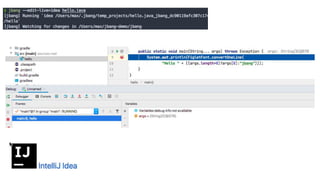
Content assist and refactoring in all major IDE’s and text editors
Debugging! Monitoring!
Recent Java language features (var, <>, lambda, text blocks, …)
Streams and more system level access in JDK
Massive ecosystem of 3rd party dependencies
BUT Maven, Gradle, etc. should NOT be required to start
F.Y.I.
“Everything should be made as
simple as possible,
but not simpler”
- (maybe) Albert
Einstein
hello.java:
class hello {
public static void main(String... args) throws Exception {
System.out.println(
"Hello " +
((args.length>0)?args[0]:"java"));
}
}
Java 1-9
Manually need to set classpath
to use 3rd party dependencies
2 steps that should be one!
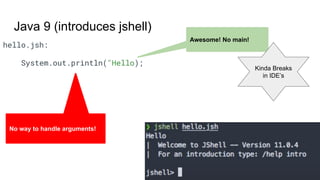
Java 9 (introduces jshell)
hello.jsh:
System.out.println("Hello);
Awesome! No main!
No way to handle arguments!
Kinda Breaks
in IDE’s
class hello {
public static void main(String... args) throws Exception {
System.out.println(
"Hello " +
((args.length>0)?args[0]:"java"));
}
}
Java 10+ Module system but still
manually configure classpath
hello:
#!/usr/bin/env java --source 11
class hello {
public static void main(String... args) throws Exception {
System.out.println(
"Hello " +
((args.length>0)?args[0]:"jbang"));
}
}
Java 11+ Cannot be called .java
#! works
but must have --source 11
Breaks every
IDE :(
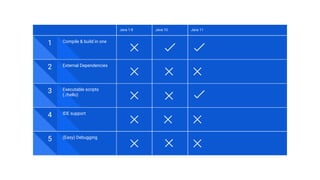
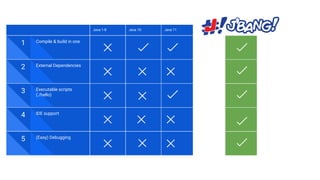
Java 1-8 Java 10 Java 11
1 Compile & build in one
2 External Dependencies
3 Executable scripts
(./hello)
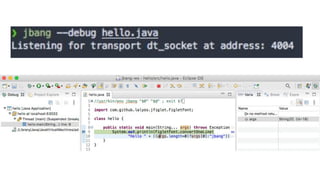
5 (Easy) Debugging
4 IDE support
0.
https://jbang.dev
hello.java:
//usr/bin/env jbang "$0" "$@" ; exit $?
//DEPS com.github.lalyos:jfiglet:0.0.8
import com.github.lalyos.jfiglet.FigletFont;
class hello {
public static void main(String... args) throws Exception {
System.out.println(FigletFont.convertOneLine(
"Hello " + ((args.length>0)?args[0]:"jbang")));
}
}
Valid Java AND shell
script
External Dependency
management
Compile and run in one!
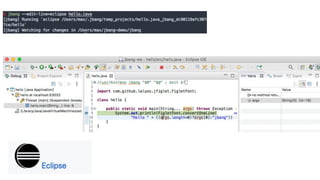
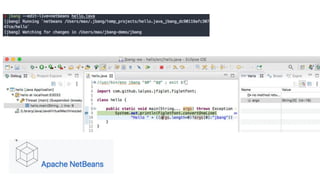
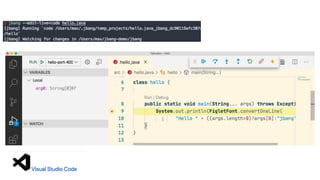
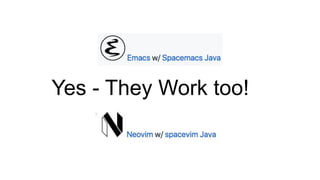
Yes - They Work too!
Java 1-8 Java 10 Java 11
1 Compile & build in one
2 External Dependencies
3 Executable scripts
(./hello)
5 (Easy) Debugging
4 IDE support
...but there is more...
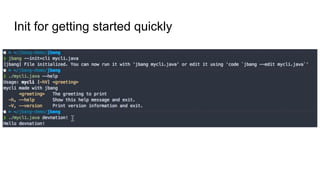
Init for getting started quickly
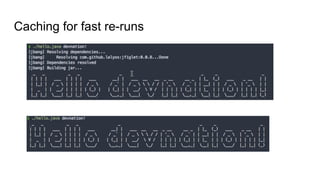
Caching for fast re-runs
hello.java:
//usr/bin/env jbang "$0" "$@" ; exit $?
//DEPS https://github.com/lalyos/jfiglet
import com.github.lalyos.jfiglet.FigletFont;
class hello {
public static void main(String... args) throws Exception {
System.out.println(FigletFont.convertOneLine(
"Hello " + ((args.length>0)?args[0]:"jbang")));
}
}
Use github repos as
dependencies (snapshot,
branches & tags)
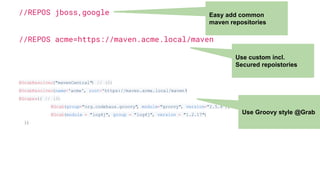
//REPOS jboss,google
//REPOS acme=https://maven.acme.local/maven
@GrabResolver("mavenCentral") // (2)
@GrabResolver(name='acme', root='https://maven.acme.local/maven')
@Grapes({ // (3)
@Grab(group="org.codehaus.groovy", module="groovy", version="2.5.8"), // (4)
@Grab(module = "log4j", group = "log4j", version = "1.2.17")
})
Easy add common
maven repositories
Use custom incl.
Secured repoistories
Use Groovy style @Grab
//usr/bin/env jbang "$0" "$@" ; exit $?
//JAVAC_OPTIONS --enable-preview -source 14
//JAVA_OPTIONS --enable-preview
import static java.lang.System.*;
public class records {
record Point(int x, int y) {}
public static void main(String[] args) {
var p = new Point(2,4);
out.println(p);
}
}
Try out latest greatest preview features
hello.jsh:
//usr/bin/env jbang "$0" "$@" ; exit $?
//DEPS com.github.lalyos:jfiglet:0.0.8
import com.github.lalyos.jfiglet.FigletFont;
System.out.println(FigletFont.convertOneLine(
"Hello " + ((args.length>0)?args[0]:"jbang")));
/exit
jshell !
No main()!
arguments!
Executable jshell script!
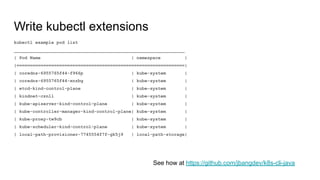
Write kubectl extensions
kubectl example pod list
________________________________________________________________
| Pod Name | namespace |
|===============================================================|
| coredns-6955765f44-f966p | kube-system |
| coredns-6955765f44-xnzbg | kube-system |
| etcd-kind-control-plane | kube-system |
| kindnet-cznll | kube-system |
| kube-apiserver-kind-control-plane | kube-system |
| kube-controller-manager-kind-control-plane| kube-system |
| kube-proxy-tw9cb | kube-system |
| kube-scheduler-kind-control-plane | kube-system |
| local-path-provisioner-7745554f7f-gk5j9 | local-path-storage|
See how at https://github.com/jbangdev/k8s-cli-java
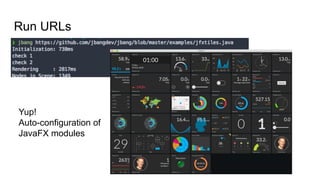
Run URLs
Yup!
Auto-configuration of
JavaFX modules
How do I get it ?
https://jbang.dev/download
Windows
Linux
Mac
Docker/Container
Github Action
Go Use JBang!
● Use it for your automation needs
● One-off scripts for fixing things
● When trying out new apis
● In docs showing how to use your api
● In issues when making a reproducer
● When teaching newcomers to java
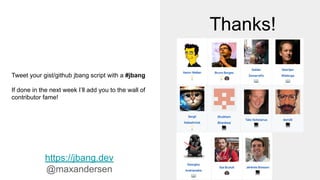
Thanks!
https://jbang.dev
@maxandersen
Tweet your gist/github jbang script with a #jbang
If done in the next week I’ll add you to the wall of
contributor fame!

jbang: Unleash the power of Java for shell scripting

  • 1.
    Unleash the powerof Java for shell scripting by Max Rydahl Andersen @maxandersen https://jbang.dev
  • 3.
    Why Java asa scripting language makes sense Top #1-#2 language in the world! Kotlin and Groovy does it, why not Java ? Content assist and refactoring in all major IDE’s and text editors Debugging! Monitoring! Recent Java language features (var, <>, lambda, text blocks, …) Streams and more system level access in JDK Massive ecosystem of 3rd party dependencies BUT Maven, Gradle, etc. should NOT be required to start
  • 6.
  • 7.
    “Everything should bemade as simple as possible, but not simpler” - (maybe) Albert Einstein
  • 8.
    hello.java: class hello { publicstatic void main(String... args) throws Exception { System.out.println( "Hello " + ((args.length>0)?args[0]:"java")); } } Java 1-9 Manually need to set classpath to use 3rd party dependencies 2 steps that should be one!
  • 9.
    Java 9 (introducesjshell) hello.jsh: System.out.println("Hello); Awesome! No main! No way to handle arguments! Kinda Breaks in IDE’s
  • 10.
    class hello { publicstatic void main(String... args) throws Exception { System.out.println( "Hello " + ((args.length>0)?args[0]:"java")); } } Java 10+ Module system but still manually configure classpath
  • 11.
    hello: #!/usr/bin/env java --source11 class hello { public static void main(String... args) throws Exception { System.out.println( "Hello " + ((args.length>0)?args[0]:"jbang")); } } Java 11+ Cannot be called .java #! works but must have --source 11 Breaks every IDE :(
  • 12.
    Java 1-8 Java10 Java 11 1 Compile & build in one 2 External Dependencies 3 Executable scripts (./hello) 5 (Easy) Debugging 4 IDE support
  • 14.
  • 15.
    hello.java: //usr/bin/env jbang "$0""$@" ; exit $? //DEPS com.github.lalyos:jfiglet:0.0.8 import com.github.lalyos.jfiglet.FigletFont; class hello { public static void main(String... args) throws Exception { System.out.println(FigletFont.convertOneLine( "Hello " + ((args.length>0)?args[0]:"jbang"))); } } Valid Java AND shell script External Dependency management Compile and run in one!
  • 20.
    Yes - TheyWork too!
  • 22.
    Java 1-8 Java10 Java 11 1 Compile & build in one 2 External Dependencies 3 Executable scripts (./hello) 5 (Easy) Debugging 4 IDE support
  • 23.
  • 24.
    Init for gettingstarted quickly
  • 25.
  • 26.
    hello.java: //usr/bin/env jbang "$0""$@" ; exit $? //DEPS https://github.com/lalyos/jfiglet import com.github.lalyos.jfiglet.FigletFont; class hello { public static void main(String... args) throws Exception { System.out.println(FigletFont.convertOneLine( "Hello " + ((args.length>0)?args[0]:"jbang"))); } } Use github repos as dependencies (snapshot, branches & tags)
  • 27.
    //REPOS jboss,google //REPOS acme=https://maven.acme.local/maven @GrabResolver("mavenCentral")// (2) @GrabResolver(name='acme', root='https://maven.acme.local/maven') @Grapes({ // (3) @Grab(group="org.codehaus.groovy", module="groovy", version="2.5.8"), // (4) @Grab(module = "log4j", group = "log4j", version = "1.2.17") }) Easy add common maven repositories Use custom incl. Secured repoistories Use Groovy style @Grab
  • 28.
    //usr/bin/env jbang "$0""$@" ; exit $? //JAVAC_OPTIONS --enable-preview -source 14 //JAVA_OPTIONS --enable-preview import static java.lang.System.*; public class records { record Point(int x, int y) {} public static void main(String[] args) { var p = new Point(2,4); out.println(p); } } Try out latest greatest preview features
  • 29.
    hello.jsh: //usr/bin/env jbang "$0""$@" ; exit $? //DEPS com.github.lalyos:jfiglet:0.0.8 import com.github.lalyos.jfiglet.FigletFont; System.out.println(FigletFont.convertOneLine( "Hello " + ((args.length>0)?args[0]:"jbang"))); /exit jshell ! No main()! arguments! Executable jshell script!
  • 30.
    Write kubectl extensions kubectlexample pod list ________________________________________________________________ | Pod Name | namespace | |===============================================================| | coredns-6955765f44-f966p | kube-system | | coredns-6955765f44-xnzbg | kube-system | | etcd-kind-control-plane | kube-system | | kindnet-cznll | kube-system | | kube-apiserver-kind-control-plane | kube-system | | kube-controller-manager-kind-control-plane| kube-system | | kube-proxy-tw9cb | kube-system | | kube-scheduler-kind-control-plane | kube-system | | local-path-provisioner-7745554f7f-gk5j9 | local-path-storage| See how at https://github.com/jbangdev/k8s-cli-java
  • 31.
  • 32.
    How do Iget it ? https://jbang.dev/download Windows Linux Mac Docker/Container Github Action
  • 33.
    Go Use JBang! ●Use it for your automation needs ● One-off scripts for fixing things ● When trying out new apis ● In docs showing how to use your api ● In issues when making a reproducer ● When teaching newcomers to java
  • 34.
    Thanks! https://jbang.dev @maxandersen Tweet your gist/githubjbang script with a #jbang If done in the next week I’ll add you to the wall of contributor fame!