Download as PDF, PPTX






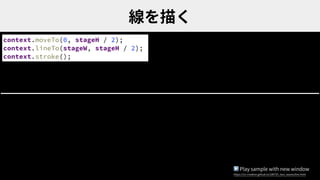
![[...Array(分割数).keys()].forEach(i => {
const x = i / (分割数 - 1) * stageW;
const ラジアン = i / 分割数 * Math.PI + 時間;
const y = 振幅 * Math.sin(ラジアン) + stageH / 2;
context.lineTo(x, y);
context.stroke();
});
▶ Play sample with new window
https://ics-creative.github.io/180725_two_waves/line_sin.htmlKeynote](https://image.slidesharecdn.com/180723creativecoding-180725100318/85/JavaScript-WebGL-12-320.jpg)
![const 分割数 = 100; // 分割数
[...Array(分割数).keys()].forEach(i => {
//・・・
context.lineTo(x, y);
});
▶ Play sample with new window
https://ics-creative.github.io/180725_two_waves/line_sin.htmlKeynote](https://image.slidesharecdn.com/180723creativecoding-180725100318/85/JavaScript-WebGL-14-320.jpg)
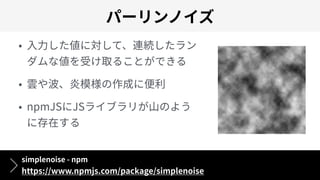
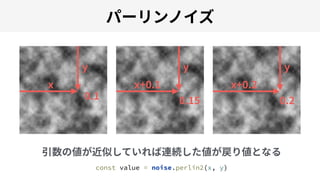
![[...Array(分割数).keys()].forEach(i => {
const x = i / (分割数 - 1) * stageW;
const px = i / 50; // 横軸の⼊⼒値
const py = 時間; // 時間の⼊⼒値
const y = amplitude * noise.perlin2(px, py) + stageH / 2;
context.lineTo(x, y);
});
▶ Play sample with new window
https://ics-creative.github.io/180725_two_waves/line_perline.htmlKeynote](https://image.slidesharecdn.com/180723creativecoding-180725100318/85/JavaScript-WebGL-17-320.jpg)
![[...Array(線数).keys()].forEach(j => {
[...Array(分割数).keys()].forEach(i => {
const x = i / (分割数 - 1) * stageW;
const px = i / (50 + j);
const py = j / 50 + time;
const y = 振幅 * noise.perlin2(px, py) + stageH / 2;
context.lineTo(x, y);
});
context.stroke();
});
▶ Play sample with new window
https://ics-creative.github.io/180725_two_waves/line_perlines.htmlKeynote](https://image.slidesharecdn.com/180723creativecoding-180725100318/85/JavaScript-WebGL-18-320.jpg)
![HSL
CreateJS HSL - ICS MEDIA
https://ics.media/tutorial-createjs/color_hsl.html
const MAX = 20;
[...Array(MAX).keys()].forEach(i => {
// HSLカラーを算出
const hue = i * (360 / MAX);
const color = `hsl(${hue}, 100%, 50%)`;
// (省略)
})](https://image.slidesharecdn.com/180723creativecoding-180725100318/85/JavaScript-WebGL-19-320.jpg)
![[...Array(線数).keys()].forEach(j => {
const h = Math.round(j / lineNum * 360); // ⾊相
const s = 100; // 彩度
const l = Math.round(j / lineNum * 100); // 明度
context.strokeStyle = `hsl(${h}, ${s}%, ${l}%)`;
[...Array(分割数).keys()].forEach(i => {
// ・・・
});
context.stroke();
});
▶ Play sample with new window
https://ics-creative.github.io/180725_two_waves/line_perlines_colorful.htmlKeynote](https://image.slidesharecdn.com/180723creativecoding-180725100318/85/JavaScript-WebGL-20-320.jpg)
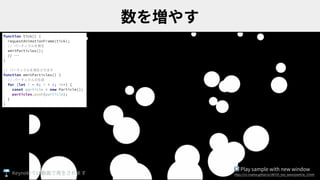
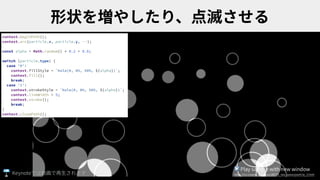
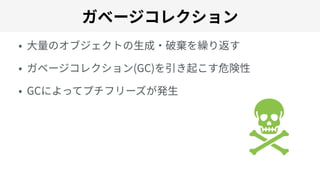
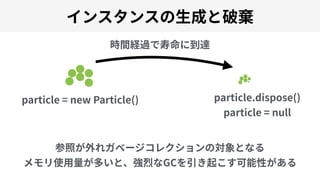
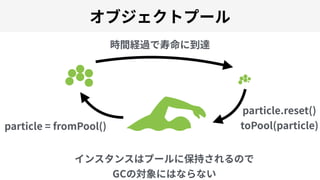
![const objectPool = []; // オブジェクトプール
function toPool(particle) {
// 使⽤済み粒⼦はプールに移動
objectPool.unshift(particle);
}
function fromPool() {
if (objectPool.length === 0) {
// プールが空なら新規⽣成
return new Particle();
} else {
// プールにストックがあれば取り出す
return objectPool.pop();
}
}
▶ Play sample with new window
https://ics-creative.github.io/180725_two_waves/particle_4.htmlKeynote](https://image.slidesharecdn.com/180723creativecoding-180725100318/85/JavaScript-WebGL-30-320.jpg)
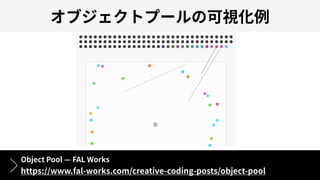




The document discusses various coding techniques and tools for creating 2D and 3D visualizations using JavaScript, WebGL, and CreateJS, including examples and code snippets. It highlights different libraries like Three.js and Babylon.js, as well as particle animation techniques. Links to samples and additional resources provided enhance understanding and practical application of the discussed concepts.


