JavaScript
Mohamed Loey
Agenda
Part I: Introduction
Part II: JavaScript Syntax
Agenda
Part I: Introduction
 What is JavaScript?
 JavaScript In HTML
 JavaScript Can
What is JavaScript?
• JavaScript is the first Web scripting language,
developed by Netscape in 1995
• JavaScript is a scripting language. It is a
lightweight, but powerful, programming
language.
• JavaScript similarities to Java/C++
• JavaScript is Client-side web programming
• JavaScript is the most popular programming
language in the world.
JavaScript In HTML
• In HTML, JavaScripts must be inserted
between <script> and </script> tags.
• JavaScripts can be put in the <body> and
in the <head> section of an HTML page.
• Two Ways to Insert JavaScript:
1. Internal script
2. External script sheet
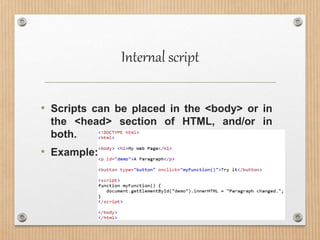
Internal script
• Scripts can be placed in the <body> or in
the <head> section of HTML, and/or in
both.
• Example:
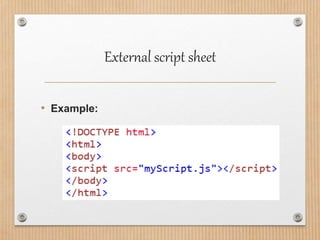
External script sheet
• Scripts can also be placed in external files.
• External scripts are practical when the
same code is used in many different web
pages.
• JavaScript files have the file extension .js.
• To use an external script, put the name of
the script file in the source (src) attribute of
the <script> tag
External script sheet
• Example:
JavaScript Can
• Change HTML Elements
• Change HTML Attributes
• Change HTML Styles (CSS)
• Validate Data
Agenda
Part II: JavaScript Syntax
 JavaScript is Case Sensitive
 JavaScript Comments
 JavaScript Variables
 JavaScript Conditions
 JavaScript Loops
 JavaScript Arrays
JavaScript is Case Sensitive
• In JavaScript all identifiers are case
sensitive.
• The variables lastName and lastname, are
two different variables.
• The functions myFunction and myfunction,
are two different functions.
• JavaScript does not interpret Var; as var.
JavaScript Comments
• Single Line Comments
• Single line comments start with //.
• Multi-line Comments
• Multi-line comments start with /* and end
with */.
JavaScript Variables
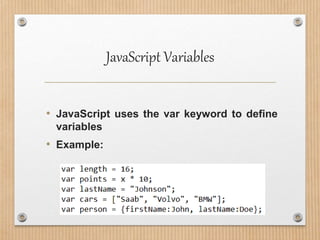
• JavaScript uses the var keyword to define
variables
• Example:
JavaScript Variables
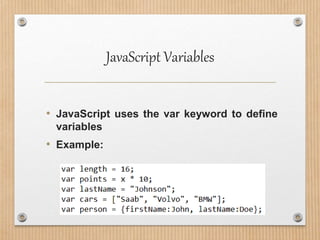
• JavaScript uses the var keyword to define
variables
• Example:
JavaScript Conditions
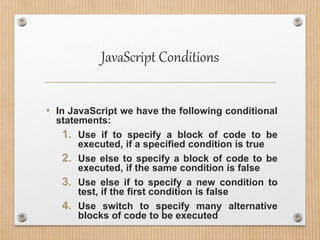
• In JavaScript we have the following conditional
statements:
1. Use if to specify a block of code to be
executed, if a specified condition is true
2. Use else to specify a block of code to be
executed, if the same condition is false
3. Use else if to specify a new condition to
test, if the first condition is false
4. Use switch to specify many alternative
blocks of code to be executed
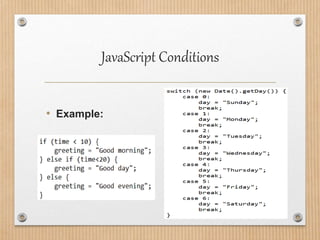
JavaScript Conditions
• Example:
JavaScript Loops
• JavaScript supports different kinds of loops:
1. for - loops through a block of code a number
of times
2. for/in - loops through the properties of an
object
3. while - loops through a block of code while a
specified condition is true
4. do/while - also loops through a block of code
while a specified condition is true
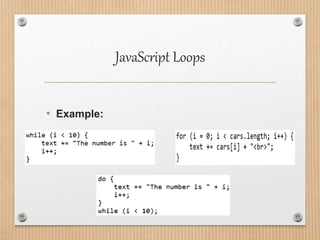
JavaScript Loops
• Example:
JavaScript Arrays
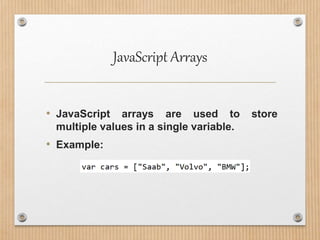
• JavaScript arrays are used to store
multiple values in a single variable.
• Example:
JavaScript Functions
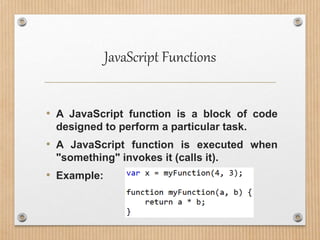
• A JavaScript function is a block of code
designed to perform a particular task.
• A JavaScript function is executed when
"something" invokes it (calls it).
• Example:
THANK U

JavaScript Comprehensive Overview

  • 1.
  • 2.
  • 3.
    Agenda Part I: Introduction What is JavaScript?  JavaScript In HTML  JavaScript Can
  • 4.
    What is JavaScript? •JavaScript is the first Web scripting language, developed by Netscape in 1995 • JavaScript is a scripting language. It is a lightweight, but powerful, programming language. • JavaScript similarities to Java/C++ • JavaScript is Client-side web programming • JavaScript is the most popular programming language in the world.
  • 5.
    JavaScript In HTML •In HTML, JavaScripts must be inserted between <script> and </script> tags. • JavaScripts can be put in the <body> and in the <head> section of an HTML page. • Two Ways to Insert JavaScript: 1. Internal script 2. External script sheet
  • 6.
    Internal script • Scriptscan be placed in the <body> or in the <head> section of HTML, and/or in both. • Example:
  • 7.
    External script sheet •Scripts can also be placed in external files. • External scripts are practical when the same code is used in many different web pages. • JavaScript files have the file extension .js. • To use an external script, put the name of the script file in the source (src) attribute of the <script> tag
  • 8.
  • 9.
    JavaScript Can • ChangeHTML Elements • Change HTML Attributes • Change HTML Styles (CSS) • Validate Data
  • 10.
    Agenda Part II: JavaScriptSyntax  JavaScript is Case Sensitive  JavaScript Comments  JavaScript Variables  JavaScript Conditions  JavaScript Loops  JavaScript Arrays
  • 11.
    JavaScript is CaseSensitive • In JavaScript all identifiers are case sensitive. • The variables lastName and lastname, are two different variables. • The functions myFunction and myfunction, are two different functions. • JavaScript does not interpret Var; as var.
  • 12.
    JavaScript Comments • SingleLine Comments • Single line comments start with //. • Multi-line Comments • Multi-line comments start with /* and end with */.
  • 13.
    JavaScript Variables • JavaScriptuses the var keyword to define variables • Example:
  • 14.
    JavaScript Variables • JavaScriptuses the var keyword to define variables • Example:
  • 15.
    JavaScript Conditions • InJavaScript we have the following conditional statements: 1. Use if to specify a block of code to be executed, if a specified condition is true 2. Use else to specify a block of code to be executed, if the same condition is false 3. Use else if to specify a new condition to test, if the first condition is false 4. Use switch to specify many alternative blocks of code to be executed
  • 16.
  • 17.
    JavaScript Loops • JavaScriptsupports different kinds of loops: 1. for - loops through a block of code a number of times 2. for/in - loops through the properties of an object 3. while - loops through a block of code while a specified condition is true 4. do/while - also loops through a block of code while a specified condition is true
  • 18.
  • 19.
    JavaScript Arrays • JavaScriptarrays are used to store multiple values in a single variable. • Example:
  • 20.
    JavaScript Functions • AJavaScript function is a block of code designed to perform a particular task. • A JavaScript function is executed when "something" invokes it (calls it). • Example:
  • 21.