Java-JSON-Jackson
Srilatha Kante
Agenda
• Introduction to JSON
• JSON and Java
• Jackson Annotations
• Introduction to XML
• XML to JSON
Introduction to JSON
• JSON – Java Script Object Notation
• JSON is a data interchange format
• Interactive Web 2.0 applications, no more use
page replacement. Data transfer without
refreshing a page.
• The most important aspects of data transfer are
simplicity, extensibility, interoperability, openness
and human readability
• Key idea in AJAX – Asynchronous Java Script and
XML
Syntax of JSON
• JSON is unstructured
• Data is in name/value pairs
• Data is separated by commas
• Curly braces hold objects
• Square brackets hold arrays
Simplicity of JSON
• JSON is a subset of Java Script. JSON can be
parsed by a Java Script parser.
• It can represent either complex or simple data
as it has data types
• They are Strings, Number, Boolean, Objects
and Arrays
JSON Compatibility
• Array
– ["Sunday", "Monday", "Tuesday", "Wednesday“]
– "employees":[
{"firstName":"John", "lastName":"Doe"},
{"firstName":"Anna", "lastName":"Smith"},
{"firstName":"Peter","lastName":"Jones"}
]
• Object
– { “firstname": “Santhosh ", “lastname": “Gowd”} All data
types are intuitive and similar to other programming
languages
• Also compatible with other languages like C, C++, C#,
ColdFusion, Python and many more.
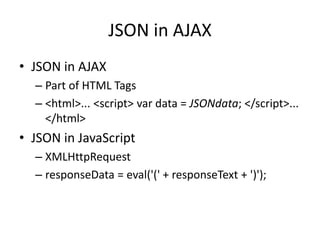
JSON in AJAX
• JSON in AJAX
– Part of HTML Tags
– <html>... <script> var data = JSONdata; </script>...
</html>
• JSON in JavaScript
– XMLHttpRequest
– responseData = eval('(' + responseText + ')');
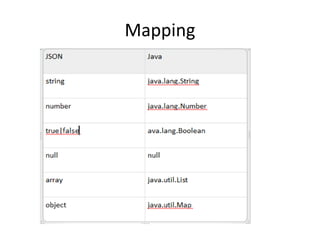
Mapping
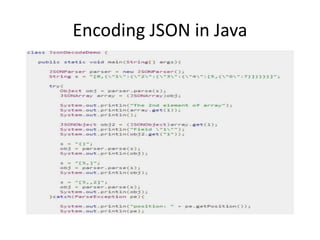
Encoding JSON in Java
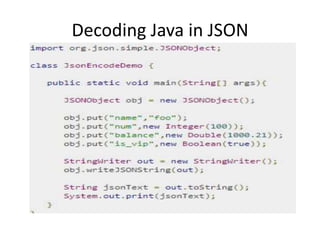
Decoding Java in JSON
JSON Schema
• JSON Schema is a specification for JSON based format
for defining the structure of JSON data
• It was written under IETF draft which expired in 2011
– Describes your existing data format.
– Clear, human- and machine-readable documentation.
– Complete structural validation, useful for automated
testing.
– Complete structural validation, validating client-submitted
data.
• Currently the most complete and compliant JSON
Schema validator available is JSV
Parsing JSON
• Streaming
• Tree Traversing
• Data Binding
Jackson Annotations
Jackson Overview
• Jackson is a simple Java-based library to serialize Java
objects to JSON and vice versa
• Features of Jackson
– Easy to use − Jackson API provides a high-level facade to
simplify commonly used use-cases.
– No need to create mapping − Jackson API provides default
mapping for most of the objects to be serialized.
– Performance − Jackson is quite fast, consumes less memory
space, and is suitable for large object graphs or systems.
– Clean JSON − Jackson creates clean and compact JSON results
which are easy to read.
– No Dependency − Jackson library does not require any other
library apart from JDK.
– Open Source − Jackson library is open source and free to use
Set up Jackson Environment
• Nothing specific for Jackson
– Install JDK and make sure path and classpath are
set
– Download jackson-all-1.9.0.jar
– Make sure this file is in the classpath in libraries
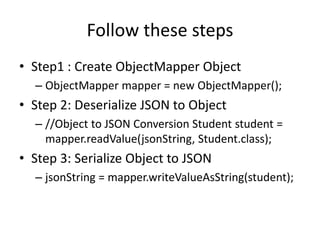
Follow these steps
• Step1 : Create ObjectMapper Object
– ObjectMapper mapper = new ObjectMapper();
• Step 2: Deserialize JSON to Object
– //Object to JSON Conversion Student student =
mapper.readValue(jsonString, Student.class);
• Step 3: Serialize Object to JSON
– jsonString = mapper.writeValueAsString(student);
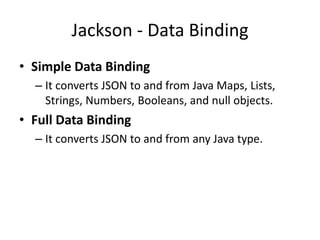
Jackson - Data Binding
• Simple Data Binding
– It converts JSON to and from Java Maps, Lists,
Strings, Numbers, Booleans, and null objects.
• Full Data Binding
– It converts JSON to and from any Java type.
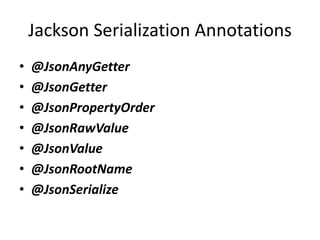
Jackson Serialization Annotations
• @JsonAnyGetter
• @JsonGetter
• @JsonPropertyOrder
• @JsonRawValue
• @JsonValue
• @JsonRootName
• @JsonSerialize
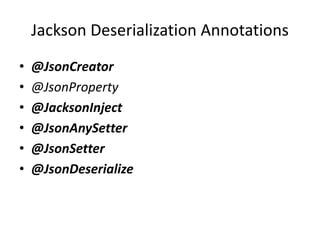
Jackson Deserialization Annotations
• @JsonCreator
• @JsonProperty
• @JacksonInject
• @JsonAnySetter
• @JsonSetter
• @JsonDeserialize
Jackson Property Inclusion
Annotations
• @JsonIgnoreProperties
• @JsonIgnore
• @JsonIgnoreType
• @JsonInclude
• @JsonAutoDetect
Jackson General Annotations
• @JsonProperty
• @JsonFormat
• @JsonUnwrapped
• @JsonView
• @JsonManagedReference
• @JsonBackReference
• @JsonIdentityInfo
• @JsonFilter
MuleSoft Transformers
• Built In APIs
• Global Mappers
• JSON to Java
• Java to JSON
• Mixin Class
– Mapping as inbound properties
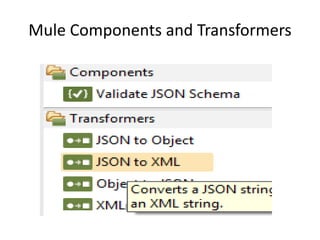
JSON in Mule
• JSON
• The JSON transformers are in the
• org.mule.module.json.transformers
• package. They provide the ability to work with
JSON documents and bind them automatically
to Java objects
Mule Components and Transformers
Resources
• www.json.org
• http://www.w3schools.com/json/json_intro.a
sp
• http://www.tutorialspoint.com/json/index.ht
m
• http://www.tutorialspoint.com/jackson/jackso
n_quick_guide.htm
• http://www.baeldung.com/jackson-
annotations

Java-JSON-Jackson

  • 1.
  • 2.
    Agenda • Introduction toJSON • JSON and Java • Jackson Annotations • Introduction to XML • XML to JSON
  • 3.
    Introduction to JSON •JSON – Java Script Object Notation • JSON is a data interchange format • Interactive Web 2.0 applications, no more use page replacement. Data transfer without refreshing a page. • The most important aspects of data transfer are simplicity, extensibility, interoperability, openness and human readability • Key idea in AJAX – Asynchronous Java Script and XML
  • 4.
    Syntax of JSON •JSON is unstructured • Data is in name/value pairs • Data is separated by commas • Curly braces hold objects • Square brackets hold arrays
  • 5.
    Simplicity of JSON •JSON is a subset of Java Script. JSON can be parsed by a Java Script parser. • It can represent either complex or simple data as it has data types • They are Strings, Number, Boolean, Objects and Arrays
  • 6.
    JSON Compatibility • Array –["Sunday", "Monday", "Tuesday", "Wednesday“] – "employees":[ {"firstName":"John", "lastName":"Doe"}, {"firstName":"Anna", "lastName":"Smith"}, {"firstName":"Peter","lastName":"Jones"} ] • Object – { “firstname": “Santhosh ", “lastname": “Gowd”} All data types are intuitive and similar to other programming languages • Also compatible with other languages like C, C++, C#, ColdFusion, Python and many more.
  • 7.
    JSON in AJAX •JSON in AJAX – Part of HTML Tags – <html>... <script> var data = JSONdata; </script>... </html> • JSON in JavaScript – XMLHttpRequest – responseData = eval('(' + responseText + ')');
  • 8.
  • 9.
  • 10.
  • 11.
    JSON Schema • JSONSchema is a specification for JSON based format for defining the structure of JSON data • It was written under IETF draft which expired in 2011 – Describes your existing data format. – Clear, human- and machine-readable documentation. – Complete structural validation, useful for automated testing. – Complete structural validation, validating client-submitted data. • Currently the most complete and compliant JSON Schema validator available is JSV
  • 12.
    Parsing JSON • Streaming •Tree Traversing • Data Binding
  • 13.
  • 14.
    Jackson Overview • Jacksonis a simple Java-based library to serialize Java objects to JSON and vice versa • Features of Jackson – Easy to use − Jackson API provides a high-level facade to simplify commonly used use-cases. – No need to create mapping − Jackson API provides default mapping for most of the objects to be serialized. – Performance − Jackson is quite fast, consumes less memory space, and is suitable for large object graphs or systems. – Clean JSON − Jackson creates clean and compact JSON results which are easy to read. – No Dependency − Jackson library does not require any other library apart from JDK. – Open Source − Jackson library is open source and free to use
  • 15.
    Set up JacksonEnvironment • Nothing specific for Jackson – Install JDK and make sure path and classpath are set – Download jackson-all-1.9.0.jar – Make sure this file is in the classpath in libraries
  • 16.
    Follow these steps •Step1 : Create ObjectMapper Object – ObjectMapper mapper = new ObjectMapper(); • Step 2: Deserialize JSON to Object – //Object to JSON Conversion Student student = mapper.readValue(jsonString, Student.class); • Step 3: Serialize Object to JSON – jsonString = mapper.writeValueAsString(student);
  • 17.
    Jackson - DataBinding • Simple Data Binding – It converts JSON to and from Java Maps, Lists, Strings, Numbers, Booleans, and null objects. • Full Data Binding – It converts JSON to and from any Java type.
  • 18.
    Jackson Serialization Annotations •@JsonAnyGetter • @JsonGetter • @JsonPropertyOrder • @JsonRawValue • @JsonValue • @JsonRootName • @JsonSerialize
  • 19.
    Jackson Deserialization Annotations •@JsonCreator • @JsonProperty • @JacksonInject • @JsonAnySetter • @JsonSetter • @JsonDeserialize
  • 20.
    Jackson Property Inclusion Annotations •@JsonIgnoreProperties • @JsonIgnore • @JsonIgnoreType • @JsonInclude • @JsonAutoDetect
  • 21.
    Jackson General Annotations •@JsonProperty • @JsonFormat • @JsonUnwrapped • @JsonView • @JsonManagedReference • @JsonBackReference • @JsonIdentityInfo • @JsonFilter
  • 22.
    MuleSoft Transformers • BuiltIn APIs • Global Mappers • JSON to Java • Java to JSON • Mixin Class – Mapping as inbound properties
  • 23.
    JSON in Mule •JSON • The JSON transformers are in the • org.mule.module.json.transformers • package. They provide the ability to work with JSON documents and bind them automatically to Java objects
  • 24.
    Mule Components andTransformers
  • 25.
    Resources • www.json.org • http://www.w3schools.com/json/json_intro.a sp •http://www.tutorialspoint.com/json/index.ht m • http://www.tutorialspoint.com/jackson/jackso n_quick_guide.htm • http://www.baeldung.com/jackson- annotations