BCA IV
Ms. Sushma Malik, Assistant Professor (IINTM)
Syllabus: Unit 2
 Inheritance: Types, Super keyword, method overriding,
covariant return type, abstract class.
 Interfaces and Packages: Creation and implementing
an interface, difference between abstract class and
interface, Packages, and importing a package.
 Exception Handling: Exception Class, built-in checked
and unchecked exceptions, user-defined exceptions, use
of try, catch, throw, throws, finally
Ms. Sushma Malik, Assistant Professor (IINTM)
Java - Inheritance
 Inheritance can be defined as the process where one
class acquires the properties (methods and fields) of
another.
 Inheritance in Java is a mechanism in which one
object acquires all the properties and behaviors of a
parent object. It is an important part of OOPs (Object
Oriented programming system).
 The class which inherits the properties of other is
known as subclass (derived class, child class) and the
class whose properties are inherited is known as
superclass (base class, parent class).
Ms. Sushma Malik, Assistant Professor (IINTM)
Java - Inheritance
 The idea behind inheritance in Java is that you can
create new classes that are built upon existing
classes.
 When you inherit from an existing class, you can
reuse methods and fields of the parent class.
 Moreover, you can add new methods and fields in
your current class also.
 Inheritance represents the IS-A relationship, also
known as parent-child relationship.
Ms. Sushma Malik, Assistant Professor (IINTM)
Terms used in Inheritance
 Class: A class is a group of objects which have common
properties. It is a template or blueprint from which
objects are created.
 Sub Class/Child Class: Subclass is a class which
inherits the other class. It is also called a derived class,
extended class, or child class.
 Super Class/Parent Class: Superclass is the class from
where a subclass inherits the features. It is also called a
base class or a parent class.
 Reusability: As the name specifies, reusability is a
mechanism which facilitates you to reuse the fields and
methods of the existing class when you create a new
class. You can use the same fields and methods already
defined in the previous class.
Ms. Sushma Malik, Assistant Professor (IINTM)
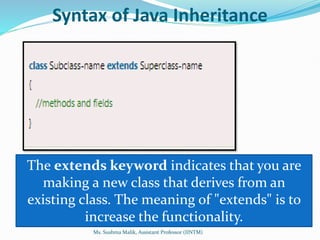
Syntax of Java Inheritance
The extends keyword indicates that you are
making a new class that derives from an
existing class. The meaning of "extends" is to
increase the functionality.
Ms. Sushma Malik, Assistant Professor (IINTM)
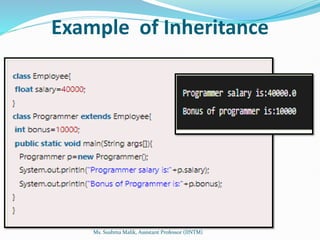
Example of Inheritance
Ms. Sushma Malik, Assistant Professor (IINTM)
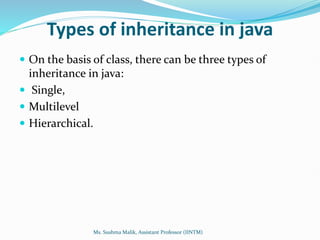
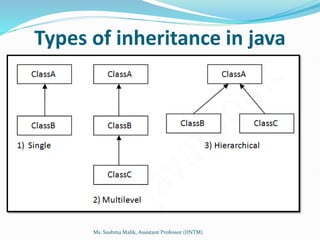
Types of inheritance in java
 On the basis of class, there can be three types of
inheritance in java:
 Single,
 Multilevel
 Hierarchical.
Ms. Sushma Malik, Assistant Professor (IINTM)
Types of inheritance in java
Ms. Sushma Malik, Assistant Professor (IINTM)
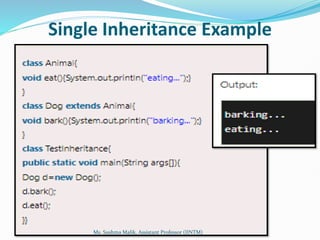
Single Inheritance Example
Ms. Sushma Malik, Assistant Professor (IINTM)
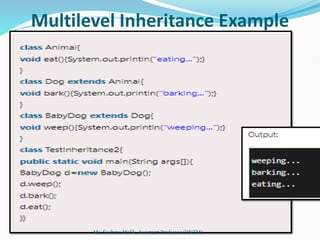
Multilevel Inheritance Example
Ms. Sushma Malik, Assistant Professor (IINTM)
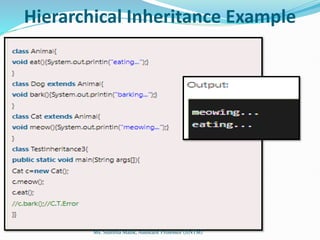
Hierarchical Inheritance Example
Ms. Sushma Malik, Assistant Professor (IINTM)
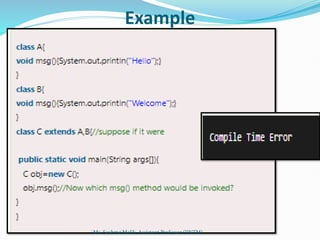
Why multiple inheritance is not supported
in java?
 To reduce the complexity and simplify the language,
multiple inheritance is not supported in java.
 Consider a scenario where A, B and C are three classes.
The C class inherits A and B classes. If A and B classes
have same method and you call it from child class object,
there will be ambiguity to call method of A or B class.
 Since compile time errors are better than runtime errors,
java renders compile time error if you inherit 2 classes. So
whether you have same method or different, there will be
compile time error now.
Ms. Sushma Malik, Assistant Professor (IINTM)
Example
Ms. Sushma Malik, Assistant Professor (IINTM)
Important facts about inheritance in
Java
 Default superclass: Except Object class, which has no superclass,
every class has one and only one direct superclass (single
inheritance). In the absence of any other explicit superclass, every
class is implicitly a subclass of the Object class.
 Superclass can only be one: A superclass can have any number of
subclasses. But a subclass can have only one superclass. This is
because Java does not support multiple inheritances with classes.
Although with interfaces, multiple inheritances are supported by
java.
 Inheriting Constructors: A subclass inherits all the members
(fields, methods, and nested classes) from its superclass.
Constructors are not members, so they are not inherited by
subclasses, but the constructor of the superclass can be invoked
from the subclass.
 Private member inheritance: A subclass does not inherit the
private members of its parent class. However, if the superclass has
public or protected methods(like getters and setters) for accessing
its private fields, these can also be used by the subclass.
Ms. Sushma Malik, Assistant Professor (IINTM)
Advantages Of Inheritance in Java
 Code Reusability: Inheritance allows for code reuse and
reduces the amount of code that needs to be written. The
subclass can reuse the properties and methods of the
superclass, reducing duplication of code.
 Abstraction: Inheritance allows for the creation of
abstract classes that define a common interface for a
group of related classes. This promotes abstraction and
encapsulation, making the code easier to maintain and
extend.
 Class Hierarchy: Inheritance allows for the creation of a
class hierarchy, which can be used to model real-world
objects and their relationships.
 Polymorphism: Inheritance allows for polymorphism,
which is the ability of an object to take on multiple forms.
Subclasses can override methods of the superclass, which
allows them to change their behavior in different ways.
Ms. Sushma Malik, Assistant Professor (IINTM)
Disadvantages of Inheritance in Java
 Complexity: Inheritance can make the code more
complex and harder to understand. This is especially
true if the inheritance hierarchy is deep or if multiple
inheritances is used.
 Tight Coupling: Inheritance creates a tight coupling
between the superclass and subclass, making it
difficult to make changes to the superclass without
affecting the subclass.
Ms. Sushma Malik, Assistant Professor (IINTM)
super keyword in java
 The super keyword in Java is a reference variable that
is used to refer to immediate parent class objects.
 Whenever you create the instance of a subclass, an
instance of the parent class is created implicitly i.e.
referred by the super reference variable.
Ms. Sushma Malik, Assistant Professor (IINTM)
Characteristics of super keyword
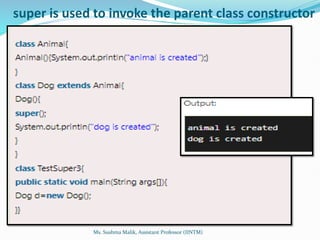
 Super is used to call a superclass constructor: When
a subclass is created, its constructor must call the
constructor of its parent class. This is done using the
super() keyword, which calls the constructor of the
parent class.
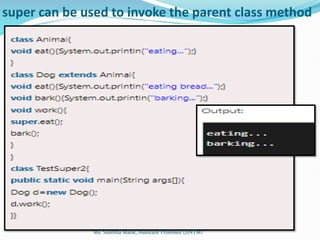
 Super is used to call a superclass method: A subclass
can call a method defined in its parent class using the
super keyword. This is useful when the subclass wants to
invoke the parent class’s implementation of the method
in addition to its own.
 Super is used to access a superclass field: A subclass
can access a field defined in its parent class using the
super keyword. This is useful when the subclass wants to
reference the parent class’s version of a field.
Ms. Sushma Malik, Assistant Professor (IINTM)
Characteristics of super keyword
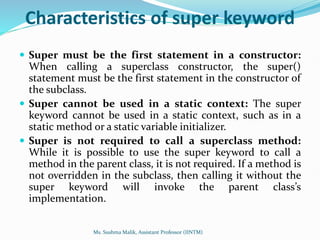
 Super must be the first statement in a constructor:
When calling a superclass constructor, the super()
statement must be the first statement in the constructor of
the subclass.
 Super cannot be used in a static context: The super
keyword cannot be used in a static context, such as in a
static method or a static variable initializer.
 Super is not required to call a superclass method:
While it is possible to use the super keyword to call a
method in the parent class, it is not required. If a method is
not overridden in the subclass, then calling it without the
super keyword will invoke the parent class’s
implementation.
Ms. Sushma Malik, Assistant Professor (IINTM)
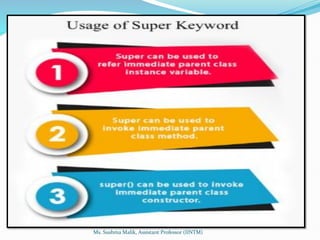
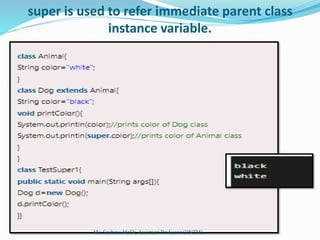
super is used to refer immediate parent class
instance variable.
Ms. Sushma Malik, Assistant Professor (IINTM)
super can be used to invoke the parent class method
Ms. Sushma Malik, Assistant Professor (IINTM)
super is used to invoke the parent class constructor
Ms. Sushma Malik, Assistant Professor (IINTM)
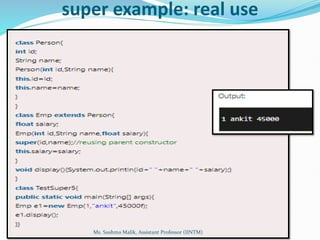
super example: real use
Ms. Sushma Malik, Assistant Professor (IINTM)
Advantages of Super Keywords
 Enables reuse of code: Using the super keyword allows
subclasses to inherit functionality from their parent
classes, which promotes reuse of code and reduces
duplication.
 Supports polymorphism: Because subclasses can
override methods and access fields from their parent
classes using super, polymorphism is possible. This
allows for more flexible and extensible code.
 Provides access to parent class behavior: Subclasses
can access and use methods and fields defined in their
parent classes through the super keyword, which allows
them to take advantage of existing behavior without
having to reimplement it.
Ms. Sushma Malik, Assistant Professor (IINTM)
Advantages of Super Keywords
 Allows for customization of behavior: By
overriding methods and using super to call the parent
implementation, subclasses can customize and extend
the behavior of their parent classes.
 Facilitates abstraction and encapsulation: The use
of super promotes encapsulation and abstraction by
allowing subclasses to focus on their own behavior
while relying on the parent class to handle lower-level
details.
Ms. Sushma Malik, Assistant Professor (IINTM)
Method Overriding in Java
 If the subclass (child class) has the same method
as declared in the parent class, it is known
as method overriding in Java.
 In other words, If a subclass provides the specific
implementation of the method that has been
provided by one of its parent classes, it is known as
method overriding.
Ms. Sushma Malik, Assistant Professor (IINTM)
Usage of Java Method Overriding
 Method overriding is used to provide specific
implementation of a method that is already
provided by its super class.
 Method overriding is used for runtime
polymorphism
Ms. Sushma Malik, Assistant Professor (IINTM)
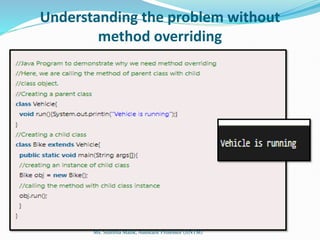
Understanding the problem without
method overriding
Ms. Sushma Malik, Assistant Professor (IINTM)
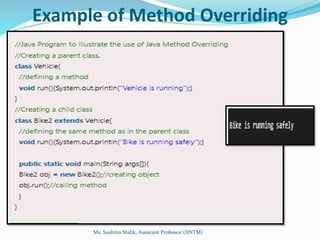
Example of Method Overriding
Ms. Sushma Malik, Assistant Professor (IINTM)
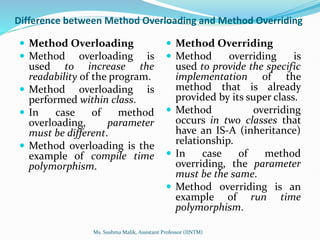
Difference between Method Overloading and Method Overriding
 Method Overloading
 Method overloading is
used to increase the
readability of the program.
 Method overloading is
performed within class.
 In case of method
overloading, parameter
must be different.
 Method overloading is the
example of compile time
polymorphism.
 Method Overriding
 Method overriding is
used to provide the specific
implementation of the
method that is already
provided by its super class.
 Method overriding
occurs in two classes that
have an IS-A (inheritance)
relationship.
 In case of method
overriding, the parameter
must be the same.
 Method overriding is an
example of run time
polymorphism.
Ms. Sushma Malik, Assistant Professor (IINTM)
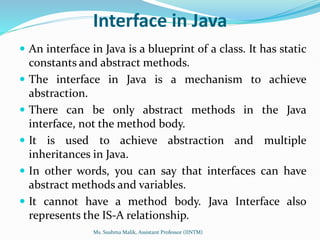
Interface in Java
 An interface in Java is a blueprint of a class. It has static
constants and abstract methods.
 The interface in Java is a mechanism to achieve
abstraction.
 There can be only abstract methods in the Java
interface, not the method body.
 It is used to achieve abstraction and multiple
inheritances in Java.
 In other words, you can say that interfaces can have
abstract methods and variables.
 It cannot have a method body. Java Interface also
represents the IS-A relationship.
Ms. Sushma Malik, Assistant Professor (IINTM)
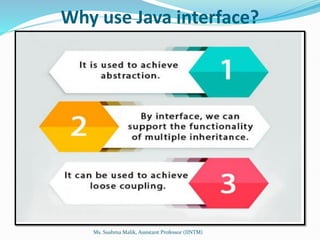
Why use Java interface?
Ms. Sushma Malik, Assistant Professor (IINTM)
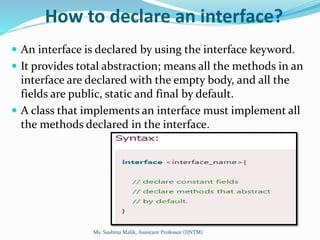
How to declare an interface?
 An interface is declared by using the interface keyword.
 It provides total abstraction; means all the methods in an
interface are declared with the empty body, and all the
fields are public, static and final by default.
 A class that implements an interface must implement all
the methods declared in the interface.
Ms. Sushma Malik, Assistant Professor (IINTM)
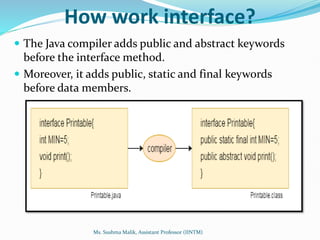
How work interface?
 The Java compiler adds public and abstract keywords
before the interface method.
 Moreover, it adds public, static and final keywords
before data members.
Ms. Sushma Malik, Assistant Professor (IINTM)
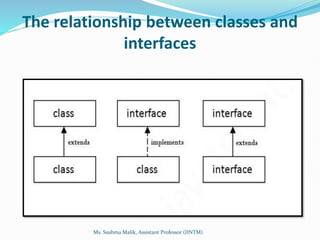
The relationship between classes and
interfaces
Ms. Sushma Malik, Assistant Professor (IINTM)
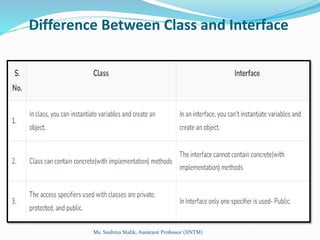
Difference Between Class and Interface
Ms. Sushma Malik, Assistant Professor (IINTM)
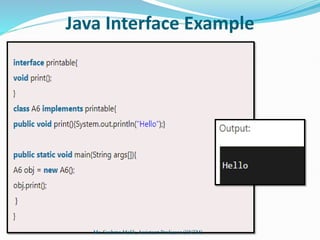
Java Interface Example
Ms. Sushma Malik, Assistant Professor (IINTM)
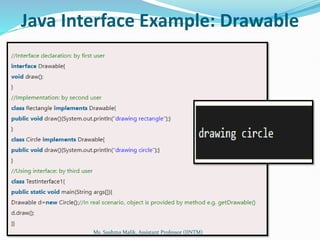
Java Interface Example: Drawable
Ms. Sushma Malik, Assistant Professor (IINTM)
Java Interface Example: Drawable
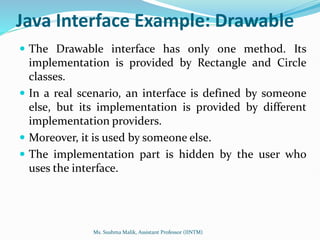
 The Drawable interface has only one method. Its
implementation is provided by Rectangle and Circle
classes.
 In a real scenario, an interface is defined by someone
else, but its implementation is provided by different
implementation providers.
 Moreover, it is used by someone else.
 The implementation part is hidden by the user who
uses the interface.
Ms. Sushma Malik, Assistant Professor (IINTM)
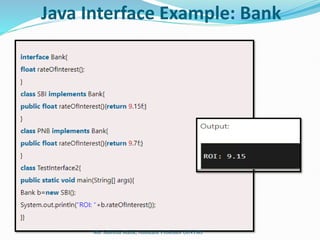
Java Interface Example: Bank
Ms. Sushma Malik, Assistant Professor (IINTM)
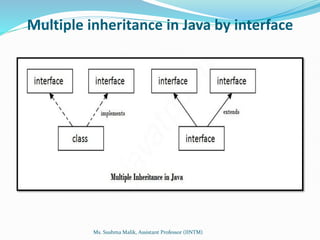
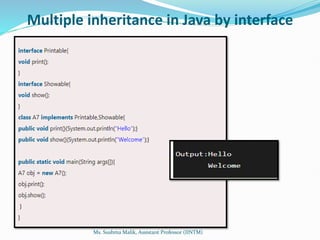
Multiple inheritance in Java by interface
Ms. Sushma Malik, Assistant Professor (IINTM)
Multiple inheritance in Java by interface
Ms. Sushma Malik, Assistant Professor (IINTM)
Multiple inheritance is not
supported through class in
java, but it is possible by an
interface, why?
Ms. Sushma Malik, Assistant Professor (IINTM)
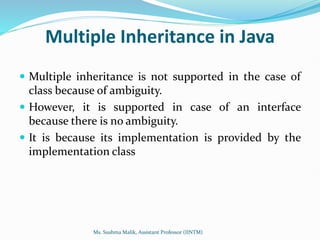
Multiple Inheritance in Java
 Multiple inheritance is not supported in the case of
class because of ambiguity.
 However, it is supported in case of an interface
because there is no ambiguity.
 It is because its implementation is provided by the
implementation class
Ms. Sushma Malik, Assistant Professor (IINTM)
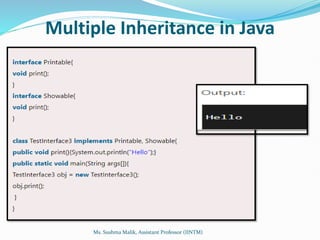
Multiple Inheritance in Java
Ms. Sushma Malik, Assistant Professor (IINTM)
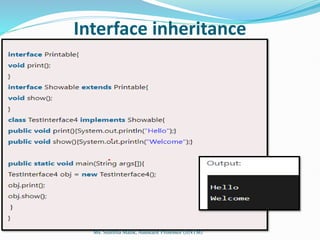
Interface inheritance
Ms. Sushma Malik, Assistant Professor (IINTM)
Why do we use an Interface?
 It is used to achieve total abstraction.
 Since java does not support multiple inheritances in
the case of class, by using an interface it can achieve
multiple inheritances.
 Any class can extend only 1 class but can any class
implement infinite number of interface.
 It is also used to achieve loose coupling.
 Interfaces are used to implement abstraction.
Ms. Sushma Malik, Assistant Professor (IINTM)
Advantages of Interfaces in Java
 Without bothering about the implementation part, we
can achieve the security of the implementation.
 In Java, multiple inheritances is not allowed, however,
you can use an interface to make use of it as you can
implement more than one interface.
Ms. Sushma Malik, Assistant Professor (IINTM)
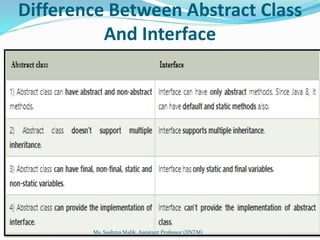
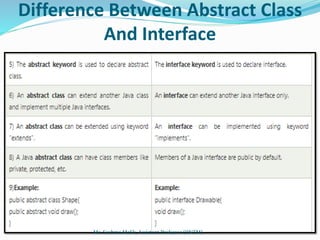
Difference Between Abstract Class
And Interface
Ms. Sushma Malik, Assistant Professor (IINTM)
Difference Between Abstract Class
And Interface
Ms. Sushma Malik, Assistant Professor (IINTM)
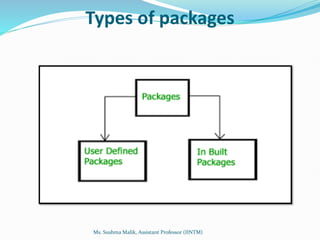
Java Package
 A java package is a group of similar types of classes,
interfaces and sub-packages.
 Package in java can be categorized in two form, built-
in package and user-defined package.
 There are many built-in packages such as java, lang,
awt, javax, swing, net, io, util, sql etc.
Ms. Sushma Malik, Assistant Professor (IINTM)
Advantage of Java Package
 Preventing naming conflicts. For example there can be
two classes with name Employee in two packages,
college.staff.cse.Employee and college.staff.ee.Employee
 Making searching/locating and usage of classes, interfaces,
enumerations and annotations easier
 Providing controlled access: protected and default have
package level access control. A protected member is
accessible by classes in the same package and its subclasses.
A default member (without any access specifier) is
accessible by classes in the same package only.
 Packages can be considered as data encapsulation (or data-
hiding).
Ms. Sushma Malik, Assistant Professor (IINTM)
Advantage of Java Package
 Reusability: While developing a project in java, we
often feel that there are few things that we are writing
again and again in our code. Using packages, you can
create such things in form of classes inside a package
and whenever you need to perform that same task, just
import that package and use the class.
 Better Organization: Again, in large java projects
where we have several hundreds of classes, it is always
required to group the similar types of classes in a
meaningful package name so that you can organize
your project better and when you need something you
can quickly locate it and use it, which improves the
efficiency.
Ms. Sushma Malik, Assistant Professor (IINTM)
Types of packages
Ms. Sushma Malik, Assistant Professor (IINTM)
Built-in Packages
 These packages consist of a large number of classes which are a
part of Java API.Some of the commonly used built-in packages
are:
 java.lang: Contains language support classes(e.g classed which
defines primitive data types, math operations). This package is
automatically imported.
 java.io: Contains classed for supporting input / output
operations.
 java.util: Contains utility classes which implement data
structures like Linked List, Dictionary and support ; for Date /
Time operations.
 java.applet: Contains classes for creating Applets.
 java.awt: Contain classes for implementing the components
for graphical user interfaces (like button , ;menus etc).
 java.net: Contain classes for supporting networking
operations.
Ms. Sushma Malik, Assistant Professor (IINTM)
User-defined packages
These are the packages that are defined by the user.
First we create a directory myPackage (name should be
same as the name of the package).
Then create the MyClass inside the directory with the
first statement being the package names.
Ms. Sushma Malik, Assistant Professor (IINTM)
How to access a package from
another package?
 There are three ways to access the package from
outside the package.
 import package.*;
 import package. Class name;
 fully qualified name.
Ms. Sushma Malik, Assistant Professor (IINTM)
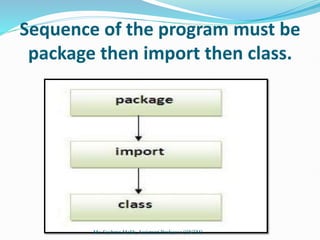
Sequence of the program must be
package then import then class.
Ms. Sushma Malik, Assistant Professor (IINTM)
1) Using packagename.*
 If you use package.* then all the classes and
interfaces of this package will be accessible
but not subpackages.
 The import keyword is used to make the
classes and interface of another package
accessible to the current package.
Ms. Sushma Malik, Assistant Professor (IINTM)
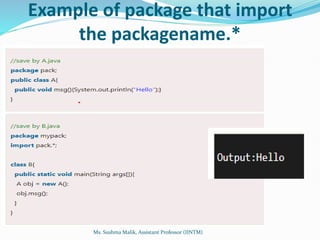
Example of package that import
the packagename.*
Ms. Sushma Malik, Assistant Professor (IINTM)
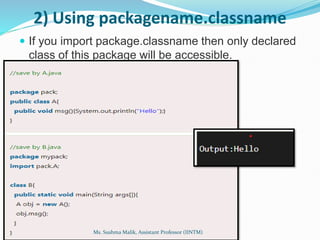
2) Using packagename.classname
 If you import package.classname then only declared
class of this package will be accessible.
Ms. Sushma Malik, Assistant Professor (IINTM)
3) Using fully qualified name
 If you use fully qualified name then only declared class
of this package will be accessible. Now there is no need
to import. But you need to use fully qualified name
every time when you are accessing the class or
interface.
 It is generally used when two packages have same class
name e.g. java.util and java.sql packages contain Date
class.
Ms. Sushma Malik, Assistant Professor (IINTM)
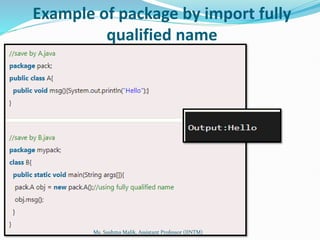
Example of package by import fully
qualified name
Ms. Sushma Malik, Assistant Professor (IINTM)
What is exception handling
 The exception handling in java is one of the
powerful mechanism to handle the runtime errors so
that normal flow of the application can be maintained.
 Exception Handling is a mechanism to handle runtime
errors such as ClassNotFound, IO, SQL, Remote etc.
Ms. Sushma Malik, Assistant Professor (IINTM)
What is exception
 Dictionary Meaning: Exception is an abnormal
condition.
 In java, exception is an event that disrupts the normal
flow of the program. It is an object which is thrown at
runtime.
Ms. Sushma Malik, Assistant Professor (IINTM)
The core advantage of exception handling
Advantage of Exception Handling
 The core advantage of exception handling
is to maintain the normal flow of the
application. Exception normally disrupts
the normal flow of the application.
Ms. Sushma Malik, Assistant Professor (IINTM)
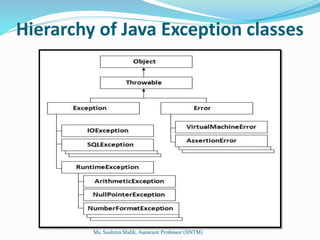
Hierarchy of Java Exception classes
Ms. Sushma Malik, Assistant Professor (IINTM)
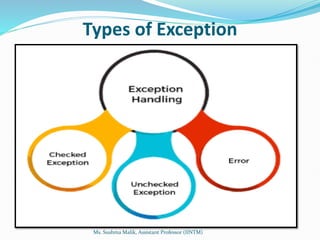
Types of Exception
Ms. Sushma Malik, Assistant Professor (IINTM)
Checked Exception
 A checked exception is an exception that occurs at the
compile time, these are also called as compile time
exceptions.
 These exceptions cannot simply be ignored at the time
of compilation, the programmer should take care of
(handle) these exceptions.
 For example, if you use FileReader class in your
program to read data from a file, if the file specified in
its constructor doesn't exist, then
a FileNotFoundException occurs, and the compiler
prompts the programmer to handle the exception.
Ms. Sushma Malik, Assistant Professor (IINTM)
Unchecked Exceptions
 An unchecked exception is an exception that occurs at the
time of execution.
 These are also called as Runtime Exceptions.
 These include programming bugs, such as logic errors or
improper use of an API.
 Runtime exceptions are ignored at the time of compilation.
 For example, if you have declared an array of size 5 in your
program, and trying to call the 6th element of the array then
an ArrayIndexOutOfBoundsExceptionexception occurs.
Ms. Sushma Malik, Assistant Professor (IINTM)
Errors
 These are not exceptions at all, but problems that
arise beyond the control of the user or the
programmer.
 Errors are typically ignored in your code because
you can rarely do anything about an error.
 For example, if a stack overflow occurs, an error
will arise.
 They are also ignored at the time of compilation.
Ms. Sushma Malik, Assistant Professor (IINTM)
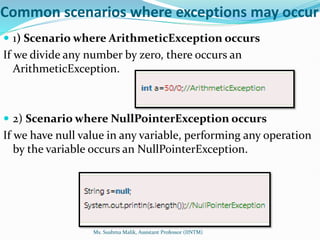
Common scenarios where exceptions may occur
 1) Scenario where ArithmeticException occurs
If we divide any number by zero, there occurs an
ArithmeticException.
 2) Scenario where NullPointerException occurs
If we have null value in any variable, performing any operation
by the variable occurs an NullPointerException.
Ms. Sushma Malik, Assistant Professor (IINTM)
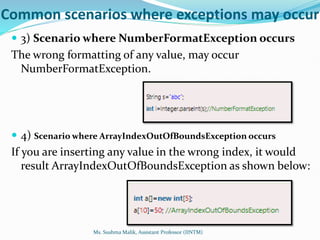
Common scenarios where exceptions may occur
 3) Scenario where NumberFormatException occurs
The wrong formatting of any value, may occur
NumberFormatException.
 4) Scenario where ArrayIndexOutOfBoundsException occurs
If you are inserting any value in the wrong index, it would
result ArrayIndexOutOfBoundsException as shown below:
Ms. Sushma Malik, Assistant Professor (IINTM)
Java Exception Handling Keywords
 There are 5 keywords used in java exception
handling.
 try
 catch
 finally
 throw
 throws
Ms. Sushma Malik, Assistant Professor (IINTM)
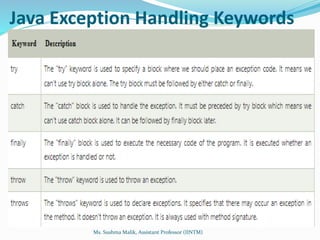
Java Exception Handling Keywords
Ms. Sushma Malik, Assistant Professor (IINTM)
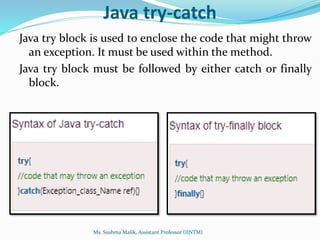
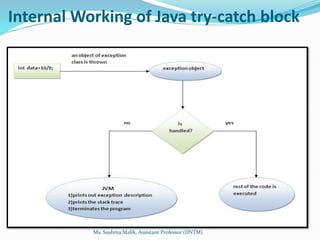
Java try-catch
Java try block is used to enclose the code that might throw
an exception. It must be used within the method.
Java try block must be followed by either catch or finally
block.
Ms. Sushma Malik, Assistant Professor (IINTM)
Java catch block
 Java catch block is used to handle the Exception by
declaring the type of exception within the parameter.
 The declared exception must be the parent class
exception ( i.e., Exception) or the generated exception
type.
 Java catch block is used to handle the Exception. It
must be used after the try block only.
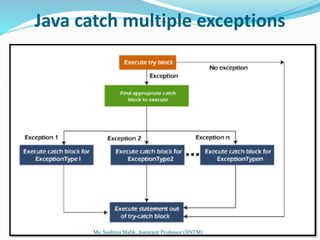
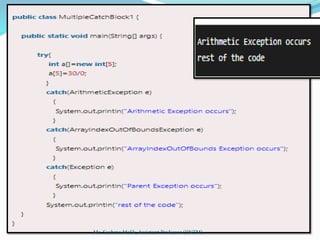
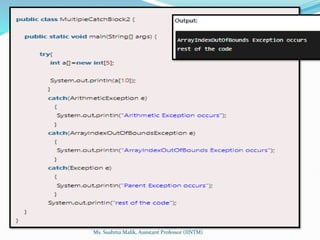
 You can use multiple catch block with a single try.
Ms. Sushma Malik, Assistant Professor (IINTM)
Internal Working of Java try-catch block
Ms. Sushma Malik, Assistant Professor (IINTM)
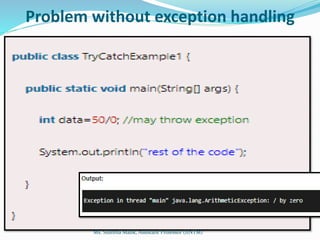
Problem without exception handling
Ms. Sushma Malik, Assistant Professor (IINTM)
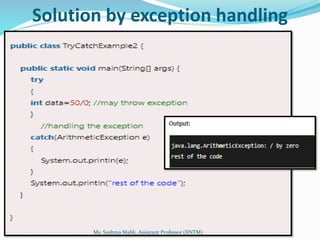
Solution by exception handling
Ms. Sushma Malik, Assistant Professor (IINTM)
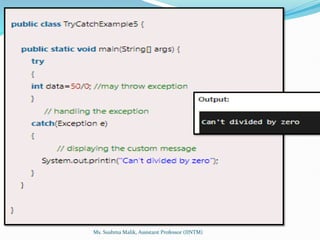
Java catch multiple exceptions
Ms. Sushma Malik, Assistant Professor (IINTM)
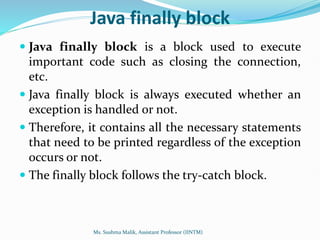
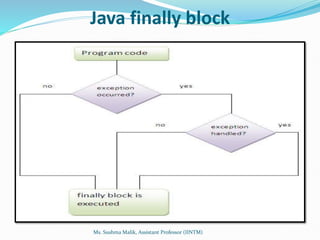
Java finally block
 Java finally block is a block used to execute
important code such as closing the connection,
etc.
 Java finally block is always executed whether an
exception is handled or not.
 Therefore, it contains all the necessary statements
that need to be printed regardless of the exception
occurs or not.
 The finally block follows the try-catch block.
Ms. Sushma Malik, Assistant Professor (IINTM)
Java finally block
Ms. Sushma Malik, Assistant Professor (IINTM)
Why use Java finally block?
 finally block in Java can be used to put
"cleanup" code such as closing a file,
closing connection, etc.
 The important statements to be printed can
be placed in the finally block.
Ms. Sushma Malik, Assistant Professor (IINTM)
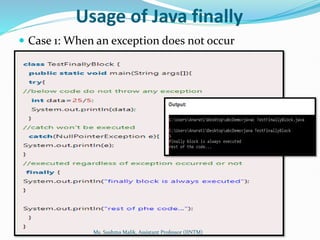
Usage of Java finally
 Case 1: When an exception does not occur
Ms. Sushma Malik, Assistant Professor (IINTM)
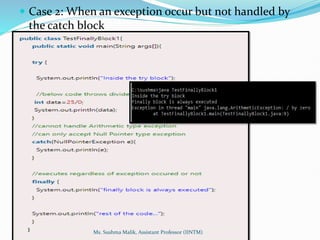
 Case 2: When an exception occur but not handled by
the catch block
Ms. Sushma Malik, Assistant Professor (IINTM)
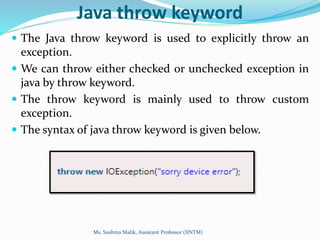
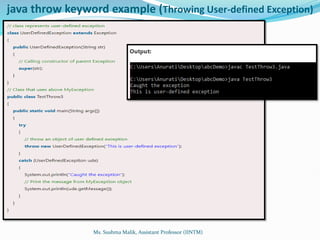
Java throw keyword
 The Java throw keyword is used to explicitly throw an
exception.
 We can throw either checked or unchecked exception in
java by throw keyword.
 The throw keyword is mainly used to throw custom
exception.
 The syntax of java throw keyword is given below.
Ms. Sushma Malik, Assistant Professor (IINTM)
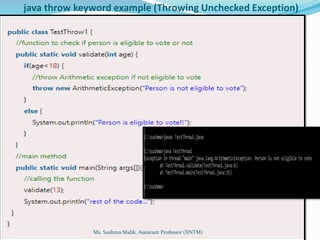
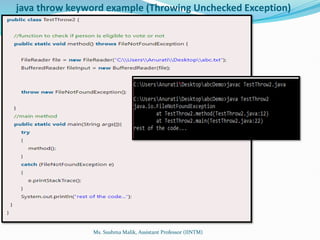
java throw keyword example (Throwing Unchecked Exception)
Ms. Sushma Malik, Assistant Professor (IINTM)
java throw keyword example (Throwing Unchecked Exception)
Ms. Sushma Malik, Assistant Professor (IINTM)
java throw keyword example (Throwing User-defined Exception)
Ms. Sushma Malik, Assistant Professor (IINTM)
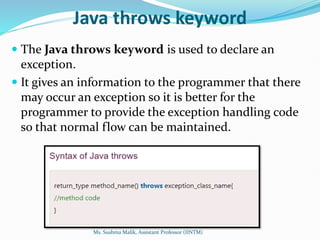
Java throws keyword
 The Java throws keyword is used to declare an
exception.
 It gives an information to the programmer that there
may occur an exception so it is better for the
programmer to provide the exception handling code
so that normal flow can be maintained.
Ms. Sushma Malik, Assistant Professor (IINTM)
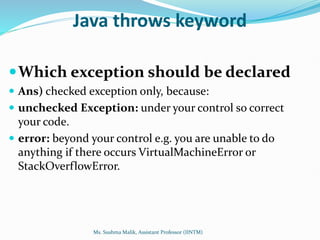
Java throws keyword
Which exception should be declared
 Ans) checked exception only, because:
 unchecked Exception: under your control so correct
your code.
 error: beyond your control e.g. you are unable to do
anything if there occurs VirtualMachineError or
StackOverflowError.
Ms. Sushma Malik, Assistant Professor (IINTM)
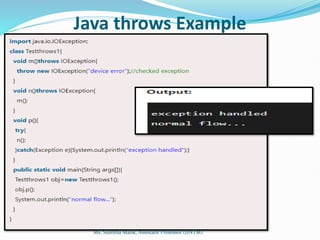
Java throws Example
Ms. Sushma Malik, Assistant Professor (IINTM)
Java throws keyword
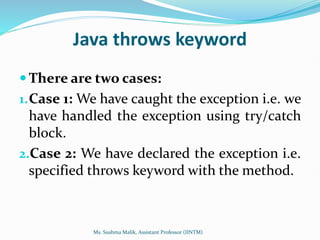
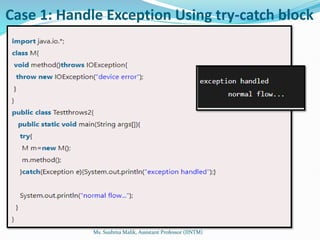
 There are two cases:
1.Case 1: We have caught the exception i.e. we
have handled the exception using try/catch
block.
2.Case 2: We have declared the exception i.e.
specified throws keyword with the method.
Ms. Sushma Malik, Assistant Professor (IINTM)
Case 1: Handle Exception Using try-catch block
Ms. Sushma Malik, Assistant Professor (IINTM)
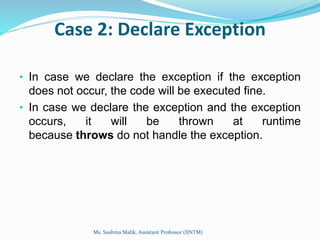
Case 2: Declare Exception
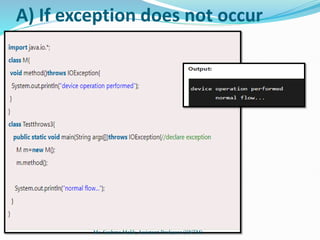
• In case we declare the exception if the exception
does not occur, the code will be executed fine.
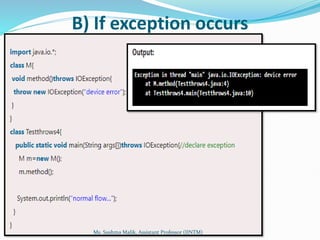
• In case we declare the exception and the exception
occurs, it will be thrown at runtime
because throws do not handle the exception.
Ms. Sushma Malik, Assistant Professor (IINTM)
A) If exception does not occur
Ms. Sushma Malik, Assistant Professor (IINTM)
B) If exception occurs
Ms. Sushma Malik, Assistant Professor (IINTM)
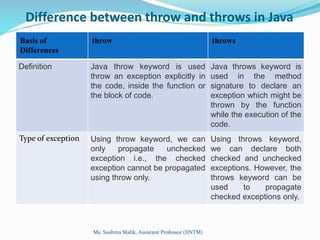
Difference between throw and throws in Java
Basis of
Differences
throw throws
Definition Java throw keyword is used
throw an exception explicitly in
the code, inside the function or
the block of code.
Java throws keyword is
used in the method
signature to declare an
exception which might be
thrown by the function
while the execution of the
code.
Type of exception Using throw keyword, we can
only propagate unchecked
exception i.e., the checked
exception cannot be propagated
using throw only.
Using throws keyword,
we can declare both
checked and unchecked
exceptions. However, the
throws keyword can be
used to propagate
checked exceptions only.
Ms. Sushma Malik, Assistant Professor (IINTM)
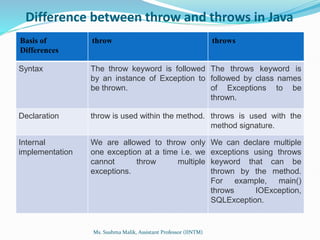
Difference between throw and throws in Java
Basis of
Differences
throw throws
Syntax The throw keyword is followed
by an instance of Exception to
be thrown.
The throws keyword is
followed by class names
of Exceptions to be
thrown.
Declaration throw is used within the method. throws is used with the
method signature.
Internal
implementation
We are allowed to throw only
one exception at a time i.e. we
cannot throw multiple
exceptions.
We can declare multiple
exceptions using throws
keyword that can be
thrown by the method.
For example, main()
throws IOException,
SQLException.
Ms. Sushma Malik, Assistant Professor (IINTM)
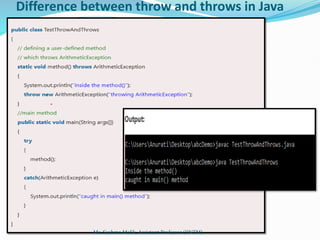
Difference between throw and throws in Java
Ms. Sushma Malik, Assistant Professor (IINTM)
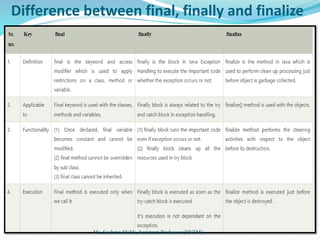
Difference between final, finally and finalize
Ms. Sushma Malik, Assistant Professor (IINTM)
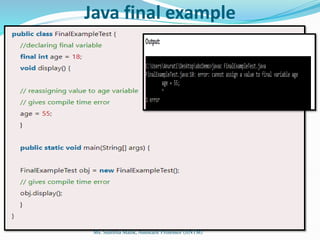
Java final example
Ms. Sushma Malik, Assistant Professor (IINTM)
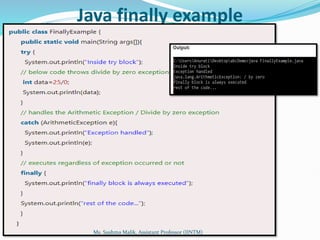
Java finally example
Ms. Sushma Malik, Assistant Professor (IINTM)
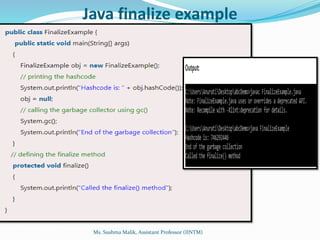
Java finalize example
Ms. Sushma Malik, Assistant Professor (IINTM)

JAVA UNIT 2 BCA students' notes IPU university

  • 1.
    BCA IV Ms. SushmaMalik, Assistant Professor (IINTM)
  • 2.
    Syllabus: Unit 2 Inheritance: Types, Super keyword, method overriding, covariant return type, abstract class.  Interfaces and Packages: Creation and implementing an interface, difference between abstract class and interface, Packages, and importing a package.  Exception Handling: Exception Class, built-in checked and unchecked exceptions, user-defined exceptions, use of try, catch, throw, throws, finally Ms. Sushma Malik, Assistant Professor (IINTM)
  • 3.
    Java - Inheritance Inheritance can be defined as the process where one class acquires the properties (methods and fields) of another.  Inheritance in Java is a mechanism in which one object acquires all the properties and behaviors of a parent object. It is an important part of OOPs (Object Oriented programming system).  The class which inherits the properties of other is known as subclass (derived class, child class) and the class whose properties are inherited is known as superclass (base class, parent class). Ms. Sushma Malik, Assistant Professor (IINTM)
  • 4.
    Java - Inheritance The idea behind inheritance in Java is that you can create new classes that are built upon existing classes.  When you inherit from an existing class, you can reuse methods and fields of the parent class.  Moreover, you can add new methods and fields in your current class also.  Inheritance represents the IS-A relationship, also known as parent-child relationship. Ms. Sushma Malik, Assistant Professor (IINTM)
  • 5.
    Terms used inInheritance  Class: A class is a group of objects which have common properties. It is a template or blueprint from which objects are created.  Sub Class/Child Class: Subclass is a class which inherits the other class. It is also called a derived class, extended class, or child class.  Super Class/Parent Class: Superclass is the class from where a subclass inherits the features. It is also called a base class or a parent class.  Reusability: As the name specifies, reusability is a mechanism which facilitates you to reuse the fields and methods of the existing class when you create a new class. You can use the same fields and methods already defined in the previous class. Ms. Sushma Malik, Assistant Professor (IINTM)
  • 6.
    Syntax of JavaInheritance The extends keyword indicates that you are making a new class that derives from an existing class. The meaning of "extends" is to increase the functionality. Ms. Sushma Malik, Assistant Professor (IINTM)
  • 7.
    Example of Inheritance Ms.Sushma Malik, Assistant Professor (IINTM)
  • 8.
    Types of inheritancein java  On the basis of class, there can be three types of inheritance in java:  Single,  Multilevel  Hierarchical. Ms. Sushma Malik, Assistant Professor (IINTM)
  • 9.
    Types of inheritancein java Ms. Sushma Malik, Assistant Professor (IINTM)
  • 10.
    Single Inheritance Example Ms.Sushma Malik, Assistant Professor (IINTM)
  • 11.
    Multilevel Inheritance Example Ms.Sushma Malik, Assistant Professor (IINTM)
  • 12.
    Hierarchical Inheritance Example Ms.Sushma Malik, Assistant Professor (IINTM)
  • 13.
    Why multiple inheritanceis not supported in java?  To reduce the complexity and simplify the language, multiple inheritance is not supported in java.  Consider a scenario where A, B and C are three classes. The C class inherits A and B classes. If A and B classes have same method and you call it from child class object, there will be ambiguity to call method of A or B class.  Since compile time errors are better than runtime errors, java renders compile time error if you inherit 2 classes. So whether you have same method or different, there will be compile time error now. Ms. Sushma Malik, Assistant Professor (IINTM)
  • 14.
    Example Ms. Sushma Malik,Assistant Professor (IINTM)
  • 15.
    Important facts aboutinheritance in Java  Default superclass: Except Object class, which has no superclass, every class has one and only one direct superclass (single inheritance). In the absence of any other explicit superclass, every class is implicitly a subclass of the Object class.  Superclass can only be one: A superclass can have any number of subclasses. But a subclass can have only one superclass. This is because Java does not support multiple inheritances with classes. Although with interfaces, multiple inheritances are supported by java.  Inheriting Constructors: A subclass inherits all the members (fields, methods, and nested classes) from its superclass. Constructors are not members, so they are not inherited by subclasses, but the constructor of the superclass can be invoked from the subclass.  Private member inheritance: A subclass does not inherit the private members of its parent class. However, if the superclass has public or protected methods(like getters and setters) for accessing its private fields, these can also be used by the subclass. Ms. Sushma Malik, Assistant Professor (IINTM)
  • 16.
    Advantages Of Inheritancein Java  Code Reusability: Inheritance allows for code reuse and reduces the amount of code that needs to be written. The subclass can reuse the properties and methods of the superclass, reducing duplication of code.  Abstraction: Inheritance allows for the creation of abstract classes that define a common interface for a group of related classes. This promotes abstraction and encapsulation, making the code easier to maintain and extend.  Class Hierarchy: Inheritance allows for the creation of a class hierarchy, which can be used to model real-world objects and their relationships.  Polymorphism: Inheritance allows for polymorphism, which is the ability of an object to take on multiple forms. Subclasses can override methods of the superclass, which allows them to change their behavior in different ways. Ms. Sushma Malik, Assistant Professor (IINTM)
  • 17.
    Disadvantages of Inheritancein Java  Complexity: Inheritance can make the code more complex and harder to understand. This is especially true if the inheritance hierarchy is deep or if multiple inheritances is used.  Tight Coupling: Inheritance creates a tight coupling between the superclass and subclass, making it difficult to make changes to the superclass without affecting the subclass. Ms. Sushma Malik, Assistant Professor (IINTM)
  • 18.
    super keyword injava  The super keyword in Java is a reference variable that is used to refer to immediate parent class objects.  Whenever you create the instance of a subclass, an instance of the parent class is created implicitly i.e. referred by the super reference variable. Ms. Sushma Malik, Assistant Professor (IINTM)
  • 19.
    Ms. Sushma Malik,Assistant Professor (IINTM)
  • 20.
    Characteristics of superkeyword  Super is used to call a superclass constructor: When a subclass is created, its constructor must call the constructor of its parent class. This is done using the super() keyword, which calls the constructor of the parent class.  Super is used to call a superclass method: A subclass can call a method defined in its parent class using the super keyword. This is useful when the subclass wants to invoke the parent class’s implementation of the method in addition to its own.  Super is used to access a superclass field: A subclass can access a field defined in its parent class using the super keyword. This is useful when the subclass wants to reference the parent class’s version of a field. Ms. Sushma Malik, Assistant Professor (IINTM)
  • 21.
    Characteristics of superkeyword  Super must be the first statement in a constructor: When calling a superclass constructor, the super() statement must be the first statement in the constructor of the subclass.  Super cannot be used in a static context: The super keyword cannot be used in a static context, such as in a static method or a static variable initializer.  Super is not required to call a superclass method: While it is possible to use the super keyword to call a method in the parent class, it is not required. If a method is not overridden in the subclass, then calling it without the super keyword will invoke the parent class’s implementation. Ms. Sushma Malik, Assistant Professor (IINTM)
  • 22.
    super is usedto refer immediate parent class instance variable. Ms. Sushma Malik, Assistant Professor (IINTM)
  • 23.
    super can beused to invoke the parent class method Ms. Sushma Malik, Assistant Professor (IINTM)
  • 24.
    super is usedto invoke the parent class constructor Ms. Sushma Malik, Assistant Professor (IINTM)
  • 25.
    super example: realuse Ms. Sushma Malik, Assistant Professor (IINTM)
  • 26.
    Advantages of SuperKeywords  Enables reuse of code: Using the super keyword allows subclasses to inherit functionality from their parent classes, which promotes reuse of code and reduces duplication.  Supports polymorphism: Because subclasses can override methods and access fields from their parent classes using super, polymorphism is possible. This allows for more flexible and extensible code.  Provides access to parent class behavior: Subclasses can access and use methods and fields defined in their parent classes through the super keyword, which allows them to take advantage of existing behavior without having to reimplement it. Ms. Sushma Malik, Assistant Professor (IINTM)
  • 27.
    Advantages of SuperKeywords  Allows for customization of behavior: By overriding methods and using super to call the parent implementation, subclasses can customize and extend the behavior of their parent classes.  Facilitates abstraction and encapsulation: The use of super promotes encapsulation and abstraction by allowing subclasses to focus on their own behavior while relying on the parent class to handle lower-level details. Ms. Sushma Malik, Assistant Professor (IINTM)
  • 28.
    Method Overriding inJava  If the subclass (child class) has the same method as declared in the parent class, it is known as method overriding in Java.  In other words, If a subclass provides the specific implementation of the method that has been provided by one of its parent classes, it is known as method overriding. Ms. Sushma Malik, Assistant Professor (IINTM)
  • 29.
    Usage of JavaMethod Overriding  Method overriding is used to provide specific implementation of a method that is already provided by its super class.  Method overriding is used for runtime polymorphism Ms. Sushma Malik, Assistant Professor (IINTM)
  • 30.
    Ms. Sushma Malik,Assistant Professor (IINTM)
  • 31.
    Understanding the problemwithout method overriding Ms. Sushma Malik, Assistant Professor (IINTM)
  • 32.
    Example of MethodOverriding Ms. Sushma Malik, Assistant Professor (IINTM)
  • 33.
    Difference between MethodOverloading and Method Overriding  Method Overloading  Method overloading is used to increase the readability of the program.  Method overloading is performed within class.  In case of method overloading, parameter must be different.  Method overloading is the example of compile time polymorphism.  Method Overriding  Method overriding is used to provide the specific implementation of the method that is already provided by its super class.  Method overriding occurs in two classes that have an IS-A (inheritance) relationship.  In case of method overriding, the parameter must be the same.  Method overriding is an example of run time polymorphism. Ms. Sushma Malik, Assistant Professor (IINTM)
  • 34.
    Interface in Java An interface in Java is a blueprint of a class. It has static constants and abstract methods.  The interface in Java is a mechanism to achieve abstraction.  There can be only abstract methods in the Java interface, not the method body.  It is used to achieve abstraction and multiple inheritances in Java.  In other words, you can say that interfaces can have abstract methods and variables.  It cannot have a method body. Java Interface also represents the IS-A relationship. Ms. Sushma Malik, Assistant Professor (IINTM)
  • 35.
    Why use Javainterface? Ms. Sushma Malik, Assistant Professor (IINTM)
  • 36.
    How to declarean interface?  An interface is declared by using the interface keyword.  It provides total abstraction; means all the methods in an interface are declared with the empty body, and all the fields are public, static and final by default.  A class that implements an interface must implement all the methods declared in the interface. Ms. Sushma Malik, Assistant Professor (IINTM)
  • 37.
    How work interface? The Java compiler adds public and abstract keywords before the interface method.  Moreover, it adds public, static and final keywords before data members. Ms. Sushma Malik, Assistant Professor (IINTM)
  • 38.
    The relationship betweenclasses and interfaces Ms. Sushma Malik, Assistant Professor (IINTM)
  • 39.
    Difference Between Classand Interface Ms. Sushma Malik, Assistant Professor (IINTM)
  • 40.
    Java Interface Example Ms.Sushma Malik, Assistant Professor (IINTM)
  • 41.
    Java Interface Example:Drawable Ms. Sushma Malik, Assistant Professor (IINTM)
  • 42.
    Java Interface Example:Drawable  The Drawable interface has only one method. Its implementation is provided by Rectangle and Circle classes.  In a real scenario, an interface is defined by someone else, but its implementation is provided by different implementation providers.  Moreover, it is used by someone else.  The implementation part is hidden by the user who uses the interface. Ms. Sushma Malik, Assistant Professor (IINTM)
  • 43.
    Java Interface Example:Bank Ms. Sushma Malik, Assistant Professor (IINTM)
  • 44.
    Multiple inheritance inJava by interface Ms. Sushma Malik, Assistant Professor (IINTM)
  • 45.
    Multiple inheritance inJava by interface Ms. Sushma Malik, Assistant Professor (IINTM)
  • 46.
    Multiple inheritance isnot supported through class in java, but it is possible by an interface, why? Ms. Sushma Malik, Assistant Professor (IINTM)
  • 47.
    Multiple Inheritance inJava  Multiple inheritance is not supported in the case of class because of ambiguity.  However, it is supported in case of an interface because there is no ambiguity.  It is because its implementation is provided by the implementation class Ms. Sushma Malik, Assistant Professor (IINTM)
  • 48.
    Multiple Inheritance inJava Ms. Sushma Malik, Assistant Professor (IINTM)
  • 49.
    Interface inheritance Ms. SushmaMalik, Assistant Professor (IINTM)
  • 50.
    Why do weuse an Interface?  It is used to achieve total abstraction.  Since java does not support multiple inheritances in the case of class, by using an interface it can achieve multiple inheritances.  Any class can extend only 1 class but can any class implement infinite number of interface.  It is also used to achieve loose coupling.  Interfaces are used to implement abstraction. Ms. Sushma Malik, Assistant Professor (IINTM)
  • 51.
    Advantages of Interfacesin Java  Without bothering about the implementation part, we can achieve the security of the implementation.  In Java, multiple inheritances is not allowed, however, you can use an interface to make use of it as you can implement more than one interface. Ms. Sushma Malik, Assistant Professor (IINTM)
  • 52.
    Difference Between AbstractClass And Interface Ms. Sushma Malik, Assistant Professor (IINTM)
  • 53.
    Difference Between AbstractClass And Interface Ms. Sushma Malik, Assistant Professor (IINTM)
  • 54.
    Java Package  Ajava package is a group of similar types of classes, interfaces and sub-packages.  Package in java can be categorized in two form, built- in package and user-defined package.  There are many built-in packages such as java, lang, awt, javax, swing, net, io, util, sql etc. Ms. Sushma Malik, Assistant Professor (IINTM)
  • 55.
    Advantage of JavaPackage  Preventing naming conflicts. For example there can be two classes with name Employee in two packages, college.staff.cse.Employee and college.staff.ee.Employee  Making searching/locating and usage of classes, interfaces, enumerations and annotations easier  Providing controlled access: protected and default have package level access control. A protected member is accessible by classes in the same package and its subclasses. A default member (without any access specifier) is accessible by classes in the same package only.  Packages can be considered as data encapsulation (or data- hiding). Ms. Sushma Malik, Assistant Professor (IINTM)
  • 56.
    Advantage of JavaPackage  Reusability: While developing a project in java, we often feel that there are few things that we are writing again and again in our code. Using packages, you can create such things in form of classes inside a package and whenever you need to perform that same task, just import that package and use the class.  Better Organization: Again, in large java projects where we have several hundreds of classes, it is always required to group the similar types of classes in a meaningful package name so that you can organize your project better and when you need something you can quickly locate it and use it, which improves the efficiency. Ms. Sushma Malik, Assistant Professor (IINTM)
  • 57.
    Types of packages Ms.Sushma Malik, Assistant Professor (IINTM)
  • 58.
    Built-in Packages  Thesepackages consist of a large number of classes which are a part of Java API.Some of the commonly used built-in packages are:  java.lang: Contains language support classes(e.g classed which defines primitive data types, math operations). This package is automatically imported.  java.io: Contains classed for supporting input / output operations.  java.util: Contains utility classes which implement data structures like Linked List, Dictionary and support ; for Date / Time operations.  java.applet: Contains classes for creating Applets.  java.awt: Contain classes for implementing the components for graphical user interfaces (like button , ;menus etc).  java.net: Contain classes for supporting networking operations. Ms. Sushma Malik, Assistant Professor (IINTM)
  • 59.
    User-defined packages These arethe packages that are defined by the user. First we create a directory myPackage (name should be same as the name of the package). Then create the MyClass inside the directory with the first statement being the package names. Ms. Sushma Malik, Assistant Professor (IINTM)
  • 60.
    How to accessa package from another package?  There are three ways to access the package from outside the package.  import package.*;  import package. Class name;  fully qualified name. Ms. Sushma Malik, Assistant Professor (IINTM)
  • 61.
    Sequence of theprogram must be package then import then class. Ms. Sushma Malik, Assistant Professor (IINTM)
  • 62.
    1) Using packagename.* If you use package.* then all the classes and interfaces of this package will be accessible but not subpackages.  The import keyword is used to make the classes and interface of another package accessible to the current package. Ms. Sushma Malik, Assistant Professor (IINTM)
  • 63.
    Example of packagethat import the packagename.* Ms. Sushma Malik, Assistant Professor (IINTM)
  • 64.
    2) Using packagename.classname If you import package.classname then only declared class of this package will be accessible. Ms. Sushma Malik, Assistant Professor (IINTM)
  • 65.
    3) Using fullyqualified name  If you use fully qualified name then only declared class of this package will be accessible. Now there is no need to import. But you need to use fully qualified name every time when you are accessing the class or interface.  It is generally used when two packages have same class name e.g. java.util and java.sql packages contain Date class. Ms. Sushma Malik, Assistant Professor (IINTM)
  • 66.
    Example of packageby import fully qualified name Ms. Sushma Malik, Assistant Professor (IINTM)
  • 67.
    What is exceptionhandling  The exception handling in java is one of the powerful mechanism to handle the runtime errors so that normal flow of the application can be maintained.  Exception Handling is a mechanism to handle runtime errors such as ClassNotFound, IO, SQL, Remote etc. Ms. Sushma Malik, Assistant Professor (IINTM)
  • 68.
    What is exception Dictionary Meaning: Exception is an abnormal condition.  In java, exception is an event that disrupts the normal flow of the program. It is an object which is thrown at runtime. Ms. Sushma Malik, Assistant Professor (IINTM)
  • 69.
    The core advantageof exception handling Advantage of Exception Handling  The core advantage of exception handling is to maintain the normal flow of the application. Exception normally disrupts the normal flow of the application. Ms. Sushma Malik, Assistant Professor (IINTM)
  • 70.
    Hierarchy of JavaException classes Ms. Sushma Malik, Assistant Professor (IINTM)
  • 71.
    Types of Exception Ms.Sushma Malik, Assistant Professor (IINTM)
  • 72.
    Checked Exception  Achecked exception is an exception that occurs at the compile time, these are also called as compile time exceptions.  These exceptions cannot simply be ignored at the time of compilation, the programmer should take care of (handle) these exceptions.  For example, if you use FileReader class in your program to read data from a file, if the file specified in its constructor doesn't exist, then a FileNotFoundException occurs, and the compiler prompts the programmer to handle the exception. Ms. Sushma Malik, Assistant Professor (IINTM)
  • 73.
    Unchecked Exceptions  Anunchecked exception is an exception that occurs at the time of execution.  These are also called as Runtime Exceptions.  These include programming bugs, such as logic errors or improper use of an API.  Runtime exceptions are ignored at the time of compilation.  For example, if you have declared an array of size 5 in your program, and trying to call the 6th element of the array then an ArrayIndexOutOfBoundsExceptionexception occurs. Ms. Sushma Malik, Assistant Professor (IINTM)
  • 74.
    Errors  These arenot exceptions at all, but problems that arise beyond the control of the user or the programmer.  Errors are typically ignored in your code because you can rarely do anything about an error.  For example, if a stack overflow occurs, an error will arise.  They are also ignored at the time of compilation. Ms. Sushma Malik, Assistant Professor (IINTM)
  • 75.
    Common scenarios whereexceptions may occur  1) Scenario where ArithmeticException occurs If we divide any number by zero, there occurs an ArithmeticException.  2) Scenario where NullPointerException occurs If we have null value in any variable, performing any operation by the variable occurs an NullPointerException. Ms. Sushma Malik, Assistant Professor (IINTM)
  • 76.
    Common scenarios whereexceptions may occur  3) Scenario where NumberFormatException occurs The wrong formatting of any value, may occur NumberFormatException.  4) Scenario where ArrayIndexOutOfBoundsException occurs If you are inserting any value in the wrong index, it would result ArrayIndexOutOfBoundsException as shown below: Ms. Sushma Malik, Assistant Professor (IINTM)
  • 77.
    Java Exception HandlingKeywords  There are 5 keywords used in java exception handling.  try  catch  finally  throw  throws Ms. Sushma Malik, Assistant Professor (IINTM)
  • 78.
    Java Exception HandlingKeywords Ms. Sushma Malik, Assistant Professor (IINTM)
  • 79.
    Java try-catch Java tryblock is used to enclose the code that might throw an exception. It must be used within the method. Java try block must be followed by either catch or finally block. Ms. Sushma Malik, Assistant Professor (IINTM)
  • 80.
    Java catch block Java catch block is used to handle the Exception by declaring the type of exception within the parameter.  The declared exception must be the parent class exception ( i.e., Exception) or the generated exception type.  Java catch block is used to handle the Exception. It must be used after the try block only.  You can use multiple catch block with a single try. Ms. Sushma Malik, Assistant Professor (IINTM)
  • 81.
    Internal Working ofJava try-catch block Ms. Sushma Malik, Assistant Professor (IINTM)
  • 82.
    Problem without exceptionhandling Ms. Sushma Malik, Assistant Professor (IINTM)
  • 83.
    Solution by exceptionhandling Ms. Sushma Malik, Assistant Professor (IINTM)
  • 84.
    Ms. Sushma Malik,Assistant Professor (IINTM)
  • 85.
    Java catch multipleexceptions Ms. Sushma Malik, Assistant Professor (IINTM)
  • 86.
    Ms. Sushma Malik,Assistant Professor (IINTM)
  • 87.
    Ms. Sushma Malik,Assistant Professor (IINTM)
  • 88.
    Java finally block Java finally block is a block used to execute important code such as closing the connection, etc.  Java finally block is always executed whether an exception is handled or not.  Therefore, it contains all the necessary statements that need to be printed regardless of the exception occurs or not.  The finally block follows the try-catch block. Ms. Sushma Malik, Assistant Professor (IINTM)
  • 89.
    Java finally block Ms.Sushma Malik, Assistant Professor (IINTM)
  • 90.
    Why use Javafinally block?  finally block in Java can be used to put "cleanup" code such as closing a file, closing connection, etc.  The important statements to be printed can be placed in the finally block. Ms. Sushma Malik, Assistant Professor (IINTM)
  • 91.
    Usage of Javafinally  Case 1: When an exception does not occur Ms. Sushma Malik, Assistant Professor (IINTM)
  • 92.
     Case 2:When an exception occur but not handled by the catch block Ms. Sushma Malik, Assistant Professor (IINTM)
  • 93.
    Java throw keyword The Java throw keyword is used to explicitly throw an exception.  We can throw either checked or unchecked exception in java by throw keyword.  The throw keyword is mainly used to throw custom exception.  The syntax of java throw keyword is given below. Ms. Sushma Malik, Assistant Professor (IINTM)
  • 94.
    java throw keywordexample (Throwing Unchecked Exception) Ms. Sushma Malik, Assistant Professor (IINTM)
  • 95.
    java throw keywordexample (Throwing Unchecked Exception) Ms. Sushma Malik, Assistant Professor (IINTM)
  • 96.
    java throw keywordexample (Throwing User-defined Exception) Ms. Sushma Malik, Assistant Professor (IINTM)
  • 97.
    Java throws keyword The Java throws keyword is used to declare an exception.  It gives an information to the programmer that there may occur an exception so it is better for the programmer to provide the exception handling code so that normal flow can be maintained. Ms. Sushma Malik, Assistant Professor (IINTM)
  • 98.
    Java throws keyword Whichexception should be declared  Ans) checked exception only, because:  unchecked Exception: under your control so correct your code.  error: beyond your control e.g. you are unable to do anything if there occurs VirtualMachineError or StackOverflowError. Ms. Sushma Malik, Assistant Professor (IINTM)
  • 99.
    Java throws Example Ms.Sushma Malik, Assistant Professor (IINTM)
  • 100.
    Java throws keyword There are two cases: 1.Case 1: We have caught the exception i.e. we have handled the exception using try/catch block. 2.Case 2: We have declared the exception i.e. specified throws keyword with the method. Ms. Sushma Malik, Assistant Professor (IINTM)
  • 101.
    Case 1: HandleException Using try-catch block Ms. Sushma Malik, Assistant Professor (IINTM)
  • 102.
    Case 2: DeclareException • In case we declare the exception if the exception does not occur, the code will be executed fine. • In case we declare the exception and the exception occurs, it will be thrown at runtime because throws do not handle the exception. Ms. Sushma Malik, Assistant Professor (IINTM)
  • 103.
    A) If exceptiondoes not occur Ms. Sushma Malik, Assistant Professor (IINTM)
  • 104.
    B) If exceptionoccurs Ms. Sushma Malik, Assistant Professor (IINTM)
  • 105.
    Difference between throwand throws in Java Basis of Differences throw throws Definition Java throw keyword is used throw an exception explicitly in the code, inside the function or the block of code. Java throws keyword is used in the method signature to declare an exception which might be thrown by the function while the execution of the code. Type of exception Using throw keyword, we can only propagate unchecked exception i.e., the checked exception cannot be propagated using throw only. Using throws keyword, we can declare both checked and unchecked exceptions. However, the throws keyword can be used to propagate checked exceptions only. Ms. Sushma Malik, Assistant Professor (IINTM)
  • 106.
    Difference between throwand throws in Java Basis of Differences throw throws Syntax The throw keyword is followed by an instance of Exception to be thrown. The throws keyword is followed by class names of Exceptions to be thrown. Declaration throw is used within the method. throws is used with the method signature. Internal implementation We are allowed to throw only one exception at a time i.e. we cannot throw multiple exceptions. We can declare multiple exceptions using throws keyword that can be thrown by the method. For example, main() throws IOException, SQLException. Ms. Sushma Malik, Assistant Professor (IINTM)
  • 107.
    Difference between throwand throws in Java Ms. Sushma Malik, Assistant Professor (IINTM)
  • 108.
    Difference between final,finally and finalize Ms. Sushma Malik, Assistant Professor (IINTM)
  • 109.
    Java final example Ms.Sushma Malik, Assistant Professor (IINTM)
  • 110.
    Java finally example Ms.Sushma Malik, Assistant Professor (IINTM)
  • 111.
    Java finalize example Ms.Sushma Malik, Assistant Professor (IINTM)