
JavaServer Faces 1.2 Peter Antman, CTO, 2007 Mogul
Java Server Faces JSF
A  specification , several implementations
A user interface (UI) framework for Java Web  applications
Designed much like a “fat” UI framework such as Swing and SWT
First RI released 2002
1.0 specification released March 2004, not part of J2EE
1.2 spec released spring 2006
1.2 is part of J2EE 1.5
Is taking of (maybe)
New in JSF 1.2 JSF and JSF now shares expression language
Missmatch with JSP fixed (new JSP ViewHandler and tag base class)
Works with JSTL forEach
Multiple windows and back-button problems fixed
Implementations and add-ons Major implementations SUN RI (1.2)
MyFaces (1.0) Component libraries Tomahawk
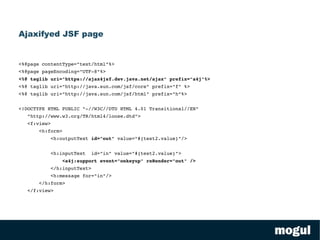
Tobago Ajax support Ajax4jsf
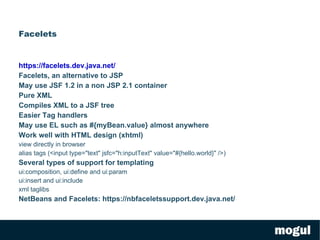
Dynamic Faces JSP alternatives Facelets
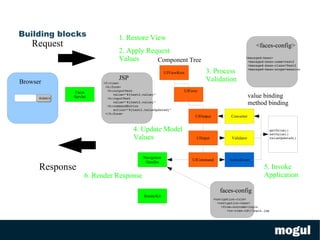
Core design Build on Model-View-Controller (MVC) pattern
Component based standard GUI components (connects view and model)
Loose coupling to models through value- and method-binding technology Lifecycle managed Clearly defined cycle for request/response handling Event driven a request triggers event handlers that update models Built in navigation model
Not tied to any specific view technology
By design geared at server side execution
Building blocks <f:view> <h:form> <h:outputText  value=&quot;#{test2.value}&quot;  <h:inputText  value=&quot;#{test2.value}&quot;  <h:commandButton  action=&quot;#{test2.valueUpdated}&quot; </h:form> Submit UIForm <navigation-rule> <navigation-case> <from-outcome>login <to-view-id>/login.jsp Browser JSP Component Tree <faces-config> faces-config Request Response value binding method binding 1. Restore View 2. Apply Request Values 3. Process Validation 4. Update Model Values 5. Invoke Application 6. Render Response UIViewRoot UIOutput UIInput Converter Validator ActionEvent getValue() setValue() valueUpdated() UICommand <managed-bean> <managed-bean-name>test2 <managed-bean-class>Test2 <managed-bean-scope>session  RenderKit Navigation Handler Faces Servlet
Configure web application in web.xml Where should state be saved <context-param> <param-name>javax.faces.STATE_SAVING_METHOD</param-name> <param-value>client</param-value> </context-param> Add FacesServlet <servlet> <servlet-name>Faces Servlet</servlet-name> <servlet-class>javax.faces.webapp.FacesServlet</servlet-class> <load-on-startup>1</load-on-startup> </servlet> Configure mapping <servlet-mapping> <servlet-name>Faces Servlet</servlet-name> <url-pattern>/faces/*</url-pattern> </servlet-mapping >
View - JSP Add taglibs <%@ taglib uri=&quot;http://java.sun.com/jsf/core&quot; prefix=&quot;f&quot; %> <%@ taglib uri=&quot;http://java.sun.com/jsf/html&quot; prefix=&quot;h&quot;%> Start with <f:view> <f:view> Build page with HTML, JSTL and JSF components <h:form> <h:outputText value=&quot;#{test2.value}&quot;/>  <h:inputText value=&quot;#{test2.value}&quot;  id=&quot;name&quot;/>  <h:commandButton action=&quot;#{test2.valueUpdated}&quot; value=&quot;Submit&quot;/> </h:form>
Validation - builtin Use builtin validators
Ad an id to enclosing element
Nest validator
Use a message for the element where any errors will appear <h:inputText  id=&quot;in&quot;  value=&quot;#{test2.value}&quot;> <f:validateLength minimum=&quot;2&quot; maximum=&quot;4&quot;/> </h:inputText> <h:message for=&quot;in&quot; />
Validator - custom Implement Validator public void validate(FacesContext, UIComponent comp, Object value) Add to faces-config
Use generic method <f:validator validatorId=”my.validator.MYID”/> <f:attribute name=”myValidatorConf” value=”SomeValue”/> Or develop a custom tag
Also possible to do ones own Converters

Java Server Faces 1.2 presented (2007)

  • 1.
    JavaServer Faces 1.2Peter Antman, CTO, 2007 Mogul
  • 2.
  • 3.
    A specification, several implementations
  • 4.
    A user interface(UI) framework for Java Web applications
  • 5.
    Designed much likea “fat” UI framework such as Swing and SWT
  • 6.
  • 7.
    1.0 specification releasedMarch 2004, not part of J2EE
  • 8.
    1.2 spec releasedspring 2006
  • 9.
    1.2 is partof J2EE 1.5
  • 10.
    Is taking of(maybe)
  • 11.
    New in JSF1.2 JSF and JSF now shares expression language
  • 12.
    Missmatch with JSPfixed (new JSP ViewHandler and tag base class)
  • 13.
  • 14.
    Multiple windows andback-button problems fixed
  • 15.
    Implementations and add-onsMajor implementations SUN RI (1.2)
  • 16.
    MyFaces (1.0) Componentlibraries Tomahawk
  • 17.
  • 18.
    Dynamic Faces JSPalternatives Facelets
  • 19.
    Core design Buildon Model-View-Controller (MVC) pattern
  • 20.
    Component based standardGUI components (connects view and model)
  • 21.
    Loose coupling tomodels through value- and method-binding technology Lifecycle managed Clearly defined cycle for request/response handling Event driven a request triggers event handlers that update models Built in navigation model
  • 22.
    Not tied toany specific view technology
  • 23.
    By design gearedat server side execution
  • 24.
    Building blocks <f:view><h:form> <h:outputText value=&quot;#{test2.value}&quot; <h:inputText value=&quot;#{test2.value}&quot; <h:commandButton action=&quot;#{test2.valueUpdated}&quot; </h:form> Submit UIForm <navigation-rule> <navigation-case> <from-outcome>login <to-view-id>/login.jsp Browser JSP Component Tree <faces-config> faces-config Request Response value binding method binding 1. Restore View 2. Apply Request Values 3. Process Validation 4. Update Model Values 5. Invoke Application 6. Render Response UIViewRoot UIOutput UIInput Converter Validator ActionEvent getValue() setValue() valueUpdated() UICommand <managed-bean> <managed-bean-name>test2 <managed-bean-class>Test2 <managed-bean-scope>session RenderKit Navigation Handler Faces Servlet
  • 25.
    Configure web applicationin web.xml Where should state be saved <context-param> <param-name>javax.faces.STATE_SAVING_METHOD</param-name> <param-value>client</param-value> </context-param> Add FacesServlet <servlet> <servlet-name>Faces Servlet</servlet-name> <servlet-class>javax.faces.webapp.FacesServlet</servlet-class> <load-on-startup>1</load-on-startup> </servlet> Configure mapping <servlet-mapping> <servlet-name>Faces Servlet</servlet-name> <url-pattern>/faces/*</url-pattern> </servlet-mapping >
  • 26.
    View - JSPAdd taglibs <%@ taglib uri=&quot;http://java.sun.com/jsf/core&quot; prefix=&quot;f&quot; %> <%@ taglib uri=&quot;http://java.sun.com/jsf/html&quot; prefix=&quot;h&quot;%> Start with <f:view> <f:view> Build page with HTML, JSTL and JSF components <h:form> <h:outputText value=&quot;#{test2.value}&quot;/> <h:inputText value=&quot;#{test2.value}&quot; id=&quot;name&quot;/> <h:commandButton action=&quot;#{test2.valueUpdated}&quot; value=&quot;Submit&quot;/> </h:form>
  • 27.
    Validation - builtinUse builtin validators
  • 28.
    Ad an idto enclosing element
  • 29.
  • 30.
    Use a messagefor the element where any errors will appear <h:inputText id=&quot;in&quot; value=&quot;#{test2.value}&quot;> <f:validateLength minimum=&quot;2&quot; maximum=&quot;4&quot;/> </h:inputText> <h:message for=&quot;in&quot; />
  • 31.
    Validator - customImplement Validator public void validate(FacesContext, UIComponent comp, Object value) Add to faces-config
  • 32.
    Use generic method<f:validator validatorId=”my.validator.MYID”/> <f:attribute name=”myValidatorConf” value=”SomeValue”/> Or develop a custom tag
  • 33.
    Also possible todo ones own Converters