JAVA NEW FEATURES
Vipul Agarwal
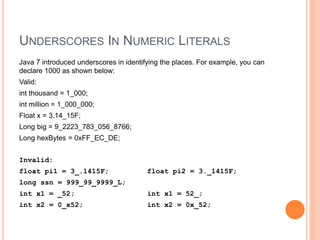
UNDERSCORES IN NUMERIC LITERALS
Java 7 introduced underscores in identifying the places. For example, you can
declare 1000 as shown below:
Valid:
int thousand = 1_000;
int million = 1_000_000;
Float x = 3.14_15F;
Long big = 9_2223_783_056_8766;
Long hexBytes = 0xFF_EC_DE;
Invalid:
float pi1 = 3_.1415F; float pi2 = 3._1415F;
long ssn = 999_99_9999_L;
int x1 = _52; int x1 = 52_;
int x2 = 0_x52; int x2 = 0x_52;
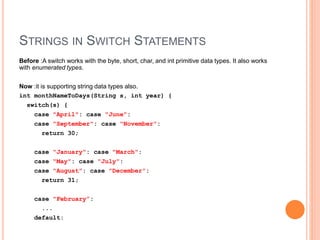
STRINGS IN SWITCH STATEMENTS
Before :A switch works with the byte, short, char, and int primitive data types. It also works
with enumerated types.
Now :it is supporting string data types also.
int monthNameToDays(String s, int year) {
switch(s) {
case "April": case "June":
case "September": case "November":
return 30;
case "January": case "March":
case "May": case "July":
case "August": case "December":
return 31;
case "February”:
...
default:
VARARGS WARNINGS – ERASURE
 import java.util.Arrays;
 import java.util.Date;
 import java.util.List;
 class Test {
 @SuppressWarnings(value={"deprecation"})
 public static void main(String[] args) {
 Date date = new Date(2008, 9, 30);

 System.out.println("date = " + date);
 }
 }
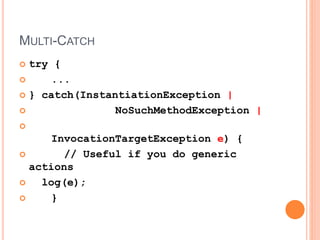
MULTI-CATCH
 try {
 ...
 } catch(InstantiationException |
 NoSuchMethodException |

InvocationTargetException e) {
 // Useful if you do generic
actions
 log(e);
 }
AUTOMATIC RESOURCE MANAGEMENT
Resources such as Connections, Files, Input/OutStreams, etc. should
be closed by the developer by writing bog-standard code. Usually we
use a try-finally block to close the respective resources.
However, Java 7 has introduced another cool feature to manage the
resources automatically. It is simple in operation, too. All we have to do
is declare the resources in the try as follows:
java.lang.AutoCloseable
 More readable code and easy to write.
 Automatic resource management.
 Number of lines of code is reduced.
 No need of finally block just to close the resources.
FOUR KEY NEW HELPER TYPES NEW IN JAVA 7
 Class java.nio.file.Paths
 Class java.nio.file.Files
 Class java.nio.file.FileSystem
 Create
 Delete
 Copy
 Move/Rename
 Create Directories
 Attributes – Modified/Owner/Permissions/Size, etc.
WATCHING A DIRECTORY
 Create a WatchService “watcher” for the filesystem
 Register a directory with the watcher
• Watcher” can be polled or waited on for events
• Events raised in the form of Keys
• Retrieve the Key from the Watcher
• Key has filename and events within it for
create/delete/modify
 WatchService watcher =
FileSystems.getDefault().newWatchService();
 Path dir = Paths.get("Path/To/Watched/Directory");
 dir.register(watcher, ENTRY_CREATE,
ENTRY_DELETE, ENTRY_MODIFY);
MAPPING JAVA.IO.FILE TO JAVA.NIO.FILE
• java.io.File
• File.canRead, canWrite,
canExecute
• File.isDirectory(), File.isFile(),
and File.length()
• File.lastModified() and
File.setLastModified(long)
• File methods: setExecutable,
setReadable, setReadOnly,
setWritable
• new File(parent, "newfile")
• java.nio.file.Path
• Files.isReadable,
Files.isWritable, and
Files.isExecutable.
• Files.isDirectory(Path,
LinkOption...),
Files.isRegularFile(Path,
LinkOption...), and
Files.size(Path)
• Files.getLastModifiedTime(Pat
h, LinkOption...) and
Files.setLastMOdifiedTime(Pat
h, FileTime)
• Files methods:
setAttribute(Path, String,
Object, LinkOption...).
• parent.resolve("newfile")
MAPPING JAVA.IO.FILE TO JAVA.NIO.FILE
• File.renameTo
• File.delete
• File.createNewFile
• File.deleteOnExit
• File.exists
• File.compareTo and equals
• File.getAbsolutePath and
getAbsoluteFile
• File.getCanonicalPath and
getCanonicalFile
• File.isHidden
• File.mkdir and mkdirs
• File.listRoots
• Files.move
• Files.delete
• Files.createFile
• DELETE_ON_CLOSE option
in createFile
• Files.exists and Files.notExists
• Path.compareTo and equals
• Path.toAbsolutePath
• Path.toRealPath or normalize
• Files.isHidden
• Path.createDirectory
• FileSystem.getRootDirectories

Java New Features

  • 1.
  • 2.
    UNDERSCORES IN NUMERICLITERALS Java 7 introduced underscores in identifying the places. For example, you can declare 1000 as shown below: Valid: int thousand = 1_000; int million = 1_000_000; Float x = 3.14_15F; Long big = 9_2223_783_056_8766; Long hexBytes = 0xFF_EC_DE; Invalid: float pi1 = 3_.1415F; float pi2 = 3._1415F; long ssn = 999_99_9999_L; int x1 = _52; int x1 = 52_; int x2 = 0_x52; int x2 = 0x_52;
  • 3.
    STRINGS IN SWITCHSTATEMENTS Before :A switch works with the byte, short, char, and int primitive data types. It also works with enumerated types. Now :it is supporting string data types also. int monthNameToDays(String s, int year) { switch(s) { case "April": case "June": case "September": case "November": return 30; case "January": case "March": case "May": case "July": case "August": case "December": return 31; case "February”: ... default:
  • 4.
    VARARGS WARNINGS –ERASURE  import java.util.Arrays;  import java.util.Date;  import java.util.List;  class Test {  @SuppressWarnings(value={"deprecation"})  public static void main(String[] args) {  Date date = new Date(2008, 9, 30);   System.out.println("date = " + date);  }  }
  • 5.
    MULTI-CATCH  try { ...  } catch(InstantiationException |  NoSuchMethodException |  InvocationTargetException e) {  // Useful if you do generic actions  log(e);  }
  • 6.
    AUTOMATIC RESOURCE MANAGEMENT Resourcessuch as Connections, Files, Input/OutStreams, etc. should be closed by the developer by writing bog-standard code. Usually we use a try-finally block to close the respective resources. However, Java 7 has introduced another cool feature to manage the resources automatically. It is simple in operation, too. All we have to do is declare the resources in the try as follows: java.lang.AutoCloseable  More readable code and easy to write.  Automatic resource management.  Number of lines of code is reduced.  No need of finally block just to close the resources.
  • 7.
    FOUR KEY NEWHELPER TYPES NEW IN JAVA 7  Class java.nio.file.Paths  Class java.nio.file.Files  Class java.nio.file.FileSystem  Create  Delete  Copy  Move/Rename  Create Directories  Attributes – Modified/Owner/Permissions/Size, etc.
  • 8.
    WATCHING A DIRECTORY Create a WatchService “watcher” for the filesystem  Register a directory with the watcher • Watcher” can be polled or waited on for events • Events raised in the form of Keys • Retrieve the Key from the Watcher • Key has filename and events within it for create/delete/modify
  • 9.
     WatchService watcher= FileSystems.getDefault().newWatchService();  Path dir = Paths.get("Path/To/Watched/Directory");  dir.register(watcher, ENTRY_CREATE, ENTRY_DELETE, ENTRY_MODIFY);
  • 10.
    MAPPING JAVA.IO.FILE TOJAVA.NIO.FILE • java.io.File • File.canRead, canWrite, canExecute • File.isDirectory(), File.isFile(), and File.length() • File.lastModified() and File.setLastModified(long) • File methods: setExecutable, setReadable, setReadOnly, setWritable • new File(parent, "newfile") • java.nio.file.Path • Files.isReadable, Files.isWritable, and Files.isExecutable. • Files.isDirectory(Path, LinkOption...), Files.isRegularFile(Path, LinkOption...), and Files.size(Path) • Files.getLastModifiedTime(Pat h, LinkOption...) and Files.setLastMOdifiedTime(Pat h, FileTime) • Files methods: setAttribute(Path, String, Object, LinkOption...). • parent.resolve("newfile")
  • 11.
    MAPPING JAVA.IO.FILE TOJAVA.NIO.FILE • File.renameTo • File.delete • File.createNewFile • File.deleteOnExit • File.exists • File.compareTo and equals • File.getAbsolutePath and getAbsoluteFile • File.getCanonicalPath and getCanonicalFile • File.isHidden • File.mkdir and mkdirs • File.listRoots • Files.move • Files.delete • Files.createFile • DELETE_ON_CLOSE option in createFile • Files.exists and Files.notExists • Path.compareTo and equals • Path.toAbsolutePath • Path.toRealPath or normalize • Files.isHidden • Path.createDirectory • FileSystem.getRootDirectories