Elegant Solutions For Everyday
Python Problems
Nina Zakharenko
@nnja
bit.ly/elegant-python
ℹ There are links in these slides. Follow along ^
What
is
elegant code?
@nnja
"Perfection is achieved, not
when there is nothing more to
add, but when there is nothing
le! to take away."
— Antoine de Saint-Exupery
@nnja
Beauty is
in the eye of
the beholder
@nnja
how do we do it?
code is elegant when you pick the best tool for the job
Resources for converting from Python 2 -> 3
@nnja
magic
methods
image source
You're used to implementing __str__ and __repr__ --but
there's a whole other world of powerful magic methods!
By implementing a few straightforward methods,
you can make your objects behave like built-ins such as:
— numbers
— lists
— dictionaries
— and more...
@nnja
class Money:
currency_rates = {
'$': 1,
'€': 0.88,
}
def __init__(self, symbol, amount):
self.symbol = symbol
self.amount = amount
def __repr__(self):
return '%s%.2f' % (self.symbol, self.amount)
def convert(self, other):
""" Converts amount in other currency to amount in this currency. """
new_amount = (
other.amount / self.currency_rates[other.symbol]
* self.currency_rates[self.symbol])
return Money(self.symbol, new_amount)
@nnja
>>> soda_cost = Money('$', 5.25)
>>> pizza_cost = Money('€', 7.99)
>>> soda_cost
$5.25
>>> pizza_cost
€7.99
@nnja
class Money:
def __add__(self, other):
""" Implements addition of two Money instances using '+' """
new_amount = self.amount + self.convert(other).amount
return Money(self.symbol, new_amount)
def __sub__(self, other):
""" Implements subtraction of two Money instances using '-' """
new_amount = self.amount - self.convert(other).amount
return Money(self.symbol, new_amount)
@nnja
>>> soda_cost = Money('$', 5.25)
>>> pizza_cost = Money('€', 7.99)
>>> soda_cost + pizza_cost
$14.33
More on Magic Methods: Dive into Python3 - Special Method Names
>>> soda_cost = Money('$', 5.25)
>>> pizza_cost = Money('€', 7.99)
>>> soda_cost + pizza_cost
$14.33
>>> pizza_cost + soda_cost
€12.61
More on Magic Methods: Dive into Python3 - Special Method Names
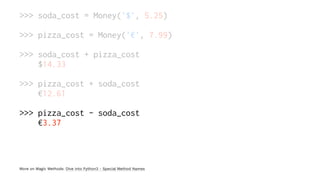
>>> soda_cost = Money('$', 5.25)
>>> pizza_cost = Money('€', 7.99)
>>> soda_cost + pizza_cost
$14.33
>>> pizza_cost + soda_cost
€12.61
>>> pizza_cost - soda_cost
€3.37
More on Magic Methods: Dive into Python3 - Special Method Names
some magic methods map to built-in functions
class Alphabet:
letters = 'ABCDEFGHIJKLMNOPQRSTUVWXYZ'
def __len__(self):
return len(self.letters)
>>> my_alphabet = Alphabet()
>>> len(my_alphabet)
26
@nnja
Making classes iterable
— In order to be iterable, a class needs to implement
__iter__()
— __iter__() must return an iterator
— In order to be an iterator a class needs to implement
__next__() which must raise StopIteration when
exhausted
or next() in python2
Great explanation of iterable vs. iterator vs. generator
example scenario
We have a Server instance running services on different
ports.
Some services are active, some are inactive.
When we loop over our the Server instance, we only
want to loop over active services.
@nnja
class IterableServer:
services = (
{'active': False, 'protocol': 'ftp', 'port': 21},
{'active': True, 'protocol': 'ssh', 'port': 22},
{'active': True, 'protocol': 'http', 'port': 21},
)
def __init__(self):
self.current_pos = 0
def __iter__(self): # can return self, because __next__ implemented
return self
def __next__(self):
while self.current_pos < len(self.services):
service = self.services[self.current_pos]
self.current_pos += 1
if service['active']:
return service['protocol'], service['port']
raise StopIteration
next = __next__ # optional python2 compatibility
@nnja
>>> for protocol, port in IterableServer():
print('service %s is running on port %d' % (protocol, port))
service ssh is running on port 22
service http is running on port 21
... not bad
@nnja
tip: use a generator
when your iterator doesn't need to
maintain a lot of state
@nnja
class Server:
services = (
{'active': False, 'protocol': 'ftp', 'port': 21},
{'active': True, 'protocol': 'ssh', 'port': 22},
{'active': True, 'protocol': 'http', 'port': 21},
)
def __iter__(self):
for service in self.services:
if service['active']:
yield service['protocol'], service['port']
@nnja
Why does this work?
use single parenthesis ( ) to create a generator
comprehension
^ technically, a generator expression but I like this term better, and so does Ned Batchelder
>>> my_gen = (num for num in range(1))
>>> my_gen
<generator object <genexpr> at 0x107581bf8>
@nnja
An iterator must implement __next__()
>>> next(my_gen) # remember __len__() mapped to built-in len()
0
and raise StopIteration when
there are no more elements
>>> next(my_gen)
... StopIteration Traceback (most recent call last)
For more tools for working with iterators, check out itertools
To make your object behave like a dict:
behavior method
key in my_dict my_dict.__contains__(key)
my_dict[key] my_dict.__getitem__(key)
my_dict[key] = value my_dict.__setitem__(key, value)
del my_dict[key] my_dict.__delitem__(key)
read: emulating container types
@nnja
Advanced example: Headers in werkzeug
Headers is a dict-like object, with some special
behaviors.
— Ordered, and can store the same key multiple times
— Representation: formatted headers suitable for HTTP
transmission
— Instead of raising a KeyError like a standard dictionary
when a key is not present, raises 400 BAD REQUEST
Read the code
@nnja
✨Method✨
✨Magic✨
@nnja
alias methods
class Word:
def __init__(self, word):
self.word = word
def __repr__(self):
return self.word
def __add__(self, other_word):
return Word('%s %s' % (self.word, other_word))
# Add an alias from method __add__ to the method concat
concat = __add__
@nnja
When we add an alias from __add__ to concat because
methods are just objects
>>> # remember, concat = __add__
>>> first_name = Word('Max')
>>> last_name = Word('Smith')
>>> first_name + last_name
Max Smith
>>> first_name.concat(last_name)
Max Smith
>>> Word.__add__ == Word.concat
True
@nnja
getattr(object, name, default)
>>> class Dog:
sound = 'Bark'
def speak(self):
print(self.sound + '!', self.sound + '!')
>>> my_dog = Dog()
>>> my_dog.speak()
Bark! Bark!
>>> getattr(my_dog, 'speak')
<bound method Dog.speak of <__main__.Dog object at 0x10b145f28>>
>>> speak_method = getattr(my_dog, 'speak')
>>> speak_method()
Bark! Bark!
read the docs
example: command line tool with dynamic commands
class Operations:
def say_hi(self, name):
print('Hello,', name)
def say_bye(self, name):
print ('Goodbye,', name)
def default(self, arg):
print ('This operation is not supported.')
if __name__ == '__main__':
operations = Operations()
# let's assume error handling
command, argument = input('> ').split()
getattr(operations, command, operations.default)(argument)
read the docs
Output
› python getattr.py
> say_hi Nina
Hello, Nina
> blah blah
This operation is not supported.
✨
additional reading - inverse of getattr() is setattr()
functool.partial(func, *args, **kwargs)
>>> from functools import partial
>>> basetwo = partial(int, base=2)
>>> basetwo # functools.partial(<class 'int'>, base=2)
>>> basetwo('10010')
18
— Return a new partial object which behaves like func
called with args & kwargs
— if more args are passed in, they are appended to args
— if more keyword arguments are passed in, they extend
and override kwargs
read the doc
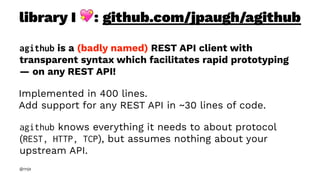
library I !: github.com/jpaugh/agithub
agithub is a (badly named) REST API client with
transparent syntax which facilitates rapid prototyping
— on any REST API!
Implemented in 400 lines.
Add support for any REST API in ~30 lines of code.
agithub knows everything it needs to about protocol
(REST, HTTP, TCP), but assumes nothing about your
upstream API.
@nnja
define endpoint url & other connection properties
class GitHub(API):
def __init__(self, token=None, *args, **kwargs):
props = ConnectionProperties(
api_url = kwargs.pop('api_url', 'api.github.com'))
self.setClient(Client(*args, **kwargs))
self.setConnectionProperties(props)
then, start using the API!
>>> gh = GitHub('token')
>>> status, data = gh.user.repos.get(visibility='public', sort='created')
>>> # ^ Maps to GET /user/repos
>>> data
... ['tweeter', 'snipey', '...']
github.com/jpaugh/agithub
black magic!
but, how?... !
@nnja
class API:
def __getattr__(self, key):
return IncompleteRequest(self.client).__getattr__(key)
__getitem__ = __getattr__
class IncompleteRequest:
def __getattr__(self, key):
if key in self.client.http_methods:
htmlMethod = getattr(self.client, key)
return partial(htmlMethod, url=self.url)
else:
self.url += '/' + str(key)
return self
__getitem__ = __getattr__
class Client:
http_methods = ('get') # ...
def get(self, url, headers={}, **params):
return self.request('GET', url, None, headers)
github.com/jpaugh/agithub source: base.py
class API:
def __getattr__(self, key):
return IncompleteRequest(self.client).__getattr__(key)
__getitem__ = __getattr__
class IncompleteRequest:
def __getattr__(self, key):
if key in self.client.http_methods:
htmlMethod = getattr(self.client, key)
return partial(htmlMethod, url=self.url)
else:
self.url += '/' + str(key)
return self
__getitem__ = __getattr__
class Client:
http_methods = ('get') # ...
def get(self, url, headers={}, **params):
return self.request('GET', url, None, headers)
github.com/jpaugh/agithub source: base.py
class API:
def __getattr__(self, key):
return IncompleteRequest(self.client).__getattr__(key)
__getitem__ = __getattr__
class IncompleteRequest:
def __getattr__(self, key):
if key in self.client.http_methods:
htmlMethod = getattr(self.client, key)
return partial(htmlMethod, url=self.url)
else:
self.url += '/' + str(key)
return self
__getitem__ = __getattr__
class Client:
http_methods = ('get') # ...
def get(self, url, headers={}, **params):
return self.request('GET', url, None, headers)
github.com/jpaugh/agithub source: base.py
given a non-existant path:
>>> status, data = this.path.doesnt.exist.get()
>>> status
... 404
& because __getitem__ is aliased to __getattr__:
>>> owner, repo = 'nnja', 'tweeter'
>>> status, data = gh.repos[owner][repo].pulls.get()
>>> # ^ Maps to GET /repos/nnja/tweeter/pulls
>>> data
.... # {....}
... !
github.com/jpaugh/agithub
lambdasmall (usually one line) function
@nnja
Use lambda + dict for a switch-like statement
def math(term, num):
def default(num):
return 'Operation not supported'
return {
'double': lambda n: n * 2,
'triple': lambda n: n * 3,
'quadruple': lambda n: n * 4,
'square': lambda n: n ** 2,
}.get(term, default)(num)
>>> math('square', 2)
4
>>> math('exponent', 5)
'Operation not supported'
@nnja
lambda for filter, map, reduce is discouraged
☝ terms borrowed from functional programming
use a list or generator comprehension instead
>>> nums = range(10)
>>> map(lambda x: x**2, nums)
>>> [x**2 for x in nums]
>>> (x**2 for x in nums) # generator exp takes advantage of lazy evaluation
>>> filter(lambda x: x % 2 != 0, nums)
>>> [x for x in nums if x % 2 != 0]
>>> (x for x in nums if x % 2 != 0)
ℹ in many cases, reduce can be replaced with a built-in like sum or a for loop
ℹ differences in python2: filter, map return a list, not an iterable and reduce is a built-in.
Additional reading - Guido's thoughts on Lambda
Context
Managers
& new in python 3: async context managers
When should I use one?
Need to perform an action before and/or after an
operation.
Common scenarios:
— Closing a resource after you're done with it (file,
network connection)
— Resource management
@nnja
Example Problem: Feature Flags
Turn features of your application on and off easily.
Uses of feature flags:
— A/B Testing
— Rolling Releases
— Show Beta version to users opted-in to Beta Testing
Program
More on Feature Flags
Simple Example - FeatureFlags Class
class FeatureFlags:
""" Example class which stores Feature Flags and their state. """
SHOW_BETA = 'Show Beta version of Home Page'
flags = {
SHOW_BETA: True
}
@classmethod
def is_on(cls, name):
return cls.flags[name]
@classmethod
def toggle(cls, name, on):
cls.flags[name] = on
feature_flags = FeatureFlags()
@nnja
How do we temporarily turn features on and off when
testing flags?
Want:
with feature_flag(FeatureFlags.SHOW_BETA):
assert '/beta' == get_homepage_url()
@nnja
Using Magic Methods __enter__ and __exit__
class feature_flag:
""" Implementing a Context Manager using Magic Methods """
def __init__(self, name, on=True):
self.name = name
self.on = on
self.old_value = feature_flags.is_on(name)
def __enter__(self):
feature_flags.toggle(self.name, self.on)
def __exit__(self, *args):
feature_flags.toggle(self.name, self.old_value)
See: contextlib.contextmanager
The be!er way: using the contextmanager decorator
from contextlib import contextmanager
@contextmanager
def feature_flag(name, on=True):
old_value = feature_flags.is_on(name)
feature_flags.toggle(name, on)
yield
feature_flags.toggle(name, old_value)
See: contextlib.contextmanager
The be!er way: using the contextmanager decorator
from contextlib import contextmanager
@contextmanager
def feature_flag(name, on=True):
""" The easier way to create Context Managers """
old_value = feature_flags.is_on(name)
feature_flags.toggle(name, on) # behavior of __enter__()
yield
feature_flags.toggle(name, old_value) # behavior of __exit__()
See: contextlib.contextmanager
either implementation
def get_homepage_url():
""" Method that returns the path of the home page we want to display. """
if feature_flags.is_on(FeatureFlags.SHOW_BETA):
return '/beta'
else:
return '/homepage'
def test_homepage_url_with_context_manager():
with feature_flag(FeatureFlags.SHOW_BETA):
# saw the beta homepage...
assert get_homepage_url() == '/beta'
with feature_flag(FeatureFlags.SHOW_BETA, on=False):
# saw the standard homepage...
assert get_homepage_url() == '/homepage'
@nnja
either implementation
def get_homepage_url():
""" Method that returns the path of the home page we want to display. """
if feature_flags.is_on(FeatureFlags.SHOW_BETA):
return '/beta'
else:
return '/homepage'
def test_homepage_url_with_context_manager():
with feature_flag(FeatureFlags.SHOW_BETA):
assert get_homepage_url() == '/beta'
print('seeing the beta homepage...')
with feature_flag(FeatureFlags.SHOW_BETA, on=False):
assert get_homepage_url() == '/homepage'
print('seeing the standard homepage...')
@nnja
Decorators
The simple explanation:
Syntactic sugar that allows modification of an underlying
function.
@nnja
Recap
— Wrap a function in another function.
— Do something:
— before the call
— after the call
— with provided arguments
— modify the return value or arguments
@nnja
def say_after(hello_function):
def say_nice_to_meet_you(name):
hello_function(name)
print('It was nice to meet you!')
return say_nice_to_meet_you
def hello(name):
print('Hello', name)
>>> say_after(hello)('Nina')
Hello Nina It was nice to meet you!
— say_after(hello) returns the function
say_nice_to_meet_you
— then we call say_nice_to_meet_you('Nina')
@nnja
def say_after(hello_function):
def say_nice_to_meet_you(name):
hello_function(name)
print('It was nice to meet you!')
return say_nice_to_meet_you
@say_after
def hello(name):
print('Hello', name)
>>> hello('Nina')
Hello Nina It was nice to meet you!
— calling the decorated function hello(name)
— is the same as calling an undecorated hello with
say_after(hello)('Nina')
@nnja
closure example
def multiply_by(num):
def do_multiplication(x):
return x * num
return do_multiplication
multiply_by_five = multiply_by(5)
>>> multiply_by_five(4)
20
@nnja
decorators that take arguments
def greeting(argument):
def greeting_decorator(greet_function):
def greet(name):
greet_function(name)
print('It was %s to meet you!' % argument)
return greet
return greeting_decorator
@greeting('bad')
def aloha(name):
print ('Aloha', name)
@nnja
decorators that take arguments
def say_this_after(argument):
def say_after(hello_function):
def say_after_meeting(name):
hello_function(name)
print('It was %s to meet you' % argument)
return say_after_meeting
return say_after
@say_this_after('bad')
def hello(name):
print('Hello', name)
Is the same as calling this on an undecorated function:
say_after_bad = say_this_after('bad')(hello)
say_after_bad('Nina')
@nnja
losing context with a decorator !
def say_bye(func):
def wrapper(name):
func()
print('Bye', name)
return wrapper
@say_bye
def my_name():
""" Say my name"""
print('Nina')
>>> my_name.__name__
'wrapper'
>>>> my_name.__doc__
# ... empty
@nnja
solution: use wraps, or wrapt library! !
from contextlib import wraps
def say_adios(func):
@wraps(func) # pass in which function to wrap
def wrapper():
func()
print('Adios!')
return wrapper
@say_adios
def say_max():
""" Says the name Max"""
print('Max')
>>> say_max.__name__
'say_max'
>>> say_max.__doc__
' Says the name Max'
@nnja
Example use: StatsD
— Collects statistics such as counters and timers over
UDP
— Pluggable backend services like Graphite, Grafana
— Lets us make pretty graphs!
—
@nnja
How can we increment a statsd
counter a!er making a method
call?
@nnja
from contextlib import wraps
def statsd_incr(function):
@wraps(function) # so that original func knows it's name and docstring
def wrapper(*args, **kwargs):
key = function.__name__
statsd.incr(key)
function(*args, **kwargs)
return wrapper
@statsd_incr
def important_operation():
print('Doing important thing...')
>>> important_operation()
# statsd incremented: important_operation
'Doing important thing...'
@nnja
Other common usecases
— logging
— timing
— validation
— rate limiting
— mocking/patching
@nnja
Advanced use: modifying arguments, validation
def require_auth(self, require_user_account=False):
def wrapper(f):
@wraps(f)
def decorated(*args, **kwargs):
user = request.user # assumes user in the request
if require_user_account:
if not user or user.is_anonymous:
raise AuthenticationException
args = (user,) + args
return f(*args, **kwargs)
return decorated
return wrapper
@nnja
in api code
@require_auth(require_user_account=True)
def change_profile(account):
# account always belongs to an authenticated user
account.update(...)
@nnja
ContextDecorators
ContextManagers
+ Decorators combined.
@nnja
As of python 3.2 ContextDecorators are in the standard
library. They're the best of both worlds!
By using ContextDecorator you can easily write classes
that can be used both as decorators with @ and context
managers with the with statement.
ContextDecorator is used by contextmanager(), so you get
this functionality ✨ automatically ✨.
Alternatively, you can write a class that extends from ContextDecorator or uses ContextDecorator
as a mixin, and implements __enter__, __exit__ and __call__
If you use python2, a backport package is available here: contextlib2
@nnja
Remember @contextmanager from earlier?
from contextlib import contextmanager
@contextmanager
def feature_flag(name, on=True):
old_value = feature_flags.is_on(name)
feature_flags.toggle(name, on)
yield
feature_flags.toggle(name, old_value)
@nnja
use it as a context manager
def get_homepage_url():
beta_flag_on = feature_flags.is_on(FeatureFlags.SHOW_BETA)
return '/beta' if beta_flag_on else '/homepage'
with feature_flag(FeatureFlags.SHOW_BETA):
assert get_homepage_url() == '/beta'
or use as a decorator
@feature_flag(FeatureFlags.SHOW_BETA, on=False)
def get_profile_page():
beta_flag_on = feature_flags.is_on(FeatureFlags.SHOW_BETA)
return 'beta.html' if beta_flag_on else 'profile.html'
assert get_profile_page() == 'profile.html'
@nnja
library I !: freezegun lets your python tests ❇ travel
through time! ❇
from freezegun import freeze_time
# use it as a Context Manager
def test():
with freeze_time("2012-01-14"):
assert datetime.datetime.now() == datetime.datetime(2012, 1, 14)
assert datetime.datetime.now() != datetime.datetime(2012, 1, 14)
# or a decorator
@freeze_time("2012-01-14")
def test():
assert datetime.datetime.now() == datetime.datetime(2012, 1, 14)
read the source sometime, it's mind-bending!
@nnja
MixinsClass wants new behavior,
but already inherits from a different class.
@nnja
Simple Example: Timestamp Mixin for sqlalchemy models
class Timestamp(object):
"""Adds `created` and `updated` columns to a model. """
created = sa.Column(sa.DateTime, default=datetime.utcnow)
updated = sa.Column(sa.DateTime, default=datetime.utcnow)
class SomeModel(Base, Timestamp):
__tablename__ = 'somemodel'
id = sa.Column(sa.Integer, primary_key=True)
@nnja
Intermediate Example: UserMixin in flask-security
Use it with your User database model, get useful helper
methods on model instances:
- is_active
- get_auth_token
- has_role
Mixins are not just for models
- Used in many other projects, Django uses them for
Views
@nnja
Clever example: ReprMixin in sqlalchemy
class ReprMixin(object):
""" Provides a method to repr all fields on a sqlalchemy model class """
def __repr__(self):
def column_names_to_repr():
for col in self.__table__.c:
yield col.name, repr(getattr(self, col.name))
def format_key_to_value(map):
for key, value in map:
yield '%s=%s' % (key, value)
args = '(%s)' % ', '.join(format_key_to_value(column_names_to_repr()))
return "<{}{}>".format(type(self).__name__, args)
@nnja
Using ReprMixin
class MyModel(Base, ReprMixin):
id = sa.Column(sa.Integer, primary_key=True)
name = sa.Column(sa.String)
category = sa.Column(sa.String)
nina = MyModel(name='Nina', state='Oregon')
Result:
Instead of: <__main__.MyModel at 0x10587e810>
Result repr(nina) is now: <MyModel(id=1, name=Nina",
state="Oregon")>
@nnja
NamedTuple
Useful when you need lightweight representations of
data.
Create tuple subclasses with named fields.
@nnja
Simple Example
from collections import namedtuple
CacheInfo = namedtuple(
"CacheInfo", ["hits", "misses", "max_size", "curr_size"])
@nnja
Giving NamedTuples default values
RoutingRule = namedtuple(
'RoutingRule',
['prefix', 'queue_name', 'wait_time']
)
(1) By specifying defaults
RoutingRule.__new__.__defaults__ = (None, None, 20)
(2) or with _replace to customize a prototype instance
default_rule = RoutingRule(None, None, 20)
user_rule = default_rule._replace(prefix='user', queue_name='user-queue')
@nnja
NamedTuples can be subclassed and extended
class Person(namedtuple('Person', ['first_name', 'last_name'])):
""" Stores first and last name of a Person"""
__slots__ = ()
def __str__(self):
return '%s %s' % (self.first_name, self.last_name)
>>> me = Person('nina', 'zakharenko')
>>> str(me)
'nina zakharenko'
>>> me
Person(first_name='nina', last_name='zakharenko')
@nnja
Tip
Use __slots__ = () in your NamedTuples!
— It prevents the creation of instance dictionaries.
— It lowers memory consumption.
— Allows for faster access
@nnja
Signalsaka pub / sub
@nnja
library I !: github.com/jek/blinker
Blinker provides a fast dispatching system that allows
any number of interested parties to subscribe to events,
or "signals".
Signal receivers can subscribe to specific senders or
receive signals sent by any sender.
@nnja
>>> from blinker import signal
>>> started = signal('round-started')
>>> def each(round):
... print "Round %s!" % round
...
>>> started.connect(each)
>>> def round_two(round):
... print "This is round two."
...
>>> started.connect(round_two, sender=2)
@nnja
>>> from blinker import signal
>>> started = signal('round-started')
>>> def each(round):
... print "Round %s!" % round
...
>>> started.connect(each)
>>> def round_two(round):
... print "This is round two."
...
>>> started.connect(round_two, sender=2)
>>> for round in range(1, 4):
... started.send(round)
...
Round 1!
Round 2!
This is round two.
Round 3!
@nnja
Blinker does so much more!
Read the docs: pythonhosted.org/blinker/
Learn about:
- Subscribing to Signals
- Emitting Signals
- Sending & Receiving data via signals
- Optimizations, & more
@nnja
Uses
Flask & many flask extensions use blinker under the
hood to send signals you can listen for if you install the
library.
Other packages provide their own signal
implementations like celery and Django.
@nnja
New tools in your toolbox:
— Magic Methods & Method ❇Magic❇
— Decorators
— ContextManagers
— ContextDecorators
— Lambda
— NamedTuple
— Signals
@nnja
Python is awesome!
Python presents us with an incredible toolbox.
A flexible language with powerful features let us
program in fun and creative ways.
@nnja
Don't be a
mindless Code Monkey
@nnja
Always code as if the person
who ends up maintaining your
code is a violent psychopath
who knows where you live. !
— Martin Golding
@nnja
Instead, be an Elegant Pythonista!
@nnja
Thanks!
@nnja
nina@nnja.io
bit.ly/elegant-python
@nnja

Elegant Solutions For Everyday Python Problems - Nina Zakharenko

  • 1.
    Elegant Solutions ForEveryday Python Problems Nina Zakharenko @nnja bit.ly/elegant-python ℹ There are links in these slides. Follow along ^
  • 2.
  • 3.
    "Perfection is achieved,not when there is nothing more to add, but when there is nothing le! to take away." — Antoine de Saint-Exupery @nnja
  • 4.
    Beauty is in theeye of the beholder @nnja
  • 5.
    how do wedo it? code is elegant when you pick the best tool for the job Resources for converting from Python 2 -> 3 @nnja
  • 6.
  • 7.
    You're used toimplementing __str__ and __repr__ --but there's a whole other world of powerful magic methods! By implementing a few straightforward methods, you can make your objects behave like built-ins such as: — numbers — lists — dictionaries — and more... @nnja
  • 8.
    class Money: currency_rates ={ '$': 1, '€': 0.88, } def __init__(self, symbol, amount): self.symbol = symbol self.amount = amount def __repr__(self): return '%s%.2f' % (self.symbol, self.amount) def convert(self, other): """ Converts amount in other currency to amount in this currency. """ new_amount = ( other.amount / self.currency_rates[other.symbol] * self.currency_rates[self.symbol]) return Money(self.symbol, new_amount) @nnja
  • 9.
    >>> soda_cost =Money('$', 5.25) >>> pizza_cost = Money('€', 7.99) >>> soda_cost $5.25 >>> pizza_cost €7.99 @nnja
  • 10.
    class Money: def __add__(self,other): """ Implements addition of two Money instances using '+' """ new_amount = self.amount + self.convert(other).amount return Money(self.symbol, new_amount) def __sub__(self, other): """ Implements subtraction of two Money instances using '-' """ new_amount = self.amount - self.convert(other).amount return Money(self.symbol, new_amount) @nnja
  • 11.
    >>> soda_cost =Money('$', 5.25) >>> pizza_cost = Money('€', 7.99) >>> soda_cost + pizza_cost $14.33 More on Magic Methods: Dive into Python3 - Special Method Names
  • 12.
    >>> soda_cost =Money('$', 5.25) >>> pizza_cost = Money('€', 7.99) >>> soda_cost + pizza_cost $14.33 >>> pizza_cost + soda_cost €12.61 More on Magic Methods: Dive into Python3 - Special Method Names
  • 13.
    >>> soda_cost =Money('$', 5.25) >>> pizza_cost = Money('€', 7.99) >>> soda_cost + pizza_cost $14.33 >>> pizza_cost + soda_cost €12.61 >>> pizza_cost - soda_cost €3.37 More on Magic Methods: Dive into Python3 - Special Method Names
  • 14.
    some magic methodsmap to built-in functions class Alphabet: letters = 'ABCDEFGHIJKLMNOPQRSTUVWXYZ' def __len__(self): return len(self.letters) >>> my_alphabet = Alphabet() >>> len(my_alphabet) 26 @nnja
  • 15.
    Making classes iterable —In order to be iterable, a class needs to implement __iter__() — __iter__() must return an iterator — In order to be an iterator a class needs to implement __next__() which must raise StopIteration when exhausted or next() in python2 Great explanation of iterable vs. iterator vs. generator
  • 16.
    example scenario We havea Server instance running services on different ports. Some services are active, some are inactive. When we loop over our the Server instance, we only want to loop over active services. @nnja
  • 17.
    class IterableServer: services =( {'active': False, 'protocol': 'ftp', 'port': 21}, {'active': True, 'protocol': 'ssh', 'port': 22}, {'active': True, 'protocol': 'http', 'port': 21}, ) def __init__(self): self.current_pos = 0 def __iter__(self): # can return self, because __next__ implemented return self def __next__(self): while self.current_pos < len(self.services): service = self.services[self.current_pos] self.current_pos += 1 if service['active']: return service['protocol'], service['port'] raise StopIteration next = __next__ # optional python2 compatibility @nnja
  • 18.
    >>> for protocol,port in IterableServer(): print('service %s is running on port %d' % (protocol, port)) service ssh is running on port 22 service http is running on port 21 ... not bad @nnja
  • 19.
    tip: use agenerator when your iterator doesn't need to maintain a lot of state @nnja
  • 20.
    class Server: services =( {'active': False, 'protocol': 'ftp', 'port': 21}, {'active': True, 'protocol': 'ssh', 'port': 22}, {'active': True, 'protocol': 'http', 'port': 21}, ) def __iter__(self): for service in self.services: if service['active']: yield service['protocol'], service['port'] @nnja
  • 21.
    Why does thiswork? use single parenthesis ( ) to create a generator comprehension ^ technically, a generator expression but I like this term better, and so does Ned Batchelder >>> my_gen = (num for num in range(1)) >>> my_gen <generator object <genexpr> at 0x107581bf8> @nnja
  • 22.
    An iterator mustimplement __next__() >>> next(my_gen) # remember __len__() mapped to built-in len() 0 and raise StopIteration when there are no more elements >>> next(my_gen) ... StopIteration Traceback (most recent call last) For more tools for working with iterators, check out itertools
  • 23.
    To make yourobject behave like a dict: behavior method key in my_dict my_dict.__contains__(key) my_dict[key] my_dict.__getitem__(key) my_dict[key] = value my_dict.__setitem__(key, value) del my_dict[key] my_dict.__delitem__(key) read: emulating container types @nnja
  • 24.
    Advanced example: Headersin werkzeug Headers is a dict-like object, with some special behaviors. — Ordered, and can store the same key multiple times — Representation: formatted headers suitable for HTTP transmission — Instead of raising a KeyError like a standard dictionary when a key is not present, raises 400 BAD REQUEST Read the code @nnja
  • 25.
  • 26.
    alias methods class Word: def__init__(self, word): self.word = word def __repr__(self): return self.word def __add__(self, other_word): return Word('%s %s' % (self.word, other_word)) # Add an alias from method __add__ to the method concat concat = __add__ @nnja
  • 27.
    When we addan alias from __add__ to concat because methods are just objects >>> # remember, concat = __add__ >>> first_name = Word('Max') >>> last_name = Word('Smith') >>> first_name + last_name Max Smith >>> first_name.concat(last_name) Max Smith >>> Word.__add__ == Word.concat True @nnja
  • 28.
    getattr(object, name, default) >>>class Dog: sound = 'Bark' def speak(self): print(self.sound + '!', self.sound + '!') >>> my_dog = Dog() >>> my_dog.speak() Bark! Bark! >>> getattr(my_dog, 'speak') <bound method Dog.speak of <__main__.Dog object at 0x10b145f28>> >>> speak_method = getattr(my_dog, 'speak') >>> speak_method() Bark! Bark! read the docs
  • 29.
    example: command linetool with dynamic commands class Operations: def say_hi(self, name): print('Hello,', name) def say_bye(self, name): print ('Goodbye,', name) def default(self, arg): print ('This operation is not supported.') if __name__ == '__main__': operations = Operations() # let's assume error handling command, argument = input('> ').split() getattr(operations, command, operations.default)(argument) read the docs
  • 30.
    Output › python getattr.py >say_hi Nina Hello, Nina > blah blah This operation is not supported. ✨ additional reading - inverse of getattr() is setattr()
  • 31.
    functool.partial(func, *args, **kwargs) >>>from functools import partial >>> basetwo = partial(int, base=2) >>> basetwo # functools.partial(<class 'int'>, base=2) >>> basetwo('10010') 18 — Return a new partial object which behaves like func called with args & kwargs — if more args are passed in, they are appended to args — if more keyword arguments are passed in, they extend and override kwargs read the doc
  • 32.
    library I !:github.com/jpaugh/agithub agithub is a (badly named) REST API client with transparent syntax which facilitates rapid prototyping — on any REST API! Implemented in 400 lines. Add support for any REST API in ~30 lines of code. agithub knows everything it needs to about protocol (REST, HTTP, TCP), but assumes nothing about your upstream API. @nnja
  • 33.
    define endpoint url& other connection properties class GitHub(API): def __init__(self, token=None, *args, **kwargs): props = ConnectionProperties( api_url = kwargs.pop('api_url', 'api.github.com')) self.setClient(Client(*args, **kwargs)) self.setConnectionProperties(props) then, start using the API! >>> gh = GitHub('token') >>> status, data = gh.user.repos.get(visibility='public', sort='created') >>> # ^ Maps to GET /user/repos >>> data ... ['tweeter', 'snipey', '...'] github.com/jpaugh/agithub
  • 34.
  • 35.
    class API: def __getattr__(self,key): return IncompleteRequest(self.client).__getattr__(key) __getitem__ = __getattr__ class IncompleteRequest: def __getattr__(self, key): if key in self.client.http_methods: htmlMethod = getattr(self.client, key) return partial(htmlMethod, url=self.url) else: self.url += '/' + str(key) return self __getitem__ = __getattr__ class Client: http_methods = ('get') # ... def get(self, url, headers={}, **params): return self.request('GET', url, None, headers) github.com/jpaugh/agithub source: base.py
  • 36.
    class API: def __getattr__(self,key): return IncompleteRequest(self.client).__getattr__(key) __getitem__ = __getattr__ class IncompleteRequest: def __getattr__(self, key): if key in self.client.http_methods: htmlMethod = getattr(self.client, key) return partial(htmlMethod, url=self.url) else: self.url += '/' + str(key) return self __getitem__ = __getattr__ class Client: http_methods = ('get') # ... def get(self, url, headers={}, **params): return self.request('GET', url, None, headers) github.com/jpaugh/agithub source: base.py
  • 37.
    class API: def __getattr__(self,key): return IncompleteRequest(self.client).__getattr__(key) __getitem__ = __getattr__ class IncompleteRequest: def __getattr__(self, key): if key in self.client.http_methods: htmlMethod = getattr(self.client, key) return partial(htmlMethod, url=self.url) else: self.url += '/' + str(key) return self __getitem__ = __getattr__ class Client: http_methods = ('get') # ... def get(self, url, headers={}, **params): return self.request('GET', url, None, headers) github.com/jpaugh/agithub source: base.py
  • 38.
    given a non-existantpath: >>> status, data = this.path.doesnt.exist.get() >>> status ... 404 & because __getitem__ is aliased to __getattr__: >>> owner, repo = 'nnja', 'tweeter' >>> status, data = gh.repos[owner][repo].pulls.get() >>> # ^ Maps to GET /repos/nnja/tweeter/pulls >>> data .... # {....} ... ! github.com/jpaugh/agithub
  • 39.
    lambdasmall (usually oneline) function @nnja
  • 40.
    Use lambda +dict for a switch-like statement def math(term, num): def default(num): return 'Operation not supported' return { 'double': lambda n: n * 2, 'triple': lambda n: n * 3, 'quadruple': lambda n: n * 4, 'square': lambda n: n ** 2, }.get(term, default)(num) >>> math('square', 2) 4 >>> math('exponent', 5) 'Operation not supported' @nnja
  • 41.
    lambda for filter,map, reduce is discouraged ☝ terms borrowed from functional programming use a list or generator comprehension instead >>> nums = range(10) >>> map(lambda x: x**2, nums) >>> [x**2 for x in nums] >>> (x**2 for x in nums) # generator exp takes advantage of lazy evaluation >>> filter(lambda x: x % 2 != 0, nums) >>> [x for x in nums if x % 2 != 0] >>> (x for x in nums if x % 2 != 0) ℹ in many cases, reduce can be replaced with a built-in like sum or a for loop ℹ differences in python2: filter, map return a list, not an iterable and reduce is a built-in. Additional reading - Guido's thoughts on Lambda
  • 42.
    Context Managers & new inpython 3: async context managers
  • 43.
    When should Iuse one? Need to perform an action before and/or after an operation. Common scenarios: — Closing a resource after you're done with it (file, network connection) — Resource management @nnja
  • 44.
    Example Problem: FeatureFlags Turn features of your application on and off easily. Uses of feature flags: — A/B Testing — Rolling Releases — Show Beta version to users opted-in to Beta Testing Program More on Feature Flags
  • 45.
    Simple Example -FeatureFlags Class class FeatureFlags: """ Example class which stores Feature Flags and their state. """ SHOW_BETA = 'Show Beta version of Home Page' flags = { SHOW_BETA: True } @classmethod def is_on(cls, name): return cls.flags[name] @classmethod def toggle(cls, name, on): cls.flags[name] = on feature_flags = FeatureFlags() @nnja
  • 46.
    How do wetemporarily turn features on and off when testing flags? Want: with feature_flag(FeatureFlags.SHOW_BETA): assert '/beta' == get_homepage_url() @nnja
  • 47.
    Using Magic Methods__enter__ and __exit__ class feature_flag: """ Implementing a Context Manager using Magic Methods """ def __init__(self, name, on=True): self.name = name self.on = on self.old_value = feature_flags.is_on(name) def __enter__(self): feature_flags.toggle(self.name, self.on) def __exit__(self, *args): feature_flags.toggle(self.name, self.old_value) See: contextlib.contextmanager
  • 48.
    The be!er way:using the contextmanager decorator from contextlib import contextmanager @contextmanager def feature_flag(name, on=True): old_value = feature_flags.is_on(name) feature_flags.toggle(name, on) yield feature_flags.toggle(name, old_value) See: contextlib.contextmanager
  • 49.
    The be!er way:using the contextmanager decorator from contextlib import contextmanager @contextmanager def feature_flag(name, on=True): """ The easier way to create Context Managers """ old_value = feature_flags.is_on(name) feature_flags.toggle(name, on) # behavior of __enter__() yield feature_flags.toggle(name, old_value) # behavior of __exit__() See: contextlib.contextmanager
  • 50.
    either implementation def get_homepage_url(): """Method that returns the path of the home page we want to display. """ if feature_flags.is_on(FeatureFlags.SHOW_BETA): return '/beta' else: return '/homepage' def test_homepage_url_with_context_manager(): with feature_flag(FeatureFlags.SHOW_BETA): # saw the beta homepage... assert get_homepage_url() == '/beta' with feature_flag(FeatureFlags.SHOW_BETA, on=False): # saw the standard homepage... assert get_homepage_url() == '/homepage' @nnja
  • 51.
    either implementation def get_homepage_url(): """Method that returns the path of the home page we want to display. """ if feature_flags.is_on(FeatureFlags.SHOW_BETA): return '/beta' else: return '/homepage' def test_homepage_url_with_context_manager(): with feature_flag(FeatureFlags.SHOW_BETA): assert get_homepage_url() == '/beta' print('seeing the beta homepage...') with feature_flag(FeatureFlags.SHOW_BETA, on=False): assert get_homepage_url() == '/homepage' print('seeing the standard homepage...') @nnja
  • 52.
    Decorators The simple explanation: Syntacticsugar that allows modification of an underlying function. @nnja
  • 53.
    Recap — Wrap afunction in another function. — Do something: — before the call — after the call — with provided arguments — modify the return value or arguments @nnja
  • 54.
    def say_after(hello_function): def say_nice_to_meet_you(name): hello_function(name) print('Itwas nice to meet you!') return say_nice_to_meet_you def hello(name): print('Hello', name) >>> say_after(hello)('Nina') Hello Nina It was nice to meet you! — say_after(hello) returns the function say_nice_to_meet_you — then we call say_nice_to_meet_you('Nina') @nnja
  • 55.
    def say_after(hello_function): def say_nice_to_meet_you(name): hello_function(name) print('Itwas nice to meet you!') return say_nice_to_meet_you @say_after def hello(name): print('Hello', name) >>> hello('Nina') Hello Nina It was nice to meet you! — calling the decorated function hello(name) — is the same as calling an undecorated hello with say_after(hello)('Nina') @nnja
  • 56.
    closure example def multiply_by(num): defdo_multiplication(x): return x * num return do_multiplication multiply_by_five = multiply_by(5) >>> multiply_by_five(4) 20 @nnja
  • 57.
    decorators that takearguments def greeting(argument): def greeting_decorator(greet_function): def greet(name): greet_function(name) print('It was %s to meet you!' % argument) return greet return greeting_decorator @greeting('bad') def aloha(name): print ('Aloha', name) @nnja
  • 58.
    decorators that takearguments def say_this_after(argument): def say_after(hello_function): def say_after_meeting(name): hello_function(name) print('It was %s to meet you' % argument) return say_after_meeting return say_after @say_this_after('bad') def hello(name): print('Hello', name) Is the same as calling this on an undecorated function: say_after_bad = say_this_after('bad')(hello) say_after_bad('Nina') @nnja
  • 59.
    losing context witha decorator ! def say_bye(func): def wrapper(name): func() print('Bye', name) return wrapper @say_bye def my_name(): """ Say my name""" print('Nina') >>> my_name.__name__ 'wrapper' >>>> my_name.__doc__ # ... empty @nnja
  • 60.
    solution: use wraps,or wrapt library! ! from contextlib import wraps def say_adios(func): @wraps(func) # pass in which function to wrap def wrapper(): func() print('Adios!') return wrapper @say_adios def say_max(): """ Says the name Max""" print('Max') >>> say_max.__name__ 'say_max' >>> say_max.__doc__ ' Says the name Max' @nnja
  • 61.
    Example use: StatsD —Collects statistics such as counters and timers over UDP — Pluggable backend services like Graphite, Grafana — Lets us make pretty graphs! — @nnja
  • 62.
    How can weincrement a statsd counter a!er making a method call? @nnja
  • 63.
    from contextlib importwraps def statsd_incr(function): @wraps(function) # so that original func knows it's name and docstring def wrapper(*args, **kwargs): key = function.__name__ statsd.incr(key) function(*args, **kwargs) return wrapper @statsd_incr def important_operation(): print('Doing important thing...') >>> important_operation() # statsd incremented: important_operation 'Doing important thing...' @nnja
  • 64.
    Other common usecases —logging — timing — validation — rate limiting — mocking/patching @nnja
  • 65.
    Advanced use: modifyingarguments, validation def require_auth(self, require_user_account=False): def wrapper(f): @wraps(f) def decorated(*args, **kwargs): user = request.user # assumes user in the request if require_user_account: if not user or user.is_anonymous: raise AuthenticationException args = (user,) + args return f(*args, **kwargs) return decorated return wrapper @nnja
  • 66.
    in api code @require_auth(require_user_account=True) defchange_profile(account): # account always belongs to an authenticated user account.update(...) @nnja
  • 67.
  • 68.
    As of python3.2 ContextDecorators are in the standard library. They're the best of both worlds! By using ContextDecorator you can easily write classes that can be used both as decorators with @ and context managers with the with statement. ContextDecorator is used by contextmanager(), so you get this functionality ✨ automatically ✨. Alternatively, you can write a class that extends from ContextDecorator or uses ContextDecorator as a mixin, and implements __enter__, __exit__ and __call__ If you use python2, a backport package is available here: contextlib2 @nnja
  • 69.
    Remember @contextmanager fromearlier? from contextlib import contextmanager @contextmanager def feature_flag(name, on=True): old_value = feature_flags.is_on(name) feature_flags.toggle(name, on) yield feature_flags.toggle(name, old_value) @nnja
  • 70.
    use it asa context manager def get_homepage_url(): beta_flag_on = feature_flags.is_on(FeatureFlags.SHOW_BETA) return '/beta' if beta_flag_on else '/homepage' with feature_flag(FeatureFlags.SHOW_BETA): assert get_homepage_url() == '/beta' or use as a decorator @feature_flag(FeatureFlags.SHOW_BETA, on=False) def get_profile_page(): beta_flag_on = feature_flags.is_on(FeatureFlags.SHOW_BETA) return 'beta.html' if beta_flag_on else 'profile.html' assert get_profile_page() == 'profile.html' @nnja
  • 71.
    library I !:freezegun lets your python tests ❇ travel through time! ❇ from freezegun import freeze_time # use it as a Context Manager def test(): with freeze_time("2012-01-14"): assert datetime.datetime.now() == datetime.datetime(2012, 1, 14) assert datetime.datetime.now() != datetime.datetime(2012, 1, 14) # or a decorator @freeze_time("2012-01-14") def test(): assert datetime.datetime.now() == datetime.datetime(2012, 1, 14) read the source sometime, it's mind-bending! @nnja
  • 72.
    MixinsClass wants newbehavior, but already inherits from a different class. @nnja
  • 73.
    Simple Example: TimestampMixin for sqlalchemy models class Timestamp(object): """Adds `created` and `updated` columns to a model. """ created = sa.Column(sa.DateTime, default=datetime.utcnow) updated = sa.Column(sa.DateTime, default=datetime.utcnow) class SomeModel(Base, Timestamp): __tablename__ = 'somemodel' id = sa.Column(sa.Integer, primary_key=True) @nnja
  • 74.
    Intermediate Example: UserMixinin flask-security Use it with your User database model, get useful helper methods on model instances: - is_active - get_auth_token - has_role Mixins are not just for models - Used in many other projects, Django uses them for Views @nnja
  • 75.
    Clever example: ReprMixinin sqlalchemy class ReprMixin(object): """ Provides a method to repr all fields on a sqlalchemy model class """ def __repr__(self): def column_names_to_repr(): for col in self.__table__.c: yield col.name, repr(getattr(self, col.name)) def format_key_to_value(map): for key, value in map: yield '%s=%s' % (key, value) args = '(%s)' % ', '.join(format_key_to_value(column_names_to_repr())) return "<{}{}>".format(type(self).__name__, args) @nnja
  • 76.
    Using ReprMixin class MyModel(Base,ReprMixin): id = sa.Column(sa.Integer, primary_key=True) name = sa.Column(sa.String) category = sa.Column(sa.String) nina = MyModel(name='Nina', state='Oregon') Result: Instead of: <__main__.MyModel at 0x10587e810> Result repr(nina) is now: <MyModel(id=1, name=Nina", state="Oregon")> @nnja
  • 77.
    NamedTuple Useful when youneed lightweight representations of data. Create tuple subclasses with named fields. @nnja
  • 78.
    Simple Example from collectionsimport namedtuple CacheInfo = namedtuple( "CacheInfo", ["hits", "misses", "max_size", "curr_size"]) @nnja
  • 79.
    Giving NamedTuples defaultvalues RoutingRule = namedtuple( 'RoutingRule', ['prefix', 'queue_name', 'wait_time'] ) (1) By specifying defaults RoutingRule.__new__.__defaults__ = (None, None, 20) (2) or with _replace to customize a prototype instance default_rule = RoutingRule(None, None, 20) user_rule = default_rule._replace(prefix='user', queue_name='user-queue') @nnja
  • 80.
    NamedTuples can besubclassed and extended class Person(namedtuple('Person', ['first_name', 'last_name'])): """ Stores first and last name of a Person""" __slots__ = () def __str__(self): return '%s %s' % (self.first_name, self.last_name) >>> me = Person('nina', 'zakharenko') >>> str(me) 'nina zakharenko' >>> me Person(first_name='nina', last_name='zakharenko') @nnja
  • 81.
    Tip Use __slots__ =() in your NamedTuples! — It prevents the creation of instance dictionaries. — It lowers memory consumption. — Allows for faster access @nnja
  • 82.
  • 83.
    library I !:github.com/jek/blinker Blinker provides a fast dispatching system that allows any number of interested parties to subscribe to events, or "signals". Signal receivers can subscribe to specific senders or receive signals sent by any sender. @nnja
  • 84.
    >>> from blinkerimport signal >>> started = signal('round-started') >>> def each(round): ... print "Round %s!" % round ... >>> started.connect(each) >>> def round_two(round): ... print "This is round two." ... >>> started.connect(round_two, sender=2) @nnja
  • 85.
    >>> from blinkerimport signal >>> started = signal('round-started') >>> def each(round): ... print "Round %s!" % round ... >>> started.connect(each) >>> def round_two(round): ... print "This is round two." ... >>> started.connect(round_two, sender=2) >>> for round in range(1, 4): ... started.send(round) ... Round 1! Round 2! This is round two. Round 3! @nnja
  • 86.
    Blinker does somuch more! Read the docs: pythonhosted.org/blinker/ Learn about: - Subscribing to Signals - Emitting Signals - Sending & Receiving data via signals - Optimizations, & more @nnja
  • 87.
    Uses Flask & manyflask extensions use blinker under the hood to send signals you can listen for if you install the library. Other packages provide their own signal implementations like celery and Django. @nnja
  • 88.
    New tools inyour toolbox: — Magic Methods & Method ❇Magic❇ — Decorators — ContextManagers — ContextDecorators — Lambda — NamedTuple — Signals @nnja
  • 89.
    Python is awesome! Pythonpresents us with an incredible toolbox. A flexible language with powerful features let us program in fun and creative ways. @nnja
  • 90.
    Don't be a mindlessCode Monkey @nnja
  • 91.
    Always code asif the person who ends up maintaining your code is a violent psychopath who knows where you live. ! — Martin Golding @nnja
  • 92.
    Instead, be anElegant Pythonista! @nnja
  • 93.