JAVA
"WRITE ONCE, RUN ANYWHERE”
Lec--6
By: Zubair Khalid
Java
£ Arrays and their types
£ Methods
£ The Void keyword
£ Methods Call by value
£ Methods Call by reference
An array is a group of consecutive memory locations with the same
name and datatype.
Used to store multiple values of same data types
Arrays
There are following types of arrays
£ One-dimensional array
£ Multi-dimensional array
Datatype Arrayname[]=new Datatype[Arraylength]
One-dimensional Array
Declaration Syntax:
A type of array in which all elements are arranged in the form of list is
known as one-dimensional array or linear list.
It consists of one column or one row.
One-dimensional Array
E.G :
Int a[]=new Int[10];
A.Datatype A.Name A.Length
One-dimensional Array
Assigning value to array:
a [0]=24;
a [1]=30;
a [2]=13;
.
.
.
Method 1(initialization):
Int a[]={33,44,55,….};
Method 2(definition):
Datatype Arrayname[][]=new Datatype[Arrayrows] [Arraycolumns]
Multi-dimensional Array
Multi-dimensional array can be considered as a table consists of rows and
columns.
Each element in 2-D array is referred with the help of two indexes. One is used to
indicate the row and the second index indicates the column of the element
Declaration Syntax:
Multi-dimensional Array
E.G :
Int a[][]=new Int[2][3];
A.Datatype A.Name A.Rows A.Columns
Multi-dimensional Array
Assigning value to array:
A [0][0]=24;
A [0][1]=30;
A [0][2]=13;
.
.
.
Method 1(initialization):
Int a[][]={33,44,55,….};
Method 2(definition):
Methods
When we call the System.Out.Println() method, the system actually executes several
statements in order to display a message on the console.
A Java method is a collection of statements that are grouped together to
perform an operation.
Example:
Creating Methods
public static int methodName(int a, int b) {
// body
}
Now we will learn how to create our own methods with or without return values, invoke a
method with or without parameters, and apply method abstraction in the program design.
Syntax:
ℑ Public static Modifier
ℑ Int Return Type
ℑ Methodname Name of method
ℑ a,b Parameters
Creating & Calling Methods
Example:
Creating
Calling
Void Keyword
Here, in the previous example we're considering a void method PFTN. This
method is a void method, which does not return any value.
The void keyword allows us to create methods which do not return a value.
Example:
Passing Arguments to Methods
Using Primitive data types  byte, short, int, long, float, double, char & boolean
Using Reference data types  Objects & Arrays etc.
A method can pass arguments in two manners:
Call by value  Pass by value
Call by reference  Pass by reference
Call by Value (or) Pass by Value
The call by value copies the values of actual parameter into formal parameters
Changing value of formal parameter not effect the value of actual parameter
The original copy of the argument value remains without changing because
the method creates own copy of argument values and then uses them
Passing Parameters by Value
While working under calling process, arguments is to be passed. These should be in the same
order as their respective parameters in the method specification. Parameters can be passed by
value or by reference.
Passing Parameters by Value means calling a method with a parameter. Through this, the
argument value is passed to the parameter.
Syntax:
add(9,5)
Method Value 1
Value 2
Passing Parameters by Value
Example:
Call by Reference (or) Pass by Reference
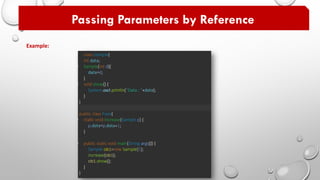
• In this approach, a reference to an object is passed as argument into the
method, inside the called method this reference is used to access the actual
object
• Therefore changes made via reference parameter within method (formal
argument) will effect the actual object
Reference types, such as an object is passed into methods by reference.
Passing Parameters by Reference
Example:

Java -lec-6

  • 1.
    JAVA "WRITE ONCE, RUNANYWHERE” Lec--6 By: Zubair Khalid
  • 2.
    Java £ Arrays andtheir types £ Methods £ The Void keyword £ Methods Call by value £ Methods Call by reference
  • 3.
    An array isa group of consecutive memory locations with the same name and datatype. Used to store multiple values of same data types Arrays There are following types of arrays £ One-dimensional array £ Multi-dimensional array
  • 4.
    Datatype Arrayname[]=new Datatype[Arraylength] One-dimensionalArray Declaration Syntax: A type of array in which all elements are arranged in the form of list is known as one-dimensional array or linear list. It consists of one column or one row.
  • 5.
    One-dimensional Array E.G : Inta[]=new Int[10]; A.Datatype A.Name A.Length
  • 6.
    One-dimensional Array Assigning valueto array: a [0]=24; a [1]=30; a [2]=13; . . . Method 1(initialization): Int a[]={33,44,55,….}; Method 2(definition):
  • 7.
    Datatype Arrayname[][]=new Datatype[Arrayrows][Arraycolumns] Multi-dimensional Array Multi-dimensional array can be considered as a table consists of rows and columns. Each element in 2-D array is referred with the help of two indexes. One is used to indicate the row and the second index indicates the column of the element Declaration Syntax:
  • 8.
    Multi-dimensional Array E.G : Inta[][]=new Int[2][3]; A.Datatype A.Name A.Rows A.Columns
  • 9.
    Multi-dimensional Array Assigning valueto array: A [0][0]=24; A [0][1]=30; A [0][2]=13; . . . Method 1(initialization): Int a[][]={33,44,55,….}; Method 2(definition):
  • 10.
    Methods When we callthe System.Out.Println() method, the system actually executes several statements in order to display a message on the console. A Java method is a collection of statements that are grouped together to perform an operation. Example:
  • 11.
    Creating Methods public staticint methodName(int a, int b) { // body } Now we will learn how to create our own methods with or without return values, invoke a method with or without parameters, and apply method abstraction in the program design. Syntax: ℑ Public static Modifier ℑ Int Return Type ℑ Methodname Name of method ℑ a,b Parameters
  • 12.
    Creating & CallingMethods Example: Creating Calling
  • 13.
    Void Keyword Here, inthe previous example we're considering a void method PFTN. This method is a void method, which does not return any value. The void keyword allows us to create methods which do not return a value. Example:
  • 14.
    Passing Arguments toMethods Using Primitive data types  byte, short, int, long, float, double, char & boolean Using Reference data types  Objects & Arrays etc. A method can pass arguments in two manners: A method can pass arguments in two manners: Call by value  Pass by value Call by reference  Pass by reference
  • 15.
    Call by Value(or) Pass by Value The call by value copies the values of actual parameter into formal parameters Changing value of formal parameter not effect the value of actual parameter The original copy of the argument value remains without changing because the method creates own copy of argument values and then uses them
  • 16.
    Passing Parameters byValue While working under calling process, arguments is to be passed. These should be in the same order as their respective parameters in the method specification. Parameters can be passed by value or by reference. Passing Parameters by Value means calling a method with a parameter. Through this, the argument value is passed to the parameter. Syntax: add(9,5) Method Value 1 Value 2
  • 17.
    Passing Parameters byValue Example:
  • 18.
    Call by Reference(or) Pass by Reference • In this approach, a reference to an object is passed as argument into the method, inside the called method this reference is used to access the actual object • Therefore changes made via reference parameter within method (formal argument) will effect the actual object Reference types, such as an object is passed into methods by reference.
  • 19.
    Passing Parameters byReference Example: