
Identifiers, keywords and types
Comments
• Three permissible styles of comment in a Java
technology program are:
// comment one line
/* comment on one
or more lines */
Semicolons, Blocks and Whitespace
• A statement is one or more lines of code
terminated by a semicolon(;):
totals = a+b+c
+d+e+f
• A block is a collection of statements bound by
opening and closing braces:
{
x=y+1;
y=x+1;
}
Semicolons,Blocks, and Whitespaces
• You can use a block in a class definition:
public class MyDate{
private int day;
private int month;
private int year;
}
• You can nest block of statements
• Any amount of whitespace is allowed in a Java program
Identifiers
• Are names given to a variable,class or method
• Can start with Unicode letter,underscore(_) , or a
dollar sign($)
• Are case sensitive and have no maximum length
• Examples
identifier
userName
User_name
_sys_varl
$change
Java Keywords
• Few keywords
abstract , if , else , for,continue
Keywords have a special meaning to the Java
Technology compiler. They identify a data type
name or program construct name.
Primitive Data type
• The Java programming language defines eight
primitive types:
– Logical boolean
– Textual char
– Integral byte, short, int and long
– Floating double and float
Logical - boolean
• The boolean data type has two literals , true
and false
• e.g
boolean truth = true;
Declares the variable truth as boolean type and
assigns it a value of true
Textual – char and String
• char
– Represents a 16 bit Unicode character
– Must have its literals enclosed in single quote(‘’)
– Uses the following notations:
• ‘a’ the letter a
• ‘t’ A tab
• String
– Is not a primitive data type; it is a class
– Has its literal enclosed in double quotes(“”)
• “ The quick brown fox jumps over the lazy dog”
– Can be used as follows:
String greeting = “Good Morning!! n”;
Integral – byte,short,int and long
• Uses three forms – Decimal,octal or
hexadecimal
– 2 The decimal value is two
– 077 The leading zero indicates an octal value
– 0xBAAC The leading 0x indicates a hexadecimal
value
• Has a default int
• Defines long by using the letter l or L
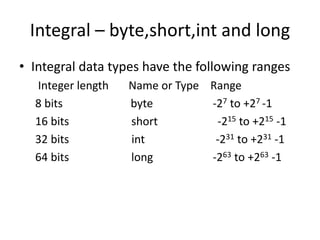
Integral – byte,short,int and long
• Integral data types have the following ranges
Integer length Name or Type Range
8 bits byte -27 to +27 -1
16 bits short -215 to +215 -1
32 bits int -231 to +231 -1
64 bits long -263 to +263 -1
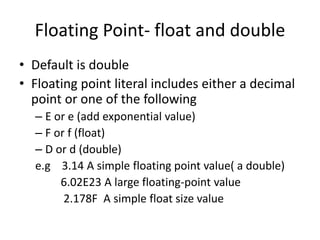
Floating Point- float and double
• Default is double
• Floating point literal includes either a decimal
point or one of the following
– E or e (add exponential value)
– F or f (float)
– D or d (double)
e.g 3.14 A simple floating point value( a double)
6.02E23 A large floating-point value
2.178F A simple float size value
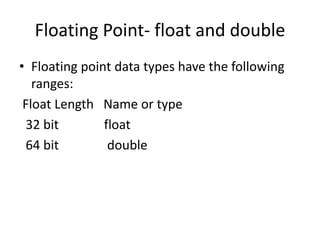
Floating Point- float and double
• Floating point data types have the following
ranges:
Float Length Name or type
32 bit float
64 bit double
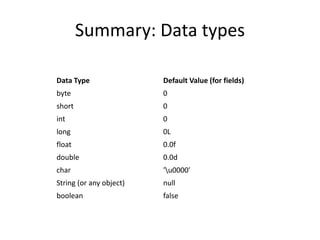
Summary: Data types
Data Type Default Value (for fields)
byte 0
short 0
int 0
long 0L
float 0.0f
double 0.0d
char 'u0000'
String (or any object) null
boolean false
Example
public class Assign
{
public static void main(String agrs[])
{
int x,y;
float z = 3.414f;
double w = 3.1415;
boolen truth =true;
char c;
String str;
String str1 = "bye";
c='A';
str="hello";
x=6;
y=1000;
}
}
Scope of variable
// 1. Demonstrate block scope.
class Scope {
public static void main(String args[]) {
int x; // known to all code within main
x = 10;
if(x == 10) {
// start new scope
int y = 20; // known only to this block
// x and y both known here.
System.out.println("x and y: " + x + " " + y);
x = y * 2;
}
// y = 100; // Error! y not known here
// x is still known here.
System.out.println("x is " + x);}}
// 2.This fragment is wrong!
count = 100; // oops! cannot use
count before it is declared!
int count;
Example
// Demonstrate lifetime of a variable.
class LifeTime {
public static void main(String args[]) {
int x;
for(x = 0; x < 3; x++) {
int y = -1; // y is initialized each time block is entered
System.out.println("y is: " + y); // this always prints -1
y = 100;
System.out.println("y is now: " + y);
}
}
}
The output generated by this program is shown here:
y is: -1
y is now: 100
y is: -1
y is now: 100
y is: -1
y is now: 100
// This program will not compile
class ScopeErr {
public static void main(String args[]) {
int bar = 1;
{ // creates a new scope
int bar = 2; // Compile-time error - bar already
defined!
}
}
}
Type Conversion and Casting
Java’s Automatic Conversions
• When one type of data is assigned to another
type of variable, an automatic type conversion
will take place if the following two conditions
are met:
– The two types are compatible.
– The destination type is larger than the source type.
Type Conversion and Casting
• When these two conditions are met, a widening conversion
takes place.
• For example,the int type is always large enough to hold all
valid byte values, so no explicit cast statement is required.
• For widening conversions, the numeric types, including
integer and floating-point types, are compatible with each
other. However, there are no automatic conversions
• from the numeric types to char.
• As mentioned earlier, Java also performs an automatic type
conversion when storing a literal integer constant into
variables of type byte, short, long, or char.
Casting Incompatible Types
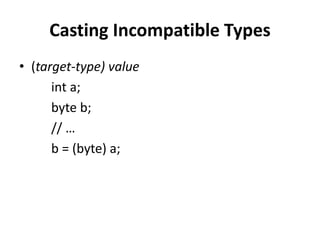
• (target-type) value
int a;
byte b;
// …
b = (byte) a;
Example
// Demonstrate casts.
class Conversion {
public static void main(String args[]) {
byte b;
int i = 257;
double d = 323.142;
System.out.println("nConversion of int to
byte.");
b = (byte) i;
System.out.println("i and b " + i + " " + b);
System.out.println("nConversion of double to
int.");
i = (int) d;
System.out.println("d and i " + d + " " + i);
System.out.println("nConversion of double to
byte.");
b = (byte) d;
System.out.println("d and b " + d + " " + b); }
}
This program generates the
following output:
Conversion of int to byte.
i and b 257 1
Conversion of double to int.
d and i 323.142 323
Conversion of double to byte.
d and b 323.142 67
The Type Promotion Rules
class Promote {
public static void main(String args[]) {
byte b = 42;
char c = 'a';
short s = 1024;
int i = 50000;
float f = 5.67f;
double d = .1234;
double result = (f * b) + (i / c) - (d * s);
System.out.println((f * b) + " + " + (i / c) + " - " + (d * s));
System.out.println("result = " + result);
}
}
Output:
238.14 + 515 - 126.3616
result = 626.7784146484375
Arrays
•An array is a group of like-typed variables that are referred to by a
common name.
•Arrays of any type can be created and may have one or more
dimensions.
• A specific element in an array is accessed by its index.
• Arrays offer a convenient means of grouping related information.
NOTE
If you are familiar with C/C++, be careful.
Arrays in Java work differently than they do in those languages.
One-Dimensional Arrays
•A one-dimensional array is, essentially, a list of like-typed
variables.
•To create an array, you first must create an array variable of the
desired type.
•The general form of a one-dimensional array declaration is
type var-name[ ];
•Here, type declares the element type (also called the base type) of
the array.
•The element type determines the data type of each element that
comprises the array.
•Thus, the element type for the array determines what type of data
the array will hold.
For example, the following declares an array named month_days
with the type “array of int”:
int month_days[];
Although this declaration establishes the fact that month_days is
an array variable, no array actually exists. In fact, the value of
month_days is set to null, which represents an array with no
value.
To link month_days with an actual, physical array of integers, you
must allocate one using new and assign it to month_days. new is
a special operator that allocates memory.
array-var = new type [size];
Here, type specifies the type of data being allocated, size specifies
the number of elements in the array, and array-var is the array
variable that is linked to the array.
That is, to use new to allocate an array, you must specify the type
and number of elements to allocate.
The elements in the array allocated by new will automatically be
initialized to zero (for numeric types), false (for boolean), or null
(for reference types, which are described in a later).
This example allocates a 12-element array of integers and links
them to month_days:
month_days = new int[12];
After this statement executes, month_days will refer to an array
of 12 integers.
Further, all elements in the array will be initialized to zero.
Obtaining an array is a two-step process.
•First, you must declare a variable of the desired array type.
•Second, you must allocate the memory that will hold the array,
using new, and assign it to the array variable.
Thus, in Java all arrays are dynamically allocated.
Once you have allocated an array, you can access a specific element
in the array by specifying its index within square brackets. All array
indexes start at zero.
Array Review
For example, this statement assigns the value 28 to the second
element of month_days:
month_days[1] = 28;
The next line displays the value stored at index 3:
System.out.println(month_days[3]);
// Demonstrate a one-dimensional array.
class Array {
public static void main(String args[]) {
int month_days[];
month_days = new int[12];
month_days[0] = 31;
month_days[1] = 28;
month_days[2] = 31;
month_days[3] = 30;
month_days[4] = 31;
month_days[5] = 30;
month_days[6] = 31;
month_days[7] = 31;
month_days[8] = 30;
month_days[9] = 31;
month_days[10] = 30;
month_days[11] = 31;
System.out.println("April has " + month_days[3] + " days.");}}
// An improved version of the previous program.
class AutoArray {
public static void main(String args[]) {
int month_days[] = { 31, 28, 31, 30, 31, 30, 31, 31,
30, 31,
30, 31 };
System.out.println("April has " + month_days[3] + "
days.");
}
}
// Average an array of values.
class Average {
public static void main(String args[]) {
double nums[] = {10.1, 11.2, 12.3, 13.4, 14.5};
double result = 0;
int i;
for(i=0; i<5; i++)
result = result + nums[i];
System.out.println("Average is " + result / 5);
}
}
Output
Average is 12.299999999999999

Identifiers, keywords and types

  • 1.
  • 2.
    Comments • Three permissiblestyles of comment in a Java technology program are: // comment one line /* comment on one or more lines */
  • 3.
    Semicolons, Blocks andWhitespace • A statement is one or more lines of code terminated by a semicolon(;): totals = a+b+c +d+e+f • A block is a collection of statements bound by opening and closing braces: { x=y+1; y=x+1; }
  • 4.
    Semicolons,Blocks, and Whitespaces •You can use a block in a class definition: public class MyDate{ private int day; private int month; private int year; } • You can nest block of statements • Any amount of whitespace is allowed in a Java program
  • 5.
    Identifiers • Are namesgiven to a variable,class or method • Can start with Unicode letter,underscore(_) , or a dollar sign($) • Are case sensitive and have no maximum length • Examples identifier userName User_name _sys_varl $change
  • 6.
    Java Keywords • Fewkeywords abstract , if , else , for,continue Keywords have a special meaning to the Java Technology compiler. They identify a data type name or program construct name.
  • 7.
    Primitive Data type •The Java programming language defines eight primitive types: – Logical boolean – Textual char – Integral byte, short, int and long – Floating double and float
  • 8.
    Logical - boolean •The boolean data type has two literals , true and false • e.g boolean truth = true; Declares the variable truth as boolean type and assigns it a value of true
  • 9.
    Textual – charand String • char – Represents a 16 bit Unicode character – Must have its literals enclosed in single quote(‘’) – Uses the following notations: • ‘a’ the letter a • ‘t’ A tab
  • 10.
    • String – Isnot a primitive data type; it is a class – Has its literal enclosed in double quotes(“”) • “ The quick brown fox jumps over the lazy dog” – Can be used as follows: String greeting = “Good Morning!! n”;
  • 11.
    Integral – byte,short,intand long • Uses three forms – Decimal,octal or hexadecimal – 2 The decimal value is two – 077 The leading zero indicates an octal value – 0xBAAC The leading 0x indicates a hexadecimal value • Has a default int • Defines long by using the letter l or L
  • 12.
    Integral – byte,short,intand long • Integral data types have the following ranges Integer length Name or Type Range 8 bits byte -27 to +27 -1 16 bits short -215 to +215 -1 32 bits int -231 to +231 -1 64 bits long -263 to +263 -1
  • 13.
    Floating Point- floatand double • Default is double • Floating point literal includes either a decimal point or one of the following – E or e (add exponential value) – F or f (float) – D or d (double) e.g 3.14 A simple floating point value( a double) 6.02E23 A large floating-point value 2.178F A simple float size value
  • 14.
    Floating Point- floatand double • Floating point data types have the following ranges: Float Length Name or type 32 bit float 64 bit double
  • 15.
    Summary: Data types DataType Default Value (for fields) byte 0 short 0 int 0 long 0L float 0.0f double 0.0d char 'u0000' String (or any object) null boolean false
  • 16.
    Example public class Assign { publicstatic void main(String agrs[]) { int x,y; float z = 3.414f; double w = 3.1415; boolen truth =true; char c; String str; String str1 = "bye"; c='A'; str="hello"; x=6; y=1000; } }
  • 17.
    Scope of variable //1. Demonstrate block scope. class Scope { public static void main(String args[]) { int x; // known to all code within main x = 10; if(x == 10) { // start new scope int y = 20; // known only to this block // x and y both known here. System.out.println("x and y: " + x + " " + y); x = y * 2; } // y = 100; // Error! y not known here // x is still known here. System.out.println("x is " + x);}} // 2.This fragment is wrong! count = 100; // oops! cannot use count before it is declared! int count;
  • 18.
    Example // Demonstrate lifetimeof a variable. class LifeTime { public static void main(String args[]) { int x; for(x = 0; x < 3; x++) { int y = -1; // y is initialized each time block is entered System.out.println("y is: " + y); // this always prints -1 y = 100; System.out.println("y is now: " + y); } } } The output generated by this program is shown here: y is: -1 y is now: 100 y is: -1 y is now: 100 y is: -1 y is now: 100
  • 19.
    // This programwill not compile class ScopeErr { public static void main(String args[]) { int bar = 1; { // creates a new scope int bar = 2; // Compile-time error - bar already defined! } } }
  • 20.
    Type Conversion andCasting Java’s Automatic Conversions • When one type of data is assigned to another type of variable, an automatic type conversion will take place if the following two conditions are met: – The two types are compatible. – The destination type is larger than the source type.
  • 21.
    Type Conversion andCasting • When these two conditions are met, a widening conversion takes place. • For example,the int type is always large enough to hold all valid byte values, so no explicit cast statement is required. • For widening conversions, the numeric types, including integer and floating-point types, are compatible with each other. However, there are no automatic conversions • from the numeric types to char. • As mentioned earlier, Java also performs an automatic type conversion when storing a literal integer constant into variables of type byte, short, long, or char.
  • 22.
    Casting Incompatible Types •(target-type) value int a; byte b; // … b = (byte) a;
  • 23.
    Example // Demonstrate casts. classConversion { public static void main(String args[]) { byte b; int i = 257; double d = 323.142; System.out.println("nConversion of int to byte."); b = (byte) i; System.out.println("i and b " + i + " " + b); System.out.println("nConversion of double to int."); i = (int) d; System.out.println("d and i " + d + " " + i); System.out.println("nConversion of double to byte."); b = (byte) d; System.out.println("d and b " + d + " " + b); } } This program generates the following output: Conversion of int to byte. i and b 257 1 Conversion of double to int. d and i 323.142 323 Conversion of double to byte. d and b 323.142 67
  • 24.
    The Type PromotionRules class Promote { public static void main(String args[]) { byte b = 42; char c = 'a'; short s = 1024; int i = 50000; float f = 5.67f; double d = .1234; double result = (f * b) + (i / c) - (d * s); System.out.println((f * b) + " + " + (i / c) + " - " + (d * s)); System.out.println("result = " + result); } } Output: 238.14 + 515 - 126.3616 result = 626.7784146484375
  • 25.
    Arrays •An array isa group of like-typed variables that are referred to by a common name. •Arrays of any type can be created and may have one or more dimensions. • A specific element in an array is accessed by its index. • Arrays offer a convenient means of grouping related information. NOTE If you are familiar with C/C++, be careful. Arrays in Java work differently than they do in those languages.
  • 26.
    One-Dimensional Arrays •A one-dimensionalarray is, essentially, a list of like-typed variables. •To create an array, you first must create an array variable of the desired type. •The general form of a one-dimensional array declaration is type var-name[ ]; •Here, type declares the element type (also called the base type) of the array. •The element type determines the data type of each element that comprises the array. •Thus, the element type for the array determines what type of data the array will hold.
  • 27.
    For example, thefollowing declares an array named month_days with the type “array of int”: int month_days[]; Although this declaration establishes the fact that month_days is an array variable, no array actually exists. In fact, the value of month_days is set to null, which represents an array with no value. To link month_days with an actual, physical array of integers, you must allocate one using new and assign it to month_days. new is a special operator that allocates memory. array-var = new type [size];
  • 28.
    Here, type specifiesthe type of data being allocated, size specifies the number of elements in the array, and array-var is the array variable that is linked to the array. That is, to use new to allocate an array, you must specify the type and number of elements to allocate. The elements in the array allocated by new will automatically be initialized to zero (for numeric types), false (for boolean), or null (for reference types, which are described in a later). This example allocates a 12-element array of integers and links them to month_days: month_days = new int[12]; After this statement executes, month_days will refer to an array of 12 integers. Further, all elements in the array will be initialized to zero.
  • 29.
    Obtaining an arrayis a two-step process. •First, you must declare a variable of the desired array type. •Second, you must allocate the memory that will hold the array, using new, and assign it to the array variable. Thus, in Java all arrays are dynamically allocated. Once you have allocated an array, you can access a specific element in the array by specifying its index within square brackets. All array indexes start at zero. Array Review For example, this statement assigns the value 28 to the second element of month_days: month_days[1] = 28; The next line displays the value stored at index 3: System.out.println(month_days[3]);
  • 30.
    // Demonstrate aone-dimensional array. class Array { public static void main(String args[]) { int month_days[]; month_days = new int[12]; month_days[0] = 31; month_days[1] = 28; month_days[2] = 31; month_days[3] = 30; month_days[4] = 31; month_days[5] = 30; month_days[6] = 31; month_days[7] = 31; month_days[8] = 30; month_days[9] = 31; month_days[10] = 30; month_days[11] = 31; System.out.println("April has " + month_days[3] + " days.");}}
  • 31.
    // An improvedversion of the previous program. class AutoArray { public static void main(String args[]) { int month_days[] = { 31, 28, 31, 30, 31, 30, 31, 31, 30, 31, 30, 31 }; System.out.println("April has " + month_days[3] + " days."); } }
  • 32.
    // Average anarray of values. class Average { public static void main(String args[]) { double nums[] = {10.1, 11.2, 12.3, 13.4, 14.5}; double result = 0; int i; for(i=0; i<5; i++) result = result + nums[i]; System.out.println("Average is " + result / 5); } } Output Average is 12.299999999999999