● This module is intend to develop basic skills in using Identifiers
keywords .
● Importance of writing comments in programs.
● Introduces to the java keywords and its usage.
● Different types of Identifiers and its usage.
● How to write valid Identifiers.
● Conventions to to create Identifiers.
Module Overview
2
 Use comments in a source program
 Distinguish between valid and invalid identifiers
 Recognize Java technology keywords
 List the eight primitive types
 Define literal values for numeric and textual types
 Define the terms primitive variable and reference variable
 Declare variables of class type
 Construct an object using new
 Describe default initialization
 Describe the significance of a reference variable
 State the consequences of assigning variables of class type
Objectives
3
Comments
Comment:A comment is a line declared in a program whic is not executed
by the compiler.
The three permissible styles of comment in a Java technology
program are:
Single Line:
// comment on one line
:
/* comment on one
* or more lines
*/
Document Type:
/** documentation comment
* can also span one or more lines
*/
4
 Statement:Astatement is one or more lines of code
terminated by a semicolon (;)
totals = a + b + c
+ d + e + f;
 Block:Ablock is a collection of statements bound by
opening and closing braces
{
x = y + 1;
y = x + 1;
}
Statement and Blocks
5
NestedBlock: Ablock enclosed in another block is
called as a nested block.
while ( i < large ) {
a = a + i;
// nested block
if ( a == max ) {
b = b + a;
a = 0;
}
i = i + 1;
}
Nested Block
 Aclass definition uses a special block:
public class MyDate {
private int day;
private int month;
private int year;
}
Block (Cont…)
7
 WhiteSpaces:Any amount of white space is
permitted in a Java program.
For example:
{int x;x=23*54;}
is equivalent to:
{
int x;
x = 23 * 54;
}
White Space
<<Module name>>/<<Session #>>/<<Lesson Name>> >>
8
Identifiers:Are names given to a variable, class, or
methods.
• Can start with a Unicode letter, underscore (_), or
dollar sign ($).
• Are case-sensitive and have no maximum length.
•Identifier Names can be alpha numeric.
•Identifiers doesnot contain whitespaces in between.
• Examples:
identifier
userName
user_name
_sys_var1
$change
Identifiers
<<Module name>>/<<Session #>>/<<Lesson Name>> >>
9
Keyword
 Keyword:A keyword is a reserved word which has a special
meaning in java technology.
 Java keywords should not be used as identifiers.
 Java keywords start with a lowercase.
Examples:
public,static,final,voidetc..
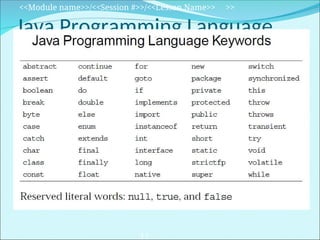
Folllowing is the list of java keywords:
10
Java Programming Language
Keywords
<<Module name>>/<<Session #>>/<<Lesson Name>> >>
11
Primitive Types
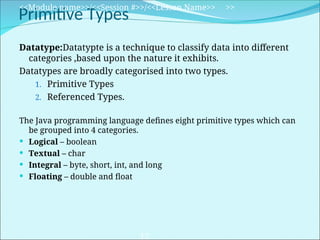
Datatype:Datatypte is a technique to classify data into different
categories ,based upon the nature it exhibits.
Datatypes are broadly categorised into two types.
1. Primitive Types
2. Referenced Types.
The Java programming language defines eight primitive types which can
be grouped into 4 categories.
 Logical – boolean
 Textual – char
 Integral – byte, short, int, and long
 Floating – double and float
<<Module name>>/<<Session #>>/<<Lesson Name>> >>
12
Logical – boolean
The boolean primitive has the following characteristics:
 The boolean data type has two literals, true and false.
 Java does not allow values 1 or 0.
 Default value for boolean is false.
 For example, the statement:
boolean decision = true;
boolean decision = 1//generates error
declares the variable decision as boolean type and assigns it a
value of true.
<<Module name>>/<<Session #>>/<<Lesson Name>> >>
13
Textual – char
The textual char primitive has the following characteristics:
 Represents a 16-bit Unicode character
 Must have its literal enclosed in single quotes (’ ’)
 Uses the following notations:
<<Module name>>/<<Session #>>/<<Lesson Name>> >>
14
'a' The letter a
't' The tab character
'u????' A specific Unicode character, ????, is replaced
with
exactly four hexadecimal digits .
For example, ’u03A6’ is the Greek letter phi [Φ].
Textual – String
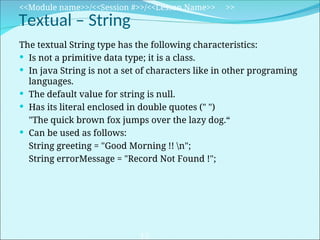
The textual String type has the following characteristics:
 Is not a primitive data type; it is a class.
 In java String is not a set of characters like in other programing
languages.
 The default value for string is null.
 Has its literal enclosed in double quotes (" ")
"The quick brown fox jumps over the lazy dog.“
 Can be used as follows:
String greeting = "Good Morning !! n";
String errorMessage = "Record Not Found !";
<<Module name>>/<<Session #>>/<<Lesson Name>> >>
15
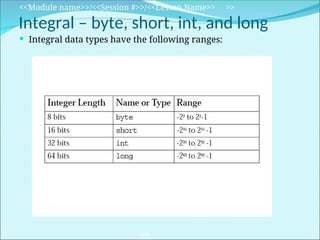
Integral – byte, short, int, and long
The integral primitives have the following characteristics:
 Integral primates use three forms: Decimal, octal, or
Hexadecimal
 Literals have a default type of int.
 Literals with the suffix L or l are of type long.
<<Module name>>/<<Session #>>/<<Lesson Name>> >>
16
2 The decimal form for the integer 2.
077 The leading 0 indicates an octal value.
0xBAAC The leading 0x indicates a hexadecimal value.
Integral – byte, short, int, and long
 Integral data types have the following ranges:
<<Module name>>/<<Session #>>/<<Lesson Name>> >>
17
Floating Point – float and double
The floating point primitives have the following characteristics:
 Floating-point literal includes either a decimal point or one of
the following:
 E or e (add exponential value)
 F or f (float)
 D or d (double)
<<Module name>>/<<Session #>>/<<Lesson Name>> >>
18
3.14 A simple floating-point value (a double)
6.02E23 A large floating-point value
2.718F A simple float size value
123.4E+306D A large double value with redundant D
Floating Point – float and double
 Literals have a default type of double.
 Floating-point data types have the following sizes
<<Module name>>/<<Session #>>/<<Lesson Name>> >>
19
32 bits float
64 bits double
Float Length Name or Type
Variables, Declarations, and Assignments
1 public class Assign {
2 public static void main (String args
[]) {
3 // declare integer variables
4 int x, y;
5 // declare and assign floating point
6 float z = 3.414f;
7 // declare and assign double
8 double w = 3.1415;
9 // declare and assign boolean
10 boolean truth = true;
11 // declare character variable
12 char c;
13 // declare String variable
14 String str;
15 // declare and assign String variable
<<Module name>>/<<Session #>>/<<Lesson Name>> >>
20
16 String str1 = "bye";
17 // assign value to char variable
18 c = 'A';
19 // assign value to String variable
20 str = "Hi out there!";
21 // assign values to int variables
22 x = 6;
23 y = 1000;
24 }
25 }
Java Reference Types
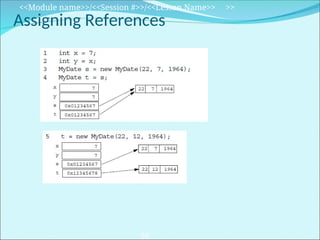
 In Java technology, beyond primitive types all others are
reference types.
 Areference variable contains a handle to an object.
 For example:
public class MyDate {
private int day = 1;
private int month = 1;
private int year = 2000;
public MyDate(int day, int month, int year) { ... }
public String toString() { ... }
}
public class TestMyDate {
public static void main(String[] args) {
MyDate today = new MyDate(22, 7, 1964);
}
}
<<Module name>>/<<Session #>>/<<Lesson Name>> >>
21
 Calling new Xyz() performs the following actions:
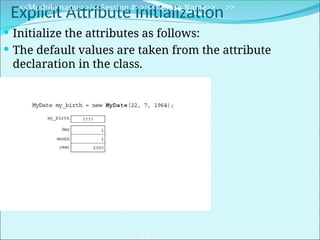
a. Memory is allocated for the object.
b. Explicit attribute initialization is performed.
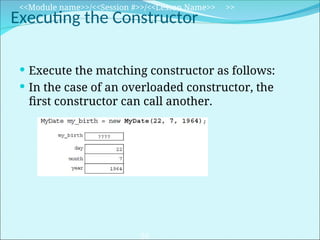
c. A constructor is executed.
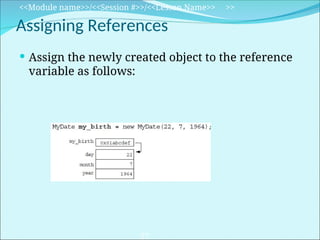
d. The object reference is returned by the new operator.
 The reference to the object is assigned to a
variable.
 An example is:
MyDate my_birth = new MyDate(22, 7, 1964);
Constructing and Initializing Objects
<<Module name>>/<<Session #>>/<<Lesson Name>> >>
22
Accessing Object Members
<<Module name>>/<<Session #>>/<<Lesson Name>> >>
23
• The dot notation is: <object>.<member>
• This is used to access object members, including attributes and
methods.
• Examples of dot notation are:
d.setWeight(42);
d.weight = 42; // only permissible if weight is public
Memory Allocation and Layout
<<Module name>>/<<Session #>>/<<Lesson Name>> >>
24
 A reference declaration allocates storage only for a reference:
 Use the new operator to allocate space for MyDate:
Explicit Attribute Initialization
<<Module name>>/<<Session #>>/<<Lesson Name>> >>
25
 Initialize the attributes as follows:
 The default values are taken from the attribute
declaration in the class.
 Execute the matching constructor as follows:
 In the case of an overloaded constructor, the
first constructor can call another.
Executing the Constructor
<<Module name>>/<<Session #>>/<<Lesson Name>> >>
26
Assigning References
<<Module name>>/<<Session #>>/<<Lesson Name>> >>
27
 Assign the newly created object to the reference
variable as follows:
Assigning References
<<Module name>>/<<Session #>>/<<Lesson Name>> >>
28
Pass-by-Value
 Java programming language passes (Primitive)arguments by
value.
 Primitive values modified in the called method does not reflect
in the calling method.
 When an object instance is passed as an argument to a method,
the value of the argument is a reference to the object.
 The contents of the object can be changed in the called method,
but the original object reference is never changed.
<<Module name>>/<<Session #>>/<<Lesson Name>> >>
29
Pass-by-Value
public class PassTest {
// Methods to change the current values
public static void changeInt(int value) {
value = 55;
}
public static void changeObjectRef(MyDate ref) {
ref = new MyDate(1, 1, 2000);
}
public static void changeObjectAttr(MyDate ref){
ref.setDay(4);
}
<<Module name>>/<<Session #>>/<<Lesson Name>> >>
30
Pass-by-Value
public static void main(String args[]) {
MyDate date;
int val;
// Assign the int
val = 11;
// Try to change it
changeInt(val);
// What is the current value?
System.out.println("Int value is: " + val);
The result of this output is:
Int value is: 11
<<Module name>>/<<Session #>>/<<Lesson Name>> >>
31
Pass-by-Value
// Assign the date
date = new MyDate(22, 7, 1964);
// Try to change it
changeObjectRef(date);
// What is the current value?
System.out.println("MyDate: " + date);
The result of this output is:
MyDate: 22-7-1964
<<Module name>>/<<Session #>>/<<Lesson Name>> >>
32
Pass-by-Value
// Now change the day attribute
// through the object reference
changeObjectAttr(date);
// What is the current value?
System.out.println("MyDate: " + date);
}
}
The result of this output is:
MyDate: 4-7-1964
<<Module name>>/<<Session #>>/<<Lesson Name>> >>
33
Here are a few uses of the this keyword:
 To resolve ambiguity between instance variables
and parameters
 To pass the current object as a parameter to
another method or constructor
The this Reference
<<Module name>>/<<Session #>>/<<Lesson Name>> >>
34
public class MyDate {
private int day = 1;
private int month = 1;
private int year = 2000;
public MyDate(int day, int month, int year) {
this.day = day;
this.month = month;
this.year = year;
}
public MyDate(MyDate date) {
this.day = date.day;
this.month = date.month;
this.year = date.year;
}
The this Reference
<<Module name>>/<<Session #>>/<<Lesson Name>> >>
35
public MyDate addDays(int moreDays) {
MyDate newDate = new MyDate(this);
newDate.day = newDate.day + moreDays;
// Not Yet Implemented: wrap around code...
return newDate;
}
public String toString() {
return "" + day + "-" + month + "-" + year;
}
}
The this Reference
<<Module name>>/<<Session #>>/<<Lesson Name>> >>
36
public class TestMyDate {
public static void main(String[] args) {
MyDate my_birth = new MyDate(22, 7, 1964);
MyDate the_next_week = my_birth.addDays(7);
System.out.println(the_next_week);
}
}
The this Reference
<<Module name>>/<<Session #>>/<<Lesson Name>> >>
37
 Packages:
com.example.domain;
 Classes, interfaces, and enum types:
SavingsAccount
 Methods:
getAccount()
 Variables:
currentCustomer
 Constants:
HEAD_COUNT
Java Programming Language Coding
Conventions
38
 Control structures:
if ( condition ) {
statement1;
} else {
statement2;
}
 Spacing:
– Use one statement per line.
– Use two or four spaces for indentation.
 Comments:
– Use // to comment inline code.
– Use /** documentation */ for class members.
Java Programming Language Coding
Conventions
39
Thank You
40

Java_Identifiers_keywords_data_types.ppt

  • 2.
    ● This moduleis intend to develop basic skills in using Identifiers keywords . ● Importance of writing comments in programs. ● Introduces to the java keywords and its usage. ● Different types of Identifiers and its usage. ● How to write valid Identifiers. ● Conventions to to create Identifiers. Module Overview 2
  • 3.
     Use commentsin a source program  Distinguish between valid and invalid identifiers  Recognize Java technology keywords  List the eight primitive types  Define literal values for numeric and textual types  Define the terms primitive variable and reference variable  Declare variables of class type  Construct an object using new  Describe default initialization  Describe the significance of a reference variable  State the consequences of assigning variables of class type Objectives 3
  • 4.
    Comments Comment:A comment isa line declared in a program whic is not executed by the compiler. The three permissible styles of comment in a Java technology program are: Single Line: // comment on one line : /* comment on one * or more lines */ Document Type: /** documentation comment * can also span one or more lines */ 4
  • 5.
     Statement:Astatement isone or more lines of code terminated by a semicolon (;) totals = a + b + c + d + e + f;  Block:Ablock is a collection of statements bound by opening and closing braces { x = y + 1; y = x + 1; } Statement and Blocks 5
  • 6.
    NestedBlock: Ablock enclosedin another block is called as a nested block. while ( i < large ) { a = a + i; // nested block if ( a == max ) { b = b + a; a = 0; } i = i + 1; } Nested Block
  • 7.
     Aclass definitionuses a special block: public class MyDate { private int day; private int month; private int year; } Block (Cont…) 7
  • 8.
     WhiteSpaces:Any amountof white space is permitted in a Java program. For example: {int x;x=23*54;} is equivalent to: { int x; x = 23 * 54; } White Space <<Module name>>/<<Session #>>/<<Lesson Name>> >> 8
  • 9.
    Identifiers:Are names givento a variable, class, or methods. • Can start with a Unicode letter, underscore (_), or dollar sign ($). • Are case-sensitive and have no maximum length. •Identifier Names can be alpha numeric. •Identifiers doesnot contain whitespaces in between. • Examples: identifier userName user_name _sys_var1 $change Identifiers <<Module name>>/<<Session #>>/<<Lesson Name>> >> 9
  • 10.
    Keyword  Keyword:A keywordis a reserved word which has a special meaning in java technology.  Java keywords should not be used as identifiers.  Java keywords start with a lowercase. Examples: public,static,final,voidetc.. Folllowing is the list of java keywords: 10
  • 11.
    Java Programming Language Keywords <<Modulename>>/<<Session #>>/<<Lesson Name>> >> 11
  • 12.
    Primitive Types Datatype:Datatypte isa technique to classify data into different categories ,based upon the nature it exhibits. Datatypes are broadly categorised into two types. 1. Primitive Types 2. Referenced Types. The Java programming language defines eight primitive types which can be grouped into 4 categories.  Logical – boolean  Textual – char  Integral – byte, short, int, and long  Floating – double and float <<Module name>>/<<Session #>>/<<Lesson Name>> >> 12
  • 13.
    Logical – boolean Theboolean primitive has the following characteristics:  The boolean data type has two literals, true and false.  Java does not allow values 1 or 0.  Default value for boolean is false.  For example, the statement: boolean decision = true; boolean decision = 1//generates error declares the variable decision as boolean type and assigns it a value of true. <<Module name>>/<<Session #>>/<<Lesson Name>> >> 13
  • 14.
    Textual – char Thetextual char primitive has the following characteristics:  Represents a 16-bit Unicode character  Must have its literal enclosed in single quotes (’ ’)  Uses the following notations: <<Module name>>/<<Session #>>/<<Lesson Name>> >> 14 'a' The letter a 't' The tab character 'u????' A specific Unicode character, ????, is replaced with exactly four hexadecimal digits . For example, ’u03A6’ is the Greek letter phi [Φ].
  • 15.
    Textual – String Thetextual String type has the following characteristics:  Is not a primitive data type; it is a class.  In java String is not a set of characters like in other programing languages.  The default value for string is null.  Has its literal enclosed in double quotes (" ") "The quick brown fox jumps over the lazy dog.“  Can be used as follows: String greeting = "Good Morning !! n"; String errorMessage = "Record Not Found !"; <<Module name>>/<<Session #>>/<<Lesson Name>> >> 15
  • 16.
    Integral – byte,short, int, and long The integral primitives have the following characteristics:  Integral primates use three forms: Decimal, octal, or Hexadecimal  Literals have a default type of int.  Literals with the suffix L or l are of type long. <<Module name>>/<<Session #>>/<<Lesson Name>> >> 16 2 The decimal form for the integer 2. 077 The leading 0 indicates an octal value. 0xBAAC The leading 0x indicates a hexadecimal value.
  • 17.
    Integral – byte,short, int, and long  Integral data types have the following ranges: <<Module name>>/<<Session #>>/<<Lesson Name>> >> 17
  • 18.
    Floating Point –float and double The floating point primitives have the following characteristics:  Floating-point literal includes either a decimal point or one of the following:  E or e (add exponential value)  F or f (float)  D or d (double) <<Module name>>/<<Session #>>/<<Lesson Name>> >> 18 3.14 A simple floating-point value (a double) 6.02E23 A large floating-point value 2.718F A simple float size value 123.4E+306D A large double value with redundant D
  • 19.
    Floating Point –float and double  Literals have a default type of double.  Floating-point data types have the following sizes <<Module name>>/<<Session #>>/<<Lesson Name>> >> 19 32 bits float 64 bits double Float Length Name or Type
  • 20.
    Variables, Declarations, andAssignments 1 public class Assign { 2 public static void main (String args []) { 3 // declare integer variables 4 int x, y; 5 // declare and assign floating point 6 float z = 3.414f; 7 // declare and assign double 8 double w = 3.1415; 9 // declare and assign boolean 10 boolean truth = true; 11 // declare character variable 12 char c; 13 // declare String variable 14 String str; 15 // declare and assign String variable <<Module name>>/<<Session #>>/<<Lesson Name>> >> 20 16 String str1 = "bye"; 17 // assign value to char variable 18 c = 'A'; 19 // assign value to String variable 20 str = "Hi out there!"; 21 // assign values to int variables 22 x = 6; 23 y = 1000; 24 } 25 }
  • 21.
    Java Reference Types In Java technology, beyond primitive types all others are reference types.  Areference variable contains a handle to an object.  For example: public class MyDate { private int day = 1; private int month = 1; private int year = 2000; public MyDate(int day, int month, int year) { ... } public String toString() { ... } } public class TestMyDate { public static void main(String[] args) { MyDate today = new MyDate(22, 7, 1964); } } <<Module name>>/<<Session #>>/<<Lesson Name>> >> 21
  • 22.
     Calling newXyz() performs the following actions: a. Memory is allocated for the object. b. Explicit attribute initialization is performed. c. A constructor is executed. d. The object reference is returned by the new operator.  The reference to the object is assigned to a variable.  An example is: MyDate my_birth = new MyDate(22, 7, 1964); Constructing and Initializing Objects <<Module name>>/<<Session #>>/<<Lesson Name>> >> 22
  • 23.
    Accessing Object Members <<Modulename>>/<<Session #>>/<<Lesson Name>> >> 23 • The dot notation is: <object>.<member> • This is used to access object members, including attributes and methods. • Examples of dot notation are: d.setWeight(42); d.weight = 42; // only permissible if weight is public
  • 24.
    Memory Allocation andLayout <<Module name>>/<<Session #>>/<<Lesson Name>> >> 24  A reference declaration allocates storage only for a reference:  Use the new operator to allocate space for MyDate:
  • 25.
    Explicit Attribute Initialization <<Modulename>>/<<Session #>>/<<Lesson Name>> >> 25  Initialize the attributes as follows:  The default values are taken from the attribute declaration in the class.
  • 26.
     Execute thematching constructor as follows:  In the case of an overloaded constructor, the first constructor can call another. Executing the Constructor <<Module name>>/<<Session #>>/<<Lesson Name>> >> 26
  • 27.
    Assigning References <<Module name>>/<<Session#>>/<<Lesson Name>> >> 27  Assign the newly created object to the reference variable as follows:
  • 28.
  • 29.
    Pass-by-Value  Java programminglanguage passes (Primitive)arguments by value.  Primitive values modified in the called method does not reflect in the calling method.  When an object instance is passed as an argument to a method, the value of the argument is a reference to the object.  The contents of the object can be changed in the called method, but the original object reference is never changed. <<Module name>>/<<Session #>>/<<Lesson Name>> >> 29
  • 30.
    Pass-by-Value public class PassTest{ // Methods to change the current values public static void changeInt(int value) { value = 55; } public static void changeObjectRef(MyDate ref) { ref = new MyDate(1, 1, 2000); } public static void changeObjectAttr(MyDate ref){ ref.setDay(4); } <<Module name>>/<<Session #>>/<<Lesson Name>> >> 30
  • 31.
    Pass-by-Value public static voidmain(String args[]) { MyDate date; int val; // Assign the int val = 11; // Try to change it changeInt(val); // What is the current value? System.out.println("Int value is: " + val); The result of this output is: Int value is: 11 <<Module name>>/<<Session #>>/<<Lesson Name>> >> 31
  • 32.
    Pass-by-Value // Assign thedate date = new MyDate(22, 7, 1964); // Try to change it changeObjectRef(date); // What is the current value? System.out.println("MyDate: " + date); The result of this output is: MyDate: 22-7-1964 <<Module name>>/<<Session #>>/<<Lesson Name>> >> 32
  • 33.
    Pass-by-Value // Now changethe day attribute // through the object reference changeObjectAttr(date); // What is the current value? System.out.println("MyDate: " + date); } } The result of this output is: MyDate: 4-7-1964 <<Module name>>/<<Session #>>/<<Lesson Name>> >> 33
  • 34.
    Here are afew uses of the this keyword:  To resolve ambiguity between instance variables and parameters  To pass the current object as a parameter to another method or constructor The this Reference <<Module name>>/<<Session #>>/<<Lesson Name>> >> 34
  • 35.
    public class MyDate{ private int day = 1; private int month = 1; private int year = 2000; public MyDate(int day, int month, int year) { this.day = day; this.month = month; this.year = year; } public MyDate(MyDate date) { this.day = date.day; this.month = date.month; this.year = date.year; } The this Reference <<Module name>>/<<Session #>>/<<Lesson Name>> >> 35
  • 36.
    public MyDate addDays(intmoreDays) { MyDate newDate = new MyDate(this); newDate.day = newDate.day + moreDays; // Not Yet Implemented: wrap around code... return newDate; } public String toString() { return "" + day + "-" + month + "-" + year; } } The this Reference <<Module name>>/<<Session #>>/<<Lesson Name>> >> 36
  • 37.
    public class TestMyDate{ public static void main(String[] args) { MyDate my_birth = new MyDate(22, 7, 1964); MyDate the_next_week = my_birth.addDays(7); System.out.println(the_next_week); } } The this Reference <<Module name>>/<<Session #>>/<<Lesson Name>> >> 37
  • 38.
     Packages: com.example.domain;  Classes,interfaces, and enum types: SavingsAccount  Methods: getAccount()  Variables: currentCustomer  Constants: HEAD_COUNT Java Programming Language Coding Conventions 38
  • 39.
     Control structures: if( condition ) { statement1; } else { statement2; }  Spacing: – Use one statement per line. – Use two or four spaces for indentation.  Comments: – Use // to comment inline code. – Use /** documentation */ for class members. Java Programming Language Coding Conventions 39
  • 40.

Editor's Notes

  • #2 Instructor Notes:
  • #3 Instructor Notes: By the end of this module, participants should be able to: <Obj1> <Obj 2>
  • #4 Instructor Notes: <<lesson Overview>>.
  • #5 Instructor Notes: <<Key Word>>: <<Definition>>
  • #7 Instructor Notes: <<Key Word>>: <<Definition>>
  • #8 Instructor Notes: <<Key Word>>: <<Definition>>
  • #9 Instructor Notes:
  • #11 Instructor Notes: <<Process flow steps>>
  • #12 Instructor Notes: <<Concept Description>>
  • #13 Instructor Notes: <<Concept Description>>
  • #14 Instructor Notes: <<Concept Description>>
  • #15 Instructor Notes: <<Concept Description>>
  • #16 Instructor Notes: <<Concept Description>>
  • #17 Instructor Notes: <<Concept Description>>
  • #18 Instructor Notes: <<Concept Description>>
  • #19 Instructor Notes: <<Concept Description>>
  • #20 Instructor Notes:
  • #21 Instructor Notes:
  • #22 Instructor Notes:
  • #23 Instructor Notes: <<Concept Description>>
  • #24 Instructor Notes:
  • #25 Instructor Notes:
  • #26 Instructor Notes:
  • #27 Instructor Notes:
  • #28 Instructor Notes:
  • #29 Instructor Notes: The benefits of <<Lesson name>> are: <<Benefit 1>> <<Benefit 2>>
  • #30 Instructor Notes: The benefits of <<Lesson name>> are: <<Benefit 1>> <<Benefit 2>>
  • #31 Instructor Notes: The benefits of <<Lesson name>> are: <<Benefit 1>> <<Benefit 2>>
  • #32 Instructor Notes: The benefits of <<Lesson name>> are: <<Benefit 1>> <<Benefit 2>>
  • #33 Instructor Notes: The benefits of <<Lesson name>> are: <<Benefit 1>> <<Benefit 2>>
  • #34 Instructor Notes:
  • #35 Instructor Notes:
  • #36 Instructor Notes:
  • #37 Instructor Notes:
  • #38 Instructor Notes:
  • #39 Instructor Notes:
  • #40 Instructor Notes: