IT Services
Getting started for new
members of staff


                          Name: of the pack: di_thehuntress'
                          photostream on Flickr
                          Homepage: egeezer.net
                          License: creative commons
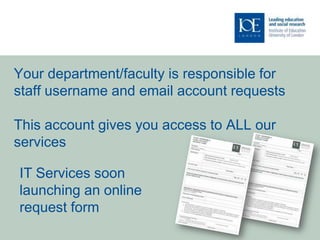
Your department/faculty is responsible for
staff username and email account requests

This account gives you access to ALL our
services

IT Services soon
launching an online
request form
You will be prompted to change your
 password at first logon

 Read guidelines about password
 creation

 Change every 90 days

Name: Colourful Shiny Puzzle Vector Illustration Homepage: http://www.webdesignhot.com/ License: Creative
Commons Attribution 3.0
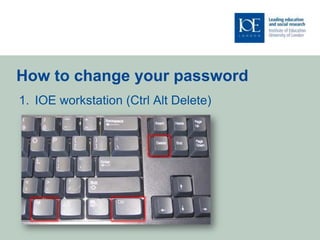
How to change your password
1. IOE workstation (Ctrl Alt Delete)
How to change your password
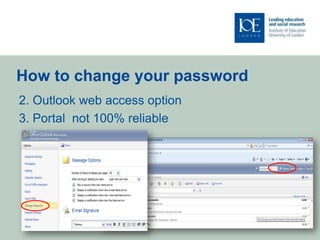
2. Outlook web access option
3. Portal not 100% reliable
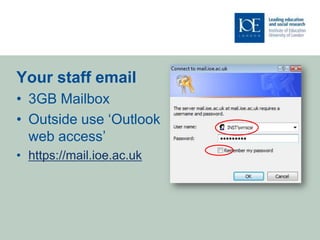
Your staff email
• 3GB Mailbox
• Outside use ‘Outlook
  web access’
• https://mail.ioe.ac.uk
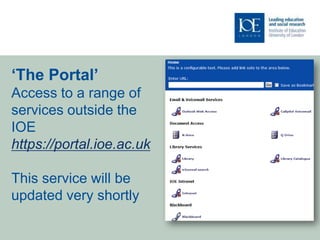
‘The Portal’
Access to a range of
services outside the
IOE
https://portal.ioe.ac.uk

This service will be
updated very shortly
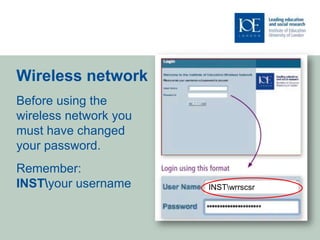
Wireless network
Before using the
wireless network you
must have changed
your password.
Remember:
INSTyour username     INSTwrrscsr
Data handling and back up
‘N’ Personal staff and student data storage 6GB

‘Q’ Shared area for staff

Any staff data deleted from ‘Q’ or ‘N’ and
 reported within two weeks can be restored

‘O’ Shared area for students
Data Protection
Don’t share your username and password

IT Services will never ask for your password

More detailed advice about working with sensitive
 data on our website
http://www.ioe.ac.uk/itservices/ITSpolicy.html
Virtual Learning Environment
To request access:
Blackboard: Email vle@ioe.ac.uk your computer username and the list
of course IDs Example: (IOE_MMATLH_12_2008)

Moodle: Piloted this year and implemented next academic year.

Learning Technology Unit: information and support for the use of
flexible and distance learning technologies across the IOE.
http://www.lkl.ac.uk/ltu
IT training and ICT support for staff
• A range of applications       • Focused support for ICT in
• A choice of learning styles     Initial Teacher Education
• Regular updates and           • Targeted ICT sessions built into
  booking information via         the programme in liaison with
  email                           tutors.
• Tailor made sessions and      • Team taught and optional
  one to one tutorials            sessions
  available                     • Project work with schools and
• Email k.huszcza@ioe.ac.uk       staff development
                                • Email r.wilson@ioe.ac.uk
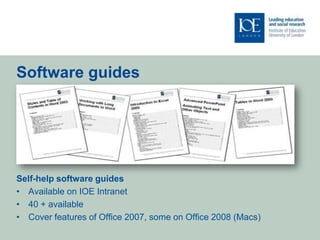
Software guides


Self-help software guides
• Available on IOE Intranet
• 40 + available
• Cover features of Office 2007, some on Office 2008 (Macs)
Media Services and equipment

• A range of media equipment is available
  for loan from the computer helpdesk
• A specialist media service desk is
  located on level 3 Core B
• Email: media.enq@ioe.ac.uk
• Telephone: 020 7612 6696
Getting help

Computer Help Desk in the Library:
Monday - Thursday: 09.00 - 18.00
Friday: 09.00 - 17.00
Saturday: 11.00 - 13.00 & 14.00 - 16.00

Help Line (020 7612 6696):
Do use the help line as your problem could be
                                                Institute of Education
resolved remotely ON THE SPOT 24 hour service   University of London
                                                20 Bedford Way
                                                London WC1H 0AL
Email:
                                                Tel +44 (0)20 7612 6000
ComputerHelpdesk@ioe.ac.uk                      Fax +44 (0)20 7612 6126
VLE@ioe.ac.uk                                   Email info@ioe.ac.uk
                                                Web www.ioe.ac.uk
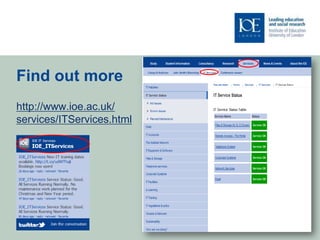
Find out more
http://www.ioe.ac.uk/
services/ITServices.html
Thank You
Email: r.wilson@ioe.ac.uk

ITinduction forstaff2011

  • 1.
    IT Services Getting startedfor new members of staff Name: of the pack: di_thehuntress' photostream on Flickr Homepage: egeezer.net License: creative commons
  • 2.
    Your department/faculty isresponsible for staff username and email account requests This account gives you access to ALL our services IT Services soon launching an online request form
  • 3.
    You will beprompted to change your password at first logon Read guidelines about password creation Change every 90 days Name: Colourful Shiny Puzzle Vector Illustration Homepage: http://www.webdesignhot.com/ License: Creative Commons Attribution 3.0
  • 4.
    How to changeyour password 1. IOE workstation (Ctrl Alt Delete)
  • 5.
    How to changeyour password 2. Outlook web access option 3. Portal not 100% reliable
  • 6.
    Your staff email •3GB Mailbox • Outside use ‘Outlook web access’ • https://mail.ioe.ac.uk
  • 7.
    ‘The Portal’ Access toa range of services outside the IOE https://portal.ioe.ac.uk This service will be updated very shortly
  • 8.
    Wireless network Before usingthe wireless network you must have changed your password. Remember: INSTyour username INSTwrrscsr
  • 9.
    Data handling andback up ‘N’ Personal staff and student data storage 6GB ‘Q’ Shared area for staff Any staff data deleted from ‘Q’ or ‘N’ and reported within two weeks can be restored ‘O’ Shared area for students
  • 10.
    Data Protection Don’t shareyour username and password IT Services will never ask for your password More detailed advice about working with sensitive data on our website http://www.ioe.ac.uk/itservices/ITSpolicy.html
  • 11.
    Virtual Learning Environment Torequest access: Blackboard: Email vle@ioe.ac.uk your computer username and the list of course IDs Example: (IOE_MMATLH_12_2008) Moodle: Piloted this year and implemented next academic year. Learning Technology Unit: information and support for the use of flexible and distance learning technologies across the IOE. http://www.lkl.ac.uk/ltu
  • 12.
    IT training andICT support for staff • A range of applications • Focused support for ICT in • A choice of learning styles Initial Teacher Education • Regular updates and • Targeted ICT sessions built into booking information via the programme in liaison with email tutors. • Tailor made sessions and • Team taught and optional one to one tutorials sessions available • Project work with schools and • Email k.huszcza@ioe.ac.uk staff development • Email r.wilson@ioe.ac.uk
  • 13.
    Software guides Self-help softwareguides • Available on IOE Intranet • 40 + available • Cover features of Office 2007, some on Office 2008 (Macs)
  • 14.
    Media Services andequipment • A range of media equipment is available for loan from the computer helpdesk • A specialist media service desk is located on level 3 Core B • Email: media.enq@ioe.ac.uk • Telephone: 020 7612 6696
  • 15.
    Getting help Computer HelpDesk in the Library: Monday - Thursday: 09.00 - 18.00 Friday: 09.00 - 17.00 Saturday: 11.00 - 13.00 & 14.00 - 16.00 Help Line (020 7612 6696): Do use the help line as your problem could be Institute of Education resolved remotely ON THE SPOT 24 hour service University of London 20 Bedford Way London WC1H 0AL Email: Tel +44 (0)20 7612 6000 ComputerHelpdesk@ioe.ac.uk Fax +44 (0)20 7612 6126 VLE@ioe.ac.uk Email info@ioe.ac.uk Web www.ioe.ac.uk
  • 16.
  • 17.

Editor's Notes

  • #2 Welcome to IT services. We want to help you get the best from our services and keep your IT ducks in a row.
  • #3 Hopefully most of you will now have your staff username and email account. This is the key information for all our services.
  • #4 Do choose you password carefully to meet the Password Ruleson your initial letter from IT services.
  • #5 The simplest way to do this is on an IOE workstation using Control alt delete and follow the usual steps.
  • #6 You can ALSO use Outlook WEB access which has an option to change password also. Changing your password via the portal is not currently 100% reliable, but we are working to improve this.
  • #7 You can access your staff email anywhere remembering to put INST backslash before your username and then your password as usual. We recommend not ticking the ‘remember my password’ for security.
  • #8 The ‘Portal’ is a very useful way to access a range of services when you are outside the IOE. We are currently working to update this very popular service.
  • #9 We know lots of staff prefer to use their laptops but remember before you first do you need to change your password and always add INST backslash before your individual username.
  • #10 All staff and students have a personal storage area know as the ‘N’ drive. Staff have a 6 GB limit. The ‘Q’ drive is where you can share files with other staff and the ‘O’ is where you can share files for students.
  • #12 Before you first use Blackboard you will have to request access via the vle@ioe.ac.uk email. This may well have been done for you. Your Blackboard username and password are the same as your computer account username and password. Next academic year this will be the same for Moodle but currently you will need ask your course administrator for your Moodle access details. We work closely with the Learning Technology Unit who give staff support on the pedagogic aspects of E learning.
  • #13 There are a range of training and ICT support options available to staff for their own professional development and to enhance their teaching with ICT. We work closely with the Learning Technology Unit to provide support for staff.
  • #14 There are a range of excellent software guides for Office applications available
  • #15 We have specialist staff who can give you in depth advice about a range of equipment and services but you can also borrow from the Computer helpdesk in the library.
  • #16 Please ask for help if you need to. We encourage you to phone our Help Line open 24/7 where a support person can often resolve your issue on the spot.
  • #17 Finally you can find out more detailed information about our services and support on the IT services website. Follow the Services and IT services tabs. Follow us on Twitter to get the latest updates.
  • #18 Thank You.Do email me if you want a copy of this presentation but rememberall the information is on our website.