iTOP
COMBODO
Amit Lanjewar (17030241021)
Mugdha Marathe (17030241022)
Rohit Mishra (17030241023)
Moonmoon Mandal (17030241024)
Agenda
• About iTOP
• What iTOP can do
• CMDB Module
• Incident Management Module
• Service Management Module
• Change Management Module
• Demo
About iTOP
• Stands for IT Operational Portal
• Open Source web application for the day to day
operations
• Designed with the ITIL best practices in mind but
does not dictate any specific process.
Using iTop you can
• Document your IT infrastructure and all the relationships
between the various pieces and stakeholders of the
infrastructure (servers, applications, network devices, virtual
machines, contacts, locations…)
• Manage incidents, user requests, planned outages…
• Document IT services and contracts with external providers
including service level agreements
• Export all the information in a manual or scripted manner
• Mass import (manually and using scripts) or
synchronize/federate any data from external systems
iTop Modules
• The basic modules that are included with iTop are :
– Configuration Management
– Incident Management
– Change Management
– Service Management
CMDB module
• This module is related to Configuration Management Data Base :-
• It allows IT operators to describe all items they have under their
control. It provides a logical model of the IT infrastructure by
identifying, controlling, maintaining and verifying the version of all
existing Configuration Items (CIs).
• iTop handles:
• Contacts, Team and Workgroups for Incident and Change tickets
• Locations
• Infrastructure (Desktop, Servers, Network devices, Circuits,
Interfaces, Applications, Patches)
• Groups of CI
Managing Contacts
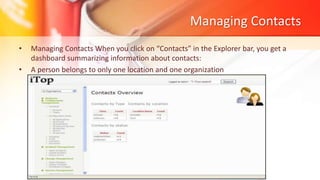
• Managing Contacts When you click on “Contacts” in the Explorer bar, you get a
dashboard summarizing information about contacts:
• A person belongs to only one location and one organization
Managing person
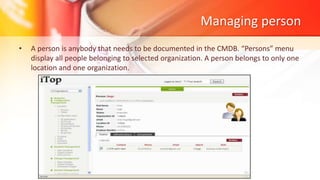
• A person is anybody that needs to be documented in the CMDB. “Persons” menu
display all people belonging to selected organization. A person belongs to only one
location and one organization.
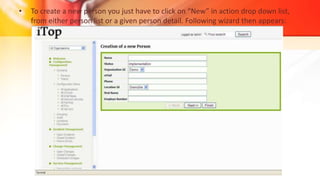
• To create a new person you just have to click on “New” in action drop down list,
from either person list or a given person detail. Following wizard then appears:
Managing team
• “Teams” menu display all teams belonging to selected organization.
Managing Locations
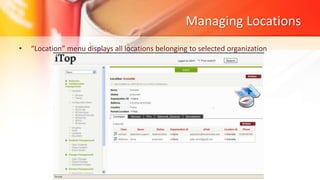
• “Location” menu displays all locations belonging to selected organization
Managing Infrastructures
• An infrastructure represents all hardware or software items installed in your IT
• MANAGING PCs
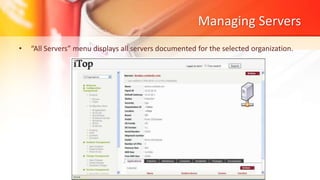
Managing Servers
• “All Servers” menu displays all servers documented for the selected organization.
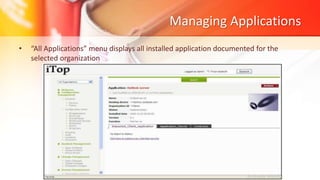
Managing Applications
• “All Applications” menu displays all installed application documented for the
selected organization
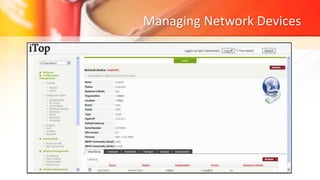
Managing Network Devices
Other sub modules in CMDB
• MANAGING PATCHES
• MANAGING INTERFACE
• MANAGING CIRCUITS
• MANAGING GROUPS
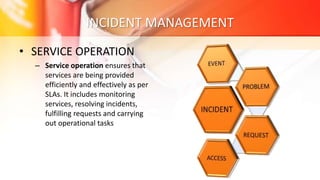
INCIDENT MANAGEMENT
• SERVICE OPERATION
– Service operation ensures that
services are being provided
efficiently and effectively as per
SLAs. It includes monitoring
services, resolving incidents,
fulfilling requests and carrying
out operational tasks
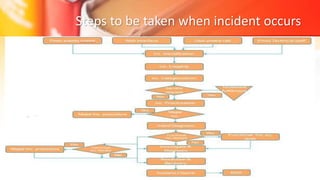
Steps to be taken when incident occurs
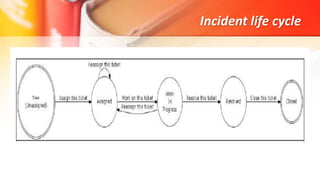
Incident life cycle
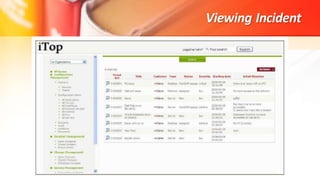
Viewing Incident
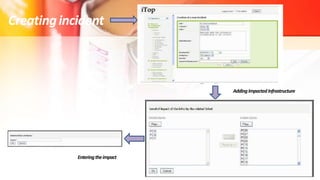
Creatingincident
AddingImpactedInfrastructure
Enteringtheimpact
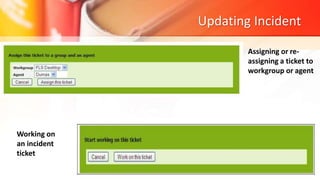
Updating Incident
Assigning or re-
assigning a ticket to
workgroup or agent
Working on
an incident
ticket
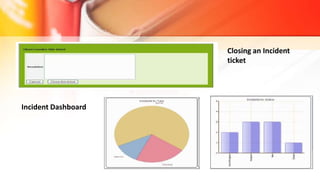
Closing an Incident
ticket
Incident Dashboard
Service Management
• The service management module allows service manager
to deal with the service definition and provider manager
to manage their contract with third party provider.
• It allows documenting all services provided by a given
provider, and which organization is using it.
• You can also document all your contracts with service
providers, which infrastructure are covered, cost of the
service, and contacts managing it.
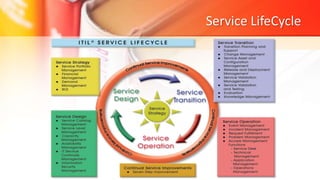
Service LifeCycle
Change Management
• Supports the structured processing of changes using
predefined steps and procedures.
• The change management module allows change
manager, change supervisor and change
implementer to deal with changes occurring in your
IT as described in ITIL best practices.
• It allows those people to define which infrastructure
will be impacted, and who will need to be notified.
• Viewing changes
• Creating a new change
• Updating a change
• Validating a change
• Planning a cha
• Approving a changenge
• Implemeting a change
• Change Dashboard
ITIL - iTop combodo tool

ITIL - iTop combodo tool

  • 1.
    iTOP COMBODO Amit Lanjewar (17030241021) MugdhaMarathe (17030241022) Rohit Mishra (17030241023) Moonmoon Mandal (17030241024)
  • 2.
    Agenda • About iTOP •What iTOP can do • CMDB Module • Incident Management Module • Service Management Module • Change Management Module • Demo
  • 3.
    About iTOP • Standsfor IT Operational Portal • Open Source web application for the day to day operations • Designed with the ITIL best practices in mind but does not dictate any specific process.
  • 4.
    Using iTop youcan • Document your IT infrastructure and all the relationships between the various pieces and stakeholders of the infrastructure (servers, applications, network devices, virtual machines, contacts, locations…) • Manage incidents, user requests, planned outages… • Document IT services and contracts with external providers including service level agreements • Export all the information in a manual or scripted manner • Mass import (manually and using scripts) or synchronize/federate any data from external systems
  • 5.
    iTop Modules • Thebasic modules that are included with iTop are : – Configuration Management – Incident Management – Change Management – Service Management
  • 6.
    CMDB module • Thismodule is related to Configuration Management Data Base :- • It allows IT operators to describe all items they have under their control. It provides a logical model of the IT infrastructure by identifying, controlling, maintaining and verifying the version of all existing Configuration Items (CIs). • iTop handles: • Contacts, Team and Workgroups for Incident and Change tickets • Locations • Infrastructure (Desktop, Servers, Network devices, Circuits, Interfaces, Applications, Patches) • Groups of CI
  • 7.
    Managing Contacts • ManagingContacts When you click on “Contacts” in the Explorer bar, you get a dashboard summarizing information about contacts: • A person belongs to only one location and one organization
  • 8.
    Managing person • Aperson is anybody that needs to be documented in the CMDB. “Persons” menu display all people belonging to selected organization. A person belongs to only one location and one organization.
  • 9.
    • To createa new person you just have to click on “New” in action drop down list, from either person list or a given person detail. Following wizard then appears:
  • 10.
    Managing team • “Teams”menu display all teams belonging to selected organization.
  • 11.
    Managing Locations • “Location”menu displays all locations belonging to selected organization
  • 12.
    Managing Infrastructures • Aninfrastructure represents all hardware or software items installed in your IT • MANAGING PCs
  • 13.
    Managing Servers • “AllServers” menu displays all servers documented for the selected organization.
  • 14.
    Managing Applications • “AllApplications” menu displays all installed application documented for the selected organization
  • 15.
  • 16.
    Other sub modulesin CMDB • MANAGING PATCHES • MANAGING INTERFACE • MANAGING CIRCUITS • MANAGING GROUPS
  • 17.
    INCIDENT MANAGEMENT • SERVICEOPERATION – Service operation ensures that services are being provided efficiently and effectively as per SLAs. It includes monitoring services, resolving incidents, fulfilling requests and carrying out operational tasks
  • 18.
    Steps to betaken when incident occurs
  • 19.
  • 20.
  • 21.
  • 22.
    Updating Incident Assigning orre- assigning a ticket to workgroup or agent Working on an incident ticket
  • 23.
  • 24.
    Service Management • Theservice management module allows service manager to deal with the service definition and provider manager to manage their contract with third party provider. • It allows documenting all services provided by a given provider, and which organization is using it. • You can also document all your contracts with service providers, which infrastructure are covered, cost of the service, and contacts managing it.
  • 25.
  • 26.
    Change Management • Supportsthe structured processing of changes using predefined steps and procedures. • The change management module allows change manager, change supervisor and change implementer to deal with changes occurring in your IT as described in ITIL best practices. • It allows those people to define which infrastructure will be impacted, and who will need to be notified.
  • 27.
    • Viewing changes •Creating a new change • Updating a change • Validating a change • Planning a cha • Approving a changenge • Implemeting a change • Change Dashboard

Editor's Notes

  • #27 The change management module allows change manager, change supervisor and change implementer to deal with changes occurring in your IT as described in ITIL best practices. It allows those people to define which infrastructure will be impacted, and who will need to be notified. It also document outages in advance to inform end users.