


Intro to Building Mobile
Apps with Xamarin
HEATHER DOWNING
Heather Downing
-Technical focus in .Net, mobile and JS
-Experience working with Fortune 500
companies
-Speaker and entrepreneur
-Horseback Archery Competitor
-Tolkien Enthusiast
-Avid Star Trek Fan
@quorralyne
DigitalLightCycle.Blogspot.com
quorralyne@gmail.com
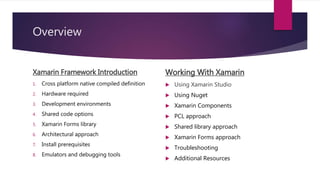
Overview
Xamarin Framework Introduction
1. Cross platform native compiled definition
2. Hardware required
3. Development environments
4. Shared code options
5. Xamarin Forms library
6. Architectural approach
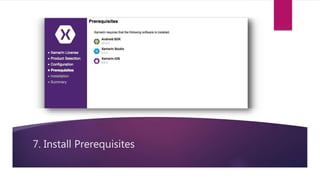
7. Install prerequisites
8. Emulators and debugging tools
Working With Xamarin
 Using Xamarin Studio
 Using Nuget
 Xamarin Components
 PCL approach
 Shared library approach
 Xamarin Forms approach
 Troubleshooting
 Additional Resources
Xamarin Framework Introduction
Session Overview
“
”
Xamarin is unique in this space by offering a single
language – C#, class library, and runtime that works
across all three mobile platforms of iOS, Android,
and Windows Phone....while still compiling native
(non-interpreted) applications that are performant
enough even for demanding games.
HTTP://DEVELOPER.XAMARIN.COM
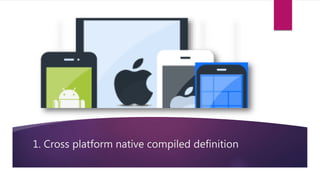
1. Cross platform native compiled definition
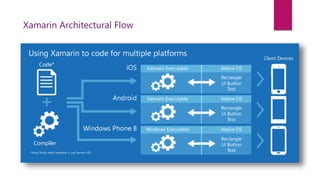
Xamarin Architectural Flow
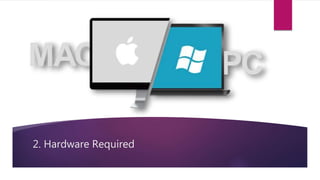
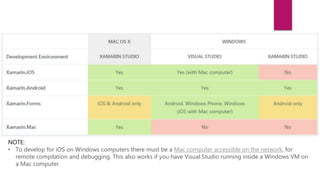
2. Hardware Required
NOTE:
• To develop for iOS on Windows computers there must be a Mac computer accessible on the network, for
remote compilation and debugging. This also works if you have Visual Studio running inside a Windows VM on
a Mac computer.
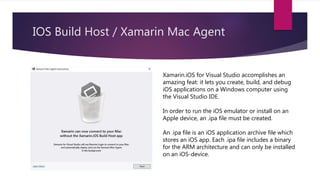
IOS Build Host / Xamarin Mac Agent
Xamarin.iOS for Visual Studio accomplishes an
amazing feat: it lets you create, build, and debug
iOS applications on a Windows computer using
the Visual Studio IDE.
In order to run the iOS emulator or install on an
Apple device, an .ipa file must be created.
An .ipa file is an iOS application archive file which
stores an iOS app. Each .ipa file includes a binary
for the ARM architecture and can only be installed
on an iOS-device.
3. Development Environments
Xamarin Studio
Xamarin Studio is a modern, sophisticated IDE with many features for creating iOS,
Mac and Android applications. It includes a rich editor, debugging, native platform
integration with iOS, Mac and Android, and integrated source control to name just of
few of its many features.
-Available to all subscription levels
-Can be used on a Mac or a PC
Visual Studio + Xamarin Plugin
Developers familiar with Visual Studio can leverage existing skills and increase
productivity by developing for Xamarin with Visual Studio. Visual Studio support also
means that applications sharing code between iOS, Android, and Windows can be
developed in the same IDE.
-Available to Business subscription level and above
-Can be used ONLY on PC
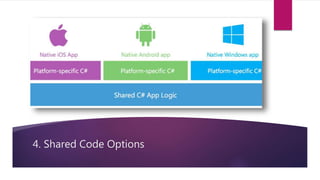
4. Shared Code Options
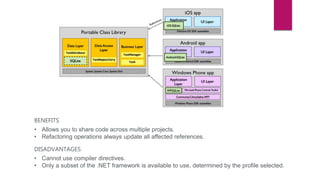
Portable Class Library (PCL)
Portable Class Libraries allow you to write code and produce libraries that
can be shared across multiple platforms including Xamarin.iOS,
Xamarin.Android and Windows Phone. Portable Class Libraries (PCLs) can be
created in both Xamarin Studio and Visual Studio, and then referenced in
each platform-specific project to allow code to be easily shared.
BENEFITS
• Allows you to share code across multiple projects.
• Refactoring operations always update all affected references.
DISADVANTAGES
• Cannot use compiler directives.
• Only a subset of the .NET framework is available to use, determined by the profile selected.
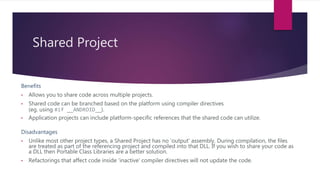
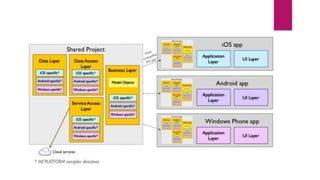
Shared Project
Benefits
• Allows you to share code across multiple projects.
• Shared code can be branched based on the platform using compiler directives
(eg. using #if __ANDROID__).
• Application projects can include platform-specific references that the shared code can utilize.
Disadvantages
• Unlike most other project types, a Shared Project has no 'output' assembly. During compilation, the files
are treated as part of the referencing project and compiled into that DLL. If you wish to share your code as
a DLL then Portable Class Libraries are a better solution.
• Refactorings that affect code inside 'inactive' compiler directives will not update the code.
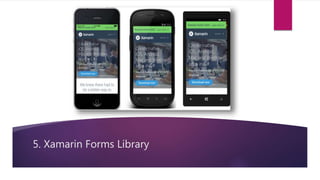
5. Xamarin Forms Library
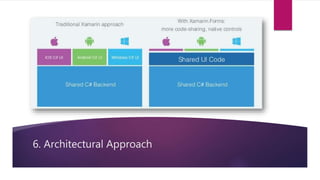
6. Architectural Approach
7. Install Prerequisites
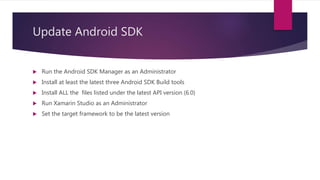
Update Android SDK
 Run the Android SDK Manager as an Administrator
 Install at least the latest three Android SDK Build tools
 Install ALL the files listed under the latest API version (6.0)
 Run Xamarin Studio as an Administrator
 Set the target framework to be the latest version
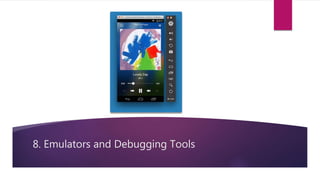
8. Emulators and Debugging Tools
Install Xamarin Android Player
The Xamarin Android Player relies on virtualization and OpenGL. This means that it cannot run inside
virtual machine instances nor can it work over Remote Desktop or VNC.
For OSX, Windows 7, Windows 8, and Windows 8.1, the Xamarin Android Player requires VirtualBox
4.3.18 or higher, which will be installed or updated as necessary. For Windows 10, you must upgrade
VirtualBox to version 5.0.2 or higher.
https://developer.xamarin.com/guides/android/getting_started/installation/android-player/
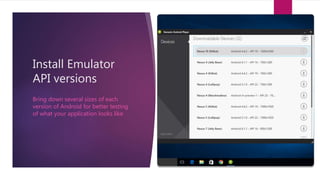
Install Emulator
API versions
Bring down several sizes of each
version of Android for better testing
of what your application looks like
BREAK
Intro to Building Mobile Apps with Xamarin
Working with Xamarin
Live Coding Session
Using Xamarin Studio
Additional Resources
Xamarin Overview: https://developer.xamarin.com/guides/cross-
platform/application_fundamentals/building_cross_platform_applications/part_1_-
_understanding_the_xamarin_mobile_platform/
System Requirements: https://developer.xamarin.com/guides/cross-platform/getting_started/requirements/
Xamarin PCL vs Shared Project Article: http://hotkrossbits.com/2015/05/03/xamarin-forms-pcl-vs-shared-
project/
Xamarin Code Sharing Options: https://docs.xamarin.com/guides/cross-
platform/application_fundamentals/building_cross_platform_applications/sharing_code_options/
Using Xamarin Forms: https://developer.xamarin.com/guides/xamarin-forms/web-services/consuming/rest/
Xamarin Forms Dependencies for Android: http://screencast.com/t/U5FBj6KlH
Xamarin Android Player Installation:
https://developer.xamarin.com/guides/android/getting_started/installation/android-player/
Thank You
QUORRALYNE@GMAIL.COM
@QUORRALYNE

Intro to Building Mobile Apps with Xamarin

  • 1.
    Intro to BuildingMobile Apps with Xamarin HEATHER DOWNING
  • 2.
    Heather Downing -Technical focusin .Net, mobile and JS -Experience working with Fortune 500 companies -Speaker and entrepreneur -Horseback Archery Competitor -Tolkien Enthusiast -Avid Star Trek Fan @quorralyne DigitalLightCycle.Blogspot.com quorralyne@gmail.com
  • 3.
    Overview Xamarin Framework Introduction 1.Cross platform native compiled definition 2. Hardware required 3. Development environments 4. Shared code options 5. Xamarin Forms library 6. Architectural approach 7. Install prerequisites 8. Emulators and debugging tools Working With Xamarin  Using Xamarin Studio  Using Nuget  Xamarin Components  PCL approach  Shared library approach  Xamarin Forms approach  Troubleshooting  Additional Resources
  • 4.
  • 5.
    “ ” Xamarin is uniquein this space by offering a single language – C#, class library, and runtime that works across all three mobile platforms of iOS, Android, and Windows Phone....while still compiling native (non-interpreted) applications that are performant enough even for demanding games. HTTP://DEVELOPER.XAMARIN.COM
  • 6.
    1. Cross platformnative compiled definition
  • 7.
  • 8.
  • 9.
    NOTE: • To developfor iOS on Windows computers there must be a Mac computer accessible on the network, for remote compilation and debugging. This also works if you have Visual Studio running inside a Windows VM on a Mac computer.
  • 10.
    IOS Build Host/ Xamarin Mac Agent Xamarin.iOS for Visual Studio accomplishes an amazing feat: it lets you create, build, and debug iOS applications on a Windows computer using the Visual Studio IDE. In order to run the iOS emulator or install on an Apple device, an .ipa file must be created. An .ipa file is an iOS application archive file which stores an iOS app. Each .ipa file includes a binary for the ARM architecture and can only be installed on an iOS-device.
  • 11.
  • 12.
    Xamarin Studio Xamarin Studiois a modern, sophisticated IDE with many features for creating iOS, Mac and Android applications. It includes a rich editor, debugging, native platform integration with iOS, Mac and Android, and integrated source control to name just of few of its many features. -Available to all subscription levels -Can be used on a Mac or a PC
  • 13.
    Visual Studio +Xamarin Plugin Developers familiar with Visual Studio can leverage existing skills and increase productivity by developing for Xamarin with Visual Studio. Visual Studio support also means that applications sharing code between iOS, Android, and Windows can be developed in the same IDE. -Available to Business subscription level and above -Can be used ONLY on PC
  • 14.
  • 15.
    Portable Class Library(PCL) Portable Class Libraries allow you to write code and produce libraries that can be shared across multiple platforms including Xamarin.iOS, Xamarin.Android and Windows Phone. Portable Class Libraries (PCLs) can be created in both Xamarin Studio and Visual Studio, and then referenced in each platform-specific project to allow code to be easily shared.
  • 16.
    BENEFITS • Allows youto share code across multiple projects. • Refactoring operations always update all affected references. DISADVANTAGES • Cannot use compiler directives. • Only a subset of the .NET framework is available to use, determined by the profile selected.
  • 17.
    Shared Project Benefits • Allowsyou to share code across multiple projects. • Shared code can be branched based on the platform using compiler directives (eg. using #if __ANDROID__). • Application projects can include platform-specific references that the shared code can utilize. Disadvantages • Unlike most other project types, a Shared Project has no 'output' assembly. During compilation, the files are treated as part of the referencing project and compiled into that DLL. If you wish to share your code as a DLL then Portable Class Libraries are a better solution. • Refactorings that affect code inside 'inactive' compiler directives will not update the code.
  • 19.
  • 20.
  • 21.
  • 22.
    Update Android SDK Run the Android SDK Manager as an Administrator  Install at least the latest three Android SDK Build tools  Install ALL the files listed under the latest API version (6.0)  Run Xamarin Studio as an Administrator  Set the target framework to be the latest version
  • 23.
    8. Emulators andDebugging Tools
  • 24.
    Install Xamarin AndroidPlayer The Xamarin Android Player relies on virtualization and OpenGL. This means that it cannot run inside virtual machine instances nor can it work over Remote Desktop or VNC. For OSX, Windows 7, Windows 8, and Windows 8.1, the Xamarin Android Player requires VirtualBox 4.3.18 or higher, which will be installed or updated as necessary. For Windows 10, you must upgrade VirtualBox to version 5.0.2 or higher. https://developer.xamarin.com/guides/android/getting_started/installation/android-player/
  • 25.
    Install Emulator API versions Bringdown several sizes of each version of Android for better testing of what your application looks like
  • 26.
    BREAK Intro to BuildingMobile Apps with Xamarin
  • 27.
  • 28.
  • 29.
    Additional Resources Xamarin Overview:https://developer.xamarin.com/guides/cross- platform/application_fundamentals/building_cross_platform_applications/part_1_- _understanding_the_xamarin_mobile_platform/ System Requirements: https://developer.xamarin.com/guides/cross-platform/getting_started/requirements/ Xamarin PCL vs Shared Project Article: http://hotkrossbits.com/2015/05/03/xamarin-forms-pcl-vs-shared- project/ Xamarin Code Sharing Options: https://docs.xamarin.com/guides/cross- platform/application_fundamentals/building_cross_platform_applications/sharing_code_options/ Using Xamarin Forms: https://developer.xamarin.com/guides/xamarin-forms/web-services/consuming/rest/ Xamarin Forms Dependencies for Android: http://screencast.com/t/U5FBj6KlH Xamarin Android Player Installation: https://developer.xamarin.com/guides/android/getting_started/installation/android-player/
  • 30.