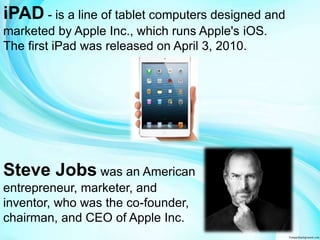
iPAD - is a line of tablet computers designed and 
marketed by Apple Inc., which runs Apple's iOS. 
The first iPad was released on April 3, 2010. 
Steve Jobs was an American 
entrepreneur, marketer, and 
inventor, who was the co-founder, 
chairman, and CEO of Apple Inc.
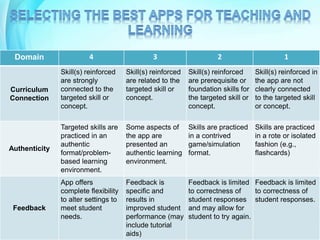
Domain 4 3 2 1 
Curriculum 
Connection 
Skill(s) reinforced 
are strongly 
connected to the 
targeted skill or 
concept. 
Skill(s) reinforced 
are related to the 
targeted skill or 
concept. 
Skill(s) reinforced 
are prerequisite or 
foundation skills for 
the targeted skill or 
concept. 
Skill(s) reinforced in 
the app are not 
clearly connected 
to the targeted skill 
or concept. 
Authenticity 
Targeted skills are 
practiced in an 
authentic 
format/problem-based 
learning 
environment. 
Some aspects of 
the app are 
presented an 
authentic learning 
environment. 
Skills are practiced 
in a contrived 
game/simulation 
format. 
Skills are practiced 
in a rote or isolated 
fashion (e.g., 
flashcards) 
Feedback 
App offers 
complete flexibility 
to alter settings to 
meet student 
needs. 
Feedback is 
specific and 
results in 
improved student 
performance (may 
include tutorial 
aids) 
Feedback is limited 
to correctness of 
student responses 
and may allow for 
student to try again. 
Feedback is limited 
to correctness of 
student responses.
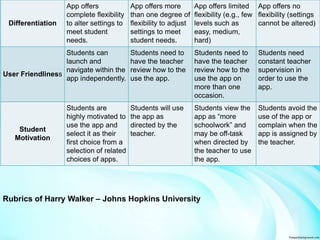
Differentiation 
App offers 
complete flexibility 
to alter settings to 
meet student 
needs. 
App offers more 
than one degree of 
flexibility to adjust 
settings to meet 
student needs. 
App offers limited 
flexibility (e.g., few 
levels such as 
easy, medium, 
hard) 
App offers no 
flexibility (settings 
cannot be altered) 
User Friendliness 
Students can 
launch and 
navigate within the 
app independently. 
Students need to 
have the teacher 
review how to the 
use the app. 
Students need to 
have the teacher 
review how to the 
use the app on 
more than one 
occasion. 
Students need 
constant teacher 
supervision in 
order to use the 
app. 
Student 
Motivation 
Students are 
highly motivated to 
use the app and 
select it as their 
first choice from a 
selection of related 
choices of apps. 
Students will use 
the app as 
directed by the 
teacher. 
Students view the 
app as “more 
schoolwork” and 
may be off-task 
when directed by 
the teacher to use 
the app. 
Students avoid the 
use of the app or 
complain when the 
app is assigned by 
the teacher. 
Rubrics of Harry Walker – Johns Hopkins University
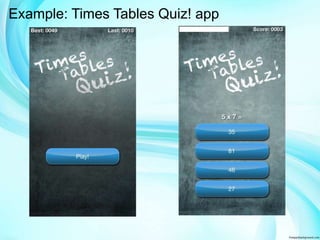
Example: Times Tables Quiz! app
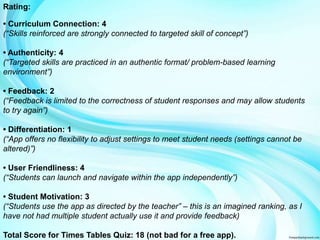
Rating: 
• Curriculum Connection: 4 
(“Skills reinforced are strongly connected to targeted skill of concept”) 
• Authenticity: 4 
(“Targeted skills are practiced in an authentic format/ problem-based learning 
environment”) 
• Feedback: 2 
(“Feedback is limited to the correctness of student responses and may allow students 
to try again”) 
• Differentiation: 1 
(“App offers no flexibility to adjust settings to meet student needs (settings cannot be 
altered)”) 
• User Friendliness: 4 
(“Students can launch and navigate within the app independently”) 
• Student Motivation: 3 
(“Students use the app as directed by the teacher” – this is an imagined ranking, as I 
have not had multiple student actually use it and provide feedback) 
Total Score for Times Tables Quiz: 18 (not bad for a free app).
Wrap Up 
This is an excellent tool for examining different 
software applications for student use in general, not 
just for the iPad – but for any tablet or other computing 
device. This logical, methodical approach can enable a 
teacher or a group of teachers to bring an informed 
perspective to selecting apps for student use. By 
having a number of teachers use different apps and 
then use this rubric to assess their applicability and 
rank them, schools can bring efficiency and uniformity 
to app selection and teaching.
Simon Thomas of 9ine Consulting reached 
out to share this exciting report. 9ine 
Consulting worked with NAACE 
(a.k.a. “the ICT Association”) to produce this 
study. The study looks at the use of iPads at 
the Longfield Academy, where a large scale 1 
to 1 iPad program was implemented.
Findings & Facts 
The report’s Executive Summary concludes, “The outcomes at 
Longfield clearly demonstrate the value of the iPad as an 
educational tool”. Among the key findings noted in the 
Executive Summary: 
• The overwhelming majority of teachers regularly use the 
iPads in their teaching 
• There is a high demand from the students for iPad use to be 
extended further 
• Teachers have identified significant benefits for their 
workload and have also identified cost savings 
• Students are more motivated when using iPads 
• The quality and standard of pupil work and progress is rising 
• Appropriate use of Apps aids learning
Students Want More 
Overwhelmingly, students wanted to make more use of their 
iPads and indicated a variety of activities that they felt should 
be further incorporated into their academic programs, 
including: 
• Photography editing and animations 
• Making videos/movies 
• Word games to help teach spelling 
• Use of the iPad in place of pen and paper 
• More writing assignments on the iPad 
• Taking tests on the tablet 
• Replacing text books with ebooks 
• Designing games 
• More science Apps
Conclusions 
The study report concluded that there was a “significant and 
very positive impact on learning and teaching which, in time, 
should be reflected in achievement and attainment, thanks to 
both pedagogical changes and new ways of learning 
engendered by the ‘any time anywhere’ access to information 
and learning tools.”
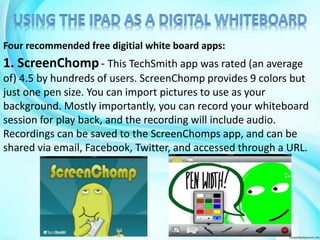
Four recommended free digitial white board apps: 
1. ScreenChomp- This TechSmith app was rated (an average 
of) 4.5 by hundreds of users. ScreenChomp provides 9 colors but 
just one pen size. You can import pictures to use as your 
background. Mostly importantly, you can record your whiteboard 
session for play back, and the recording will include audio. 
Recordings can be saved to the ScreenChomps app, and can be 
shared via email, Facebook, Twitter, and accessed through a URL.
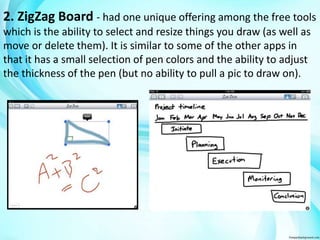
2. ZigZag Board - had one unique offering among the free tools 
which is the ability to select and resize things you draw (as well as 
move or delete them). It is similar to some of the other apps in 
that it has a small selection of pen colors and the ability to adjust 
the thickness of the pen (but no ability to pull a pic to draw on).
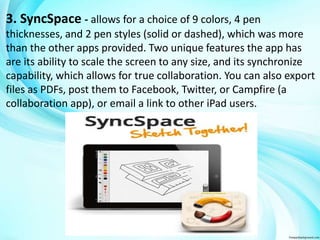
3. SyncSpace - allows for a choice of 9 colors, 4 pen 
thicknesses, and 2 pen styles (solid or dashed), which was more 
than the other apps provided. Two unique features the app has 
are its ability to scale the screen to any size, and its synchronize 
capability, which allows for true collaboration. You can also export 
files as PDFs, post them to Facebook, Twitter, or Campfire (a 
collaboration app), or email a link to other iPad users.
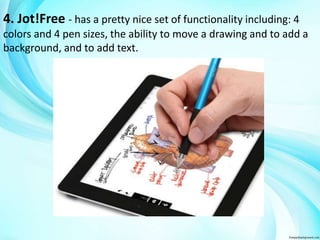
4. Jot!Free - has a pretty nice set of functionality including: 4 
colors and 4 pen sizes, the ability to move a drawing and to add a 
background, and to add text.
Free Apps: 
1. Evernote - allows you to easily maintain sets of notes 
and access them from just about any device, along with 
additional functionality. 
2. Dropbox - allows you to synch files between multiple 
devices so you can easily get to them regardless of which 
device you’re on, and provides 2GB of storage for free. 
3. Neu.Notes - Take hand written notes and drawing on 
your iPad with great free app for sketching, note taking, mind 
mapping and more.
4. Screen Chomp - provides 9 colors but just one pen 
size. You can import pictures to use as your background. 
Mostly importantly, you can record your whiteboard session 
for play back, and the recording will include audio. Recordings 
can be saved to the ScreenChomps app, and can be shared via 
email, Facebook, Twitter, and accessed through a URL. 
5. TED Videos - Access TED Talks here, “talks from some 
of the world’s most fascinating people”. 
6. EduCreations - Educreations turns your iPad into a 
recordable whiteboard. 
7. iBooks - Apple’s electronic books app is included with 
iOS 5 ahich you can open a PDF in iBooks once you have it 
open on the iPad and it will be saved there until you delete it.
8. Skitch - Mark up photos, screenshots, maps, and 
webpages then share them with anyone you like. 
9. Twitter - The insanely popular microblogging 
platform. 
10. Zite - is a free personalized magazine for your iPad 
that automatically learns what you like and gets smarter 
every time you use it. 
11. Science360 - provides easy access to engaging 
science and engineering images and video from around the 
globe and a news feed featuring breaking news from NSF-funded 
institutions.
Paid Apps: 
12. Alge-Bingo - Students can develop their algebraic 
equation solving skills through playing a Bingo game. Created 
by a high school math teacher with over 25 years of 
experience in the classroom. 
13. SplashTop - A very popular remote desktop app that 
let’s you access your desktop PCs or macs and run the apps 
on them. 
14. Explain Everything - This iPad presentation tool is 
easy-to-use, letting you annotate, animate, and narrate 
explanations and presentations. 
15. NoteTaker HD - Capture and manage handwritten 
notes and diagrams.
1. Apple’s Education Resources for the iPad (http://www.apple.com/education/apps/ 
& http://www.apple.com/education/ipad/) 
2. The “Apps in Education” Blog (http://appsineducation.blogspot.com/) 
3. iPadCurriculum.com (http://www.ipadcurriculum.com/) 
4. iPadinSchools.com (http://www.ipadinschools.com/) 
5. The “iPads in Education” Social Network (ipadeducators.ning.com) 
6. The “iPads in Education” Scoop It Page (http://www.scoop.it/t/ipads-in-education) 
7. iPadagogy YouTube Channel (http://www.youtube.com/user/iPadagogy/) 
8. “iPad for Education and Training” LinkedIn Group (www.linkedin.com/groups/IPAD-Education- 
Training-2713512)
Thank You for Listening… 
“A person who doesn’t value EDUCATION 
is a person who doesn’t value LIFE”

Ipads on Education

  • 2.
    iPAD - isa line of tablet computers designed and marketed by Apple Inc., which runs Apple's iOS. The first iPad was released on April 3, 2010. Steve Jobs was an American entrepreneur, marketer, and inventor, who was the co-founder, chairman, and CEO of Apple Inc.
  • 3.
    Domain 4 32 1 Curriculum Connection Skill(s) reinforced are strongly connected to the targeted skill or concept. Skill(s) reinforced are related to the targeted skill or concept. Skill(s) reinforced are prerequisite or foundation skills for the targeted skill or concept. Skill(s) reinforced in the app are not clearly connected to the targeted skill or concept. Authenticity Targeted skills are practiced in an authentic format/problem-based learning environment. Some aspects of the app are presented an authentic learning environment. Skills are practiced in a contrived game/simulation format. Skills are practiced in a rote or isolated fashion (e.g., flashcards) Feedback App offers complete flexibility to alter settings to meet student needs. Feedback is specific and results in improved student performance (may include tutorial aids) Feedback is limited to correctness of student responses and may allow for student to try again. Feedback is limited to correctness of student responses.
  • 4.
    Differentiation App offers complete flexibility to alter settings to meet student needs. App offers more than one degree of flexibility to adjust settings to meet student needs. App offers limited flexibility (e.g., few levels such as easy, medium, hard) App offers no flexibility (settings cannot be altered) User Friendliness Students can launch and navigate within the app independently. Students need to have the teacher review how to the use the app. Students need to have the teacher review how to the use the app on more than one occasion. Students need constant teacher supervision in order to use the app. Student Motivation Students are highly motivated to use the app and select it as their first choice from a selection of related choices of apps. Students will use the app as directed by the teacher. Students view the app as “more schoolwork” and may be off-task when directed by the teacher to use the app. Students avoid the use of the app or complain when the app is assigned by the teacher. Rubrics of Harry Walker – Johns Hopkins University
  • 5.
  • 6.
    Rating: • CurriculumConnection: 4 (“Skills reinforced are strongly connected to targeted skill of concept”) • Authenticity: 4 (“Targeted skills are practiced in an authentic format/ problem-based learning environment”) • Feedback: 2 (“Feedback is limited to the correctness of student responses and may allow students to try again”) • Differentiation: 1 (“App offers no flexibility to adjust settings to meet student needs (settings cannot be altered)”) • User Friendliness: 4 (“Students can launch and navigate within the app independently”) • Student Motivation: 3 (“Students use the app as directed by the teacher” – this is an imagined ranking, as I have not had multiple student actually use it and provide feedback) Total Score for Times Tables Quiz: 18 (not bad for a free app).
  • 7.
    Wrap Up Thisis an excellent tool for examining different software applications for student use in general, not just for the iPad – but for any tablet or other computing device. This logical, methodical approach can enable a teacher or a group of teachers to bring an informed perspective to selecting apps for student use. By having a number of teachers use different apps and then use this rubric to assess their applicability and rank them, schools can bring efficiency and uniformity to app selection and teaching.
  • 8.
    Simon Thomas of9ine Consulting reached out to share this exciting report. 9ine Consulting worked with NAACE (a.k.a. “the ICT Association”) to produce this study. The study looks at the use of iPads at the Longfield Academy, where a large scale 1 to 1 iPad program was implemented.
  • 9.
    Findings & Facts The report’s Executive Summary concludes, “The outcomes at Longfield clearly demonstrate the value of the iPad as an educational tool”. Among the key findings noted in the Executive Summary: • The overwhelming majority of teachers regularly use the iPads in their teaching • There is a high demand from the students for iPad use to be extended further • Teachers have identified significant benefits for their workload and have also identified cost savings • Students are more motivated when using iPads • The quality and standard of pupil work and progress is rising • Appropriate use of Apps aids learning
  • 10.
    Students Want More Overwhelmingly, students wanted to make more use of their iPads and indicated a variety of activities that they felt should be further incorporated into their academic programs, including: • Photography editing and animations • Making videos/movies • Word games to help teach spelling • Use of the iPad in place of pen and paper • More writing assignments on the iPad • Taking tests on the tablet • Replacing text books with ebooks • Designing games • More science Apps
  • 11.
    Conclusions The studyreport concluded that there was a “significant and very positive impact on learning and teaching which, in time, should be reflected in achievement and attainment, thanks to both pedagogical changes and new ways of learning engendered by the ‘any time anywhere’ access to information and learning tools.”
  • 12.
    Four recommended freedigitial white board apps: 1. ScreenChomp- This TechSmith app was rated (an average of) 4.5 by hundreds of users. ScreenChomp provides 9 colors but just one pen size. You can import pictures to use as your background. Mostly importantly, you can record your whiteboard session for play back, and the recording will include audio. Recordings can be saved to the ScreenChomps app, and can be shared via email, Facebook, Twitter, and accessed through a URL.
  • 13.
    2. ZigZag Board- had one unique offering among the free tools which is the ability to select and resize things you draw (as well as move or delete them). It is similar to some of the other apps in that it has a small selection of pen colors and the ability to adjust the thickness of the pen (but no ability to pull a pic to draw on).
  • 14.
    3. SyncSpace -allows for a choice of 9 colors, 4 pen thicknesses, and 2 pen styles (solid or dashed), which was more than the other apps provided. Two unique features the app has are its ability to scale the screen to any size, and its synchronize capability, which allows for true collaboration. You can also export files as PDFs, post them to Facebook, Twitter, or Campfire (a collaboration app), or email a link to other iPad users.
  • 15.
    4. Jot!Free -has a pretty nice set of functionality including: 4 colors and 4 pen sizes, the ability to move a drawing and to add a background, and to add text.
  • 16.
    Free Apps: 1.Evernote - allows you to easily maintain sets of notes and access them from just about any device, along with additional functionality. 2. Dropbox - allows you to synch files between multiple devices so you can easily get to them regardless of which device you’re on, and provides 2GB of storage for free. 3. Neu.Notes - Take hand written notes and drawing on your iPad with great free app for sketching, note taking, mind mapping and more.
  • 17.
    4. Screen Chomp- provides 9 colors but just one pen size. You can import pictures to use as your background. Mostly importantly, you can record your whiteboard session for play back, and the recording will include audio. Recordings can be saved to the ScreenChomps app, and can be shared via email, Facebook, Twitter, and accessed through a URL. 5. TED Videos - Access TED Talks here, “talks from some of the world’s most fascinating people”. 6. EduCreations - Educreations turns your iPad into a recordable whiteboard. 7. iBooks - Apple’s electronic books app is included with iOS 5 ahich you can open a PDF in iBooks once you have it open on the iPad and it will be saved there until you delete it.
  • 18.
    8. Skitch -Mark up photos, screenshots, maps, and webpages then share them with anyone you like. 9. Twitter - The insanely popular microblogging platform. 10. Zite - is a free personalized magazine for your iPad that automatically learns what you like and gets smarter every time you use it. 11. Science360 - provides easy access to engaging science and engineering images and video from around the globe and a news feed featuring breaking news from NSF-funded institutions.
  • 19.
    Paid Apps: 12.Alge-Bingo - Students can develop their algebraic equation solving skills through playing a Bingo game. Created by a high school math teacher with over 25 years of experience in the classroom. 13. SplashTop - A very popular remote desktop app that let’s you access your desktop PCs or macs and run the apps on them. 14. Explain Everything - This iPad presentation tool is easy-to-use, letting you annotate, animate, and narrate explanations and presentations. 15. NoteTaker HD - Capture and manage handwritten notes and diagrams.
  • 20.
    1. Apple’s EducationResources for the iPad (http://www.apple.com/education/apps/ & http://www.apple.com/education/ipad/) 2. The “Apps in Education” Blog (http://appsineducation.blogspot.com/) 3. iPadCurriculum.com (http://www.ipadcurriculum.com/) 4. iPadinSchools.com (http://www.ipadinschools.com/) 5. The “iPads in Education” Social Network (ipadeducators.ning.com) 6. The “iPads in Education” Scoop It Page (http://www.scoop.it/t/ipads-in-education) 7. iPadagogy YouTube Channel (http://www.youtube.com/user/iPadagogy/) 8. “iPad for Education and Training” LinkedIn Group (www.linkedin.com/groups/IPAD-Education- Training-2713512)
  • 21.
    Thank You forListening… “A person who doesn’t value EDUCATION is a person who doesn’t value LIFE”