


Copyright © 2014, Oracle and/or its affiliates. All rights reserved. Insert Information Protection Policy Classification from Slide 121
Enterprise Manager 12c and
Keys to the Castle
Kellyn Pot’Vin
Consulting Member of Technical Team
Strategic Customer Program
Copyright © 2014, Oracle and/or its affiliates. All rights reserved. Insert Information Protection Policy Classification from Slide 123
The following is intended to outline our general product
direction. It is intended for information purposes only, and
may not be incorporated into any contract. It is not a
commitment to deliver any material, code, or functionality,
and should not be relied upon in making purchasing
decisions. The development, release, and timing of any
features or functionality described for Oracle’s products
remains at the sole discretion of Oracle.
Copyright © 2014, Oracle and/or its affiliates. All rights reserved. Insert Information Protection Policy Classification from Slide 124
The Importance of Securing The EM12c
Environment
 IT environments are now more complex and dynamic.
 Financial implications and loss of goodwill coupled with stringent
regulatory requirements.
 Challenges due to introduction of distributed system management
applications.
What best practices are in place for system management products?
Copyright © 2014, Oracle and/or its affiliates. All rights reserved. Insert Information Protection Policy Classification from Slide 125
Focus on Security Groups, Roles and Auditing
 Creating significant roles and then grant roles to users instead of
granting privileges.
 Take advantage of privilege propagation groups and systems to deter
from resource demands
 Treat the Repository as you would any other database. Use common
sense and standard security best practices.
 Enable auditing to retain information about actions in the repository
and export to an external directory to retain limited information.
5
Copyright © 2014, Oracle and/or its affiliates. All rights reserved. Insert Information Protection Policy Classification from Slide 126
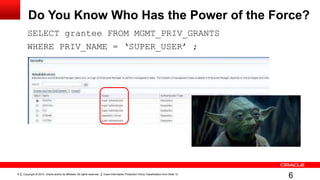
Do You Know Who Has the Power of the Force?
SELECT grantee FROM MGMT_PRIV_GRANTS
WHERE PRIV_NAME = ‘SUPER_USER’ ;
6
Copyright © 2014, Oracle and/or its affiliates. All rights reserved. Insert Information Protection Policy Classification from Slide 127
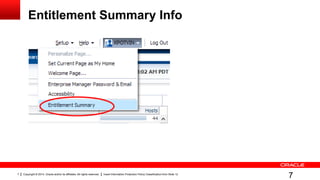
Entitlement Summary Info
7
Copyright © 2014, Oracle and/or its affiliates. All rights reserved. Insert Information Protection Policy Classification from Slide 128
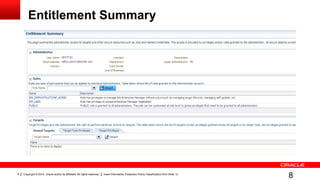
Entitlement Summary
8
Copyright © 2014, Oracle and/or its affiliates. All rights reserved. Insert Information Protection Policy Classification from Slide 129
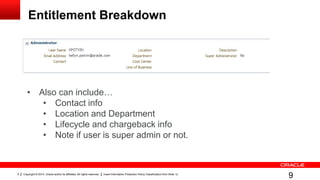
Entitlement Breakdown
9
• Also can include…
• Contact info
• Location and Department
• Lifecycle and chargeback info
• Note if user is super admin or not.
Copyright © 2014, Oracle and/or its affiliates. All rights reserved. Insert Information Protection Policy Classification from Slide 1210
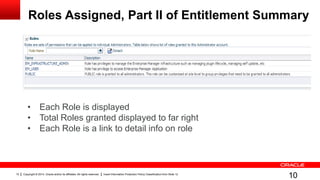
Roles Assigned, Part II of Entitlement Summary
10
• Each Role is displayed
• Total Roles granted displayed to far right
• Each Role is a link to detail info on role
Copyright © 2014, Oracle and/or its affiliates. All rights reserved. Insert Information Protection Policy Classification from Slide 1211
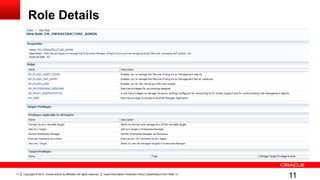
Role Details
11
Copyright © 2014, Oracle and/or its affiliates. All rights reserved. Insert Information Protection Policy Classification from Slide 1212
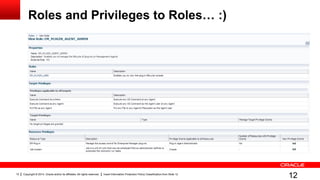
Roles and Privileges to Roles… :)
12
Copyright © 2014, Oracle and/or its affiliates. All rights reserved. Insert Information Protection Policy Classification from Slide 1213
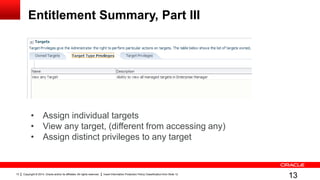
Entitlement Summary, Part III
13
• Assign individual targets
• View any target, (different from accessing any)
• Assign distinct privileges to any target
Copyright © 2014, Oracle and/or its affiliates. All rights reserved. Insert Information Protection Policy Classification from Slide 1214
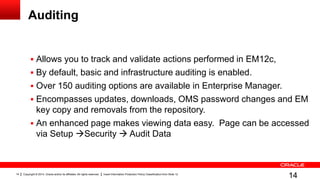
Auditing
 Allows you to track and validate actions performed in EM12c,
 By default, basic and infrastructure auditing is enabled.
 Over 150 auditing options are available in Enterprise Manager.
 Encompasses updates, downloads, OMS password changes and EM
key copy and removals from the repository.
 An enhanced page makes viewing data easy. Page can be accessed
via Setup Security  Audit Data
14
Copyright © 2014, Oracle and/or its affiliates. All rights reserved. Insert Information Protection Policy Classification from Slide 1215
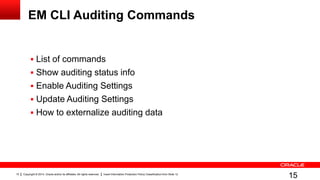
EM CLI Auditing Commands
 List of commands
 Show auditing status info
 Enable Auditing Settings
 Update Auditing Settings
 How to externalize auditing data
15
Copyright © 2014, Oracle and/or its affiliates. All rights reserved. Insert Information Protection Policy Classification from Slide 1216
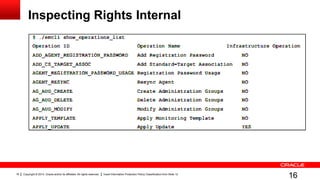
Inspecting Rights Internal
16
Copyright © 2014, Oracle and/or its affiliates. All rights reserved. Insert Information Protection Policy Classification from Slide 1217
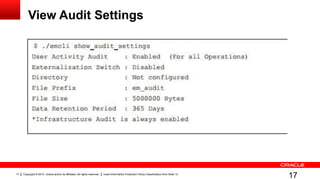
View Audit Settings
17
Copyright © 2014, Oracle and/or its affiliates. All rights reserved. Insert Information Protection Policy Classification from Slide 1218
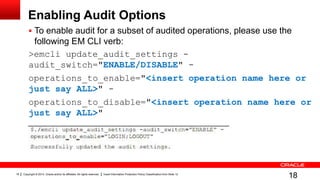
Enabling Audit Options
 To enable audit for a subset of audited operations, please use the
following EM CLI verb:
>emcli update_audit_settings -
audit_switch="ENABLE/DISABLE" -
operations_to_enable="<insert operation name here or
just say ALL>" -
operations_to_disable="<insert operation name here or
just say ALL>"
18
Copyright © 2014, Oracle and/or its affiliates. All rights reserved. Insert Information Protection Policy Classification from Slide 1219
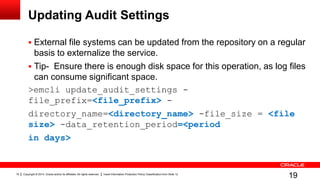
Updating Audit Settings
 External file systems can be updated from the repository on a regular
basis to externalize the service.
 Tip- Ensure there is enough disk space for this operation, as log files
can consume significant space.
>emcli update_audit_settings -
file_prefix=<file_prefix> -
directory_name=<directory_name> -file_size = <file
size> -data_retention_period=<period
in days>
19
Copyright © 2014, Oracle and/or its affiliates. All rights reserved. Insert Information Protection Policy Classification from Slide 1220
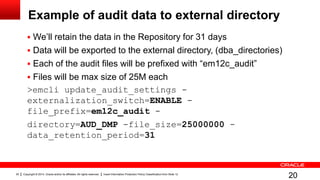
Example of audit data to external directory
 We’ll retain the data in the Repository for 31 days
 Data will be exported to the external directory, (dba_directories)
 Each of the audit files will be prefixed with “em12c_audit”
 Files will be max size of 25M each
>emcli update_audit_settings -
externalization_switch=ENABLE -
file_prefix=em12c_audit -
directory=AUD_DMP -file_size=25000000 -
data_retention_period=31
20
Copyright © 2014, Oracle and/or its affiliates. All rights reserved. Insert Information Protection Policy Classification from Slide 1221
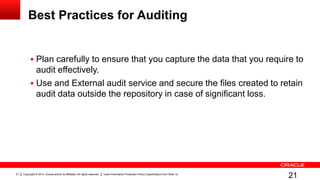
Best Practices for Auditing
 Plan carefully to ensure that you capture the data that you require to
audit effectively.
 Use and External audit service and secure the files created to retain
audit data outside the repository in case of significant loss.
21
Copyright © 2014, Oracle and/or its affiliates. All rights reserved. Insert Information Protection Policy Classification from Slide 1222
Connect with me-
Copyright © 2014, Oracle and/or its affiliates. All rights reserved. Insert Information Protection Policy Classification from Slide 1223
Copyright © 2014, Oracle and/or its affiliates. All rights reserved. Insert Information Protection Policy Classification from Slide 1224

IOUG Collaborate 2014 Auditing/Security in EM12c

  • 1.
    Copyright © 2014,Oracle and/or its affiliates. All rights reserved. Insert Information Protection Policy Classification from Slide 121
  • 2.
    Enterprise Manager 12cand Keys to the Castle Kellyn Pot’Vin Consulting Member of Technical Team Strategic Customer Program
  • 3.
    Copyright © 2014,Oracle and/or its affiliates. All rights reserved. Insert Information Protection Policy Classification from Slide 123 The following is intended to outline our general product direction. It is intended for information purposes only, and may not be incorporated into any contract. It is not a commitment to deliver any material, code, or functionality, and should not be relied upon in making purchasing decisions. The development, release, and timing of any features or functionality described for Oracle’s products remains at the sole discretion of Oracle.
  • 4.
    Copyright © 2014,Oracle and/or its affiliates. All rights reserved. Insert Information Protection Policy Classification from Slide 124 The Importance of Securing The EM12c Environment  IT environments are now more complex and dynamic.  Financial implications and loss of goodwill coupled with stringent regulatory requirements.  Challenges due to introduction of distributed system management applications. What best practices are in place for system management products?
  • 5.
    Copyright © 2014,Oracle and/or its affiliates. All rights reserved. Insert Information Protection Policy Classification from Slide 125 Focus on Security Groups, Roles and Auditing  Creating significant roles and then grant roles to users instead of granting privileges.  Take advantage of privilege propagation groups and systems to deter from resource demands  Treat the Repository as you would any other database. Use common sense and standard security best practices.  Enable auditing to retain information about actions in the repository and export to an external directory to retain limited information. 5
  • 6.
    Copyright © 2014,Oracle and/or its affiliates. All rights reserved. Insert Information Protection Policy Classification from Slide 126 Do You Know Who Has the Power of the Force? SELECT grantee FROM MGMT_PRIV_GRANTS WHERE PRIV_NAME = ‘SUPER_USER’ ; 6
  • 7.
    Copyright © 2014,Oracle and/or its affiliates. All rights reserved. Insert Information Protection Policy Classification from Slide 127 Entitlement Summary Info 7
  • 8.
    Copyright © 2014,Oracle and/or its affiliates. All rights reserved. Insert Information Protection Policy Classification from Slide 128 Entitlement Summary 8
  • 9.
    Copyright © 2014,Oracle and/or its affiliates. All rights reserved. Insert Information Protection Policy Classification from Slide 129 Entitlement Breakdown 9 • Also can include… • Contact info • Location and Department • Lifecycle and chargeback info • Note if user is super admin or not.
  • 10.
    Copyright © 2014,Oracle and/or its affiliates. All rights reserved. Insert Information Protection Policy Classification from Slide 1210 Roles Assigned, Part II of Entitlement Summary 10 • Each Role is displayed • Total Roles granted displayed to far right • Each Role is a link to detail info on role
  • 11.
    Copyright © 2014,Oracle and/or its affiliates. All rights reserved. Insert Information Protection Policy Classification from Slide 1211 Role Details 11
  • 12.
    Copyright © 2014,Oracle and/or its affiliates. All rights reserved. Insert Information Protection Policy Classification from Slide 1212 Roles and Privileges to Roles… :) 12
  • 13.
    Copyright © 2014,Oracle and/or its affiliates. All rights reserved. Insert Information Protection Policy Classification from Slide 1213 Entitlement Summary, Part III 13 • Assign individual targets • View any target, (different from accessing any) • Assign distinct privileges to any target
  • 14.
    Copyright © 2014,Oracle and/or its affiliates. All rights reserved. Insert Information Protection Policy Classification from Slide 1214 Auditing  Allows you to track and validate actions performed in EM12c,  By default, basic and infrastructure auditing is enabled.  Over 150 auditing options are available in Enterprise Manager.  Encompasses updates, downloads, OMS password changes and EM key copy and removals from the repository.  An enhanced page makes viewing data easy. Page can be accessed via Setup Security  Audit Data 14
  • 15.
    Copyright © 2014,Oracle and/or its affiliates. All rights reserved. Insert Information Protection Policy Classification from Slide 1215 EM CLI Auditing Commands  List of commands  Show auditing status info  Enable Auditing Settings  Update Auditing Settings  How to externalize auditing data 15
  • 16.
    Copyright © 2014,Oracle and/or its affiliates. All rights reserved. Insert Information Protection Policy Classification from Slide 1216 Inspecting Rights Internal 16
  • 17.
    Copyright © 2014,Oracle and/or its affiliates. All rights reserved. Insert Information Protection Policy Classification from Slide 1217 View Audit Settings 17
  • 18.
    Copyright © 2014,Oracle and/or its affiliates. All rights reserved. Insert Information Protection Policy Classification from Slide 1218 Enabling Audit Options  To enable audit for a subset of audited operations, please use the following EM CLI verb: >emcli update_audit_settings - audit_switch="ENABLE/DISABLE" - operations_to_enable="<insert operation name here or just say ALL>" - operations_to_disable="<insert operation name here or just say ALL>" 18
  • 19.
    Copyright © 2014,Oracle and/or its affiliates. All rights reserved. Insert Information Protection Policy Classification from Slide 1219 Updating Audit Settings  External file systems can be updated from the repository on a regular basis to externalize the service.  Tip- Ensure there is enough disk space for this operation, as log files can consume significant space. >emcli update_audit_settings - file_prefix=<file_prefix> - directory_name=<directory_name> -file_size = <file size> -data_retention_period=<period in days> 19
  • 20.
    Copyright © 2014,Oracle and/or its affiliates. All rights reserved. Insert Information Protection Policy Classification from Slide 1220 Example of audit data to external directory  We’ll retain the data in the Repository for 31 days  Data will be exported to the external directory, (dba_directories)  Each of the audit files will be prefixed with “em12c_audit”  Files will be max size of 25M each >emcli update_audit_settings - externalization_switch=ENABLE - file_prefix=em12c_audit - directory=AUD_DMP -file_size=25000000 - data_retention_period=31 20
  • 21.
    Copyright © 2014,Oracle and/or its affiliates. All rights reserved. Insert Information Protection Policy Classification from Slide 1221 Best Practices for Auditing  Plan carefully to ensure that you capture the data that you require to audit effectively.  Use and External audit service and secure the files created to retain audit data outside the repository in case of significant loss. 21
  • 22.
    Copyright © 2014,Oracle and/or its affiliates. All rights reserved. Insert Information Protection Policy Classification from Slide 1222 Connect with me-
  • 23.
    Copyright © 2014,Oracle and/or its affiliates. All rights reserved. Insert Information Protection Policy Classification from Slide 1223
  • 24.
    Copyright © 2014,Oracle and/or its affiliates. All rights reserved. Insert Information Protection Policy Classification from Slide 1224