iOS Development - Tips & Tricks
Software Development Lead - iOS
Galin Kardzhilov
Software Development Manager - iOS
Stefan Tsvyatkov
iOS Development - Tips & Tricks
Agenda
Why iOS
Some challenges
iOS Security
iOS Development - Tips & Tricks
About Me
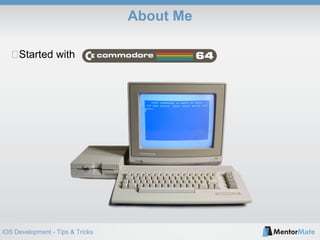
Started with
iOS Development - Tips & Tricks
About Me
iOS Development - Tips & Tricks
Why iOS?
-(NSString *)generateReasonsWhyiOS {
NSMutableString *reasons = [[NSMutableString alloc] init];
[reasons appendString:@"It's new"];
[reasons appendString:@"It's challenging"];
[reasons appendString:@"It compiles to native"];
[reasons appendString:@"You have to deal with hardware limitations"];
[reasons appendString:@"You have to provide responsiveness"];
[reasons appendString:@"You have to provide usability"];
[reasons appendString:@"You have to provide security"];
[reasons appendString:@"0ften craftsmanship is required"];
[reasons appendString:@"Your code runs into people's pockets"];
return reasons;
}
iOS Development - Tips & Tricks
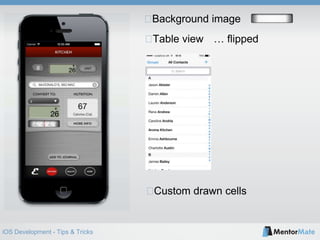
Table view
Background image
Custom drawn cells
… flipped
iOS Development - Tips & Tricks
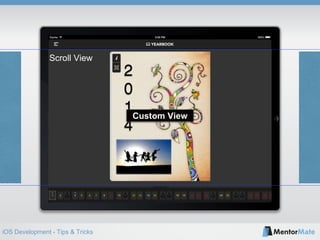
Scroll View
Custom View
iOS Development - Tips & Tricks
Security in iOS
Local Storage
Communication with the server
Binary analysis and manipulation
iOS Development - Tips & Tricks
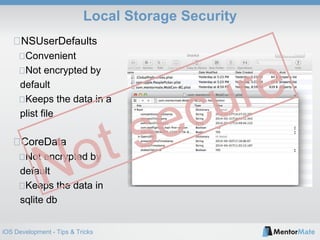
Local Storage Security
NSUserDefaults
Convenient
Not encrypted by
default
Keeps the data in a
plist file
CoreData
Not encrypted by
default
Keeps the data in
sqlite db
iOS Development - Tips & Tricks
Local Storage Security
Keychain Access
Encrypted by default
A bit more complex for use
Insecure on jailbroken devices
Data encryption
Crypto API
Obfuscate the encryption key
Use unique device information
String constant
[[UIDevice
currentDevice]
identifierForVendor]
Custom
algorithm
Secure encryption key
iOS Development - Tips & Tricks
Server Communication Security
Use SSL
Don’t accept self-signed certificates
Client and server side data validation
iOS Development - Tips & Tricks
Runtime Manipulation
#import "AppDelegate.h"
#import "ptrace.h"
int main(int argc, char * argv[])
{
#ifndef DEBUG
ptrace(PT_DENY_ATTACH, 0, 0, 0);
#endif
@autoreleasepool {
return UIApplicationMain(argc, argv, nil, NSStringFromClass([AppDelegate class]));
}
}
ptrace
Deny a debugger to attach
Can be patched from binary
Put it in multiple places
iOS Development - Tips & Tricks
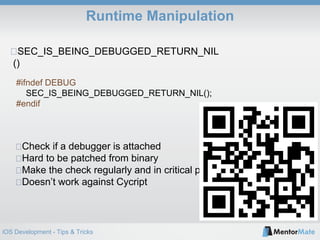
SEC_IS_BEING_DEBUGGED_RETURN_NIL
()
Check if a debugger is attached
Hard to be patched from binary
Make the check regularly and in critical parts
Doesn’t work against Cycript
Runtime Manipulation
#ifndef DEBUG
SEC_IS_BEING_DEBUGGED_RETURN_NIL();
#endif
iOS Development - Tips & Tricks
Conclusion
Keychain Access for storing
SSL for transporting
Check for debuggers
100% security does not exist
iOS Development - Tips & Tricks
Thank you!
Galin Kardzhilov @gravera
Stefan Tsvyatkov @stsvyatkov

iOS Development - Tips & Tricks

  • 1.
    iOS Development -Tips & Tricks iOS Development - Tips & Tricks Software Development Lead - iOS Galin Kardzhilov Software Development Manager - iOS Stefan Tsvyatkov
  • 2.
    iOS Development -Tips & Tricks Agenda Why iOS Some challenges iOS Security
  • 3.
    iOS Development -Tips & Tricks About Me Started with
  • 4.
    iOS Development -Tips & Tricks About Me
  • 5.
    iOS Development -Tips & Tricks Why iOS? -(NSString *)generateReasonsWhyiOS { NSMutableString *reasons = [[NSMutableString alloc] init]; [reasons appendString:@"It's new"]; [reasons appendString:@"It's challenging"]; [reasons appendString:@"It compiles to native"]; [reasons appendString:@"You have to deal with hardware limitations"]; [reasons appendString:@"You have to provide responsiveness"]; [reasons appendString:@"You have to provide usability"]; [reasons appendString:@"You have to provide security"]; [reasons appendString:@"0ften craftsmanship is required"]; [reasons appendString:@"Your code runs into people's pockets"]; return reasons; }
  • 6.
    iOS Development -Tips & Tricks Table view Background image Custom drawn cells … flipped
  • 7.
    iOS Development -Tips & Tricks
  • 8.
    iOS Development -Tips & Tricks Scroll View Custom View
  • 9.
    iOS Development -Tips & Tricks
  • 10.
    iOS Development -Tips & Tricks Security in iOS Local Storage Communication with the server Binary analysis and manipulation
  • 11.
    iOS Development -Tips & Tricks Local Storage Security NSUserDefaults Convenient Not encrypted by default Keeps the data in a plist file CoreData Not encrypted by default Keeps the data in sqlite db
  • 12.
    iOS Development -Tips & Tricks Local Storage Security Keychain Access Encrypted by default A bit more complex for use Insecure on jailbroken devices Data encryption Crypto API Obfuscate the encryption key Use unique device information String constant [[UIDevice currentDevice] identifierForVendor] Custom algorithm Secure encryption key
  • 13.
    iOS Development -Tips & Tricks Server Communication Security Use SSL Don’t accept self-signed certificates Client and server side data validation
  • 14.
    iOS Development -Tips & Tricks Runtime Manipulation #import "AppDelegate.h" #import "ptrace.h" int main(int argc, char * argv[]) { #ifndef DEBUG ptrace(PT_DENY_ATTACH, 0, 0, 0); #endif @autoreleasepool { return UIApplicationMain(argc, argv, nil, NSStringFromClass([AppDelegate class])); } } ptrace Deny a debugger to attach Can be patched from binary Put it in multiple places
  • 15.
    iOS Development -Tips & Tricks SEC_IS_BEING_DEBUGGED_RETURN_NIL () Check if a debugger is attached Hard to be patched from binary Make the check regularly and in critical parts Doesn’t work against Cycript Runtime Manipulation #ifndef DEBUG SEC_IS_BEING_DEBUGGED_RETURN_NIL(); #endif
  • 16.
    iOS Development -Tips & Tricks Conclusion Keychain Access for storing SSL for transporting Check for debuggers 100% security does not exist
  • 17.
    iOS Development -Tips & Tricks Thank you! Galin Kardzhilov @gravera Stefan Tsvyatkov @stsvyatkov

Editor's Notes

  • #11 Здравейте. Аз съм Стефан Цвятков - iOS Development Manager в МенторМейт. Ще продължа темата с няколко съвета как да подобрим сигурността в iOS приложенията. Тъй като това е твърде обширна тема дори и за часове, а ние имаме минути, днес ще засегна само основите. Най-уязвимите места в едно приложение са мястото, където съхраняваме данните, комуникацията със сървъра и самото байнъри. Това и са нещата, чиято защита ще разгледаме.
  • #12 Започваме със съхранението на данни в мобилното устройство. Често ни се налага да записваме потребителски имена, сешън токъни и дори пароли локално в приложението. Например когато имплементираме офлайн логин за различни потребили в едно устройство. Най-удобният начин за записване на информация е NSUserDefaults. Използва се лесно - съхраняваме и четем данни с един ред код. Нека видим обаче колко сигурен е този подход. NSUserDefaults съхранява данните в plist файл, който съдържа плйейн текст списък от кий-велю записи. В интернет има голям избор от приложения, които инсталирани на компютър със свързано мобилно устройство, показват данните от всяко инсталирано приложение. Аз например използвам DiskAid. Тук съм отворил съдържанието на едно от приложенията, които разработваме и както виждате имам списък с файловете в него. Дори съм отворил плист файла, който съхранява данните на NSUserDefaults. Понеже приложението е написано качествено, тук не виждаме данни, които изглеждат важни. Нека разглеждаме друго популярно място за съхранение на данни - CoreData. Обикновено тук се съхраняват данни, които имат по-сложна структура и по-голям обем. Използването е малко по-трудоемко понеже трябва да си създадем дейта модел и да си имплементираме основните методи, нужни за CoreData имплементацията. Но нас пак ни интересува по-скоро колко сигурен е този метод. CoreData, подобно на NSUserDefaults, съхранява инфорамацията във файл в бъндъла на приложението. Това файл преставлява sqllite database. За да видя данните, аз просто трябва да намеря програма, която отваря sqlite файлове - такива колкото искаш в интернет. Дори файърфокс може да го направи. До какъв извод стигаме - най-популярните места за съхранение на данни са с много ниска степен на сигурност.
  • #13 И сега правилния начин за съхранение -