Ionic framework provides ready made templates to start development
of mobile applications.
This presentation provides explanation for various concepts used in
the tabs template
Tabs Template Explained
By: Belavadi N.Ramesh
Email: raga2560@gmail.com
Index

The tabs template setup and scope

The tabs template app look

Concepts used in this app

Contents to observe in index.html

Contents to observe in app.js

Comparison of tab-dash.html and corresponding screen

Various controllers in this app.

Analysis of ChatsCtrl and ChatDetailCtrl

Analysis of Tab-chats.html

Ng-repeat usage example using Chats array, functions in controller.

Analysis of Chats services

Ngmodel usage example

Summary
The tabs template setup and scope
Setup
Tabs template app is created using following commands.
ionic start myApp tabs
Refer:
http://ionicframework.com/getting-started/
Scope
The ionic framework app(tabs template) generated is a angularjs application.
It uses angularjs syntax, conventions etc.
The purpose of the presentation is to explain new comers meaning of various
Angularjs concepts used in app.
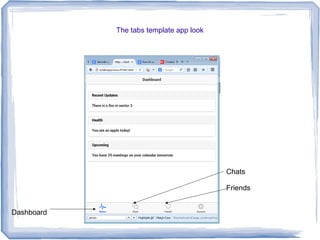
The tabs template app look
Dashboard
Chats
Friends
Concepts used in this app
Advanced concepts
1. Uses custom directives
example - ion-nav-bar, ion-nav-view
2. Uses dependency injection
example - angular.module('starter', ['ionic',
'starter.controllers', 'starter.services'])
3. Uses nested states (Ui-router)
example .state('tab.dash'), .state( 'tab.chats')
4. Uses $factory or $service
example
.factory('Chats', function() )
.factory('Friends', function() )
Simple concepts
1. Ng-model
- ng-model="settings.enableFriends" in tabs-account.html
2. Ng-repeat
- ng-repeat="chat in chats" in tabs-chats.html
3. $scope
- $scope.chats in controllers.js for accessing array
- $scope.remove in controllers.js for creating a function
Organization of files
Modules
- Services.js
Controllers
-Controllers.js
Run, Config
- App.js
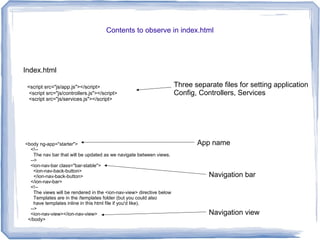
Contents to observe in index.html
Index.html
<script src="js/app.js"></script>
<script src="js/controllers.js"></script>
<script src="js/services.js"></script>
<body ng-app="starter">
<!--
The nav bar that will be updated as we navigate between views.
-->
<ion-nav-bar class="bar-stable">
<ion-nav-back-button>
</ion-nav-back-button>
</ion-nav-bar>
<!--
The views will be rendered in the <ion-nav-view> directive below
Templates are in the /templates folder (but you could also
have templates inline in this html file if you'd like).
-->
<ion-nav-view></ion-nav-view>
</body>
App name
Navigation bar
Navigation view
Three separate files for setting application
Config, Controllers, Services
Contents to observe in app.js
App.js
angular.module('starter', ['ionic', 'starter.controllers', 'starter.services'])
.config(function($stateProvider, $urlRouterProvider) {
// Ionic uses AngularUI Router which uses the concept of states
// Learn more here: https://github.com/angular-ui/ui-router
// Set up the various states which the app can be in.
// Each state's controller can be found in controllers.js
$stateProvider
// setup an abstract state for the tabs directive
.state('tab', {
url: "/tab",
abstract: true,
templateUrl: "templates/tabs.html"
})
// Each tab has its own nav history stack:
.state('tab.dash', {
url: '/dash',
views: {
'tab-dash': {
templateUrl: 'templates/tab-dash.html',
controller: 'DashCtrl'
}
}
})
State based navigation
Base state
Nested state
Module starter is dependent on
3 other modules.
When /dash is accessed, the view
tab-dash in tabs.html, is populated from template
tab-dash.html, which is controlled by controller
DashCtrl
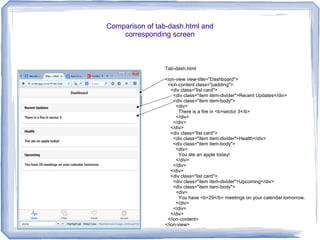
Comparison of tab-dash.html and
corresponding screen
Tab-dash.html
<ion-view view-title="Dashboard">
<ion-content class="padding">
<div class="list card">
<div class="item item-divider">Recent Updates</div>
<div class="item item-body">
<div>
There is a fire in <b>sector 3</b>
</div>
</div>
</div>
<div class="list card">
<div class="item item-divider">Health</div>
<div class="item item-body">
<div>
You ate an apple today!
</div>
</div>
</div>
<div class="list card">
<div class="item item-divider">Upcoming</div>
<div class="item item-body">
<div>
You have <b>29</b> meetings on your calendar tomorrow.
</div>
</div>
</div>
</ion-content>
</ion-view>
Various controllers in this app.
angular.module('starter.controllers', [])
.controller('DashCtrl', function($scope) {})
.controller('ChatsCtrl', function($scope, Chats) {
$scope.chats = Chats.all();
$scope.remove = function(chat) {
Chats.remove(chat);
}
})
.controller('ChatDetailCtrl', function($scope, $stateParams, Chats) {
$scope.chat = Chats.get($stateParams.chatId);
})
.controller('FriendsCtrl', function($scope, Friends) {
$scope.friends = Friends.all();
})
.controller('FriendDetailCtrl', function($scope, $stateParams, Friends) {
$scope.friend = Friends.get($stateParams.friendId);
})
.controller('AccountCtrl', function($scope) {
$scope.settings = {
enableFriends: true
};
});
Let us consider ChatsCtrl and
ChatDetailCtrl for understanding
Module name
Empty controller
Chats is the service name.
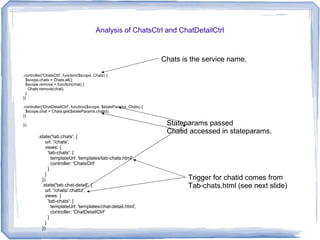
Analysis of ChatsCtrl and ChatDetailCtrl
.controller('ChatsCtrl', function($scope, Chats) {
$scope.chats = Chats.all();
$scope.remove = function(chat) {
Chats.remove(chat);
}
})
.controller('ChatDetailCtrl', function($scope, $stateParams, Chats) {
$scope.chat = Chats.get($stateParams.chatId);
})
});
Chats is the service name.
.state('tab.chats', {
url: '/chats',
views: {
'tab-chats': {
templateUrl: 'templates/tab-chats.html',
controller: 'ChatsCtrl'
}
}
})
.state('tab.chat-detail', {
url: '/chats/:chatId',
views: {
'tab-chats': {
templateUrl: 'templates/chat-detail.html',
controller: 'ChatDetailCtrl'
}
}
})
Stateparams passed
Chatid accessed in stateparams.
Trigger for chatid comes from
Tab-chats.html (see next slide)
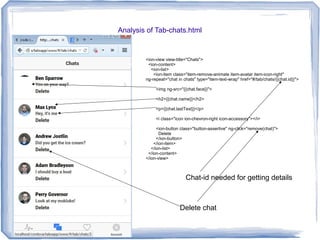
Analysis of Tab-chats.html
<ion-view view-title="Chats">
<ion-content>
<ion-list>
<ion-item class="item-remove-animate item-avatar item-icon-right"
ng-repeat="chat in chats" type="item-text-wrap" href="#/tab/chats/{{chat.id}}">
<img ng-src="{{chat.face}}">
<h2>{{chat.name}}</h2>
<p>{{chat.lastText}}</p>
<i class="icon ion-chevron-right icon-accessory"></i>
<ion-button class="button-assertive" ng-click="remove(chat)">
Delete
</ion-button>
</ion-item>
</ion-list>
</ion-content>
</ion-view>
Chat-id needed for getting details
Delete chat
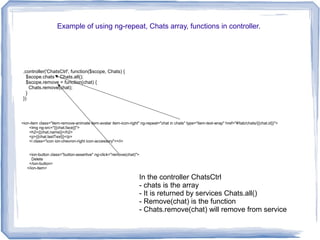
Example of using ng-repeat, Chats array, functions in controller.
.controller('ChatsCtrl', function($scope, Chats) {
$scope.chats = Chats.all();
$scope.remove = function(chat) {
Chats.remove(chat);
}
})
<ion-item class="item-remove-animate item-avatar item-icon-right" ng-repeat="chat in chats" type="item-text-wrap" href="#/tab/chats/{{chat.id}}">
<img ng-src="{{chat.face}}">
<h2>{{chat.name}}</h2>
<p>{{chat.lastText}}</p>
<i class="icon ion-chevron-right icon-accessory"></i>
<ion-button class="button-assertive" ng-click="remove(chat)">
Delete
</ion-button>
</ion-item>
In the controller ChatsCtrl
- chats is the array
- It is returned by services Chats.all()
- Remove(chat) is the function
- Chats.remove(chat) will remove from service
Analysis of Chats services
angular.module('starter.services', [])
.factory('Chats', function() {
// Might use a resource here that returns a JSON array
// Some fake testing data
var chats = [{
id: 0,
name: 'Ben Sparrow',
lastText: 'You on your way?',
face: 'https://pbs.twimg.com/profile_images/514549811765211136/9SgAuHeY.png'
}, {
id: 1,
name: 'Max Lynx',
lastText: 'Hey, it's me',
face: 'https://avatars3.githubusercontent.com/u/11214?v=3&s=460'
},
}];
return {
all: function() {
return chats;
},
remove: function(chat) {
chats.splice(chats.indexOf(chat), 1);
},
get: function(chatId) {
for (var i = 0; i < chats.length; i++) {
if (chats[i].id === parseInt(chatId)) {
return chats[i];
}
}
return null;
}
}
})
Name of module with services
Name of service
Returns all entries in chat array.
Remove chat from array.
Ngmodel usage example
Setting value in Account controller
controller('AccountCtrl', function($scope) {
$scope.settings = {
enableFriends: true
};
});
Tab-account.html
<ion-view view-title="Account">
<ion-content>
<ion-list>
<ion-item class="item-toggle">
Enable Friends
<label class="toggle">
<input type="checkbox" ng-model="settings.enableFriends">
<div class="track">
<div class="handle"></div>
</div>
</label>
</ion-item>
</ion-list>
</ion-content>
</ion-view>
Mapping controller to html in app.js
.state('tab.account', {
url: '/account',
views: {
'tab-account': {
templateUrl: 'templates/tab-account.html',
controller: 'AccountCtrl'
}
}
});
Ngmodel declaration
Ngmodel usage.
Mapping relationship
Summary
We understood how ngmodel, ngrepeat is used
We understood usage of dependencies
We understood accessing arrays and functions in controllers
We understood organization and usage of services
We understood accessing and usage of stateparms.
We understood ui-router navigation using states
We understood organizing files of services, application details, controllers, modules.
For clarifications and help:-
Contact: Belavadi N Ramesh
Email: raga2560@gmail.com

Ionic tabs template explained

  • 1.
    Ionic framework providesready made templates to start development of mobile applications. This presentation provides explanation for various concepts used in the tabs template Tabs Template Explained By: Belavadi N.Ramesh Email: raga2560@gmail.com
  • 2.
    Index  The tabs templatesetup and scope  The tabs template app look  Concepts used in this app  Contents to observe in index.html  Contents to observe in app.js  Comparison of tab-dash.html and corresponding screen  Various controllers in this app.  Analysis of ChatsCtrl and ChatDetailCtrl  Analysis of Tab-chats.html  Ng-repeat usage example using Chats array, functions in controller.  Analysis of Chats services  Ngmodel usage example  Summary
  • 3.
    The tabs templatesetup and scope Setup Tabs template app is created using following commands. ionic start myApp tabs Refer: http://ionicframework.com/getting-started/ Scope The ionic framework app(tabs template) generated is a angularjs application. It uses angularjs syntax, conventions etc. The purpose of the presentation is to explain new comers meaning of various Angularjs concepts used in app.
  • 4.
    The tabs templateapp look Dashboard Chats Friends
  • 5.
    Concepts used inthis app Advanced concepts 1. Uses custom directives example - ion-nav-bar, ion-nav-view 2. Uses dependency injection example - angular.module('starter', ['ionic', 'starter.controllers', 'starter.services']) 3. Uses nested states (Ui-router) example .state('tab.dash'), .state( 'tab.chats') 4. Uses $factory or $service example .factory('Chats', function() ) .factory('Friends', function() ) Simple concepts 1. Ng-model - ng-model="settings.enableFriends" in tabs-account.html 2. Ng-repeat - ng-repeat="chat in chats" in tabs-chats.html 3. $scope - $scope.chats in controllers.js for accessing array - $scope.remove in controllers.js for creating a function Organization of files Modules - Services.js Controllers -Controllers.js Run, Config - App.js
  • 6.
    Contents to observein index.html Index.html <script src="js/app.js"></script> <script src="js/controllers.js"></script> <script src="js/services.js"></script> <body ng-app="starter"> <!-- The nav bar that will be updated as we navigate between views. --> <ion-nav-bar class="bar-stable"> <ion-nav-back-button> </ion-nav-back-button> </ion-nav-bar> <!-- The views will be rendered in the <ion-nav-view> directive below Templates are in the /templates folder (but you could also have templates inline in this html file if you'd like). --> <ion-nav-view></ion-nav-view> </body> App name Navigation bar Navigation view Three separate files for setting application Config, Controllers, Services
  • 7.
    Contents to observein app.js App.js angular.module('starter', ['ionic', 'starter.controllers', 'starter.services']) .config(function($stateProvider, $urlRouterProvider) { // Ionic uses AngularUI Router which uses the concept of states // Learn more here: https://github.com/angular-ui/ui-router // Set up the various states which the app can be in. // Each state's controller can be found in controllers.js $stateProvider // setup an abstract state for the tabs directive .state('tab', { url: "/tab", abstract: true, templateUrl: "templates/tabs.html" }) // Each tab has its own nav history stack: .state('tab.dash', { url: '/dash', views: { 'tab-dash': { templateUrl: 'templates/tab-dash.html', controller: 'DashCtrl' } } }) State based navigation Base state Nested state Module starter is dependent on 3 other modules. When /dash is accessed, the view tab-dash in tabs.html, is populated from template tab-dash.html, which is controlled by controller DashCtrl
  • 8.
    Comparison of tab-dash.htmland corresponding screen Tab-dash.html <ion-view view-title="Dashboard"> <ion-content class="padding"> <div class="list card"> <div class="item item-divider">Recent Updates</div> <div class="item item-body"> <div> There is a fire in <b>sector 3</b> </div> </div> </div> <div class="list card"> <div class="item item-divider">Health</div> <div class="item item-body"> <div> You ate an apple today! </div> </div> </div> <div class="list card"> <div class="item item-divider">Upcoming</div> <div class="item item-body"> <div> You have <b>29</b> meetings on your calendar tomorrow. </div> </div> </div> </ion-content> </ion-view>
  • 9.
    Various controllers inthis app. angular.module('starter.controllers', []) .controller('DashCtrl', function($scope) {}) .controller('ChatsCtrl', function($scope, Chats) { $scope.chats = Chats.all(); $scope.remove = function(chat) { Chats.remove(chat); } }) .controller('ChatDetailCtrl', function($scope, $stateParams, Chats) { $scope.chat = Chats.get($stateParams.chatId); }) .controller('FriendsCtrl', function($scope, Friends) { $scope.friends = Friends.all(); }) .controller('FriendDetailCtrl', function($scope, $stateParams, Friends) { $scope.friend = Friends.get($stateParams.friendId); }) .controller('AccountCtrl', function($scope) { $scope.settings = { enableFriends: true }; }); Let us consider ChatsCtrl and ChatDetailCtrl for understanding Module name Empty controller Chats is the service name.
  • 10.
    Analysis of ChatsCtrland ChatDetailCtrl .controller('ChatsCtrl', function($scope, Chats) { $scope.chats = Chats.all(); $scope.remove = function(chat) { Chats.remove(chat); } }) .controller('ChatDetailCtrl', function($scope, $stateParams, Chats) { $scope.chat = Chats.get($stateParams.chatId); }) }); Chats is the service name. .state('tab.chats', { url: '/chats', views: { 'tab-chats': { templateUrl: 'templates/tab-chats.html', controller: 'ChatsCtrl' } } }) .state('tab.chat-detail', { url: '/chats/:chatId', views: { 'tab-chats': { templateUrl: 'templates/chat-detail.html', controller: 'ChatDetailCtrl' } } }) Stateparams passed Chatid accessed in stateparams. Trigger for chatid comes from Tab-chats.html (see next slide)
  • 11.
    Analysis of Tab-chats.html <ion-viewview-title="Chats"> <ion-content> <ion-list> <ion-item class="item-remove-animate item-avatar item-icon-right" ng-repeat="chat in chats" type="item-text-wrap" href="#/tab/chats/{{chat.id}}"> <img ng-src="{{chat.face}}"> <h2>{{chat.name}}</h2> <p>{{chat.lastText}}</p> <i class="icon ion-chevron-right icon-accessory"></i> <ion-button class="button-assertive" ng-click="remove(chat)"> Delete </ion-button> </ion-item> </ion-list> </ion-content> </ion-view> Chat-id needed for getting details Delete chat
  • 12.
    Example of usingng-repeat, Chats array, functions in controller. .controller('ChatsCtrl', function($scope, Chats) { $scope.chats = Chats.all(); $scope.remove = function(chat) { Chats.remove(chat); } }) <ion-item class="item-remove-animate item-avatar item-icon-right" ng-repeat="chat in chats" type="item-text-wrap" href="#/tab/chats/{{chat.id}}"> <img ng-src="{{chat.face}}"> <h2>{{chat.name}}</h2> <p>{{chat.lastText}}</p> <i class="icon ion-chevron-right icon-accessory"></i> <ion-button class="button-assertive" ng-click="remove(chat)"> Delete </ion-button> </ion-item> In the controller ChatsCtrl - chats is the array - It is returned by services Chats.all() - Remove(chat) is the function - Chats.remove(chat) will remove from service
  • 13.
    Analysis of Chatsservices angular.module('starter.services', []) .factory('Chats', function() { // Might use a resource here that returns a JSON array // Some fake testing data var chats = [{ id: 0, name: 'Ben Sparrow', lastText: 'You on your way?', face: 'https://pbs.twimg.com/profile_images/514549811765211136/9SgAuHeY.png' }, { id: 1, name: 'Max Lynx', lastText: 'Hey, it's me', face: 'https://avatars3.githubusercontent.com/u/11214?v=3&s=460' }, }]; return { all: function() { return chats; }, remove: function(chat) { chats.splice(chats.indexOf(chat), 1); }, get: function(chatId) { for (var i = 0; i < chats.length; i++) { if (chats[i].id === parseInt(chatId)) { return chats[i]; } } return null; } } }) Name of module with services Name of service Returns all entries in chat array. Remove chat from array.
  • 14.
    Ngmodel usage example Settingvalue in Account controller controller('AccountCtrl', function($scope) { $scope.settings = { enableFriends: true }; }); Tab-account.html <ion-view view-title="Account"> <ion-content> <ion-list> <ion-item class="item-toggle"> Enable Friends <label class="toggle"> <input type="checkbox" ng-model="settings.enableFriends"> <div class="track"> <div class="handle"></div> </div> </label> </ion-item> </ion-list> </ion-content> </ion-view> Mapping controller to html in app.js .state('tab.account', { url: '/account', views: { 'tab-account': { templateUrl: 'templates/tab-account.html', controller: 'AccountCtrl' } } }); Ngmodel declaration Ngmodel usage. Mapping relationship
  • 15.
    Summary We understood howngmodel, ngrepeat is used We understood usage of dependencies We understood accessing arrays and functions in controllers We understood organization and usage of services We understood accessing and usage of stateparms. We understood ui-router navigation using states We understood organizing files of services, application details, controllers, modules. For clarifications and help:- Contact: Belavadi N Ramesh Email: raga2560@gmail.com

Editor's Notes

  • #6 Reference link https://blog.nraboy.com/2014/12/using-nested-states-angularjs-ui-router/ https://scotch.io/tutorials/angular-routing-using-ui-router