Adrian Sorsby
General Manager, Balluff Limited
IO-Link Technology
2PROFIBUS UK
what is IO-link?
3PROFIBUS UK 3
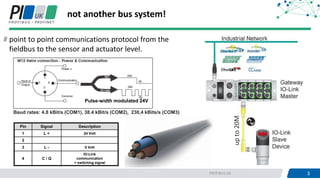
not another bus system!
point to point communications protocol from the
fieldbus to the sensor and actuator level.
upto20M
Pulse-width modulated 24V
Baud rates: 4.8 kBit/s (COM1), 38.4 kBit/s (COM2), 230,4 kBits/s (COM3)
Pin Signal Description
1 L + 24 Volt
2
3 L - 0 Volt
4 C / Q
IO-Link
communication
+ switching signal
4PROFIBUS UK 4
an open standard
standard - IEC 61131-9
network neutral
209 Industrial automation and
communication companies
Over 7,000 IO-Link devices
available
5PROFIBUS UK 5
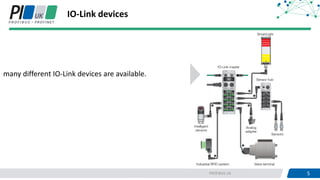
IO-Link devices
many different IO-Link devices are available.
6PROFIBUS UK 6
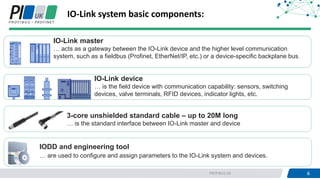
IO-Link system basic components:
IO-Link master
… acts as a gateway between the IO-Link device and the higher level communication
system, such as a fieldbus (Profinet, EtherNet/IP, etc.) or a device-specific backplane bus.
IO-Link device
… is the field device with communication capability: sensors, switching
devices, valve terminals, RFID devices, indicator lights, etc.
3-core unshielded standard cable – up to 20M long
… is the standard interface between IO-Link master and device
IODD and engineering tool
… are used to configure and assign parameters to the IO-Link system and devices.
7PROFIBUS UK 7
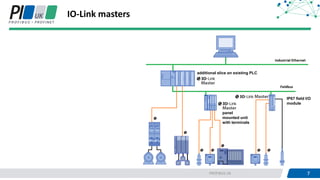
IO-Link masters
panel
mounted unit
with terminals
IP67 field I/O
module
additional slice on existing PLC
8PROFIBUS UK
why IO-Link?
9PROFIBUS UK 9
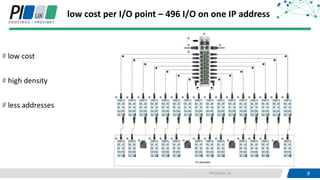
low cost per I/O point – 496 I/O on one IP address
low cost
high density
less addresses
10PROFIBUS UK 10
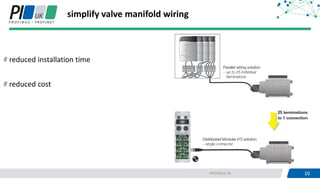
simplify valve manifold wiring
reduced installation time
reduced cost
11PROFIBUS UK 11
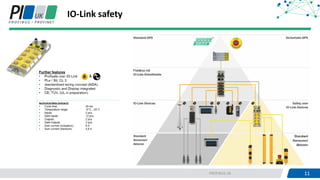
IO-Link safety
12PROFIBUS UK 12
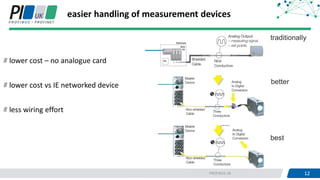
easier handling of measurement devices
lower cost – no analogue card
lower cost vs IE networked device
less wiring effort
traditionally
better
best
13PROFIBUS UK 13
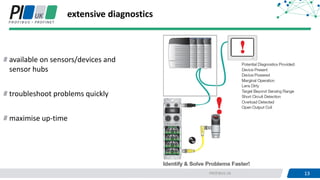
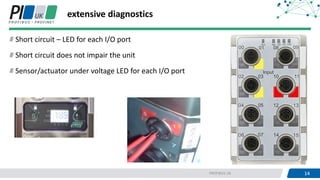
extensive diagnostics
available on sensors/devices and
sensor hubs
troubleshoot problems quickly
maximise up-time
14PROFIBUS UK 14
extensive diagnostics
Short circuit – LED for each I/O port
Short circuit does not impair the unit
Sensor/actuator under voltage LED for each I/O port
15PROFIBUS UK 15
Device
Example:
Pressure sensor
Smart Device
with IO-Link
Diagnostics
Pressure
Linearisierung
Kompensation
Komparator
Anzeige, Param.
D
A
analog value
0…10V
4…20mA
SwitchingPoint
1 0
true
false
Parameter
Measurement
0…10 bar
-1…5 bar
0…100 bar
Mess-
zelle
Pressure
Linearisierung
Kompensation
Komparator
Anzeige, Param.
µP
Mess-
zelle
Speicher
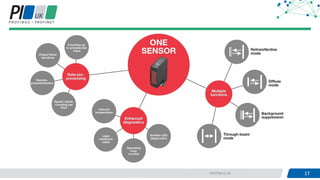
What's the difference between simple and smart
devices
17PROFIBUS UK 17
19PROFIBUS UK 19
HMI
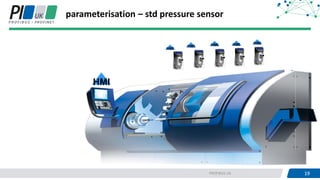
parameterisation – std pressure sensor
HMI
HMIHMIHMI
HMI
20PROFIBUS UK
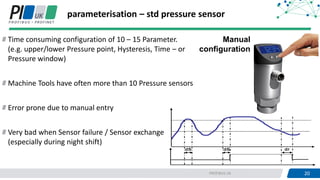
parameterisation – std pressure sensor
Time consuming configuration of 10 – 15 Parameter.
(e.g. upper/lower Pressure point, Hysteresis, Time – or
Pressure window)
Machine Tools have often more than 10 Pressure sensors
Error prone due to manual entry
Very bad when Sensor failure / Sensor exchange
(especially during night shift)
Manual
configuration
21PROFIBUS UK 21
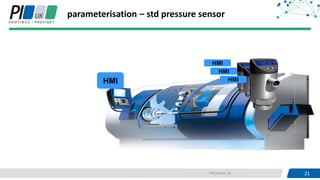
parameterisation – std pressure sensor
HMI
HMI
HMI
HMI
22PROFIBUS UK 22
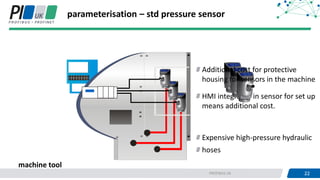
HMI integrated in sensor for set up
means additional cost.
Expensive high-pressure hydraulic
hoses
parameterisation – std pressure sensor
machine tool
Additional cost for protective
housing for sensors in the machine
23PROFIBUS UK 23
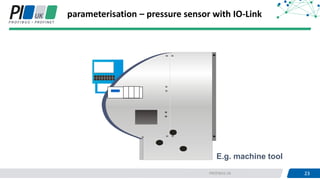
parameterisation – pressure sensor with IO-Link
E.g. machine tool
24PROFIBUS UK 24
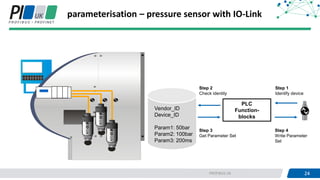
PLC
Function-
blocks
Vendor_ID
Device_ID
Param1: 50bar
Param2: 100bar
Param3: 200ms
Step 1
Identify device
Step 3
Get Parameter Set
Step 2
Check identity
Step 4
Write Parameter
Set
parameterisation – pressure sensor with IO-Link
25PROFIBUS UK 25
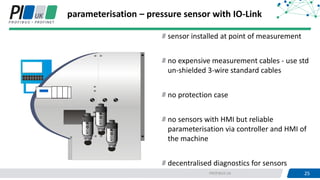
parameterisation – pressure sensor with IO-Link
sensor installed at point of measurement
no expensive measurement cables - use std
un-shielded 3-wire standard cables
no protection case
no sensors with HMI but reliable
parameterisation via controller and HMI of
the machine
decentralised diagnostics for sensors
26PROFIBUS UK 26
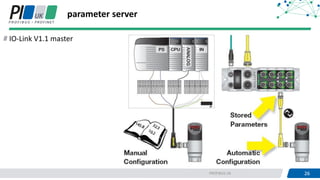
parameter server
IO-Link V1.1 master
27PROFIBUS UK 27
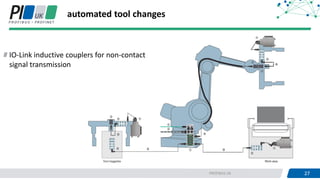
automated tool changes
IO-Link inductive couplers for non-contact
signal transmission
28PROFIBUS UK 28
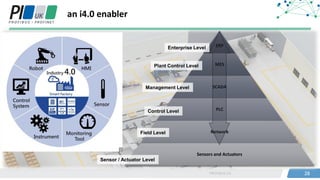
an i4.0 enabler
ERP
MES
SCADA
PLC
Network
Sensors and Actuators
Enterprise Level
Control Level
Management Level
Plant Control Level
Field Level
Sensor / Actuator Level
29PROFIBUS UK 29
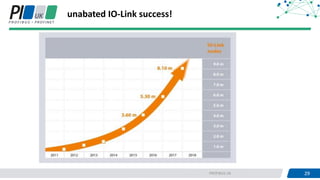
unabated IO-Link success!
30PROFIBUS UK 30
how IO-Link?
31PROFIBUS UK 31
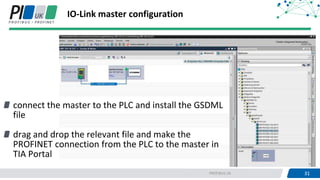
connect the master to the PLC and install the GSDML
file
drag and drop the relevant file and make the
PROFINET connection from the PLC to the master in
TIA Portal
IO-Link master configuration
32PROFIBUS UK 32
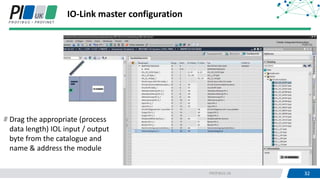
IO-Link master configuration
Drag the appropriate (process
data length) IOL input / output
byte from the catalogue and
name & address the module
33PROFIBUS UK 33
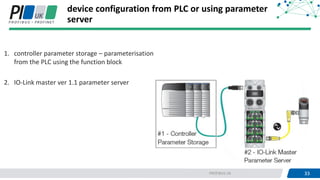
device configuration from PLC or using parameter
server
1. controller parameter storage – parameterisation
from the PLC using the function block
2. IO-Link master ver 1.1 parameter server
34PROFIBUS UK 34
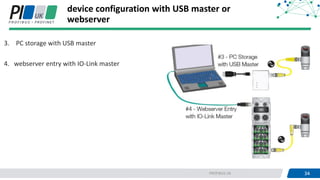
device configuration with USB master or
webserver
3. PC storage with USB master
4. webserver entry with IO-Link master
35PROFIBUS UK 35
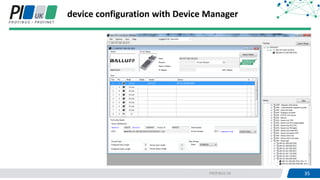
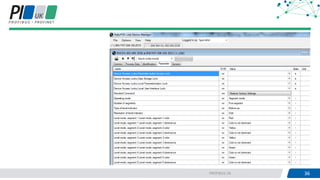
device configuration with Device Manager
36PROFIBUS UK 36
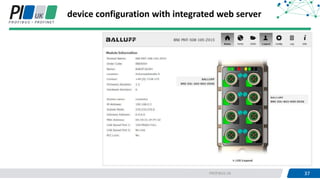
37PROFIBUS UK 37
device configuration with integrated web server
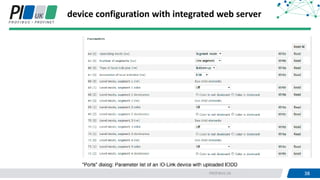
38PROFIBUS UK 38
device configuration with integrated web server
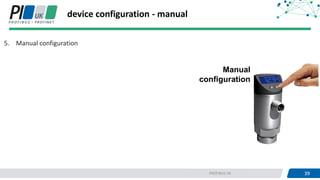
39PROFIBUS UK 39
device configuration - manual
Manual
configuration
5. Manual configuration
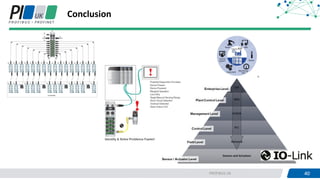
40PROFIBUS UK 40
Conclusion
41PROFIBUS UK 41
THANKS FOR LISTENING!
Adrian Sorsby
General Manager
01606 812 777
adrian.sorsby@balluff.co.uk

IO-Link technology - Adrian Sorsby

  • 1.
    Adrian Sorsby General Manager,Balluff Limited IO-Link Technology
  • 2.
  • 3.
    3PROFIBUS UK 3 notanother bus system! point to point communications protocol from the fieldbus to the sensor and actuator level. upto20M Pulse-width modulated 24V Baud rates: 4.8 kBit/s (COM1), 38.4 kBit/s (COM2), 230,4 kBits/s (COM3) Pin Signal Description 1 L + 24 Volt 2 3 L - 0 Volt 4 C / Q IO-Link communication + switching signal
  • 4.
    4PROFIBUS UK 4 anopen standard standard - IEC 61131-9 network neutral 209 Industrial automation and communication companies Over 7,000 IO-Link devices available
  • 5.
    5PROFIBUS UK 5 IO-Linkdevices many different IO-Link devices are available.
  • 6.
    6PROFIBUS UK 6 IO-Linksystem basic components: IO-Link master … acts as a gateway between the IO-Link device and the higher level communication system, such as a fieldbus (Profinet, EtherNet/IP, etc.) or a device-specific backplane bus. IO-Link device … is the field device with communication capability: sensors, switching devices, valve terminals, RFID devices, indicator lights, etc. 3-core unshielded standard cable – up to 20M long … is the standard interface between IO-Link master and device IODD and engineering tool … are used to configure and assign parameters to the IO-Link system and devices.
  • 7.
    7PROFIBUS UK 7 IO-Linkmasters panel mounted unit with terminals IP67 field I/O module additional slice on existing PLC
  • 8.
  • 9.
    9PROFIBUS UK 9 lowcost per I/O point – 496 I/O on one IP address low cost high density less addresses
  • 10.
    10PROFIBUS UK 10 simplifyvalve manifold wiring reduced installation time reduced cost
  • 11.
  • 12.
    12PROFIBUS UK 12 easierhandling of measurement devices lower cost – no analogue card lower cost vs IE networked device less wiring effort traditionally better best
  • 13.
    13PROFIBUS UK 13 extensivediagnostics available on sensors/devices and sensor hubs troubleshoot problems quickly maximise up-time
  • 14.
    14PROFIBUS UK 14 extensivediagnostics Short circuit – LED for each I/O port Short circuit does not impair the unit Sensor/actuator under voltage LED for each I/O port
  • 15.
    15PROFIBUS UK 15 Device Example: Pressuresensor Smart Device with IO-Link Diagnostics Pressure Linearisierung Kompensation Komparator Anzeige, Param. D A analog value 0…10V 4…20mA SwitchingPoint 1 0 true false Parameter Measurement 0…10 bar -1…5 bar 0…100 bar Mess- zelle Pressure Linearisierung Kompensation Komparator Anzeige, Param. µP Mess- zelle Speicher What's the difference between simple and smart devices
  • 16.
  • 17.
    19PROFIBUS UK 19 HMI parameterisation– std pressure sensor HMI HMIHMIHMI HMI
  • 18.
    20PROFIBUS UK parameterisation –std pressure sensor Time consuming configuration of 10 – 15 Parameter. (e.g. upper/lower Pressure point, Hysteresis, Time – or Pressure window) Machine Tools have often more than 10 Pressure sensors Error prone due to manual entry Very bad when Sensor failure / Sensor exchange (especially during night shift) Manual configuration
  • 19.
    21PROFIBUS UK 21 parameterisation– std pressure sensor HMI HMI HMI HMI
  • 20.
    22PROFIBUS UK 22 HMIintegrated in sensor for set up means additional cost. Expensive high-pressure hydraulic hoses parameterisation – std pressure sensor machine tool Additional cost for protective housing for sensors in the machine
  • 21.
    23PROFIBUS UK 23 parameterisation– pressure sensor with IO-Link E.g. machine tool
  • 22.
    24PROFIBUS UK 24 PLC Function- blocks Vendor_ID Device_ID Param1:50bar Param2: 100bar Param3: 200ms Step 1 Identify device Step 3 Get Parameter Set Step 2 Check identity Step 4 Write Parameter Set parameterisation – pressure sensor with IO-Link
  • 23.
    25PROFIBUS UK 25 parameterisation– pressure sensor with IO-Link sensor installed at point of measurement no expensive measurement cables - use std un-shielded 3-wire standard cables no protection case no sensors with HMI but reliable parameterisation via controller and HMI of the machine decentralised diagnostics for sensors
  • 24.
    26PROFIBUS UK 26 parameterserver IO-Link V1.1 master
  • 25.
    27PROFIBUS UK 27 automatedtool changes IO-Link inductive couplers for non-contact signal transmission
  • 26.
    28PROFIBUS UK 28 ani4.0 enabler ERP MES SCADA PLC Network Sensors and Actuators Enterprise Level Control Level Management Level Plant Control Level Field Level Sensor / Actuator Level
  • 27.
    29PROFIBUS UK 29 unabatedIO-Link success!
  • 28.
  • 29.
    31PROFIBUS UK 31 connectthe master to the PLC and install the GSDML file drag and drop the relevant file and make the PROFINET connection from the PLC to the master in TIA Portal IO-Link master configuration
  • 30.
    32PROFIBUS UK 32 IO-Linkmaster configuration Drag the appropriate (process data length) IOL input / output byte from the catalogue and name & address the module
  • 31.
    33PROFIBUS UK 33 deviceconfiguration from PLC or using parameter server 1. controller parameter storage – parameterisation from the PLC using the function block 2. IO-Link master ver 1.1 parameter server
  • 32.
    34PROFIBUS UK 34 deviceconfiguration with USB master or webserver 3. PC storage with USB master 4. webserver entry with IO-Link master
  • 33.
    35PROFIBUS UK 35 deviceconfiguration with Device Manager
  • 34.
  • 35.
    37PROFIBUS UK 37 deviceconfiguration with integrated web server
  • 36.
    38PROFIBUS UK 38 deviceconfiguration with integrated web server
  • 37.
    39PROFIBUS UK 39 deviceconfiguration - manual Manual configuration 5. Manual configuration
  • 38.
  • 39.
    41PROFIBUS UK 41 THANKSFOR LISTENING! Adrian Sorsby General Manager 01606 812 777 adrian.sorsby@balluff.co.uk