EDP
Introduction
K i t a w A .
Introduction
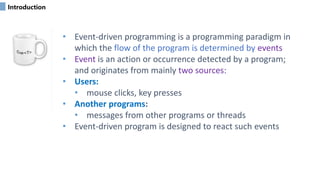
• Event-driven programming is a programming paradigm in
which the flow of the program is determined by events
• Event is an action or occurrence detected by a program;
and originates from mainly two sources:
• Users:
• mouse clicks, key presses
• Another programs:
• messages from other programs or threads
• Event-driven program is designed to react such events
Introduction
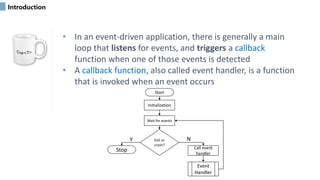
• In an event-driven application, there is generally a main
loop that listens for events, and triggers a callback
function when one of those events is detected
• A callback function, also called event handler, is a function
that is invoked when an event occurs
Initialization
Wait for events
Exit or
crash?
Call event
handler
Event
Handler
Stop
Start
Y N
Introduction
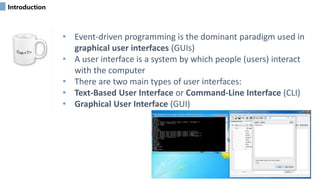
• Event-driven programming is the dominant paradigm used in
graphical user interfaces (GUIs)
• A user interface is a system by which people (users) interact
with the computer
• There are two main types of user interfaces:
• Text-Based User Interface or Command-Line Interface (CLI)
• Graphical User Interface (GUI)
Introduction
• Command Line Interface - CLI
• This is a text only interface, which only requires input from
the keyboard (usually referred to as “entering a command”)
• Typically, Enter key is pressed at the end of a command, after
which the computer will receive, parse and execute that
command
• The output of the command will be returned back to the
terminal as text lines
• This interface relies primarily on the keyboard
Introduction
• Command Line Interface - CLI
• The main advantages of a CLI are:
• users only need to utilize the keyboard and may need to
execute only few commands to complete the task
• a computer that is only using the command line takes a lot
less of the computers resources
• The main disadvantages of a CLI are:
• difficult for new users to learn
• relies heavily on recall rather than recognition
• navigation is often more difficult
Introduction
• Graphical User Interface - GUI
• It is a type of interface that allows users to communicate with
applications in the form of images/animations/icons as
opposed to text
• This interface presents the user with the information/actions
through graphical objects (i.e. GUI Controls or Widgets)
• Both mouse and keyboard can be used for the interaction
• The user performs actions by directly manipulating graphical
objects on the screen
Introduction
• Graphical User Interface - GUI
• The main advantages of a GUI are:
• less expert knowledge is required to use it (more user friendly)
• easier to navigate
• The main disadvantages of a GUI are:
• consumes system resources
• slower compared to CLI
What is .NET?
• .NET is a developer platform made up of tools, programming
languages, and libraries for building different types of
applications
• It is created by Microsoft
• Its applications are multi-platform applications
• It has been designed in such a way that it can be used from
any of the following languages: C#, C++, Visual Basic, etc
• It consists of an enormous library of codes used by the client
languages such as C# using object-oriented programming
(OOP) techniques
What is .NET?
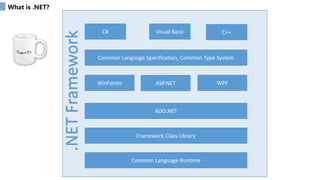
Common Language Runtime
Framework Class Library
ADO.NET
WinForms
Common Language Specification, Common Type System
C#
ASP.NET WPF
Visual Basic C++
.NET
Framework
Common Language Runtime
• The CLR is responsible for maintaining the execution
of all applications developed using the .NET library
• It provides various services to managed code:
• Compilation and execution
• Integrating software components written in different .NET
languages,
• Garbage collection, and more.
Common Language Runtime
• Managed code is compiled into machine-specific
instructions in the following steps:
• First, the code is compiled into Microsoft Intermediate
Language (MSIL)
• When the app executes, another compiler (known as the
just-in-time compiler or JIT compiler) in the CLR translates
the MSIL in into machine-language code (for a particular
platform)
• The machine-language code executes on that platform
Common Language Runtime
• The Framework provides a high level of language
interoperability
• Because software components written in different .NET
languages (such as C# and Visual Basic) are all compiled into
MSIL, the components can be combined to create a single
unified program
• Thus, MSIL allows the .NET Framework to be language
independent
Framework Class Library
• The .NET framework class library is a library of classes and
interfaces that provide access to system functionality
• It is the foundation on which .NET Framework applications are
built
• The library is categorized into a number of namespaces
• The System.Windows namespaces contain types used in
Windows Presentation Foundation (WPF) applications,
• System.Windows.Forms and its child namespaces are used for
developing Windows Forms applications.
ADO.NET
• ADO.NET provides consistent access to data sources such as
SQL Server and XML
• Applications can use ADO.NET to connect to these data
sources and perform CRUD operations:
• Create,
• Read,
• Update and
• Delete data
System.Windows (WPF)
• System.Windows provides an object-oriented set of classes
that enable you to develop rich Windows applications
• With this module and some additional code you can:
• design UI
• read information from the user
• respond to the information provided
• manipulate data from external sources (i.e. files and
databases)
Common Type System
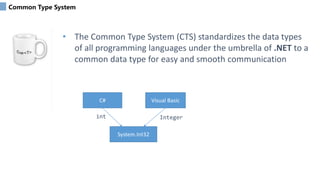
• The Common Type System (CTS) standardizes the data types
of all programming languages under the umbrella of .NET to a
common data type for easy and smooth communication
C# Visual Basic
System.Int32
Integer
int
Common Language Specification
• CLS is a set of basic language features that .NET Languages
needed to develop Applications and Services , which are
compatible with the .NET Framework.
• When there is a situation to communicate Objects written in
different .NET Complaint languages , those objects must
expose the features that are common to all the languages
• For example, one rule is that you cannot use multiple inheritance within
.NET Framework. As you may know C++ supports multiple inheritance
but; that’s not allowed to use such a C++ code within C# because it
doesn’t supports multiple inheritance
• Another rule is that you cannot have members with the same name but
different cases i.e. you cannot have add() and Add() methods. This easily
works in C# because it is case-sensitive but because VB is not case
sensitive, it’s not possible to use such a code
.NET Implementations
• Three implementations:
1. .NET Framework is the original implementation of .NET. It supports
running websites, services, desktop apps, and more on Windows
2. .NET Core is a cross-platform implementation for running websites,
services, and console apps on Windows, Linux, and macOS. This
implementation is open source on GitHub
3. Xamarin/Mono is a .NET implementation for running apps on all the
major mobile operating systems, including iOS and Android
EDP
END
T h a n k y o u !
Kitaw A.

Introduction.pptx the event driven course

  • 1.
  • 2.
    Introduction • Event-driven programmingis a programming paradigm in which the flow of the program is determined by events • Event is an action or occurrence detected by a program; and originates from mainly two sources: • Users: • mouse clicks, key presses • Another programs: • messages from other programs or threads • Event-driven program is designed to react such events
  • 3.
    Introduction • In anevent-driven application, there is generally a main loop that listens for events, and triggers a callback function when one of those events is detected • A callback function, also called event handler, is a function that is invoked when an event occurs Initialization Wait for events Exit or crash? Call event handler Event Handler Stop Start Y N
  • 4.
    Introduction • Event-driven programmingis the dominant paradigm used in graphical user interfaces (GUIs) • A user interface is a system by which people (users) interact with the computer • There are two main types of user interfaces: • Text-Based User Interface or Command-Line Interface (CLI) • Graphical User Interface (GUI)
  • 5.
    Introduction • Command LineInterface - CLI • This is a text only interface, which only requires input from the keyboard (usually referred to as “entering a command”) • Typically, Enter key is pressed at the end of a command, after which the computer will receive, parse and execute that command • The output of the command will be returned back to the terminal as text lines • This interface relies primarily on the keyboard
  • 6.
    Introduction • Command LineInterface - CLI • The main advantages of a CLI are: • users only need to utilize the keyboard and may need to execute only few commands to complete the task • a computer that is only using the command line takes a lot less of the computers resources • The main disadvantages of a CLI are: • difficult for new users to learn • relies heavily on recall rather than recognition • navigation is often more difficult
  • 7.
    Introduction • Graphical UserInterface - GUI • It is a type of interface that allows users to communicate with applications in the form of images/animations/icons as opposed to text • This interface presents the user with the information/actions through graphical objects (i.e. GUI Controls or Widgets) • Both mouse and keyboard can be used for the interaction • The user performs actions by directly manipulating graphical objects on the screen
  • 8.
    Introduction • Graphical UserInterface - GUI • The main advantages of a GUI are: • less expert knowledge is required to use it (more user friendly) • easier to navigate • The main disadvantages of a GUI are: • consumes system resources • slower compared to CLI
  • 9.
    What is .NET? •.NET is a developer platform made up of tools, programming languages, and libraries for building different types of applications • It is created by Microsoft • Its applications are multi-platform applications • It has been designed in such a way that it can be used from any of the following languages: C#, C++, Visual Basic, etc • It consists of an enormous library of codes used by the client languages such as C# using object-oriented programming (OOP) techniques
  • 10.
    What is .NET? CommonLanguage Runtime Framework Class Library ADO.NET WinForms Common Language Specification, Common Type System C# ASP.NET WPF Visual Basic C++ .NET Framework
  • 11.
    Common Language Runtime •The CLR is responsible for maintaining the execution of all applications developed using the .NET library • It provides various services to managed code: • Compilation and execution • Integrating software components written in different .NET languages, • Garbage collection, and more.
  • 12.
    Common Language Runtime •Managed code is compiled into machine-specific instructions in the following steps: • First, the code is compiled into Microsoft Intermediate Language (MSIL) • When the app executes, another compiler (known as the just-in-time compiler or JIT compiler) in the CLR translates the MSIL in into machine-language code (for a particular platform) • The machine-language code executes on that platform
  • 13.
    Common Language Runtime •The Framework provides a high level of language interoperability • Because software components written in different .NET languages (such as C# and Visual Basic) are all compiled into MSIL, the components can be combined to create a single unified program • Thus, MSIL allows the .NET Framework to be language independent
  • 14.
    Framework Class Library •The .NET framework class library is a library of classes and interfaces that provide access to system functionality • It is the foundation on which .NET Framework applications are built • The library is categorized into a number of namespaces • The System.Windows namespaces contain types used in Windows Presentation Foundation (WPF) applications, • System.Windows.Forms and its child namespaces are used for developing Windows Forms applications.
  • 15.
    ADO.NET • ADO.NET providesconsistent access to data sources such as SQL Server and XML • Applications can use ADO.NET to connect to these data sources and perform CRUD operations: • Create, • Read, • Update and • Delete data
  • 16.
    System.Windows (WPF) • System.Windowsprovides an object-oriented set of classes that enable you to develop rich Windows applications • With this module and some additional code you can: • design UI • read information from the user • respond to the information provided • manipulate data from external sources (i.e. files and databases)
  • 17.
    Common Type System •The Common Type System (CTS) standardizes the data types of all programming languages under the umbrella of .NET to a common data type for easy and smooth communication C# Visual Basic System.Int32 Integer int
  • 18.
    Common Language Specification •CLS is a set of basic language features that .NET Languages needed to develop Applications and Services , which are compatible with the .NET Framework. • When there is a situation to communicate Objects written in different .NET Complaint languages , those objects must expose the features that are common to all the languages • For example, one rule is that you cannot use multiple inheritance within .NET Framework. As you may know C++ supports multiple inheritance but; that’s not allowed to use such a C++ code within C# because it doesn’t supports multiple inheritance • Another rule is that you cannot have members with the same name but different cases i.e. you cannot have add() and Add() methods. This easily works in C# because it is case-sensitive but because VB is not case sensitive, it’s not possible to use such a code
  • 19.
    .NET Implementations • Threeimplementations: 1. .NET Framework is the original implementation of .NET. It supports running websites, services, desktop apps, and more on Windows 2. .NET Core is a cross-platform implementation for running websites, services, and console apps on Windows, Linux, and macOS. This implementation is open source on GitHub 3. Xamarin/Mono is a .NET implementation for running apps on all the major mobile operating systems, including iOS and Android
  • 20.
    EDP END T h an k y o u ! Kitaw A.