Introduction To Coding
Part Deuce
Jeremy Montoya
What Will Be Covered?
●General overview of last session
(variables, if statements, etc..) but from the
PHP aspect
● Understand how logic and concepts can
be learned – and easily applied using any
language.
● A high level overview of querying a
database using PHP
No SQL again today..
●That concept is a completely
different monster in the world of
programming.
Today's Language - PHP
PHP Hypertext Processor
● One of the most widely used server
scripting languages
● Ideal to use when a web page needs
to be dynamic or when communication
with databases is needed
● Static pages can be generated as well
– but not needed
Where Is This PHP?
● Windows
http://windows.php.net/download/
● Unix
http://www.php.net/manual/en/install.unix.php
● Mac OS X
http://www.php.net/manual/en/install.macosx.php
Not Everyone Likes PHP..
(11:39:56 AM) Myself: do you like PHP
(11:40:04 AM) Paimoe: eh
(11:40:17 AM) Myself: congrats
(11:40:20 AM) Myself: you just made my presentation
(11:40:24 AM) Paimoe: lol
Some People Do!
(11:44:09 AM) Myself: do you like PHP
(11:44:15 AM) Ben: I do
(11:44:18 AM) Myself: why's that
(11:44:18 AM) Ben: It works well enough
(11:44:24 AM) Ben: Some useful features
(11:44:28 AM) Ben: Stellar documents
(11:44:33 AM) Myself: congrats, you just made my
presentation
(11:44:41 AM) Ben: lol
Today's Learning Process
PHP Edition
● Variables
● Storage
● Comments
● Running Code
● Review and Run
● If/Else Statement
● Loops
● Exercises
● Database Interaction
●“The Knockout” Recipe
PHP Syntax
Instruction separation
PHP requires semicolons to be used to separate
instructions (Ruby does not)
Ex:
$a = “test”; $b = “another test”;
Commenting
While Ruby uses the pound sign to tell the computer
to ignore lines of code, PHP uses slashes and
asterisks for comments.
For Single Line Comments (Double Slash)
//This is a commented line
$testvar = “hello”;
PHP Syntax (cont.)
There may be instances where one may want to
comment out a whole section of code, rather than a
single line. This normally happens when testing
different sections or describing a function (multiple
sentences needed). To do this, start the commented
area with “/*” and close it off with “*/”.
/*
This next line will assign the value 7 to a variable
because 7 is my favorite number. If anyone wants to
know why, they can come and ask me.
*/
$var = 7;
PHP Variables
Syntax: $<variable name>
● Must start with a dollar sign
Ex: $firstname = “Jeremy”;
Variable Name
● Variable name must begin with a letter or “_”
(underscore)
Ex:
$_fruit = “pear”; //Good
$8mile = “slimshady”; //Bad
● Variable can only contain alphanumeric characters
and “_”, no spaces allowed, case sensitive ($test !=
$Test)
PHP Variables (Cont.)
● Same method of assigning strings, integers as
Ruby has – only slightly different syntax.
Ruby
A = “apple”
B = 10
PHP
$A = “apple”;
$B = 10;
Remember, PHP requires semicolons to be used to
separate out instructions
PHP Variables (Cont.)
● As with Ruby, storage actions are done the same
way, with just a few syntax differences.
Ruby
Three = one + two
Fullname = “Jeremy Montoya”
PHP
$three = $one + $two;
$fullname = “Jeremy Montoya”;
Running a PHP script
● Without performing the full installation and just learning
the syntax. Simply type in your script and submit to see
the output.
http://sandbox.onlinephpfunctions.com/
● For full implementation / ability to see graphical output,
a .php file will need to be created, with the code written
inside the file. (Ruby = .rb, PHP = .php)
● With your .PHP file saved (assuming you have
performed the steps needed to have PHP installed,
alongside a web server (apache, IIS, etc..), simply place
the file in your web directory and access through the
browser.
Ex: http://www.cpap.com/index.php
Review and Run!
http://sandbox.onlinephpfunctions.com/
If/Else Statements
Review
● There may be scenarios where we want to perform
certain actions depending on the value of a variable.
This is where If/Else statements come into place.
Ex:
if( $pet == “cat” ){
echo “How unfortunate!”;
}
else{
echo “Good choice”;
}
If/Else Statements
● Once again, logic is the same, only with syntax
differences.
Ruby
If one == 2
puts “equals 2”
else
puts “does not equal 2”
end
PHP
if( $one == 2 ){
echo “equals 2”;
}
else{
echo “does not equal 2”;
}
Loops
● Used in programming to execute a block of code a
given number of times, or while a condition is true.
● There are a number of different types of loops to
use, all which have advantages depending on the
task at hand.
● These would include for and while loops
Loop Scenario
Let us imagine we would want to write a piece of
code that is to be used during the final moments of
2013. We would like a countdown to be displayed to
the crowd starting at 10 seconds until midnight. Once
midnight is reached, a large “HAPPY NEW YEAR!”
message will be displayed.
For Loops
For our “Happy New Year” task...it would look like
this in PHP:
for( $i=10; $i > 0; $i=$i-1 ){
echo $i;
}
echo “HAPPY NEW YEAR!”;
For loops are constructed different parts, which we
will go over in the next several slides.
For Loops
for( $i=10; $i > 0; $i=$i-1 ){
echo $i;
}
echo “HAPPY NEW YEAR!”;
The first part of the loop is the first instruction to be
run, before the loop even starts.
Typically, it assigns the starting value to the variable
involved in the loop. In the New Year's scenario, it's
starting the counter of at 10 (since we going to be
counting down until 0.
For Loops
for( $i=10; $i > 0; $i=$i-1 ){
echo $i;
}
echo “HAPPY NEW YEAR!”;
The second part of the loop is the condition that is
checked on every iteration through the loop. It is the
deciding factor in terms of knowing when to stop
looping and when to keep going.
In the New Year's scenario, the condition is to
continue the loop while the variable $i is greater than
0. Once that condition is violated ($i is equal to 0),
then the loop stops.
For Loops
for( $i=10; $i > 0; $i=$i-1 ){
echo $i;
}
The third part of the loop is the instruction to be done
after each iteration of loop. It's the most important
part due to the fact it controls the variable finally
getting to an end condition ($i reaching 0).
In the New Year's scenario, the instruction is to
deduct 1 from $i after each iteration since we are
counting down.
For Loops
for( $i=10; $i > 0; $i=$i-1 ){
echo $i;
}
echo “HAPPY NEW YEAR”;
The section that lies within the open and close
brackets is the block of code that is to be executed
on each iteration.
In this scenario, we wanted to display a countdown,
so we will simply be displaying out the value of $i to
the screen to emulate this.
Cat Break:
what what what what, scratch scratch scratch, meow meow meow
For Loops
for( $i=10; $i > 0; $i=$i-1 ){
echo $i;
}
echo “HAPPY NEW YEAR”;
As soon as the value of $i reaches 0, the condition
“$i > 0” will be violated, thus exiting out of loop. Now,
we will see our final message which is set to show
after the loop has completed.
DANGER: For Loops
for( $i=10; $i > 0; $i=$i-1 ){
echo $i;
$i = $i + 5;
}
echo “HAPPY NEW YEAR!”;
10
15
14
As with any loops, one must be sure to carefully set up their loop parameters
correctly, as well as not manipulating the loop variable within the block of code.
In this case, everything is setup properly, except for a single line that will add 5
to $i during each iteration. This now causes $i to just get bigger and bigger,
rather than closer to 0. This will result in what we call an “infinite loop”.
While Loop
Similar to for loops, but with a different structural
setup. In many cases, this will be used when the
number of iterations is not known. Generally, there
will be a condition that must be met to terminate the
loop. In this example, we'll play the guessing game.
$numberInHead=8;
$guess=0;
while( $guess != $numberInHead ){
//ask the user for a number
}
echo “ABOUT TIME!”;
As you can notice, it took a couple more lines of
code to achieve what the for loop did, but in many
cases, it's easier to read for someone else.
While Loop
$numberInHead=8;
$guess=0;
while( $guess != $numberInHead ){
//ask the user for a number
}
echo “ABOUT TIME!”;
This acts just like the first parameter in a for loop.
We want to start the variable off at it's start value, so
we set it to 0 since no guess has been made.
While Loop
$numberInHead=8;
$guess=0;
while( $guess != $numberInHead ){
//ask the user for a number....
$guess = whateverweaskthemfor;
}
echo “ABOUT TIME!”;
The core of a while loop. One can pretty much say
what they see out loud to understand what's
happening. “While variable 'guess' is not equal to the
variable $numberInHead”, we will perform whatever
is in between the brackets.
While Loop
$numberInHead=8;
$guess=0;
while( $guess != $numberInHead ){
//ask the user for a number
}
echo “ABOUT TIME!”;
Just like the for loop, any code within the brackets
will be executed on each iteration. In this case, we
will prompt the user for a number to guess.
While Loop
$numberInHead=8;
$guess=0;
while( $guess != $numberInHead ){
//ask the user for a number
}
echo “ABOUT TIME!”;
Alas, the user will finally make the correct guess, and
get out of the loop. We can then congratulate them
accordingly.
Exercises
What Will Be Output To The
Screen?
for($x=0;$x<=10;$x=$x+1){
if( $x < 5 ){
echo $x;
}
else{
echo “$x is too high”;
}
}
echo “Done!”;
What Will Be Output To The
Screen?
for($x=0;$x<=10;$x=$x+1){
if( $x < 5 ){
echo $x;
}
else{
echo “$x is too high”;
}
}
echo “Done!”;
0
1
2
3
4
5 is too high
6 is too high
7 is too high
8 is too high
9 is too high
10 is too high
What's Wrong With This Loop?
for( $i=0; $i<5; $i=$i-1 ){
echo “Hooray for coding”;
}
What's Wrong With This Loop?
for( $i=0; $i<5; $i=$i-1 ){
echo “Hooray for coding”;
}
$i will start at 0 and decrement
by 1 each time, thus never
satisfying the condition to exit
the loop, which is for $i to
exceed or equal 5.
INFINITE LOOP!
What's Wrong With This Loop?
x = 5;
while( x > 0 ){
x = x – 1;
}
What's Wrong With This Loop?
x = 5;
while( x > 0 ){
x = x - 1;
}
Shame on you if you didn't get it. This is PHP, where
are all the dollar signs?!!
Database Interaction
Now that we have gotten basic condition
checking and loops out of the way in PHP, we
can now go over how we use this when talking to
databases.
Database Interaction
As a starting example, let's say we have a table named
“PlacesTbl” of restaurants in the local area that a group
enjoys going to for lunch. It consists of 3 fields - a unique
id given to each one, the name of the restaurant and a
flag implying if they have gluten free options or not.
Database Request
A page needs to be set up to display to users all the restaurants in the area - in order of
the restaurants name, and stating whether or not they are gluten free. The SQL statement is
the first thing to set up.
SELECT *
FROM PlacesTbl
ORDER BY Description
Running this SQL manually before using in your PHP script
should always be done so you know it's working correctly.
PHP Implementation
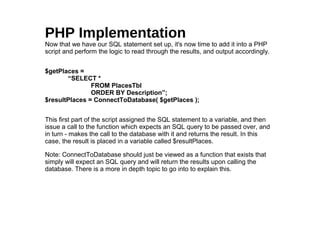
Now that we have our SQL statement set up, it's now time to add it into a PHP
script and perform the logic to read through the results, and output accordingly.
$getPlaces =
“SELECT *
FROM PlacesTbl
ORDER BY Description”;
$resultPlaces = ConnectToDatabase( $getPlaces );
This first part of the script assigned the SQL statement to a variable, and then
issue a call to the function which expects an SQL query to be passed over, and
in turn - makes the call to the database with it and returns the result. In this
case, the result is placed in a variable called $resultPlaces.
Note: ConnectToDatabase should just be viewed as a function that exists that
simply will expect an SQL query and will return the results upon calling the
database. There is a more in depth topic to go into to explain this.
PHP Implementation
With $resultPlaces containing the result of our query, it's now time to read
through it and output the information.
$rowPlaces = mysql_fetch_array( $resultPlaces );
while( $rowPlaces != false ){
if( $rowPlaces['FlagGF'] == 1 ){
echo $rowPlaces['Description'] . “ - Gluten Free<br>”;
}
else{
echo $rowPlaces['Description'] . “ - Gluten Everywhere<br>”;
}
//Get next row
$rowPlaces = mysql_fetch_array( $resultPlaces );
}
Ok, first let's explain the mysql_fetch_array function call. This is a function built
into the MySQL library in PHP. It receives in the variable that is holding the
result, and returns the next row in the results. If there are no rows left to read in,
it returns false.
Given that we will set our loop variable to the first row and begin the loop.
PHP Implementation
$rowPlaces = mysql_fetch_array( $resultPlaces );
while( $rowPlaces != false ){
if( $rowPlaces['FlagGF'] == 1 ){
echo $rowPlaces['Description'] . “ - Gluten Free<br>”;
}
else{
echo $rowPlaces['Description'] . “ - Gluten Everywhere<br>”;
}
//Get next row
$rowPlaces = mysql_fetch_array( $resultPlaces );
}
We will set the condition to get out of our loop to be once $rowPlaces is set to
false. This is because once we run out of rows to read, mysql_fetch_array will
return false.
PHP Implementation
$rowPlaces = mysql_fetch_array( $resultPlaces );
while( $rowPlaces != false ){
if( $rowPlaces['FlagGF'] == 1 ){
echo $rowPlaces['Description'] . “ - Gluten Free<br>”;
}
else{
echo $rowPlaces['Description'] . “ - Gluten
Everywhere<br>”;
}
//Get next row
$rowPlaces = mysql_fetch_array( $resultPlaces );
}
In the meat of our loop, we will perform a comparison to see if the gluten free
flag (“FlagGF”) is set to 1. If it is, the restaurants name will be output, alongside
text stating it is gluten free. If it is not equal to 1, we will perform the same
output - but stating it's full of gluten.
After the output is displayed, we will give our loop variable $rowPlaces its new
value, by assigning it what mysql_fetch_array now returns. This will prepare it
for the condition check at the beginning of the loop!
PHP Implementation
The resulting page will look something like this!
The Knockout
Perfect for inducing an idyllic summer nap, The Knockout offers a sweet blend of fruit
with a sharp kick of tequila:
2 parts lime juice
1 part tequila
1 part Midori
splash of simple syrup
8 blueberries
Crush blueberries in a bowl with a spoon. Set aside.
Combine lime juice, tequila, midori and simple syrup in a tumbler with ice. Shake.
Salt serving glass, fill with ice, garnish with blueberries, then pour the strained mixture
on top.
Garnish with a blueberries and a sprig of mint.
And what do you get...?
Fin

CPAP.com Introduction To Coding: Part 2

  • 1.
    Introduction To Coding PartDeuce Jeremy Montoya
  • 2.
    What Will BeCovered? ●General overview of last session (variables, if statements, etc..) but from the PHP aspect ● Understand how logic and concepts can be learned – and easily applied using any language. ● A high level overview of querying a database using PHP
  • 3.
    No SQL againtoday.. ●That concept is a completely different monster in the world of programming.
  • 4.
    Today's Language -PHP PHP Hypertext Processor ● One of the most widely used server scripting languages ● Ideal to use when a web page needs to be dynamic or when communication with databases is needed ● Static pages can be generated as well – but not needed
  • 5.
    Where Is ThisPHP? ● Windows http://windows.php.net/download/ ● Unix http://www.php.net/manual/en/install.unix.php ● Mac OS X http://www.php.net/manual/en/install.macosx.php
  • 6.
    Not Everyone LikesPHP.. (11:39:56 AM) Myself: do you like PHP (11:40:04 AM) Paimoe: eh (11:40:17 AM) Myself: congrats (11:40:20 AM) Myself: you just made my presentation (11:40:24 AM) Paimoe: lol
  • 7.
    Some People Do! (11:44:09AM) Myself: do you like PHP (11:44:15 AM) Ben: I do (11:44:18 AM) Myself: why's that (11:44:18 AM) Ben: It works well enough (11:44:24 AM) Ben: Some useful features (11:44:28 AM) Ben: Stellar documents (11:44:33 AM) Myself: congrats, you just made my presentation (11:44:41 AM) Ben: lol
  • 8.
    Today's Learning Process PHPEdition ● Variables ● Storage ● Comments ● Running Code ● Review and Run ● If/Else Statement ● Loops ● Exercises ● Database Interaction ●“The Knockout” Recipe
  • 9.
    PHP Syntax Instruction separation PHPrequires semicolons to be used to separate instructions (Ruby does not) Ex: $a = “test”; $b = “another test”; Commenting While Ruby uses the pound sign to tell the computer to ignore lines of code, PHP uses slashes and asterisks for comments. For Single Line Comments (Double Slash) //This is a commented line $testvar = “hello”;
  • 10.
    PHP Syntax (cont.) Theremay be instances where one may want to comment out a whole section of code, rather than a single line. This normally happens when testing different sections or describing a function (multiple sentences needed). To do this, start the commented area with “/*” and close it off with “*/”. /* This next line will assign the value 7 to a variable because 7 is my favorite number. If anyone wants to know why, they can come and ask me. */ $var = 7;
  • 11.
    PHP Variables Syntax: $<variablename> ● Must start with a dollar sign Ex: $firstname = “Jeremy”; Variable Name ● Variable name must begin with a letter or “_” (underscore) Ex: $_fruit = “pear”; //Good $8mile = “slimshady”; //Bad ● Variable can only contain alphanumeric characters and “_”, no spaces allowed, case sensitive ($test != $Test)
  • 12.
    PHP Variables (Cont.) ●Same method of assigning strings, integers as Ruby has – only slightly different syntax. Ruby A = “apple” B = 10 PHP $A = “apple”; $B = 10; Remember, PHP requires semicolons to be used to separate out instructions
  • 13.
    PHP Variables (Cont.) ●As with Ruby, storage actions are done the same way, with just a few syntax differences. Ruby Three = one + two Fullname = “Jeremy Montoya” PHP $three = $one + $two; $fullname = “Jeremy Montoya”;
  • 14.
    Running a PHPscript ● Without performing the full installation and just learning the syntax. Simply type in your script and submit to see the output. http://sandbox.onlinephpfunctions.com/ ● For full implementation / ability to see graphical output, a .php file will need to be created, with the code written inside the file. (Ruby = .rb, PHP = .php) ● With your .PHP file saved (assuming you have performed the steps needed to have PHP installed, alongside a web server (apache, IIS, etc..), simply place the file in your web directory and access through the browser. Ex: http://www.cpap.com/index.php
  • 15.
  • 16.
    If/Else Statements Review ● Theremay be scenarios where we want to perform certain actions depending on the value of a variable. This is where If/Else statements come into place. Ex: if( $pet == “cat” ){ echo “How unfortunate!”; } else{ echo “Good choice”; }
  • 17.
    If/Else Statements ● Onceagain, logic is the same, only with syntax differences. Ruby If one == 2 puts “equals 2” else puts “does not equal 2” end PHP if( $one == 2 ){ echo “equals 2”; } else{ echo “does not equal 2”; }
  • 18.
    Loops ● Used inprogramming to execute a block of code a given number of times, or while a condition is true. ● There are a number of different types of loops to use, all which have advantages depending on the task at hand. ● These would include for and while loops
  • 19.
    Loop Scenario Let usimagine we would want to write a piece of code that is to be used during the final moments of 2013. We would like a countdown to be displayed to the crowd starting at 10 seconds until midnight. Once midnight is reached, a large “HAPPY NEW YEAR!” message will be displayed.
  • 20.
    For Loops For our“Happy New Year” task...it would look like this in PHP: for( $i=10; $i > 0; $i=$i-1 ){ echo $i; } echo “HAPPY NEW YEAR!”; For loops are constructed different parts, which we will go over in the next several slides.
  • 21.
    For Loops for( $i=10;$i > 0; $i=$i-1 ){ echo $i; } echo “HAPPY NEW YEAR!”; The first part of the loop is the first instruction to be run, before the loop even starts. Typically, it assigns the starting value to the variable involved in the loop. In the New Year's scenario, it's starting the counter of at 10 (since we going to be counting down until 0.
  • 22.
    For Loops for( $i=10;$i > 0; $i=$i-1 ){ echo $i; } echo “HAPPY NEW YEAR!”; The second part of the loop is the condition that is checked on every iteration through the loop. It is the deciding factor in terms of knowing when to stop looping and when to keep going. In the New Year's scenario, the condition is to continue the loop while the variable $i is greater than 0. Once that condition is violated ($i is equal to 0), then the loop stops.
  • 23.
    For Loops for( $i=10;$i > 0; $i=$i-1 ){ echo $i; } The third part of the loop is the instruction to be done after each iteration of loop. It's the most important part due to the fact it controls the variable finally getting to an end condition ($i reaching 0). In the New Year's scenario, the instruction is to deduct 1 from $i after each iteration since we are counting down.
  • 24.
    For Loops for( $i=10;$i > 0; $i=$i-1 ){ echo $i; } echo “HAPPY NEW YEAR”; The section that lies within the open and close brackets is the block of code that is to be executed on each iteration. In this scenario, we wanted to display a countdown, so we will simply be displaying out the value of $i to the screen to emulate this.
  • 25.
    Cat Break: what whatwhat what, scratch scratch scratch, meow meow meow
  • 26.
    For Loops for( $i=10;$i > 0; $i=$i-1 ){ echo $i; } echo “HAPPY NEW YEAR”; As soon as the value of $i reaches 0, the condition “$i > 0” will be violated, thus exiting out of loop. Now, we will see our final message which is set to show after the loop has completed.
  • 27.
    DANGER: For Loops for($i=10; $i > 0; $i=$i-1 ){ echo $i; $i = $i + 5; } echo “HAPPY NEW YEAR!”; 10 15 14 As with any loops, one must be sure to carefully set up their loop parameters correctly, as well as not manipulating the loop variable within the block of code. In this case, everything is setup properly, except for a single line that will add 5 to $i during each iteration. This now causes $i to just get bigger and bigger, rather than closer to 0. This will result in what we call an “infinite loop”.
  • 28.
    While Loop Similar tofor loops, but with a different structural setup. In many cases, this will be used when the number of iterations is not known. Generally, there will be a condition that must be met to terminate the loop. In this example, we'll play the guessing game. $numberInHead=8; $guess=0; while( $guess != $numberInHead ){ //ask the user for a number } echo “ABOUT TIME!”; As you can notice, it took a couple more lines of code to achieve what the for loop did, but in many cases, it's easier to read for someone else.
  • 29.
    While Loop $numberInHead=8; $guess=0; while( $guess!= $numberInHead ){ //ask the user for a number } echo “ABOUT TIME!”; This acts just like the first parameter in a for loop. We want to start the variable off at it's start value, so we set it to 0 since no guess has been made.
  • 30.
    While Loop $numberInHead=8; $guess=0; while( $guess!= $numberInHead ){ //ask the user for a number.... $guess = whateverweaskthemfor; } echo “ABOUT TIME!”; The core of a while loop. One can pretty much say what they see out loud to understand what's happening. “While variable 'guess' is not equal to the variable $numberInHead”, we will perform whatever is in between the brackets.
  • 31.
    While Loop $numberInHead=8; $guess=0; while( $guess!= $numberInHead ){ //ask the user for a number } echo “ABOUT TIME!”; Just like the for loop, any code within the brackets will be executed on each iteration. In this case, we will prompt the user for a number to guess.
  • 32.
    While Loop $numberInHead=8; $guess=0; while( $guess!= $numberInHead ){ //ask the user for a number } echo “ABOUT TIME!”; Alas, the user will finally make the correct guess, and get out of the loop. We can then congratulate them accordingly.
  • 33.
  • 34.
    What Will BeOutput To The Screen? for($x=0;$x<=10;$x=$x+1){ if( $x < 5 ){ echo $x; } else{ echo “$x is too high”; } } echo “Done!”;
  • 35.
    What Will BeOutput To The Screen? for($x=0;$x<=10;$x=$x+1){ if( $x < 5 ){ echo $x; } else{ echo “$x is too high”; } } echo “Done!”; 0 1 2 3 4 5 is too high 6 is too high 7 is too high 8 is too high 9 is too high 10 is too high
  • 36.
    What's Wrong WithThis Loop? for( $i=0; $i<5; $i=$i-1 ){ echo “Hooray for coding”; }
  • 37.
    What's Wrong WithThis Loop? for( $i=0; $i<5; $i=$i-1 ){ echo “Hooray for coding”; } $i will start at 0 and decrement by 1 each time, thus never satisfying the condition to exit the loop, which is for $i to exceed or equal 5. INFINITE LOOP!
  • 38.
    What's Wrong WithThis Loop? x = 5; while( x > 0 ){ x = x – 1; }
  • 39.
    What's Wrong WithThis Loop? x = 5; while( x > 0 ){ x = x - 1; } Shame on you if you didn't get it. This is PHP, where are all the dollar signs?!!
  • 40.
    Database Interaction Now thatwe have gotten basic condition checking and loops out of the way in PHP, we can now go over how we use this when talking to databases.
  • 41.
    Database Interaction As astarting example, let's say we have a table named “PlacesTbl” of restaurants in the local area that a group enjoys going to for lunch. It consists of 3 fields - a unique id given to each one, the name of the restaurant and a flag implying if they have gluten free options or not.
  • 42.
    Database Request A pageneeds to be set up to display to users all the restaurants in the area - in order of the restaurants name, and stating whether or not they are gluten free. The SQL statement is the first thing to set up. SELECT * FROM PlacesTbl ORDER BY Description Running this SQL manually before using in your PHP script should always be done so you know it's working correctly.
  • 43.
    PHP Implementation Now thatwe have our SQL statement set up, it's now time to add it into a PHP script and perform the logic to read through the results, and output accordingly. $getPlaces = “SELECT * FROM PlacesTbl ORDER BY Description”; $resultPlaces = ConnectToDatabase( $getPlaces ); This first part of the script assigned the SQL statement to a variable, and then issue a call to the function which expects an SQL query to be passed over, and in turn - makes the call to the database with it and returns the result. In this case, the result is placed in a variable called $resultPlaces. Note: ConnectToDatabase should just be viewed as a function that exists that simply will expect an SQL query and will return the results upon calling the database. There is a more in depth topic to go into to explain this.
  • 44.
    PHP Implementation With $resultPlacescontaining the result of our query, it's now time to read through it and output the information. $rowPlaces = mysql_fetch_array( $resultPlaces ); while( $rowPlaces != false ){ if( $rowPlaces['FlagGF'] == 1 ){ echo $rowPlaces['Description'] . “ - Gluten Free<br>”; } else{ echo $rowPlaces['Description'] . “ - Gluten Everywhere<br>”; } //Get next row $rowPlaces = mysql_fetch_array( $resultPlaces ); } Ok, first let's explain the mysql_fetch_array function call. This is a function built into the MySQL library in PHP. It receives in the variable that is holding the result, and returns the next row in the results. If there are no rows left to read in, it returns false. Given that we will set our loop variable to the first row and begin the loop.
  • 45.
    PHP Implementation $rowPlaces =mysql_fetch_array( $resultPlaces ); while( $rowPlaces != false ){ if( $rowPlaces['FlagGF'] == 1 ){ echo $rowPlaces['Description'] . “ - Gluten Free<br>”; } else{ echo $rowPlaces['Description'] . “ - Gluten Everywhere<br>”; } //Get next row $rowPlaces = mysql_fetch_array( $resultPlaces ); } We will set the condition to get out of our loop to be once $rowPlaces is set to false. This is because once we run out of rows to read, mysql_fetch_array will return false.
  • 46.
    PHP Implementation $rowPlaces =mysql_fetch_array( $resultPlaces ); while( $rowPlaces != false ){ if( $rowPlaces['FlagGF'] == 1 ){ echo $rowPlaces['Description'] . “ - Gluten Free<br>”; } else{ echo $rowPlaces['Description'] . “ - Gluten Everywhere<br>”; } //Get next row $rowPlaces = mysql_fetch_array( $resultPlaces ); } In the meat of our loop, we will perform a comparison to see if the gluten free flag (“FlagGF”) is set to 1. If it is, the restaurants name will be output, alongside text stating it is gluten free. If it is not equal to 1, we will perform the same output - but stating it's full of gluten. After the output is displayed, we will give our loop variable $rowPlaces its new value, by assigning it what mysql_fetch_array now returns. This will prepare it for the condition check at the beginning of the loop!
  • 47.
    PHP Implementation The resultingpage will look something like this!
  • 48.
    The Knockout Perfect forinducing an idyllic summer nap, The Knockout offers a sweet blend of fruit with a sharp kick of tequila: 2 parts lime juice 1 part tequila 1 part Midori splash of simple syrup 8 blueberries Crush blueberries in a bowl with a spoon. Set aside. Combine lime juice, tequila, midori and simple syrup in a tumbler with ice. Shake. Salt serving glass, fill with ice, garnish with blueberries, then pour the strained mixture on top. Garnish with a blueberries and a sprig of mint. And what do you get...?
  • 49.