What is PHP ?
 PHP is a server-side scripting language designed for web development
 PHP powers everything from blogs to the most popular websites in the
world.
 PHP stands for Hypertext Preprocessor
 PHP code may be embedded into HTML code
 PHP is used as a server-side language
 PHP is free, fast, flexible and pragmatic
Where is PHP used ?
 The world's largest social network, Facebook uses PHP
 The world's largest content management system, Wordpress runs on PHP
 Many developers use PHP as a server-side language
 PHP is simple. Hence, many beginners use it.
Why PHP?
 PHP is secure
 PHP runs on many operating systems like Windows, Mac OS, Linux, etc.
 PHP is supported by many servers like Apache, IIS, Lighttpd, etc.
 PHP supports many database systems like MYSQL, Mango DB, etc.
 PHP is free
The power of PHP
 PHP can serve dynamic web pages
 PHP can collect, validate, save form data
 PHP can add, modify, delete data in the database
 PHP can handle sessions and cookies
 PHP can read, write, delete files on the server
 PHP can serve Images, PDFs, Flash Movies and more file types
 PHP can resize, compress, edit images
How to install ?
 The first step is installing PHP on your computer. But, before that, you will
need to understand this simple procedure about how we going to install
PHP.
 PHP can run by itself, but, here we will let it run on a web server. (That's
how PHP is used as a server-side language)
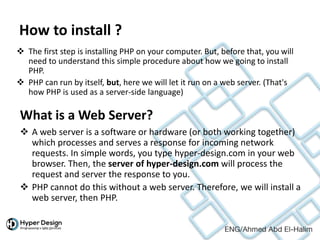
 A web server is a software or hardware (or both working together)
which processes and serves a response for incoming network
requests. In simple words, you type hyper-design.com in your web
browser. Then, the server of hyper-design.com will process the
request and server the response to you.
 PHP cannot do this without a web server. Therefore, we will install a
web server, then PHP.
What is a Web Server?
Let's Install the server
Here are the steps.
 Installing Web Server (Here we will use Apache)
 Installing PHP
However, you can do both of the above steps at once by
installing one of the following web development environments.
 WAMP Server - Only Windows
 XAMPP Server- Supports Windows, Linux, OS X
Installing a text editor
You need a good text editor to write and edit PHP files. The following are some of
recommended text editors. Go to those websites and choose any editor you like.
 Sublime Text
 Atom [recommended]
 Visual Studio Code
Your first PHP Program
Default Extension
The default file extension for PHP is .php. The web server will
recognize and execute the files with the .php extension as PHP files by
default.
Hello World Script
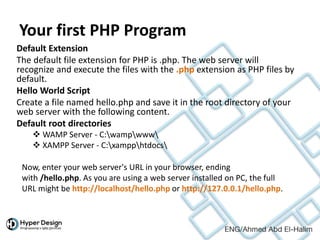
Create a file named hello.php and save it in the root directory of your
web server with the following content.
Default root directories
 WAMP Server - C:wampwww
 XAMPP Server - C:xampphtdocs
Now, enter your web server's URL in your browser, ending
with /hello.php. As you are using a web server installed on PC, the full
URL might be http://localhost/hello.php or http://127.0.0.1/hello.php.
The Logic of the Localhost
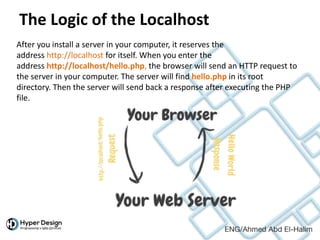
After you install a server in your computer, it reserves the
address http://localhost for itself. When you enter the
address http://localhost/hello.php, the browser will send an HTTP request to
the server in your computer. The server will find hello.php in its root
directory. Then the server will send back a response after executing the PHP
file.
PHP Basic Syntax
What is syntax ?
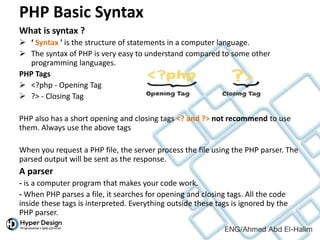
 ‘ Syntax ' is the structure of statements in a computer language.
 The syntax of PHP is very easy to understand compared to some other
programming languages.
PHP Tags
 <?php - Opening Tag
 ?> - Closing Tag
PHP also has a short opening and closing tags <? and ?> not recommend to use
them. Always use the above tags
When you request a PHP file, the server process the file using the PHP parser. The
parsed output will be sent as the response.
A parser
- is a computer program that makes your code work.
- When PHP parses a file, it searches for opening and closing tags. All the code
inside these tags is interpreted. Everything outside these tags is ignored by the
PHP parser.
1. Only PHP
PHP files can have only PHP code. In this case, you can omit closing tags. This
prevents accidental whitespace or new lines being added after the PHP
closing tag.
<?php echo 'Hello World';
2. PHP inside HTML
You can use PHP code inside HTML. Here, the closing tag is compulsory.
<!DOCTYPE html>
<html>
<head>
<title>Hello World</title>
</head>
<body>
<h1>My First PHP-Enabled Page</h1>
<p><?php echo 'Hello World'; ?></p>
</body>
</html>
 <?php announces the opening of the PHP code.
 echo says to output the string right after it.
 ; says to terminate the current statement or instruction
 ?> announces the ending of the PHP code. (This is not needed in this
script as we only have PHP code in it.)
• PHP Case-Sensitivity
PHP is a SEMI-CASE-SENSITIVE language which means some features are
case-sensitive while others are not.
Following are case-insensitive
 All the keywords (if, else, while, for, foreach, etc.)
 Functions
 Statements
 Classes
PHP Variables are case-sensitive. <?php
$name = 'Hyvor Developer'; echo $name;
// echo $Name;
<?php
echo 'Hello World';
ECHO 'Hello World';
eCHo 'Hello World';
Echo 'Hello World';
PHP Comments
 Comments are used to understand the code while reading.
 They can also be used to leave a part from the code.
 Comments are really important when trying to understand other's or your own
code after years.
 Comments can explain what the code does.
 Comments does not need to follow language syntax rules
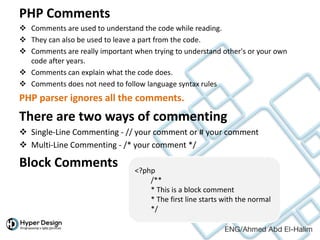
PHP parser ignores all the comments.
There are two ways of commenting
 Single-Line Commenting - // your comment or # your comment
 Multi-Line Commenting - /* your comment */
Block Comments <?php
/**
* This is a block comment
* The first line starts with the normal
*/
PHP Variables
Variables are used to store information and retrieve
them when needed. They can be labeled with a
meaningful name to be understood easily by the readers
and ourselves.
The data stored in variables can be changed.
What can we do with variables?
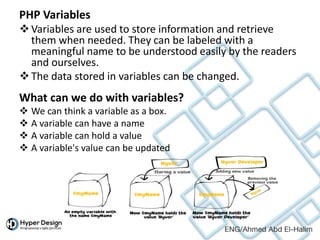
 We can think a variable as a box.
 A variable can have a name
 A variable can hold a value
 A variable's value can be updated
Variable Naming
 The $ identifier should be added in front of the name of the variable.
 A variable name must start with a letter or underscore.
 A variable name cannot start with a number.
 A variable name cannot be $this. ($this is a special variable which cannot
be assigned)
 A variable name can contain letters, numbers, and characters between
127-255 ASCII after the first character.
 Variable names are case sensitive.
<?php
$name = 'Hyvor'; // valid
$_name = 'Hyvor'; // valid - starts with an underscore
$näme = 'Hyvor'; // valid - 'ä' is (Extended) ASCII 228
$1name = 'Hyvor'; // invalid - cannot start with a number
$this = 'Hyvor'; // invalid - cannot assign value to $this
Note that the variable names are case-sensitive. $name and $Name are two
different variables.
Declaring Variables
In programming, creating a variable is called declaring. But, in PHP, unlike
other programming languages, there is no keyword to declare a variable.
 Variables are declared when you assign a value to them
 Unlike other programming languages, you do not have to define data types for
variables. (Programming languages like this is called loosely typed languages)
Note: Strings should be wrapped with " (double-quotes) or ' (single-quotes).
<?php
$month = "May";
$day = 22;
Reassigning Values to Variables
 A variable stores the value of its most recent assignment.
Output Will be : World
because it is the value of the last assignment
Constants
 Constant is a piece of information stored in the computer's memory which does
not change (cannot be changed).
 Once a constant is defined, it cannot be changed.
 All the constants have global scopes, even it is defined inside a function.
 Unlike variables, constants do not have $ before the name.
 A constant name should start with a letter or underscore.
 A constant name can have letters, numbers, ASCII characters between 127-255
after the first letter.
<?php
$text = 'Hello';
$text = 'World';
echo $text
We have to use define() function for declaring constants.
 name: The name of the constant
 value: The value of the constant - boolean, integer, float, string or array. (You will
learn about these later)
 case-insensitive: Specify whether the constant is case-insensitive or not. The
default is false (case-sensitive).
Why Constants?
 To save database credentials:
Normally, we save database credentials in a single file and we will use constants to
save username and passwords in. The reason for this is the value of constants cannot
be changed programmatically.
What if we need to change the password? In this case, we can simply edit our file
and change the value of the constants.
 To save main configurations:
In your website, there will be main configurations like company name, logo URL, etc.
Saving these values in a constant is a good idea.
define(name, value, case-insensitive)
<?php
define('GREETING', 'Hello World', true);
echo GREETING, '<br>';
echo Greeting, '<br>';
echo gReeting, '<br>';
Strings
A string is any finite sequence of characters (letters, numerals, symbols,
punctuation marks, etc.)
Declaring Strings
There are two ways.
 Single Quoted ‘ ’
 Double Quoted “ “
Single Quoted
 The easiest way to declare a string is by enclosing it by single quotes.
Character: '
 What if you needed to add a single quote inside a single quoted string?
Just escape that character with a back slash. ‘
 What if you needed to have ' in a single quoted string? Use  to escape
the  character. And, as in the last example, ' to escape the ' character.
$string = 'This is my first string';
$string = 'This is the hyper 's PHP Tutorial';
$string = 'Backslash and Quote: '';
Double Quoted
 Strings can be declared enclosed by double quotes. Character: ".
 In single quotes, only  and ' had a special meaning. But, in double
quotes, there are more escape sequences.
<pre>
<?php
echo "Hello World";
echo "<br>";
echo ""Hello World"";
echo "ntHello Worldn";
?>
</pre>
PHP Output
 PHP is executed on the server, only an output is sent to the browser.
 Output is the process that we send a response back to the client. This can
be a normal text, HTML markup, XML, Javascript code
 There are two output statements in PHP :
 Echo : used to output text, variables, HTML markup, Javascript code, and
any other kind of text. Also, echo statement can output values of PHP
variables and constants
<?php
echo "<h1>I love PHP</h1>"; // html markup echo
"I am learning PHP at Hyvor Developer <br>";
// connected with concatenation operator
echo "PHP: " . "Hypertext Preprocesser" . "<br>";
// connected with multiple parameters
echo "PHP: " , "the best language", " ever";
"<script>alert('Hello');</script>"; // javascript echo
<?php
$hello = 'Hello World';
echo $hello;
// outputs Hello World
echo "<br>";
$x = 5; $y = 10;
echo $x + $y; // outputs 15
Shorthand Echo
PHP Data Types
 Variables can store different data types.
 PHP chooses the appropriate data type for the variable automatically.
 There are several data types in PHP.
 Boolean
 Integer
 Float or Double
 String
 Array
 Object
 Null
var_dump() function dumps information about a variable. The importance
of this function is, it outputs the data type of the variable with its value
Booleans variable that can have one of two possible values, true or false
<h1> <?= 'Hyvor Developer' ?> </h1>
<?php
$x = 12;
var_dump($x);
// outputs int(12)
$a = true;
$b = false; var_dump($a);
var_dump($b);
// outputs bool(true) bool(false)
Integers a number which is not a fraction; a whole number ( -2, -1, 0, 1, 2 )
Floats anumber that can contain a fractional part (2.56, 1.24)
Strings A string is any finite sequence of characters (letters, numerals,
symbols, punctuation marks, etc.)
Arrays is a series of values
 There are two ways to declare an array:
 An array can be declared using the array() function.
 An array can be declared wrapping with [ and ].
 Elements of the arrays should be separated with a comma. And, elements
can be any type
<?php
$array = array('Apple', 'Banana', 'Orange', 'Mango');
var_dump($array);
$array = ['Apple', 'Banana', 'Orange', 'Mango'];
var_dump($array);
// output
array(4) { [0]=> string(5) "Apple" [1]=> string(6)
"Banana" [2]=> string(6) "Orange" [3]=> string(5)
"Mango" }
Objects particular instance of a class where it can be a combination of
variables, functions, and data structures. We will cover it latter
NULL a variable with no value
 Null means no value.
 Null is not 0, false or any other value, it is null.
 Null is case-insensitive. All Null, null and NULL are equal.
<?php
$var = null;
var_dump($var); // unsetting variables with null
$text = 'Hello World';
$text = null; // now $text does not hold any value
var_dump($text);
//Output NULL NULL
Type Casting
 is taking a variable of one particular data type and converting it to another
data type. (ex: Integer to Float)
 There are two types of casting
 Implicit Casting (Automatic)
 Explicit Casting (Manual)
<?php
$x = 2;
$y = 4;
var_dump($x / $y); // 2/4 = 0.5 (Float)
var_dump($y / $x); // 4/2 = 2 (Int)
<?php
$x = 5.35;
$y = (int) $x; // cast $x to integer
var_dump($y);
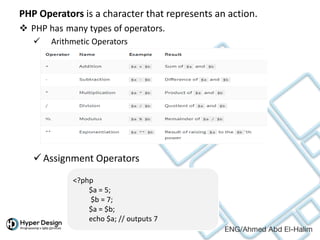
PHP Operators is a character that represents an action.
 PHP has many types of operators.
 Arithmetic Operators
Assignment Operators
<?php
$a = 5;
$b = 7;
$a = $b;
echo $a; // outputs 7
There are some other assignment operators to learn
 Comparison Operators
 Logical Operators
Note:
 Only strings and numbers (integers and floats) are affected by these
operators.
 Arrays and objects are not affected.
 Decrementing null has no effect, but incrementing results in 1
 Incrementing/Decrementing Operators
 String Operators
 Array Operators
PHP Conditionals used to perform different actions on different
conditions.
PHP Conditional Statements
 If Statement
 If-Else Statement
 If-Elseif-Else Statement
 Switch Statement
if Syntax
• Code group is a group of statements which needed to be executed if the
condition is true.
• Condition is an expression which returns a Boolean value. Here you can
use the operators we learned in the last chapter.
if (condition){
Code group
}
<?php
$day = date('j'); // day of the month
if ($day < 15){
echo 'You are spending the first half of the month';
}
If-Else Statement
if (condition){
code to be executed if
the condition is true
}else{
code to be executed if
the condition is false
}
<?php
$day = date('j'); // day of the month
if ($day < 15){
echo 'You are spending the first half of the month';
} else {
echo 'You are spending the last half of the month';
}
If-Elseif-Else Statement
if (condition 1){
code to be executed if the condition 1 is true
}elseif (condition 2){
code to be executed if the condition 1 is false,
but condition 2 is true
} else {
code to be executed if both condition 1 and 2 are
false
}
<?php
$day = date('j'); // day of the month
if ($day >= 21) {
$quarter = 'last';
} else if ($day >= 14) {
$quarter = 'third';
} else if ($day >= 7) {
$quarter = 'second';
} else {
$quarter = 'first';
}
echo 'You are spending the ' . $quarter . ' quarter of the month';
<?php
$randomScore = rand(0,4); // random score between 0-4
if ($randomScore === 0) {
echo '0 Points, please try again';
} elseif ($randomScore === 1) {
echo '1 Point, Try more';
} elseif ($randomScore === 2) {
echo '2 Points, Nice!';
} elseif ($randomScore === 3) {
echo '3 Points, One more to reach the best';
} elseif ($randomScore === 4) {
echo '4 Points, You won!';
Switch Statement
switch(expression){
case value1: code to execute if expression = value1
break;
case value2: code to execute if expression = value2
break;
...
default:
code to execute if expression is not equal to any value
above
}
<?php
$randomScore = rand(0,4); // random score between 0-4
switch ($randomScore) {
case 0: echo '0 Points, please try again';
break;
case 1: echo '1 Point, Try more';
break;
case 2: echo '2 Points, Nice!‘
; break;
case 3: echo '3 Points, One more to reach the best';
break;
case 4: echo '4 Points, You won!';
break;
Note: break statement is used to jump out from the switch statement.
Using Logical Operators in If Statements
Nested If Statements
We can use if statements inside if
statements. These statements are
called Nested If Statements.
<?php
$a = true;
$b = true;
if ($a and $b) {
echo 'Both $a and $b are true';
}
$a = false;
$b = true;
if ($a and $b) {
echo 'This is not echoed because $a is false';
}
<?php
$a = 10;
if ($a >= 0) {
echo 'Positive Number <br>';
if ($a % 10 === 0) {
echo 'The number is a multiple of 10';
} } else {
echo 'Negative Number. Please enter a
positive one';
}
PHP Loops sequence of instructions that is repeated while a certain
condition is true
4 types of loops.
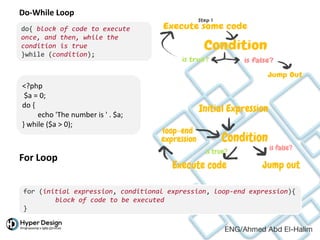
1- While Loop
Example:
while(condition){
code to execute if the
condition is true
}
<?php
$a = 1;
while ($a < 10) {
echo 'Now, $a is ' . $a;
echo '<br>'; // line break
$a++; // increment by 1
}
Do-While Loop
For Loop
do{ block of code to execute
once, and then, while the
condition is true
}while (condition);
<?php
$a = 0;
do {
echo 'The number is ' . $a;
} while ($a > 0);
for (initial expression, conditional expression, loop-end expression){
block of code to be executed
}
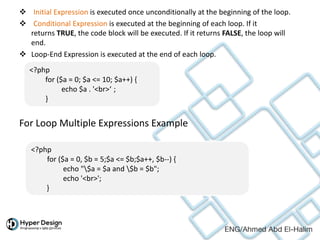
 Initial Expression is executed once unconditionally at the beginning of the loop.
 Conditional Expression is executed at the beginning of each loop. If it
returns TRUE, the code block will be executed. If it returns FALSE, the loop will
end.
 Loop-End Expression is executed at the end of each loop.
For Loop Multiple Expressions Example
<?php
for ($a = 0; $a <= 10; $a++) {
echo $a . '<br>‘ ;
}
<?php
for ($a = 0, $b = 5;$a <= $b;$a++, $b--) {
echo "$a = $a and $b = $b";
echo '<br>';
}
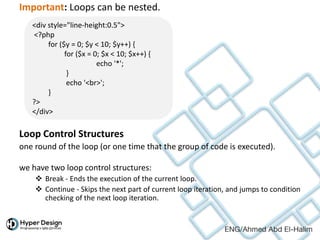
Important: Loops can be nested.
Loop Control Structures
one round of the loop (or one time that the group of code is executed).
we have two loop control structures:
 Break - Ends the execution of the current loop.
 Continue - Skips the next part of current loop iteration, and jumps to condition
checking of the next loop iteration.
<div style="line-height:0.5">
<?php
for ($y = 0; $y < 10; $y++) {
for ($x = 0; $x < 10; $x++) {
echo '*';
}
echo '<br>';
}
?>
</div>
Break statement terminates the execution of the current loop.
<?php
/*break on 5 */
$a = 0;
while ($a < 10) {
echo $a . '<br>’;
if ($a === 5) {
break;
}
$a++;
}
<?php
for ($a = 0; $a < 10; $a++) {
echo "$";
for ($b = 0; $b < 10; $b++) {
if ($a === 3 && $b === 5) {
echo '<br> Breaking two loops’;
break 2;
}
echo $b;
}
echo '<br>’;
}
An optional numeric
argument can be used to
specify how many loops need
to be broken. (break 2; will
terminate 2 nested loops)
Continue skips the next part of the current loop iteration. Then, the next
loop iteration will run after checking the conditions.
Functions
 A function is a group of statements.
 A function is not executed until it is called
 A function can be called as many times as you need
<?php
$a = 0;
while ($a < 10) {
if ($a === 5) {
$a++; continue; // 5 is not printed
}
echo $a . '<br>’;
$a++;
}
Built-In Functions PHP has thousands of built-in functions.
 echo() - to output a string
 define() - to define a constant
 var_dump() - to dump data of a variable
User-Defined Functions
 Function naming is almost the same as variable naming except for
the $ sign at the beginning. Functions do not have the $ sign.
 A function name should start with a letter or underscore.
 A function name cannot start with a number.
 Letters, numbers, and underscores can be used after the first letter in a
function.
 A function name is case-insensitive (Both boom() and Boom() refers to the
same function.)
 Tip: Always name functions with a name that describes the usage of the
function
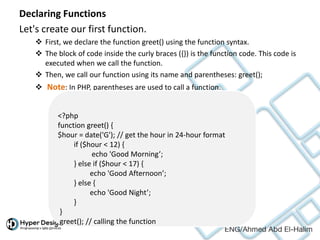
Declaring Functions
Let's create our first function.
 First, we declare the function greet() using the function syntax.
 The block of code inside the curly braces ({}) is the function code. This code is
executed when we call the function.
 Then, we call our function using its name and parentheses: greet();
 Note: In PHP, parentheses are used to call a function.
<?php
function greet() {
$hour = date('G'); // get the hour in 24-hour format
if ($hour < 12) {
echo 'Good Morning’;
} else if ($hour < 17) {
echo 'Good Afternoon’;
} else {
echo 'Good Night’;
}
}
greet(); // calling the function
Function Arguments arguments are the values passed into a function. An
argument is a variable inside the function
 Arguments are defined inside the parentheses which are there
immediately after the function name.
 A function can have any number of arguments, separated them with
commas.
 An argument name should obey the same rules as a variable since
arguments are variables.
<?php
function myName($name) {
echo 'My name is ' . $name; echo '<br>'; // line break
}
myName('Joe’);
myName('Adam’);
myName('David');
function functionName(arg1, arg2, ....) {
code to be executed
}
Functions can have multiple arguments.
Passing By Value By default, arguments are passed into functions by value.
See the following example to understand it.
<?php
function myDetails($name, $age, $country) {
echo “ My name is $name <br>
My age is $age <br>
My country is $country <br><br> ";
}
myDetails('Joe', 22, 'USA’);
myDetails('Adam', 25, 'United Kingdom’);
myDetails('David', 30, 'France');
<?php
function changeName($name) {
$name .= ' Developer’;
echo 'Inside the function: ' . $name . '<br>'; // outputs "Hyvor Developer“
}
$rootName = 'Hyvor’;
changeName($rootName);
echo 'Outside the function: ' . $rootName; // it is stil 'Hyvor'
Passing By Reference
Default Values
<?php
function changeName(&$name) {
$name .= ' Developer’;
echo 'Inside the function: ' . $name . '<br>'; // outputs "Hyvor Developer“
}
$rootName = 'Hyvor’;
changeName($rootName);
echo 'Outside the function: ' . $rootName; // now it's 'Hyvor Developer'
<?php
function printNumber($number = 10) {
echo "The number is: $number <br>";
}
printNumber(2);
printNumber(25);
printNumber(); // will print 10, the default value
printNumber(500);
Function Arguments - Type Declaration
 Type declaration can be used to specify a data type for each argument .
 data type should be added before the argument to specify type declaration for it
Valid Types For Type Declaration
 Array The argument must be an array
<?php
function myDetails(string $name, int $age, string $country) {
echo " My name is $name <br>
My age is $age <br>
My country is $country <br><br> ";
}
myDetails('Joe', 22, 'USA’);
myDetails('Adam', 25, 'United Kingdom’);
myDetails('David', 30, 'France’);
# myDetails('John', 'N/A', 'Australia'); this will cause an error
<?php
function dumpArray(array $arr) {
var_dump($arr);
}
$array = ['Joe', 'Adam', 'David'];
dumpArray($array);
 Callable The argument must be a callable function
Int The argument must be an integer
<?php
function runFunction(callable $func) {
echo 'Function is running <br>’;
$func();
}
runFunction(function() {
echo 'Yay!’;
});
<?php
function echoNumber(int $number)
{
echo $number;
}
echoNumber(12); // valid
 Float The argument must be a float
 Bool The argument must be a Boolean
 String The argument must be a String
<?php
function echoFloat(float $float) {
echo $float;
}
echoFloat(12.5); // valid
<?php
function echoName(string $name, bool $isMale)
{
echo (($isMale) ? 'He' : 'She') . " is $name <br>";
}
echoName('Adam', true);
echoName('Chistina', false);
Functions – Returning
There are two uses of return statements.
 To return a value from a function.
 To stop the execution of a function when a certain condition is true.
Returning Values
Type Declaration for Returning Values
You can define the data type
of the returning value
<?php
function sum($num1, $num2) {
return $num1 + $num2;
}
echo '5 + 5 = ' . sum(5,5) . '<br>’;
echo '4 + 3 = ' . sum(4,3) . '<br>’;
echo '8 + 1 = ' . sum(8,1) . '<br>';
<?php function sum($num1, $num2) : float {
return $num1 + $num2;
}
var_dump(sum(5, 2)); // float value is returned
Variable Functions
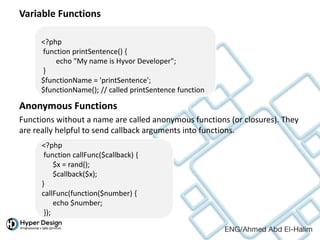
Anonymous Functions
Functions without a name are called anonymous functions (or closures). They
are really helpful to send callback arguments into functions.
<?php
function printSentence() {
echo "My name is Hyvor Developer";
}
$functionName = 'printSentence';
$functionName(); // called printSentence function
<?php
function callFunc($callback) {
$x = rand();
$callback($x);
}
callFunc(function($number) {
echo $number;
});
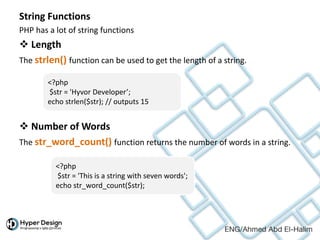
String Functions
PHP has a lot of string functions
 Length
The strlen() function can be used to get the length of a string.
 Number of Words
The str_word_count() function returns the number of words in a string.
<?php
$str = 'Hyvor Developer’;
echo strlen($str); // outputs 15
<?php
$str = 'This is a string with seven words';
echo str_word_count($str);
 Changing The Case
The strtolower() and strtoupper() are used to make a string lowercase
and uppercase respectively
 Removing Unnecessary Whitespace
The trim() function removes unnecessary whitespace from the beginning
and the end of a string.
<?php
$str = 'Hyvor Developer’;
echo strtolower($str); // hyvor developer
echo '<br>’;
echo strtoupper($str); // HYVOR DEVELOPER
<?php
$str = ' Hyvor Developer ‘;
echo strlen($str) . '<br>'; // length is 21
$str = trim($str); // remove whitespace
echo strlen($str); // now, length is 15
 Reverse
The strrev() function is used to reverse a string.
 Searching For a Substring in a String
The strpos() function returns the position of the first occurrence of a
substring in a string.
 Replacing Text within a String
The str_replace() function replaces a text within a string.
<?php
$str = 'Hello World’;
echo strpos($str, 'World’); // will output 6
<?php
$str = 'Hyvor Developer’;
echo strrev($str);
<?php
$str = 'Good Morning’;
echo str_replace('Morning', 'Evening', $str);
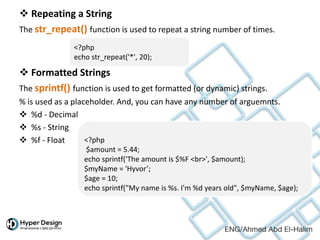
 Repeating a String
The str_repeat() function is used to repeat a string number of times.
 Formatted Strings
The sprintf() function is used to get formatted (or dynamic) strings.
% is used as a placeholder. And, you can have any number of arguemnts.
 %d - Decimal
 %s - String
 %f - Float <?php
$amount = 5.44;
echo sprintf('The amount is $%F <br>', $amount);
$myName = 'Hyvor’;
$age = 10;
echo sprintf("My name is %s. I'm %d years old", $myName, $age);
<?php
echo str_repeat('*', 20);
Variable Scope
Scope refers to the visibility of variables. In other words, which part of the
program can use that variable.
There are three types of scopes in PHP.
 Local Scope
 Global Scope
 Static Scope
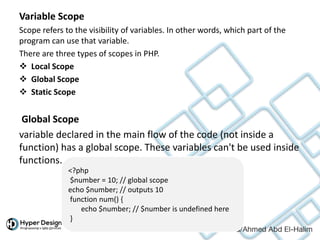
Global Scope
variable declared in the main flow of the code (not inside a
function) has a global scope. These variables can't be used inside
functions.
<?php
$number = 10; // global scope
echo $number; // outputs 10
function num() {
echo $number; // $number is undefined here
}
• Local Scope
variable declared inside a function has a local scope. This variable is unique to
this function and can only be accessed within the function. You can define
different variables with the same name in different functions.
Note : variables are deleted and no longer available after the execution of the
function.
Global Variables in Local Scope
There are two ways to access global variables within a function.
 Using the global keyword
 Using the $GLOBALS array
<?php
function hello() {
$txt = 'Hello World'; // local scope
echo $txt; // $txt can be used here
} hello();
// $txt cannot be used outside
1. Global Keyword
You can use global keyword inside a function to access global variables.
Before using variables, add global keyword followed by comma-
separated variable names you need to use inside the function.
2. $GLOBALS Array
PHP saves all the global variables in PHP-defined $GLOBALS array. The array
key contains the variable name. The array value contains the variable value.
<?php
$x = 'Hyvor’;
$y = 'Developer’;
function websiteName() {
global $x, $y;
echo $x, $y;
}
websiteName(); // outputs HyvorDeveloper
Static Scope
As we discussed earlier, local scope variables are deleted after the end of the
execution of the function. But, sometimes we need to keep the variable alive.
<?php
$x = 'Hyvor’;
$y = 'Developer’;
function websiteName() {
echo $GLOBALS['x'], $GLOBALS['y’];
}
websiteName(); // outputs HyvorDeveloper
<?php
function test() {
static $number = 0; // declare static variable
echo $number . '<br>'; // echo number with line break
$number = $number + 5; // add five to $number
}
test(); // 0
test(); // 5
test(); // 10
PHP Arrays
 Arrays are variables that store multiple values.
 Arrays are really useful when we work with lists (or data) of similar types.
 Arrays are commonly used for many purposes. An array in PHP can be
considered as mapping a value to a key.
 Arrays can have key/value pairs.
 The key can either be an integer or string. If it was a float, boolean it will
be cast to integer.
 Values can be any data type.
Declaring an Array
there are two ways to declare an array:
 An array can be declared using the array() function.
 An array can be declared wrapped with [ and ].
<?php
$array = array('Apple', 'Banana', 'Orange', 'Mango');
var_dump($array);
$array = ['Apple', 'Banana', 'Orange', 'Mango'];
var_dump($array);
Types of Arrays
There are three types of arrays in PHP.
 Indexed Arrays: Arrays with numeric indexes (keys).
 Associative Arrays: Arrays with named keys.
 Multidimensional arrays: Arrays of array.
Indexed Arrays
Indexed arrays have numeric indexes or keys
You can refer an element of the array as: $arrayName[index].
<?php
$fruits = ['Apple', 'Banana', 'Orange', 'Mango'];
<?php
$fruits[0] = 'Apple’;
$fruits[1] = 'Banana’;
$fruits[2] = 'Orange’;
$fruits[3] = 'Mango';
<?php
$fruits = ['Apple', 'Banana', 'Orange', 'Mango’];
echo "First Fruit is $fruits[0]" . '<br>’;
echo "Second Fruit is $fruits[1]" . '<br>’;
echo "Third Fruit is $fruits[2]" . '<br>’;
echo "Forth Fruit is $fruits[3]" . '<br>';
Associative Arrays
 Associative arrays have named keys.
 There are two ways to declare associative arrays.
1. An associative array can be declared using the array() function or []
2. An associative array can be declared manually by adding keys.
<?php
$age = array( 'Joe' => 22,
'Adam' => 25,
'David' => 30
);
// or
$age = [ 'Joe' => 22,
'Adam' => 25,
'David' => 30
];
<?php
$age['Joe'] = 22;
$age['Adam'] = 25;
$age['David'] = 30;
Array keys can also be integers.
The difference between indexed arrays and the above
associative arrays is that associative array is
constructed by adding keys explicitly by us without
any order (We didn't start from index 0).
<?php
$age = array('Joe' => 22,
'Adam' => 25,
'David' => 30
);
$age['Peter'] = 22;
$age['Christina'] = 25;
var_dump($age);
<?php
$schedule = [
16 => 'My Birthday’,
20 => 'Special Dinner’,
25 => 'PHP Conference’
];
Multidimensional Arrays
 Multidimensional arrays are arrays of arrays.
 you can store an array as the value of an array element. These types of
arrays are called Multidimensional arrays
Foreach Loop loop is used to loop through arrays.
Syntax
foreach with Indexed Arrays
foreach ($array as $key => $value) { code to execute }
<?php
$people = [
'Joe' => [ 'age' => 22, 'country' => 'USA’ ],
'Adam' => [ 'age' => 25, 'country' => 'United Kingdom' ],
'David' => [ 'age' => 30, 'country' => 'France’ ]
];
<?php
$fruits = ['Apple', 'Banana', 'Orange', 'Mango’];
// foreach loop
foreach ($fruits as $fruit) {
echo $fruit . '<br>’;
}
foreach with Associative Arrays
foreach with Multidimensional Arrays
<?php
$people = [ 'Joe' => 22, 'Adam' => 25, 'David' => 30 ]; foreach
($people as $name => $age) {
echo "My name is $name, and age is $age" . '<br>’;
}
<?php
$data = [
'Game of Thrones' => ['Jaime Lannister', 'Catelyn Stark', 'Cersei Lannister’],
'Black Mirror' => ['Nanette Cole', 'Selma Telse', 'Karin Parke’]
];
echo '<h1>Famous TV Series and Actors’;
foreach ($data as $series => $actors) {
echo "<h2>$series</h2>";
foreach ($actors as $actor) {
echo "<div>$actor</div>";
}
}
Playing with Arrays
1. Adding New Elements to Arrays (Using Brackets)
2. Adding New Elements to Arrays (Using array_push)
The array_push() function can be used to add new elements to an array. In this
function, you can add multiple elements at the end at the same time
3. Prepending New Elements to Arrays
The array_unshift() function is used to prepend elements to an array. After
prepending, array indexes will be changed accordingly. See this example
<?php
$fruits = ['Apple', 'Banana', 'Orange', 'Mango']; // add new elements to the end
$fruits[] = 'Pears’;
$fruits[] = 'Watermelon’;
var_dump($fruits);
<?php
$fruits = ['Apple', 'Banana', 'Orange', 'Mango']; # add new elements
array_push($fruits, 'Pears', 'Watermelon’);
var_dump($fruits);
4. PHP Getting the Length of an Array
The count() function is used to get the length of an Array in PHP.
5. PHP Merging Two Arrays
The array_merge() function can be used to merge two arrays.
<?php
$indexedArray = ['USA', 'UK', 'Canada’];
var_dump($indexedArray); // 0 => USA
array_unshift($indexedArray, 'Australia', 'New Zealand');
var_dump($indexedArray); // 0 => Australia
<?php
$fruits = ['Apple', 'Banana', 'Orange', 'Mango’];
echo count($fruits); // will return 4
echo '<br>’;
$age = array( 'Joe' => 22, 'Adam' => 25, 'David' => 30 );
echo count($age); // will return 3;
Note:This function will add new indexes for indexed arrays, and it will
overwrite the same keys for associative arrays.
The array union operator (+) can be used to merge two arrays when you have
different keys.
<?php
$array1 = ['red', 'blue’];
$array2 = ['yellow', 'green’];
$arrayMerged = array_merge($array1, $array2);
var_dump($arrayMerged);
<?php
$array1 = ['name' => 'John', 'age' => 24];
$array2 = ['country' => 'UK’];
$arrayMerged = $array1 + $array2;
var_dump($arrayMerged);
6. PHP is_array()
is_array() checks if a variable is an array.
7. PHP Check if an element exists in an array - in_array()
checks if a specific element is there in the given array.
<?php
$int = 1;
$string = 'String’;
$array = ['This', 'is', 'an', 'array’];
var_dump(is_array($int)); // false
var_dump(is_array($string));// false
var_dump(is_array($array)); // true
<?php
$array = ['James', 'Doe', 'John’];
if (in_array('James', $array)) {
echo "James is in the array";
}
8. Check if a key exists in an array - array_key_exists()
function checks if a specific key exists in an array.
9. Get the Array Keys - array_keys()
function is used to get the array keys as an indexed array.
10. Get the Array Values - array_values()
function is used to get the array values as an indexed array.
<?php
$array = [ 'name' => 'William', 'age' => 25, 'country' => 'N/A' ];
var_dump( array_key_exists('name', $array) ); // true
var_dump( array_key_exists('birthday', $array) ); // false
<?php
$array = [ 'name' => 'William', 'age' => 25, 'country' => 'N/A' ];
$keys = array_keys($array);
var_dump($keys);
11. A Function on Each Element - array_map()
We can perform a function on each element and return a new array
<?php
$array = [ 'name' => 'William', 'age' => 25, 'country' => 'N/A' ];
$values = array_values($array);
var_dump($values);
<?php
$array1 = [24, 12, 45, 23];
$array2 = array_map(function($val) {
return $val * 2;
}, $array1);
var_dump($array2);
Superglobal Variables
are built-in variables that are always available in all the scopes
 We used $GLOBALS array to access globals variables inside a function We
could use $GLOBALS inside a function directly because it is
a superglobal variable.
 Important: All superglobal variables are available everywhere in the script.
 PHP has 9 superglobals. All of them are indexed or associative arrays
which contain a specific set of data.
 $GLOBALS
 $_SERVER
 $_GET
 $_POST
 $_FILES
 $_ENV
 $_COOKIE
 $_SESSION
 $_REQUEST
 Tip: Note that all the superglobals has an _ (underscore) after the $ (dollar
sign) except $GLOBALS.
$GLOBALS
$_SERVER
a very useful and huge array which holds the data about the currently
executing script, network addresses, paths, locations, etc.
<?php
$x = 'Hyvor’;
$y = 'Developer’;
function websiteName() {
echo $GLOBALS['x'], $GLOBALS['y’];
}
websiteName(); // outputs HyvorDeveloper
• Quiz 1:
1- write a php program that output
2- write a php program that draw table
Using
$array = [
['Joe', 'joe@hmail.com', 24],
['Doe', 'doe@hmail.com', 25],
['Dane', 'dane@hmail.com', 20]
];
<?php
echo $_SERVER['PHP_SELF'] . '<br>’;
echo $_SERVER['DOCUMENT_ROOT'] . '<br>’;
echo $_SERVER['SERVER_ADDR'] . '<br>’;
echo $_SERVER['SERVER_NAME'] . '<br>’;
echo $_SERVER['REQUEST_METHOD'] . '<br>’;
echo $_SERVER['REQUEST_TIME'] . '<br>’;
echo $_SERVER['HTTP_USER_AGENT'] . '<br>’;
echo $_SERVER['REMOTE_ADDR'];
<?php
$array = [
['Joe', 'joe@hmail.com', 24],
['Doe', 'doe@hmail.com', 25],
['Dane', 'dane@hmail.com', 20]
];
?>
<table>
<tr>
<th>Name</th>
<th>Email</th>
<th>Age</th>
</tr>
<?php foreach ($array as $person) : ?>
<tr>
<?php foreach ($person as $detail) : ?>
<td><?php echo $detail ?></td>
<?php endforeach; ?>
</tr>
<?php endforeach; ?>
</table>
<html>
<head>
<title></title>
</head>
<body>
<?php for ($i = 1; $i < 6; $i++) : ?>
<li>List Item <?php echo $i ?></li>
<?php endfor; ?>
</body>
</html>

Introduction to-php

  • 2.
    What is PHP?  PHP is a server-side scripting language designed for web development  PHP powers everything from blogs to the most popular websites in the world.  PHP stands for Hypertext Preprocessor  PHP code may be embedded into HTML code  PHP is used as a server-side language  PHP is free, fast, flexible and pragmatic Where is PHP used ?  The world's largest social network, Facebook uses PHP  The world's largest content management system, Wordpress runs on PHP  Many developers use PHP as a server-side language  PHP is simple. Hence, many beginners use it.
  • 3.
    Why PHP?  PHPis secure  PHP runs on many operating systems like Windows, Mac OS, Linux, etc.  PHP is supported by many servers like Apache, IIS, Lighttpd, etc.  PHP supports many database systems like MYSQL, Mango DB, etc.  PHP is free The power of PHP  PHP can serve dynamic web pages  PHP can collect, validate, save form data  PHP can add, modify, delete data in the database  PHP can handle sessions and cookies  PHP can read, write, delete files on the server  PHP can serve Images, PDFs, Flash Movies and more file types  PHP can resize, compress, edit images
  • 4.
    How to install?  The first step is installing PHP on your computer. But, before that, you will need to understand this simple procedure about how we going to install PHP.  PHP can run by itself, but, here we will let it run on a web server. (That's how PHP is used as a server-side language)  A web server is a software or hardware (or both working together) which processes and serves a response for incoming network requests. In simple words, you type hyper-design.com in your web browser. Then, the server of hyper-design.com will process the request and server the response to you.  PHP cannot do this without a web server. Therefore, we will install a web server, then PHP. What is a Web Server?
  • 5.
    Let's Install theserver Here are the steps.  Installing Web Server (Here we will use Apache)  Installing PHP However, you can do both of the above steps at once by installing one of the following web development environments.  WAMP Server - Only Windows  XAMPP Server- Supports Windows, Linux, OS X Installing a text editor You need a good text editor to write and edit PHP files. The following are some of recommended text editors. Go to those websites and choose any editor you like.  Sublime Text  Atom [recommended]  Visual Studio Code
  • 6.
    Your first PHPProgram Default Extension The default file extension for PHP is .php. The web server will recognize and execute the files with the .php extension as PHP files by default. Hello World Script Create a file named hello.php and save it in the root directory of your web server with the following content. Default root directories  WAMP Server - C:wampwww  XAMPP Server - C:xampphtdocs Now, enter your web server's URL in your browser, ending with /hello.php. As you are using a web server installed on PC, the full URL might be http://localhost/hello.php or http://127.0.0.1/hello.php.
  • 7.
    The Logic ofthe Localhost After you install a server in your computer, it reserves the address http://localhost for itself. When you enter the address http://localhost/hello.php, the browser will send an HTTP request to the server in your computer. The server will find hello.php in its root directory. Then the server will send back a response after executing the PHP file.
  • 8.
    PHP Basic Syntax Whatis syntax ?  ‘ Syntax ' is the structure of statements in a computer language.  The syntax of PHP is very easy to understand compared to some other programming languages. PHP Tags  <?php - Opening Tag  ?> - Closing Tag PHP also has a short opening and closing tags <? and ?> not recommend to use them. Always use the above tags When you request a PHP file, the server process the file using the PHP parser. The parsed output will be sent as the response. A parser - is a computer program that makes your code work. - When PHP parses a file, it searches for opening and closing tags. All the code inside these tags is interpreted. Everything outside these tags is ignored by the PHP parser.
  • 9.
    1. Only PHP PHPfiles can have only PHP code. In this case, you can omit closing tags. This prevents accidental whitespace or new lines being added after the PHP closing tag. <?php echo 'Hello World'; 2. PHP inside HTML You can use PHP code inside HTML. Here, the closing tag is compulsory. <!DOCTYPE html> <html> <head> <title>Hello World</title> </head> <body> <h1>My First PHP-Enabled Page</h1> <p><?php echo 'Hello World'; ?></p> </body> </html>
  • 10.
     <?php announcesthe opening of the PHP code.  echo says to output the string right after it.  ; says to terminate the current statement or instruction  ?> announces the ending of the PHP code. (This is not needed in this script as we only have PHP code in it.) • PHP Case-Sensitivity PHP is a SEMI-CASE-SENSITIVE language which means some features are case-sensitive while others are not. Following are case-insensitive  All the keywords (if, else, while, for, foreach, etc.)  Functions  Statements  Classes PHP Variables are case-sensitive. <?php $name = 'Hyvor Developer'; echo $name; // echo $Name; <?php echo 'Hello World'; ECHO 'Hello World'; eCHo 'Hello World'; Echo 'Hello World';
  • 11.
    PHP Comments  Commentsare used to understand the code while reading.  They can also be used to leave a part from the code.  Comments are really important when trying to understand other's or your own code after years.  Comments can explain what the code does.  Comments does not need to follow language syntax rules PHP parser ignores all the comments. There are two ways of commenting  Single-Line Commenting - // your comment or # your comment  Multi-Line Commenting - /* your comment */ Block Comments <?php /** * This is a block comment * The first line starts with the normal */
  • 12.
    PHP Variables Variables areused to store information and retrieve them when needed. They can be labeled with a meaningful name to be understood easily by the readers and ourselves. The data stored in variables can be changed. What can we do with variables?  We can think a variable as a box.  A variable can have a name  A variable can hold a value  A variable's value can be updated
  • 13.
    Variable Naming  The$ identifier should be added in front of the name of the variable.  A variable name must start with a letter or underscore.  A variable name cannot start with a number.  A variable name cannot be $this. ($this is a special variable which cannot be assigned)  A variable name can contain letters, numbers, and characters between 127-255 ASCII after the first character.  Variable names are case sensitive. <?php $name = 'Hyvor'; // valid $_name = 'Hyvor'; // valid - starts with an underscore $näme = 'Hyvor'; // valid - 'ä' is (Extended) ASCII 228 $1name = 'Hyvor'; // invalid - cannot start with a number $this = 'Hyvor'; // invalid - cannot assign value to $this
  • 14.
    Note that thevariable names are case-sensitive. $name and $Name are two different variables. Declaring Variables In programming, creating a variable is called declaring. But, in PHP, unlike other programming languages, there is no keyword to declare a variable.  Variables are declared when you assign a value to them  Unlike other programming languages, you do not have to define data types for variables. (Programming languages like this is called loosely typed languages) Note: Strings should be wrapped with " (double-quotes) or ' (single-quotes). <?php $month = "May"; $day = 22;
  • 15.
    Reassigning Values toVariables  A variable stores the value of its most recent assignment. Output Will be : World because it is the value of the last assignment Constants  Constant is a piece of information stored in the computer's memory which does not change (cannot be changed).  Once a constant is defined, it cannot be changed.  All the constants have global scopes, even it is defined inside a function.  Unlike variables, constants do not have $ before the name.  A constant name should start with a letter or underscore.  A constant name can have letters, numbers, ASCII characters between 127-255 after the first letter. <?php $text = 'Hello'; $text = 'World'; echo $text
  • 16.
    We have touse define() function for declaring constants.  name: The name of the constant  value: The value of the constant - boolean, integer, float, string or array. (You will learn about these later)  case-insensitive: Specify whether the constant is case-insensitive or not. The default is false (case-sensitive). Why Constants?  To save database credentials: Normally, we save database credentials in a single file and we will use constants to save username and passwords in. The reason for this is the value of constants cannot be changed programmatically. What if we need to change the password? In this case, we can simply edit our file and change the value of the constants.  To save main configurations: In your website, there will be main configurations like company name, logo URL, etc. Saving these values in a constant is a good idea. define(name, value, case-insensitive) <?php define('GREETING', 'Hello World', true); echo GREETING, '<br>'; echo Greeting, '<br>'; echo gReeting, '<br>';
  • 17.
    Strings A string isany finite sequence of characters (letters, numerals, symbols, punctuation marks, etc.) Declaring Strings There are two ways.  Single Quoted ‘ ’  Double Quoted “ “ Single Quoted  The easiest way to declare a string is by enclosing it by single quotes. Character: '  What if you needed to add a single quote inside a single quoted string? Just escape that character with a back slash. ‘  What if you needed to have ' in a single quoted string? Use to escape the character. And, as in the last example, ' to escape the ' character. $string = 'This is my first string'; $string = 'This is the hyper 's PHP Tutorial'; $string = 'Backslash and Quote: '';
  • 18.
    Double Quoted  Stringscan be declared enclosed by double quotes. Character: ".  In single quotes, only and ' had a special meaning. But, in double quotes, there are more escape sequences. <pre> <?php echo "Hello World"; echo "<br>"; echo ""Hello World""; echo "ntHello Worldn"; ?> </pre>
  • 19.
    PHP Output  PHPis executed on the server, only an output is sent to the browser.  Output is the process that we send a response back to the client. This can be a normal text, HTML markup, XML, Javascript code  There are two output statements in PHP :  Echo : used to output text, variables, HTML markup, Javascript code, and any other kind of text. Also, echo statement can output values of PHP variables and constants <?php echo "<h1>I love PHP</h1>"; // html markup echo "I am learning PHP at Hyvor Developer <br>"; // connected with concatenation operator echo "PHP: " . "Hypertext Preprocesser" . "<br>"; // connected with multiple parameters echo "PHP: " , "the best language", " ever"; "<script>alert('Hello');</script>"; // javascript echo <?php $hello = 'Hello World'; echo $hello; // outputs Hello World echo "<br>"; $x = 5; $y = 10; echo $x + $y; // outputs 15
  • 20.
    Shorthand Echo PHP DataTypes  Variables can store different data types.  PHP chooses the appropriate data type for the variable automatically.  There are several data types in PHP.  Boolean  Integer  Float or Double  String  Array  Object  Null var_dump() function dumps information about a variable. The importance of this function is, it outputs the data type of the variable with its value Booleans variable that can have one of two possible values, true or false <h1> <?= 'Hyvor Developer' ?> </h1> <?php $x = 12; var_dump($x); // outputs int(12) $a = true; $b = false; var_dump($a); var_dump($b); // outputs bool(true) bool(false)
  • 21.
    Integers a numberwhich is not a fraction; a whole number ( -2, -1, 0, 1, 2 ) Floats anumber that can contain a fractional part (2.56, 1.24) Strings A string is any finite sequence of characters (letters, numerals, symbols, punctuation marks, etc.) Arrays is a series of values  There are two ways to declare an array:  An array can be declared using the array() function.  An array can be declared wrapping with [ and ].  Elements of the arrays should be separated with a comma. And, elements can be any type <?php $array = array('Apple', 'Banana', 'Orange', 'Mango'); var_dump($array); $array = ['Apple', 'Banana', 'Orange', 'Mango']; var_dump($array); // output array(4) { [0]=> string(5) "Apple" [1]=> string(6) "Banana" [2]=> string(6) "Orange" [3]=> string(5) "Mango" }
  • 22.
    Objects particular instanceof a class where it can be a combination of variables, functions, and data structures. We will cover it latter NULL a variable with no value  Null means no value.  Null is not 0, false or any other value, it is null.  Null is case-insensitive. All Null, null and NULL are equal. <?php $var = null; var_dump($var); // unsetting variables with null $text = 'Hello World'; $text = null; // now $text does not hold any value var_dump($text); //Output NULL NULL
  • 23.
    Type Casting  istaking a variable of one particular data type and converting it to another data type. (ex: Integer to Float)  There are two types of casting  Implicit Casting (Automatic)  Explicit Casting (Manual) <?php $x = 2; $y = 4; var_dump($x / $y); // 2/4 = 0.5 (Float) var_dump($y / $x); // 4/2 = 2 (Int) <?php $x = 5.35; $y = (int) $x; // cast $x to integer var_dump($y);
  • 24.
    PHP Operators isa character that represents an action.  PHP has many types of operators.  Arithmetic Operators Assignment Operators <?php $a = 5; $b = 7; $a = $b; echo $a; // outputs 7
  • 25.
    There are someother assignment operators to learn
  • 26.
  • 27.
     Logical Operators Note: Only strings and numbers (integers and floats) are affected by these operators.  Arrays and objects are not affected.  Decrementing null has no effect, but incrementing results in 1
  • 28.
  • 29.
  • 30.
    PHP Conditionals usedto perform different actions on different conditions. PHP Conditional Statements  If Statement  If-Else Statement  If-Elseif-Else Statement  Switch Statement if Syntax • Code group is a group of statements which needed to be executed if the condition is true. • Condition is an expression which returns a Boolean value. Here you can use the operators we learned in the last chapter. if (condition){ Code group } <?php $day = date('j'); // day of the month if ($day < 15){ echo 'You are spending the first half of the month'; }
  • 31.
    If-Else Statement if (condition){ codeto be executed if the condition is true }else{ code to be executed if the condition is false } <?php $day = date('j'); // day of the month if ($day < 15){ echo 'You are spending the first half of the month'; } else { echo 'You are spending the last half of the month'; } If-Elseif-Else Statement if (condition 1){ code to be executed if the condition 1 is true }elseif (condition 2){ code to be executed if the condition 1 is false, but condition 2 is true } else { code to be executed if both condition 1 and 2 are false }
  • 32.
    <?php $day = date('j');// day of the month if ($day >= 21) { $quarter = 'last'; } else if ($day >= 14) { $quarter = 'third'; } else if ($day >= 7) { $quarter = 'second'; } else { $quarter = 'first'; } echo 'You are spending the ' . $quarter . ' quarter of the month'; <?php $randomScore = rand(0,4); // random score between 0-4 if ($randomScore === 0) { echo '0 Points, please try again'; } elseif ($randomScore === 1) { echo '1 Point, Try more'; } elseif ($randomScore === 2) { echo '2 Points, Nice!'; } elseif ($randomScore === 3) { echo '3 Points, One more to reach the best'; } elseif ($randomScore === 4) { echo '4 Points, You won!';
  • 33.
    Switch Statement switch(expression){ case value1:code to execute if expression = value1 break; case value2: code to execute if expression = value2 break; ... default: code to execute if expression is not equal to any value above } <?php $randomScore = rand(0,4); // random score between 0-4 switch ($randomScore) { case 0: echo '0 Points, please try again'; break; case 1: echo '1 Point, Try more'; break; case 2: echo '2 Points, Nice!‘ ; break; case 3: echo '3 Points, One more to reach the best'; break; case 4: echo '4 Points, You won!'; break;
  • 34.
    Note: break statementis used to jump out from the switch statement. Using Logical Operators in If Statements Nested If Statements We can use if statements inside if statements. These statements are called Nested If Statements. <?php $a = true; $b = true; if ($a and $b) { echo 'Both $a and $b are true'; } $a = false; $b = true; if ($a and $b) { echo 'This is not echoed because $a is false'; } <?php $a = 10; if ($a >= 0) { echo 'Positive Number <br>'; if ($a % 10 === 0) { echo 'The number is a multiple of 10'; } } else { echo 'Negative Number. Please enter a positive one'; }
  • 35.
    PHP Loops sequenceof instructions that is repeated while a certain condition is true 4 types of loops. 1- While Loop Example: while(condition){ code to execute if the condition is true } <?php $a = 1; while ($a < 10) { echo 'Now, $a is ' . $a; echo '<br>'; // line break $a++; // increment by 1 }
  • 36.
    Do-While Loop For Loop do{block of code to execute once, and then, while the condition is true }while (condition); <?php $a = 0; do { echo 'The number is ' . $a; } while ($a > 0); for (initial expression, conditional expression, loop-end expression){ block of code to be executed }
  • 37.
     Initial Expressionis executed once unconditionally at the beginning of the loop.  Conditional Expression is executed at the beginning of each loop. If it returns TRUE, the code block will be executed. If it returns FALSE, the loop will end.  Loop-End Expression is executed at the end of each loop. For Loop Multiple Expressions Example <?php for ($a = 0; $a <= 10; $a++) { echo $a . '<br>‘ ; } <?php for ($a = 0, $b = 5;$a <= $b;$a++, $b--) { echo "$a = $a and $b = $b"; echo '<br>'; }
  • 38.
    Important: Loops canbe nested. Loop Control Structures one round of the loop (or one time that the group of code is executed). we have two loop control structures:  Break - Ends the execution of the current loop.  Continue - Skips the next part of current loop iteration, and jumps to condition checking of the next loop iteration. <div style="line-height:0.5"> <?php for ($y = 0; $y < 10; $y++) { for ($x = 0; $x < 10; $x++) { echo '*'; } echo '<br>'; } ?> </div>
  • 39.
    Break statement terminatesthe execution of the current loop. <?php /*break on 5 */ $a = 0; while ($a < 10) { echo $a . '<br>’; if ($a === 5) { break; } $a++; } <?php for ($a = 0; $a < 10; $a++) { echo "$"; for ($b = 0; $b < 10; $b++) { if ($a === 3 && $b === 5) { echo '<br> Breaking two loops’; break 2; } echo $b; } echo '<br>’; } An optional numeric argument can be used to specify how many loops need to be broken. (break 2; will terminate 2 nested loops)
  • 40.
    Continue skips thenext part of the current loop iteration. Then, the next loop iteration will run after checking the conditions. Functions  A function is a group of statements.  A function is not executed until it is called  A function can be called as many times as you need <?php $a = 0; while ($a < 10) { if ($a === 5) { $a++; continue; // 5 is not printed } echo $a . '<br>’; $a++; }
  • 41.
    Built-In Functions PHPhas thousands of built-in functions.  echo() - to output a string  define() - to define a constant  var_dump() - to dump data of a variable User-Defined Functions  Function naming is almost the same as variable naming except for the $ sign at the beginning. Functions do not have the $ sign.  A function name should start with a letter or underscore.  A function name cannot start with a number.  Letters, numbers, and underscores can be used after the first letter in a function.  A function name is case-insensitive (Both boom() and Boom() refers to the same function.)  Tip: Always name functions with a name that describes the usage of the function
  • 42.
    Declaring Functions Let's createour first function.  First, we declare the function greet() using the function syntax.  The block of code inside the curly braces ({}) is the function code. This code is executed when we call the function.  Then, we call our function using its name and parentheses: greet();  Note: In PHP, parentheses are used to call a function. <?php function greet() { $hour = date('G'); // get the hour in 24-hour format if ($hour < 12) { echo 'Good Morning’; } else if ($hour < 17) { echo 'Good Afternoon’; } else { echo 'Good Night’; } } greet(); // calling the function
  • 43.
    Function Arguments argumentsare the values passed into a function. An argument is a variable inside the function  Arguments are defined inside the parentheses which are there immediately after the function name.  A function can have any number of arguments, separated them with commas.  An argument name should obey the same rules as a variable since arguments are variables. <?php function myName($name) { echo 'My name is ' . $name; echo '<br>'; // line break } myName('Joe’); myName('Adam’); myName('David'); function functionName(arg1, arg2, ....) { code to be executed }
  • 44.
    Functions can havemultiple arguments. Passing By Value By default, arguments are passed into functions by value. See the following example to understand it. <?php function myDetails($name, $age, $country) { echo “ My name is $name <br> My age is $age <br> My country is $country <br><br> "; } myDetails('Joe', 22, 'USA’); myDetails('Adam', 25, 'United Kingdom’); myDetails('David', 30, 'France'); <?php function changeName($name) { $name .= ' Developer’; echo 'Inside the function: ' . $name . '<br>'; // outputs "Hyvor Developer“ } $rootName = 'Hyvor’; changeName($rootName); echo 'Outside the function: ' . $rootName; // it is stil 'Hyvor'
  • 45.
    Passing By Reference DefaultValues <?php function changeName(&$name) { $name .= ' Developer’; echo 'Inside the function: ' . $name . '<br>'; // outputs "Hyvor Developer“ } $rootName = 'Hyvor’; changeName($rootName); echo 'Outside the function: ' . $rootName; // now it's 'Hyvor Developer' <?php function printNumber($number = 10) { echo "The number is: $number <br>"; } printNumber(2); printNumber(25); printNumber(); // will print 10, the default value printNumber(500);
  • 46.
    Function Arguments -Type Declaration  Type declaration can be used to specify a data type for each argument .  data type should be added before the argument to specify type declaration for it Valid Types For Type Declaration  Array The argument must be an array <?php function myDetails(string $name, int $age, string $country) { echo " My name is $name <br> My age is $age <br> My country is $country <br><br> "; } myDetails('Joe', 22, 'USA’); myDetails('Adam', 25, 'United Kingdom’); myDetails('David', 30, 'France’); # myDetails('John', 'N/A', 'Australia'); this will cause an error <?php function dumpArray(array $arr) { var_dump($arr); } $array = ['Joe', 'Adam', 'David']; dumpArray($array);
  • 47.
     Callable Theargument must be a callable function Int The argument must be an integer <?php function runFunction(callable $func) { echo 'Function is running <br>’; $func(); } runFunction(function() { echo 'Yay!’; }); <?php function echoNumber(int $number) { echo $number; } echoNumber(12); // valid
  • 48.
     Float Theargument must be a float  Bool The argument must be a Boolean  String The argument must be a String <?php function echoFloat(float $float) { echo $float; } echoFloat(12.5); // valid <?php function echoName(string $name, bool $isMale) { echo (($isMale) ? 'He' : 'She') . " is $name <br>"; } echoName('Adam', true); echoName('Chistina', false);
  • 49.
    Functions – Returning Thereare two uses of return statements.  To return a value from a function.  To stop the execution of a function when a certain condition is true. Returning Values Type Declaration for Returning Values You can define the data type of the returning value <?php function sum($num1, $num2) { return $num1 + $num2; } echo '5 + 5 = ' . sum(5,5) . '<br>’; echo '4 + 3 = ' . sum(4,3) . '<br>’; echo '8 + 1 = ' . sum(8,1) . '<br>'; <?php function sum($num1, $num2) : float { return $num1 + $num2; } var_dump(sum(5, 2)); // float value is returned
  • 50.
    Variable Functions Anonymous Functions Functionswithout a name are called anonymous functions (or closures). They are really helpful to send callback arguments into functions. <?php function printSentence() { echo "My name is Hyvor Developer"; } $functionName = 'printSentence'; $functionName(); // called printSentence function <?php function callFunc($callback) { $x = rand(); $callback($x); } callFunc(function($number) { echo $number; });
  • 51.
    String Functions PHP hasa lot of string functions  Length The strlen() function can be used to get the length of a string.  Number of Words The str_word_count() function returns the number of words in a string. <?php $str = 'Hyvor Developer’; echo strlen($str); // outputs 15 <?php $str = 'This is a string with seven words'; echo str_word_count($str);
  • 52.
     Changing TheCase The strtolower() and strtoupper() are used to make a string lowercase and uppercase respectively  Removing Unnecessary Whitespace The trim() function removes unnecessary whitespace from the beginning and the end of a string. <?php $str = 'Hyvor Developer’; echo strtolower($str); // hyvor developer echo '<br>’; echo strtoupper($str); // HYVOR DEVELOPER <?php $str = ' Hyvor Developer ‘; echo strlen($str) . '<br>'; // length is 21 $str = trim($str); // remove whitespace echo strlen($str); // now, length is 15
  • 53.
     Reverse The strrev()function is used to reverse a string.  Searching For a Substring in a String The strpos() function returns the position of the first occurrence of a substring in a string.  Replacing Text within a String The str_replace() function replaces a text within a string. <?php $str = 'Hello World’; echo strpos($str, 'World’); // will output 6 <?php $str = 'Hyvor Developer’; echo strrev($str); <?php $str = 'Good Morning’; echo str_replace('Morning', 'Evening', $str);
  • 54.
     Repeating aString The str_repeat() function is used to repeat a string number of times.  Formatted Strings The sprintf() function is used to get formatted (or dynamic) strings. % is used as a placeholder. And, you can have any number of arguemnts.  %d - Decimal  %s - String  %f - Float <?php $amount = 5.44; echo sprintf('The amount is $%F <br>', $amount); $myName = 'Hyvor’; $age = 10; echo sprintf("My name is %s. I'm %d years old", $myName, $age); <?php echo str_repeat('*', 20);
  • 55.
    Variable Scope Scope refersto the visibility of variables. In other words, which part of the program can use that variable. There are three types of scopes in PHP.  Local Scope  Global Scope  Static Scope Global Scope variable declared in the main flow of the code (not inside a function) has a global scope. These variables can't be used inside functions. <?php $number = 10; // global scope echo $number; // outputs 10 function num() { echo $number; // $number is undefined here }
  • 56.
    • Local Scope variabledeclared inside a function has a local scope. This variable is unique to this function and can only be accessed within the function. You can define different variables with the same name in different functions. Note : variables are deleted and no longer available after the execution of the function. Global Variables in Local Scope There are two ways to access global variables within a function.  Using the global keyword  Using the $GLOBALS array <?php function hello() { $txt = 'Hello World'; // local scope echo $txt; // $txt can be used here } hello(); // $txt cannot be used outside
  • 57.
    1. Global Keyword Youcan use global keyword inside a function to access global variables. Before using variables, add global keyword followed by comma- separated variable names you need to use inside the function. 2. $GLOBALS Array PHP saves all the global variables in PHP-defined $GLOBALS array. The array key contains the variable name. The array value contains the variable value. <?php $x = 'Hyvor’; $y = 'Developer’; function websiteName() { global $x, $y; echo $x, $y; } websiteName(); // outputs HyvorDeveloper
  • 58.
    Static Scope As wediscussed earlier, local scope variables are deleted after the end of the execution of the function. But, sometimes we need to keep the variable alive. <?php $x = 'Hyvor’; $y = 'Developer’; function websiteName() { echo $GLOBALS['x'], $GLOBALS['y’]; } websiteName(); // outputs HyvorDeveloper <?php function test() { static $number = 0; // declare static variable echo $number . '<br>'; // echo number with line break $number = $number + 5; // add five to $number } test(); // 0 test(); // 5 test(); // 10
  • 59.
    PHP Arrays  Arraysare variables that store multiple values.  Arrays are really useful when we work with lists (or data) of similar types.  Arrays are commonly used for many purposes. An array in PHP can be considered as mapping a value to a key.  Arrays can have key/value pairs.  The key can either be an integer or string. If it was a float, boolean it will be cast to integer.  Values can be any data type. Declaring an Array there are two ways to declare an array:  An array can be declared using the array() function.  An array can be declared wrapped with [ and ]. <?php $array = array('Apple', 'Banana', 'Orange', 'Mango'); var_dump($array); $array = ['Apple', 'Banana', 'Orange', 'Mango']; var_dump($array);
  • 60.
    Types of Arrays Thereare three types of arrays in PHP.  Indexed Arrays: Arrays with numeric indexes (keys).  Associative Arrays: Arrays with named keys.  Multidimensional arrays: Arrays of array. Indexed Arrays Indexed arrays have numeric indexes or keys You can refer an element of the array as: $arrayName[index]. <?php $fruits = ['Apple', 'Banana', 'Orange', 'Mango']; <?php $fruits[0] = 'Apple’; $fruits[1] = 'Banana’; $fruits[2] = 'Orange’; $fruits[3] = 'Mango'; <?php $fruits = ['Apple', 'Banana', 'Orange', 'Mango’]; echo "First Fruit is $fruits[0]" . '<br>’; echo "Second Fruit is $fruits[1]" . '<br>’; echo "Third Fruit is $fruits[2]" . '<br>’; echo "Forth Fruit is $fruits[3]" . '<br>';
  • 61.
    Associative Arrays  Associativearrays have named keys.  There are two ways to declare associative arrays. 1. An associative array can be declared using the array() function or [] 2. An associative array can be declared manually by adding keys. <?php $age = array( 'Joe' => 22, 'Adam' => 25, 'David' => 30 ); // or $age = [ 'Joe' => 22, 'Adam' => 25, 'David' => 30 ]; <?php $age['Joe'] = 22; $age['Adam'] = 25; $age['David'] = 30;
  • 62.
    Array keys canalso be integers. The difference between indexed arrays and the above associative arrays is that associative array is constructed by adding keys explicitly by us without any order (We didn't start from index 0). <?php $age = array('Joe' => 22, 'Adam' => 25, 'David' => 30 ); $age['Peter'] = 22; $age['Christina'] = 25; var_dump($age); <?php $schedule = [ 16 => 'My Birthday’, 20 => 'Special Dinner’, 25 => 'PHP Conference’ ];
  • 63.
    Multidimensional Arrays  Multidimensionalarrays are arrays of arrays.  you can store an array as the value of an array element. These types of arrays are called Multidimensional arrays Foreach Loop loop is used to loop through arrays. Syntax foreach with Indexed Arrays foreach ($array as $key => $value) { code to execute } <?php $people = [ 'Joe' => [ 'age' => 22, 'country' => 'USA’ ], 'Adam' => [ 'age' => 25, 'country' => 'United Kingdom' ], 'David' => [ 'age' => 30, 'country' => 'France’ ] ]; <?php $fruits = ['Apple', 'Banana', 'Orange', 'Mango’]; // foreach loop foreach ($fruits as $fruit) { echo $fruit . '<br>’; }
  • 64.
    foreach with AssociativeArrays foreach with Multidimensional Arrays <?php $people = [ 'Joe' => 22, 'Adam' => 25, 'David' => 30 ]; foreach ($people as $name => $age) { echo "My name is $name, and age is $age" . '<br>’; } <?php $data = [ 'Game of Thrones' => ['Jaime Lannister', 'Catelyn Stark', 'Cersei Lannister’], 'Black Mirror' => ['Nanette Cole', 'Selma Telse', 'Karin Parke’] ]; echo '<h1>Famous TV Series and Actors’; foreach ($data as $series => $actors) { echo "<h2>$series</h2>"; foreach ($actors as $actor) { echo "<div>$actor</div>"; } }
  • 65.
    Playing with Arrays 1.Adding New Elements to Arrays (Using Brackets) 2. Adding New Elements to Arrays (Using array_push) The array_push() function can be used to add new elements to an array. In this function, you can add multiple elements at the end at the same time 3. Prepending New Elements to Arrays The array_unshift() function is used to prepend elements to an array. After prepending, array indexes will be changed accordingly. See this example <?php $fruits = ['Apple', 'Banana', 'Orange', 'Mango']; // add new elements to the end $fruits[] = 'Pears’; $fruits[] = 'Watermelon’; var_dump($fruits); <?php $fruits = ['Apple', 'Banana', 'Orange', 'Mango']; # add new elements array_push($fruits, 'Pears', 'Watermelon’); var_dump($fruits);
  • 66.
    4. PHP Gettingthe Length of an Array The count() function is used to get the length of an Array in PHP. 5. PHP Merging Two Arrays The array_merge() function can be used to merge two arrays. <?php $indexedArray = ['USA', 'UK', 'Canada’]; var_dump($indexedArray); // 0 => USA array_unshift($indexedArray, 'Australia', 'New Zealand'); var_dump($indexedArray); // 0 => Australia <?php $fruits = ['Apple', 'Banana', 'Orange', 'Mango’]; echo count($fruits); // will return 4 echo '<br>’; $age = array( 'Joe' => 22, 'Adam' => 25, 'David' => 30 ); echo count($age); // will return 3;
  • 67.
    Note:This function willadd new indexes for indexed arrays, and it will overwrite the same keys for associative arrays. The array union operator (+) can be used to merge two arrays when you have different keys. <?php $array1 = ['red', 'blue’]; $array2 = ['yellow', 'green’]; $arrayMerged = array_merge($array1, $array2); var_dump($arrayMerged); <?php $array1 = ['name' => 'John', 'age' => 24]; $array2 = ['country' => 'UK’]; $arrayMerged = $array1 + $array2; var_dump($arrayMerged);
  • 68.
    6. PHP is_array() is_array()checks if a variable is an array. 7. PHP Check if an element exists in an array - in_array() checks if a specific element is there in the given array. <?php $int = 1; $string = 'String’; $array = ['This', 'is', 'an', 'array’]; var_dump(is_array($int)); // false var_dump(is_array($string));// false var_dump(is_array($array)); // true <?php $array = ['James', 'Doe', 'John’]; if (in_array('James', $array)) { echo "James is in the array"; }
  • 69.
    8. Check ifa key exists in an array - array_key_exists() function checks if a specific key exists in an array. 9. Get the Array Keys - array_keys() function is used to get the array keys as an indexed array. 10. Get the Array Values - array_values() function is used to get the array values as an indexed array. <?php $array = [ 'name' => 'William', 'age' => 25, 'country' => 'N/A' ]; var_dump( array_key_exists('name', $array) ); // true var_dump( array_key_exists('birthday', $array) ); // false <?php $array = [ 'name' => 'William', 'age' => 25, 'country' => 'N/A' ]; $keys = array_keys($array); var_dump($keys);
  • 70.
    11. A Functionon Each Element - array_map() We can perform a function on each element and return a new array <?php $array = [ 'name' => 'William', 'age' => 25, 'country' => 'N/A' ]; $values = array_values($array); var_dump($values); <?php $array1 = [24, 12, 45, 23]; $array2 = array_map(function($val) { return $val * 2; }, $array1); var_dump($array2);
  • 71.
    Superglobal Variables are built-invariables that are always available in all the scopes  We used $GLOBALS array to access globals variables inside a function We could use $GLOBALS inside a function directly because it is a superglobal variable.  Important: All superglobal variables are available everywhere in the script.  PHP has 9 superglobals. All of them are indexed or associative arrays which contain a specific set of data.  $GLOBALS  $_SERVER  $_GET  $_POST  $_FILES  $_ENV  $_COOKIE  $_SESSION  $_REQUEST  Tip: Note that all the superglobals has an _ (underscore) after the $ (dollar sign) except $GLOBALS.
  • 73.
    $GLOBALS $_SERVER a very usefuland huge array which holds the data about the currently executing script, network addresses, paths, locations, etc. <?php $x = 'Hyvor’; $y = 'Developer’; function websiteName() { echo $GLOBALS['x'], $GLOBALS['y’]; } websiteName(); // outputs HyvorDeveloper
  • 74.
    • Quiz 1: 1-write a php program that output 2- write a php program that draw table Using $array = [ ['Joe', 'joe@hmail.com', 24], ['Doe', 'doe@hmail.com', 25], ['Dane', 'dane@hmail.com', 20] ]; <?php echo $_SERVER['PHP_SELF'] . '<br>’; echo $_SERVER['DOCUMENT_ROOT'] . '<br>’; echo $_SERVER['SERVER_ADDR'] . '<br>’; echo $_SERVER['SERVER_NAME'] . '<br>’; echo $_SERVER['REQUEST_METHOD'] . '<br>’; echo $_SERVER['REQUEST_TIME'] . '<br>’; echo $_SERVER['HTTP_USER_AGENT'] . '<br>’; echo $_SERVER['REMOTE_ADDR'];
  • 75.
    <?php $array = [ ['Joe','joe@hmail.com', 24], ['Doe', 'doe@hmail.com', 25], ['Dane', 'dane@hmail.com', 20] ]; ?> <table> <tr> <th>Name</th> <th>Email</th> <th>Age</th> </tr> <?php foreach ($array as $person) : ?> <tr> <?php foreach ($person as $detail) : ?> <td><?php echo $detail ?></td> <?php endforeach; ?> </tr> <?php endforeach; ?> </table>
  • 76.
    <html> <head> <title></title> </head> <body> <?php for ($i= 1; $i < 6; $i++) : ?> <li>List Item <?php echo $i ?></li> <?php endfor; ?> </body> </html>