How web sites work


 An epic story of how rugbyheaven.com.au
delivers important news to my screen every
                   morning
Covering

•  What is a website and where does it live?

•  How does our browser find a given website?

•  How does our browser display a given website?

•  What is a database and how does it work?
What is the Internet?

•  The internet is like our office computer network but on a
   global scale

•  There are literally millions of computers in this networked
   together

•  Simply put the internet is an international network of
   computers.
What is the World Wide Web?

•  The www exists on the internet

•  It’s a lose term to define the part of the internet that
   everyone can see and use
What is a website?

•  According to the wikipedia a website is a collection of
   related web pages, images, videos or other digital assets
   that are addressed with a common domain name

•  Let’s be serious though, we all know what a website is.
   We’ve all been to google.com, wikipedia.org or of course
   rugbyheaven.com.au
Do websites actually exist in cyberspace?

•  No!!!

•  Websites live in specific locations on web servers
How do we find what we’re looking for?

•  With all these computers and all this information available
   on the www wouldn’t it be great if there was a uniformed
   way of locating all the resources we’re looking for…

•  Introducing the uniformed resource locator or URL for
   short

•  http://www.rugbyheaven.com.au/news/200909.html
How does a URL map to a web page?

•  Domain names are part of a URL
     (http://www.rugbyheaven.com.au/news/200909.html)


•  DNS servers map domain names to physical machines
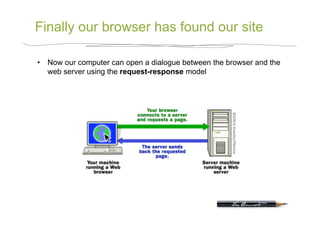
Finally our browser has found our site

•  Now our computer can open a dialogue between the browser and the
   web server using the request-response model
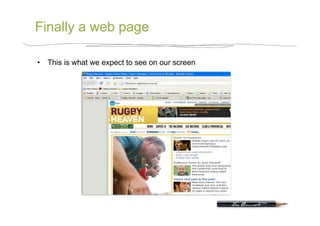
Finally a web page

•  This is what we expect to see on our screen
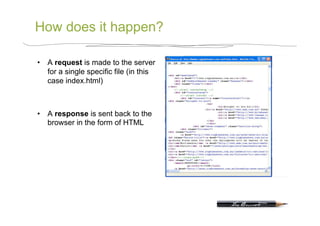
How does it happen?

•  A request is made to the server
   for a single specific file (in this
   case index.html)


•  A response is sent back to the
   browser in the form of HTML
HTML

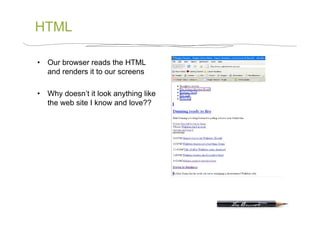
•  Our browser reads the HTML
   and renders it to our screens

•  Why doesn’t it look anything like
   the web site I know and love??
HTML is very simple

•  Yes that kind of simple

•  BUT it does do a couple of
   things very well
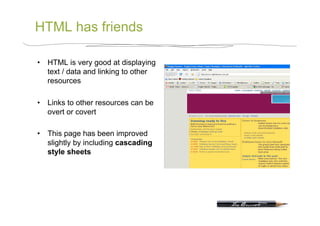
HTML has friends

•  HTML is very good at displaying
   text / data and linking to other
   resources

•  Links to other resources can be
   overt or covert

•  This page has been improved
   slightly by including cascading
   style sheets
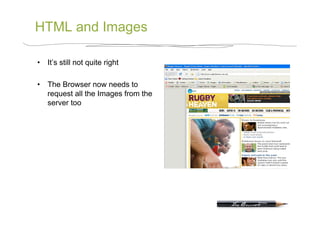
HTML and Images

•  It’s still not quite right

•  The Browser now needs to
   request all the Images from the
   server too
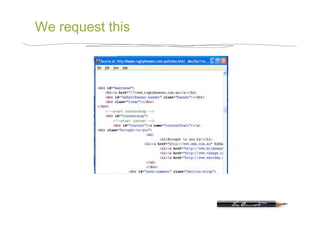
We request this
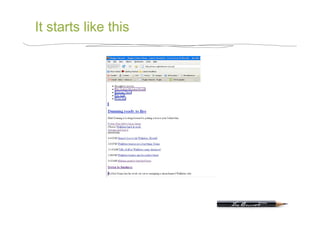
It starts like this
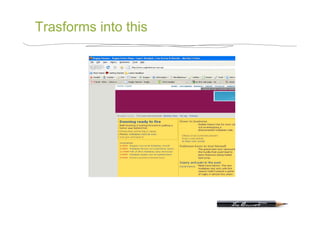
Trasforms into this
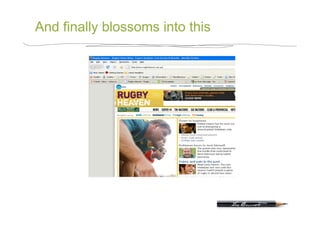
And finally blossoms into this
Statistics

•  In the example we just saw there were 64 files downloaded
   to the browser, they were combinations of css, js, jpg, gif
   and swf’s… And it all happened so quickly

•  A little closer to home, on the PhotoChains homepage
   there are more than 130 separate files downloaded!!!
So who builds this?

•  Basically everything we’ve seen so far is built by Keong or
   a bunch of people like him

•  And if web sites / pages never changed I’d be out of a job
A little bit of jargon

•  Server side code versus client side code
So what does server side code do?

•  Web pages are not all static, in fact most these days are
   dynamic

•  Servers run pieces of code to deliver different and more
   specific responses to the browser

•  Server side rarely lives alone though, it’s usually coupled
   with one or more databases (or databi if you want to
   impress)
What is a Database?

•  Think of Dom’s rolodex, it stores specific information

•  The databases we use allow us create our own structure
Finally

•  We now know what a website is and where it physically
   lives

•  We also know how our computer finds that website

•  And finally we know how a webpage gets displayed in our
   browser

•  We know what a database is and a bit about how it works
Honourable techies

•  Thanks for listening, you can all be honourable techies for
   the day… Because deep down I all know you want to be

Introduction to web (techie side)

  • 1.
    How web siteswork An epic story of how rugbyheaven.com.au delivers important news to my screen every morning
  • 2.
    Covering •  What isa website and where does it live? •  How does our browser find a given website? •  How does our browser display a given website? •  What is a database and how does it work?
  • 3.
    What is theInternet? •  The internet is like our office computer network but on a global scale •  There are literally millions of computers in this networked together •  Simply put the internet is an international network of computers.
  • 4.
    What is theWorld Wide Web? •  The www exists on the internet •  It’s a lose term to define the part of the internet that everyone can see and use
  • 5.
    What is awebsite? •  According to the wikipedia a website is a collection of related web pages, images, videos or other digital assets that are addressed with a common domain name •  Let’s be serious though, we all know what a website is. We’ve all been to google.com, wikipedia.org or of course rugbyheaven.com.au
  • 6.
    Do websites actuallyexist in cyberspace? •  No!!! •  Websites live in specific locations on web servers
  • 7.
    How do wefind what we’re looking for? •  With all these computers and all this information available on the www wouldn’t it be great if there was a uniformed way of locating all the resources we’re looking for… •  Introducing the uniformed resource locator or URL for short •  http://www.rugbyheaven.com.au/news/200909.html
  • 8.
    How does aURL map to a web page? •  Domain names are part of a URL  (http://www.rugbyheaven.com.au/news/200909.html) •  DNS servers map domain names to physical machines
  • 9.
    Finally our browserhas found our site •  Now our computer can open a dialogue between the browser and the web server using the request-response model
  • 10.
    Finally a webpage •  This is what we expect to see on our screen
  • 11.
    How does ithappen? •  A request is made to the server for a single specific file (in this case index.html) •  A response is sent back to the browser in the form of HTML
  • 12.
    HTML •  Our browserreads the HTML and renders it to our screens •  Why doesn’t it look anything like the web site I know and love??
  • 13.
    HTML is verysimple •  Yes that kind of simple •  BUT it does do a couple of things very well
  • 14.
    HTML has friends • HTML is very good at displaying text / data and linking to other resources •  Links to other resources can be overt or covert •  This page has been improved slightly by including cascading style sheets
  • 15.
    HTML and Images • It’s still not quite right •  The Browser now needs to request all the Images from the server too
  • 16.
  • 17.
  • 18.
  • 19.
  • 20.
    Statistics •  In theexample we just saw there were 64 files downloaded to the browser, they were combinations of css, js, jpg, gif and swf’s… And it all happened so quickly •  A little closer to home, on the PhotoChains homepage there are more than 130 separate files downloaded!!!
  • 21.
    So who buildsthis? •  Basically everything we’ve seen so far is built by Keong or a bunch of people like him •  And if web sites / pages never changed I’d be out of a job
  • 22.
    A little bitof jargon •  Server side code versus client side code
  • 23.
    So what doesserver side code do? •  Web pages are not all static, in fact most these days are dynamic •  Servers run pieces of code to deliver different and more specific responses to the browser •  Server side rarely lives alone though, it’s usually coupled with one or more databases (or databi if you want to impress)
  • 24.
    What is aDatabase? •  Think of Dom’s rolodex, it stores specific information •  The databases we use allow us create our own structure
  • 25.
    Finally •  We nowknow what a website is and where it physically lives •  We also know how our computer finds that website •  And finally we know how a webpage gets displayed in our browser •  We know what a database is and a bit about how it works
  • 26.
    Honourable techies •  Thanksfor listening, you can all be honourable techies for the day… Because deep down I all know you want to be