Introduction to React
& MobX
Anjali Chawla
SDE-II Expedia
Agenda
 What is React
 How React works
 React Component lifecycle
 State management - MobX
What is React
 A JavaScript library for building user interfaces
Declarative
 Create interactive Uis
 Design simple views
 Predictable and easier
to debug code
Component Based
 Building block of
complex UI
 Manage their own
state
Learn Once, write
anywhere
 Create Web based
applications
 Progressive WebApps
 Native Mobile Apps
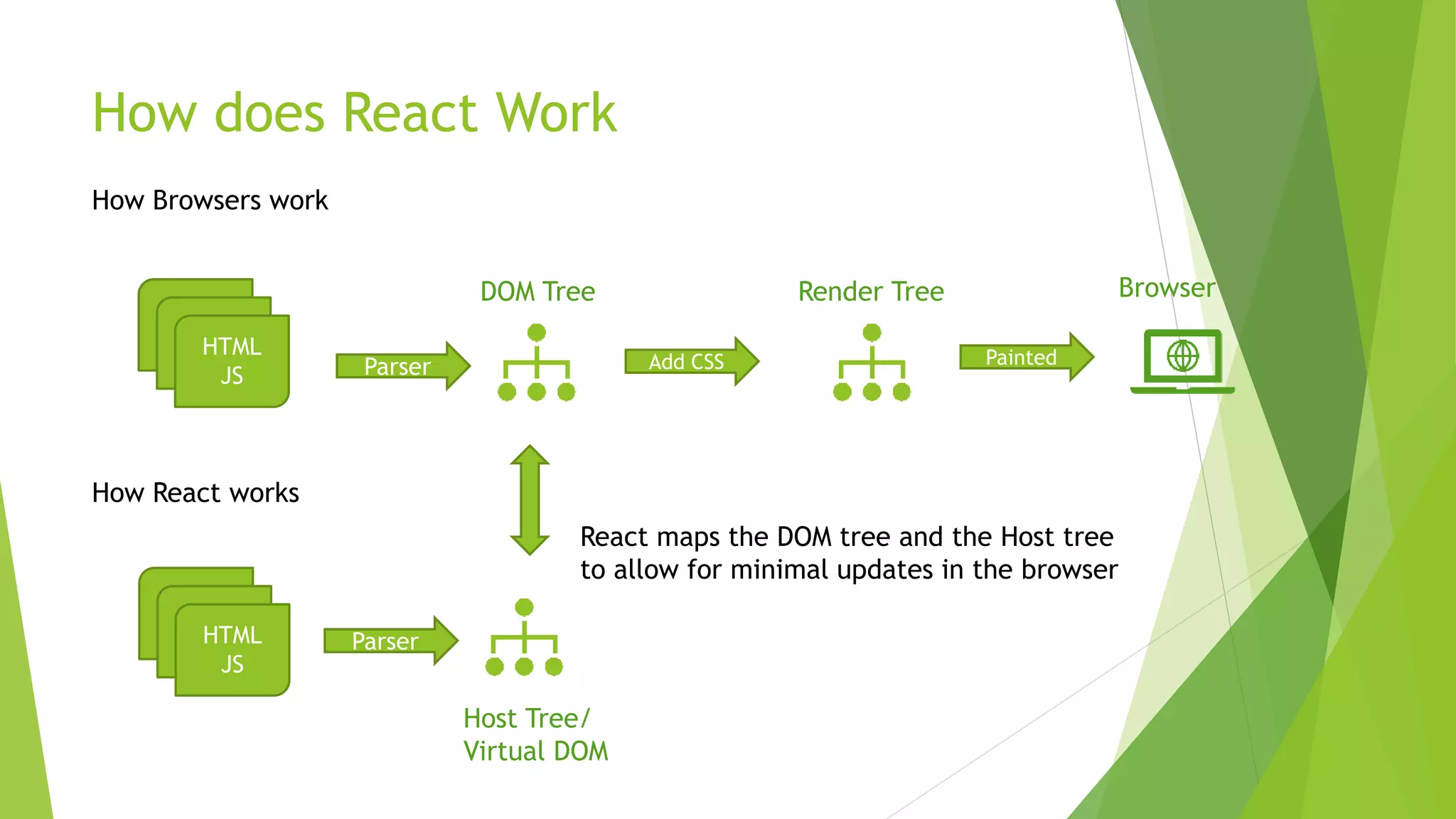
How does React Work
HTML
JS
How Browsers work
Add CSS
DOM Tree
Parser
Render Tree
Painted
Browser
How React works
HTML
JS
Host Tree/
Virtual DOM
Parser
React maps the DOM tree and the Host tree
to allow for minimal updates in the browser
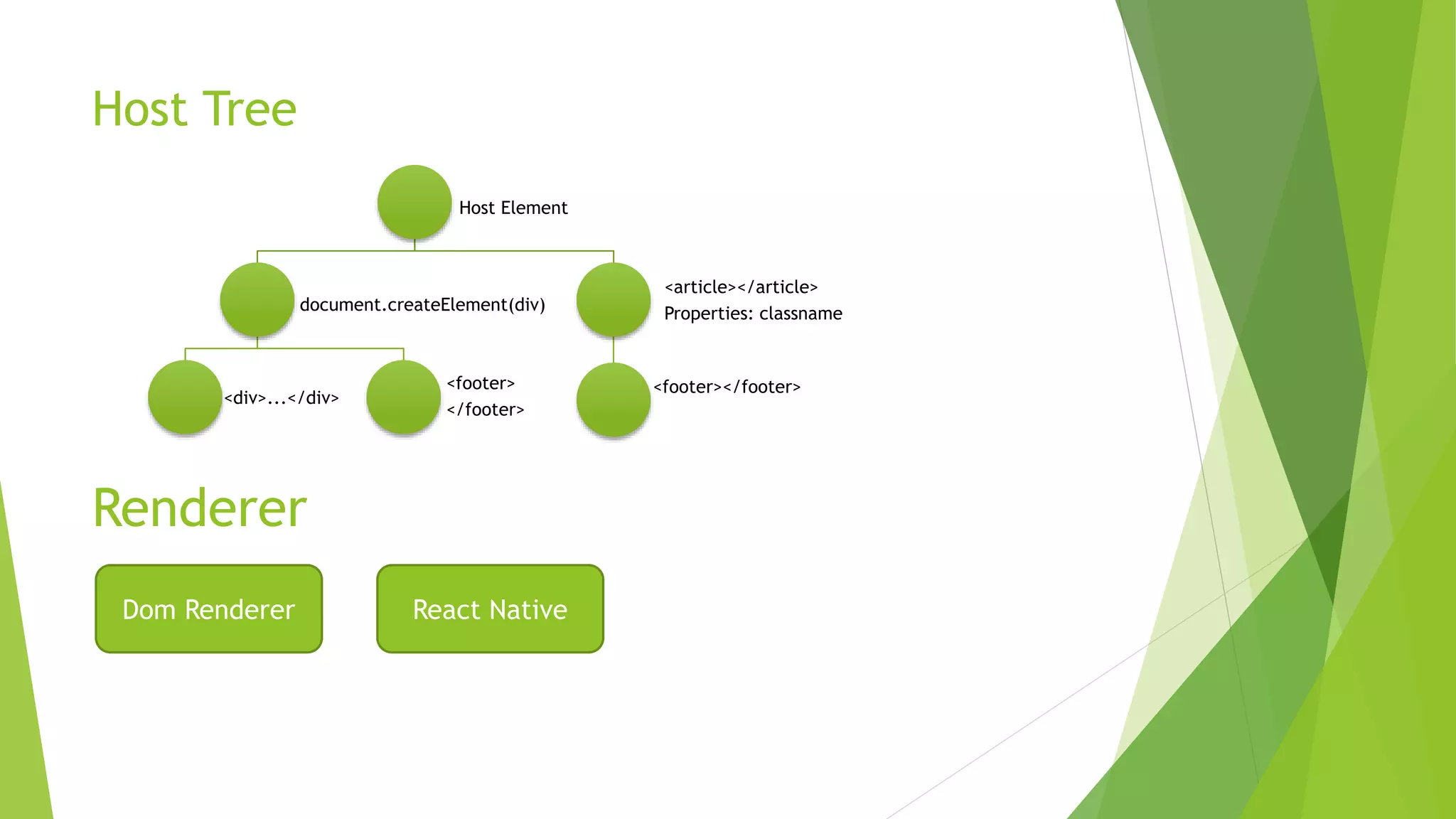
Host Tree
Host Element
document.createElement(div)
<div>...</div>
<footer>
</footer>
<article></article>
Properties: classname
<footer></footer>
Renderer
Dom Renderer React Native
React Element
{ type: 'dialog’,
props: {
children: [{ type: 'button', props: { className: 'blue' } },
{ type: 'button', props: { className: 'red' } }]
} }
Entry Point:
ReactDOM.render( // { type: 'button', props: { className: 'blue' } }
<button className="blue" />,
document.getElementById('container’)
);
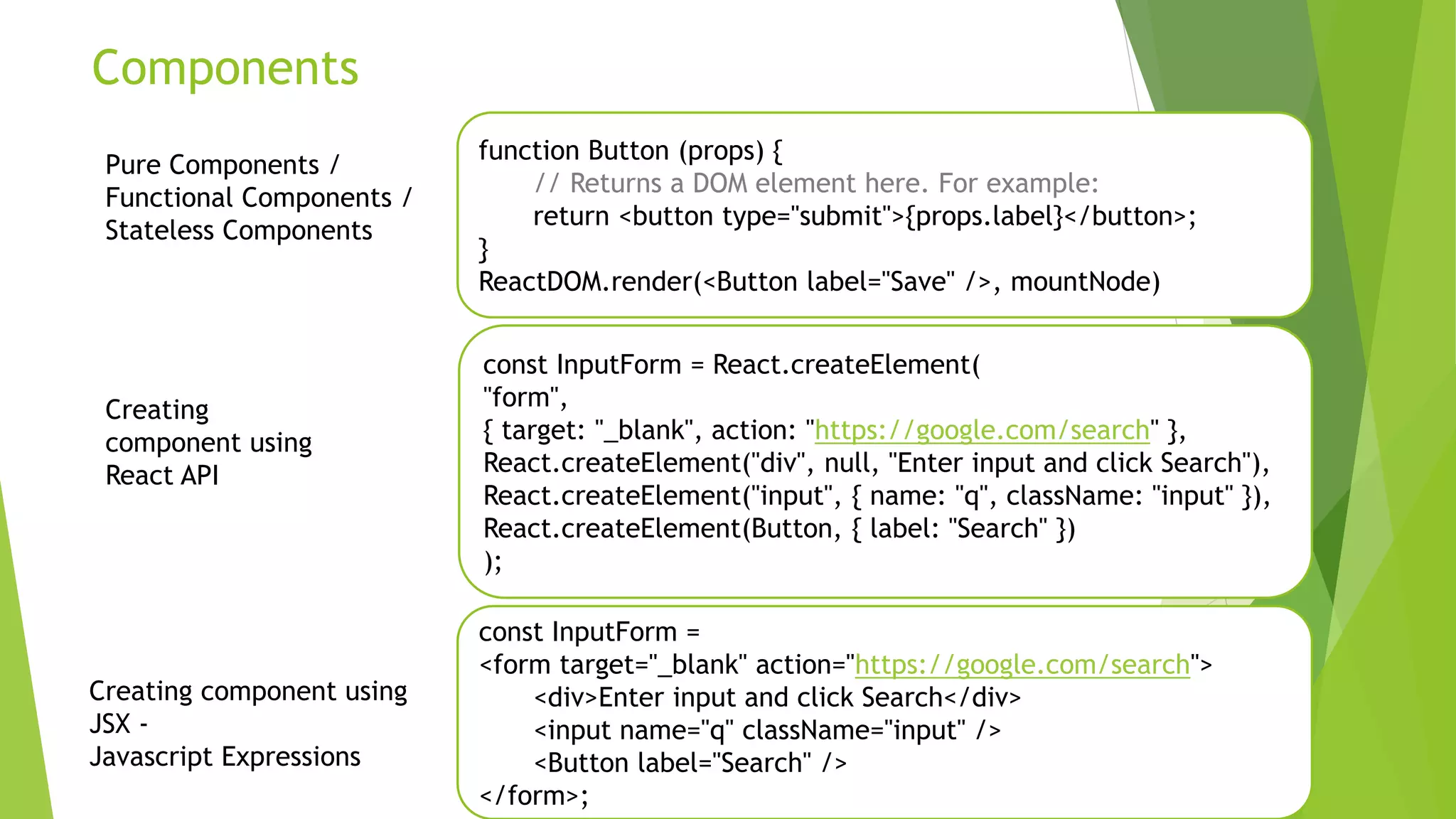
Components
function Button (props) {
// Returns a DOM element here. For example:
return <button type="submit">{props.label}</button>;
}
ReactDOM.render(<Button label="Save" />, mountNode)
const InputForm = React.createElement(
"form",
{ target: "_blank", action: "https://google.com/search" },
React.createElement("div", null, "Enter input and click Search"),
React.createElement("input", { name: "q", className: "input" }),
React.createElement(Button, { label: "Search" })
);
Pure Components /
Functional Components /
Stateless Components
const InputForm =
<form target="_blank" action="https://google.com/search">
<div>Enter input and click Search</div>
<input name="q" className="input" />
<Button label="Search" />
</form>;
Creating component using
JSX -
Javascript Expressions
Creating
component using
React API
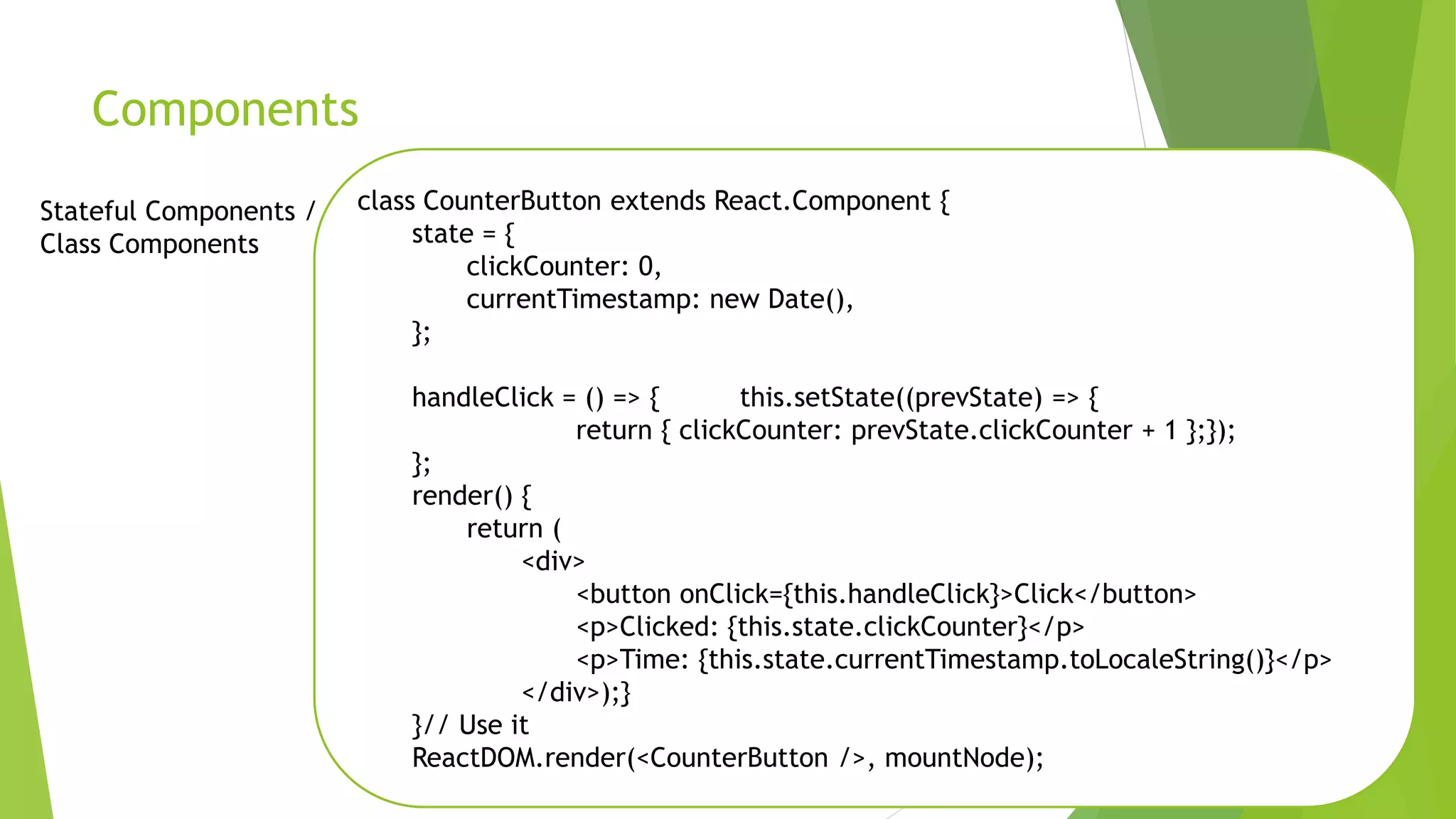
Components
class CounterButton extends React.Component {
state = {
clickCounter: 0,
currentTimestamp: new Date(),
};
handleClick = () => { this.setState((prevState) => {
return { clickCounter: prevState.clickCounter + 1 };});
};
render() {
return (
<div>
<button onClick={this.handleClick}>Click</button>
<p>Clicked: {this.state.clickCounter}</p>
<p>Time: {this.state.currentTimestamp.toLocaleString()}</p>
</div>);}
}// Use it
ReactDOM.render(<CounterButton />, mountNode);
Stateful Components /
Class Components
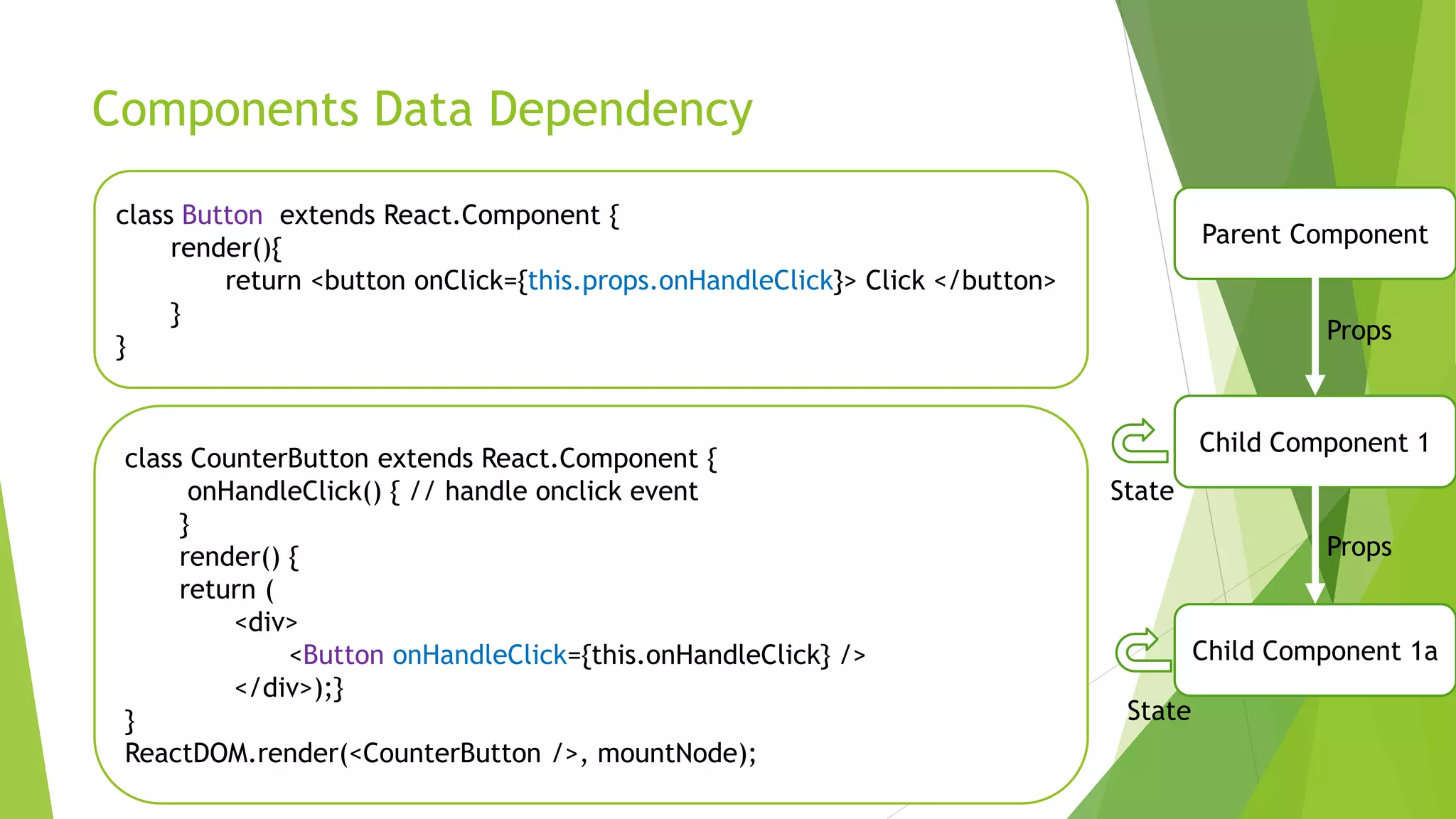
Components Data Dependency
class CounterButton extends React.Component {
onHandleClick() { // handle onclick event
}
render() {
return (
<div>
<Button onHandleClick={this.onHandleClick} />
</div>);}
}
ReactDOM.render(<CounterButton />, mountNode);
class Button extends React.Component {
render(){
return <button onClick={this.props.onHandleClick}> Click </button>
}
}
Parent Component
Child Component 1a
Child Component 1
Props
Props
State
State
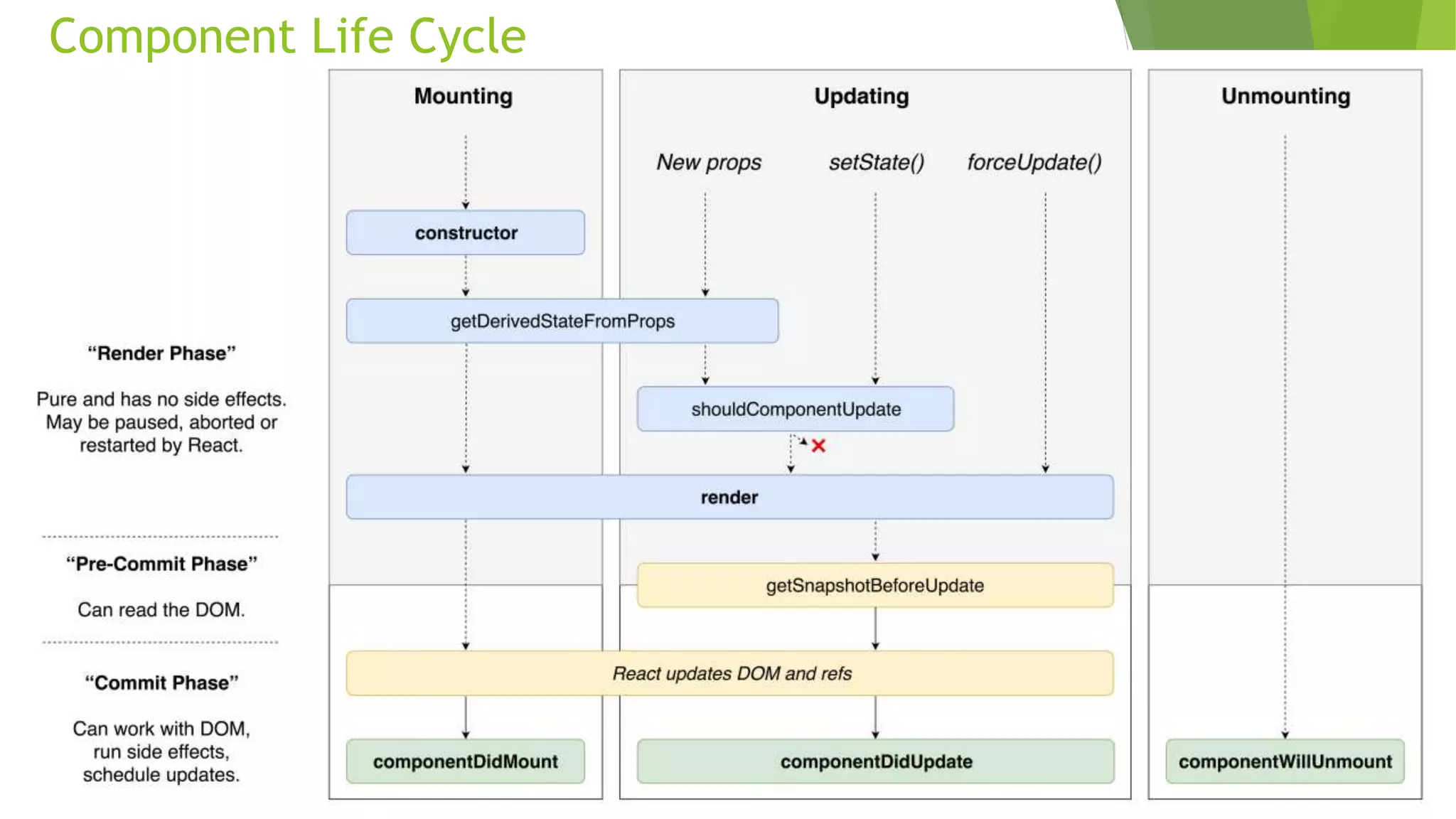
Component Life Cycle
MobX - State Management
 MobX provides mechanisms to optimally synchronize application state with
the React components by using a reactive virtual dependency state graph that
is only updated when strictly needed and is never stale.
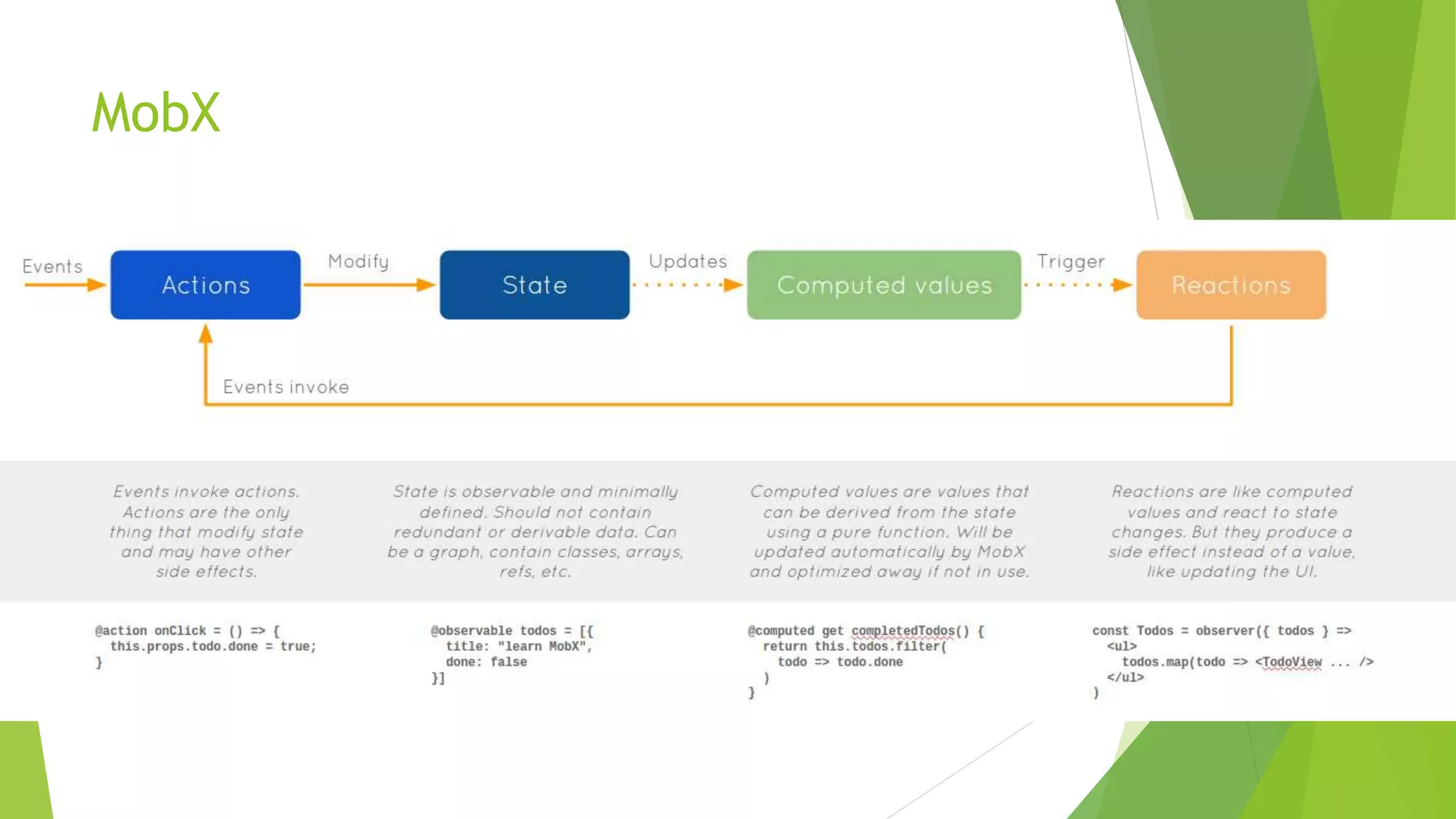
MobX
MobX - Core Concepts
 Observable state
 Computed values
import { observable } from "mobx";
class Todo {
id = Math.random();
@observable title = "";
@observable finished = false; }
class TodoList {
@observable todos = [];
@computed get unfinishedTodoCount() {
return this.todos.filter(todo => !todo.finished).length;
}
}
MobX – Core Concepts
 Reactions
 Actions
@observer
class TodoListView extends Component {
render() {
return ( <div> <ul>
{this.props.todoList.todos.map(todo => ( <TodoView todo={todo} key={todo.id} />
))} </ul>
Tasks left: {this.props.todoList.unfinishedTodoCount}
</div> ); } }
store.todos.push(new Todo("Get Coffee"), new Todo("Write simpler code"));
store.todos[0].finished = true;
References
 https://reactjs.org/
 https://overreacted.io/react-as-a-ui-runtime/
 https://medium.freecodecamp.org/all-the-fundamental-react-js-concepts-
jammed-into-this-single-medium-article-c83f9b53eac2
 https://mobx.js.org/
 https://medium.com/@mweststrate/mobx-4-better-simpler-faster-smaller-
c1fbc08008da
 https://hackernoon.com/becoming-fully-reactive-an-in-depth-explanation-of-
mobservable-55995262a254

Introduction to React and MobX

  • 1.
    Introduction to React &MobX Anjali Chawla SDE-II Expedia
  • 2.
    Agenda  What isReact  How React works  React Component lifecycle  State management - MobX
  • 3.
    What is React A JavaScript library for building user interfaces Declarative  Create interactive Uis  Design simple views  Predictable and easier to debug code Component Based  Building block of complex UI  Manage their own state Learn Once, write anywhere  Create Web based applications  Progressive WebApps  Native Mobile Apps
  • 4.
    How does ReactWork HTML JS How Browsers work Add CSS DOM Tree Parser Render Tree Painted Browser How React works HTML JS Host Tree/ Virtual DOM Parser React maps the DOM tree and the Host tree to allow for minimal updates in the browser
  • 5.
  • 6.
    React Element { type:'dialog’, props: { children: [{ type: 'button', props: { className: 'blue' } }, { type: 'button', props: { className: 'red' } }] } } Entry Point: ReactDOM.render( // { type: 'button', props: { className: 'blue' } } <button className="blue" />, document.getElementById('container’) );
  • 7.
    Components function Button (props){ // Returns a DOM element here. For example: return <button type="submit">{props.label}</button>; } ReactDOM.render(<Button label="Save" />, mountNode) const InputForm = React.createElement( "form", { target: "_blank", action: "https://google.com/search" }, React.createElement("div", null, "Enter input and click Search"), React.createElement("input", { name: "q", className: "input" }), React.createElement(Button, { label: "Search" }) ); Pure Components / Functional Components / Stateless Components const InputForm = <form target="_blank" action="https://google.com/search"> <div>Enter input and click Search</div> <input name="q" className="input" /> <Button label="Search" /> </form>; Creating component using JSX - Javascript Expressions Creating component using React API
  • 8.
    Components class CounterButton extendsReact.Component { state = { clickCounter: 0, currentTimestamp: new Date(), }; handleClick = () => { this.setState((prevState) => { return { clickCounter: prevState.clickCounter + 1 };}); }; render() { return ( <div> <button onClick={this.handleClick}>Click</button> <p>Clicked: {this.state.clickCounter}</p> <p>Time: {this.state.currentTimestamp.toLocaleString()}</p> </div>);} }// Use it ReactDOM.render(<CounterButton />, mountNode); Stateful Components / Class Components
  • 9.
    Components Data Dependency classCounterButton extends React.Component { onHandleClick() { // handle onclick event } render() { return ( <div> <Button onHandleClick={this.onHandleClick} /> </div>);} } ReactDOM.render(<CounterButton />, mountNode); class Button extends React.Component { render(){ return <button onClick={this.props.onHandleClick}> Click </button> } } Parent Component Child Component 1a Child Component 1 Props Props State State
  • 10.
  • 11.
    MobX - StateManagement  MobX provides mechanisms to optimally synchronize application state with the React components by using a reactive virtual dependency state graph that is only updated when strictly needed and is never stale.
  • 12.
  • 13.
    MobX - CoreConcepts  Observable state  Computed values import { observable } from "mobx"; class Todo { id = Math.random(); @observable title = ""; @observable finished = false; } class TodoList { @observable todos = []; @computed get unfinishedTodoCount() { return this.todos.filter(todo => !todo.finished).length; } }
  • 14.
    MobX – CoreConcepts  Reactions  Actions @observer class TodoListView extends Component { render() { return ( <div> <ul> {this.props.todoList.todos.map(todo => ( <TodoView todo={todo} key={todo.id} /> ))} </ul> Tasks left: {this.props.todoList.unfinishedTodoCount} </div> ); } } store.todos.push(new Todo("Get Coffee"), new Todo("Write simpler code")); store.todos[0].finished = true;
  • 15.
    References  https://reactjs.org/  https://overreacted.io/react-as-a-ui-runtime/ https://medium.freecodecamp.org/all-the-fundamental-react-js-concepts- jammed-into-this-single-medium-article-c83f9b53eac2  https://mobx.js.org/  https://medium.com/@mweststrate/mobx-4-better-simpler-faster-smaller- c1fbc08008da  https://hackernoon.com/becoming-fully-reactive-an-in-depth-explanation-of- mobservable-55995262a254