MySQL for IBM i

                        Function Junction
Mike Pavlak
Solutions Consultant
mike.p@zend.com
(815) 722 3454


                                            © All rights reserved. Zend Technologies, Inc.
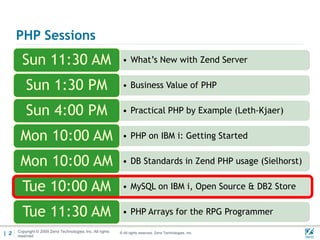
PHP Sessions
        Sun 11:30 AM                                         • What’s New with Zend Server


          Sun 1:30 PM                                        • Business Value of PHP


          Sun 4:00 PM                                        • Practical PHP by Example (Leth-Kjaer)


       Mon 10:00 AM                                          • PHP on IBM i: Getting Started


       Mon 10:00 AM                                          • DB Standards in Zend PHP usage (Sielhorst)


        Tue 10:00 AM                                         • MySQL on IBM i, Open Source & DB2 Store


        Tue 11:30 AM                                         • PHP Arrays for the RPG Programmer

| 2   Copyright © 2009 Zend Technologies, Inc, All rights
      reserved
                                                            © All rights reserved. Zend Technologies, Inc.   02/03/
Agenda

      • What is MySQL
      • Install
      • Access
      • GUI’s
      • DB2 Storage Engine
      • Q&A


| 3                          © All rights reserved. Zend Technologies, Inc.   02/04/
What is MySQL?

      • Most Popular and widely used Open Source Database

      • Relational Database management System (RDBMS)

      • Like DB2, but not, really

      • Command line interface

      • Many utilities available to manage

        • phpMyAdmin, Adminer,


| 4                        © All rights reserved. Zend Technologies, Inc.   02/04/
Who uses MySQL & why?

      • Millions of downloads

      • Big companies

      • Growing in IBM i

      • Nearly Everyone using open source PHP applications

      • Free

      • Open Source

      • Delivered by Zend

      • Back end for thousands of applications like drupal, Sugar
        CRM, Media Wiki, etc.
| 5                         © All rights reserved. Zend Technologies, Inc.   02/04/
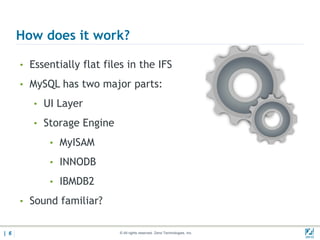
How does it work?

      • Essentially flat files in the IFS

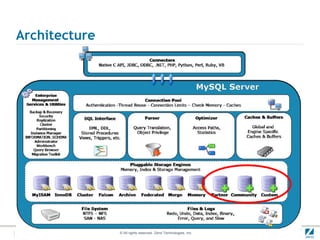
      • MySQL has two major parts:

         • UI Layer

         • Storage Engine

            • MyISAM

            • INNODB

            • IBMDB2

      • Sound familiar?


| 6                          © All rights reserved. Zend Technologies, Inc.   02/04/
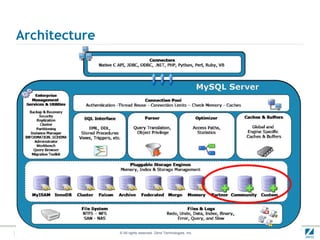
Architecture


               © All rights reserved. Zend Technologies, Inc.
History of MySQL


         © All rights reserved. Zend Technologies, Inc.
In the beginning

      Founded by
        David Axmark
        Allan Larsson
        Michael “Monty” Widenius
      Named after Monty’s daughter “My” (Pronounced mee)


| 9                       © All rights reserved. Zend Technologies, Inc.   02/04/
Ownership

Remember MySQL is Open Source: Anyone can compile the
  source code and use the binaries as long as they follow the
  rules of the license.
Jan 2008:Sun purchased MySQL for $1B
Oracle purchased sun about year later for $7.4B
FUD ensues…
Today, MySQL continues to live on


                      © All rights reserved. Zend Technologies, Inc.
What about IBM i?

Two years ago Oracle dropped support for MySQL on Power
  and discontinued compiling the binaries.
Old binaries still available on Oracle archive site
IBM began looking for a new suitor
Zend stepped up and took over the binary distribution for
  MySQL for IBM i and the new product is called Zend DBi
Same wonderful MySQL, just compiled for POWER IBM i
Available for no charge at www.zend.com/products/dbi


                       © All rights reserved. Zend Technologies, Inc.
Installation, Zend DBi


          © All rights reserved. Zend Technologies, Inc.
First, remove old version???
       • If you have no real data…
            • Stop ZMYSQL Subsystem
            • Delete ZMYSQL library
            • RMVLNK ‘/usr/local/mysql*’
       • Knowledge base article 305 (Dated but still useful!)
            • http://kb.zend.com/index.php?View=entry&EntryID=305


| 13                         © All rights reserved. Zend Technologies, Inc.   02/04/
Zend DBi Installation process
       • Documented at Zend.com
       • Option to install or update within point release
             • Can update 5.1.n to 5.1.current (Zend Server)
             • Cannot update 5.0.n (Zend Core)
       • Download .zip from Zend.com, contains SAVF & README
       • Follow readme.txt in SAVF, pretty straight forward
       • Required LP’s are typically installed before Zend Server
       • A word about QSECOFR…


| 14                         © All rights reserved. Zend Technologies, Inc.   02/04/
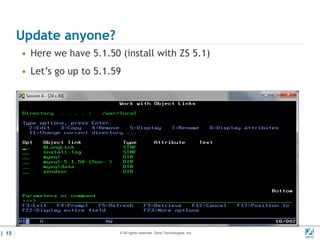
Update anyone?
       • Here we have 5.1.50 (install with ZS 5.1)
       • Let’s go up to 5.1.59


| 15                         © All rights reserved. Zend Technologies, Inc.   02/04/
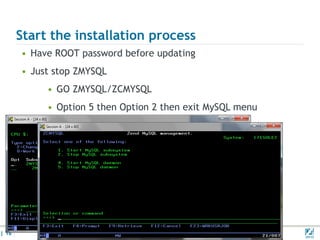
Start the installation process
       • Have ROOT password before updating
       • Just stop ZMYSQL
            • GO ZMYSQL/ZCMYSQL
            • Option 5 then Option 2 then exit MySQL menu


| 16                        © All rights reserved. Zend Technologies, Inc.   02/04/
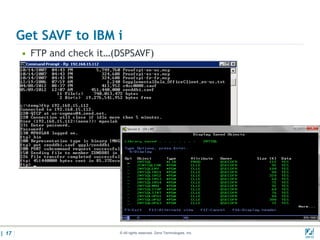
Get SAVF to IBM i
       • FTP and check it…(DSPSAVF)


| 17                       © All rights reserved. Zend Technologies, Inc.   02/04/
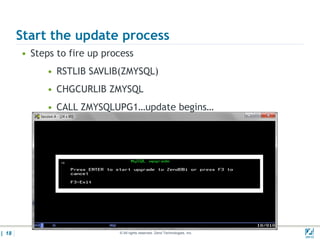
Start the update process
       • Steps to fire up process
             • RSTLIB SAVLIB(ZMYSQL)
             • CHGCURLIB ZMYSQL
             • CALL ZMYSQLUPG1…update begins…


| 18                         © All rights reserved. Zend Technologies, Inc.   02/04/
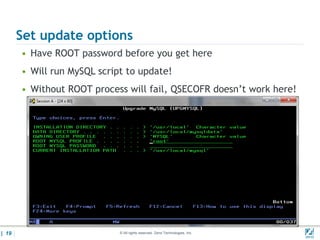
Set update options
       • Have ROOT password before you get here
       • Will run MySQL script to update!
       • Without ROOT process will fail, QSECOFR doesn’t work here!


| 19                         © All rights reserved. Zend Technologies, Inc.   02/04/
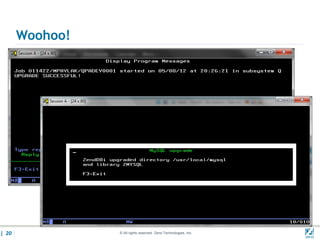
Woohoo!


| 20             © All rights reserved. Zend Technologies, Inc.   02/04/
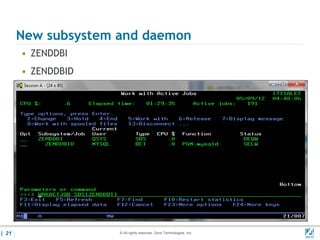
New subsystem and daemon
       • ZENDDBI
       • ZENDDBID


| 21                 © All rights reserved. Zend Technologies, Inc.   02/04/
MySQL Command Line


        © All rights reserved. Zend Technologies, Inc.
MySQL Monitor
       • MySQL has no native GUI interface (sound familiar?)
       • Command line accessible from QSHELL, QP2TERM, etc.
       • This is the brute force method for accessing.
       • Will show you access, but not a big fan.
       • Fully documented at mysql website
       • Many books on the subject


| 23                         © All rights reserved. Zend Technologies, Inc.   02/04/
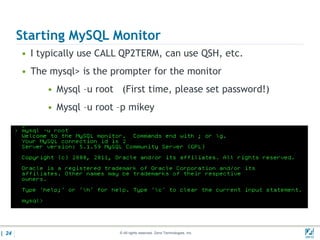
Starting MySQL Monitor
       • I typically use CALL QP2TERM, can use QSH, etc.
       • The mysql> is the prompter for the monitor
            • Mysql –u root (First time, please set password!)
            • Mysql –u root –p mikey


| 24                        © All rights reserved. Zend Technologies, Inc.   02/04/
List all the databases
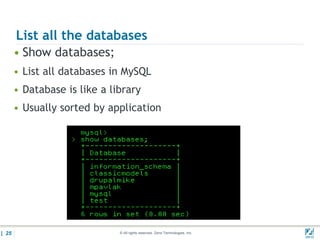
       • Show databases;
       • List all databases in MySQL
       • Database is like a library
       • Usually sorted by application


| 25                          © All rights reserved. Zend Technologies, Inc.   02/04/
Set database
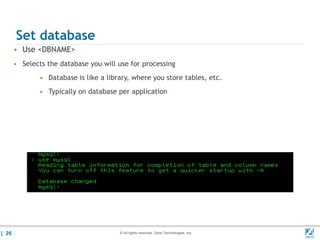
       • Use <DBNAME>
       • Selects the database you will use for processing
               • Database is like a library, where you store tables, etc.
               • Typically on database per application


| 26                                    © All rights reserved. Zend Technologies, Inc.   02/04/
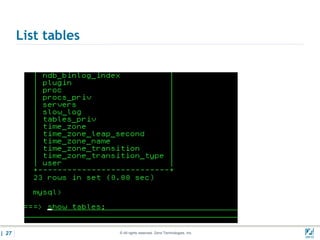
List tables


| 27                 © All rights reserved. Zend Technologies, Inc.   02/04/
Display the user table
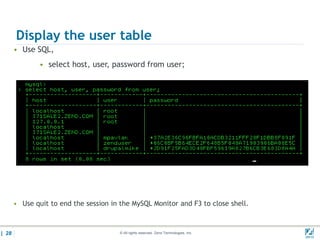
       • Use SQL,
               • select host, user, password from user;


       • Use quit to end the session in the MySQL Monitor and F3 to close shell.


| 28                                    © All rights reserved. Zend Technologies, Inc.   02/04/
Are there any GUI’s?


          © All rights reserved. Zend Technologies, Inc.
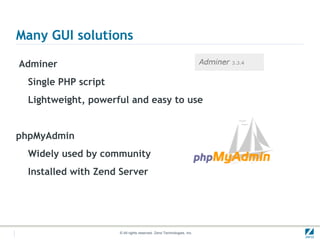
Many GUI solutions

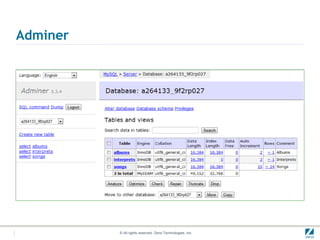
Adminer
  Single PHP script
  Lightweight, powerful and easy to use


phpMyAdmin
  Widely used by community
  Installed with Zend Server


                      © All rights reserved. Zend Technologies, Inc.
Adminer


          © All rights reserved. Zend Technologies, Inc.
phpMyAdmin
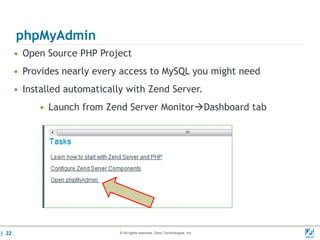
       • Open Source PHP Project
       • Provides nearly every access to MySQL you might need
       • Installed automatically with Zend Server.
            • Launch from Zend Server MonitorDashboard tab


| 32                           © All rights reserved. Zend Technologies, Inc.   02/04/
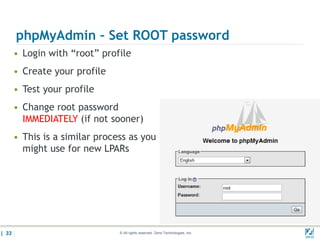
phpMyAdmin – Set ROOT password
       • Login with “root” profile
       • Create your profile
       • Test your profile
       • Change root password
         IMMEDIATELY (if not sooner)
       • This is a similar process as you
         might use for new LPARs


| 33                            © All rights reserved. Zend Technologies, Inc.   02/04/
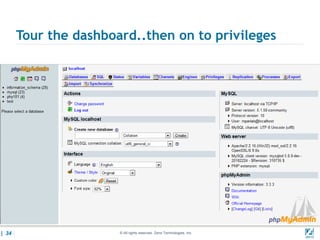
Tour the dashboard..then on to privileges


| 34                   © All rights reserved. Zend Technologies, Inc.   02/04/
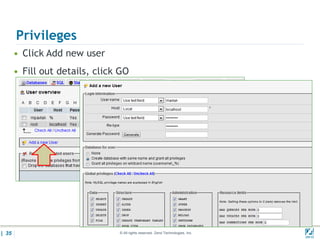
Privileges
       • Click Add new user
       • Fill out details, click GO


| 35                            © All rights reserved. Zend Technologies, Inc.   02/04/
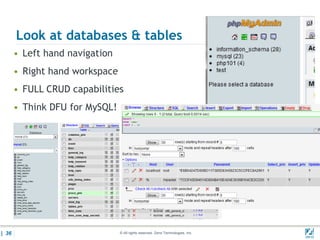
Look at databases & tables
       • Left hand navigation
       • Right hand workspace
       • FULL CRUD capabilities
       • Think DFU for MySQL!


| 36                            © All rights reserved. Zend Technologies, Inc.   02/04/
IBM DB2 Storage
Engine


         © All rights reserved. Zend Technologies, Inc.
Why use MySQL to store data in DB2?

Many PHP applications in the open source arena
These application “talk” to MySQL by design
Modifying to access DB2 can be cumbersome & then updates?
Zend DBi includes IBM DB2 Storage Engine
Two instructions and you are there!


                      © All rights reserved. Zend Technologies, Inc.
Architecture


               © All rights reserved. Zend Technologies, Inc.
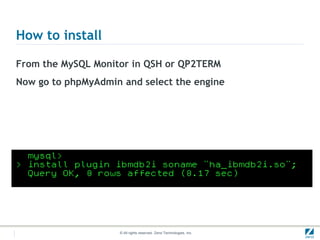
How to install

From the MySQL Monitor in QSH or QP2TERM
Now go to phpMyAdmin and select the engine


                    © All rights reserved. Zend Technologies, Inc.
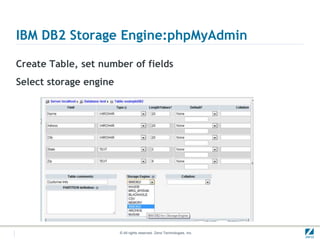
IBM DB2 Storage Engine:phpMyAdmin

Create Table, set number of fields
Select storage engine


                        © All rights reserved. Zend Technologies, Inc.
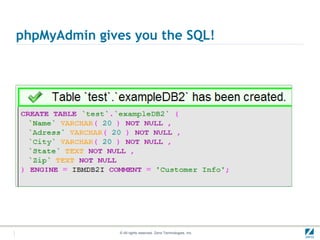
phpMyAdmin gives you the SQL!


               © All rights reserved. Zend Technologies, Inc.
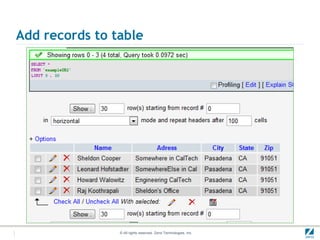
Add records to table


                © All rights reserved. Zend Technologies, Inc.
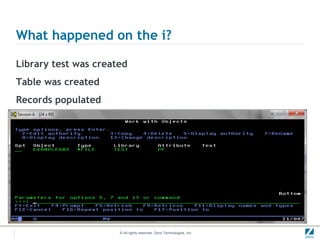
What happened on the i?

Library test was created
Table was created
Records populated


                      © All rights reserved. Zend Technologies, Inc.
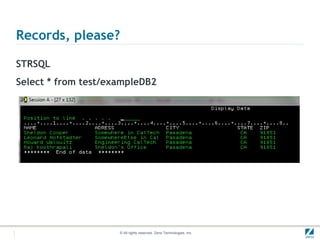
Records, please?

STRSQL
Select * from test/exampleDB2


                     © All rights reserved. Zend Technologies, Inc.
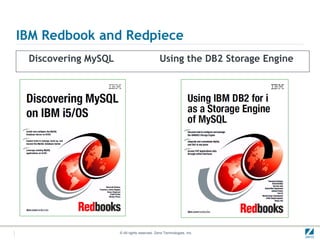
IBM Redbook and Redpiece
 Discovering MySQL                            Using the DB2 Storage Engine


                     © All rights reserved. Zend Technologies, Inc.
Join us at ZendCon
The premier PHP conference!
October 22-25, 2012 – Santa Clara, CA


  Conference Themes                                                           Conference Highlights
  PHP in 2012 - The latest PHP technologies and tools                         • Sessions focused on how to best develop and deploy PHP
  Learn how to leverage the latest mobile, HTML 5, testing and
  PHP best practices                                                          • Sessions designed for all knowledge levels

  Zend Framework 2 - Hit the ground running                                   • Intensive tutorials for accelerated learning
  Learn how to build faster, more modular and more expandable                 • PHP Certification crash courses and testing
  applications
                                                                              • Exhibit hall showcasing the latest products
  Development & The Cloud – A love story
  Learn how the latest developments in cloud-based services,                  • Special networking opportunities during meals and events
  infrastructure and best practices can benefit you


                                                 www.zendcon.com
                                                © All rights reserved. Zend Technologies, Inc.
Q&A
                   www.zend.com
              mike.p@zend.com

         Please fill out your
         Session Evaluation!
48   Insert->Header & Footer   © All rights reserved. Zend Technologies, Inc.

Introduction to My SQL

  • 1.
    MySQL for IBMi Function Junction Mike Pavlak Solutions Consultant mike.p@zend.com (815) 722 3454 © All rights reserved. Zend Technologies, Inc.
  • 2.
    PHP Sessions Sun 11:30 AM • What’s New with Zend Server Sun 1:30 PM • Business Value of PHP Sun 4:00 PM • Practical PHP by Example (Leth-Kjaer) Mon 10:00 AM • PHP on IBM i: Getting Started Mon 10:00 AM • DB Standards in Zend PHP usage (Sielhorst) Tue 10:00 AM • MySQL on IBM i, Open Source & DB2 Store Tue 11:30 AM • PHP Arrays for the RPG Programmer | 2 Copyright © 2009 Zend Technologies, Inc, All rights reserved © All rights reserved. Zend Technologies, Inc. 02/03/
  • 3.
    Agenda • What is MySQL • Install • Access • GUI’s • DB2 Storage Engine • Q&A | 3 © All rights reserved. Zend Technologies, Inc. 02/04/
  • 4.
    What is MySQL? • Most Popular and widely used Open Source Database • Relational Database management System (RDBMS) • Like DB2, but not, really • Command line interface • Many utilities available to manage • phpMyAdmin, Adminer, | 4 © All rights reserved. Zend Technologies, Inc. 02/04/
  • 5.
    Who uses MySQL& why? • Millions of downloads • Big companies • Growing in IBM i • Nearly Everyone using open source PHP applications • Free • Open Source • Delivered by Zend • Back end for thousands of applications like drupal, Sugar CRM, Media Wiki, etc. | 5 © All rights reserved. Zend Technologies, Inc. 02/04/
  • 6.
    How does itwork? • Essentially flat files in the IFS • MySQL has two major parts: • UI Layer • Storage Engine • MyISAM • INNODB • IBMDB2 • Sound familiar? | 6 © All rights reserved. Zend Technologies, Inc. 02/04/
  • 7.
    Architecture © All rights reserved. Zend Technologies, Inc.
  • 8.
    History of MySQL © All rights reserved. Zend Technologies, Inc.
  • 9.
    In the beginning Founded by David Axmark Allan Larsson Michael “Monty” Widenius Named after Monty’s daughter “My” (Pronounced mee) | 9 © All rights reserved. Zend Technologies, Inc. 02/04/
  • 10.
    Ownership Remember MySQL isOpen Source: Anyone can compile the source code and use the binaries as long as they follow the rules of the license. Jan 2008:Sun purchased MySQL for $1B Oracle purchased sun about year later for $7.4B FUD ensues… Today, MySQL continues to live on © All rights reserved. Zend Technologies, Inc.
  • 11.
    What about IBMi? Two years ago Oracle dropped support for MySQL on Power and discontinued compiling the binaries. Old binaries still available on Oracle archive site IBM began looking for a new suitor Zend stepped up and took over the binary distribution for MySQL for IBM i and the new product is called Zend DBi Same wonderful MySQL, just compiled for POWER IBM i Available for no charge at www.zend.com/products/dbi © All rights reserved. Zend Technologies, Inc.
  • 12.
    Installation, Zend DBi © All rights reserved. Zend Technologies, Inc.
  • 13.
    First, remove oldversion??? • If you have no real data… • Stop ZMYSQL Subsystem • Delete ZMYSQL library • RMVLNK ‘/usr/local/mysql*’ • Knowledge base article 305 (Dated but still useful!) • http://kb.zend.com/index.php?View=entry&EntryID=305 | 13 © All rights reserved. Zend Technologies, Inc. 02/04/
  • 14.
    Zend DBi Installationprocess • Documented at Zend.com • Option to install or update within point release • Can update 5.1.n to 5.1.current (Zend Server) • Cannot update 5.0.n (Zend Core) • Download .zip from Zend.com, contains SAVF & README • Follow readme.txt in SAVF, pretty straight forward • Required LP’s are typically installed before Zend Server • A word about QSECOFR… | 14 © All rights reserved. Zend Technologies, Inc. 02/04/
  • 15.
    Update anyone? • Here we have 5.1.50 (install with ZS 5.1) • Let’s go up to 5.1.59 | 15 © All rights reserved. Zend Technologies, Inc. 02/04/
  • 16.
    Start the installationprocess • Have ROOT password before updating • Just stop ZMYSQL • GO ZMYSQL/ZCMYSQL • Option 5 then Option 2 then exit MySQL menu | 16 © All rights reserved. Zend Technologies, Inc. 02/04/
  • 17.
    Get SAVF toIBM i • FTP and check it…(DSPSAVF) | 17 © All rights reserved. Zend Technologies, Inc. 02/04/
  • 18.
    Start the updateprocess • Steps to fire up process • RSTLIB SAVLIB(ZMYSQL) • CHGCURLIB ZMYSQL • CALL ZMYSQLUPG1…update begins… | 18 © All rights reserved. Zend Technologies, Inc. 02/04/
  • 19.
    Set update options • Have ROOT password before you get here • Will run MySQL script to update! • Without ROOT process will fail, QSECOFR doesn’t work here! | 19 © All rights reserved. Zend Technologies, Inc. 02/04/
  • 20.
    Woohoo! | 20 © All rights reserved. Zend Technologies, Inc. 02/04/
  • 21.
    New subsystem anddaemon • ZENDDBI • ZENDDBID | 21 © All rights reserved. Zend Technologies, Inc. 02/04/
  • 22.
    MySQL Command Line © All rights reserved. Zend Technologies, Inc.
  • 23.
    MySQL Monitor • MySQL has no native GUI interface (sound familiar?) • Command line accessible from QSHELL, QP2TERM, etc. • This is the brute force method for accessing. • Will show you access, but not a big fan. • Fully documented at mysql website • Many books on the subject | 23 © All rights reserved. Zend Technologies, Inc. 02/04/
  • 24.
    Starting MySQL Monitor • I typically use CALL QP2TERM, can use QSH, etc. • The mysql> is the prompter for the monitor • Mysql –u root (First time, please set password!) • Mysql –u root –p mikey | 24 © All rights reserved. Zend Technologies, Inc. 02/04/
  • 25.
    List all thedatabases • Show databases; • List all databases in MySQL • Database is like a library • Usually sorted by application | 25 © All rights reserved. Zend Technologies, Inc. 02/04/
  • 26.
    Set database • Use <DBNAME> • Selects the database you will use for processing • Database is like a library, where you store tables, etc. • Typically on database per application | 26 © All rights reserved. Zend Technologies, Inc. 02/04/
  • 27.
    List tables | 27 © All rights reserved. Zend Technologies, Inc. 02/04/
  • 28.
    Display the usertable • Use SQL, • select host, user, password from user; • Use quit to end the session in the MySQL Monitor and F3 to close shell. | 28 © All rights reserved. Zend Technologies, Inc. 02/04/
  • 29.
    Are there anyGUI’s? © All rights reserved. Zend Technologies, Inc.
  • 30.
    Many GUI solutions Adminer Single PHP script Lightweight, powerful and easy to use phpMyAdmin Widely used by community Installed with Zend Server © All rights reserved. Zend Technologies, Inc.
  • 31.
    Adminer © All rights reserved. Zend Technologies, Inc.
  • 32.
    phpMyAdmin • Open Source PHP Project • Provides nearly every access to MySQL you might need • Installed automatically with Zend Server. • Launch from Zend Server MonitorDashboard tab | 32 © All rights reserved. Zend Technologies, Inc. 02/04/
  • 33.
    phpMyAdmin – SetROOT password • Login with “root” profile • Create your profile • Test your profile • Change root password IMMEDIATELY (if not sooner) • This is a similar process as you might use for new LPARs | 33 © All rights reserved. Zend Technologies, Inc. 02/04/
  • 34.
    Tour the dashboard..thenon to privileges | 34 © All rights reserved. Zend Technologies, Inc. 02/04/
  • 35.
    Privileges • Click Add new user • Fill out details, click GO | 35 © All rights reserved. Zend Technologies, Inc. 02/04/
  • 36.
    Look at databases& tables • Left hand navigation • Right hand workspace • FULL CRUD capabilities • Think DFU for MySQL! | 36 © All rights reserved. Zend Technologies, Inc. 02/04/
  • 37.
    IBM DB2 Storage Engine © All rights reserved. Zend Technologies, Inc.
  • 38.
    Why use MySQLto store data in DB2? Many PHP applications in the open source arena These application “talk” to MySQL by design Modifying to access DB2 can be cumbersome & then updates? Zend DBi includes IBM DB2 Storage Engine Two instructions and you are there! © All rights reserved. Zend Technologies, Inc.
  • 39.
    Architecture © All rights reserved. Zend Technologies, Inc.
  • 40.
    How to install Fromthe MySQL Monitor in QSH or QP2TERM Now go to phpMyAdmin and select the engine © All rights reserved. Zend Technologies, Inc.
  • 41.
    IBM DB2 StorageEngine:phpMyAdmin Create Table, set number of fields Select storage engine © All rights reserved. Zend Technologies, Inc.
  • 42.
    phpMyAdmin gives youthe SQL! © All rights reserved. Zend Technologies, Inc.
  • 43.
    Add records totable © All rights reserved. Zend Technologies, Inc.
  • 44.
    What happened onthe i? Library test was created Table was created Records populated © All rights reserved. Zend Technologies, Inc.
  • 45.
    Records, please? STRSQL Select *from test/exampleDB2 © All rights reserved. Zend Technologies, Inc.
  • 46.
    IBM Redbook andRedpiece Discovering MySQL Using the DB2 Storage Engine © All rights reserved. Zend Technologies, Inc.
  • 47.
    Join us atZendCon The premier PHP conference! October 22-25, 2012 – Santa Clara, CA Conference Themes Conference Highlights PHP in 2012 - The latest PHP technologies and tools • Sessions focused on how to best develop and deploy PHP Learn how to leverage the latest mobile, HTML 5, testing and PHP best practices • Sessions designed for all knowledge levels Zend Framework 2 - Hit the ground running • Intensive tutorials for accelerated learning Learn how to build faster, more modular and more expandable • PHP Certification crash courses and testing applications • Exhibit hall showcasing the latest products Development & The Cloud – A love story Learn how the latest developments in cloud-based services, • Special networking opportunities during meals and events infrastructure and best practices can benefit you www.zendcon.com © All rights reserved. Zend Technologies, Inc.
  • 48.
    Q&A www.zend.com mike.p@zend.com Please fill out your Session Evaluation! 48 Insert->Header & Footer © All rights reserved. Zend Technologies, Inc.