For Data Science
Structure
• Part 1 - Introduction, recap & warm-up exercises
• Part 2 - NumPy (Numerical Python)
• Part 3 - Basic plotting
• Part 4 - pandas (Python Data Analysis Library)
Ask!
The art and science of asking questions is the source of all knowledge.
- Thomas Berger
• Do not hesitate to ask!
• During exercises (you can also ask others).
Image by mohamed Hassan from Pixabay
Now let me ask something..
• Why do you want to learn Python/programming?
• What would you use Python for?
Failure
• Coding is all about trial and error.
• Don't be afraid of it.
• Error messages aren't scary, they are useful.
Python natalensis by A. Smith on Wikimedia Commons
History
• Started by Guido Van
Rossum as a hobby
• Now widely spread
• Open Source! Free!
• Versatile
Guido Van Rossum
by Doc Searls on
Flickr CC-BY-SA
Python today
• Developed a large and active scientific computing and data analysis
community
• Now one of the most important languages for
• Data science
• Machine learning
• General software development
• Packages: NumPy, pandas, matplotlib, SciPy, scikit-learn, statsmodels
2 Modes
1. IPython
Python can be run interactively
Used extensively in research
2. Python scripts
What if we want to run more than a few lines of code?
Then we must write text files in .py
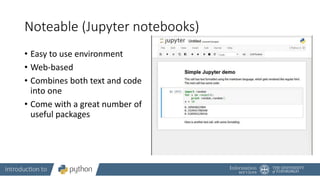
Noteable (Jupyter notebooks)
• Easy to use environment
• Web-based
• Combines both text and code
into one
• Come with a great number of
useful packages
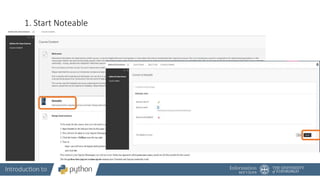
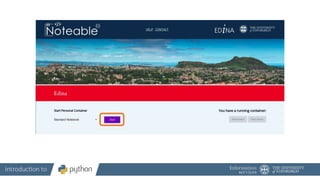
1. Start Noteable
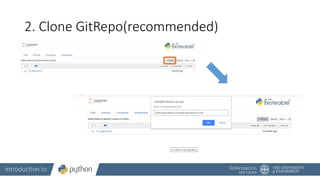
2. Clone GitRepo(recommended)
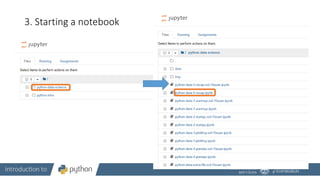
3. Starting a notebook
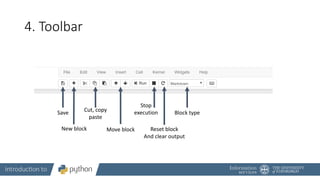
4. Toolbar
Save
New block
Cut, copy
paste
Move block
Stop
execution
Reset block
And clear output
Block type
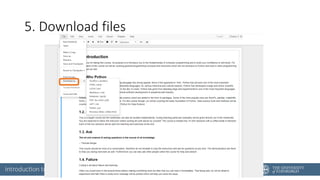
5. Download files
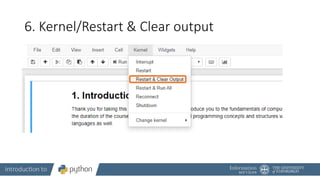
6. Kernel/Restart & Clear output
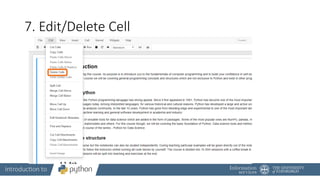
7. Edit/Delete Cell
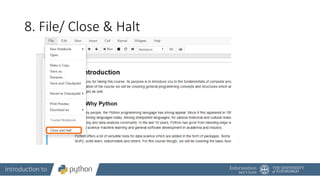
8. File/ Close & Halt
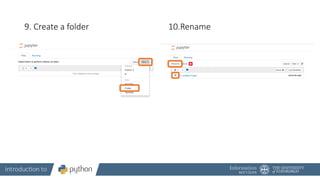
9. Create a folder 10.Rename
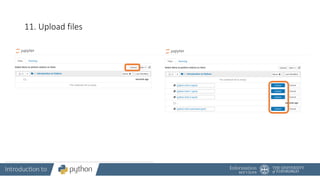
11. Upload files
Running blocks
• By pressing the Run button
• Shift + Enter – runs block
• Alt + Enter – creates a new block
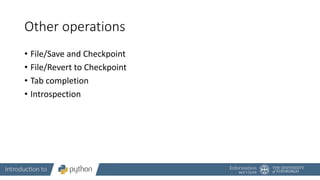
Other operations
• File/Save and Checkpoint
• File/Revert to Checkpoint
• Tab completion
• Introspection
Let us start
To follow along, you need to open your own notebook. But please try to
keep up with my presentation, as you still have time for exercises during
the teaching.
Thank you for attending!
• You can continue to access the ‘Python for Data Science’ Learn course
and notebooks after the course.
• There are solution notebooks for all the topics we have covered
today, plus notebooks covering additional topics (text analysis, signal
processing, regular expressions, network analysis, machine learning &
Conway’s game of life).
• Visit the Digital Skills Framework to find more Python learning
resources: https://www.digitalskills.ed.ac.uk/

Python-data-science.pptx

  • 1.
  • 2.
    Structure • Part 1- Introduction, recap & warm-up exercises • Part 2 - NumPy (Numerical Python) • Part 3 - Basic plotting • Part 4 - pandas (Python Data Analysis Library)
  • 3.
    Ask! The art andscience of asking questions is the source of all knowledge. - Thomas Berger • Do not hesitate to ask! • During exercises (you can also ask others). Image by mohamed Hassan from Pixabay
  • 4.
    Now let meask something.. • Why do you want to learn Python/programming? • What would you use Python for?
  • 5.
    Failure • Coding isall about trial and error. • Don't be afraid of it. • Error messages aren't scary, they are useful.
  • 6.
    Python natalensis byA. Smith on Wikimedia Commons
  • 7.
    History • Started byGuido Van Rossum as a hobby • Now widely spread • Open Source! Free! • Versatile Guido Van Rossum by Doc Searls on Flickr CC-BY-SA
  • 8.
    Python today • Developeda large and active scientific computing and data analysis community • Now one of the most important languages for • Data science • Machine learning • General software development • Packages: NumPy, pandas, matplotlib, SciPy, scikit-learn, statsmodels
  • 9.
    2 Modes 1. IPython Pythoncan be run interactively Used extensively in research 2. Python scripts What if we want to run more than a few lines of code? Then we must write text files in .py
  • 10.
    Noteable (Jupyter notebooks) •Easy to use environment • Web-based • Combines both text and code into one • Come with a great number of useful packages
  • 11.
  • 13.
  • 14.
    3. Starting anotebook
  • 15.
    4. Toolbar Save New block Cut,copy paste Move block Stop execution Reset block And clear output Block type
  • 16.
  • 17.
    6. Kernel/Restart &Clear output
  • 18.
  • 19.
  • 20.
    9. Create afolder 10.Rename
  • 21.
  • 22.
    Running blocks • Bypressing the Run button • Shift + Enter – runs block • Alt + Enter – creates a new block
  • 23.
    Other operations • File/Saveand Checkpoint • File/Revert to Checkpoint • Tab completion • Introspection
  • 24.
    Let us start Tofollow along, you need to open your own notebook. But please try to keep up with my presentation, as you still have time for exercises during the teaching.
  • 25.
    Thank you forattending! • You can continue to access the ‘Python for Data Science’ Learn course and notebooks after the course. • There are solution notebooks for all the topics we have covered today, plus notebooks covering additional topics (text analysis, signal processing, regular expressions, network analysis, machine learning & Conway’s game of life). • Visit the Digital Skills Framework to find more Python learning resources: https://www.digitalskills.ed.ac.uk/

Editor's Notes

  • #2 - Welcome and thank you for coming - Introduction - aims: -- introduce fundamentals -- build up confidence for self-study!!! Not as scary as the real-world version - assumptions: -- basic high-school maths -- no prior experience in coding CC-BY Digital Skills Team at the University of Edinburgh www.ed.ac.uk/is/skills
  • #4 All of us learn through asking and being curious more of a conversation - don't hesitate to stop me and ask
  • #5 make notes
  • #6 You might fail 5 times while doing something but in the end you will understand how it works and be able to replicate it
  • #8 - Started by Guido Van Rossum as a hobby over the Christmas vacation. - named after Monty Python's Flying Circus - First released in 1991, loved by Unix scripters - Now transformed into the most popular interpreted language. You can build anything with it! - Facts! Python was the most used language in 2016 and still most likely is!
  • #9 Why choose it instead of MATLAB, R, SAS, Stata and others? - It is free and open source - Intuitive and easy to learn - Extremely versatile – examples – websites, planes, robots, data - Large and friendly community - packages Very important in industry and academia
  • #10 Python has 2 modes of running - IPython stands for Interactive Python Python can be interpreted – good for a calculator Live demo!
  • #11 We will be using Noteable, just another service Jupyter Notebooks. It is free and open source Web environment focused at Python Easy to use – nice gui and no setup required Block based. Has blocks which execute the code within it. Single type only Allows to combine text and code into same page. Helps with readability
  • #12 start noteable from learn - Link at the top of homepage Agree on personal data usage You don't have to share anything
  • #13 Probably enter myed login details Then press start on noteable homepage
  • #15 Start a notebook by clicking on it. Notebook 0 is an environment introduction. Skip that, open notebook 1 Make sure that everybody is ready
  • #16 Autosave
  • #21 We need to make a course folder Then rename it to Introduction to Python or whatever Then go into that folder
  • #22 Make sure that you are inside that folder
  • #23 Run button but its best with shortcut Shift + Return/Enter Alt + Return/Enter which creates a new block after the on you are currently on.
  • #24 Checkpoints are useful! You can download it as multiple different things: Notebook Python script pdf