What is aProject?
“Unique process consisting of a set of coordinated and
controlled activities with start and finish dates, undertaken to
achieve an objective conforming to specific requirements,
including constraints of time, cost, quality and resources”
• A Project is a planned set of activities
• A Project has a scope
• A Project has time, cost, quality and resource constraints
3.
What is ProjectManagement?
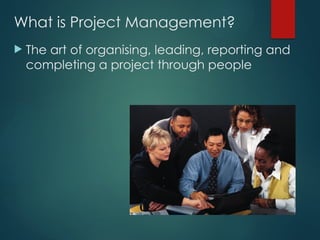
The art of organising, leading, reporting and
completing a project through people
4.
What is ProjectManagement?
A project is a planned undertaking
A project manager is a person who causes
things to happen
Therefore, project management is causing a
planned undertaking to happen.
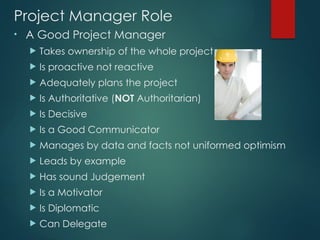
Project Manager Role
•A Good Project Manager
Takes ownership of the whole project
Is proactive not reactive
Adequately plans the project
Is Authoritative (NOT Authoritarian)
Is Decisive
Is a Good Communicator
Manages by data and facts not uniformed optimism
Leads by example
Has sound Judgement
Is a Motivator
Is Diplomatic
Can Delegate
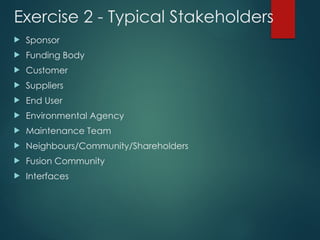
Stakeholder
“A person orgroup of people who have a vested
interest in the success of an organization and the
environment in which the organization operates”
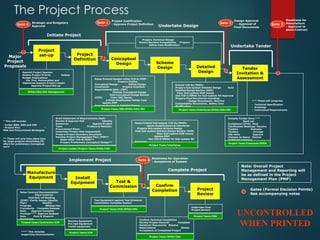
The Project Process
Project
set-up
Major
Project
Proposals
Project
DefinitionConceptual
Design Scheme
Design Detailed
Design
Tender
Invitation &
Assessment
Manufacture
Equipment Install
Equipment
Confirm
Completion
Test &
Commission
Project
Review
Appoint Project Sponsor
Assess Project Priority Assess
Budget Implications
Est. Proj. Deliverables and
Objectives Appoint Project Leader
Approve Project Set-up
Draft Statement of Requirements (SoR)
Review & Approve SoR Identify
Resources Appoint Project
Team Produce & Maintain
Procurement Plans
Undertake Project Risk Assessment
Prepare Project Boundary Document
Develop Project Management Plan (PMP)*
Raise initial TCD-R/PERF**
Prepare Preliminary Conceptual Design**
Raise/Extend/Update initial TCD-R/PERF
Prepare Outline
Conceptual Design Define Design
Constraints Prepare Interface
Requirements Spec. (IRP)
Finalise Conceptual Design
Hold Conceptual Design Review
(CDR) Clear CDR Issues
Initiate Modification Safety Case
Update PMP
Approve Proceed to Detailed Design
Raise/Extend Sub-system TCD-Rs/PERFs
Agree Classifications & Interfaces
Prepare Sub-system Scheme Design
Hold Sub-system Scheme Design Review (SDR)
Clear Sub-system SDR Issues
Update PMP
Use TCD-I/MMAC for Sub-system SD
Approval
Extend TCD-Rs/PERFs
Prepare Sub-system Detailed Design Hold
Detailed Design Review (DDR)
Clear Sub-system DDR Issues
Use TCD-I/MMAC for Sub-system DD Approval
Prepare Final Documents including:
- Design Documents., Machine
Compatibility Documents., Safety Case
Modification
Compile Tender Docs.***
Send out
Invitations (ITTS) Hold
Clarification Meetings Receive
Tenders Evaluate
Tenders Arrange
site visits Approve
changes to Specs. Choose
preferred Company
Raise Contract Documentation
Place Contract
Hold Kick off Meeting
(KOM) Clarify Issues (Quality
Plan) Monitor
Progress Witness key
Procedures Complete Release
Note Approve Complete
Package**** Approve Release
Note Pack & Dispatch
Equipment
Receive Equipment
Pre-test Equipment
Install equipment
Test Equipment against Test Schedule
Commission Complete System
Confirm Technical Completion
Review Project Records Complete
Handover Documents Resolve
Reservations Obtain
Acceptance of Completed Project
Initiate Project
Undertake Design
Implement Project
Complete Project
EFDA/CSU/JOC Management
Project Leader/Project Team/EFDA/CSU
Project Team/IRP/EFDA/CSU/JDC
Project Team/Interfaces
Project Team/Interfaces/EFDA/CSU/JDC
Project Team/ICM
Project Team/ICM/EFDA/CSU
Project Team/EFDA/CSU
Project Team/CSU
Undertake Post
Project Review
Project Team/Contracts/EFDA
Project Team/Contractor/ICM
Prepare Technical Design
Ensure Machine Compatibility Prepare
Safety Case Modification
*** These will comprise:
- Technical Specification
- Drawings
- Contractual Requirements
Note: Overall Project
Management and Reporting will
be as defined in the Project
Management Plan (PMP)
**** This includes
supporting documentation
Gate 4
Gate 1 Gate 2 Gate 3
Gates (Formal Decision Points)
See accompanying notes
Gate 0
Project Justification
- Approve Project Definition
Design Approval
- Approval of
Final Documents
Readiness for
Manufacture
- Approval to
place Contract
Readiness for Operation
- Acceptance of System
Strategic and Budgetary
Approval
Undertake Tender
* This will include:
- Initial WBS, OBS and CBS
- Project Plan -
Risk and Procurement Strategies
** These will only take place here
for large projects demanding DO
effort for preliminary Conceptual
work
UNCONTROLLED
WHEN PRINTED
13.
Key Points inProject Set-up and Definition
Create Project Management Plan (PMP)
Be clear of scope and objectives
Establish clear statement of what is to be
done (WBS)
Establish Risks to be Managed
Establish Costs and Durations
Establish Resources Required
14.
Project management Plan- PMP
Master Document for Project
Defines the following:-
Project Objectives, Scope, Deliverables
Stakeholders (Internal & External)
Work to be done (WBS)
Project Organisation and Resources (OBS)
Project Costings (CBS)
Project Schedule
Procurement/Contract Strategy
Risk Management
Quality management
Change Management
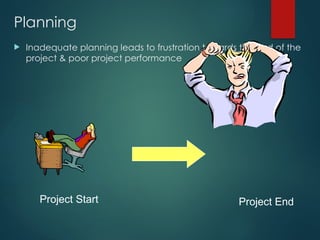
Planning
Inadequate planningleads to frustration towards the end of the
project & poor project performance
Project Start Project End
18.
Work Breakdown Structure(WBS)
• The Work Breakdown Structure is the foundation for
effective project planning, costing and management.
• It is the most important aspect in setting-up a Project
It is the foundation on which
everything else builds
19.
Work Breakdown Structure-
Definition
“A Work Breakdown Structure (WBS) is a hierarchical
(from general to specific) tree structure of
deliverables and tasks that need to be performed
to complete a project.”
20.
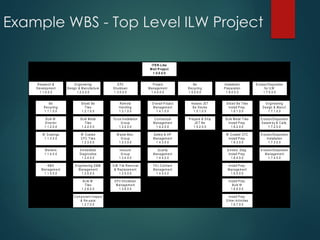
Example WBS -Top Level ILW Project
Be
Recycling
1.1.1.0.0
Bulk W
Divertor
1.1.2.0.0
W Coatings
1.1.3.0.0
M arkers
1.1.4.0.0
R&D
M anagem ent
1.1.5.0.0
R esearch &
Developm ent
1.1.0.0.0
Sliced Be
Tiles
1.2.1.0.0
Bulk M etal
Tiles
1.2.2.0.0
W C oated
C FC Tile s
1.2.3.0.0
Em bedded
Diagnostics
1.2.4.0.0
Engineering D &M
M anagem ent
1.2.5.0.0
B ulk W
Tiles
1.2.6.0.0
C om ponent Inspect
& Re-pack
1.2.7.0.0
E ngineering
Design & M anufacture
1.2.0.0.0
R em ote
H andling
1.3.1.0.0
To rus Installation
G roup
1.3.2.0.0
W aste M an.
G roup
1.3.3.0.0
Va cuum
G roup
1.3.4.0.0
ILW Tile Rem oval
& Replacem ent
1.3.5.0.0
E P 2 S hutdown
M anagem ent
1.3.6.0.0
EP2
Shutdown
1.3.0.0.0
O verall P roject
M anagem ent
1.4.1.0.0
Contractual
M anagem ent
1.4.2.0.0
Safety & HP
M anagem ent
1.4.3.0.0
Q uality
M anagem ent
1.4.4.0.0
FZJ C ontract
M anagem ent
1.4.5.0.0
Project
M anagem ent
1.4.0.0.0
Assess JET
B e Stocks
1.5.1.0.0
Prepare & S hip
JET Be
1.5.2.0.0
Be
Recycling
1.5.0.0.0
S liced Be Tiles
Install P rep.
1.6.1.0.0
Bulk M etal Tiles
Install P rep.
1.6.2.0.0
W Coated CFC
Install P rep.
1.6.3.0.0
Em bed. Diag.
Install P rep.
1.6.4.0.0
Install P rep.
M anagem ent
1.6.5.0.0
Install P rep.
Bulk W
1.6.6.0.0
Install P rep.
O ther Activities
1.6.7.0.0
Installation
Preparation
1.6.0.0.0
Engineering
Design & Manuf.
1.7.1.0.0
Erosion/D eposition
A ssem by & C alib.
1.7.2.0.0
Erosion/D eposition
Installation
1.7.3.0.0
Erosion/D eposition
M anagem ent
1.7.4.0.0
Erosion/Deposition
for ILW
1.7.0.0.0
ITER-Like
Wall Project
1.0.0.0.0
21.
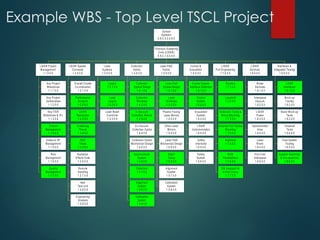
Example WBS -Top Level TSCL Project
Key Project
M ilestones
1.1.1.0.0
Key Project
Deliverables
1.1.2.0.0
Key ITER
M ilestones & IPL
1.1.3.0.0
Overall
Management
1.1.4.0.0
Safety & HP
Management
1.1.5.0.0
Risk
Management
1.1.6.0.0
Quality
Management
1.1.7.0.0
LIDAR Project
Managem ent
1.1.0.0.0
Overall Cluster
Co-ordination
1.2.1.0.0
Performance
Analysis
1.2.2.0.0
LIDAR
Neutronics
1.2.3.0.0
Scattering
Theory
1.2.4.0.0
R&D
Ta sks
1.2.5.0.0
Radiation
Effects Data
1.2.6.0.0
Remote
Handling
1.2.7.0.0
Item
Te st Unit
1.2.8.0.0
Engineering
Analysis
1.2.9.0.0
LIDAR System
Concepts
1.2.0.0.0
Lasers
1.3.1.0.0
Laser
Layout
1.3.2.0.0
Laser Beam
Com biner
1.3.3.0.0
Laser
System s
1.3.0.0.0
Collection
O ptical Design
1.4.1.0.0
Collection
W indows
1.4.2.0.0
In-Vacuum
Collection Mirrors
1.4.3.0.0
Ex-Vacuum
Collection O ptics
1.4.4.0.0
Collection O ptics
M echanical Design
1.4.5.0.0
Spectrometer
System
1.4.6.0.0
Detectors
1.4.7.0.0
Alignm ent
System
1.4.8.0.0
Calibration
System
1.4.9.0.0
Collection
Optics
1.4.0.0.0
Laser Path
Optical Design
1.5.1.0.0
Laser
W indows
1.5.2.0.0
Plasm a Facing
Laser Mirrors
1.5.3.0.0
Other Laser
Mirrors
1.5.4.0.0
Laser Path
M echanical Design
1.5.5.0.0
Beam
Dump
1.5.6.0.0
Alignm ent
System
1.5.7.0.0
Calibration
System
1.5.8.0.0
Laser Path
Optics
1.5.0.0.0
Control System
Interface Definition
1.6.1.0.0
Control
System
1.6.2.0.0
Acquisition
System
1.6.3.0.0
LIDAR
Instrumentation
1.6.4.0.0
Safety
Interlocks
1.6.5.0.0
Safety
System
1.6.6.0.0
Control &
Acquisition
1.6.0.0.0
Shutters
1.7.1.0.0
Labyrinth
1.7.2.0.0
Extension Tubes &
Mirror Mounting
1.7.3.0.0
External Port Optics
M ounting
1.7.4.0.0
Bioshield
1.7.5.0.0
BSM
Penetrations
1.7.6.0.0
EM Analysis for
In-Port Com p.
1.7.7.0.0
LIDAR
Port Engineering
1.7.0.0.0
W ater
Services
1.8.1.0.0
Interspace
Vacuum
1.8.2.0.0
LIDAR
Power
1.8.3.0.0
Spectrometer
Area
1.8.4.0.0
Laser
Room
1.8.5.0.0
Port Cell/
Interspace
1.8.6.0.0
LIDAR
Services
1.8.0.0.0
LIDAR
Interfaces
1.9.1.0.0
Mock-up
Facility
1.9.2.0.0
Basic Mock-up
Te sts
1.9.3.0.0
To kam ak
Te sts
1.9.4.0.0
Final System
Te sting
1.9.5.0.0
System Assem bly
& Dis-assem bly
1.9.6.0.0
Interfaces &
Integrated Te sting
1.9.0.0.0
Thom son Scattering
Core (LIDAR)
5.5.C.1.0.0.0.0
Optical
Systems
5.5.C.0.0.0.0.0
22.
Project Planning –WBS (1)
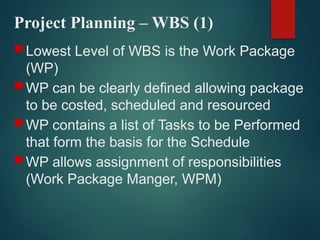
Lowest Level of WBS is the Work Package
(WP)
WP can be clearly defined allowing package
to be costed, scheduled and resourced
WP contains a list of Tasks to be Performed
that form the basis for the Schedule
WP allows assignment of responsibilities
(Work Package Manger, WPM)
23.
Project Planning –WBS (2)
WBS allows hierarchical build-up of costs
and schedule
Cost and Schedule can be reported at any
level of the WBS
WBS facilitates strong management during
project execution (Cost and Schedule
control)
WBS can be used for many other things -
Document Management, Risk Management
etc.
24.
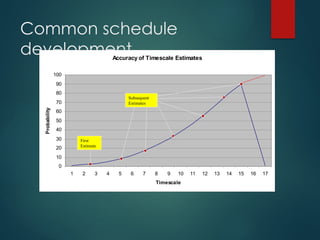
Project Planning
Aword about Scheduling
– Schedules (task durations) can have a wide
variation
– There is no unique answer. Rather, there is a
statistical variation depending on assumptions
– Need to understand the basis of scheduling
(Most challenging; Most likely; Absolute certainty
- bet your life on it!)
– Most people are very optimistic/naive
25.
Common schedule
development
Accuracy ofTimescale Estimates
0
10
20
30
40
50
60
70
80
90
100
1 2 3 4 5 6 7 8 9 10 11 12 13 14 15 16 17
Timescale
Probability
First
Estimate
Subsequent
Estimates
26.
Project Planning –Key Points
Recognise that adequate project planning is
essential
Produce a sound WBS
Use the framework provided by the Project
Management Plan (PMP) template
Involve the right people
Allow enough time
Be systematic
Project Risk –Definition (1)
“Project risk is an uncertain event or condition that, if
it occurs, has a positive or negative effect on a
project objective”
29.
Project Risk –Definition (2)
“A combination of the probability of a defined threat or opportunity
(Likelihood) and the magnitude of the consequences of the
occurrence (Impact) defines a Risk Index”
30.
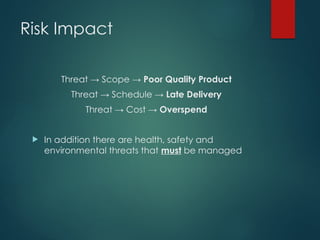
Risk Impact
Threat →Scope → Poor Quality Product
Threat → Schedule → Late Delivery
Threat → Cost → Overspend
In addition there are health, safety and
environmental threats that must be managed
31.
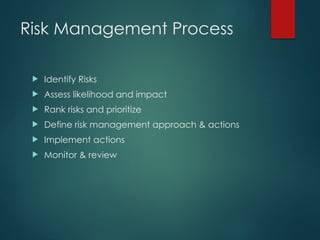
Risk Management Process
Identify Risks
Assess likelihood and impact
Rank risks and prioritize
Define risk management approach & actions
Implement actions
Monitor & review
32.
Risk Management –Key
Points
Make the management of risk integral to the way
the project is managed
Ensure that cost and time contingencies are
consistent with identified risks
Focus on the “significant few” – don’t try to
manage too many risks
Be vigilant (be ready for possible problems and
diffuculties)and proactive
Exercise 3
Writedown three typical project
control/monitoring activities
35.
Project Monitoring
TypicalMonitoring Activities
regular reviews of progress against schedule using WBS as basis (Plan
against Baseline)
regular review of actual costs (O/P from SAP) against budgeted costs
and Earned Value at WBS level
regular review of resource loading
regular progress meetings with project team
regular meetings with contractors
production of periodic progress reports
risk reviews
inspections/ audits
36.
Project Control
TypicalControl Activities
assign responsibilities at Work Package level
staged authorisation of work to be done
staged release of budgets (staged release of WBS(e) numbers)
ensure PM has a ‘Management Reserve’ under his control
seek corrective action reports when WPs go ‘off track’ (overrunning
or overspending)
release Management Reserve carefully
37.
Project Monitoring andControl
Summary
Monitor against the plan – status regularly
Take a factual approach to decisions
Identify management action early
Check that defined controls are being applied – correct if
necessary
Apply change control
38.
Confirm Completion
Ensuredesign records are complete and
accurate
Ensure any outstanding actions or issues are
addressed
Ensure Maintenance Records are produced
Ensure User Manuals are produced
Hold a formal Post Project review