What if Data Integration Just
Worked…
Business Problem The burning questions
• Why is every feed built by
hand?
• Why do non-critical changes
cause crashes?
• Why are so many non-linked
systems needed for data
governance?
• Why can’t executives know
where their data is going?
• Data integration is a time
consuming mess of manual
work.
• Most business data is too
chaotic for ETL software.
• Metadata and profiling are
delivered by separate apps.
• Little control over keeping
personal data within a
company.
Product
• Cloud-based data management
platform.
• Automatically map data between
systems.
• Location, platform and format
agnostic.
• Works inside corporate networks
and Cloud stores.
• On-site application available for
high security or volume customers.
• Connects to all major data stores:
RDBMS, NoSQL, and file.
• Encryption in transit and at rest.
• No hardware requirements.
• Scheduling or on-demand
execution.
• API interface and wrappers for
.NET.
Features
Use Cases
Data Warehouse and BI loading
Customer data integration
Operational data integration
Product data integration
Consolidating LOB apps
Providing Master Data services
Database migration from legacy
platforms
Migration to cloud platforms
Data movement between dev, test
and prod
Data synchronisation between
relational to NoSQL stores.
On-premise and Cloud data
synchronisation
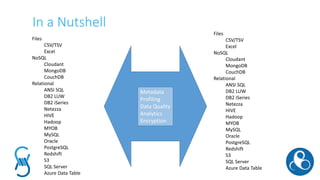
In a Nutshell
Metadata
Profiling
Data Quality
Analytics
Encryption
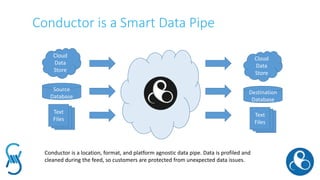
Conductor is a Smart Data Pipe
Cloud
Data
Store
Destination
Database
Text
Files
Cloud
Data
Store
Source
Database
Text
Files
Conductor is a location, format, and platform agnostic data pipe. Data is profiled and
cleaned during the feed, so customers are protected from unexpected data issues.
Ground to Cloud Integration
ODBC
Client Server
Source
Database OLEDB
ODBC
OLEDB
Cloud Data Store
API
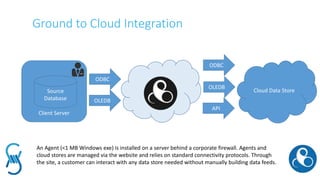
An Agent (<1 MB Windows exe) is installed on a server behind a corporate firewall. Agents and
cloud stores are managed via the website and relies on standard connectivity protocols. Through
the site, a customer can interact with any data store needed without manually building data feeds.
Conductor
SSIS
US HQ
Asia
Branch
Azure
Excel Files
From
Customers
API
HTTPS
ODBC
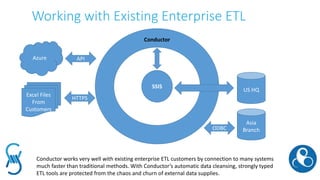
Conductor works very well with existing enterprise ETL customers by connection to many systems
much faster than traditional methods. With Conductor’s automatic data cleansing, strongly typed
ETL tools are protected from the chaos and churn of external data supplies.
Working with Existing Enterprise ETL
Conductor’s User Manual
• Log in
• Create source and destination data stores.
• Download an agent if needed (<1 MB).
• Create processes:
• Select source and destination data stores
• Select objects (tables or files) to manage
• Select thresholds for dynamic mapping.
• Run the process.
KPI: 90% of data integration tasks completed in < 4 minutes.
KPI: 99% of staff trained to proficiency in less than an hour.
The Next 6 Months
Goal based integration
• After defining data stores, Conductor automatically maps compatible objects.
• Drag and drop integration: drag files onto a browser and it is automatically moved to a
likely destination table.
Data profiling
• A statistical profile is built for analysis, and any significant deviations are flagged.
ETL Cooperation
• Integration with Enterprise ETL through pre and post process script execution.
• Merging metadata with Enterprise ETL repositories.
Metadata analytics
• A metadata data store is provided to customers and will be automatically populated for
data lineage and history governance.
Personal Identifiable Information (PII) Control
• PII is scanned for and masked or removed from data feeds.
Questions?
Jason Gleason – Business Director
jason@eight-wire.com
www.eight-wire.com
@eightwiredata
+64 21 183 4634

Introduction to Conductor

  • 1.
    What if DataIntegration Just Worked…
  • 2.
    Business Problem Theburning questions • Why is every feed built by hand? • Why do non-critical changes cause crashes? • Why are so many non-linked systems needed for data governance? • Why can’t executives know where their data is going? • Data integration is a time consuming mess of manual work. • Most business data is too chaotic for ETL software. • Metadata and profiling are delivered by separate apps. • Little control over keeping personal data within a company.
  • 3.
    Product • Cloud-based datamanagement platform. • Automatically map data between systems. • Location, platform and format agnostic. • Works inside corporate networks and Cloud stores. • On-site application available for high security or volume customers. • Connects to all major data stores: RDBMS, NoSQL, and file. • Encryption in transit and at rest. • No hardware requirements. • Scheduling or on-demand execution. • API interface and wrappers for .NET. Features
  • 4.
    Use Cases Data Warehouseand BI loading Customer data integration Operational data integration Product data integration Consolidating LOB apps Providing Master Data services Database migration from legacy platforms Migration to cloud platforms Data movement between dev, test and prod Data synchronisation between relational to NoSQL stores. On-premise and Cloud data synchronisation
  • 5.
    In a Nutshell Metadata Profiling DataQuality Analytics Encryption
  • 6.
    Conductor is aSmart Data Pipe Cloud Data Store Destination Database Text Files Cloud Data Store Source Database Text Files Conductor is a location, format, and platform agnostic data pipe. Data is profiled and cleaned during the feed, so customers are protected from unexpected data issues.
  • 7.
    Ground to CloudIntegration ODBC Client Server Source Database OLEDB ODBC OLEDB Cloud Data Store API An Agent (<1 MB Windows exe) is installed on a server behind a corporate firewall. Agents and cloud stores are managed via the website and relies on standard connectivity protocols. Through the site, a customer can interact with any data store needed without manually building data feeds.
  • 8.
    Conductor SSIS US HQ Asia Branch Azure Excel Files From Customers API HTTPS ODBC Conductorworks very well with existing enterprise ETL customers by connection to many systems much faster than traditional methods. With Conductor’s automatic data cleansing, strongly typed ETL tools are protected from the chaos and churn of external data supplies. Working with Existing Enterprise ETL
  • 9.
    Conductor’s User Manual •Log in • Create source and destination data stores. • Download an agent if needed (<1 MB). • Create processes: • Select source and destination data stores • Select objects (tables or files) to manage • Select thresholds for dynamic mapping. • Run the process. KPI: 90% of data integration tasks completed in < 4 minutes. KPI: 99% of staff trained to proficiency in less than an hour.
  • 10.
    The Next 6Months Goal based integration • After defining data stores, Conductor automatically maps compatible objects. • Drag and drop integration: drag files onto a browser and it is automatically moved to a likely destination table. Data profiling • A statistical profile is built for analysis, and any significant deviations are flagged. ETL Cooperation • Integration with Enterprise ETL through pre and post process script execution. • Merging metadata with Enterprise ETL repositories. Metadata analytics • A metadata data store is provided to customers and will be automatically populated for data lineage and history governance. Personal Identifiable Information (PII) Control • PII is scanned for and masked or removed from data feeds.
  • 11.
    Questions? Jason Gleason –Business Director jason@eight-wire.com www.eight-wire.com @eightwiredata +64 21 183 4634